
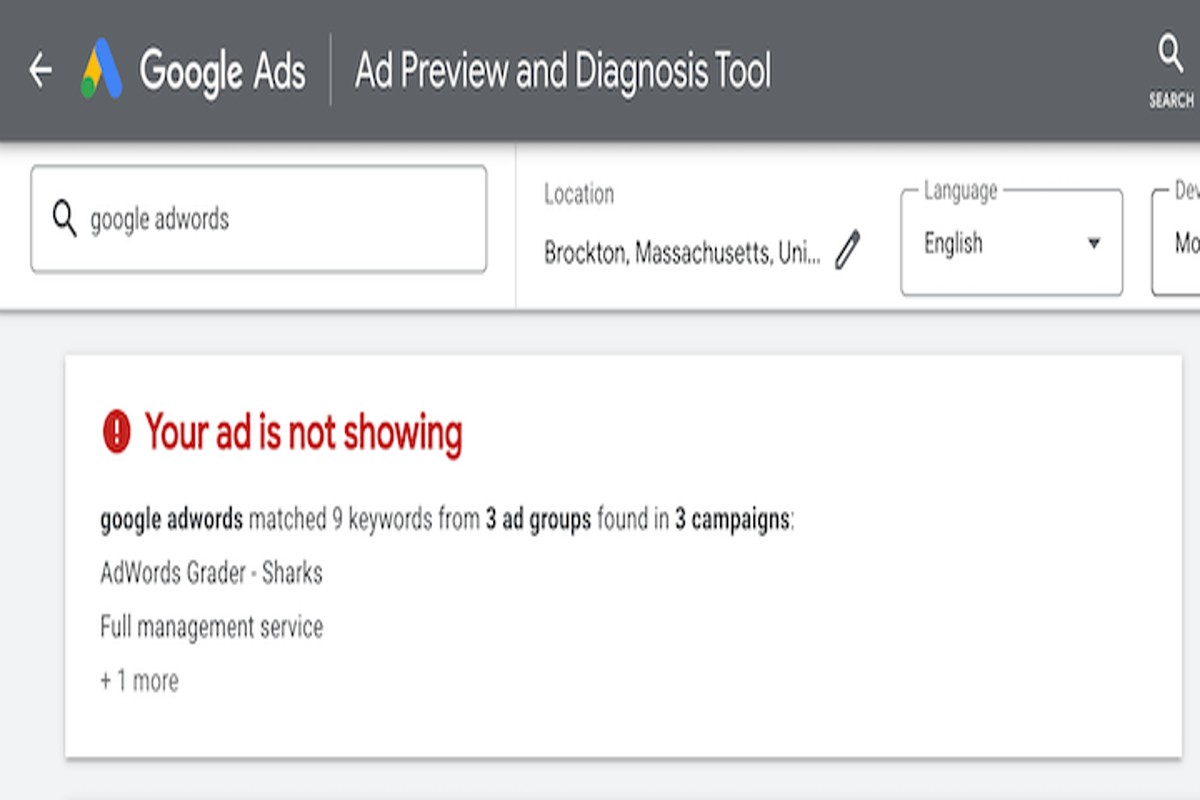
Why does my Google ad not show up? Your ad may not be displaying due to factors such as low bids, poor ad quality, targeting issues, or budget constraints. It’s essential to identify these elements to ensure your ad reaches the intended audience.
Understanding why Google ads may not appear is crucial for businesses and marketers investing in online advertising. Mismanagement in this area can lead to wasted budgets and missed opportunities for engagement and conversion.
This article will outline the common reasons for ad visibility issues, including bid strategies, ad quality scores, targeting settings, and budget limitations, providing actionable insights for resolution.
Why is my Google ad not showing even though I’ve set a budget?
Your Google ad may not be showing due to several factors, despite having a budget in place. Issues related to ad rank, competition, targeting, or even account status can significantly impact visibility. A thorough examination of these elements is essential for effective ad performance.
- Check Ad Rank: Ad rank determines the position of your ad in the auction. It is calculated based on your bid, the quality of your ad, and the expected impact of extensions. If your ad rank is too low, your ad may not be displayed, even with an adequate budget.
- Review Budget Settings: Ensure your budget is set correctly for your campaign type. If your daily budget is too low, your ads may only show intermittently or not at all during peak times. Adjusting your budget can enhance visibility.
- Analyze Competition: In competitive markets, other advertisers may outbid you. If competitors have higher bids or better ad quality, your ad might not appear. Researching competitor strategies can provide insights into necessary adjustments.
- Targeting Options: Verify that your targeting settings align with your intended audience. Narrow targeting may limit your ad’s reach. Expanding your targeting options can increase the likelihood of your ad being shown.
- Check Account Status: Ensure that your Google Ads account is in good standing. Any policy violations or payment issues can halt ad visibility. Regularly reviewing account notifications can help prevent such issues.
To improve the chances of your ad showing, regularly monitor performance metrics and make adjustments as needed. Staying informed about changes in the Google Ads platform can also enhance your advertising strategy.
Expert Tip: Utilize Google’s Keyword Planner to identify relevant keywords with lower competition, potentially lowering your cost-per-click while improving ad visibility. This strategic approach can help you make the most of your budget.
What are the common reasons for Google ads not displaying?
Google ads may not display for several reasons, primarily related to ad approval status, targeting settings, and quality score. Each of these factors can significantly influence whether an ad is shown to potential customers. Identifying these issues is essential for improving ad visibility and performance.
One primary reason ads do not appear is related to ad approval status. Google reviews all ads to ensure they comply with advertising policies. If an ad is disapproved due to policy violations, it will not show. Common violations include inappropriate content, misleading information, or restricted products. Advertisers should regularly check their Google Ads account for approval notifications and rectify any issues promptly.
Targeting settings also play a crucial role in ad visibility. Ads may be set to target specific demographics, locations, or interests. If these settings are too narrow or misaligned with the intended audience, ads may not display at all. For example, if a campaign is set to a specific geographic area where there are few potential customers, it may lead to limited or no impressions. Advertisers should ensure their targeting settings are broad enough to reach a suitable audience while still being relevant.
- Quality score: A low quality score can prevent ads from appearing. This score is based on ad relevance, expected click-through rate, and landing page experience.
- Budget constraints: If the daily budget is too low, ads may not display consistently, especially in competitive markets.
- Ad scheduling: If ads are scheduled to run during specific times, they will not show outside of those hours.
Monitoring these factors can help optimize ad campaigns and ensure better performance. Regularly reviewing ad performance metrics and adjusting strategies accordingly is essential for success in Google Ads.
Implementing A/B testing for different targeting options can yield insights into which settings work best. This data-driven approach can enhance ad visibility and overall campaign effectiveness.
How can I check if my Google ad is approved?
To check if your Google ad is approved, access your Google Ads account and navigate to the “Ads & extensions” tab. This section provides the status of each ad, indicating whether it is approved, disapproved, or pending review.
Follow these steps to verify your ad’s approval status:
- Log in to your Google Ads account using your credentials.
- On the left-hand side menu, click on the Ads & extensions tab to view all your ads.
- Review the Status column for each ad. Ads marked as “Approved” are live, while “Disapproved” indicates issues that need addressing.
- If an ad is disapproved, hover over the status to see a tooltip explaining the reason for disapproval.
- For pending ads, Google typically reviews them within one business day. Check back later for updates.
Be mindful that ad disapproval can stem from various factors, such as policy violations or issues with the ad content. Addressing these concerns promptly can help ensure your ads go live without unnecessary delays.
Expert Tip: Regularly monitor your account notifications for updates on ad approvals or disapprovals, as Google may provide specific recommendations for compliance with advertising policies.
What is an ad rank and how does it affect my Google ad visibility?
Ad rank determines the position of your Google ad on the search results page and whether it will be displayed at all. It is calculated based on several factors, including your bid amount and quality score. A higher ad rank increases the chances of your ad being shown prominently, while a lower rank can result in your ad not appearing.
Ad rank is influenced primarily by two components: the maximum bid you set for your keywords and your ad’s quality score, which assesses the relevance and quality of your ad and landing page. The relationship between these components can be compared as follows:
- Bid Amount: This is the maximum amount you are willing to pay for a click on your ad. A higher bid can improve your ad rank but does not guarantee visibility if quality metrics are poor.
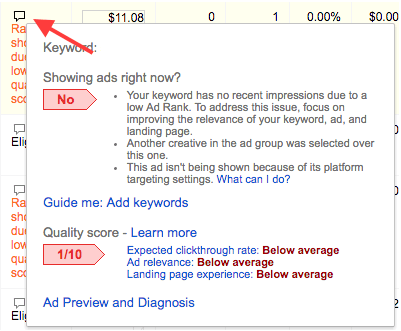
- Quality Score: This score ranges from 1 to 10 and is based on factors such as click-through rate (CTR), ad relevance, and landing page experience. A higher quality score can enhance your ad rank even with a lower bid.
- Ad Rank Formula: Ad rank is calculated using the formula: Ad Rank = Bid Amount x Quality Score. This means both bid and quality score directly influence your overall ad rank.
The interplay between bid amount and quality score is critical. A high bid with a low-quality score may not achieve a favorable ad position, while a lower bid with a high-quality score can outperform competitors with higher bids. This highlights the importance of optimizing both elements to enhance ad visibility.
Expert Tip: Regularly monitor and adjust your quality score through A/B testing of ad copy and landing pages. Improving your quality score can lower your costs and improve your ad rank, making your campaign more effective.
Does the type of keywords affect whether my Google ad shows up?
Yes, the type of keywords significantly impacts whether your Google ad is displayed. Keyword selection and match types play crucial roles in determining ad visibility. Choosing relevant and well-structured keywords can enhance your ad’s performance and ensure it reaches the intended audience.
Keyword selection begins with identifying terms that are relevant to your business and the products or services you offer. Using highly relevant keywords increases the likelihood of your ad appearing in search results. Moreover, consider incorporating a mix of short-tail and long-tail keywords. Short-tail keywords can drive high traffic volume, whereas long-tail keywords often have less competition and can attract more targeted traffic, leading to higher conversion rates.
- Utilize Different Match Types: Google Ads offers various match types—broad match, phrase match, exact match, and negative keywords. Each type affects how closely your keywords need to match a user’s search query for your ad to appear. Using a combination of match types can help you balance reach and relevance.
- Focus on Negative Keywords: Adding negative keywords prevents your ad from showing up in irrelevant searches. This strategy helps refine your audience targeting and improves click-through rates (CTR) by ensuring your ad is only displayed for relevant queries.
- Regularly Review and Optimize: Continuously monitor the performance of your keywords. Use Google Ads reports to identify which keywords are performing well and which are not. Regular optimization of your keyword list can enhance ad visibility and overall campaign effectiveness.
Expertly crafted keyword strategies are essential for maximizing ad visibility. Experimenting with keyword variations and match types can lead to improved performance metrics, ultimately reducing the likelihood of your Google ad not showing up.
How long does it take for my Google ad to start showing after creation?
Typically, a Google ad takes about 24 hours to start showing after its creation. However, this timeframe can vary depending on several factors, including the ad’s approval status and the complexity of your campaign setup.
The approval process is a critical step that can impact when your ad becomes visible. Google reviews each ad to ensure compliance with its advertising policies. This review process usually takes a few hours, but it can extend to 24 hours or more during high-traffic times. If the ad requires additional information or revisions, this can further delay visibility.
Several factors can affect the time it takes for your ad to show up. Campaign settings, such as targeting options and budget allocations, play a role in how quickly ads are approved. Additionally, if your ad contains any restricted content or keywords that require more scrutiny, it may take longer for Google to review and approve it. Seasonal trends and increased advertiser activity can also lead to delays in the approval process.
To ensure a smoother launch, advertisers should double-check that their ads meet Google’s advertising guidelines before submission. This proactive approach can help minimize delays and improve the chances of timely visibility.
Expert Tip: Monitor the status of your ad in the Google Ads dashboard. If it remains in “pending” status for longer than 24 hours, consider reviewing the ad for compliance issues or contacting Google support for assistance.
What should I do if my Google ad is disapproved?
If your Google ad is disapproved, take immediate action to identify and rectify the issue. Disapproved ads can stem from several factors, including policy violations or technical errors. Knowing how to address the problem will help you get your ad back on track.
- Check the Disapproval Notification: Review the email notification or Google Ads account alert regarding the disapproval. This will specify the reason for the disapproval, such as policy violations or missing information.
- Review Google Ads Policies: Familiarize yourself with Google’s advertising policies relevant to your ad. These guidelines cover content, targeting, and technical specifications that must be adhered to.
- Make Necessary Edits: Based on the disapproval reason, make the required changes to your ad. This may include revising ad copy, adjusting targeting settings, or updating landing pages to ensure compliance.
- Resubmit Your Ad: After making the necessary adjustments, navigate to your Google Ads account and resubmit the disapproved ad for review. This process can typically be done from the “Ads & Extensions” section.
- Monitor for Approval: Keep an eye on your ad status after resubmission. Approval can take anywhere from a few hours to a couple of days, depending on the volume of submissions Google is processing.
- Contact Google Support if Necessary: If the ad is still disapproved after resubmission, reach out to Google Ads Support for further assistance. They can provide additional insights and guidance on resolving the issue.
Ensure all future ads comply with Google’s advertising policies to minimize the risk of disapproval. Regularly review your ads and stay informed about any policy updates from Google.
Expert Tip: Utilize the “Ad Preview and Diagnosis” tool in Google Ads to check how your ads appear and troubleshoot potential issues before submitting them for approval. This proactive step can save time and enhance ad performance.
Understanding Ad Rank and Quality Score
This section explores the mechanics of Ad Rank and Quality Score, which are vital for determining the visibility of Google ads. A thorough comprehension of these concepts can significantly impact ad performance and effectiveness.
What is Ad Rank?
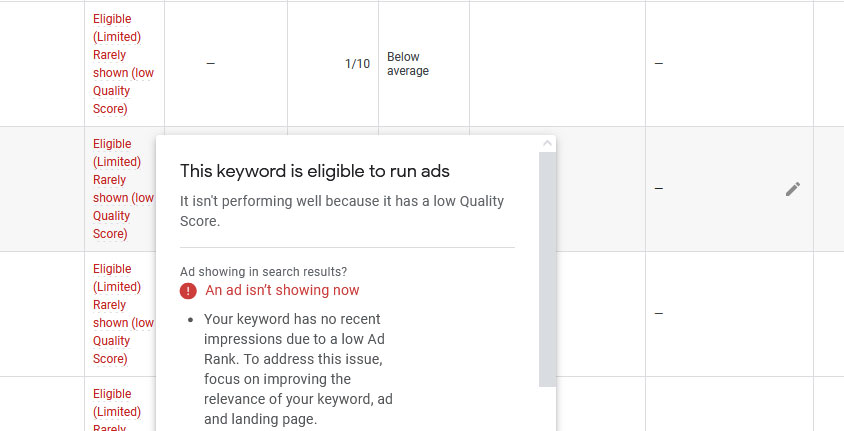
Ad Rank is a value that Google uses to determine the position of an ad on the search results page. It is calculated based on a combination of your bid amount, quality score, and the expected impact of extensions and other ad formats. A higher Ad Rank results in a better position, meaning your ad is more likely to appear prominently when users conduct relevant searches. Understanding Ad Rank is essential for advertisers aiming to maximize their ad visibility.
Factors Influencing Quality Score
Quality Score is a key component of Ad Rank and reflects the relevance and quality of your ads, keywords, and landing pages. It is measured on a scale from 1 to 10, with 10 being the highest score. Several factors influence Quality Score:
- Click-Through Rate (CTR): Higher CTR indicates that users find your ad relevant.
- Ad Relevance: The degree to which your ad matches the intent of the keyword.
- Landing Page Experience: How well your landing page meets user expectations and provides relevant content.
Improving Quality Score for Better Visibility
- Optimize Ad Copy: Ensure your ad text is compelling and closely aligned with the targeted keywords.
- Refine Keywords: Use specific and relevant keywords to improve ad relevance and CTR.
- Enhance Landing Pages: Create user-friendly landing pages that load quickly and provide the information users seek.
Real-World Examples of Ad Rank Impact
Consider two advertisers targeting the same keyword. Advertiser A has a higher bid but a lower Quality Score, while Advertiser B has a slightly lower bid but a significantly higher Quality Score. Despite the lower bid, Advertiser B may achieve a higher Ad Rank, resulting in better ad placement. This highlights the importance of Quality Score in determining visibility and cost-effectiveness in advertising.
Nuances and Common Misconceptions
One common misconception is that increasing the bid alone guarantees a higher Ad Rank. While bid amount is a factor, without a solid Quality Score, the ad may still fall short in visibility. Additionally, Quality Score is not static; it can fluctuate based on changes in CTR and relevance over time. Advertisers should continuously monitor performance and adjust strategies to maintain or improve their scores.
Practical Application
To effectively leverage this information, advertisers should:
- Regularly review Quality Score metrics in Google Ads.
- Test different ad copy variations to determine which performs best.
- Utilize A/B testing for landing pages to enhance user experience and relevance.
By applying these strategies, advertisers can improve their Quality Score, ultimately addressing the question, “why does my Google ad not show up?” and increasing the likelihood of ad visibility.
Troubleshooting Common Google Ads Issues
This section provides a detailed troubleshooting guide to address the common issues that prevent your Google ads from appearing. Understanding and resolving these issues is essential for maximizing ad visibility and ensuring effective campaign performance.
Step-by-Step Troubleshooting Process
- Check Campaign Status: Ensure your campaign is active. Inactive campaigns won’t display ads.
- Review Budget Settings: Confirm your daily budget is sufficient. If the budget is too low, ads may not show consistently.
- Examine Ad Approval Status: Verify that your ads have been approved. Disapproved ads will not be displayed.
- Inspect Targeting Settings: Assess your targeting options, including location, language, and audience. Narrow targeting can limit visibility.
- Check Bids: Ensure your bids are competitive. Low bids may result in ad placement below competitors.
Common Mistakes Advertisers Make
- Ignoring Ad Extensions: Failing to use ad extensions can reduce ad visibility and engagement.
- Overly Narrow Targeting: Restricting targeting options too much can prevent ads from reaching a broader audience.
- Not Monitoring Performance: Neglecting to analyze performance data can lead to missed opportunities for optimization.
Using Google Ads Tools for Diagnostics
Google Ads provides several tools that can help diagnose visibility issues. Utilize the following:
- Ad Preview and Diagnosis Tool: This tool allows you to see how your ads appear in search results without triggering an impression.
- Keyword Planner: Assess keyword performance and search volume to ensure you are targeting the right terms.
- Change History Tool: Review changes made to campaigns, ad groups, and ads to identify potential issues.
Case Studies of Successful Troubleshooting
In one instance, a retail client noticed their ads were not appearing despite a healthy budget. Upon investigation, it was discovered that their targeting settings excluded key demographics. Adjusting these settings resulted in a significant increase in ad impressions. Another case involved a service provider who had disapproved ads due to policy violations. After revising the ad copy to comply with Google’s advertising policies, the ads were successfully approved and began generating leads.
Nuance / Expert Layer
Many advertisers mistakenly believe that simply increasing the budget or bids will resolve visibility issues. However, this approach often overlooks critical factors such as ad relevance and quality score. Google prioritizes ads that are not only financially competitive but also relevant to user queries. Therefore, focusing on crafting high-quality ads and optimizing landing pages can yield better results than merely increasing bids or budgets.
Practical Application
To effectively troubleshoot your Google ad visibility issues, follow the outlined steps methodically. Regularly monitor your ad performance using Google Ads tools, adjust your targeting and bidding strategies as needed, and ensure compliance with advertising policies. By implementing these strategies, you can enhance the likelihood of your ads showing up and achieving desired campaign outcomes.
Optimizing Your Google Ads for Better Performance
This section provides advanced strategies to enhance your Google Ads visibility through effective keyword selection, compelling ad copy, the use of ad extensions, and competitor analysis. Implementing these techniques can significantly improve ad performance and increase impressions.
Best Practices for Keyword Selection and Targeting
Effective keyword selection is foundational to successful Google Ads. Focus on a combination of broad, phrase, and exact match keywords to capture diverse search intents. Utilize tools like Google Keyword Planner to identify high-volume, low-competition keywords relevant to your business. Additionally, consider negative keywords to filter out irrelevant traffic.
- Relevance: Ensure keywords align closely with your ad copy and landing pages.
- Long-tail keywords: Target specific phrases that indicate higher intent, leading to better conversion rates.
- Location targeting: Customize keywords based on geographic relevance to reach your target audience effectively.
Effective Ad Copywriting Tips
Ad copy should be concise, engaging, and action-oriented. A/B testing different headlines and descriptions can reveal what resonates best with your audience. Focus on including a clear call to action (CTA) that encourages clicks.
- Highlight unique selling propositions: Clearly articulate what sets your product or service apart.
- Use emotional triggers: Phrases that evoke feelings can increase engagement.
- Incorporate keywords: Seamlessly integrate primary keywords into your ad copy for better relevance.
Utilizing Ad Extensions for Enhanced Visibility
Ad extensions provide additional information and increase the real estate of your ads on the search results page. This can lead to higher click-through rates (CTR) and improved ad rankings.
- Sitelink extensions: Direct users to specific pages of your website.
- Call extensions: Allow users to call your business directly from the ad.
- Location extensions: Show your business address, enhancing local visibility.
Analyzing Competitor Ads for Insights
Competitor analysis offers valuable insights into effective advertising strategies. Use tools like SEMrush or SpyFu to review competitor ads, keywords, and performance metrics.
- Identify gaps: Look for keywords your competitors are targeting that you may have overlooked.
- Analyze ad copy: Assess the tone, style, and offers in competitor ads for inspiration.
- Benchmark performance: Compare your ad metrics against industry standards to identify areas for improvement.
While these strategies enhance ad performance, common misconceptions exist. For instance, many advertisers believe that simply increasing budgets will lead to better visibility. In reality, optimizing keywords, ad copy, and extensions often yields more significant results than budget adjustments alone. Furthermore, the importance of ongoing testing and refinement cannot be overstated; what works today may not work tomorrow.
To implement these strategies effectively, start by conducting thorough keyword research and refining your ad copy based on audience insights. Regularly utilize ad extensions and monitor competitor efforts to stay competitive. Finally, establish a routine for A/B testing your ads to continually enhance performance metrics.
Understanding Google Ads Policies and Compliance
This section delves into Google Ads policies that impact ad approval and visibility. Adhering to these regulations is essential for maximizing the effectiveness of advertising campaigns.
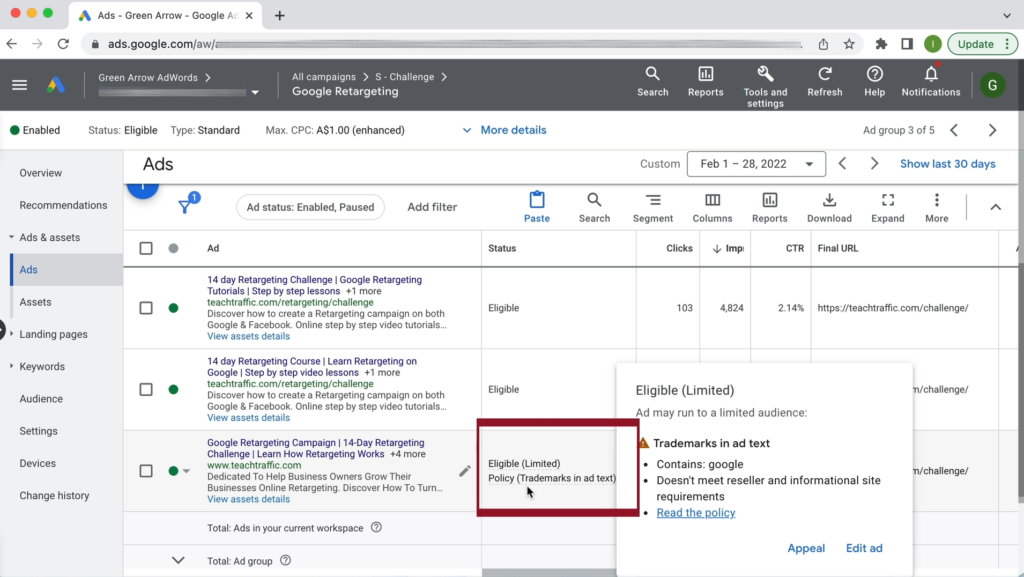
Overview of Key Google Ads Policies
Google Ads policies are designed to maintain a safe and trustworthy advertising environment. Key categories include:
- Prohibited Content: Ads promoting illegal products, dangerous goods, or misleading information.
- Restricted Content: Ads for adult content, alcohol, gambling, and healthcare products that require special handling.
- Editorial Standards: Ads must be clear, professional, and free from grammar or spelling errors.
- Privacy and Data Collection: Ads must respect user privacy and comply with data protection laws.
- Destination Requirements: Landing pages must provide a good user experience and be relevant to the ad content.
Common Reasons for Ad Disapproval Related to Policy Violations
Ad disapproval can stem from various policy violations. Common reasons include:
- Misleading Claims: Ads that exaggerate benefits or make unfounded claims can be rejected.
- Inappropriate Content: Ads containing offensive language or imagery will not be approved.
- Violation of Trademark Policies: Using registered trademarks without permission can lead to disapproval.
- Inaccurate Landing Pages: Ads that link to pages with irrelevant or misleading content may be flagged.
- Improper Use of Ad Extensions: Using extensions inappropriately can lead to ad rejection.
How to Ensure Compliance Before Submitting Ads
Adhering to Google Ads policies requires thorough preparation. Steps to ensure compliance include:
- Review the Google Ads Policy Center to familiarize yourself with the latest policies.
- Conduct a thorough check of ad content for clarity, accuracy, and appropriateness.
- Ensure that landing pages align with ad messaging and provide a positive user experience.
- Utilize Google’s Ad Preview and Diagnosis Tool to see how ads might appear and identify issues.
- Seek feedback from colleagues or industry experts to spot potential compliance issues.
Resources for Staying Updated on Policy Changes
Policy changes can occur frequently, requiring advertisers to stay informed. Reliable resources include:
- Google Ads Help Center: Offers detailed explanations of policies and guidelines.
- Google Ads Community Forums: A space for discussions and updates from other advertisers.
- Industry Blogs and Newsletters: Subscribe to reputable sources for the latest developments in digital advertising.
- Webinars and Workshops: Participate in events hosted by Google and industry experts to stay ahead.
To effectively manage compliance, advertisers should regularly review their ad campaigns for alignment with Google Ads policies. Regularly consult the Google Ads Policy Center, engage with the community, and keep abreast of industry news to ensure that ads are consistently compliant. This proactive approach minimizes the risk of ad disapproval and enhances visibility, addressing concerns on why does my google ad not show up.
Frequently Asked Questions
Why is my Google ad not showing even though I’ve set a budget?
Your Google ad may not be showing due to factors such as ad approval status, low ad rank, or targeting settings. Ensure your ad is approved and that your targeting aligns with your budget.
What are the common reasons for Google ads not displaying?
Common reasons include disapproved ads, low ad rank, insufficient budget, or targeting settings that do not match your audience. Additionally, keywords may not be triggering your ads effectively.
How can I check if my Google ad is approved?
You can check the approval status of your Google ad in the Google Ads dashboard under the “Ads & Extensions” section. Approved ads will be marked as “Approved” while disapproved ads will indicate the reason for disapproval.
What is an ad rank and how does it affect my Google ad visibility?
Ad rank determines your ad’s position in search results and is calculated based on your bid amount, ad quality, and expected impact of extensions. A low ad rank can result in your ad not being displayed or appearing lower in the search results.
Does the type of keywords affect whether my Google ad shows up?
Yes, the type of keywords you choose significantly impacts ad visibility. If your keywords are too broad or irrelevant, your ads may not trigger for relevant searches.
How long does it take for my Google ad to start showing after creation?
Typically, it takes a few hours for your Google ad to start showing after creation, assuming it is approved. However, factors such as ad review times and bidding strategy can affect this timeframe.
What should I do if my Google ad is disapproved?
If your Google ad is disapproved, review the disapproval reason provided in your Google Ads account. Make the necessary changes to comply with Google’s advertising policies and resubmit the ad for approval.
Final Thoughts on why does my google ad not show up
The absence of your Google ad can often be traced back to critical factors such as ad approval status, budget mismanagement, or insufficient ad rank. Understanding these elements is essential for optimizing visibility and ensuring your advertising efforts yield the desired results.
To improve your ad’s performance, conduct a thorough audit of your campaign settings and ad quality. Check your Ad Rank and Quality Score, then make the necessary adjustments to enhance relevance and competitiveness.
Mastering the intricacies of Google Ads not only maximizes your marketing potential but also positions your business for sustained growth in an increasingly digital marketplace.
Leave a Reply