
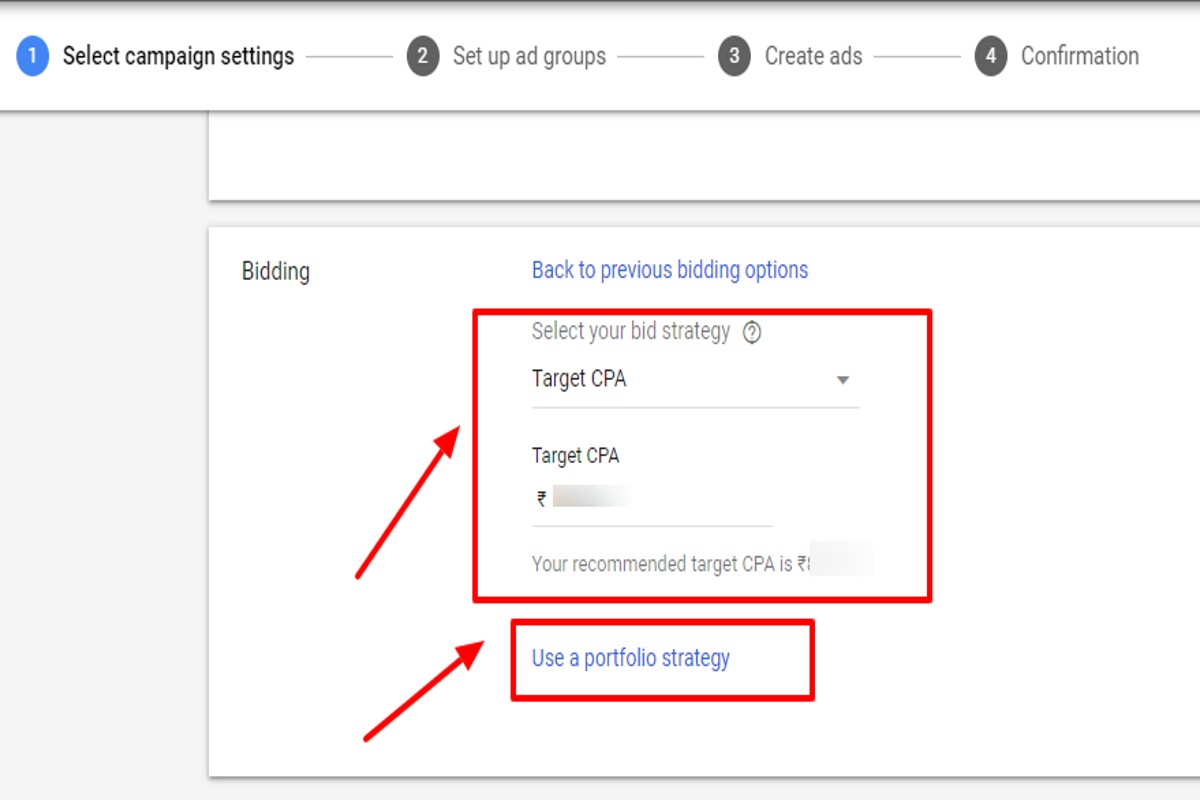
Target CPA in Google Ads is a bidding strategy that sets your bids to achieve as many conversions as possible at or below your target cost-per-acquisition. This approach effectively optimizes ad spend by automatically adjusting bids based on the likelihood of conversion.
Understanding Target CPA is crucial for marketers and businesses aiming to maximize their advertising budget. Mismanagement of this bidding strategy can lead to overspending and missed conversion opportunities, ultimately affecting overall campaign performance.
This guide will detail how to implement Target CPA, best practices for setting your target cost, and tips for analyzing performance metrics to ensure your campaigns are both efficient and effective.
What does Target CPA mean in Google Ads?
Target CPA (Cost Per Acquisition) in Google Ads is an automated bidding strategy that aims to get as many conversions as possible at or below a specified cost per acquisition. This strategy allows advertisers to set a target cost for each conversion, optimizing bids in real-time to achieve that goal. By using Target CPA, advertisers can streamline their bidding process while focusing on conversion efficiency.
The Target CPA bidding strategy is designed to maximize conversions by leveraging machine learning algorithms. These algorithms analyze historical data and user behavior to adjust bids dynamically, ensuring that the ads are shown to users most likely to convert within the target CPA. This approach reduces the need for manual bid adjustments and can lead to more efficient ad spend.
- Conversion Tracking: Effective use of Target CPA requires robust conversion tracking to measure performance accurately. Without this, the algorithm cannot optimize effectively.
- Campaign Type: Target CPA can be applied to various campaign types, including Search and Display, but may perform differently depending on the campaign’s goals and audience.
- Learning Phase: Upon implementation, campaigns enter a learning phase where the algorithm gathers data. During this period, performance may fluctuate until sufficient data is collected.
Advertisers should also consider the competitiveness of their industry and the average cost per conversion when setting their Target CPA. Setting the target too low may hinder the algorithm’s ability to generate conversions, while setting it too high could lead to overspending without achieving desired results.
Expert Tip: Regularly review and adjust your Target CPA based on seasonal trends and campaign performance. This proactive approach can enhance your return on investment and ensure your advertising budget is utilized effectively.
How do I set up Target CPA in Google Ads?
Setting up Target CPA in Google Ads involves configuring your campaign settings to optimize for a specific cost per acquisition. This process allows Google’s algorithms to adjust bids automatically to achieve the desired CPA while maximizing conversions. Follow these steps to implement Target CPA effectively.
- Sign in to Google Ads: Access your Google Ads account by entering your credentials at ads.google.com.
- Select your campaign: Navigate to the campaign where you want to set the Target CPA. Click on the campaign name to open its settings.
- Access Settings: In the left-hand menu, click on “Settings” to view the campaign settings options.
- Change Bidding Strategy: Under the “Bidding” section, click on the pencil icon to modify the current bidding strategy. Choose “Target CPA” from the list of available strategies.
- Set your Target CPA: Enter the desired cost per acquisition amount. This should reflect the maximum amount you are willing to pay for a conversion.
- Save Changes: After entering your Target CPA, click “Save” to apply the changes to your campaign.
It is essential to monitor the performance of your campaign after implementing Target CPA. Adjustments may be necessary based on the initial results, as the algorithm requires time to optimize effectively. Additionally, consider factors such as seasonality and market trends, which can influence conversion rates and costs.
Expert Tip: Utilize conversion tracking to ensure accurate data is available for the Target CPA strategy. This tracking enables Google Ads to make better-informed bidding decisions, ultimately improving your campaign’s performance.
What is the difference between Target CPA and Maximize Conversions?
Target CPA (Cost Per Acquisition) and Maximize Conversions are two bidding strategies in Google Ads, each designed to achieve specific advertising goals. While Target CPA focuses on achieving a specific cost per conversion, Maximize Conversions aims to generate as many conversions as possible within a given budget. Both strategies cater to different campaign objectives and performance metrics.
Target CPA allows advertisers to set a target cost they are willing to pay for each conversion. This strategy leverages Google’s machine learning to optimize bids in real-time, ensuring that the cost per conversion aligns closely with the specified target. This approach is beneficial for businesses with a defined budget and cost-per-conversion goals, as it provides more control over spending while maximizing efficiency.
In contrast, Maximize Conversions does not set a specific cost target. Instead, it automatically adjusts bids to secure the highest number of conversions possible within the allocated budget. This strategy is advantageous for advertisers seeking to increase their conversion volume quickly, especially when there is flexibility in cost-per-conversion. However, it may lead to fluctuating costs, which can exceed initial expectations if not monitored closely.
- Objective: Target CPA focuses on achieving a specific cost per conversion; Maximize Conversions aims to maximize conversion volume.
- Bidding Approach: Target CPA uses a set target to optimize bids; Maximize Conversions adjusts bids dynamically based on the budget.
- Cost Control: Target CPA provides more control over spending; Maximize Conversions may lead to higher costs if not managed carefully.
When selecting between the two strategies, consider your campaign goals and budget flexibility. For campaigns with strict cost constraints, Target CPA is the preferred option. Conversely, if the primary goal is to increase overall conversions without a specific cost target, Maximize Conversions may be more effective.
Expert Tip: Regularly review performance metrics for both strategies. Adjusting your target CPA or budget for Maximize Conversions based on real-time data can significantly enhance campaign performance and ROI.
How much should I set my Target CPA?
Your Target CPA (Cost Per Acquisition) should generally fall within a range of $10 to $50, depending on your industry and campaign goals. Setting it too low may hinder your ability to acquire conversions, while setting it too high can lead to inefficient spending. It is essential to find a balance that aligns with your overall marketing objectives and budget.
Several factors influence the optimal Target CPA for your Google Ads campaigns. Understanding these factors can help in making informed decisions:
- Industry Standards: Different industries have varying average CPAs. For instance, e-commerce may have a lower CPA than financial services due to differing customer acquisition costs.
- Conversion Rates: Assess your historical conversion rates. A higher conversion rate can justify a higher Target CPA, as you will acquire more customers for your investment.
- Profit Margins: Determine your product or service’s profit margins. Your Target CPA should ideally be less than your average profit per sale to ensure profitability.
- Customer Lifetime Value (CLV): If your customers have a high lifetime value, a higher Target CPA may be viable. This allows for greater upfront spending to acquire customers who will generate more revenue over time.
- Competition: Analyze your competitors’ bidding strategies. In a competitive landscape, you may need to adjust your Target CPA upward to secure ad placements and gain visibility.
Conducting A/B tests with different Target CPA settings can provide valuable insights. Monitoring performance closely allows for adjustments based on real-time data, ensuring that your campaigns remain cost-effective and aligned with your business goals.
Utilizing automated bidding strategies can also assist in optimizing your Target CPA over time. These strategies leverage machine learning to adjust bids based on multiple signals, ultimately driving better results.
How long does it take for Target CPA to optimize?
Typically, it takes about 7 to 14 days for Google Ads to optimize under Target CPA settings. This timeframe allows the algorithm to gather sufficient data and make informed bidding decisions to achieve the desired cost per acquisition.
Several factors can influence the optimization period. The volume of conversions plays a significant role; campaigns with higher conversion rates tend to optimize faster. Additionally, the complexity of the campaign, including the number of ad groups and targeting options, can affect how quickly Google’s machine learning algorithms can analyze performance data. If a campaign has limited traffic or conversions, the optimization process may extend beyond the typical timeframe.
Another critical factor is the variability of conversion behavior. If a product or service has seasonal demand or fluctuating purchasing patterns, the optimization may require more time to adjust to these changes. Furthermore, frequent adjustments to the campaign settings can reset the optimization period, as the algorithm needs time to adapt to new parameters. Therefore, maintaining stability in campaign settings during the initial optimization phase is advisable for better results.
Expert Tip: To expedite the optimization process, ensure that the campaign is set up with sufficient budget and bid adjustments that align with your Target CPA. This will provide the algorithm with the necessary data to refine its bidding strategy effectively.
What are best practices for using Target CPA?
To maximize the effectiveness of Target CPA in Google Ads, advertisers should adopt a strategic approach that focuses on data-driven decision-making. Implementing best practices can help achieve more conversions at a desired cost while optimizing ad spend. Here are several actionable strategies to enhance your Target CPA campaigns.
- Set realistic CPA targets: Analyze historical data to determine a feasible CPA target based on previous campaign performance. Setting overly ambitious targets can lead to insufficient data collection and ineffective bidding.
- Utilize conversion tracking: Ensure that conversion tracking is accurately set up. This allows Google Ads to learn from actual conversion data, improving the algorithm’s ability to optimize bids effectively.
- Enable enhanced CPC: Consider enabling enhanced cost-per-click (eCPC) alongside Target CPA. This option allows Google Ads to adjust your bids automatically, increasing the likelihood of conversions when the system identifies opportunities for better performance.
- Segment campaigns: Break down campaigns into smaller, more focused ad groups. This enables more precise targeting and optimization, allowing the system to learn from specific audience behaviors and tailor bids accordingly.
- Monitor and adjust regularly: Continuously analyze performance metrics and adjust your CPA targets as necessary. Regularly reviewing your campaigns helps identify trends, allowing for timely adjustments that can improve overall results.
Implementing these best practices can enhance the performance of Target CPA campaigns, leading to better conversion rates and optimized budget allocation. Additionally, maintaining a flexible approach to adjustments based on real-time data can significantly improve campaign outcomes.
For optimal results, consider leveraging Google’s machine learning capabilities by allowing sufficient time for the algorithm to gather data before making significant changes to your CPA targets.
Can I use Target CPA for shopping campaigns?
Yes, Target CPA can be used for shopping campaigns in Google Ads. This bidding strategy allows advertisers to set a target cost-per-acquisition, optimizing bids to achieve conversions at or below that specified cost.
For example, consider an online retailer selling athletic shoes. The retailer sets a Target CPA of $20 for their shopping campaign. Google Ads will automatically adjust bids for each product based on the likelihood of converting a click into a sale while maintaining the average cost per conversion at $20. If certain products are performing exceptionally well, the algorithm may increase bids to capitalize on those sales, while lowering bids for products that are less likely to convert.
However, advertisers should be aware of certain nuances. Shopping campaigns rely heavily on product feed data, including price, availability, and product images. If these elements are not optimized, achieving the desired Target CPA may be challenging. Additionally, the effectiveness of Target CPA can vary based on the volume of conversions; campaigns with lower conversion data may require a different strategy until sufficient data is collected for effective bidding.
Expert Tip: Regularly monitor and optimize your product feed to improve the performance of your Target CPA campaigns. High-quality images and accurate product descriptions can significantly enhance click-through rates and conversion rates, ultimately helping to achieve your CPA goals.
Advanced Strategies for Target CPA Optimization
This section explores advanced tactics for optimizing Target CPA in Google Ads, focusing on audience refinement, accurate conversion tracking, bid adjustments, and creative testing. Implementing these strategies can significantly enhance your campaign’s ROI.
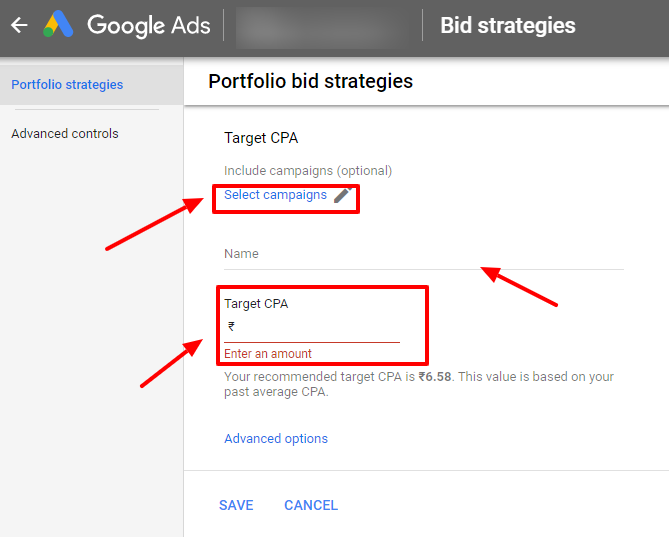
Utilizing Audience Targeting
Refining CPA goals begins with effective audience targeting. By segmenting your audience based on demographics, interests, and online behaviors, campaigns can become more focused. Consider the following strategies:
- Custom Audiences: Create custom audiences based on past interactions, such as website visitors or previous converters.
- Lookalike Audiences: Use data from existing customers to target new users who exhibit similar behaviors.
- Remarketing Lists: Re-engage users who have previously interacted with your ads, tailoring your messaging to encourage conversion.
Implementing Conversion Tracking
Accurate conversion tracking is essential for measuring CPA effectively. Set up conversion tracking by following these steps:
- Access your Google Ads account and navigate to the “Tools & Settings” menu.
- Select “Conversions” under the “Measurement” section.
- Click the “+” button to create a new conversion action, defining the type of conversion (e.g., purchases, sign-ups).
- Install the conversion tracking tag on your website to capture data accurately.
Utilizing Google Tag Manager can simplify this process by managing all tags in one place, ensuring seamless tracking across campaigns.
Adjusting Bids Based on Performance
Bidding strategies must adapt to device performance and geographical location. Analyze data to inform bid adjustments:
- Device Performance: Review conversion rates across devices. Increase bids for high-performing devices and decrease for low-performing ones.
- Location Performance: Evaluate conversions by location. Adjust bids to allocate more budget to regions with higher conversion rates.
- Time of Day: Analyze performance trends by time. Increase bids during peak conversion hours and reduce during low-traffic times.
Testing Different Ad Creatives
Ad creatives play a crucial role in conversion rates. Implement A/B testing to identify effective elements:
- Headlines: Experiment with different headlines to see which generates higher click-through rates.
- Call-to-Actions: Test various calls-to-action (CTAs) to determine which prompts the most conversions.
- Visual Elements: Change images or videos in ads to gauge their impact on user engagement and conversion.
Nuanced Considerations
One common misconception is that Target CPA is a one-size-fits-all solution. In reality, different industries may require distinct approaches to CPA management. For example, e-commerce businesses might focus more on product-specific campaigns, while service-based industries may need to emphasize lead generation. Furthermore, seasonality and external factors can influence conversion rates, necessitating ongoing adjustments to CPA targets.
Practical Application
To implement these strategies effectively, begin by segmenting your audience and setting up robust conversion tracking. Regularly analyze device and location performance to inform bid adjustments. Commit to ongoing A/B testing of ad creatives, documenting results to refine future campaigns. By actively engaging in these practices, the potential for improved CPA outcomes significantly increases.
Common Mistakes to Avoid with Target CPA
Implementing Target CPA bidding in Google Ads can optimize advertising efforts, but several common mistakes can undermine its effectiveness. Recognizing and avoiding these pitfalls is essential for maximizing campaign performance.

1. Setting Unrealistic CPA Goals
One of the most significant errors advertisers make is setting unrealistic CPA goals. Establishing a target that is too low can lead to insufficient data collection and a lack of conversions. For instance, if a business typically sees a CPA of $50, aiming for $10 may restrict ad visibility and limit opportunities for engagement. A more effective approach involves analyzing historical data to set achievable CPA targets that align with actual performance metrics.
2. Neglecting Ongoing Monitoring and Adjustments
Target CPA is not a set-it-and-forget-it strategy. Advertisers often fail to monitor and adjust their CPA targets over time, which can lead to performance stagnation. Regularly reviewing campaign data allows advertisers to assess whether the set CPA is still optimal based on changing market conditions, seasonality, or shifts in consumer behavior. Adjustments should be made as necessary to ensure alignment with business goals and market dynamics.
3. Failing to Properly Integrate Conversion Tracking
Effective conversion tracking is the backbone of successful Target CPA campaigns. Advertisers frequently overlook the importance of accurate tracking setup, which can skew data and lead to misguided CPA targets. Implementing Google Ads conversion tracking correctly involves defining what constitutes a conversion, ensuring the tracking code is properly installed, and regularly testing to confirm that conversions are being recorded accurately. Without this, the system cannot optimize effectively.
4. Overlooking Ad Quality and Relevance
Ad quality and relevance play a crucial role in the success of Target CPA campaigns. Many advertisers mistakenly focus solely on CPA targets without considering the quality of their ads. High-quality ads that resonate with the target audience improve click-through rates (CTR) and conversion rates, ultimately leading to better performance at a lower CPA. Regularly optimizing ad copy, images, and targeting parameters is essential to maintaining ad relevance.
Expert Insights on Target CPA Misconceptions
Many advertisers believe that simply implementing Target CPA will automatically yield lower costs and higher conversions. However, this misconception ignores the necessity of a thorough understanding of their target audience and market conditions. Furthermore, some campaigns may not be suitable for automated bidding strategies, particularly those with low conversion volumes or highly variable performance. Analyzing individual campaign characteristics is critical before committing to a Target CPA strategy.
Practical Steps to Optimize Target CPA Use
- Conduct a thorough analysis of historical CPA data to set realistic targets.
- Schedule regular performance reviews to make necessary adjustments to CPA goals.
- Ensure proper implementation and testing of conversion tracking for accurate data.
- Continuously optimize ad content and targeting to enhance relevance and quality.
By focusing on these actionable steps, advertisers can avoid common mistakes and leverage Target CPA bidding more effectively, ultimately driving better results in their Google Ads campaigns.
Real-World Case Studies of Target CPA Success
This section explores practical applications of Target CPA in Google Ads through real-world case studies. These examples illustrate how businesses across various sectors have effectively utilized this bidding strategy to achieve their advertising objectives.
Retail Brand Increases Sales with Target CPA
A prominent retail brand implemented Target CPA strategies to boost online sales during a seasonal promotion. By setting a Target CPA of $30, the brand was able to generate a 25% increase in conversions compared to previous campaigns. The key was optimizing ad placements and focusing on high-intent keywords that aligned with consumer search behavior.
- Initial CPA: $50
- Target CPA: $30
- Conversion Rate Increase: 25%
This success was attributed to continuous monitoring and adjusting bids based on performance metrics, ensuring that the ads reached audiences most likely to convert. The brand also utilized remarketing strategies to re-engage previous visitors, further enhancing conversion rates.
Service-Based Company Reduces Acquisition Costs
A service-based company focused on home improvement utilized Target CPA to streamline its customer acquisition process. Initially facing an average acquisition cost of $40 per customer, the company set a Target CPA of $25. Over six months, it successfully reduced the acquisition cost to $22 while increasing the number of leads generated by 30%.
- Initial Acquisition Cost: $40
- Target CPA: $25
- Final Acquisition Cost: $22
The company achieved these results by refining its audience targeting and leveraging A/B testing on ad creatives. This approach allowed them to identify the most effective messaging and visuals, ultimately driving down costs while maintaining lead quality.
Non-Profit Organization Maximizes Donations
A non-profit organization aimed to increase donations for its annual campaign by implementing Target CPA in Google Ads. By setting a Target CPA of $15, the organization saw a 40% increase in online donations. This was achieved through tailored ad messaging that resonated with their target demographic and strategic placement during peak donation periods.
- Initial Donation Rate: $10 per donor
- Target CPA: $15
- Final Donation Rate: $6 per donor
The organization also employed a storytelling approach in their ads, effectively connecting potential donors with the cause, which significantly enhanced engagement and conversion rates.
Lessons from Unsuccessful Campaigns
Not all campaigns using Target CPA are successful. A tech startup experienced challenges when its initial Target CPA was set too low, resulting in limited ad exposure and insufficient data for optimization. The startup initially aimed for a Target CPA of $10 but found that their actual costs averaged $25.
- Initial Target CPA: $10
- Actual CPA: $25
- Outcome: Low ad visibility and poor performance
To pivot, the startup increased the Target CPA to $20, allowing for broader reach and better data collection. This adjustment enabled them to refine their targeting and ultimately achieve a sustainable acquisition cost that aligned more closely with their budget.
These case studies demonstrate that while Target CPA can drive significant results, it requires continuous monitoring and adjustment to optimize performance. Businesses should regularly analyze their campaigns to align target costs with actual performance metrics.
To effectively apply these insights, businesses should:
- Set realistic Target CPA goals based on historical data.
- Continuously monitor and adjust bids based on performance.
- Utilize A/B testing to identify the most effective ad creatives.
- Engage in remarketing to re-target previous visitors.
Comparative Analysis: Target CPA vs. Other Bidding Strategies
This section examines how Target CPA compares to other bidding strategies within Google Ads. Understanding these distinctions is essential for advertisers to optimize their campaigns effectively.

Manual CPC: Control Over Cost
Manual Cost-Per-Click (CPC) bidding allows advertisers to set individual bids for each keyword. This strategy is advantageous for those seeking direct control over their ad spend and performance. Advertisers can adjust bids based on specific keyword performance or seasonal trends. Manual CPC is particularly useful when the advertiser has extensive knowledge of their target audience and can make informed decisions based on historical data.
Target ROAS: Maximizing Return on Ad Spend
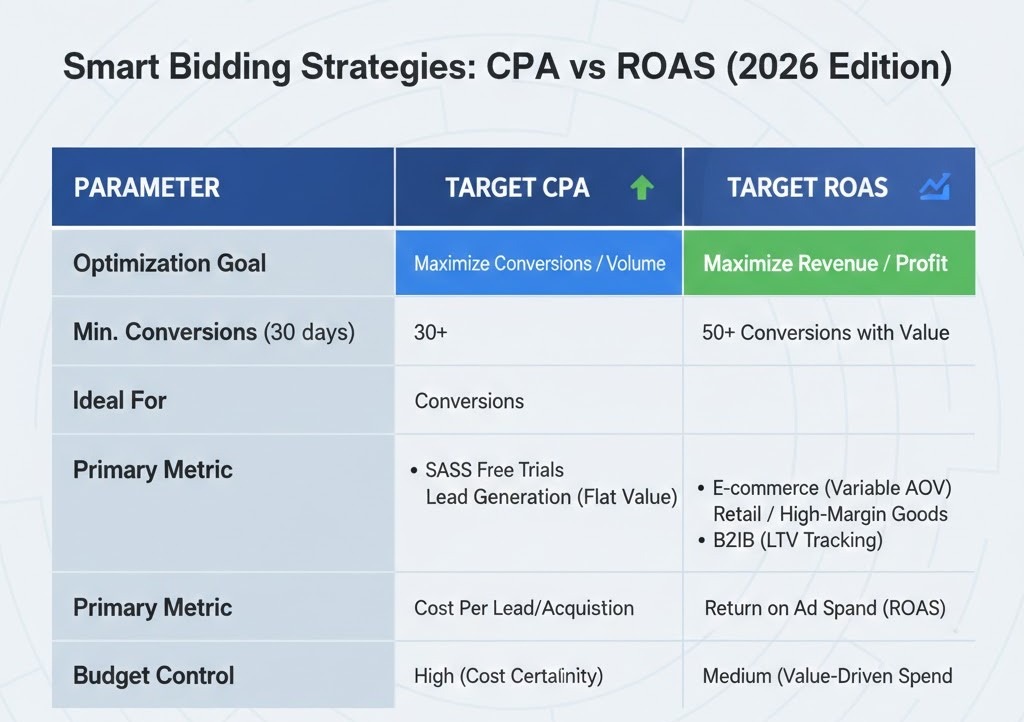
Target Return on Ad Spend (ROAS) focuses on maximizing revenue relative to ad spend, contrasting with the Target CPA approach, which centers on achieving a specific cost per conversion. Advertisers should consider Target ROAS when their primary goal is to increase revenue rather than just conversion volume. This strategy is beneficial for e-commerce businesses that need to ensure profitability per sale.
- Target CPA is ideal for campaigns focused on cost efficiency.
- Target ROAS is better suited for revenue-focused campaigns.
- Target ROAS requires accurate conversion value tracking to be effective.
Maximize Clicks: Prioritizing Traffic
Maximize Clicks is a bidding strategy that automatically sets bids to get the most clicks possible within a specified budget. This approach can be suitable for advertisers looking to increase website traffic without a specific cost-per-conversion goal. However, when the objective shifts to optimizing for conversions, Target CPA becomes more relevant. Maximize Clicks may dilute focus on quality traffic if conversions are the priority.
Hybrid Approaches: Finding Balance
In certain scenarios, a hybrid approach combining Target CPA with manual strategies or other automated options may prove beneficial. For example, advertisers can set a Target CPA for specific high-value keywords while using Maximize Clicks for broader, less targeted campaigns. This strategy allows for flexibility and can lead to improved overall performance by balancing traffic generation and cost efficiency.
Expert Insights: Misconceptions and Distinctions
Many advertisers mistakenly believe that Target CPA is always the best option for conversion-focused campaigns. However, this strategy may not yield optimal results in every context. For instance, businesses with limited historical data may struggle with Target CPA, as the algorithm requires sufficient conversion data to optimize effectively. In such cases, starting with Manual CPC or Maximize Clicks can provide valuable insights before transitioning to Target CPA. Additionally, blending these strategies can help mitigate risks associated with algorithm-driven bidding.
Practical Application
To determine the most suitable bidding strategy, consider the following actionable steps:
- Assess your campaign goals: Are you prioritizing conversions, revenue, or traffic?
- Evaluate historical performance data to understand which strategies have worked best in the past.
- Test different bidding strategies by allocating a small budget to experiment with various approaches.
- Monitor performance metrics closely and adjust bidding strategies based on real-time data.
Frequently Asked Questions
What does Target CPA mean in Google Ads?
Target CPA (Cost Per Acquisition) is a bidding strategy in Google Ads that aims to get as many conversions as possible at or below a specified cost per acquisition. It automatically adjusts bids to achieve the desired CPA based on historical data and real-time signals.
How do I set up Target CPA in Google Ads?
To set up Target CPA, navigate to your Google Ads campaign, select “Bidding,” and choose “Target CPA” as your bid strategy. Enter your desired CPA amount, and Google Ads will optimize your bids to meet this target.
What is the difference between Target CPA and Maximize Conversions?
Target CPA focuses on achieving a specific cost per acquisition, while Maximize Conversions aims to get the highest number of conversions possible within your budget. Target CPA provides more control over costs, whereas Maximize Conversions prioritizes volume.
How much should I set my Target CPA?
Your Target CPA should be based on your historical conversion data and overall marketing goals. Analyze past performance to determine a realistic CPA that aligns with your desired return on investment.
How long does it take for Target CPA to optimize?
Optimization for Target CPA typically takes about 7 to 14 days, depending on the volume of conversions. During this period, Google Ads gathers sufficient data to adjust bids effectively and meet your CPA goals.
What are best practices for using Target CPA?
Best practices include setting a realistic Target CPA based on historical data, ensuring sufficient conversion volume, and allowing time for the algorithm to optimize. Regularly monitor performance and adjust your CPA as needed to improve results.
Can I use Target CPA for shopping campaigns?
Yes, Target CPA can be used for Google Shopping campaigns, allowing advertisers to manage their cost per acquisition effectively. This bidding strategy helps optimize bids based on product performance and conversion data.
Final Thoughts on what is target cpa in google ads
Target CPA in Google Ads is a pivotal strategy for advertisers seeking to optimize their campaigns effectively while maintaining cost efficiency. By setting a specific cost per acquisition goal, businesses can leverage automated bidding to align their advertising spend with desired outcomes, ultimately driving better return on investment.
To enhance your use of Target CPA, conduct a thorough analysis of your past campaign performance data and adjust your CPA targets based on historical conversion rates and market trends for your specific industry.
Understanding and mastering Target CPA not only empowers advertisers to maximize their budgets but also positions them strategically in an increasingly competitive digital landscape.
Leave a Reply