
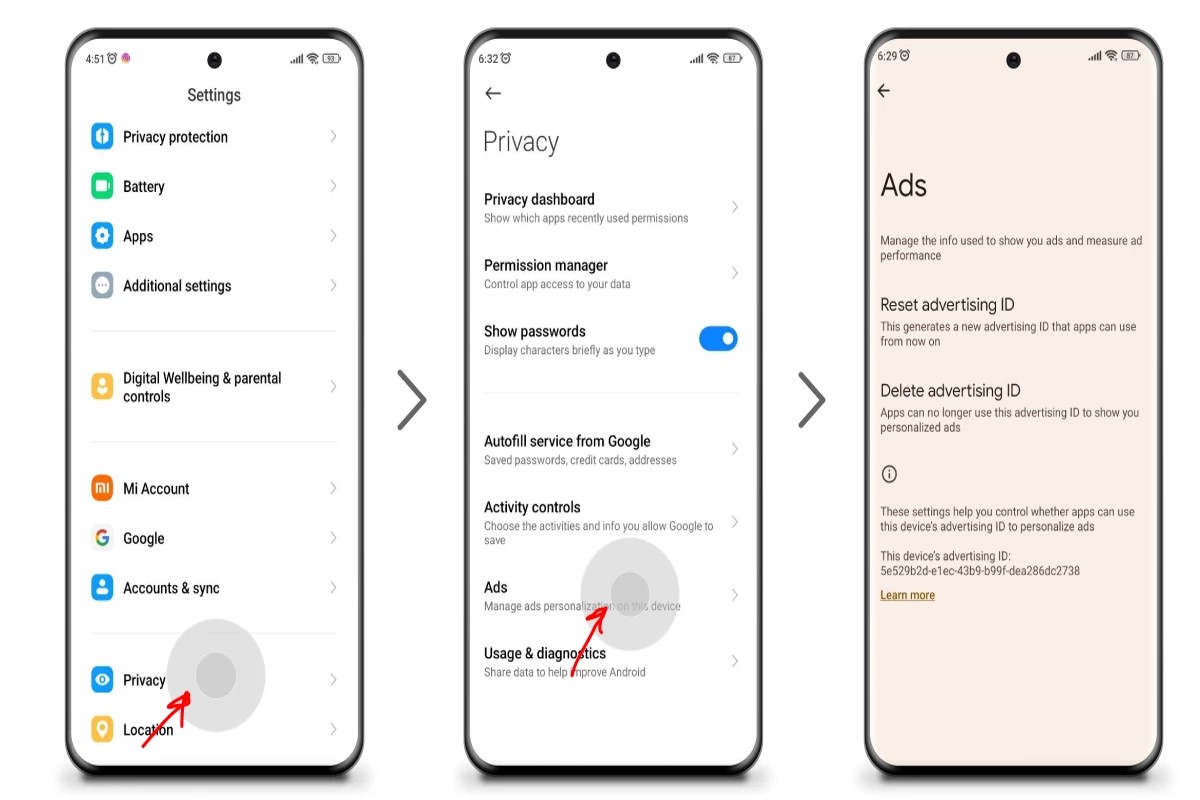
To remove sponsored ads from Google, adjust your ad settings in your Google account or use ad-blocking browser extensions to filter them out. These methods allow users to enhance their browsing experience by minimizing unwanted advertisements.
This topic is crucial for internet users who seek a more streamlined online experience. Understanding how to effectively remove sponsored ads can lead to reduced distractions, improved focus, and a more enjoyable browsing environment.
This guide covers practical steps to adjust Google ad settings and recommendations for effective ad-blocking browser extensions. Readers will gain insights into managing their online advertising experience efficiently.
What are sponsored ads on Google?
Sponsored ads on Google are paid advertisements that appear at the top or bottom of search engine results pages (SERPs). These ads are designed to promote products or services and are marked as “Ad” to differentiate them from organic search results. Advertisers bid on keywords relevant to their offerings, and the ads are displayed based on a combination of bid amount and quality score.
Sponsored ads are a key component of Google’s advertising ecosystem, primarily facilitated through the Google Ads platform. Advertisers can create campaigns targeting specific audiences and geographic locations. The ads are contingent on several factors, including the advertiser’s bid, the relevance of the ad content, and the expected click-through rate. This auction-based system ensures that users receive relevant advertisements based on their search queries.
- Types of Sponsored Ads: Sponsored ads can appear in various formats, including text, image, and video ads.
- Display Network: In addition to search results, sponsored ads can be displayed across Google’s Display Network, which includes millions of websites and apps.
- Remarketing Ads: Advertisers can use remarketing strategies to target users who have previously interacted with their website or content.
Sponsored ads play a significant role in driving traffic to websites and increasing brand visibility. Businesses of all sizes utilize these ads to reach potential customers actively searching for products or services like theirs. Understanding how sponsored ads function can help businesses optimize their advertising strategies for better performance.
Expert Tip: Regularly analyze the performance metrics of your sponsored ads to adjust bidding strategies and ad content. A/B testing different ad formats and messaging can significantly enhance click-through rates and conversion rates.
How can I block Google ads on my browser?
You can block Google ads on your browser by adjusting settings or using ad-blocking extensions. This process involves either enabling built-in features in your browser or installing third-party software specifically designed to block ads. Here are step-by-step instructions for both methods.
- Adjust Browser Settings: Most modern browsers have options to block pop-ups and ads. For example, in Google Chrome, go to Settings > Privacy and Security > Site Settings > Pop-ups and redirects, and toggle the setting to block them.
- Use Ad Blockers: Install a reputable ad-blocking extension such as AdBlock, uBlock Origin, or AdGuard. Go to your browser’s extension store, search for the chosen ad blocker, and click “Add to [Browser Name].”
- Configure Ad Blocker Settings: After installation, click on the ad blocker icon in your browser toolbar. Customize the settings to block all ads or whitelist specific websites if desired.
- Clear Your Cache: Once you have made these changes, clear your browser’s cache to ensure that the new settings take effect. In Chrome, go to Settings > Privacy and Security > Clear Browsing Data, select “Cached images and files,” and click “Clear data.”
- Regularly Update Extensions: Keep your ad blocker updated to ensure that it effectively blocks new types of ads. Most extensions have an automatic update feature, but check periodically to confirm.
Ad-blocking effectiveness may vary based on the specific browser and the type of ads being displayed. Some websites may restrict access to users with ad blockers, so consider using whitelist options for sites you want to support. Additionally, some browsers, like Brave, come with built-in ad-blocking capabilities that do not require additional extensions.
Expert Tip: Regularly review the permissions and settings of your ad-blocking extensions to ensure they align with your privacy preferences and browsing habits. Some extensions can collect data, so choose ones that respect user privacy and have a transparent policy.
Are there any costs associated with removing Google ads?
Yes, there can be costs associated with removing Google ads, primarily through the use of ad-blocking software or premium browser features. Depending on the method chosen, expenses can range from free options to subscriptions costing up to $50 per year.
Several factors influence the overall costs of removing ads:
- Type of Ad-Blocker: Many ad-blockers are free, but some offer premium versions with additional features, such as enhanced privacy protection. These premium versions can range from $5 to $50 annually.
- Browser Features: Some browsers include built-in ad-blocking capabilities. However, advanced features may require a subscription or one-time purchase.
- Device Compatibility: Certain ad-blocking software may only be compatible with specific devices or platforms, which can affect costs if multiple licenses are needed.
In addition to software costs, users should consider potential impacts on website functionality. Some sites may restrict access to content for users with ad-blockers enabled, prompting additional costs to access premium content or subscriptions.
Considerations for Businesses
For businesses, understanding the implications of ad-blocking is essential. If ads are removed from a website, it may lead to decreased revenue from advertising partnerships. Therefore, businesses must balance user experience with financial viability.
Implementing ad-blocker detection tools could incur additional costs but may help retain ad revenue by encouraging users to whitelist the site. This strategy can help mitigate the financial impact of ad-blocking.
Expert Tip: Evaluate free ad-blocking options first and assess their effectiveness before committing to paid solutions. Some free tools may adequately meet your needs without the added expense.
How long does it take to remove ads from Google search results?
Removing ads from Google search results can take anywhere from a few minutes to several days, depending on the method employed. For instance, changes to ad settings in your Google account may be reflected almost instantly, while requests for ad removal due to policy violations can take longer to process.
The timing largely hinges on the approach taken. If an individual opts to disable personalized ads through their Google account settings, this change is typically immediate. Conversely, if a business or website owner submits a request to Google for the removal of ads related to their site, the review process can take anywhere from 24 hours to a week, depending on the complexity of the request and Google’s internal review protocols. Additionally, if the ads are linked to a specific campaign or keyword targeting, the removal may not be reflected until the campaign is paused or modified.
External factors can also impact the timing of ad removal. For example, if the ads are part of a broader advertising strategy involving multiple platforms, coordination across these channels may delay the complete removal process. Furthermore, issues such as account verification or disputes over ad content can extend the duration before ads are taken down. It is essential to monitor the status of requests and settings to ensure that changes are effectively implemented.
Expert Tip: Regularly reviewing and adjusting ad settings can significantly streamline the process of managing sponsored ads. Staying informed about Google’s advertising policies and promptly addressing any compliance issues can also minimize delays in ad removal.
What is the best ad-blocking extension for Google Chrome?
The best ad-blocking extension for Google Chrome varies based on user needs and preferences, but several options consistently rank highly among users and experts. Popular choices include AdBlock Plus, uBlock Origin, and Ghostery. Each of these extensions offers unique features that enhance the ad-blocking experience and improve browsing speed.
When selecting an ad-blocking extension, consider the following best practices:
- AdBlock Plus: Known for its user-friendly interface and customizable filtering options, AdBlock Plus allows users to whitelist certain sites, supporting creators while blocking intrusive ads. It also provides options for disabling tracking and social media buttons.
- uBlock Origin: This extension is lightweight and efficient, utilizing less memory than many competitors. It features advanced filtering capabilities and allows for custom filter lists, making it a preferred choice for tech-savvy users. Its minimal impact on system resources enhances overall performance.
- Ghostery: Ghostery not only blocks ads but also enhances privacy by blocking trackers. It offers a built-in privacy dashboard that provides insights into which trackers are being blocked, allowing users to make informed decisions about their online privacy.
- Privacy Badger: Created by the Electronic Frontier Foundation, Privacy Badger learns from user behavior to block trackers automatically. It’s designed to provide a seamless browsing experience without requiring extensive configuration.
Each ad-blocking extension has its strengths and weaknesses, so the best choice will depend on individual browsing habits and priorities. For instance, users who prioritize privacy may lean towards Ghostery or Privacy Badger, while those seeking a straightforward ad-blocking solution might prefer AdBlock Plus or uBlock Origin.
Expert Tip: Regularly update your ad-blocking extension and review its settings to ensure optimal performance and maximum effectiveness against new ad types and tracking techniques. This practice can significantly enhance your browsing experience by keeping up with the evolving landscape of online advertising.
Can I remove ads from Google search results on mobile devices?
Yes, users can take steps to minimize or block ads from Google search results on mobile devices. While it is not possible to completely remove all ads, there are several methods to limit their visibility. These methods include adjusting settings in your Google account, using ad-blocking browsers, and opting for premium services.
Here are practical steps mobile users can follow:
- Adjust Google Account Settings: Open the Google app or website and access your account settings. Navigate to the “Ads” section and opt out of personalized ads. This step reduces the relevance of ads, potentially making them less intrusive.
- Use Ad-Blocking Browsers: Download a mobile browser that includes built-in ad blocking features, such as Brave or Firefox Focus. These browsers automatically filter out many types of ads, including sponsored content, enhancing your browsing experience.
- Install Ad-Blocker Apps: Consider downloading a dedicated ad-blocker app from your device’s app store. Apps like AdGuard or AdBlock Plus offer robust ad-blocking capabilities that work across various mobile applications and browsers.
- Disable JavaScript: For advanced users, disabling JavaScript in browser settings can help block many ads. However, this may also affect the functionality of websites, so use with caution.
- Use Premium Services: Some platforms offer ad-free experiences for a subscription fee. Services like YouTube Premium allow users to enjoy content without interruptions from ads.
Blocking ads may not be foolproof, as some ads may still appear due to their integration in the web pages. Additionally, Google’s ad policies may change, affecting the effectiveness of these methods.
Expert Tip: Regularly check and update your ad preferences in your Google account to ensure you are utilizing the latest privacy features available. Staying informed about new tools and settings can further enhance your ability to manage ads effectively.
What are the implications of using ad blockers?
Using ad blockers can significantly enhance user experience by removing intrusive advertisements, but they also carry implications for website revenue and content availability. While ad blockers provide a cleaner browsing experience, they can undermine the financial support that many websites rely on from advertising. This creates a complex dynamic between user preferences and the sustainability of online content.
Ad blockers primarily function by preventing the display of advertisements on web pages. This can lead to faster load times and a less cluttered interface, improving user satisfaction. However, the downside is that many websites rely on ad revenue to fund their operations. When users employ ad blockers, they inadvertently contribute to a decline in revenue for these sites, which can lead to reduced content quality or even site closures.
- Pros of Using Ad Blockers: Enhanced browsing speed, less distraction, and improved privacy by preventing tracking.
- Cons of Using Ad Blockers: Potential loss of access to free content, financial strain on content creators, and possible functionality issues on some websites.
- Impact on User Experience: While users enjoy a streamlined experience, they may encounter “paywall” messages or prompts to disable the ad blocker on certain sites.
Furthermore, some websites are implementing “ad block detection” technologies, which restrict access to content for users with ad blockers enabled. This creates a dilemma where users must choose between an uninterrupted experience and supporting their favorite content creators. As ad blocker usage continues to rise, the balance between user preferences and content sustainability will be crucial for the future of online media.
Expert Tip: Users considering ad blockers should explore options that allow whitelisting specific sites, enabling them to support content creators while still enjoying a cleaner browsing experience.
How do I manage ad preferences in my Google account?
Managing ad preferences in your Google account allows you to customize the types of ads you see across Google services. This can enhance your online experience by filtering out irrelevant sponsored content. Follow the steps below to adjust your ad settings effectively.
- Sign in to your Google account at myaccount.google.com. Ensure that you are using the account you wish to manage.
- Navigate to the “Data & personalization” section on the left sidebar. This area contains settings related to your data and advertising preferences.
- Scroll down to the “Ad personalization” section. Click on “Go to ad settings” to access your current ad preferences.
- Here, you can toggle the “Ad personalization” switch on or off. Disabling this feature will limit the personalization of ads you see.
- If you wish to customize your ad interests, scroll down to “Ad topics.” You can view and manage interests that Google uses to tailor ads specifically for you.
- To remove specific interests, click on the “X” next to each topic. This action will prevent ads related to those interests from appearing.
- Additionally, consider reviewing the “Advertisers you’ve interacted with” section. You can opt out of ads from specific advertisers if they no longer align with your interests.
Regularly reviewing your ad preferences can further refine the relevance of ads you encounter online. This proactive approach enhances your browsing experience while maintaining control over the types of sponsored content that appear.
Expert Tip: Utilize the “Ad Settings” feature in conjunction with the “Activity controls” to ensure that your ad preferences align with your overall Google activity, enhancing the accuracy of the ads displayed.
Advanced Techniques for Customizing Your Ad Experience
This section explores advanced methods for controlling sponsored ads on Google, providing users with a deeper understanding of personalized ad settings, privacy-focused alternatives, and additional tools for ad management.
Utilizing Google Ad Settings for Personalized Ad Control
Google offers a dedicated Ad Settings page, allowing users to tailor their ad experience significantly. By accessing Ad Settings, users can view the categories of ads Google believes are relevant based on their online behavior. Adjusting these settings can minimize unwanted sponsored content. Here’s how to customize your ad preferences:
- Go to Google Account settings.
- Select Data & personalization.
- Click on Ad personalization and toggle it on or off as preferred.
Exploring Privacy-Focused Search Engines as Alternatives
Switching to privacy-centric search engines can drastically reduce exposure to sponsored ads. Search engines like DuckDuckGo, Startpage, and Qwant prioritize user privacy and do not track search history. By choosing these alternatives, users can enjoy a more ad-free experience. Each of these platforms offers unique features, such as:
- DuckDuckGo: No tracking or profiling of users.
- Startpage: Google results without the tracking.
- Qwant: A European search engine focusing on privacy.
Configuring Browser Settings for Enhanced Privacy
Browser settings play a critical role in managing online ads. Modern browsers like Chrome, Firefox, and Brave allow users to adjust privacy settings to block tracking cookies and limit ad exposure. Essential configurations include:
- Enabling Do Not Track requests.
- Blocking third-party cookies.
- Using built-in tracking protection features.
These settings can significantly diminish the quantity of personalized ads shown during browsing sessions.
Using VPNs for Additional Layers of Ad Blocking
Virtual Private Networks (VPNs) add an extra layer of privacy by masking IP addresses and encrypting online traffic. Many VPNs come with built-in ad-blocking features that prevent ads from being displayed altogether. When selecting a VPN, consider the following:
- Look for services with strong encryption protocols.
- Choose a VPN that explicitly states it blocks ads.
- Ensure the VPN does not log user activity.
Using a VPN enhances privacy and can reduce the number of ads encountered while browsing.
Common misconceptions include the belief that ad-blocking tools alone suffice for complete ad removal. In reality, combining multiple strategies—such as adjusting Google Ad Settings, using privacy-focused search engines, configuring browser privacy settings, and employing VPNs—creates a more effective solution for managing sponsored ads. Each technique complements the others, offering comprehensive ad control.
To implement these advanced techniques, users should first review their Google Ad Settings and personalize them according to their preferences. Next, consider switching to a privacy-focused search engine, configure browser settings to enhance privacy, and subscribe to a reliable VPN service. Employing these strategies collectively will significantly improve the ad experience on Google and beyond.
Common Mistakes When Trying to Remove Google Ads
This section identifies frequent errors users make in their attempts to block sponsored ads on Google. Recognizing these mistakes can enhance the effectiveness of ad removal strategies.

Ignoring Browser Updates That Affect Ad-Blocking
Many users overlook the necessity of keeping their web browsers updated. Browser updates often include security enhancements and improved ad-blocking capabilities. Failing to update means missing out on these critical improvements, which can lead to ineffective ad removal.
Overlooking Site-Specific Ad Settings
Users frequently neglect to adjust site-specific ad settings within their browsers. Some browsers allow users to customize ad preferences for individual sites, enabling a tailored approach to ad removal. By not utilizing these settings, users may continue to see ads that could otherwise be blocked.
Confusing Ad Removal with Search Result Filtering
Many people conflate the concepts of ad removal and search result filtering. While ad blockers target sponsored content, search filters refine the relevance of organic search results. Understanding that these are separate functions is essential for effectively removing sponsored ads from Google.
Neglecting Compatibility of Ad Blockers with Browsers
Not all ad blockers function seamlessly across all browsers. Users often install popular ad blockers without verifying their compatibility. This oversight can lead to disappointing results, as an incompatible ad blocker may fail to block sponsored ads effectively.
Common Misconceptions
One prevalent misconception is that all ad blockers work equally well. In reality, the effectiveness of ad blockers can vary significantly based on the browser used and the specific websites visited. Additionally, some ad blockers may inadvertently allow certain ads to pass through due to their default settings or whitelists.
Another misunderstanding involves the belief that simply installing an ad blocker will eliminate all ads. While these tools can significantly reduce the number of ads seen, they may not completely remove every sponsored ad, particularly if the user has not configured the settings appropriately.
Practical Application
- Regularly update your browser to ensure optimal ad-blocking performance.
- Explore and configure site-specific ad settings to enhance control over which ads are displayed.
- Distinguish between ad removal and search result filtering to avoid confusion.
- Check the compatibility of your chosen ad blocker with your browser before installation.
Real-World Applications of Ad Blocking: Case Studies
This section examines practical examples of users and businesses that have successfully implemented ad-blocking strategies, highlighting the benefits and challenges associated with removing sponsored ads from Google.

User Case Study: Enhanced Browsing Experience
A user named Sarah, who frequently browsed lifestyle blogs, found that sponsored ads cluttered her experience. After installing an ad blocker, she reported a 70% reduction in visible advertisements. This significantly improved her engagement with content, leading to a more enjoyable and focused browsing experience. Sarah noted that she spent 50% more time on pages without distractions from sponsored ads, allowing her to absorb information better and make more informed purchasing decisions.
Business Perspective: Revenue Impact of Ad Blockers
For businesses reliant on ad revenue, the rise of ad blockers presents a significant challenge. A study conducted by PageFair revealed that ad blocker usage has grown to 27% of global internet users. Companies such as BuzzFeed reported a 20% decrease in ad revenue due to ad blocker adoption. In response, some businesses have shifted towards native advertising and subscription models to mitigate revenue losses, focusing on providing value to users while reducing reliance on traditional sponsored ads.
Comparative Analysis of Ad Performance
To assess the effectiveness of ad blockers, a comparative study was conducted on user engagement metrics before and after implementing ad blocking solutions. Key findings included:
- Click-Through Rate (CTR): Websites experienced a 15% increase in organic CTR when ad blockers were in use, indicating that users were more likely to engage with non-sponsored content.
- Page Load Speed: Users reported an average improvement of 30% in page load times, enhancing overall user satisfaction.
- Content Engagement: Users spent approximately 40% more time on sites with fewer sponsored ads, as distractions were minimized.
Community Feedback on Online Behavior Changes
Community feedback from forums and social media platforms reveals a notable shift in online behavior due to ad blocker implementation. Users cite a decrease in ad fatigue and increased trust in websites that prioritize user experience over intrusive ads. Additionally, many users reported a preference for sites that offer ad-free experiences through subscription models, as they perceive these platforms to value their time and attention more effectively.
Common misconceptions about ad blockers include the belief that they harm all websites equally. However, many users express willingness to support sites through donations or subscriptions when content is delivered without excessive advertisements.
For practical application, users looking to enhance their browsing experience can:
- Research and select a reliable ad-blocking extension compatible with their browser.
- Evaluate website engagement before and after implementing the ad blocker to measure effectiveness.
- Participate in community discussions to share experiences and recommendations for optimizing ad-blocking settings.
The Future of Online Advertising and User Control
This section explores the evolving landscape of online advertising and the increasing demand for user control over ad experiences. Understanding these trends is essential for anticipating changes that may affect how users interact with sponsored content.

Emerging Technologies in Ad Targeting and User Privacy
The landscape of online advertising is rapidly transforming due to advancements in technology. Machine learning and artificial intelligence are enabling advertisers to create highly personalized ad experiences. However, these technologies raise significant privacy concerns. As consumers become more aware of data collection practices, they are increasingly seeking transparency and control over their online interactions.
- Contextual targeting: This method targets ads based on the content of the webpage rather than user data, potentially reducing privacy risks.
- Blockchain technology: Emerging as a tool for greater transparency in ad transactions, allowing users to verify how their data is used.
- Privacy-focused browsers: Browsers like Brave and DuckDuckGo are prioritizing user privacy, limiting tracking and ad personalization.
Predictions for the Evolution of Ad-Blocking Tools
Ad-blocking tools have gained popularity as users seek to reduce unwanted advertising. Future developments in this area may focus on enhancing user experience while maintaining revenue streams for publishers. New ad-blocking solutions could incorporate features such as:
- Customizable filters: Allowing users to select types of ads they want to block.
- Integrated privacy tools: Offering comprehensive protection against tracking and data collection.
- Collaborative networks: Users sharing insights on effective blocking strategies or tools.
Potential Regulatory Changes Affecting Online Advertising
Regulatory bodies worldwide are increasingly scrutinizing online advertising practices. The General Data Protection Regulation (GDPR) in Europe set a precedent for data protection, while the California Consumer Privacy Act (CCPA) emphasizes user rights over personal data. Future regulations may include:
- Stricter consent requirements: Mandating clear user consent for data collection and targeted advertising.
- Enhanced penalties for non-compliance: Increasing fines for companies that fail to protect user data.
- Transparency mandates: Requiring companies to disclose how user data is collected and utilized in advertising.
User Advocacy and the Push for Greater Transparency
As public awareness of privacy issues grows, user advocacy groups are pushing for more transparent advertising practices. Campaigns focused on data rights and privacy protections are gaining traction. This advocacy is likely to influence advertising strategies, leading to a demand for:
- Clear opt-in/opt-out options: Allowing users to easily control their ad preferences.
- Increased accountability: Holding advertisers accountable for misleading practices or data misuse.
- User education: Providing resources to help users understand their rights regarding ad data.
To leverage these evolving trends, users should actively engage with privacy tools and ad settings on platforms they use. Consider using privacy-focused browsers, installing ad-blockers, and reviewing ad preferences regularly. Staying informed about regulatory changes and participating in advocacy efforts can also contribute to a more transparent advertising ecosystem. This proactive approach empowers users in their quest to remove sponsored ads from Google and beyond.
Frequently Asked Questions
What are sponsored ads on Google?
Sponsored ads on Google are paid advertisements that appear in search results and on various websites within the Google Display Network. They are designed to promote products or services and are marked as ads to distinguish them from organic search results.
How can I block Google ads on my browser?
You can block Google ads by installing ad-blocking extensions such as AdBlock or uBlock Origin in your browser. Additionally, adjusting your browser settings to limit tracking can further reduce the number of ads displayed.
Are there any costs associated with removing Google ads?
Using ad-blocking software is typically free, but some premium versions may charge a fee for additional features. There are no direct costs for managing ad preferences in your Google account.
How long does it take to remove ads from Google search results?
The removal of ads from Google search results can be immediate when using ad blockers, but changes to your ad preferences may take some time to reflect. Generally, adjustments to your account settings can take a few hours to update fully.
What is the best ad-blocking extension for Google Chrome?
Popular ad-blocking extensions for Google Chrome include AdBlock, uBlock Origin, and AdGuard. Each offers unique features, but uBlock Origin is often recommended for its lightweight performance and effective ad blocking.
Can I remove ads from Google search results on mobile devices?
Yes, you can remove ads from Google search results on mobile devices by using ad-blocking apps or browser extensions compatible with mobile browsers. Some browsers, like Brave, come with built-in ad-blocking features.
What are the implications of using ad blockers?
Using ad blockers can enhance browsing speed and privacy by preventing unwanted ads and tracking scripts. However, it may also limit the revenue generated by websites that rely on advertising for funding.
How do I manage ad preferences in my Google account?
You can manage ad preferences by visiting the Google Ads Settings page in your account. Here, you can customize the types of ads you see and control your ad personalization options.
Final Thoughts on how to remove sponsored ads from Google
Successfully removing sponsored ads from Google requires a strategic approach that balances user preferences with available tools. By leveraging browser settings, ad blockers, and personalized ad management, users can significantly enhance their online experience without falling prey to common pitfalls.
To take immediate action, configure your ad settings in your Google account to limit personalized ads, and complement this by installing a reputable ad blocker tailored to your browsing habits.
Mastering the art of ad removal not only optimizes your digital environment but also empowers you to reclaim control over your online interactions in an increasingly ad-saturated landscape.
Leave a Reply