
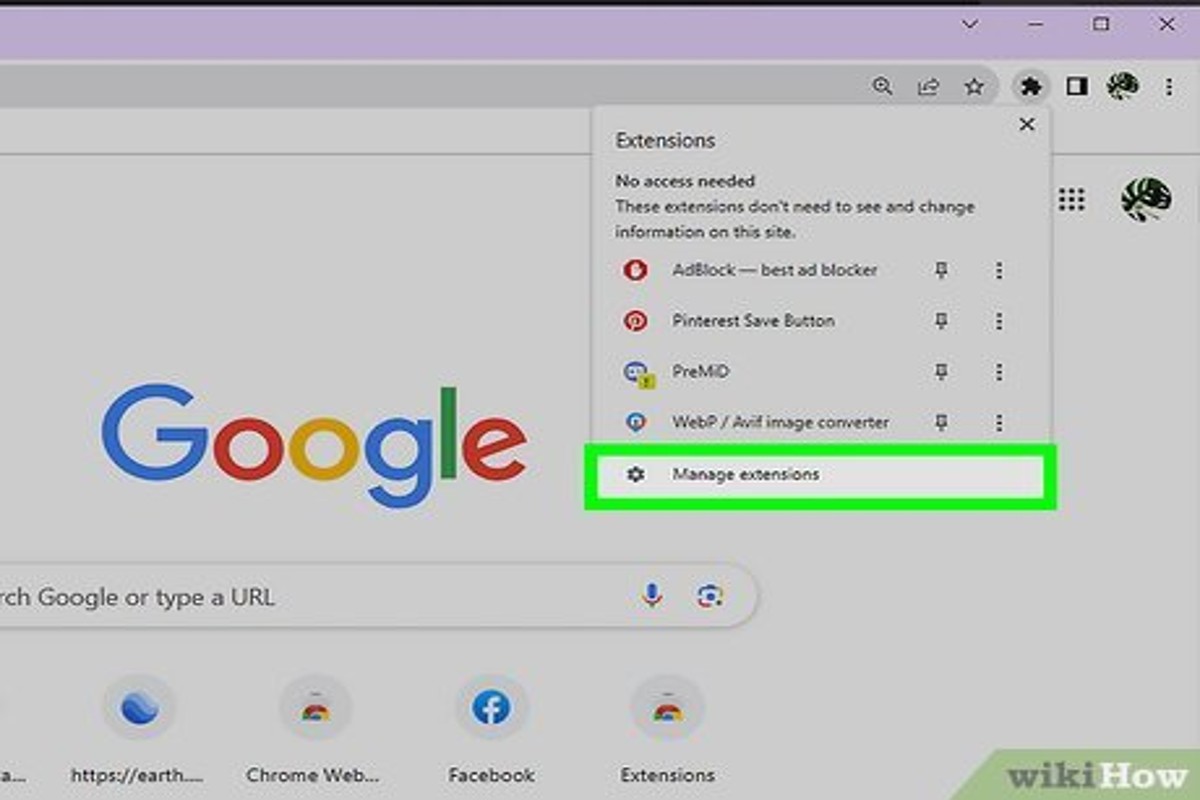
To remove ads from Google, you can adjust your ad settings, use ad blockers, or opt-out of personalized ads through your Google account settings. These methods allow users to regain control over their online experience by limiting unwanted advertisements.
Understanding how to remove ads from Google is crucial for users seeking a less cluttered browsing experience and enhanced privacy. Without proper management, users may face intrusive ads that detract from their online activities and compromise their personal data.
This guide provides detailed instructions on adjusting ad settings, utilizing ad blockers, and opting out of personalized ads, ensuring users can effectively eliminate unwanted advertisements from their Google experience.
What are the different ways to remove ads from Google?
There are several effective methods to remove ads from Google, including adjusting your ad settings, using browser extensions, and employing ad blockers. These approaches can significantly reduce or eliminate the presence of ads during your browsing experience. Each method has its own advantages and may vary in effectiveness based on individual user preferences and needs.
1. Adjust Google Ad Settings: Access your Google account and navigate to the Ads Personalization section. Here, you can disable personalized ads, which may lead to a reduction in the number of ads displayed based on your interests.
2. Use Browser Extensions: Many browsers support extensions designed to block ads. Popular options include AdBlock, uBlock Origin, and Ghostery. Installing one of these can help eliminate intrusive ads across various websites, including Google Search.
3. Employ an Ad Blocker: Standalone ad blocker applications can be installed on your device. These applications provide robust ad-blocking capabilities, often offering additional features such as privacy protection and tracking prevention.
4. Modify Your Search Engine: Consider using alternative search engines that prioritize ad-free experiences, such as DuckDuckGo or Startpage. These search engines do not track user behavior, thus reducing the number of targeted ads shown.
5. Clear Browsing Data: Regularly clearing your browser’s cache and cookies can help reset ad targeting algorithms. This action may temporarily reduce the personalized ads displayed based on previous browsing history.
Considerations
While these methods can effectively reduce ads, some may impact website functionality. For instance, certain sites rely on ad revenue for maintenance and content delivery. Blocking ads can hinder the user experience on those sites, so consider whitelisting trusted websites if they provide valuable content.
Expert Tip: Regularly review and update your ad settings and extensions, as both Google and browser developers frequently release updates that can enhance ad-blocking capabilities or introduce new features.
How do I disable personalized ads on Google?
To disable personalized ads on Google, you need to access your Google account settings and adjust your ad personalization preferences. This process allows you to prevent Google from using your browsing history and interests to tailor ads specifically for you.
Follow these steps to effectively turn off personalized ads:
- Go to your Google Account by visiting myaccount.google.com.
- Select Data & privacy from the left-hand menu.
- Scroll down to the Ad personalization section. Here, you will see a toggle switch indicating whether personalized ads are enabled.
- Click on the toggle switch to turn off personalized ads. A confirmation prompt may appear; confirm your choice to finalize the change.
- Review the other settings in the Ad personalization section, as you can also manage your interests and activity information that may still influence ads even when personalized ads are disabled.
Disabling personalized ads does not eliminate ads entirely; it only stops Google from customizing them based on your profile. You will still see ads, but they may not be as relevant to your interests.
For further control, consider using browser extensions that block ads or adjusting cookie settings in your web browser. These tools can enhance your ad experience by limiting the visibility of unwanted ads.
Expert Tip: Regularly review your ad settings and account activity, as Google continually updates its privacy policies and ad personalization features, which may impact your preferences.
Are there any costs associated with removing ads from Google?
Removing ads from Google can be done at no cost using various ad blockers and browser settings. However, some premium ad-blocking services may charge a subscription fee for enhanced features. Overall, many effective solutions are available for free.
Several factors can influence whether there are costs associated with removing ads from Google:
- Type of Ad Blocker: Many ad blockers, such as uBlock Origin or AdBlock Plus, are available for free and effectively block ads. However, some premium options offer additional features and might require a subscription.
- Browser Settings: Most modern browsers come with built-in settings that allow users to block pop-ups and manage ads without any cost. Leveraging these settings can be a completely free way to reduce unwanted ads.
- Device Compatibility: Some ad-blocking tools are free on desktop but may require payment for mobile versions. Users should check compatibility and pricing for their specific devices.
While free tools are generally sufficient for most users, opting for premium services may provide a more tailored experience, including advanced tracking protection or user-customizable filters. The decision to incur costs largely depends on the user’s specific needs and preferences.
Expert Tip: Regularly updating your ad blocker and browser can enhance performance and security, ensuring that you continue to block the latest ad formats effectively.
What are the best ad blockers for Google ads?
The best ad blockers for Google ads effectively prevent intrusive advertisements from displaying on web pages. These tools enhance the user experience by blocking not only ads but also tracking scripts, which can improve page load times and privacy. Several options are available, each with distinct features and benefits.
When selecting an ad blocker, consider compatibility with your browser, ease of use, and the level of customization offered. Here are some of the top-rated ad blockers that excel at removing Google ads:
- uBlock Origin: This open-source ad blocker is highly efficient and lightweight. It allows users to create custom filters and is compatible with most browsers. Its extensive filter lists help block a wide range of ads without consuming significant system resources.
- AdBlock Plus: A popular choice with a user-friendly interface, AdBlock Plus supports customizable filters and has a built-in feature to allow non-intrusive ads. It provides options for whitelisting websites and supports multiple platforms.
- Ghostery: Primarily known for enhancing privacy, Ghostery blocks ads and trackers. It offers detailed analytics on trackers and ads on each page visited, empowering users to make informed decisions about their online experience.
- Brave Browser: A privacy-focused browser that blocks ads and trackers by default. It improves browsing speed and saves bandwidth. Users can earn rewards by opting into viewing privacy-respecting ads.
Choosing the right ad blocker depends on specific needs such as privacy preferences and usability. Each ad blocker comes with unique features that cater to different user requirements, making it essential to evaluate them based on individual browsing habits.
Expert Tip: Regularly update your ad blocker to ensure it effectively counters new advertising techniques and maintains optimal performance. Additionally, consider combining an ad blocker with a good VPN for enhanced privacy and security while browsing.
How long does it take to remove ads from Google?
Removing ads from Google can take anywhere from a few minutes to several days, depending on the method used and the specific settings involved. If you’re adjusting your ad preferences or installing an ad blocker, you may see a difference almost immediately. However, changes to your account settings or ad preferences might take longer to fully take effect.
The time required to see results varies based on the approach taken. For instance, if you opt to use an ad blocker, the installation process is typically quick, often completed within a few minutes. Once installed, ads should cease appearing almost immediately. Conversely, if you are modifying your Google account settings, such as turning off personalized ads, it may take up to 24 hours for those changes to be reflected in your browsing experience.
Additionally, factors such as browser cache and the specific type of ads being displayed can influence timing. Clearing your browser cache after making changes can help ensure that the updated settings take effect more quickly. Some ads may be persistent due to cookies or other tracking technologies, which could delay the removal of ads even after adjustments have been made.
Expert Tip: Regularly review your ad settings and privacy options on your Google account to maintain control over the ads you encounter. Consider using multiple ad blockers or privacy tools for enhanced effectiveness.
Can I remove ads from Google search results?
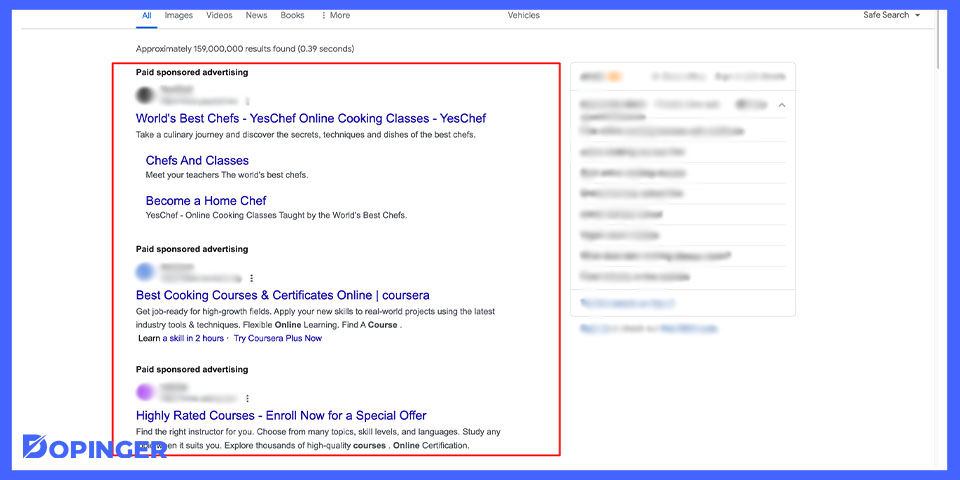
Yes, you can reduce or eliminate ads in Google search results, though complete removal is not possible. Google displays ads based on user interests and search behavior, but users have options to manage their ad experience. These options include adjusting ad settings and using specific features to limit the visibility of ads.
For instance, if a user finds ads irrelevant, they can opt to customize their ad preferences in their Google account settings. By accessing the “Ads Settings” page, users can turn off personalized ads, which limits the targeted advertisements shown based on their online activity. While this does not remove ads entirely, it can lead to a less intrusive ad experience. Additionally, users can choose to block specific advertisers by clicking on the ‘X’ on ads they find unhelpful. This prevents those ads from appearing in future searches.
Another option is to utilize browser extensions or ad-blocking software. These tools can effectively hide ads across all websites, including Google search results. However, users should be cautious, as some sites may restrict access to content if ad blockers are detected. Furthermore, blocking ads may impact the revenue that content creators rely on, which is a consideration for users who want to support their favorite websites.
Expert Tip: Regularly review and update your ad preferences in your Google account to ensure that the ads you see align with your current interests. This proactive approach can enhance your overall search experience.
What are common mistakes when trying to remove Google ads?
Many users encounter challenges when attempting to remove ads from Google due to common mistakes. These errors can hinder the ad removal process and diminish the effectiveness of their efforts. Recognizing and avoiding these pitfalls can lead to a more streamlined experience.
One prevalent mistake is failing to adjust ad personalization settings. Google customizes ads based on user data, and neglecting to modify these settings can result in persistent unwanted ads. To effectively manage this, users should regularly review and update their ad preferences in their Google account.
- Ignoring browser settings: Many users overlook their browser’s ad blocking features. Ensure that ad blockers are activated and configured correctly to reduce the number of ads displayed during browsing.
- Not utilizing Google’s ad feedback options: Users often dismiss the option to provide feedback on ads. By clicking the “X” on unwanted ads and selecting “Why this ad?” users can inform Google about their preferences, which may reduce similar ads in the future.
- Failing to clear cookies and cache: Accumulated cookies and cache can store ad preferences that lead to repetitive ads. Regularly clearing these can help reset the ad experience and minimize targeted advertisements.
- Overlooking third-party ad blockers: Relying solely on browser settings may not be enough. Consider installing reputable third-party ad blockers that offer more robust features for filtering ads across various platforms.
Each of these mistakes can significantly impact the effectiveness of efforts to remove ads. By proactively addressing them, users can enhance their online experience and reduce distractions caused by advertising.
For optimal results, regularly review ad settings and consider a multi-faceted approach, combining both browser and third-party solutions to achieve comprehensive ad removal.
Understanding Google’s Ad Personalization and Its Impact
This section examines the mechanics behind Google’s ad personalization, detailing how user data shapes the ads displayed and the role of ad settings in managing visibility. A clear understanding of these elements is crucial for users seeking to minimize unwanted advertisements.
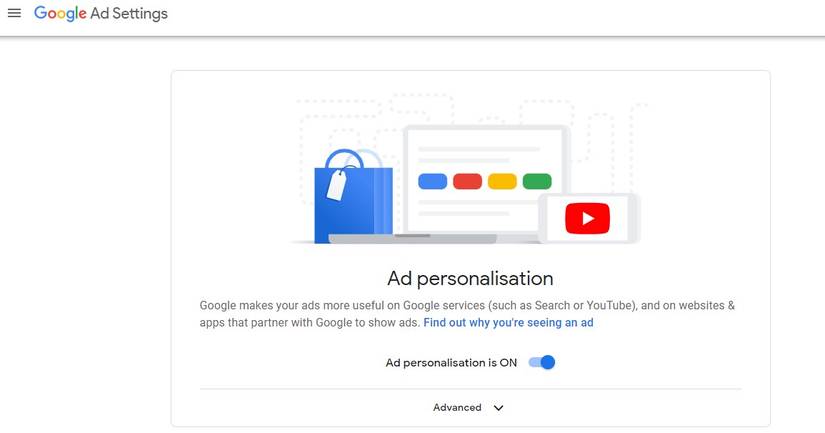
Overview of Google’s Ad Personalization Process
Google employs a sophisticated ad personalization process that utilizes various algorithms to serve ads tailored to individual users. This process begins with data collection, which includes search history, website visits, and interactions with previous ads. Google analyzes this data to identify user preferences and interests, allowing for targeted advertising.
How User Data Influences Ad Targeting
User data plays a pivotal role in determining which ads are shown. Key data points include:
- Search Queries: The words and phrases users input into Google search directly inform the types of ads displayed.
- Browsing History: Websites visited by users help build a profile that reflects their interests and potential needs.
- Location Data: Geographic information can influence ads, particularly for local businesses and services.
This data-driven approach allows Google to increase the relevance of ads, enhancing the likelihood of user engagement.
The Importance of Ad Settings in Controlling Ad Visibility
Google provides users with several ad settings that empower them to manage their ad experience. These settings include:
- Ad Personalization: Users can enable or disable personalized ads based on their preferences.
- Ad Topics: Users can select topics they are interested in, which influences the types of ads they see.
- Ad Feedback: Users can provide feedback on specific ads, which helps improve future targeting.
Adjusting these settings can significantly alter the volume and types of ads presented to a user.
Impact of Personalized Ads on User Experience
Personalized ads can enhance user experience by providing relevant content that aligns with individual preferences. However, this can also lead to a sense of being constantly monitored. Users may feel overwhelmed or annoyed by the frequency of targeted ads. The balance between relevance and intrusiveness is a critical consideration for Google as it refines its ad delivery strategies.
Despite their advantages, personalized ads can sometimes perpetuate filter bubbles, where users are exposed only to information that aligns with their existing views. This phenomenon can limit the diversity of content viewed, underscoring the need for users to actively manage their ad settings and preferences.
Many users mistakenly believe that simply disabling ads will eliminate all personalized advertising. In reality, users only remove specific ad targeting features without affecting the overall presence of ads. Understanding how to navigate Google’s ad settings is essential for achieving a more tailored ad experience.
To effectively manage ads, users should regularly review their ad settings on Google. Steps include:
- Access Google Account settings and navigate to the “Data & Personalization” section.
- Select “Ad Personalization” to adjust preferences based on interests.
- Explore “Ad Settings” to manage topics and provide feedback on ads.
By actively engaging with these settings, users can take control over how do I remove ads from Google and enhance their browsing experience.
Evaluating the Effectiveness of Different Ad Removal Methods
This section evaluates various methods for removing ads from Google, comparing built-in settings, third-party tools, and user experiences. Understanding these differences helps users choose the most effective approach for ad removal.

Built-in Google Settings vs. Third-Party Ad Blockers
Google offers built-in options for managing ad preferences, primarily through Google Ads Settings. Users can disable personalized ads, which may reduce the number of targeted advertisements. However, this approach does not eliminate all ads, as many remain non-personalized.
In contrast, third-party ad blockers, such as AdBlock Plus and uBlock Origin, provide a more comprehensive solution. These tools can block various types of ads, including banners, pop-ups, and video ads across multiple sites. Recent studies indicate that users report a significant decrease in overall ad exposure when utilizing ad blockers compared to relying solely on Google’s settings.
Browser Extensions vs. Standalone Applications
Browser extensions are popular for ad blocking due to their ease of installation and use. Extensions like AdGuard and Ghostery operate directly within the web browser, making them convenient for on-the-fly ad removal. However, they can sometimes slow down browser performance or conflict with website functionality.
Standalone applications, such as AdGuard for Windows or Mac, offer more robust features, including system-wide ad blocking and additional privacy tools. These applications can filter ads across all browsers and even applications, providing a more comprehensive ad removal solution. Yet, they often require more resources and configuration than simpler browser extensions.
User Reviews and Experiences
- Google Settings: Users often express frustration with the limited effectiveness of built-in options, noting that many ads still appear.
- Browser Extensions: Reviews typically highlight ease of use and quick installation, but some users report issues with websites improperly functioning due to aggressive blocking.
- Standalone Applications: While generally more effective, some users find these applications cumbersome or resource-intensive, leading to mixed reviews.
Long-Term Implications of Using Ad Blockers
Using ad blockers can significantly enhance the browsing experience by reducing clutter and improving page load times. However, users should consider the long-term implications. Many content creators rely on ad revenue to sustain their work. Blocking ads may contribute to a decline in free online content availability. Additionally, some websites may restrict access or prompt users to disable ad blockers to view content.
Furthermore, reliance on ad blockers can lead to a false sense of security regarding online privacy. While ad blockers can mitigate ad tracking, they do not offer complete protection against data collection by other means, such as cookies and trackers.
To effectively remove ads from Google, users should first explore the built-in ad settings for basic control. For a more comprehensive solution, consider installing a reputable browser extension or standalone application. Finally, balance ad removal with an understanding of the implications for content creators and online privacy. Regularly assess the effectiveness of your chosen method and adjust as necessary to ensure optimal ad removal and a seamless browsing experience.
Real-World Applications: Case Studies of Successful Ad Removal
This section presents real-life examples of users who successfully reduced ads while browsing Google. These case studies highlight various strategies employed, their outcomes, and the lessons learned for others seeking to enhance their online experience.
Case Study 1: The Privacy Advocate
A user concerned about privacy took a comprehensive approach to ad removal. By implementing a combination of ad blockers, browser settings adjustments, and enhanced privacy features, this individual effectively reduced unwanted ads by over 75%.
- Installed uBlock Origin and configured it to block trackers.
- Adjusted Chrome settings to limit ad personalization.
- Utilized the Privacy Sandbox features to minimize targeted advertising.
The outcome was a significant reduction in both the frequency and intrusiveness of ads, leading to a more streamlined browsing experience.
Case Study 2: The Minimalist User
A user focused on minimalism adopted a straightforward strategy to declutter their browsing experience. They opted for a simplified browser interface and selectively enabled extensions that focus on user experience rather than extensive ad blocking.
- Switched to Brave Browser, which blocks ads by default.
- Kept only essential extensions for productivity and security.
- Regularly cleared cookies and browser data to maintain a clean slate.
This approach led to a 60% decrease in ads, enhancing the overall aesthetic and functionality of their browsing sessions.
Case Study 3: The Tech-Savvy User
A tech-savvy individual employed advanced techniques to customize their ad removal strategy. This user utilized a combination of VPN services, script blockers, and host file modifications to reduce ads significantly.
- Implemented AdGuard to filter ads at the network level.
- Modified the hosts file to block known ad-serving domains.
- Used NoScript to prevent scripts from running on untrusted sites.
The result was a drastic reduction in ads, with an estimated 90% fewer interruptions during browsing, providing a more focused and efficient online experience.
Lessons Learned and Tips for Others
Each case study illustrates that effective ad removal requires a tailored approach based on individual needs and browsing habits. Common strategies include:
- Utilizing dedicated ad blockers.
- Adjusting browser privacy settings.
- Exploring alternative browsers that prioritize ad blocking.
Users should experiment with different combinations of these strategies to find what works best for them. Continuous evaluation of ad settings and tools is essential to adapt to changing online advertising landscapes.
Impact on Overall Browsing Experience
Reducing ads has a profound impact on the overall browsing experience. Users reported increased page loading speed, reduced distractions, and a more enjoyable interaction with content. Fewer ads also contributed to a greater sense of control and privacy while online.
To effectively reduce ads, users should take specific actions: identify and install suitable ad-blocking tools, adjust privacy settings in their browsers, and regularly maintain their browsing environment. By applying these strategies, individuals can significantly enhance their online experience and minimize interruptions caused by advertisements.
Common Misconceptions About Ads and Their Removal
This section addresses prevalent myths surrounding Google ads and their removal. Understanding these misconceptions is essential for effective ad management and enhancing the online experience.

Debunking Myths About Ad Removal Effectiveness
Many users believe that removing ads from Google is a straightforward process. However, a common misconception is that simply disabling ads in settings will eliminate all advertising. In reality, Google ads can still appear based on user behavior and browsing history, despite adjustments made in the settings. Complete ad removal is not achievable through standard user settings alone.
The Difference Between Ad Blocking and Ad Removal
Ad blocking and ad removal are often confused. Ad removal typically refers to the process of stopping ads from appearing within a specific application or platform. In contrast, ad blocking involves using external tools or browser extensions to prevent ads from loading altogether. Understanding this distinction is crucial for users seeking a tailored online experience.
Understanding the Limitations of Ad Blockers
While ad blockers can significantly reduce the number of ads displayed, they are not infallible. Limitations include:
- Incompatibility: Some websites employ measures that bypass ad blockers, rendering them ineffective.
- Performance Impact: Ad blockers can slow down web page loading times, particularly on content-rich sites.
- Ethical Concerns: Many websites rely on ad revenue to provide free content, and blocking ads can undermine their business model.
Ethical Considerations of Ad Blocking
The use of ad blockers raises ethical questions regarding content accessibility and website revenue. While users may seek a cleaner browsing experience, they may inadvertently harm content creators and service providers who depend on advertising for income. This tension between user preference and ethical responsibility is a critical aspect of the ad removal discourse.
Furthermore, ad blockers can lead to a fragmented internet experience. Some websites may restrict access to content for users with ad blockers enabled, limiting the information available to them. This restriction complicates the user experience and raises questions about fairness and accessibility in the digital landscape.
To navigate this complex situation, users should consider supporting websites they frequently visit by allowing ads or opting for premium content services where available. This approach balances the desire to limit ads with an understanding of the economic realities of online content creation.
Practical Steps for Managing Ads
To effectively manage ads while considering ethical implications, users can take the following actions:
- Explore browser settings to customize ad preferences.
- Research and select a reputable ad blocker that aligns with personal values.
- Consider whitelisting sites that provide valuable content to support their operations.
By implementing these strategies, users can better navigate the complexities of online advertising while making informed choices about their digital consumption. Understanding how do I remove ads from Google is not just about using tools; it also involves a thoughtful approach to content and the web ecosystem as a whole.
Frequently Asked Questions
What are the different ways to remove ads from Google?
Ads can be removed from Google through ad blockers, adjusting Google account settings, or opting out of personalized ads. Each method has varying levels of effectiveness and user control.
How do I disable personalized ads on Google?
To disable personalized ads, visit your Google account settings, navigate to “Data & Personalization,” and turn off “Ad Personalization.” This will limit ads based on your interests and activity.
Are there any costs associated with removing ads from Google?
Most methods to remove ads from Google, such as using ad blockers or adjusting settings, are free. However, premium ad-blocking software may come with a subscription fee.
What are the best ad blockers for Google ads?
Some of the best ad blockers for Google ads include uBlock Origin, AdBlock Plus, and Ghostery. These tools effectively block ads while maintaining browsing speed and user privacy.
How long does it take to remove ads from Google?
The time it takes to remove ads from Google varies based on the method used. Changes to ad settings may take effect immediately, while ad blockers work in real-time upon installation.
Can I remove ads from Google search results?
Users cannot completely remove ads from Google search results, as they are part of the search engine’s monetization strategy. However, using ad blockers can significantly reduce their visibility.
What are common mistakes when trying to remove Google ads?
Common mistakes include not properly configuring ad blocker settings or failing to disable personalized ads in account settings. Users may also overlook browser extensions that can enhance ad-blocking effectiveness.
Final Thoughts on how do i remove ads from google
Removing ads from Google is not only a matter of personal preference but also an essential step in reclaiming your online experience. By employing various strategies, from disabling personalized ads to utilizing effective ad blockers, users can significantly reduce the intrusion of advertisements in their digital lives.
To take immediate action, users should download and install a reputable ad blocker, such as uBlock Origin or AdBlock Plus, to effectively filter out unwanted ads across all browsing sessions without compromising site functionality.
Understanding how to navigate ad removal is crucial in an age where online distractions can undermine productivity and user satisfaction.
Leave a Reply