
Why don’t I see my Google ads when I search? This can happen due to factors like targeting settings, ad rank, or budget limitations that affect visibility.
This topic is crucial for businesses and marketers relying on Google Ads for customer acquisition. Understanding the reasons behind ad visibility can directly impact campaign effectiveness and budget allocation.
This article will detail the primary reasons for ad invisibility, including targeting settings, ad rank components, and budget constraints, providing actionable insights to enhance visibility.
Why am I not seeing my own Google Ads?
You may not see your own Google Ads due to several factors related to targeting settings and ad visibility. These include your account settings, location, and device preferences. Understanding these factors can help you identify why your ads are not appearing in your search results.
- Targeting Settings: Review your targeting settings in Google Ads. If you have set specific demographics, locations, or interests, you may be excluding yourself from seeing your ads. Ensure that your settings align with your intended audience.
- Ad Approval Status: Check the approval status of your ads. If your ads are under review or have been disapproved for policy violations, they will not appear in search results. Ensure all ads comply with Google’s advertising policies.
- Personalization and Search History: Google customizes ad visibility based on user behavior and search history. If you frequently interact with your ads or have settings that limit personalization, you might not see them. Log out of your Google account or use incognito mode to check if your ads appear.
- Ad Rank and Budget: Your ad’s position is influenced by its quality and bid amount. If your budget is low, your ad may not be displayed at all, especially in competitive markets. Review your bidding strategy and budget allocation.
It is also possible that your ads are being shown to other users instead of yourself to avoid conflicts of interest, particularly in campaigns that are highly targeted.
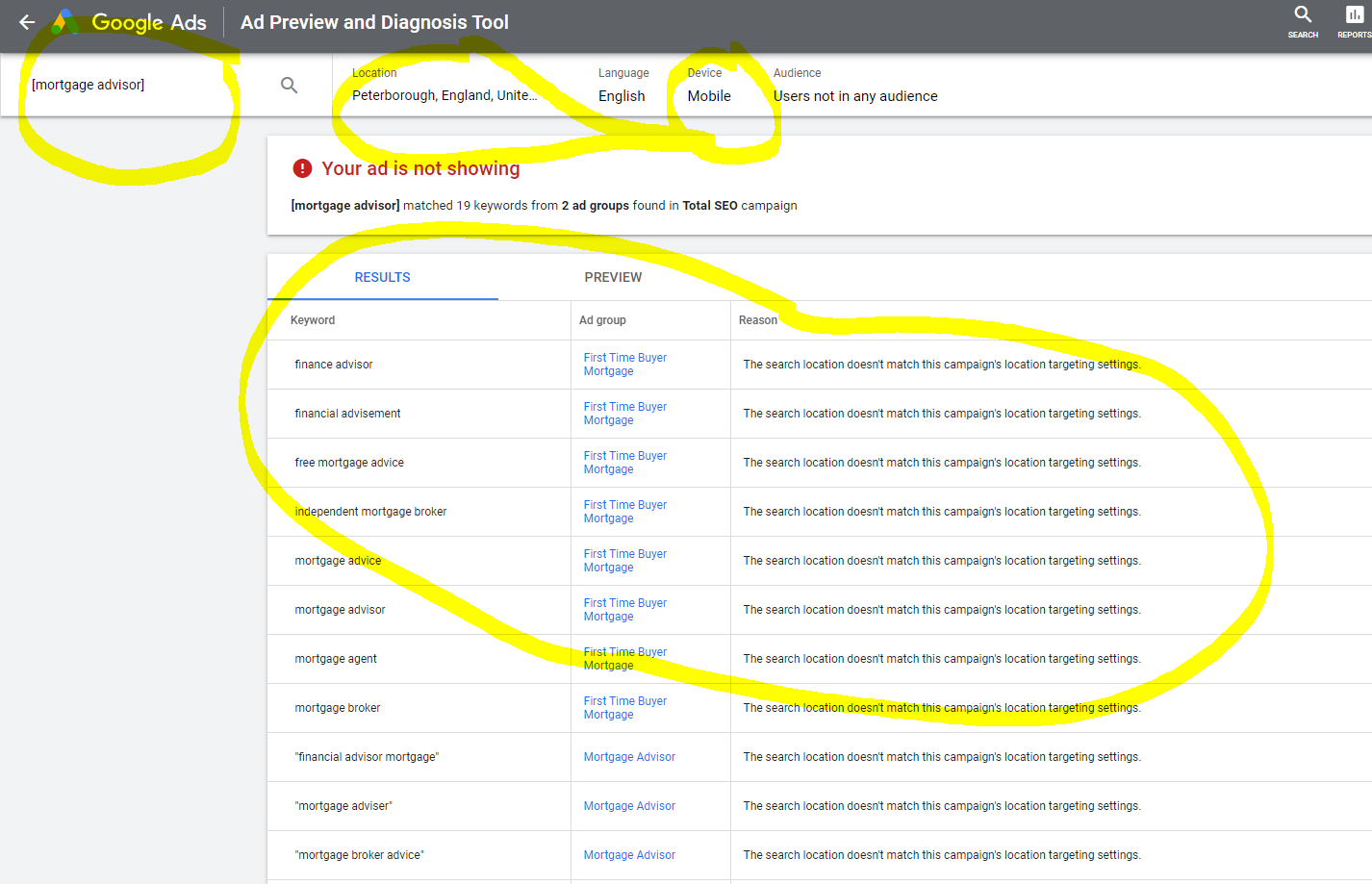
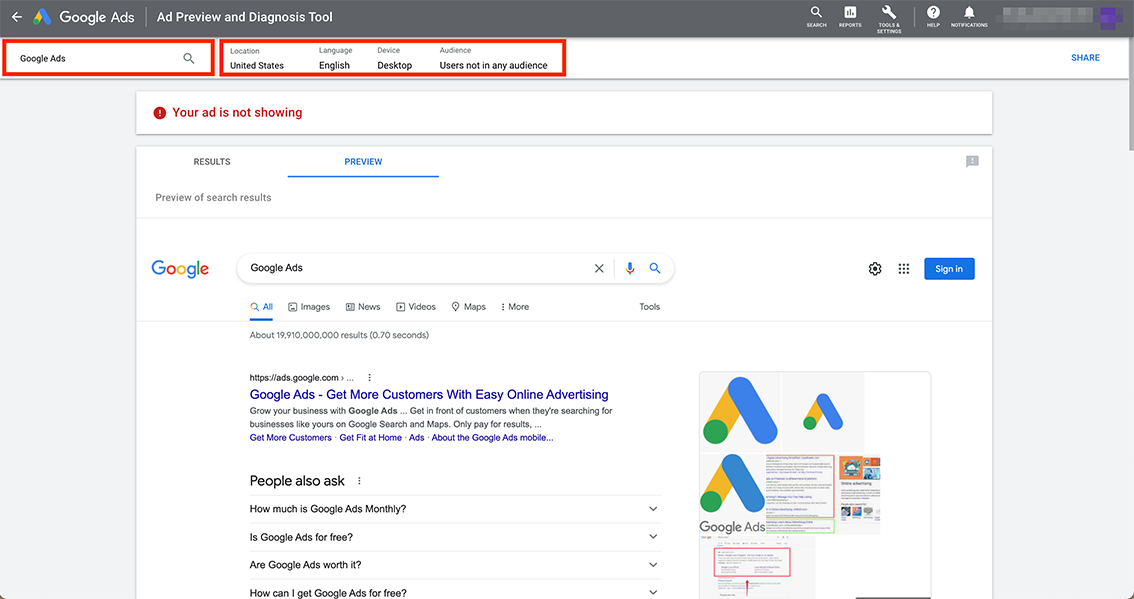
Expert Tip: Use the “Ad Preview and Diagnosis Tool” in Google Ads to see how your ads appear in real-time without affecting your ad performance. This tool allows you to verify visibility across different locations and devices without triggering impressions or clicks.
What factors influence Google Ads visibility?
The visibility of Google Ads is primarily influenced by targeting, ad rank, and budget. Each of these factors plays a critical role in determining whether ads are displayed when a user conducts a search. A combination of these elements ultimately affects the likelihood of an ad appearing on the search results page.
Targeting refers to the criteria set by advertisers to reach specific audiences. This includes demographic details, geographic locations, and user interests. If a user’s search query does not align with the targeting parameters of an ad, the ad will not be shown. Additionally, keywords chosen by advertisers must match the terms users are searching for; otherwise, the ad will not be relevant to the search.
Ad rank is determined by the bid amount, quality score, and expected impact of extensions and other ad formats. A higher ad rank increases the chances of visibility. Advertisers with lower ad ranks may find their ads not appearing at all, especially in competitive markets. The quality score is influenced by factors such as click-through rates and landing page experience, which means that optimizing ads can lead to better visibility.
Budget is another essential factor. Each campaign has a daily budget that limits the total amount spent on ads. If the budget is exhausted, ads will stop displaying until the budget resets. Advertisers must also consider their bidding strategy; if bids are set too low in a competitive environment, it can lead to limited visibility for their ads.
Expert Tip: Regularly reviewing and adjusting targeting criteria, improving ad quality, and strategically managing budget and bids can significantly enhance ad visibility. Utilizing A/B testing on ad copy and targeting settings can provide insights into what resonates best with the intended audience, leading to improved performance.
How can I check if my Google Ads are running?
To check if your Google Ads are running, access the Google Ads dashboard and review the status of your campaigns. This platform provides valuable insights about your ads’ visibility, performance metrics, and any potential issues affecting their display.
Follow these steps to verify the status of your ads:
- Log in to your Google Ads account. Navigate to the campaign overview page to see all your active campaigns listed.
- Check the status column for each campaign. Look for indicators such as “Enabled,” “Paused,” or “Removed” to understand the current operational state of your ads.
- Review the performance metrics. Click on a specific campaign to view detailed reports, including impressions, clicks, and cost, which can help identify if your ads are effectively reaching your target audience.
- Utilize the “Ad Preview and Diagnosis” tool. This feature allows you to see how your ads appear for specific search queries without affecting your ad metrics.
- Examine any notifications or alerts. Google Ads may provide alerts regarding policy violations or budget issues that could prevent your ads from running.
Regularly checking the Google Ads dashboard not only helps to confirm whether your ads are running but also aids in optimizing future campaigns. Monitoring performance metrics can reveal trends and inform adjustments needed for better visibility.
Expert Tip: Set up automated reports to receive regular updates on your ad performance, ensuring you can quickly address any issues that may arise.
Do Google Ads show for all search queries?
No, Google Ads do not show for all search queries. The visibility of ads depends on various factors such as search intent, competition, and ad targeting settings. As a result, some queries may not trigger ads even if they are relevant to the advertiser’s offerings.
Search queries can be categorized into different types based on user intent, including informational, navigational, and transactional. Ads are more likely to appear for transactional queries, where users are looking to make a purchase or take action. In contrast, informational queries, which seek knowledge rather than products, often do not yield ads. Additionally, the competition among advertisers for specific keywords plays a significant role. Highly competitive keywords may have multiple ads displayed, while niche queries with fewer advertisers may not show any ads.
Furthermore, ad targeting settings influence visibility. Advertisers can set parameters like location, language, and device type, which can limit when and where their ads are shown. For example, an ad targeting a specific geographic area will not display for queries made outside that region. Understanding these nuances helps clarify why ads may not be visible for certain searches.
- Informational Queries: Typically do not show ads, as users seek knowledge.
- Transactional Queries: More likely to display ads, targeting users ready to purchase.
- Competition Level: High competition increases ad visibility; low competition may result in no ads shown.
Expert Tip: Regularly review keyword performance and adjust targeting settings to optimize ad visibility. Utilizing tools like Google Ads Keyword Planner can help identify opportunities where ads can be more effectively displayed.
What is ad rank in Google Ads?
Ad rank is a value that determines the position of an ad on Google’s search results page. It is calculated based on multiple factors, including bid amount, ad quality, and the expected impact of extensions and other ad formats.
Ad rank plays a critical role in ad visibility. When a user conducts a search, Google uses ad rank to decide which ads to display and in what order. Higher ad ranks lead to better ad positions, increasing the likelihood of user engagement and clicks. The formula for ad rank is not solely based on the maximum bid; it also incorporates the performance history of the ad and the relevancy of the keywords.
- Bid Amount: The maximum amount an advertiser is willing to pay for a click.
- Ad Quality: Evaluated through the Quality Score, which considers the relevance of the ad copy, landing page quality, and expected click-through rate.
- Ad Extensions: Additional information that can enhance the ad’s visibility, such as site links or call buttons, which can positively influence ad rank.
Changes in any of these components can affect ad rank, meaning advertisers must continuously optimize their campaigns to maintain or improve their visibility. Additionally, competition plays a significant role; as more advertisers enter a market, the necessary ad rank for a favorable position rises, potentially impacting your ads’ visibility.
Expert Tip: Regularly reviewing and optimizing your Quality Score can significantly enhance your ad rank without increasing your bid, leading to a more cost-effective advertising strategy. Focus on aligning your ad content closely with user search intent to improve both ad quality and relevance.
How can I improve my Google Ads visibility?
Improving Google Ads visibility involves optimizing keywords, enhancing ad quality, and adjusting your budget. Implementing these strategies can significantly increase the likelihood of your ads appearing in search results.
First, focus on keyword optimization. Conduct thorough keyword research to identify relevant terms that potential customers are using. Utilize tools like Google Ads Keyword Planner to find high-traffic keywords with manageable competition. Incorporate these keywords into your ad copy and landing pages to align your content with user searches, enhancing the relevance of your ads.
Next, prioritize ad quality improvements. Google uses a metric called Quality Score to measure the relevance and quality of your ads. Higher Quality Scores can lead to better ad placements and lower costs. To improve your score, ensure your ads are compelling, clearly communicate value, and include strong calls-to-action. Additionally, optimize your landing pages for a seamless user experience, as this also impacts your Quality Score.
- Adjust your budget to ensure your campaigns remain competitive. If your daily budget is too low, your ads may not show as frequently as desired. Monitor your spending and adjust based on performance metrics to maximize visibility.
- Utilize ad extensions to provide additional information and improve click-through rates. Extensions can include site links, callouts, and structured snippets, which enhance your ad’s visibility and appeal.
- Test different ad formats to determine what resonates best with your audience. Experiment with responsive search ads, display ads, or video ads to find the most effective approach for your target market.
Expert Tip: Regularly analyze your ad performance data to identify trends and areas for improvement. A/B testing different elements of your ads, such as headlines or call-to-action phrases, can yield valuable insights and lead to higher engagement rates.
Why might my Google Ads budget affect visibility?
A limited Google Ads budget can significantly restrict ad visibility during searches. If the budget is insufficient to compete for ad placements, ads may not show up at all, or they will appear less frequently. This can result in missed opportunities to connect with potential customers.
Several factors influence the cost of Google Ads, impacting budget allocation and, subsequently, visibility. These factors include:
- Bid Amount: The maximum amount an advertiser is willing to pay per click affects ad placement. Higher bids generally lead to better visibility.
- Quality Score: This metric, determined by ad relevance, expected click-through rate, and landing page experience, influences how much an advertiser pays for clicks. A higher Quality Score can reduce costs and improve visibility.
- Competition: The number of advertisers targeting the same keywords can drive up costs. In highly competitive markets, a larger budget may be necessary to maintain visibility.
To effectively manage an advertising budget, advertisers should regularly review performance metrics and adjust bids accordingly. Implementing strategies such as focusing on long-tail keywords or improving ad quality can help optimize spending. Additionally, setting daily or monthly budget limits allows for better control over overall expenses while still achieving visibility goals.
Expert Tip: Utilize Google Ads’ budget tools to forecast potential visibility based on various budget scenarios. This can help in making informed decisions about where to allocate funds for maximum impact.
What should I do if my Google Ads are not showing?
If your Google Ads are not appearing when you search, there are several troubleshooting steps to take. These steps can help identify the issue and improve ad visibility. Follow the actions outlined below to resolve the problem effectively.
- Check Your Keyword Targeting: Review the keywords you are targeting in your ad campaigns. Ensure they are relevant to your ads and search queries. If your keywords are too broad or too specific, it may affect ad visibility.
- Examine Your Ad Status: Log into your Google Ads account and verify that your ads are approved and active. If your ads are disapproved due to policy violations, rectify the issues and resubmit them for approval.
- Review Your Bidding Strategy: Analyze your bidding strategy and ensure you are offering competitive bids for your keywords. Low bids may prevent your ads from being displayed, especially in competitive markets.
- Inspect Audience Targeting: Check if you have set specific audience targeting options that may limit who sees your ads. Adjust these settings if necessary to widen your ad reach.
- Assess Location and Language Settings: Ensure that your ads are targeted to the correct geographical areas and languages. If your settings are too restrictive, it may lead to lower visibility.
- Utilize Ad Preview and Diagnosis Tool: Use Google Ads’ Ad Preview and Diagnosis Tool to see how your ads appear in search results without affecting your performance metrics. This tool can help identify if your ads are showing but not for your specific search.
Regularly monitoring and adjusting your Google Ads settings is essential for maintaining ad visibility. Stay informed about any changes in Google Ads policies and best practices to enhance your advertising strategy.
Expert Tip: Always conduct A/B testing on your ads to determine which variations perform best. This can provide insights into what messaging resonates with your audience and improve overall ad effectiveness.
Understanding Targeting Settings and Their Impact
This section explores how various targeting settings in Google Ads can significantly influence ad visibility. By understanding these factors, advertisers can optimize their campaigns to enhance reach and effectiveness.
Types of Targeting
Google Ads offers several targeting options that can restrict who sees your ads. The main types include:
- Location Targeting: Ads can be shown only to users in specific geographic areas. If your targeting is too narrow, potential customers may be excluded.
- Demographic Targeting: Advertisers can target audiences based on age, gender, and household income. Incorrect demographic settings may limit ad exposure to the intended audience.
- Interest Targeting: This allows advertisers to reach users based on their interests and online behavior. If interests are misaligned with your product offering, visibility may be reduced.
Impact of Negative Keywords
Negative keywords play a crucial role in controlling which searches trigger your ads. By specifying terms that should not activate your ads, you can refine your audience, but excessive use of negative keywords can inadvertently restrict visibility. For instance, if an advertiser adds “free” as a negative keyword, they may miss potential customers searching for promotional offers.
Adjusting Targeting for Better Reach
To improve ad visibility, regularly review and adjust your targeting settings. Consider broadening location areas or demographics if ads are not being seen. This can involve:
- Analyzing current performance metrics to identify gaps.
- Testing wider geographic locations to capture more users.
- Expanding demographic criteria based on recent customer data.
Testing Different Targeting Strategies
Implementing A/B testing is essential for optimizing targeting strategies. By running parallel campaigns with different settings, advertisers can determine which configurations yield the best results. Key aspects to test include:
- Different combinations of geographic locations.
- Varying demographic settings, such as age ranges.
- Adjusting interest categories based on audience engagement.
Many advertisers mistakenly believe that more targeted settings always lead to better performance. However, overly restrictive targeting can limit visibility, leading to fewer impressions and clicks. For optimal results, it is vital to strike a balance between specificity and broad reach.
Actionable steps include regularly reviewing targeting settings and performance data. Use insights from A/B testing to refine your audience approach and expand your targeting parameters when necessary. Monitor ad performance closely to ensure that your campaigns reach the desired audience effectively. Implement these adjustments to address the question of why dont I see my google ads when I search, enhancing ad visibility and engagement.
The Role of Ad Rank in Visibility
This section explores how Ad Rank determines the visibility of Google Ads during searches. Understanding Ad Rank is essential for advertisers aiming to enhance their ad performance and reach their target audience.
Factors Contributing to Ad Rank
Ad Rank is a critical metric that Google uses to determine whether an ad will appear in search results and its position on the page. Two primary factors contribute to Ad Rank:
- Bid Amount: This is the maximum amount an advertiser is willing to pay for a click on their ad. Higher bids can improve Ad Rank, but they are not the sole determinant.
- Quality Score: This score reflects the quality and relevance of the ad, keywords, and landing page. A higher Quality Score can lead to better ad positioning at a lower cost.
The Impact of Ad Relevance
Ad relevance plays a significant role in determining Quality Score and, consequently, Ad Rank. Google evaluates how well an ad matches the user’s search query. If the keywords in the ad group closely align with the search terms, the ad is deemed more relevant, boosting its Quality Score. This relevance is assessed through:
- The alignment of keywords with ad copy.
- The relevance of the landing page content to the ad and keywords.
- User engagement metrics, such as click-through rate (CTR).
Strategies to Improve Quality Score
Improving Quality Score requires a multifaceted approach. Advertisers can adopt the following strategies:
- Keyword Optimization: Regularly review and refine keyword lists to ensure they are relevant and targeted.
- Ad Copy Refinement: Create compelling ad copy that directly addresses user intent and includes relevant keywords.
- Landing Page Enhancement: Ensure that landing pages are user-friendly, relevant to the ad, and optimized for speed and mobile devices.
Real-World Examples of Successful Ad Rank Adjustments
Several companies have successfully improved their Ad Rank through strategic adjustments. For instance, a retail brand increased its Quality Score from 5 to 9 by optimizing its landing pages and refining ad copy. As a result, their ad position improved significantly, leading to a 30% increase in CTR. Another example is a local service provider that expanded its keyword strategy to include long-tail keywords, enhancing ad relevance and achieving a top position in search results.
Nuances in Ad Rank Considerations
One common misconception is that higher bids always guarantee better ad placements. While bid amounts are a factor, a low bid combined with a high Quality Score can outperform a high bid with a low Quality Score. Additionally, competition for keywords can fluctuate, impacting Ad Rank dynamically. Advertisers must continuously monitor their campaigns and adjust strategies accordingly. Moreover, factors like ad extensions can enhance visibility and improve Quality Score without increasing the bid amount.
Practical Application
To leverage this information effectively, advertisers should focus on the following actionable steps:
- Conduct regular audits of keyword relevance and expand keyword lists to improve targeting.
- Test different ad copies to identify which messages resonate best with the audience.
- Optimize landing pages for speed, mobile-friendliness, and alignment with ad content to enhance user experience.
Troubleshooting Common Google Ads Issues
This section provides a systematic approach to diagnosing and resolving issues that may prevent Google Ads from appearing during searches. Understanding these common problems is essential for optimizing ad visibility and ensuring effective campaign management.
Identifying Common Issues
Multiple factors can lead to the absence of Google Ads when conducting a search. The most prevalent issues include:
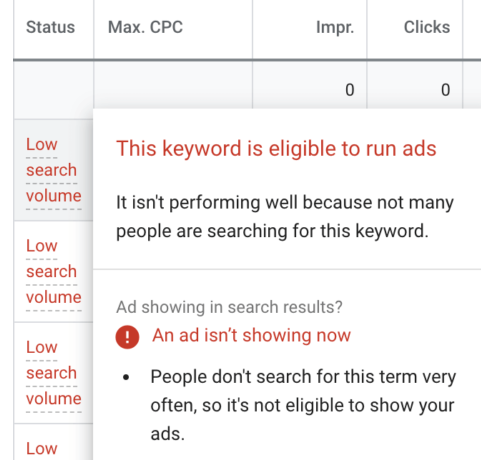
- Budget Constraints: If the daily budget is reached or set too low, ads may not display. Regularly review budget settings and adjust according to campaign performance.
- Targeting Settings: Narrow targeting criteria, such as specific geographic locations or demographics, may limit ad visibility. Ensure that your targeting aligns with your intended audience.
- Policy Violations: Google has strict advertising policies. Any violation can lead to ad disapproval. Regularly check your account for notifications regarding policy issues.
Using Google Ads Support Tools for Troubleshooting
Google provides several tools that can assist in diagnosing ad visibility issues. Key resources include:
- Ad Preview and Diagnosis Tool: This tool allows you to see how ads appear in searches without affecting ad performance.
- Campaign Diagnostics: This feature provides insights into campaign settings, identifying issues with budgets, targeting, or ad approvals.
- Google Ads Help Center: The Help Center offers comprehensive articles and guides for resolving specific issues related to ad visibility.
Case Studies of Resolved Issues
Real-world examples can provide context for common problems. For instance, a local business faced a lack of ad visibility due to overly restrictive geographic targeting. After broadening their targeting parameters, they observed a 50% increase in ad impressions within a week. Another example involved a company whose ads were disapproved due to a minor policy violation. After adjusting the ad copy to comply with guidelines, they regained visibility and improved click-through rates.
Best Practices for Ongoing Monitoring
Implementing routine checks can prevent future visibility issues. Key practices include:
- Regularly review budget allocations to ensure they meet campaign needs.
- Monitor ad performance metrics to identify trends and adjust strategies accordingly.
- Stay informed about Google Ads policy changes to maintain compliance.
Understanding the various factors that contribute to why dont I see my google ads when I search is crucial for effective advertising. Continuous monitoring and proactive adjustments can significantly enhance ad visibility and campaign success.
Nuance / Expert Layer
Many advertisers mistakenly believe that high bid amounts guarantee ad visibility. However, ad rank is determined by a combination of bid, ad quality, and expected impact of extensions and other ad formats. This means that even with a high bid, ads may not appear if quality scores are low. Advertisers should focus on improving ad relevance and user experience to enhance visibility.
Practical Application
To enhance ad visibility, conduct a thorough review of your current campaign settings. Adjust your budget based on performance data, broaden targeting criteria if necessary, and ensure compliance with Google’s advertising policies. Utilize support tools to diagnose issues promptly and implement best practices for ongoing monitoring to maintain optimal ad performance.
Optimizing Your Google Ads for Better Performance
Effective optimization of Google Ads significantly increases ad visibility and overall campaign success. This section delves into advanced techniques that can enhance the performance of your ads and ensure they reach the intended audience.

A/B Testing for Ad Copy and Landing Pages
A/B testing is a vital method for refining ad copy and landing pages. By creating multiple versions of ads or landing pages, advertisers can determine which elements resonate best with their audience. Key components to test include:
- Headlines
- Call-to-action phrases
- Visual elements
Implementing A/B tests allows for data-driven decisions, enabling advertisers to optimize their campaigns based on real performance metrics, ultimately addressing the question of why dont I see my google ads when I search.
Leveraging Remarketing Strategies
Remarketing is an effective strategy to re-engage users who have previously interacted with your website. By targeting these individuals with tailored ads, advertisers can increase conversion rates significantly. Consider these remarketing techniques:
- Segmenting audiences based on previous interactions
- Customizing ad content to reflect user behavior
- Using dynamic remarketing for personalized product ads
This approach not only boosts visibility but also builds brand recall, making it more likely that users will return and convert.
The Importance of Ad Extensions
Ad extensions enhance the visibility and effectiveness of Google Ads by providing additional information to potential customers. Types of ad extensions include:
- Sitelink Extensions: Direct users to specific pages on your site
- Call Extensions: Allow users to contact your business directly
- Location Extensions: Help users find your business location easily
Utilizing these extensions can improve click-through rates (CTR) and overall ad performance, ensuring that your ads stand out in search results.
Continuous Learning and Adaptation Based on Analytics
Regular analysis of ad performance data is essential for ongoing optimization. Use Google Ads and Google Analytics to track key performance indicators (KPIs) such as CTR, conversion rates, and bounce rates. This continuous feedback loop allows for timely adjustments to improve campaign effectiveness.
Common misconceptions include the belief that once a campaign is set up, it requires little to no further adjustment. In reality, market trends and user behaviors change, necessitating regular updates and refinements to ad strategies.
Practical Application
To optimize your Google Ads effectively, follow these actionable steps:
- Conduct A/B tests on ad copy and landing pages bi-weekly.
- Implement remarketing campaigns within two weeks of initial user engagement.
- Utilize all relevant ad extensions to enhance visibility.
- Review analytics weekly to identify areas for improvement.
By systematically applying these strategies, advertisers can enhance ad visibility and address issues related to why dont I see my google ads when I search.
Frequently Asked Questions
Why am I not seeing my own Google Ads?
You may not see your own Google Ads due to targeting settings, such as location or device restrictions. Additionally, Google may suppress your ads if they do not meet specific quality or relevance criteria.
What factors influence Google Ads visibility?
Google Ads visibility is influenced by bid amount, ad quality, relevance, and competition from other advertisers. Factors like keyword selection and targeting options also play a crucial role.
How can I check if my Google Ads are running?
You can check the status of your Google Ads by logging into your Google Ads account and reviewing the campaign dashboard. The dashboard provides real-time data on ad performance and visibility.
Do Google Ads show for all search queries?
No, Google Ads do not appear for all search queries. Ads are shown based on keyword relevance, bid strategy, and the advertiser’s targeting settings.
What is ad rank in Google Ads?
Ad rank is a value that determines the position of your ad in search results. It is calculated based on your bid amount, ad quality, and the expected impact of ad extensions and other formats.
How can I improve my Google Ads visibility?
Improving Google Ads visibility can be achieved by optimizing ad quality, increasing bids, and refining targeting options. Regularly testing ad copy and utilizing relevant keywords can also enhance performance.
Why might my Google Ads budget affect visibility?
Your Google Ads budget directly affects visibility since a lower budget may restrict the number of impressions your ads receive. If the budget runs out, ads will stop showing until the budget is replenished.
What should I do if my Google Ads are not showing?
If your Google Ads are not showing, first check your campaign settings for any restrictions. Additionally, review your budget, bids, and ad quality to identify potential issues that may be impacting visibility.
Final Thoughts on why dont i see my google ads when i search
The absence of Google Ads during searches can stem from various factors, including targeting settings, ad rank, and specific search queries. Understanding these elements is crucial for optimizing ad visibility and ensuring effective campaigns.
To enhance ad visibility, review your targeting settings and adjust them based on your desired audience. Additionally, utilize Google Ads tools to monitor performance metrics and identify potential issues.
Recognizing the dynamics of ad visibility is essential for leveraging digital marketing effectively and maximizing return on investment.
Leave a Reply