
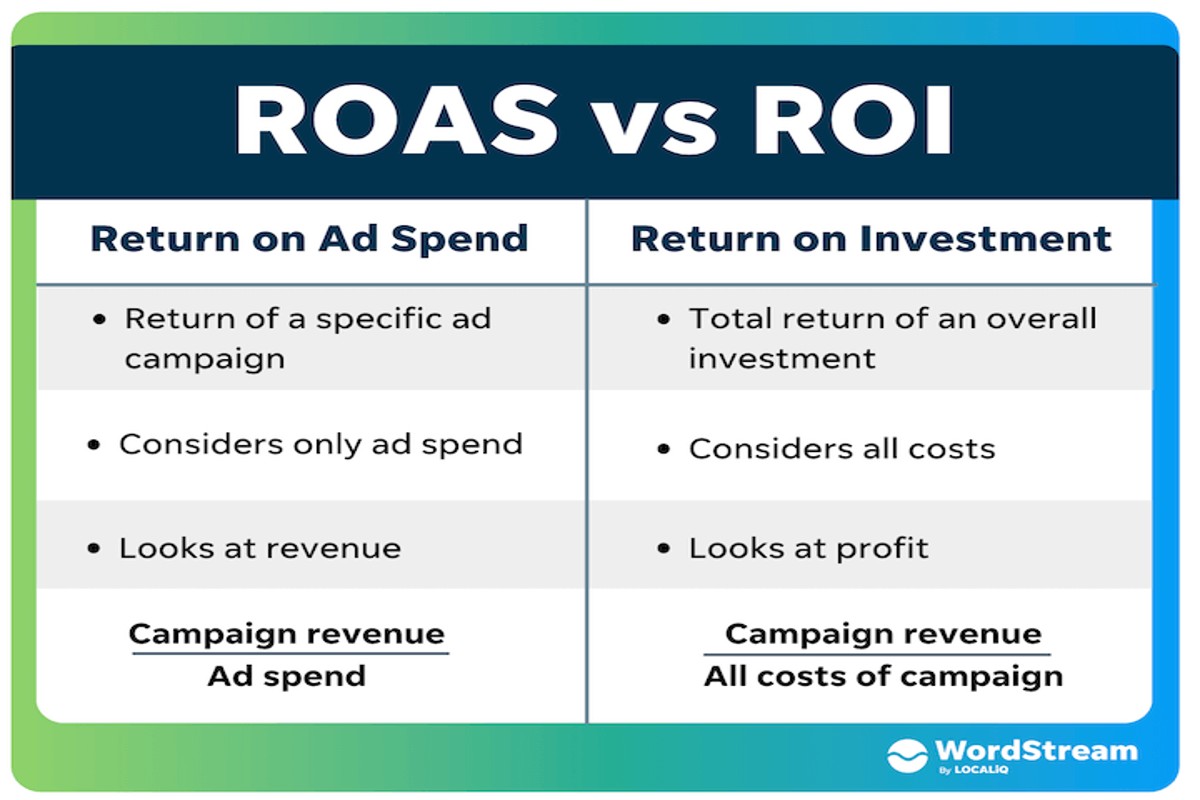
Is Google Ads worth it? Yes, Google Ads can be worth it if managed effectively, as it offers targeted reach, measurable results, and a potential high ROI.
This topic is crucial for businesses aiming to enhance their online visibility and attract customers through digital marketing. Misunderstanding Google Ads can lead to wasted budgets and missed opportunities in a competitive online landscape.
This guide will examine the effectiveness of Google Ads, including strategies for optimizing campaigns, understanding key metrics, and evaluating potential return on investment.
What are the benefits of using Google Ads?
Google Ads offers several key benefits, including targeted advertising, measurable results, and increased visibility for businesses. These advantages can significantly enhance a company’s online presence and drive customer engagement. By utilizing Google Ads, businesses can effectively reach their desired audience and optimize their marketing budgets.
One of the primary advantages of Google Ads is its targeted advertising. Businesses can create ads that target specific demographics, interests, and geographic locations, ensuring that the right message reaches the right audience. This level of precision increases the likelihood of conversions, as ads are shown to users actively searching for related products or services.
Another significant benefit is the measurable results that Google Ads provides. Advertisers can track key performance metrics such as click-through rates, conversion rates, and return on investment (ROI) in real-time. This data allows for continuous optimization of ad campaigns, enabling businesses to make informed decisions and allocate their budgets more effectively.
- Increased visibility: Google Ads places ads at the top of search results, which can lead to higher click rates compared to organic listings.
- Flexible budgeting: Advertisers can set daily budgets and adjust bids to control spending, making it accessible for businesses of all sizes.
- Quick results: Unlike organic search engine optimization, which can take time to yield results, Google Ads can generate immediate traffic and leads.
Expert Tip: To maximize the effectiveness of Google Ads, continuously refine targeting options and regularly A/B test ad copy and visuals. This approach can significantly enhance engagement rates and improve overall campaign performance.
How much do Google Ads cost on average?
On average, businesses can expect to pay between $1 to $2 per click for Google Ads. However, costs can vary significantly depending on the industry, competition, and specific targeting options. Some highly competitive sectors may see costs exceeding $50 per click.
The cost of Google Ads is influenced by several factors, including the quality score of the ads, the bidding strategy employed, and the geographic targeting. Additionally, the industry plays a crucial role; for example, finance and legal sectors often incur higher costs than retail or e-commerce.
- Quality Score: This metric, based on ad relevance and landing page experience, directly affects how much advertisers pay per click. Higher quality scores can lead to lower costs.
- Bidding Strategy: Google Ads operates on a bidding system. Advertisers can choose between manual and automated bidding, impacting overall costs based on competition and campaign goals.
- Targeting Options: Geographic and demographic targeting can also influence costs, as more specific targeting may lead to higher competition and, consequently, higher prices.
Budgeting for Google Ads requires careful planning. Businesses should consider their overall marketing budget, set specific campaign goals, and continuously monitor performance to adjust bids and spending effectively. Testing different ad formats and targeting strategies can optimize costs and improve return on investment.
Expert Tip: Consider using remarketing campaigns to engage users who have previously interacted with your site. This often leads to lower costs per conversion compared to targeting new users.
How do I determine if Google Ads is right for my business?
To determine if Google Ads is right for your business, assess your specific goals, target audience, and budget. Evaluating these factors will help clarify whether investing in Google Ads aligns with your marketing strategy and desired outcomes.
Start by defining your business goals. Are you looking to increase brand awareness, drive traffic to your website, or generate sales? Clearly articulated goals will guide your advertising strategy and help you measure success. Next, identify your target audience. Understanding who your customers are, including their demographics, interests, and online behaviors, will inform your ad targeting options and messaging.
- Analyze Your Business Goals: Determine whether your primary objectives are short-term, such as immediate sales, or long-term, like brand loyalty. Google Ads can be tailored to meet both types of goals effectively.
- Identify Your Target Audience: Conduct market research to pinpoint your ideal customer profile. Knowing your audience will assist in creating compelling ads that resonate with potential customers.
- Evaluate Your Budget: Establish a clear budget for your advertising efforts. Consider whether you can allocate sufficient funds for a meaningful campaign, as Google Ads operates on a pay-per-click model that requires ongoing investment.
After completing these steps, consider conducting a small test campaign to gauge results. This approach can provide practical insights into how Google Ads performs for your business without committing significant resources upfront.
Expert Tip: Utilize Google Ads’ targeting features, such as location and demographic targeting, to maximize your budget’s efficiency. A well-targeted ad campaign can yield a higher return on investment and better meet your business objectives.
Is Google Ads more effective than Facebook Ads?
Google Ads can be more effective than Facebook Ads depending on the business goals, target audience, and industry. Google Ads excels in capturing demand from users actively searching for products or services, while Facebook Ads is strong in creating awareness and engaging users based on their interests. Each platform has distinct advantages that may serve different marketing strategies.
Google Ads primarily operates on a pay-per-click (PPC) model, allowing advertisers to target users based on their search queries. This intent-driven approach enables businesses to reach customers when they are most likely to make a purchase. In contrast, Facebook Ads utilizes a social media framework, targeting users based on demographics, interests, and behaviors. This allows brands to build awareness and engage with potential customers even before they express intent to buy.
When comparing effectiveness, consider the following key differences:
- Targeting Options: Google Ads targets keywords and search intent, making it effective for capturing demand. Facebook Ads targets user behavior and interests, which can enhance brand visibility and engagement.
- Audience Reach: Google has a broader reach for users actively searching for products, while Facebook’s vast user base allows for extensive demographic targeting, making it suitable for brand discovery.
- Cost: Google Ads can often be more expensive due to competitive bidding on keywords, while Facebook Ads may offer lower costs per click but can require more budget for effective reach and engagement.
For businesses focused on immediate sales and conversions, Google Ads may provide a better return on investment. However, for brands looking to enhance awareness and engage with new audiences, Facebook Ads can be equally valuable.
Expert Tip: An integrated approach, utilizing both platforms, often yields the best results. Tailor campaigns based on specific objectives, leveraging Google Ads for direct response and Facebook Ads for long-term brand building.
What are common mistakes to avoid with Google Ads?
Many businesses make critical errors when using Google Ads that can lead to wasted budgets and ineffective campaigns. Avoiding these common mistakes is essential for maximizing return on investment. Poor keyword selection, neglecting ad extensions, and failing to conduct A/B testing are among the most significant pitfalls.
First, poor keyword selection can severely limit the effectiveness of an ad campaign. Businesses often target overly broad keywords, resulting in high competition and low conversion rates. Instead, focus on specific long-tail keywords that align closely with user intent. This approach can improve click-through rates and reduce costs by attracting more relevant traffic.
- Neglecting ad extensions is another frequent oversight. Ad extensions enhance the visibility of ads and provide additional information to potential customers. Utilize extensions such as site links, callouts, and structured snippets to improve ad performance and increase the likelihood of clicks.
- Lack of A/B testing hampers optimization efforts. Without testing different ad variations, it’s challenging to identify which messages resonate with the target audience. Run A/B tests on headlines, ad copy, and calls to action to determine the most effective combinations, ensuring continuous improvement of campaigns.
- Ignoring negative keywords can lead to irrelevant traffic. Regularly review search term reports to identify terms that are not converting and add them as negative keywords to prevent wasted spend on unqualified clicks.
By avoiding these common mistakes, businesses can create more effective Google Ads campaigns that yield better returns. Regularly reviewing and refining strategies is essential for sustained success.
Expert Tip: Consider implementing automated rules and alerts in Google Ads to monitor performance metrics in real-time. This proactive approach allows for immediate adjustments, optimizing campaigns for better results.
How long does it take to see results from Google Ads?
Typically, businesses can expect to see initial results from Google Ads within a few days to a couple of weeks. However, achieving significant outcomes, such as a return on investment (ROI) or achieving specific sales targets, may take several weeks to months, depending on various factors.
Several factors influence the timeframe for seeing results from Google Ads. First, the campaign setup plays a critical role; well-structured campaigns with targeted keywords and high-quality ad copy tend to yield faster results. Additionally, the industry and competition level affect how quickly ads can generate traffic and conversions. In highly competitive sectors, it may take longer to establish a foothold and see meaningful results.
Budget allocation also impacts the speed of results. A higher daily budget allows for more ad impressions and clicks, which can expedite data collection and optimization processes. Furthermore, the learning phase of Google Ads is crucial; the platform’s algorithm needs time to gather data on which ads perform best, leading to optimized targeting and bidding strategies. As the algorithm learns, the potential for improved results increases.
Finally, the type of goals set for the campaign can dictate the timeline. Short-term objectives, such as generating website visits, can yield quicker results, while long-term goals, like building brand awareness or increasing customer loyalty, require sustained efforts over a longer period.
Expert Tip: Regularly monitor and adjust campaigns based on performance metrics. Implementing A/B testing for ad variations can significantly enhance results and reduce the time needed to identify effective strategies.
What are the best practices for optimizing Google Ads campaigns?
Effective optimization of Google Ads campaigns is essential for maximizing return on investment and achieving business objectives. By implementing strategic practices, businesses can enhance their ad performance, improve click-through rates, and ultimately drive conversions. Below are some of the best practices to consider.
- Conduct Thorough Keyword Research: Utilize tools like Google Keyword Planner to identify relevant keywords with high search volume and low competition. Focus on long-tail keywords that reflect user intent and consider negative keywords to filter out irrelevant traffic.
- Improve Ad Copy: Craft compelling ad copy that addresses the needs and pain points of your target audience. Use clear calls to action, incorporate keywords naturally, and highlight unique selling propositions to differentiate your ads from competitors.
- Utilize Ad Extensions: Enhance your ads with various ad extensions such as site links, callouts, and structured snippets. These extensions provide additional information and increase visibility, leading to higher click-through rates.
- Monitor and Adjust Bids: Regularly review campaign performance and adjust bids based on keyword performance, location, and device. Employ automated bidding strategies where appropriate to maximize efficiency and control costs.
- Track and Analyze Performance: Use Google Ads and Google Analytics to track key performance indicators such as conversion rates, click-through rates, and cost per acquisition. Analyze this data to make informed decisions about campaign adjustments and budget allocation.
Implementing these best practices can significantly improve the effectiveness of Google Ads campaigns. Regularly revisiting and refining strategies ensures alignment with changing market conditions and audience behaviors.
Expert Tip: A/B testing different ad variations can provide valuable insights into what resonates best with your audience. Continuous testing and iteration lead to more effective campaigns over time.
Understanding the Google Ads Auction System
This section delves into the mechanics of the Google Ads auction system, a critical component that determines ad placement and costs. Understanding this process is essential for businesses seeking to maximize their advertising investments.

Overview of the Auction Process
The Google Ads auction operates on a real-time bidding system, where advertisers compete for ad placements based on keywords. Each time a user performs a search, Google evaluates all eligible ads and determines which ones will be displayed. This process involves several components:
- Advertiser Bids: Advertisers set a maximum bid they are willing to pay per click on their ad.
- Ad Quality: Google assesses the relevance and quality of the ad through the Quality Score.
- Ad Rank: The final position of an ad is determined by multiplying the bid by the Quality Score.
The Role of Quality Score
Quality Score is a critical factor in ad placement. It is calculated based on several metrics, including click-through rate (CTR), ad relevance, and landing page experience. A higher Quality Score indicates that the ad is relevant and useful to users, which can significantly enhance ad rank. Advertisers with higher Quality Scores can achieve better placements at lower costs.
Influence of Bid Strategies
Bid strategies play a pivotal role in determining both costs and ad visibility. Google Ads offers various bidding options, including:
- Manual CPC: Advertisers set their CPC bids manually for more control.
- Enhanced CPC: Google adjusts bids in real-time to maximize conversions.
- Target CPA: Advertisers specify a desired cost per acquisition, and Google automatically optimizes bids to achieve this target.
Choosing the right strategy depends on the business goals and the competitive landscape of the targeted keywords.
Maximizing ROI through the Auction System
To leverage the auction system effectively, businesses should focus on the following strategies:
- Optimize Ad Quality: Regularly review and enhance ad copy, keywords, and landing pages to improve Quality Score.
- Use Negative Keywords: Implement negative keywords to prevent ads from appearing for irrelevant searches, thus improving CTR.
- Analyze Competitor Bids: Monitor competitors’ bidding strategies to adjust bids and stay competitive.
While many articles discuss the basics of the Google Ads auction system, few emphasize the intricate relationship between Quality Score and ad costs. A common misconception is that simply increasing bids guarantees better placement. However, without optimizing ad quality, increased bids may lead to wasted budgets and lower ROI.
Businesses should actively monitor their campaigns and adjust strategies based on performance data. Regular A/B testing of ad copy and landing pages can provide insights into what resonates with the target audience. Additionally, utilizing automated bidding strategies can help optimize ad spend based on real-time market conditions.
Real-World Case Studies: Success Stories with Google Ads
This section examines real-world examples of businesses that have successfully leveraged Google Ads to enhance their marketing efforts. By analyzing diverse industries, key metrics, and lessons learned, this exploration provides valuable insights for any business considering Google Ads as a marketing strategy.

Industry Diversification in Google Ads Strategies
Businesses across various sectors have tailored their Google Ads strategies to meet specific market needs. For instance:
- E-commerce: A fashion retailer utilized targeted shopping ads, resulting in a 150% increase in online sales over six months.
- Healthcare: A local clinic focused on local search ads, achieving a 40% increase in appointment bookings within three months.
- Education: An online learning platform employed video ads, doubling their enrollment rates year-over-year.
Key Metrics: Before and After Google Ads Implementation
Measuring success is crucial for understanding the effectiveness of Google Ads. Key performance indicators (KPIs) observed in successful campaigns include:
- Click-Through Rate (CTR): Many businesses saw their CTR rise from an average of 2% to over 5% after optimizing ad copy and targeting.
- Conversion Rate: A home services company increased its conversion rate from 3% to 7% by refining its landing pages and ad targeting.
- Return on Ad Spend (ROAS): Retailers reported ROAS improvements from 200% to 400% by implementing retargeting strategies.
Lessons Learned and Best Practices
Successful campaigns provide insights into effective practices. Key lessons include:
- Audience Targeting: Understanding the target audience is critical. Businesses that segmented their audiences saw better engagement and conversion rates.
- Ad Copy Optimization: Continuous testing of ad copy led to significant improvements in CTR and conversion metrics.
- Utilizing Negative Keywords: Implementing negative keywords helped reduce irrelevant clicks, improving overall campaign efficiency.
Replicating Success in Your Own Business
To replicate these successes, businesses should consider the following steps:
- Conduct thorough market research to identify target demographics.
- Create targeted ad campaigns with specific goals and KPIs.
- Regularly analyze campaign performance and adjust strategies accordingly.
- Invest in ongoing learning and adaptation based on industry trends and competitor analysis.
While many articles may simplify Google Ads strategies, they often overlook the nuances of industry-specific tactics. Not every business will achieve the same results; factors like market saturation, ad spend, and competition play substantial roles. Furthermore, misconceptions about Google Ads being a quick-fix solution can lead to disappointment if expectations are not aligned with strategic execution.
Businesses should take actionable steps based on these insights. Begin by analyzing your current marketing efforts against potential Google Ads strategies. Identify your unique selling propositions and tailor your ad content accordingly. Establish clear metrics to track performance and remain flexible to adapt as data becomes available. This systematic approach will enhance the likelihood of achieving a favorable return on investment, affirming whether Google Ads is worth it for your business.
Advanced Targeting Options in Google Ads
Advanced targeting options in Google Ads empower businesses to reach specific audiences more effectively. These techniques can significantly enhance campaign performance and return on investment.

Audience Targeting Features
Google Ads provides a robust suite of audience targeting features that allow advertisers to tailor their campaigns to specific user segments. These include:
- In-Market Audiences: Target users who are actively searching and considering purchasing products or services similar to yours.
- Affinity Audiences: Reach users based on their interests and lifestyle choices, helping brands connect with potential customers on a deeper level.
- Custom Intent Audiences: Create audiences based on specific keywords and URLs, allowing for a more personalized targeting approach.
Utilizing Remarketing for Increased Conversions
Remarketing serves as a powerful tool to re-engage users who have previously interacted with your website or app. With remarketing lists, advertisers can target specific groups such as:
- Users who visited a product page but did not complete a purchase.
- Visitors who abandoned their shopping carts.
- Previous customers who may be interested in complementary products.
Implementing dynamic remarketing can further enhance these efforts by displaying tailored ads featuring products users have viewed, significantly increasing the chances of conversion.
Geographic and Demographic Targeting
Effective campaigns consider not just who the audience is, but where they are located. Geographic targeting allows advertisers to focus on specific regions, cities, or even radii around a location, maximizing relevance and engagement. Demographic targeting complements this by allowing marketers to filter audiences based on criteria such as:
- Age
- Gender
- Household income
By integrating both geographic and demographic targeting, businesses can ensure their ads reach the most relevant potential customers.
Best Practices for Setting Up Custom Audiences
Creating custom audiences involves a strategic approach for optimal results. Here are best practices to follow:
- Define Your Goals: Understand what you want to achieve with your custom audience, whether it’s brand awareness, lead generation, or sales.
- Segment Your Audience: Break down your audience into smaller, more specific groups to tailor messaging effectively.
- Utilize Customer Data: Leverage existing customer data from CRM systems or website interactions to create lookalike audiences.
Implementing these practices ensures that your custom audiences are both relevant and effective, enhancing your overall campaign performance.
Advanced targeting techniques in Google Ads can significantly impact campaign success. Businesses should actively explore audience targeting, remarketing strategies, geographic and demographic filters, and custom audience setups. By doing so, they can improve engagement and maximize the return on their advertising spend, ultimately answering the question: is Google Ads worth it?
Analyzing Google Ads Performance: Metrics That Matter
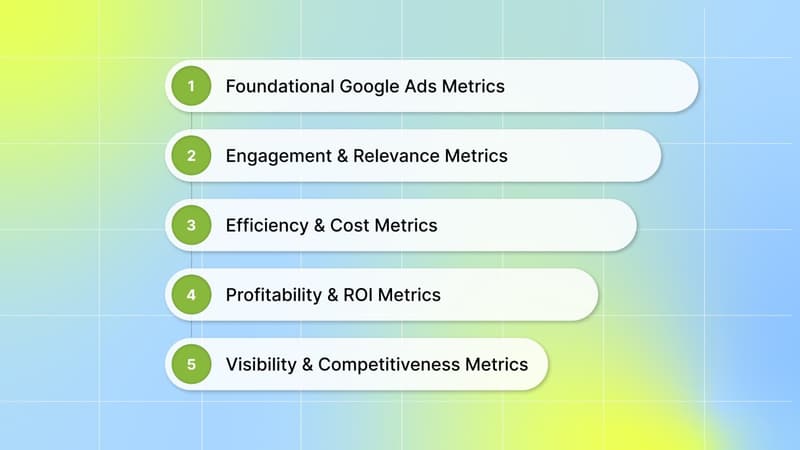
Effective analysis of Google Ads performance hinges on understanding key metrics that directly impact a business’s return on investment. This section delves into critical performance indicators, the significance of conversion tracking, and methods for data analysis that drive continuous improvement.
Key Performance Indicators (KPIs) to Track for Success
Tracking the right metrics is essential for gauging the effectiveness of Google Ads campaigns. Focus on the following KPIs:
- Click-Through Rate (CTR): Measures the percentage of users who click on your ad after seeing it. A higher CTR indicates effective ad copy and targeting.
- Cost Per Click (CPC): Represents the amount spent for each click on your ad. Monitoring CPC helps manage budget allocation effectively.
- Conversion Rate: The percentage of users who complete a desired action after clicking your ad. A high conversion rate signifies successful engagement.
- Return on Ad Spend (ROAS): Compares revenue generated from ads against the total ad spend. A higher ROAS indicates a more profitable campaign.
Understanding Conversion Tracking and Its Importance
Conversion tracking is a critical component of Google Ads analytics, allowing businesses to measure the effectiveness of their ads in driving specific actions, such as purchases or sign-ups. Implementing conversion tracking entails placing a small snippet of code on the website to monitor user behavior post-click. Accurate conversion data provides insights into which ads, keywords, and targeting strategies yield the best results. This data is vital for optimizing campaigns and ensuring that advertising budgets are efficiently utilized.
How to Analyze Data for Continuous Improvement
Data analysis should be an ongoing process to enhance Google Ads performance. Follow these steps:
- Regularly Review Campaign Performance: Analyze metrics weekly or bi-weekly to identify trends and areas for improvement.
- A/B Testing: Experiment with different ad copies, landing pages, and targeting options to determine what resonates best with your audience.
- Utilize Attribution Models: Understand how different touchpoints contribute to conversions and adjust marketing strategies accordingly.
By consistently analyzing performance data, businesses can refine their strategies, allocate budgets more effectively, and ultimately enhance the overall success of their campaigns.
Using Google Analytics in Conjunction with Google Ads
Integrating Google Analytics with Google Ads provides a more comprehensive view of campaign performance. Google Analytics tracks user behavior on your website, offering insights into how visitors interact after clicking an ad. Key metrics to focus on include bounce rate, pages per session, and average session duration. By understanding user engagement, businesses can identify potential bottlenecks in the conversion process and make necessary adjustments to ad targeting and landing page design.
Many businesses underestimate the value of combining these two powerful tools. By leveraging both platforms, companies can develop a holistic view of their marketing effectiveness, leading to improved decision-making and strategy formulation.
To maximize the insights gained from Google Ads performance metrics, businesses should take the following actions:
- Set clear goals for your campaigns and align KPIs accordingly.
- Implement conversion tracking to accurately measure success.
- Regularly analyze data and adjust strategies based on performance insights.
- Utilize Google Analytics to gain deeper insights into user behavior and enhance conversion rates.
Frequently Asked Questions
What are the benefits of using Google Ads?
Google Ads offers targeted reach, allowing businesses to connect with potential customers actively searching for related products or services. It provides measurable results and flexibility in budget management, making it suitable for various marketing strategies.
How much do Google Ads cost on average?
The average cost of Google Ads varies widely, typically ranging from $1 to $2 per click for search campaigns. However, costs can increase significantly depending on the industry, competition, and specific keywords targeted.
How do I determine if Google Ads is right for my business?
Evaluate your target audience, marketing goals, and budget to assess if Google Ads aligns with your strategy. Businesses with specific, measurable objectives and a defined customer base often find Google Ads to be a valuable tool.
Is Google Ads more effective than Facebook Ads?
Effectiveness depends on business objectives and audience targeting; Google Ads excels in capturing intent-driven traffic, while Facebook Ads are better for brand awareness and engagement. An integrated approach may yield the best results for many businesses.
What are common mistakes to avoid with Google Ads?
Common mistakes include neglecting keyword research, failing to optimize ad copy, and not monitoring campaign performance regularly. Additionally, setting unrealistic budgets or targeting overly broad audiences can lead to wasted ad spend.
How long does it take to see results from Google Ads?
Results from Google Ads can be seen within days, especially for search campaigns targeting high-intent keywords. However, optimizing campaigns for better performance may take several weeks or months of continuous management.
What are the best practices for optimizing Google Ads campaigns?
Best practices include conducting thorough keyword research, regularly updating ad copy, and utilizing A/B testing to refine strategies. Additionally, monitoring performance metrics and adjusting bids based on data can enhance overall campaign effectiveness.
Final Thoughts on is google ads worth it
Google Ads can offer substantial benefits for businesses willing to invest strategically, providing targeted reach and measurable results that often surpass other advertising platforms. The decision to utilize Google Ads should be informed by a thorough assessment of your business goals, budget, and audience engagement strategies, as its effectiveness hinges on precise execution and continuous optimization.
To maximize the potential of Google Ads, conduct a detailed analysis of your target market and leverage the platform’s advanced targeting options, ensuring your campaigns resonate with the right audience segments.
Investing in Google Ads is not merely an option; it is a necessity for businesses aiming to thrive in a competitive digital landscape.
Leave a Reply