
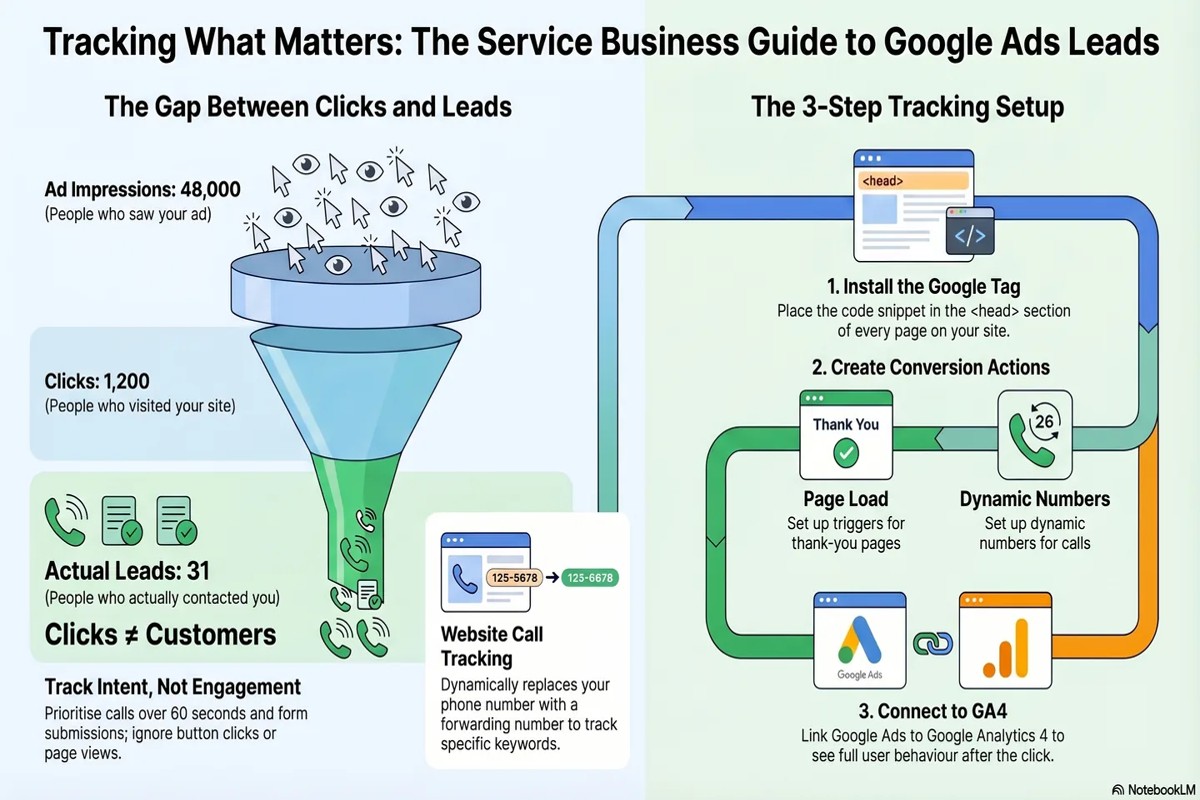
Yes, Google Analytics can track leads from your Google Ads. By setting up conversion tracking, you can measure user actions such as form submissions and purchases that result from your ads.
This capability is crucial for marketers and businesses seeking to optimize their advertising spend. Understanding how leads are tracked ensures accurate measurement of campaign performance, enabling informed decision-making and maximizing return on investment.
This article details the steps for setting up conversion tracking in Google Analytics, the types of leads you can monitor, and best practices for interpreting the data effectively.
How does Google Analytics track leads from Google Ads?
Google Analytics tracks leads from Google Ads by linking the two platforms and setting up conversion tracking. This integration allows you to monitor user interactions and conversions generated through your ads. By analyzing this data, marketers can assess the effectiveness of their campaigns and optimize their advertising strategies.
To begin tracking leads, first, link your Google Ads account to your Google Analytics account. This can be done in the Admin section of Google Analytics by navigating to the property settings and selecting the Google Ads Linking option. Once linked, Analytics can import Google Ads data, enabling you to view campaign performance metrics directly within the Analytics interface.
- Link Accounts: In Google Analytics, go to the Admin section and select the appropriate property. Under the “Product Linking” section, choose “Google Ads Linking” and follow the prompts to link your accounts.
- Set Up Conversion Tracking: Define what constitutes a lead for your business, such as form submissions or product purchases. In Google Analytics, go to the “Goals” section under the Admin settings to create specific goals aligned with these actions.
- Import Goals into Google Ads: Once goals are set up in Analytics, go back to your Google Ads account. Under the “Tools & Settings” menu, select “Conversions” and import the goals you created. This allows you to track conversions directly related to your ads.
- Monitor Performance: Regularly review your Google Analytics reports to assess the performance of your Google Ads campaigns. Pay attention to metrics such as conversion rates, user engagement, and revenue generated to identify areas for improvement.
By effectively linking Google Ads and Google Analytics, marketers can gain valuable insights into user behavior and campaign performance. This data-driven approach enables informed decision-making and enhances the overall effectiveness of advertising efforts.
Expert Tip: Regularly audit your conversion tracking setup to ensure it accurately reflects your business objectives. Misconfigured goals can lead to misleading data, hampering your ability to make strategic adjustments.
What are the benefits of tracking leads with Google Analytics?
Tracking leads with Google Analytics provides valuable insights into user behavior and the effectiveness of marketing campaigns. By analyzing data from Google Ads, businesses can refine their strategies and optimize ad spending. This leads to improved conversion rates and a better return on investment.
One of the primary advantages of tracking leads is the ability to understand user interactions at various touchpoints. This data reveals how users engage with ads, which keywords drive traffic, and what content resonates most with potential customers. With this information, businesses can tailor their ads and landing pages to align more closely with user preferences, enhancing the overall user experience.
- Data-Driven Decision Making: Access to detailed analytics allows marketers to make informed decisions based on actual user behavior rather than assumptions. This leads to better-targeted campaigns.
- Budget Optimization: By identifying which ads or keywords generate the most leads, businesses can allocate their budget more effectively, ensuring funds are directed toward high-performing areas.
- Enhanced Tracking of Customer Journeys: Google Analytics provides insights into the full customer journey, from the initial ad click to conversion. This holistic view helps businesses understand where they may lose potential leads.
Implementing lead tracking requires proper setup within Google Analytics and Google Ads. Ensuring that goals and conversions are correctly defined is essential for accurate data collection. Businesses must also regularly review data to adapt their strategies in real-time.
Expert Tip: Utilize UTM parameters in your Google Ads URLs to gain granular insights into campaign performance. This additional layer of tracking can illuminate which specific ads are most effective in generating leads, enabling more precise optimization efforts.
Can Google Analytics track offline conversions from Google Ads?
Google Analytics can track offline conversions from Google Ads, but this requires specific setup and integration. While online conversions are automatically tracked through user interactions on a website, offline conversions need to be manually imported into Google Analytics. This can complicate the tracking process, but it is feasible with the right approach.
Offline conversions include actions such as phone calls, in-store purchases, or any lead that does not occur online. Google Ads provides features to track these conversions through integration with Google Analytics, but you must ensure that the offline data is accurately recorded and uploaded. The key difference lies in the method of tracking: online conversions are captured in real-time, while offline conversions require manual input and may not be immediately reflected in reports.
- Online Conversions: Automatically tracked through website interactions, such as form submissions or purchases, using UTM parameters and tracking codes.
- Offline Conversions: Require manual data import into Google Analytics, typically through CSV files or integration with CRM systems that capture offline sales.
- Reporting Differences: Online conversions provide immediate insights, while offline conversions may lag in reporting and require additional analysis to understand their impact on campaigns.
For effective tracking of offline conversions, businesses should utilize Google Ads’ conversion tracking features, including the ability to import offline conversion data from CRM systems. This allows marketers to connect online interactions with subsequent offline actions, providing a more comprehensive view of campaign performance.
Expert Tip: Implementing a robust CRM system that can integrate seamlessly with Google Analytics will enhance the accuracy of offline conversion tracking. This integration can bridge the gap between online and offline marketing efforts, enabling more effective decision-making based on complete customer journeys.
How long does it take to set up lead tracking in Google Analytics?
Setting up lead tracking in Google Analytics typically takes between 30 minutes to a few hours. The exact time frame depends on several factors, including your familiarity with Google Analytics, the complexity of your tracking needs, and whether you are using additional tools like Google Tag Manager.
The initial setup involves configuring goals or events that represent leads, such as form submissions or phone calls. If you are already familiar with Google Analytics, this process can be completed quickly. However, if you are new to the platform, it may take longer as you familiarize yourself with the interface and tracking options.
Additionally, the integration with Google Ads can add complexity to the setup. Ensuring that goals in Google Analytics align with your Google Ads campaigns requires careful planning and testing. If you plan to use enhanced conversions or set up specific tracking parameters, this may extend the setup time further.
Factors Affecting Setup Time
Several factors can influence how long it takes to set up lead tracking. First, the type of leads you want to track will dictate the complexity of the configuration. For example, tracking downloads or newsletter sign-ups may require different approaches compared to tracking contact form submissions. Second, existing infrastructure plays a role; if your website is already equipped with tracking capabilities, setup will be faster. Lastly, collaboration with developers or marketing teams can either expedite or delay the process, depending on communication and resource availability.
For those looking to streamline the process, utilizing Google Tag Manager can simplify lead tracking setup. This tool allows for easier management of tracking codes and can reduce the need for extensive coding, thus saving time.
Expert Tip: To enhance the quality of your lead tracking, consider implementing UTM parameters in your Google Ads campaigns. This will provide deeper insights into which ads are generating leads, allowing for more informed decision-making in future campaigns.
What is the cost of using Google Analytics for tracking leads?
Google Analytics is free to use for most users, but advanced features and integrations may incur costs. The standard version offers robust tracking capabilities without any direct fees. However, using Google Ads alongside Google Analytics can lead to additional costs depending on your advertising budget and campaign structure.
The primary costs associated with tracking leads through Google Analytics stem from the advertising expenses of Google Ads. While Google Analytics itself does not charge for tracking, the following factors can influence overall costs:
- Google Ads Budget: The amount allocated to your Google Ads campaigns directly affects costs. Higher budgets can lead to more leads but will also increase spending.
- Campaign Type: Different types of campaigns (search, display, video) have varying costs per click (CPC) or per impression. This variability affects the total investment required for lead generation.
- Bid Strategy: Automated bidding strategies can optimize for lead generation but may lead to higher costs if not managed carefully.
In addition to direct costs, consider the potential need for advanced analytics features. Google Analytics 360, the premium version, offers enhanced data capabilities but comes with a significant price tag that can exceed $150,000 annually. Businesses may opt for this version if they require advanced tracking or integration with other enterprise tools.
Effective tracking of leads from Google Ads through Google Analytics involves understanding these cost structures. By carefully managing ad spend and campaign strategies, businesses can optimize their investment in both platforms.
Expert Tip: Utilize Google Analytics’ conversion tracking features to gain insights into which ads and keywords are driving the most leads. This data can help refine your advertising strategy, potentially reducing unnecessary spending while maximizing lead generation effectiveness.
What are common mistakes when tracking leads from Google Ads?
Common mistakes when tracking leads from Google Ads often stem from improper setup and configuration within Google Analytics. These errors can lead to incomplete data, misattribution of leads, and ultimately hinder the effectiveness of advertising campaigns. Addressing these pitfalls is essential for accurate performance measurement.
One frequent mistake is failing to link Google Ads and Google Analytics accounts properly. Without this integration, data transfer between the two platforms is disrupted, leading to gaps in reporting. Ensure that the accounts are linked under the “Admin” section in Google Analytics and that auto-tagging is enabled in Google Ads to facilitate seamless data flow.
- Neglecting Goal Setup: Not setting up specific goals in Google Analytics can result in a lack of clarity regarding lead conversions. Define clear conversion goals that align with your business objectives, such as form submissions or phone calls, to track lead generation effectively.
- Inaccurate Tracking Codes: Using incorrect or outdated tracking codes can skew data. Always verify that the tracking codes are correctly implemented on all relevant pages, ensuring that they capture the necessary user interactions accurately.
- Ignoring UTM Parameters: Failing to use UTM parameters for campaigns can lead to confusion about traffic sources. Implement UTM parameters consistently in your Google Ads URLs to distinguish between organic and paid traffic, helping clarify where leads originate.
- Overlooking Attribution Models: Relying solely on last-click attribution can misrepresent the customer journey. Explore different attribution models in Google Analytics to gain a comprehensive view of how various touchpoints contribute to lead conversions.
Implementing these best practices can enhance the accuracy and effectiveness of tracking leads from Google Ads. Regularly reviewing your tracking setup and data can further optimize your lead generation strategy.
Integrating data from both platforms allows for deeper insights into campaign performance. Consider using advanced features such as Google Analytics 4’s event tracking for more granular data analysis.
How can I improve lead tracking accuracy in Google Analytics?
Improving lead tracking accuracy in Google Analytics requires a combination of proper setup, consistent monitoring, and the use of advanced features. By implementing specific best practices, businesses can ensure that their lead data is reliable and actionable. Accurate lead tracking enables informed decision-making and optimizes marketing efforts.
First, ensure that Google Ads and Google Analytics are properly linked. This integration allows for seamless data flow between the two platforms. When linked, Google Analytics can automatically import data from Google Ads, providing insights into user behavior after clicking on ads. Regularly check the linking status and confirm that the correct Google Ads account is connected to your Analytics property.
- Utilize UTM Parameters: Implement UTM parameters in your Google Ads campaigns to accurately track the source, medium, and campaign. This helps distinguish traffic from different campaigns and assess which ads generate the most leads. Use the Google Campaign URL Builder for consistent tagging.
- Set Up Goals and Conversion Tracking: Define specific goals within Google Analytics that reflect lead actions, such as form submissions or phone calls. Use the Goal setup feature to track these conversions effectively. Ensure that conversion tracking is properly configured to capture all relevant lead data.
- Employ Enhanced Ecommerce Tracking: If applicable, enable Enhanced Ecommerce tracking in Google Analytics. This feature provides deeper insights into user interactions, such as product views and checkout behavior, which can help identify where leads drop off in the sales funnel.
- Regularly Review and Optimize Tracking Setup: Periodically assess your tracking setup for accuracy. Check for discrepancies in data and refine goals or UTM parameters as necessary. Regular audits ensure that tracking remains aligned with business objectives and marketing strategies.
Implementing these best practices will significantly enhance the accuracy of lead tracking in Google Analytics. Properly configured tracking not only measures the effectiveness of Google Ads but also provides insights for ongoing campaign optimization.
Establishing a routine for reviewing analytics data can uncover trends and areas for improvement, leading to more effective advertising strategies. Consistent monitoring allows for timely adjustments, maximizing the return on investment from Google Ads.
Advanced Techniques for Optimizing Google Ads Lead Tracking
This section delves into advanced strategies for enhancing the tracking of leads generated through Google Ads using Google Analytics. Effective tracking is essential for maximizing ROI and understanding user behavior across campaigns.

Utilizing UTM Parameters for Detailed Tracking
UTM parameters are essential for gaining granular insights into the performance of Google Ads campaigns. By appending these parameters to your ad URLs, you can identify specific traffic sources, mediums, and campaigns in Google Analytics. This allows for detailed tracking of user interactions from ads, enabling marketers to assess which campaigns drive the most leads.
- Source: Identifies where the traffic is coming from (e.g., google).
- Medium: Specifies the marketing medium (e.g., cpc for cost-per-click).
- Campaign: Names the specific campaign (e.g., spring_sale).
Implementing Event Tracking for Specific User Actions
Event tracking provides deeper insights into user interactions beyond page views. By configuring event tracking in Google Analytics, marketers can capture specific actions, such as form submissions, button clicks, or downloads that signify lead generation. This data is invaluable for understanding user engagement and optimizing conversion funnels.
- Define the actions you want to track (e.g., form submissions).
- Use Google Tag Manager to create tags for these actions.
- Test the tags to ensure they are firing correctly in real-time.
Leveraging Google Tag Manager for Streamlined Management
Google Tag Manager (GTM) simplifies the management of tracking codes and events on your website. By using GTM, marketers can implement and update tracking without modifying the website code directly. This agility allows for rapid adjustments to tracking setups in response to changing campaign strategies.
Furthermore, GTM supports version control and built-in debugging tools, making it easier to troubleshoot and maintain tracking accuracy. This is especially beneficial for complex campaigns where multiple tracking codes might be necessary.
Setting Up Custom Reports for Deeper Insights
Custom reports in Google Analytics enable marketers to focus on metrics that matter most to their lead generation efforts. By creating tailored reports, businesses can analyze user behavior, traffic sources, and conversion paths in a way that standard reports do not allow. Custom dimensions and metrics can also be utilized to segment data effectively.
- Choose relevant dimensions (e.g., traffic source, user location).
- Select metrics that align with your campaign goals (e.g., conversion rate).
- Schedule reports for regular review to monitor performance trends.
Many marketers underestimate the importance of correlating user behavior to specific ad interactions. A common misconception is that basic conversion tracking suffices for comprehensive analysis. In reality, leveraging advanced techniques such as UTM tagging, event tracking, and custom reporting provides a holistic view of campaign performance. Understanding the interplay between user actions and ad performance is critical for optimizing lead generation efforts effectively.
To optimize lead tracking effectively, implement UTM parameters for all Google Ads, set up event tracking for key user actions, manage tracking through Google Tag Manager, and create custom reports tailored to your business objectives. Regularly review these insights to refine your ad strategies and improve lead generation outcomes.
Real-World Case Studies: Successful Lead Tracking with Google Ads
This section examines real-world case studies demonstrating effective lead tracking through Google Analytics and Google Ads. By analyzing these examples, businesses can learn how to optimize their campaigns for improved ROI.
Case Study: Tech Solutions Inc.
Tech Solutions Inc., a B2B software provider, implemented Google Analytics to track leads generated from their Google Ads campaigns. Initially, their lead conversion rate stood at 2%. After establishing a robust tracking system, they observed a significant increase to 5% within six months.
Lead Conversion Rate Analysis
Prior to implementing Google Analytics, Tech Solutions relied on basic conversion tracking methods that failed to provide comprehensive insights. The organization adopted a multi-step tracking approach that included:
- Setting up goals in Google Analytics to measure form submissions.
- Linking Google Ads accounts to Google Analytics for unified data.
- Utilizing UTM parameters to track ad performance across different channels.
After these optimizations, Tech Solutions not only increased their conversion rate but also reduced their cost per lead by 30%, showcasing a direct correlation between effective tracking and ROI enhancement.
Lessons Learned from Campaign Optimizations
Through this process, several key lessons emerged:
- Integrating Google Ads and Google Analytics provides a holistic view of user behavior.
- Regularly analyzing user journeys helps identify drop-off points that need addressing.
- Testing different ad creatives and landing pages led to better audience engagement.
These insights allowed Tech Solutions to refine their marketing strategies and focus on channels yielding the highest returns.
Key Metrics for Ongoing Improvement
To maintain and enhance lead tracking efforts, it is essential to monitor the following metrics:
- Conversion Rate: Measure the percentage of visitors who complete desired actions.
- Cost per Acquisition (CPA): Analyze the cost-effectiveness of ad spend.
- Bounce Rate: Identify the percentage of visitors who leave without interacting.
- Average Session Duration: Assess user engagement with content.
Monitoring these metrics enables continuous improvement and informs strategic adjustments to campaigns.
While many businesses successfully implement lead tracking, common misconceptions persist. A notable misconception is that tracking alone guarantees success. The true value lies in the analysis of the data and the willingness to adapt strategies accordingly. Businesses often overlook the importance of segmenting audiences to tailor messages effectively, which can drastically improve engagement rates.
For organizations aiming to leverage these insights, consider the following actionable steps:
- Set clear goals in Google Analytics for effective tracking.
- Integrate Google Ads with Google Analytics to unify data sources.
- Regularly review and adjust campaigns based on performance metrics.
Implementing these strategies will enhance the ability to track leads effectively and maximize the return on investment from Google Ads campaigns.
Comparing Google Analytics with Other Tracking Tools for Ads
This section evaluates how Google Analytics compares with other lead tracking tools, such as HubSpot and Mixpanel, focusing on features, integration capabilities, and cost-effectiveness. Understanding these differences is essential for marketers looking to optimize their ad campaigns.
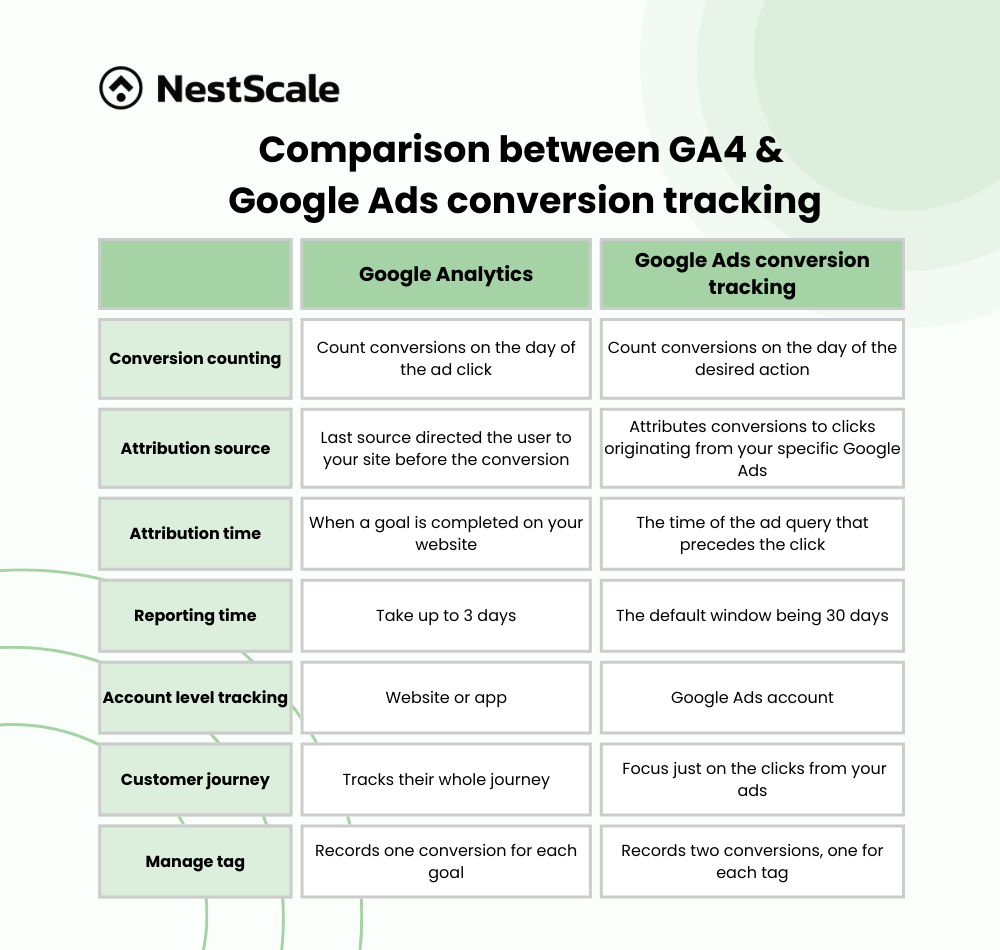
Feature Comparison
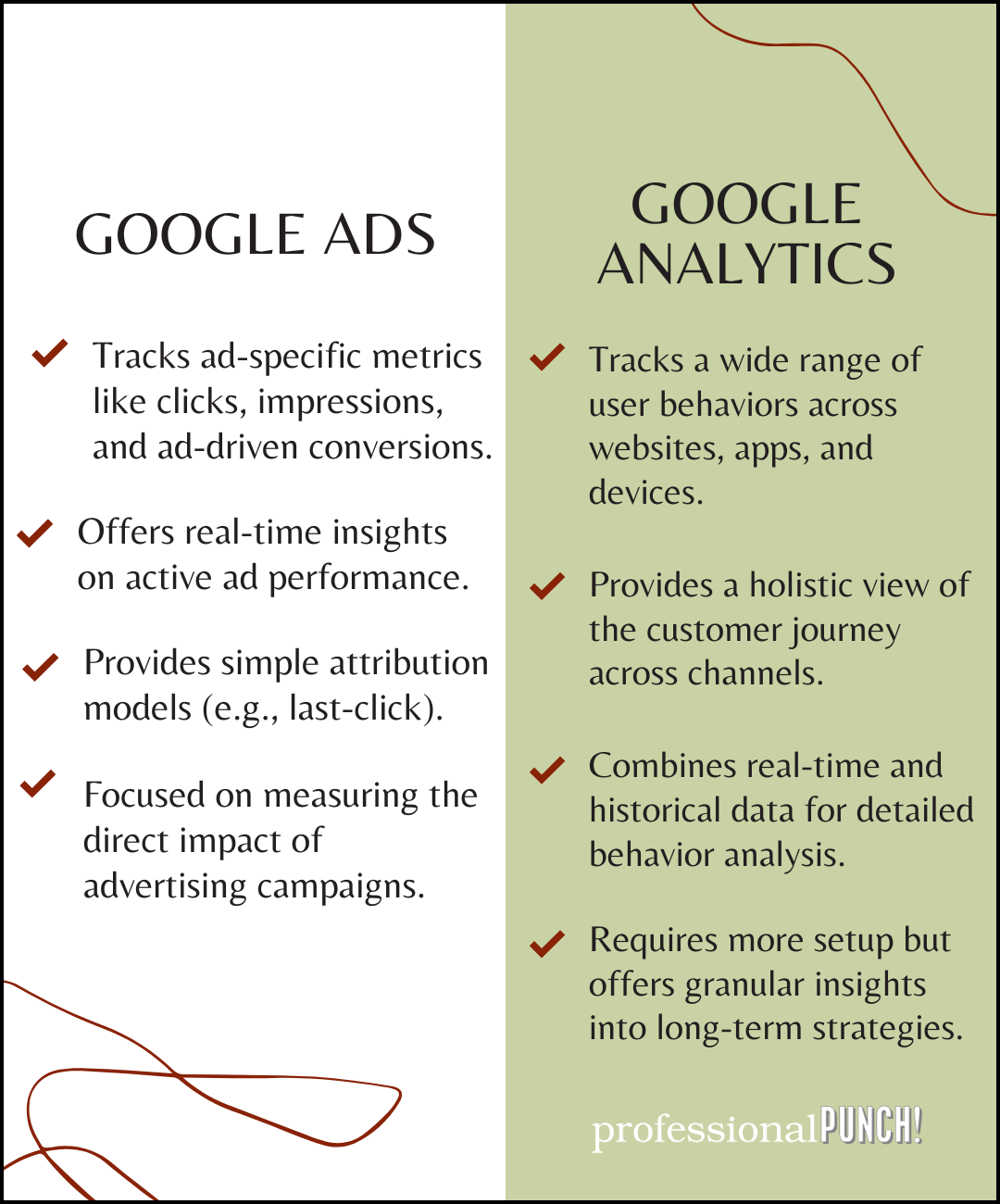
Google Analytics offers a robust set of features for tracking website traffic and user behavior. However, dedicated lead tracking tools like HubSpot and Mixpanel provide additional functionalities that enhance lead generation and management. Key features include:
- Google Analytics: Traffic source tracking, user behavior analysis, goal conversions.
- HubSpot: Comprehensive CRM capabilities, email marketing integration, lead nurturing workflows.
- Mixpanel: Advanced event tracking, cohort analysis, user retention metrics.
While Google Analytics excels in traffic analysis, HubSpot and Mixpanel are tailored for in-depth lead tracking and customer engagement, making them more suitable for businesses focused on lead generation.
Pros and Cons of Google Analytics vs. Dedicated Lead Tracking Software
Choosing between Google Analytics and specialized lead tracking software involves weighing several pros and cons:
- Pros of Google Analytics:
- Free to use, making it accessible for small businesses.
- Integrates seamlessly with Google Ads, providing direct insights.
- Offers a wide range of reporting features.
- Cons of Google Analytics:
- Limited lead management features compared to dedicated tools.
- More complex setup for tracking specific lead actions.
- Lacks CRM functionalities for managing leads.
In contrast, dedicated tools like HubSpot and Mixpanel provide targeted features for lead management but often come with monthly subscription fees.
Integration Capabilities
Google Analytics integrates well with various marketing platforms, including Google Ads, allowing for streamlined ad performance tracking. In comparison:
- HubSpot: Offers extensive integrations with email marketing, social media, and CRM systems.
- Mixpanel: Integrates with mobile apps and provides API access for custom implementations.
For businesses using multiple marketing tools, HubSpot and Mixpanel may provide a more cohesive ecosystem, whereas Google Analytics serves as a powerful, standalone option for traffic analysis.
Cost-Effectiveness of Google Analytics
Google Analytics is free, making it an attractive option for businesses with limited budgets. While the premium version, Google Analytics 360, offers advanced features, the free version suffices for many small to medium-sized businesses. In contrast, HubSpot and Mixpanel typically require subscription fees, which can range from $50 to several hundred dollars monthly, depending on the features selected. This makes Google Analytics a cost-effective solution for initial lead tracking efforts.
Many marketers mistakenly believe that Google Analytics can fully replace dedicated lead tracking tools. However, while it provides valuable insights into user behavior and traffic sources, it lacks comprehensive lead management features that can enhance conversion rates.
To optimize lead tracking from Google Ads, businesses should consider the following actionable steps:
- Set up conversion goals in Google Analytics to track leads effectively.
- Integrate Google Analytics with Google Ads to analyze ad performance.
- Evaluate whether additional lead tracking tools may better serve specific business needs.
By understanding the strengths and limitations of Google Analytics compared to other tools, businesses can make informed decisions for their lead tracking strategies.
Frequently Asked Questions
How does Google Analytics track leads from Google Ads?
Google Analytics tracks leads from Google Ads by utilizing UTM parameters and conversion tracking setup. When users click on ads and complete a predefined action, such as filling out a form, the data is captured and reported in Google Analytics.
What are the benefits of tracking leads with Google Analytics?
Tracking leads with Google Analytics provides insights into user behavior, allowing for better optimization of marketing strategies. It enables businesses to measure the effectiveness of Google Ads campaigns and improve ROI through data-driven decisions.
Can Google Analytics track offline conversions from Google Ads?
Yes, Google Analytics can track offline conversions from Google Ads by importing offline conversion data. This requires setting up a proper integration to upload conversion data from CRM systems or other sources.
How long does it take to set up lead tracking in Google Analytics?
Setting up lead tracking in Google Analytics typically takes a few hours to a couple of days, depending on the complexity of the setup. This includes configuring goals, linking Google Ads, and ensuring proper tracking codes are implemented on the website.
What is the cost of using Google Analytics for tracking leads?
Google Analytics offers a free version that includes lead tracking capabilities suitable for most businesses. For advanced features and greater data processing needs, Google Analytics 360 is available at a premium cost.
What are common mistakes when tracking leads from Google Ads?
Common mistakes include not setting up conversion tracking properly or failing to link Google Ads and Google Analytics accounts. Additionally, neglecting to define clear goals can lead to inaccurate data on lead performance.
How can I improve lead tracking accuracy in Google Analytics?
To improve lead tracking accuracy, ensure that all tracking codes are correctly implemented and regularly test conversions. Additionally, utilize UTM parameters for better campaign tracking and regularly review and update goals in Google Analytics.
Final Thoughts on can google analytics track leads from my google ads
Google Analytics is a powerful tool that effectively tracks leads from Google Ads, providing insights that drive informed marketing decisions. By utilizing advanced tracking techniques and integrating offline conversions, businesses can enhance their understanding of customer journeys and optimize their ad spend for maximum ROI.
To leverage this capability, implement conversion tracking by setting up goals and events in Google Analytics, ensuring that all potential lead touchpoints are monitored accurately.
Mastering lead tracking through Google Analytics not only enhances marketing strategies but also empowers businesses to make data-driven decisions that elevate performance and profitability.
Leave a Reply