
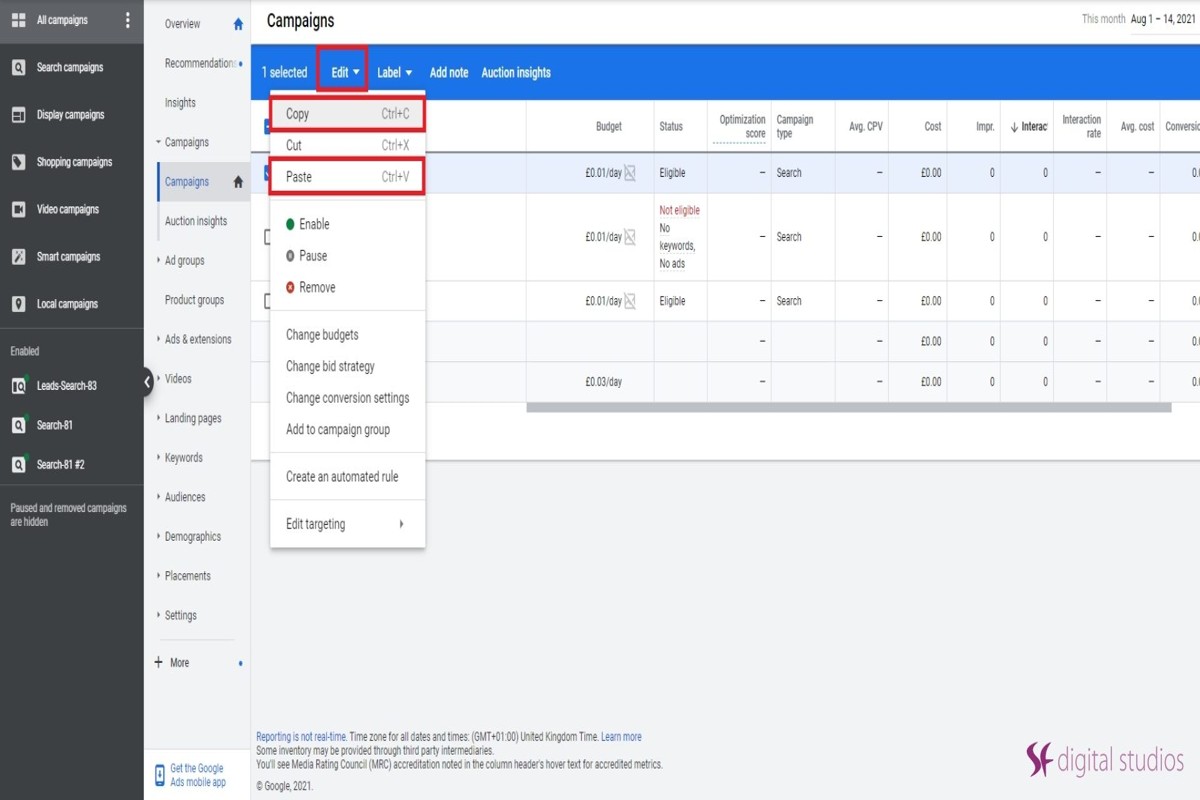
Yes, you can duplicate Google Ad campaigns using the Google Ads interface. This functionality enables advertisers to create a copy of an existing campaign, streamlining management and optimization efforts.
Understanding how to duplicate Google Ad campaigns is crucial for marketers aiming to enhance their advertising strategies. Incorrect duplication can lead to wasted budgets and ineffective ad performance, making it essential to grasp the nuances of this process.
This guide details the step-by-step process for duplicating campaigns, discusses best practices to follow, and highlights common pitfalls to avoid for optimizing ad performance.
How do you duplicate a Google Ads campaign?
You can duplicate a Google Ads campaign directly within the Google Ads interface. This process allows advertisers to replicate existing campaigns, including their settings, ads, and keywords, making it easier to test variations or scale successful efforts.
- Sign in to your Google Ads account. Navigate to the campaign section from the left-hand menu after logging in.
- Select the campaign you want to duplicate. Click on the checkbox next to the campaign name to highlight it.
- Click on the “Edit” dropdown menu. This is located at the top of the page once you have selected the campaign.
- Choose “Copy” from the dropdown. This action will copy all aspects of the selected campaign to your clipboard.
- Click on the “Edit” dropdown again. This time, select “Paste.” You will be prompted to create a new campaign based on the copied content.
- Edit the duplicated campaign settings. Make necessary adjustments, such as changing the campaign name, budget, or targeting settings to differentiate it from the original.
- Review and save the new campaign. Ensure all settings are accurate and click “Save” to activate the duplicated campaign.
Duplicating a Google Ads campaign can streamline the process of managing multiple campaigns. However, remember that while the structural elements are copied, performance metrics will not carry over, requiring close monitoring of the new campaign’s performance.
Expert Tip: Consider using the duplication process in conjunction with A/B testing to compare performance metrics between the original and duplicated campaigns effectively. Adjust only one variable at a time to ensure clear insights into what drives results.
What are the benefits of duplicating Google Ad campaigns?
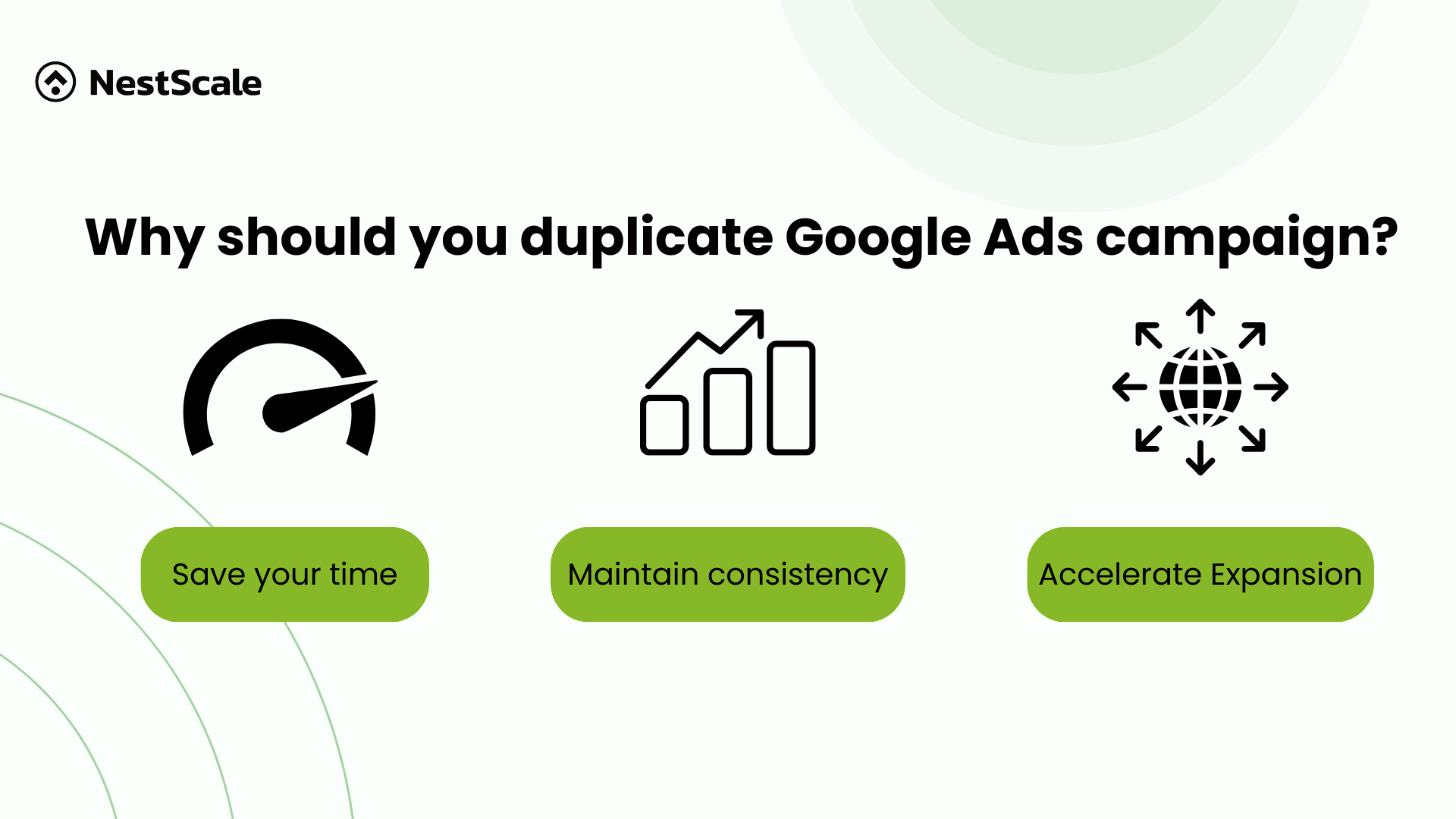
Duplication of Google Ad campaigns offers several advantages, including significant time savings, consistency in messaging, and simplified testing of variations. By creating copies of existing campaigns, advertisers can streamline their processes and maintain brand uniformity across different ads. This approach also facilitates rapid experimentation with different strategies without starting from scratch.
One of the primary benefits of duplicating campaigns is the time efficiency it provides. Advertisers can quickly replicate successful campaigns and adjust specific parameters such as targeting, budgets, or ad creatives. This allows for faster deployment of campaigns that have already proven effective, minimizing the time spent on initial setup and optimization.
Additionally, maintaining consistency in messaging is crucial for brand recognition. When campaigns are duplicated, the core messaging and branding elements remain intact, which helps in reinforcing the brand’s identity. This is especially beneficial for businesses running multiple campaigns simultaneously, ensuring that all advertisements convey a unified message to their target audience.
- Ease of Testing Variations: Duplicating campaigns enables advertisers to test different ad variations efficiently. By altering a few elements in the duplicated campaign, such as headlines or call-to-action buttons, one can measure performance differences without the risk of losing the original campaign’s effectiveness.
- Targeting Adjustments: Duplicated campaigns can be tailored to different audience segments or geographic locations, allowing for more precise targeting strategies.
- Performance Benchmarking: By keeping the original campaign active alongside its duplicate, advertisers can compare performance metrics side by side, providing insights into what works best.
Expert Tip: When duplicating campaigns, consider using different ad formats or extensions within the duplicates to gather comprehensive data on performance variations. This approach not only enhances testing but also helps in discovering optimal ad elements that resonate with the target audience.
Are there any costs associated with duplicating Google Ads?
Duplicating Google Ads does not inherently incur additional costs from Google. However, the overall ad spend may increase depending on how the duplicated campaigns are managed and optimized.
When a campaign is duplicated, it essentially creates a new set of ads that can run concurrently with the original. This means that if both campaigns are active and competing for the same keywords, they may drive up costs due to increased competition. Factors that can affect the overall cost include:
- Bid Strategy: If both campaigns use aggressive bidding strategies, the cost-per-click (CPC) may rise significantly.
- Budget Allocation: If the budget is not adjusted, the total spend can exceed expectations as both campaigns draw from the same budget pool.
- Targeting Options: Different targeting settings for the duplicated campaign may lead to varying cost implications based on audience competition.
In addition, duplicated campaigns might require additional monitoring and management efforts. A lack of optimization can lead to wasted spend on underperforming ads. Therefore, while duplicating campaigns is free in terms of Google’s fees, the financial implications depend on how the campaigns are structured and managed.
Expert Tip: Regularly analyze the performance of both the original and duplicated campaigns. Adjust bids, budgets, and targeting to ensure that duplicating ads enhances performance without unnecessarily inflating costs.
Can you duplicate Google Ads across different accounts?
Yes, you can duplicate Google Ads across different accounts, but there are limitations and specific methods to follow. While Google Ads does not offer a direct feature for copying campaigns between accounts, users can manually replicate campaigns or utilize third-party tools. Understanding these methods is essential for effective campaign management.
Duplicating campaigns involves two main approaches: manual replication and using third-party tools. Manual replication requires users to recreate each campaign element, including ad copy, keywords, and targeting settings, in the new account. This method is time-consuming and prone to errors if not carefully executed. In contrast, third-party tools can streamline this process, enabling users to export campaigns from one account and import them into another. However, these tools often come with limitations, such as restrictions on certain campaign types or features that may not transfer seamlessly.
Another consideration is the account structure and settings. If the original account has specific configurations, such as linked Google Analytics or conversion tracking, these will need to be set up again in the new account. Additionally, account-level settings, such as billing information and user permissions, do not transfer during the duplication process. Understanding these differences can help prevent disruptions in campaign performance.
Expert Tip: When duplicating campaigns, ensure that you monitor performance metrics closely after the transfer. Small discrepancies in settings or configurations can lead to significant variations in outcomes.
How long does it take to duplicate a Google Ads campaign?
Duplicating a Google Ads campaign typically takes between 30 minutes to a few hours, depending on the complexity of the original campaign and the adjustments needed. Simple campaigns may be duplicated quickly, while more intricate setups with multiple ad groups and specific targeting may require additional time.
Several factors influence the time required to duplicate a campaign. First, the structure of the original campaign plays a significant role. Campaigns with multiple ad groups, varied targeting settings, or extensive keyword lists will naturally take longer to replicate. Additionally, if the duplication involves modifying elements such as targeting locations, ad copy, or bidding strategies, this can add to the time spent. Technological proficiency also impacts speed; users familiar with the Google Ads interface can duplicate campaigns more efficiently than those still learning.
Practical implications include the need for thorough review and adjustments post-duplication. After duplicating a campaign, it is crucial to assess the new campaign settings to ensure they align with marketing goals. This may involve refining keywords, adjusting bids, or tailoring ad copy to better suit the target audience. Allowing time for this review process is essential for optimizing campaign performance.
Expert Tip: Utilize Google Ads Editor for bulk actions; it can significantly speed up the duplication process. This tool allows for offline editing and can handle multiple campaigns simultaneously, making it ideal for larger accounts.
What are common mistakes when duplicating Google Ads?
Common mistakes when duplicating Google Ads include failing to adjust targeting settings, neglecting to review ad copy, and not analyzing performance metrics. These pitfalls can lead to ineffective campaigns that do not resonate with the intended audience. Addressing these issues is crucial for successful campaign duplication.
One significant mistake is not updating the targeting settings. Each campaign should be tailored to specific audiences based on geographic location, demographics, and interests. Duplicating a campaign without modifying these settings can result in wasted budget and poor ad performance, as the duplicated campaign may not align with the new target audience.
- Neglecting ad copy variation: Simply copying and pasting the same ad content can limit engagement. Different campaigns should feature unique messaging that resonates with the specific audience you are targeting.
- Ignoring performance metrics: Before duplicating a campaign, it is essential to analyze its performance data. Understanding what worked and what didn’t can inform necessary adjustments to improve the new campaign’s effectiveness.
- Overlooking budget and bidding settings: Each campaign may require different budgets and bidding strategies. A direct duplication can lead to overspending or underspending, impacting the overall success of the campaign.
Another common error is failing to implement appropriate tracking and conversion settings. A duplicated campaign should have its conversion tracking set up to ensure that performance can be accurately measured. Without this, it becomes challenging to assess the campaign’s effectiveness and make necessary adjustments.
Expert Tip: Always conduct A/B testing on duplicated campaigns to identify which variations perform best. This practice allows for data-driven decisions that can enhance overall campaign success and optimize ad spend.
Can you duplicate ad groups within a Google Ads campaign?
Yes, you can duplicate ad groups within a Google Ads campaign easily. This feature allows advertisers to replicate existing ad groups to streamline campaign management and testing. By duplicating ad groups, you can quickly create variations without starting from scratch.
For example, imagine a company running a campaign for a new product line with multiple ad groups focused on different demographics. The marketing team identifies a successful ad group targeting millennials. To optimize their efforts, they duplicate this ad group to create a new one aimed at Gen Z. The duplicated ad group retains the same ads, keywords, and settings, allowing for rapid testing of messaging and targeting strategies for the new audience.
When duplicating ad groups, it is essential to review the settings in the new group, as certain parameters, such as bids or budget limits, may require adjustment based on the target audience’s behavior. Furthermore, duplicating ad groups can facilitate A/B testing, enabling advertisers to compare performance metrics across different demographics or variations of ads effectively. This approach can lead to enhanced campaign performance and better allocation of advertising resources.
Expert Tip: When duplicating ad groups, consider using different ad copy or call-to-action phrases to evaluate which resonates best with the new target audience. This will provide deeper insights into consumer preferences and improve overall campaign effectiveness.
Advanced Techniques for Effective Campaign Duplication
This section delves into advanced strategies for optimizing duplicated Google Ad campaigns, focusing on techniques that enhance performance and precision. By employing these methodologies, marketers can ensure that their duplicated campaigns drive better results and meet specific business objectives.

Utilizing A/B Testing to Refine Duplicated Campaigns
A/B testing is a powerful method for evaluating the effectiveness of different campaign elements. By creating variations of the duplicated campaign, marketers can test variables such as ad copy, images, and call-to-action phrases. This approach allows for data-driven decisions to improve click-through rates (CTR) and conversion rates.
- Identify one variable to test at a time to isolate its impact.
- Run tests simultaneously to ensure results are not affected by external factors.
- Analyze performance data post-campaign to determine the winning variation.
Adjusting Targeting Settings for Specific Audience Segments
Duplicating a campaign without adjusting targeting settings may limit its effectiveness. Tailoring audience segments based on demographics, interests, and behaviors can enhance engagement. Utilize Google Ads’ audience insights to identify high-potential groups.
- Refine geographic targeting to focus on regions with higher conversion rates.
- Employ remarketing lists to re-engage users who have previously interacted with your brand.
- Experiment with in-market audiences to attract users actively considering purchases.
Implementing Custom Tracking for Performance Analysis
To gain deeper insights into duplicated campaign performance, implementing custom tracking parameters is vital. This allows for granular analysis of traffic sources and user behavior after clicking on ads. Google Analytics and UTM parameters can facilitate this process.
- Create unique UTM codes for each duplicated campaign to track their effectiveness separately.
- Monitor key performance indicators (KPIs) such as conversion rates and return on ad spend (ROAS).
- Use conversion tracking to measure the impact of specific ad variations on overall campaign success.
Leveraging Automation Tools to Streamline the Duplication Process
Automation tools can significantly enhance efficiency in campaign duplication. By utilizing features such as Google Ads Editor or automated rules, marketers can expedite the setup and management of multiple campaigns.
- Use Google Ads Editor for bulk editing and duplicating campaigns efficiently.
- Set up automated rules to adjust bids or pause underperforming ads based on real-time metrics.
- Integrate third-party tools for advanced automation and performance tracking.
Most articles on this topic overlook the importance of integrating advanced analytics and automation in campaign duplication. Often, marketers focus on the basics, neglecting how these tools can provide a competitive edge. For instance, using automation not only saves time but also reduces human error, ensuring that campaigns are consistently optimized based on real-time data.
To apply these techniques, begin by selecting a campaign to duplicate. Implement A/B testing on key elements, adjust targeting settings for specific segments, and set up custom tracking to monitor performance. Finally, leverage automation tools to streamline the process, allowing for more efficient management of your campaigns. This structured approach will enhance the effectiveness of your duplicated Google Ad campaigns, driving better results for your business.
Analyzing Performance: When to Duplicate vs. Start Fresh
This section examines the critical factors influencing whether to duplicate existing Google Ad campaigns or create new ones. Analyzing performance metrics is essential for optimizing advertising effectiveness and maximizing return on investment.
Key Performance Indicators (KPIs)
Establishing a clear understanding of key performance indicators (KPIs) is fundamental to making informed decisions regarding campaign duplication or renewal. Common KPIs include:
- Click-Through Rate (CTR): A measure of how often people click on your ads compared to how often they see them.
- Conversion Rate: The percentage of users who complete a desired action after clicking your ad.
- Cost Per Acquisition (CPA): The total cost of acquiring a customer through your advertising efforts.
Evaluating these metrics allows advertisers to gauge the effectiveness of their campaigns and identify areas for improvement.
Identifying Underperformance
Recognizing when a campaign is underperforming is crucial. Signs of underperformance may include:
- A decline in CTR over a significant period.
- A low conversion rate compared to industry benchmarks.
- A rising CPA that exceeds acceptable thresholds.
When these indicators persist, it may be more beneficial to create a new campaign rather than duplicating an ineffective one.
Market Conditions and Their Impact
Changes in market conditions can significantly affect campaign performance. Factors to consider include:
- Seasonality: Certain products or services may experience fluctuating demand based on the time of year.
- Competitor Activity: Increased competition can lead to higher costs and lower visibility.
- Consumer Behavior Trends: Shifts in consumer preferences can render previous strategies obsolete.
Adapting campaigns to reflect these changes can lead to better performance outcomes.
Historical Data Analysis
Comparing historical data is vital for predicting future performance. Consider the following approaches:
- Analyze past campaigns to identify successful strategies and areas needing improvement.
- Look for patterns in performance metrics during similar timeframes or under similar market conditions.
- Utilize A/B testing results to guide decisions on which elements to replicate or alter.
Historical insights can inform whether duplicating a campaign is a viable strategy or if a fresh approach is warranted.
While duplicating a campaign may seem efficient, it is essential to evaluate its performance comprehensively. Many advertisers mistakenly assume that replication will yield similar results. However, without addressing underlying issues or adapting to changing conditions, duplicated campaigns may underperform just as their predecessors did.
To effectively apply this analysis, follow these steps:
- Review your campaign’s KPIs regularly to identify trends.
- Assess underperformance indicators and determine if they are temporary or persistent.
- Monitor market conditions and adjust strategies accordingly.
- Utilize historical data to inform your decisions on duplication versus starting fresh.
By systematically evaluating these factors, advertisers can make informed decisions that enhance campaign efficacy and drive better results.
Real-World Case Studies: Successful Campaign Duplication
This section explores real-world examples of businesses that effectively duplicated Google Ad campaigns, demonstrating the strategies they employed and the outcomes achieved. These case studies illustrate the potential benefits and pitfalls of campaign duplication, providing valuable insights for marketers.
Retail Brand: Seasonal Campaign Duplication
A prominent retail brand experienced significant success by duplicating its seasonal advertising campaigns. By analyzing previous campaign data, the brand identified peak shopping times and customer behavior trends. This led to a structured approach where they replicated successful elements from past campaigns, such as high-performing ad copy and targeted audience segments.
- ROI Increase: The brand reported a 35% increase in ROI during the duplicated campaign period.
- Audience Targeting: They refined their audience targeting based on previous campaign insights, which resulted in a 20% increase in conversion rates.
- Creative Consistency: Maintaining a consistent brand message across campaigns reinforced brand recognition and loyalty.
Service-Based Company: Optimizing Ad Spend
A service-based company specializing in home renovations optimized its ad spend through the strategic duplication of successful campaigns. Initially, they focused on high-converting keywords and ad placements from previous efforts. By replicating these successful strategies, the company reduced its cost-per-acquisition (CPA) by 15%.
- Keyword Analysis: They identified top-performing keywords from earlier campaigns and duplicated their usage across new ads.
- A/B Testing: The company implemented A/B testing on duplicated ads to fine-tune messaging and visuals, leading to improved click-through rates.
- Budget Reallocation: Savings from reduced CPA allowed for budget reallocation towards broader audience targeting, expanding reach.
Lessons from Failed Duplications
Not all attempts at campaign duplication yield positive results. A tech startup attempted to replicate a high-performing campaign without adjusting for changes in market conditions, leading to a 50% drop in performance. Key reasons for failure included:
- Lack of Market Research: The startup failed to conduct updated market research, resulting in mismatched messaging.
- Ignoring Seasonal Changes: They did not account for shifts in consumer behavior influenced by seasonal trends.
- Static Targeting: The audience segments used for duplication were outdated, failing to capture new potential customers.
Best Practices for Successful Campaign Duplication
Successful campaign duplication requires a strategic approach. Here are best practices derived from various industries:
- Data-Driven Decisions: Utilize analytics to identify successful elements from previous campaigns.
- Customization: Tailor duplicated campaigns to current market conditions and audience preferences.
- Continuous Testing: Implement A/B testing to optimize ad performance continuously.
- Feedback Loops: Establish mechanisms for gathering feedback to refine campaigns over time.
Marketers should leverage these insights by assessing past campaign data and understanding the nuances of audience behavior. Begin by identifying key performance indicators (KPIs) from previous campaigns and use them as benchmarks for new initiatives. Implement A/B testing to refine messaging and targeting, ensuring that each duplicated campaign is optimized for current market dynamics.
Frequently Asked Questions
How do you duplicate a Google Ads campaign?
To duplicate a Google Ads campaign, navigate to the campaign you wish to copy, select “Edit,” and choose “Copy.” Then, click “Edit” again and select “Paste” to create a duplicate campaign within the same account.
What are the benefits of duplicating Google Ad campaigns?
Duplicating Google Ad campaigns allows for rapid scaling and testing of different strategies without starting from scratch. It also helps maintain consistency in targeting and ad creatives across multiple campaigns.
Are there any costs associated with duplicating Google Ads?
There are no direct costs for duplicating Google Ads campaigns, as the duplication process itself is free. However, any ads that run as a result of the duplication will incur the same costs as original campaigns based on clicks and impressions.
Can you duplicate Google Ads across different accounts?
Direct duplication of Google Ads across different accounts is not possible within the Google Ads interface. However, you can manually recreate campaigns by exporting settings and importing them into the other account.
How long does it take to duplicate a Google Ads campaign?
The duplication process for a Google Ads campaign is typically quick, often taking just a few minutes. The time may vary based on the complexity and number of settings in the original campaign.
What are common mistakes when duplicating Google Ads?
Common mistakes include failing to update targeting settings or budgets, which can lead to inefficient ad performance. Another mistake is not reviewing ad copy and keywords, resulting in duplicates that do not align with campaign goals.
Can you duplicate ad groups within a Google Ads campaign?
Yes, ad groups within a Google Ads campaign can be duplicated similarly to entire campaigns. This allows for efficient replication of settings and ads while maintaining the overall structure of the original campaign.
Final Thoughts on can you duplicate google ad campaigns
Duplicating Google Ad campaigns can significantly enhance efficiency and scalability when executed correctly. By understanding the nuances of campaign duplication, advertisers can leverage successful strategies while minimizing the risks associated with performance inconsistencies.
To maximize the benefits of duplicating campaigns, conduct a thorough performance analysis of existing ads before initiating duplication. This ensures that only the most effective elements are replicated, optimizing overall ad spend and results.
Mastering the art of campaign duplication is essential for staying competitive in the dynamic landscape of digital advertising.
Leave a Reply