
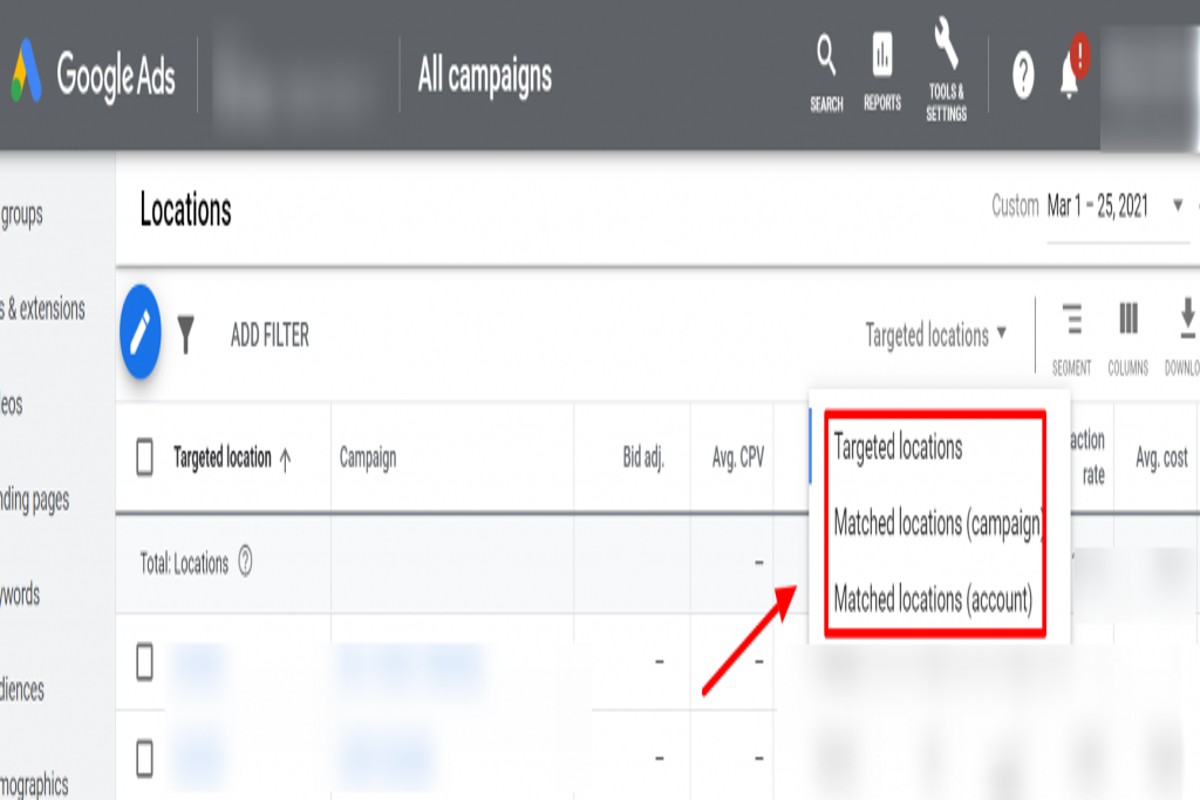
To find matched locations in Google Ads, navigate to the ‘Locations’ tab in your campaign settings. Utilize the ‘Location options’ to refine your targeting based on geographic data, ensuring your ads reach the appropriate audience.
Understanding how to find matched locations in Google Ads is crucial for advertisers aiming to optimize their campaigns. Accurate location targeting can significantly impact ad performance and return on investment, making it essential to grasp this feature fully.
This guide provides a step-by-step approach to identifying matched locations, tips for refining geographic targeting, and best practices to enhance your campaign’s effectiveness.
What are matched locations in Google Ads?
Matched locations in Google Ads refer to the geographic areas where your ads are displayed based on user searches and your specific targeting settings. This feature enables advertisers to reach potential customers in relevant locations, enhancing the effectiveness of their campaigns. By utilizing matched locations, businesses can tailor their ads to specific regions, maximizing engagement and conversion rates.
Matched locations are determined by several factors, including the location settings in your campaign, the physical location of users, and their search queries. Advertisers have the option to specify targeted locations, such as countries, regions, cities, or even a radius around a specific point. Additionally, Google uses information from users’ devices to refine ad delivery, ensuring that ads are shown to individuals who are geographically relevant to the business.
There are different types of matched locations in Google Ads, including:
- Location targeting: Focuses on specific geographic areas where ads will be displayed.
- Location extensions: Adds business addresses to ads, making it easier for users to find physical locations.
- Geographic bid adjustments: Allows advertisers to increase or decrease bids based on the performance of specific locations.
To effectively utilize matched locations, advertisers should regularly review their campaign performance data. This helps identify which areas yield the best results and allows for strategic adjustments. Analyzing location performance can lead to optimized ad spend and improved ROI.
Expert Tip: Leveraging Google Ads’ location insights can reveal emerging markets or untapped regions that may not have been initially considered, presenting new opportunities for growth.
How do I set up location targeting in Google Ads?
To set up location targeting in Google Ads, access your campaign settings, select ‘Locations’, and then choose the geographic areas you want to target. This process allows you to specify the locations where your ads will be shown, ensuring they reach your intended audience effectively.
Begin by logging into your Google Ads account and navigating to the campaign you wish to configure. Click on the ‘Settings’ tab, then scroll down to the ‘Locations’ section. Here, you can enter specific locations such as countries, regions, cities, or even a radius around a point of interest. Google Ads provides options to include or exclude certain areas, allowing for precise targeting.
Consider using the ‘Advanced Search’ feature for more granular control. This tool allows you to target specific demographics, such as people who are in or regularly in your selected locations. Additionally, you can set up location groups based on criteria like businesses or places of interest, which can enhance the relevance of your ads.
Adjusting Location Targeting Options
Google Ads also offers options to adjust how your location settings affect your ad visibility. You can choose to target people based on their physical location or the location they have shown interest in, which can significantly impact campaign performance. Regularly reviewing your location performance metrics will help refine your targeting strategy over time.
For optimal results, consider testing different location settings and analyzing their effectiveness. Utilizing A/B testing can reveal which locations yield the highest conversion rates and help allocate your budget more efficiently.
Expert Tip: Regularly update your location targeting based on changing market dynamics and customer behavior. This proactive approach ensures that your ads remain relevant and appealing to your target audience.
What is the difference between location targeting and location options in Google Ads?
Location targeting in Google Ads determines the geographic areas where your ads will be shown. In contrast, location options specify the criteria for how closely a user’s location must match your targeted areas. Understanding these distinctions is crucial for optimizing ad reach and effectiveness.
Location targeting allows advertisers to select specific regions, such as countries, cities, or even a radius around a location. This feature provides the flexibility to focus on areas where potential customers are likely to be. For instance, a business can target a specific city or a radius of 10 miles around its physical store. The choice of location targeting directly influences the potential audience size and relevance of ad impressions.
Location options, on the other hand, refine how user locations are matched to the targeted areas. There are several settings available under location options, including:
- People in or regularly in your targeted locations: Ads will show to users who either are currently in the area or have a history of being there.
- People searching for your targeted locations: This option displays ads to users who are searching for services in the targeted area, regardless of their actual location.
- People who show interest in your targeted locations: Ads will reach users who have previously shown interest in the geographic region, even if they are not currently located there.
By selecting the appropriate combination of location targeting and options, advertisers can enhance their campaign’s effectiveness. The right settings will ensure that ads reach the most relevant audience, maximizing engagement and conversion rates.
Expert Tip: Regularly review and adjust your location options based on campaign performance data. This enables fine-tuning of your audience targeting and can significantly improve ROI by aligning ad visibility with user intent and location behavior.
How much does location targeting cost in Google Ads?
The cost of location targeting in Google Ads primarily depends on your bidding strategy and the level of competition for the selected locations. Costs can range from a few cents to several dollars per click, influenced by various factors related to your campaign settings and market dynamics.
Several factors can impact the cost of location targeting in Google Ads:
- Bidding Strategy: The choice of bidding strategy—manual CPC, enhanced CPC, or automated bidding—can significantly influence costs. Higher bids typically lead to better ad placements.
- Competition: The level of competition in your targeted geographic area affects pricing. In highly competitive markets, bids may need to be higher to secure visibility.
- Ad Quality and Relevance: Google uses a Quality Score that considers ad relevance and landing page experience. Higher quality ads can lead to lower costs per click, as Google rewards advertisers who deliver a better experience.
- Geographic Location: Different regions may have varying costs associated with location targeting. Urban areas often have higher competition, which can drive up costs compared to rural locations.
In practical terms, advertisers should regularly monitor and adjust their bids based on performance and competition. Utilizing tools like Google’s Keyword Planner can help estimate costs and refine targeting strategies effectively.
Expert Tip: To optimize costs, consider layering location targeting with demographic filters. This approach can enhance ad relevance and potentially lower CPC by reaching a more qualified audience.
How long does it take to see results from location targeting in Google Ads?
Results from location targeting in Google Ads can be observed almost immediately after your ads are approved, typically within a few hours. However, achieving optimal performance and refining your targeting strategy may take several weeks, as data accumulates and adjustments are made.
Several factors influence the timing of results from location targeting. The approval process for ads is generally swift, allowing campaigns to start delivering impressions and clicks almost right away. However, the effectiveness of these ads may vary based on the competition in the selected locations, the relevance of the ad content, and the overall quality score assigned by Google. High competition can lead to increased costs per click, potentially delaying the return on investment.
Additionally, analyzing performance data takes time. Initially, metrics such as click-through rate (CTR) and conversion rate can fluctuate, making it essential to monitor trends over the first few weeks. Continuous optimization based on location performance—such as adjusting bids or refining targeting criteria—can enhance results over time. Seasonal factors and local events can also impact performance, making it crucial to remain agile in your strategy.
Expert Tip: Regularly review and analyze your location performance reports to identify underperforming areas. This proactive approach allows for timely adjustments that can significantly improve the effectiveness of your location targeting strategy in Google Ads.
What are the best practices for using matched locations in Google Ads?
To effectively use matched locations in Google Ads, implement strategies that enhance targeting and optimize ad performance. Best practices include utilizing location reports, regularly assessing campaign performance, and adjusting bids based on location effectiveness.
Start by leveraging location reports to identify which geographical areas yield the best results. These reports provide insights into user behavior, conversion rates, and overall campaign performance by region. Use this data to refine targeting and focus on locations that generate high engagement and return on investment (ROI).
- Regularly review performance metrics: Set a schedule to analyze location performance at least once a month. Look for trends in clicks, conversions, and costs associated with different regions. This ongoing analysis allows for timely adjustments to optimize campaigns.
- Adjust bids based on location effectiveness: Utilize bid adjustments to allocate budget strategically. If certain locations consistently outperform others, consider increasing bids for those areas to maximize visibility and conversion potential.
- Use location targeting options wisely: Google Ads offers various targeting options, such as radius targeting or targeting by specific locations. Choose the method that aligns best with your business goals and audience demographics, ensuring that your ads reach the most relevant users.
- Test and iterate: Implement A/B testing for different location settings and ad creatives. Experiment with various approaches to see which combinations yield the best performance, and refine your strategy based on the results.
Expert Tip: Consider incorporating local keywords into ad copy to enhance relevance for specific regions. This approach can improve click-through rates (CTR) and align messaging with the interests of users in those areas.
Can I target multiple locations in Google Ads?
Yes, you can target multiple locations in Google Ads by selecting various geographic areas in your campaign settings. This feature allows advertisers to reach specific audiences in different regions simultaneously, enhancing campaign effectiveness.
For example, a local coffee shop in San Francisco may want to expand its reach to nearby cities, such as Oakland and Berkeley. In the campaign settings, the advertiser would navigate to the “Locations” section and manually input the desired cities. Additionally, Google Ads offers options to target specific zip codes or even a radius around a location, allowing for precise targeting based on the shop’s delivery or service area.
Moreover, advertisers can utilize location groups to combine multiple locations into a single targeting option. This is beneficial for businesses with multiple branches or franchises. By creating a location group, the coffee shop could target all its locations at once, streamlining management and ensuring consistent messaging across different areas.
Expert Tip: Regularly review location performance reports in Google Ads to identify which areas yield the best results. Adjusting bids based on performance can optimize budget allocation and improve overall campaign ROI.
Advanced Techniques for Optimizing Matched Locations
This section delves into advanced strategies for optimizing matched locations in Google Ads, focusing on tactics that enhance local targeting effectiveness and improve ad performance.

Utilizing Radius Targeting for Local Campaigns
Radius targeting allows advertisers to reach potential customers within a specific distance from a location. This technique is especially beneficial for local businesses aiming to attract nearby consumers. For example, a restaurant can set a radius of 5 miles to ensure ads are shown to users likely to visit. Radius targeting can be customized to fit various campaign goals, whether it’s promoting a single store or multiple locations.
Creating Custom Location Groups Based on Business Needs
Custom location groups enable advertisers to tailor their targeting to specific business requirements. By grouping various locations, businesses can optimize their campaigns based on performance metrics. For instance, a retail chain might create a group for urban locations and another for suburban areas, allowing for differentiated budgeting and messaging strategies. This customization enhances relevance and engagement with the target audience.
Leveraging Location-Based Audience Insights for Better Targeting
Utilizing location-based audience insights can significantly refine targeting efforts. Google Ads provides demographic data and behavior analytics based on user locations. By analyzing these insights, advertisers can identify high-performing regions and adjust bids accordingly. For instance, if a certain city shows higher conversion rates, increasing the budget for that area can yield better returns.
Implementing Geo-Fencing for Precise Ad Delivery
Geo-fencing involves creating virtual boundaries around a specific geographic area to deliver ads to users when they enter that space. This method is particularly effective for time-sensitive promotions or events. For example, a retailer can set up geo-fences around their store to trigger ads when potential customers are nearby. This precision ensures that ads reach individuals who are most likely to convert, enhancing the overall effectiveness of campaigns.
Nuancing Targeting Strategies
One common misconception is that broader targeting yields better results. However, precision often trumps reach in local advertising. Advertisers should consider edge cases where a broader radius may dilute ad effectiveness. For example, a business targeting a niche market may find that focusing on a smaller, more relevant audience leads to higher engagement and conversion rates. Additionally, advertisers should regularly review and adjust their strategies based on performance data to optimize their matched locations continually.
Practical Application
- Implement radius targeting by setting specific distances for local campaigns.
- Create custom location groups based on performance metrics to allocate budgets effectively.
- Analyze location-based audience insights regularly to identify high-conversion areas.
- Set up geo-fences around physical locations to trigger targeted ads for nearby users.
By applying these strategies, advertisers can significantly enhance their ability to find matched locations in Google Ads, leading to improved campaign performance and increased return on investment.
Common Mistakes in Location Targeting and How to Avoid Them
Effective location targeting is vital for maximizing the ROI of Google Ads campaigns. This section highlights common mistakes advertisers make and offers actionable solutions to enhance targeting strategies.
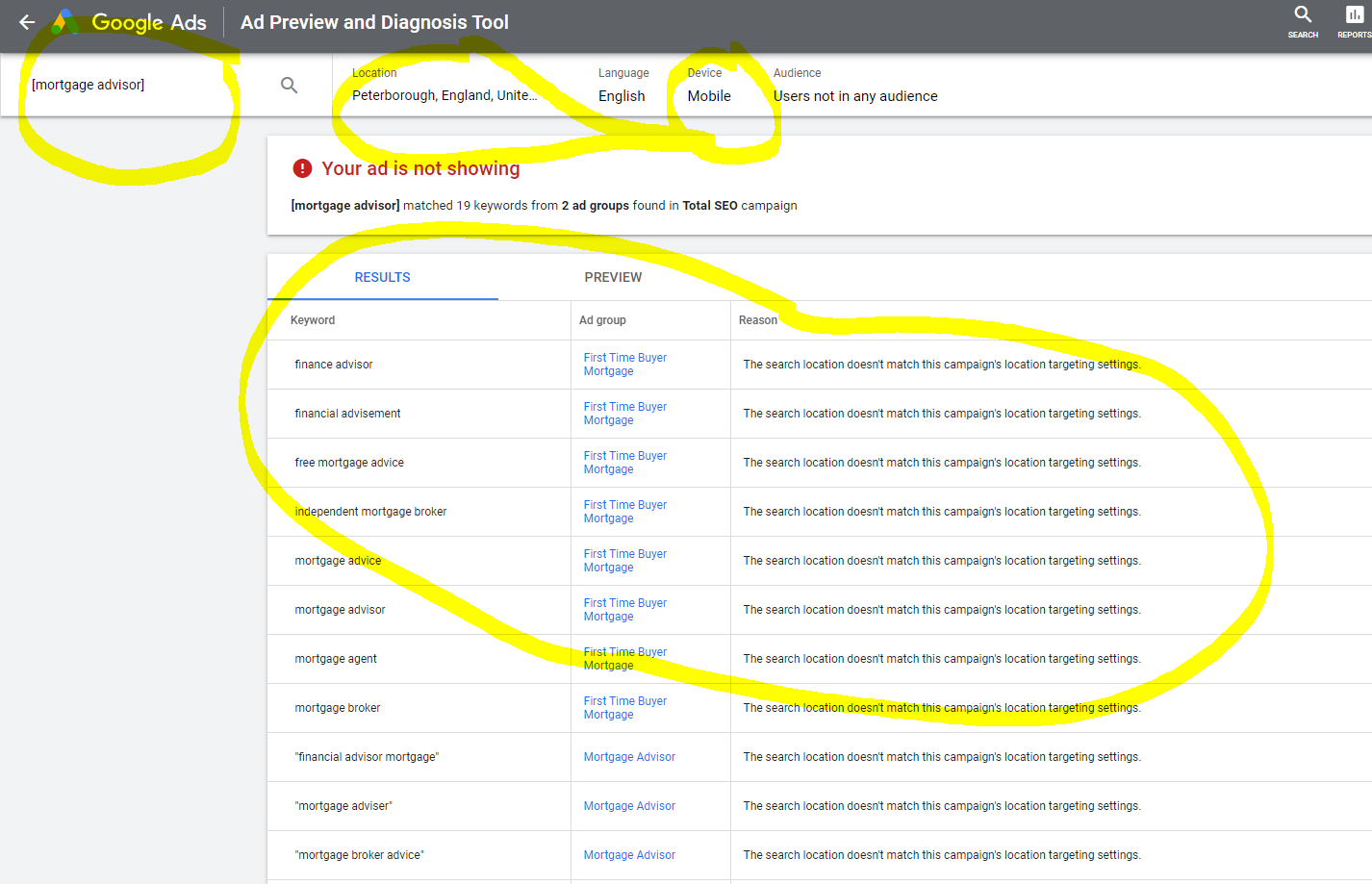
Failing to Exclude Unwanted Locations
Many advertisers neglect to exclude locations that do not align with their target audience. This oversight can lead to wasted ad spend and diluted campaign performance. For instance, a local business may inadvertently target an entire country instead of focusing on its city, resulting in clicks from irrelevant regions.
- Conduct thorough research to identify regions that do not convert.
- Utilize the “Location exclusions” feature in Google Ads to filter out these areas.
- Regularly review and update excluded locations based on performance data.
Not Adjusting Bids for High-Performing Areas
Another common pitfall is failing to adjust bids for areas that yield higher conversion rates. Advertisers may set uniform bids across all locations, missing opportunities to capitalize on successful regions.
- Analyze performance metrics to identify high-performing locations.
- Implement location-based bid adjustments to enhance visibility in these areas.
- Continuously monitor performance to optimize bids accordingly.
Ignoring Location Performance Reports
Location performance reports provide critical insights into how ads perform across different regions. Ignoring these reports can lead to missed opportunities for optimization. Advertisers should regularly analyze these reports to identify trends and adjust strategies accordingly.
- Access location reports in Google Ads to evaluate performance by region.
- Look for patterns in click-through rates and conversion rates.
- Use this data to refine targeting and improve ad spend efficiency.
Overlooking Mobile vs. Desktop Location Targeting Differences
Location targeting effectiveness can differ between mobile and desktop users. Advertisers often overlook this distinction, leading to suboptimal performance. For example, a location that performs well on mobile may not yield the same results on desktop.
- Analyze device performance data to understand where users are engaging.
- Adjust location targeting strategies based on device-specific behaviors.
- Consider creating separate campaigns for mobile and desktop targeting.
While many articles discuss general location targeting, few delve into the complexities of how user behavior varies across devices and demographics. A nuanced approach to location targeting involves segmenting audiences not only by geography but also by device type. This ensures that campaigns are tailored to the unique behaviors of users in each category, resulting in improved engagement and conversion rates.
To implement these strategies effectively, advertisers should take the following actions:
- Conduct a comprehensive review of current location settings and exclusions.
- Utilize performance reports to make informed bid adjustments.
- Create device-specific targeting strategies to cater to mobile and desktop users.
Real-World Applications of Matched Locations in Google Ads
This section explores practical case studies demonstrating the effectiveness of matched locations in Google Ads across various industries. These real-world examples highlight how location targeting strategies can enhance advertising efforts and drive significant results.

Case Study: Local Restaurant Utilizing Geo-Targeting
A local restaurant in Austin, Texas, implemented geo-targeting to attract nearby customers. By defining a radius of five miles, the restaurant was able to tailor its ads to showcase lunch specials during peak hours. The result was a 30% increase in foot traffic during weekdays, as well as a 20% rise in online orders. This strategy capitalized on the convenience factor for local patrons, demonstrating the power of location-specific advertising.
Retail Chain Optimizing Ads for Seasonal Events
A national retail chain successfully optimized its Google Ads campaigns around seasonal events, such as back-to-school and holiday shopping. By analyzing customer data, the chain identified key regions where demand for specific products surged during certain times of the year. They adjusted their ads to feature location-based promotions, resulting in a 40% increase in sales during these events. The targeted approach ensured that the right messages reached the right audience at the optimal time.
Success Story: Service Provider Leveraging Local Targeting
A plumbing service provider in a metropolitan area utilized local targeting to improve lead generation. By focusing on neighborhoods with higher home ownership rates, the company tailored its ads to address common plumbing issues faced by residents in those areas. This strategy led to a 50% increase in service calls and improved conversion rates, as the ads resonated with the specific needs of the local population.
Insights from a National Brand Using Regional Campaigns
A prominent national fitness brand adopted a regional campaign strategy to boost membership sign-ups at local gyms. By analyzing regional demographics and interests, the brand created targeted ads that highlighted community events and local success stories. This tailored approach resulted in a 25% increase in new memberships in targeted regions, showcasing how localized marketing efforts can drive significant engagement and business growth.
Common misconceptions about matched locations include the belief that broader targeting always yields better results. However, these case studies illustrate that precision in targeting can often prove more effective than a blanket approach.
To implement these insights, businesses should:
- Analyze local demographics and customer behavior to inform targeting strategies.
- Utilize seasonal data to optimize ad campaigns around relevant events.
- Test different radius settings to identify the most effective locations for your target audience.
- Continuously monitor and adjust campaigns based on performance metrics.
Employing these strategies can maximize the effectiveness of Google Ads and ensure that marketing efforts resonate with the intended audience. Businesses must take actionable steps to refine their location targeting for optimal results.
Frequently Asked Questions
What are matched locations in Google Ads?
Matched locations in Google Ads refer to specific geographic areas where ads are targeted based on user searches and behavior. This feature helps advertisers reach audiences in relevant locations to enhance ad performance.
How do I set up location targeting in Google Ads?
To set up location targeting in Google Ads, navigate to the campaign settings and select the “Locations” option. You can then choose specific countries, regions, or even a radius around a location to target your ads.
What is the difference between location targeting and location options in Google Ads?
Location targeting determines where your ads will be shown, while location options provide additional settings that refine how ads are shown based on user location. Location options include settings like “People in or regularly in your targeted locations.”
How much does location targeting cost in Google Ads?
The cost of location targeting in Google Ads varies based on factors like competition and bidding strategy. Advertisers pay for clicks or impressions, so expenses depend on the effectiveness of the targeted locations.
How long does it take to see results from location targeting in Google Ads?
Results from location targeting can typically be seen within a few days of launching the campaign. However, significant insights may take a few weeks as data accumulates and optimizations are made.
What are the best practices for using matched locations in Google Ads?
Best practices for matched locations include using specific geographic targeting, analyzing performance data, and adjusting bids based on location performance. Regularly reviewing and optimizing locations can enhance ad effectiveness.
Can I target multiple locations in Google Ads?
Yes, Google Ads allows advertisers to target multiple locations within a single campaign. You can select various cities, regions, or even countries to reach a broader audience.
Final Thoughts on how to find matched locations google ads
Understanding matched locations in Google Ads is crucial for optimizing your advertising strategy and maximizing ROI. By effectively leveraging location targeting and options, advertisers can significantly enhance their campaign relevance and engagement, ensuring that ads reach the right audience in the right places.
To capitalize on these insights, conduct a thorough analysis of your target demographics and geographic performance metrics, then refine your location targeting settings accordingly to align with your business goals.
Mastering matched locations not only drives better campaign performance but also positions businesses to outperform competitors in an increasingly localized market landscape.
Leave a Reply