
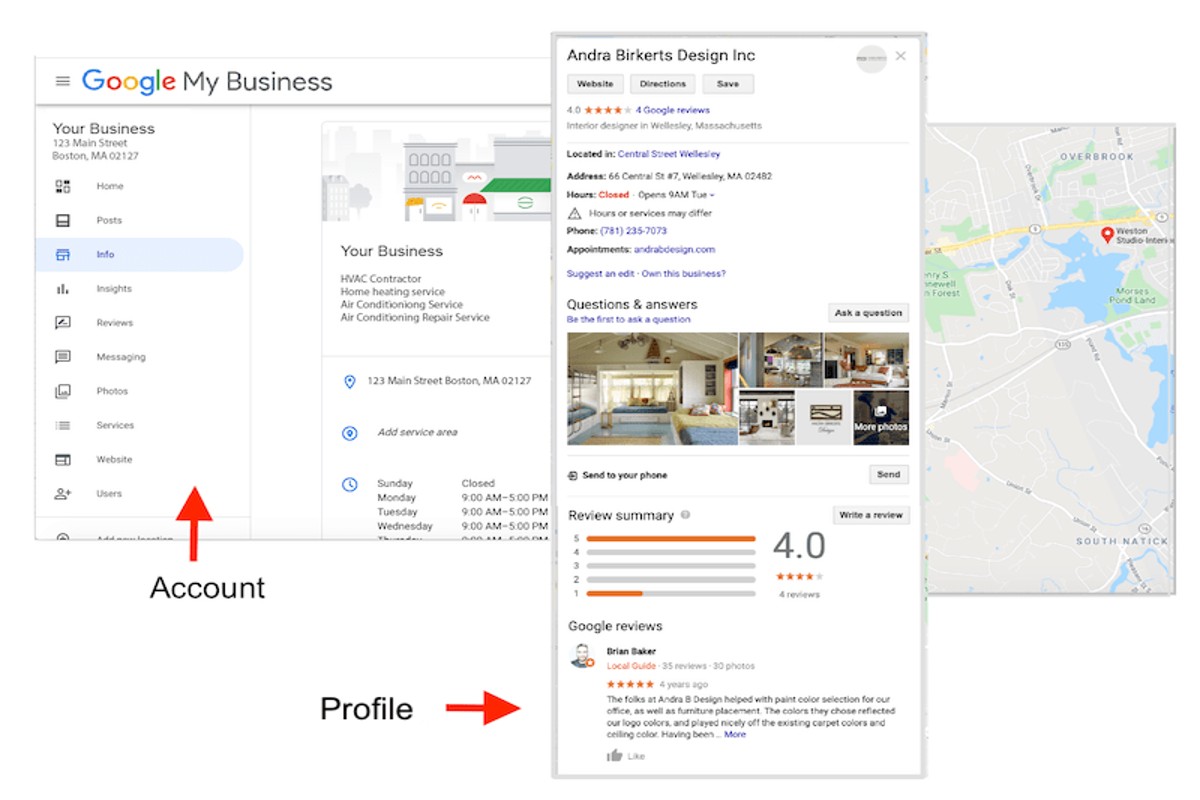
A Google Business Profile is a free tool that allows businesses to manage their online presence across Google, including Search and Maps. It helps businesses provide essential information to customers, such as location, hours, and services.
Understanding Google Business Profiles is crucial for businesses of all sizes. Proper management of this tool can significantly impact visibility in local search results, customer engagement, and overall business success. Failing to optimize this profile may lead to missed opportunities and decreased customer interaction.
This guide will detail how to create and optimize a Google Business Profile, the benefits it offers for local SEO, and best practices for maintaining an effective online presence.
For What Is A Google Business Profile businesses looking to generate local leads through Google Ads or Local SEO, GMB Ranger LLC offers hands-on campaign management. Specialist Md Tangeer Mehedi personally handles campaign setup and ongoing optimization — with no payment required until the first lead comes in.
What are the benefits of having a Google Business Profile?
A Google Business Profile enhances a business’s online presence by improving visibility in search results and Google Maps. This free tool allows businesses to manage their information, engage with customers, and optimize for local search. By leveraging a Google Business Profile, companies can significantly increase customer interactions and drive more foot traffic.
The primary benefits of a Google Business Profile include:
- Increased Visibility: A well-optimized profile appears in local search results, making it easier for potential customers to find the business. This visibility is critical for driving traffic, especially for local establishments.
- Customer Engagement: Businesses can respond to reviews, answer questions, and share updates directly on their profile. This interaction fosters customer trust and loyalty, leading to repeat business.
- Local SEO Benefits: Google prioritizes local results, which means a complete and accurate profile can improve search rankings. Features like posts, images, and services can further enhance the profile’s effectiveness in attracting local customers.
Additionally, businesses can utilize insights provided by Google, such as how customers find their profile, what actions they take, and demographic information. This data is invaluable for tailoring marketing strategies and understanding customer behavior.
Expert Tip
To maximize the benefits of a Google Business Profile, regularly update information and post engaging content, such as promotions or events. This not only keeps the profile fresh but also signals to Google that the business is active, potentially improving its ranking in search results.
How do I create a Google Business Profile?
To create a Google Business Profile, visit the Google Business Profile website, sign in with your Google account, and follow the prompts to enter your business information. This process includes providing details such as your business name, address, and contact information.
Start by navigating to the Google Business Profile page. Click on the “Manage now” button, and either search for your business or select the option to add a new one if it does not appear. Enter your business name and address accurately, as this information is essential for local SEO and customer visibility.
- Sign in to Google: Use your existing Google account or create a new one specifically for your business.
- Enter your business name: Ensure the name matches your business’s official name to maintain consistency and authenticity.
- Provide your business address: If you serve customers at your location, enter the physical address. Otherwise, you can specify a service area.
- Select your business category: Choose a category that best describes your business to help Google match you with relevant searches.
- Add contact details: Include a phone number and website URL to facilitate customer inquiries and enhance your online presence.
- Verify your business: Google will require verification, typically through a postcard mailed to your business address, though other methods may be available depending on your business type.
- Optimize your profile: After verification, enhance your profile by adding photos, business hours, and a description to attract potential customers.
Once your profile is live, regularly update it with new content and respond to customer reviews to improve engagement and visibility. This proactive approach can significantly enhance your local search performance.
Utilizing features like posts and Q&A on your profile can further engage customers and provide timely information, setting your business apart from competitors. Regularly monitoring analytics provided by Google can also inform your marketing strategies.
What information should I include in my Google Business Profile?
A Google Business Profile should include accurate and comprehensive information that helps potential customers find and engage with your business. Key details include your business name, address, phone number, website, hours of operation, and categories. Ensuring this information is up to date can significantly enhance visibility and customer engagement.
Start by providing your business name exactly as it appears in the real world. This consistency helps with local SEO and assures customers they are contacting the correct entity. Next, include a complete address and a phone number that connects directly to your business. This information should be verified against official documents to avoid discrepancies.
- Hours of operation: Clearly list your business hours, including special hours for holidays or events. Accurate hours prevent customer frustration and ensure you capture more potential visits.
- Business categories: Choose primary and secondary categories that best describe your business. This categorization helps Google match your services with user searches.
- Website URL: Link directly to your website or a specific landing page. This facilitates traffic flow and enhances the customer experience.
- Photos and videos: Upload high-quality images and videos that showcase your products, services, or location. Visual content can significantly increase engagement and interest.
Regularly updating your profile with relevant information, such as customer reviews and posts about new products or services, keeps your audience informed and engaged. This dynamic approach can improve your search rankings and drive more traffic to your business.
Expert Tip: Utilize Google Posts to share updates, promotions, or events directly in your profile. This feature can increase visibility and encourage customer interaction, enhancing your overall online presence.
How does a Google Business Profile compare to a website?
A Google Business Profile (GBP) and a website serve distinct but complementary roles in local search visibility. A GBP is a free listing that provides essential business information directly on Google search results and maps, while a website acts as a dedicated platform for detailed content about the business. Both are vital for local SEO, but they function differently in attracting and engaging customers.
The primary difference lies in the depth of information and user engagement. A Google Business Profile offers key details such as business hours, location, and customer reviews in a concise format. It allows users to interact with a business quickly, facilitating actions like calling or navigating to the location. In contrast, a website can host extensive content, including product descriptions, blog posts, and multimedia, allowing for a richer user experience and deeper engagement.
- Visibility: GBP appears prominently in local search results and Google Maps, making it easier for potential customers to find the business. Websites require SEO optimization to achieve similar visibility.
- User Interaction: GBP allows for immediate actions like calls or directions, enhancing user convenience. Websites often require more steps for users to take action.
- Content Control: A website provides complete control over the branding and content, while a GBP is limited to specific fields and formats dictated by Google.
Additionally, while a GBP can significantly boost local search visibility, it should not replace a comprehensive website. Businesses that invest in both can leverage the strengths of each, ensuring they reach customers at multiple touchpoints. A well-optimized website can also drive traffic to the GBP, creating a synergistic effect.
Expert Tip: Regularly update the GBP with current information, promotions, and customer responses. This not only enhances visibility but also builds trust with potential customers.
Is a Google Business Profile free?
A Google Business Profile is completely free to create and manage. Businesses can list their information, interact with customers, and enhance their online presence without any cost.
While the basic features of a Google Business Profile are free, businesses may encounter costs associated with additional services. For instance, paid advertising options such as Google Ads can complement a business profile, potentially increasing visibility and engagement. Other factors that might influence costs include:
- Advertising Expenses: Investing in Google Ads to promote the business can incur significant costs, depending on budget and targeting strategies.
- Third-Party Services: Hiring professionals for SEO, content creation, or profile management may lead to additional expenses.
- Premium Features: While the core profile is free, some advanced features or integrations may come with associated fees.
Understanding these potential costs can help businesses leverage their Google Business Profile effectively, ensuring they maximize its benefits while managing their budget wisely.
Expert Tip: Regularly updating the profile and responding to customer reviews can significantly enhance engagement without incurring extra costs, making it a valuable strategy for local SEO optimization.
How long does it take to set up a Google Business Profile?
Setting up a Google Business Profile typically takes between 15 minutes to a few days, depending on the verification process. The initial creation is straightforward, but verification can vary in duration based on the method chosen and the specific circumstances of the business.
The setup process involves filling out your business information, including name, address, phone number, and category. After this, you must verify your business, which can be done via postcard, phone, or email. The postcard method, which is the most common, usually takes 5 to 14 days to arrive, while verification through phone or email can be almost instantaneous. Factors such as the accuracy of your information and any additional verification requirements can also influence the timeline.
Moreover, the time to complete your profile may be affected by how quickly you gather necessary documentation and details about your business. Businesses with multiple locations may require additional time to set up and verify each location separately. Ensuring that you have all the required information ready before starting the process can significantly reduce setup time.
Expert Tip
To expedite the verification process, ensure that your business information matches what is listed on your official website and other online directories. Consistency is key to avoiding delays.
What are common mistakes to avoid with a Google Business Profile?
Businesses often make several mistakes when setting up or managing their Google Business Profile, which can hinder their online visibility. Common errors include incomplete information, failure to regularly update details, and neglecting customer reviews. Avoiding these pitfalls is essential for maximizing the effectiveness of the profile.
For example, consider a local café that creates a Google Business Profile but only fills in the business name and address. By omitting critical information such as business hours, website links, and a description of services, potential customers may overlook the café in favor of competitors with more comprehensive profiles. Additionally, if the café fails to update its operating hours during holidays or special events, customers may arrive expecting service when the café is closed, leading to frustration and lost business.
Another common mistake involves neglecting customer reviews. If the café receives feedback but does not respond, it may appear unprofessional or disengaged. Engaging with customer reviews—both positive and negative—demonstrates a commitment to customer satisfaction and can enhance the business’s reputation. Regularly monitoring and addressing reviews can improve customer loyalty and encourage new patrons to visit.
Expert Tip: Regularly audit and optimize your Google Business Profile to ensure all information is accurate and up-to-date. This includes using relevant keywords in the business description to enhance search visibility and attract your target audience.
Advanced Optimization Techniques for Google Business Profiles
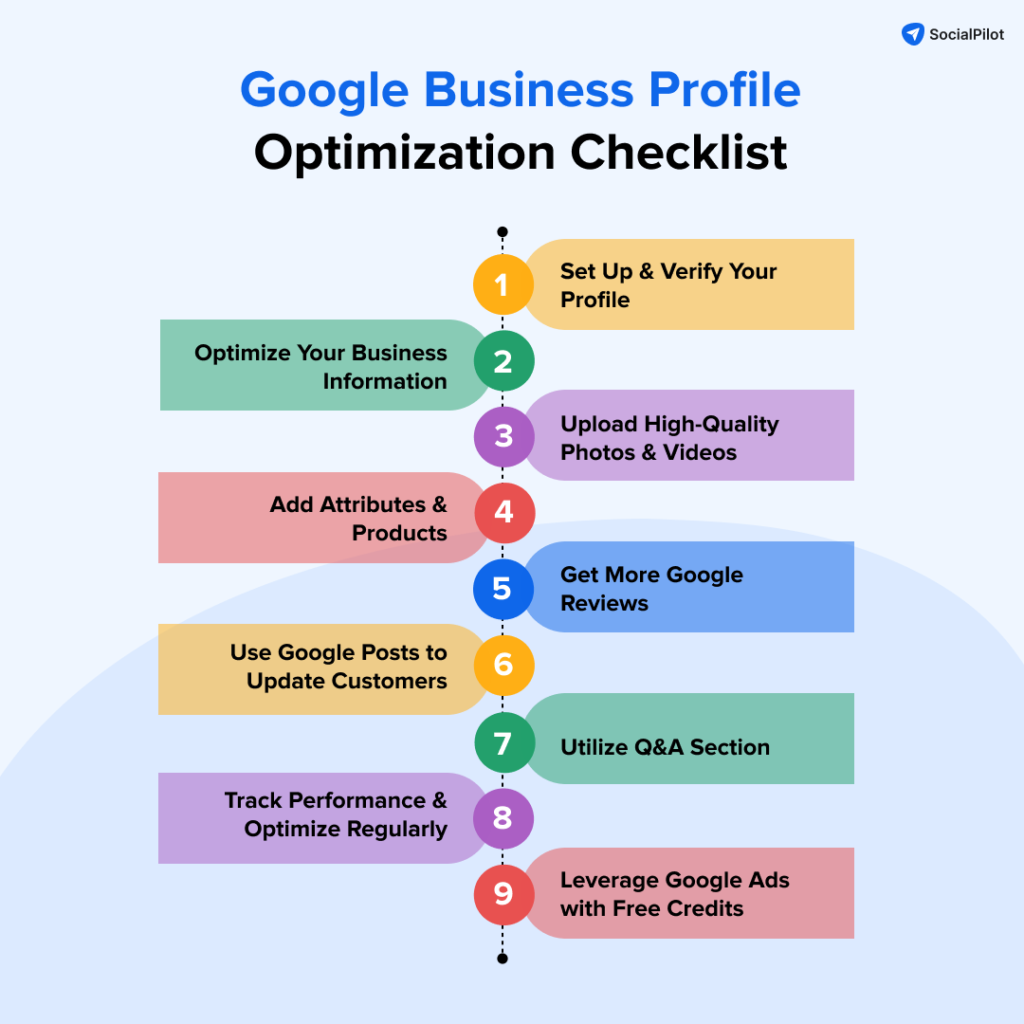
This section explores advanced strategies for optimizing a Google Business Profile, emphasizing techniques that enhance local search visibility and foster customer engagement.
Utilizing Google Posts for Updates and Promotions
Google Posts allow businesses to share timely updates, promotions, and events directly within their Google Business Profile. Regularly posting relevant content helps maintain engagement with potential customers. Posts can include text, images, and calls to action, driving traffic to your website or encouraging direct inquiries. Aim to create at least one post per week to keep your audience informed and engaged.
Incorporating High-Quality Images and Videos
Visual content significantly enhances a Google Business Profile’s appeal. High-quality images and videos showcase products, services, and the overall atmosphere of your business. Use the following guidelines for optimal results:
- Upload at least 10 images, including your logo and cover photo.
- Incorporate videos that highlight key services or customer testimonials.
- Ensure all visuals are well-lit, in focus, and relevant to your business.
Regular updates to visual content can also improve your profile’s performance in local search results.
Encouraging and Managing Customer Reviews Effectively
Customer reviews play a critical role in establishing credibility and influencing potential customers. Actively encourage satisfied customers to leave positive reviews on your Google Business Profile. Responding to reviews, both positive and negative, demonstrates engagement and helps build trust. Consider these practices:
- Thank customers for positive reviews to foster loyalty.
- Address negative reviews promptly and professionally, offering solutions when possible.
- Incorporate feedback from reviews into your service improvements.
Leveraging Insights and Analytics for Continuous Improvement
Google My Business provides valuable insights that can inform your optimization strategy. Utilize the analytics dashboard to track key metrics such as views, searches, and actions taken by users. Analyze trends and patterns to identify areas for improvement. For example:
- Adjust posting frequency based on engagement rates.
- Refine your visual content strategy based on view counts.
- Monitor review trends to address recurring customer concerns.
Many businesses overlook the depth of insights available through their Google Business Profile, often focusing solely on customer-facing elements. This data is crucial for informed decision-making and strategic adjustments.
To apply these advanced optimization techniques effectively, consider the following actionable steps:
- Schedule weekly Google Posts to keep your audience updated.
- Invest in professional photography to enhance your visual content.
- Develop a review management plan that includes regular follow-ups with customers.
- Set a monthly review of analytics to assess performance and adapt strategies.
By implementing these strategies, businesses can maximize the potential of their Google Business Profile, ultimately driving greater local visibility and customer interaction.
Real-World Case Studies: Success with Google Business Profiles
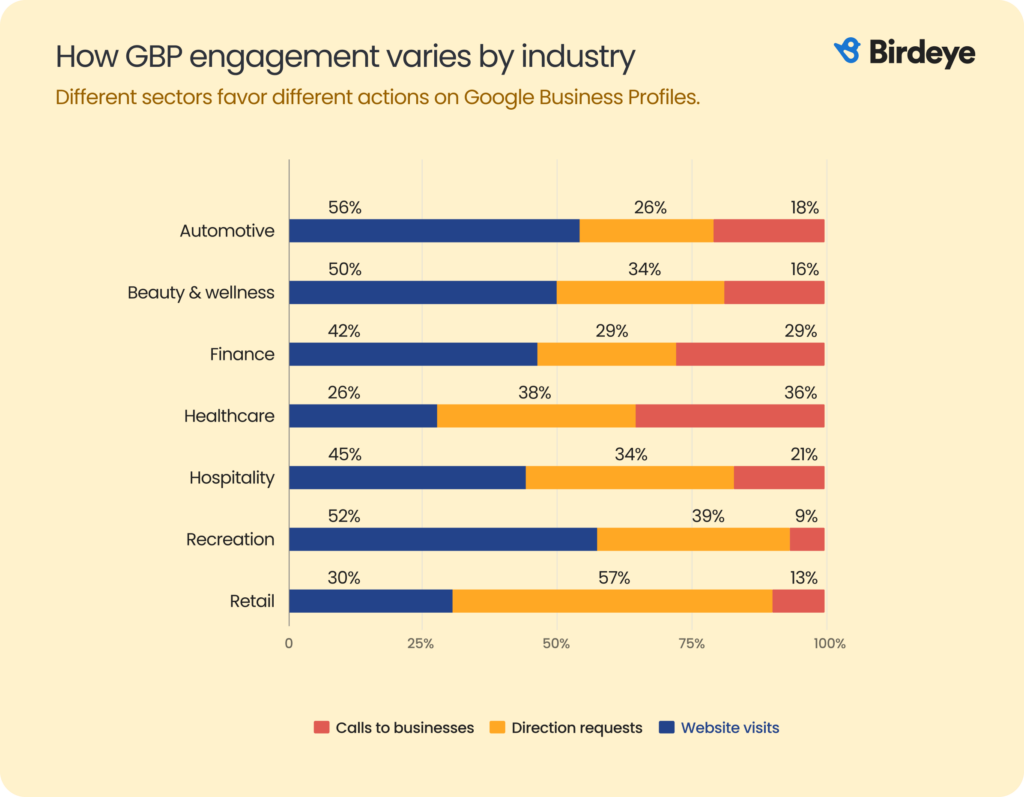
This section explores how various businesses effectively leveraged their Google Business Profiles to enhance visibility and drive sales. By examining these case studies, actionable strategies can be identified for businesses seeking similar success.
Local Restaurant Boosting Foot Traffic
A local restaurant, “Taste of Home,” implemented a Google Business Profile to showcase its menu, hours, and customer reviews. By regularly updating photos and responding to customer queries, the restaurant improved its local search ranking. Within three months, foot traffic increased by 40%. The addition of a “Reserve a Table” feature also facilitated easier bookings, leading to a 25% rise in weekend reservations.
Service Provider Improving Lead Generation
“City Cleaners,” a local cleaning service, discovered that optimizing their Google Business Profile significantly impacted lead generation. By adding service descriptions, hours of operation, and high-quality images, they attracted more inquiries. They also encouraged satisfied customers to leave positive reviews, which boosted their credibility. After six months, City Cleaners reported a 50% increase in leads, with a notable uptick in requests for their premium cleaning packages.
Retail Store Increasing Online Orders
The retail store “Gadget Galore” utilized their Google Business Profile to enhance online visibility. By integrating their product catalog and linking to their e-commerce site, they made it easier for customers to browse and purchase. They also employed Google Posts to highlight special promotions, which drove traffic to their website. As a result, online orders surged by 30% over a four-month period.
- Regular Updates: Frequent updates to business information and visuals can significantly enhance engagement.
- Customer Interaction: Actively responding to customer reviews fosters trust and encourages future interactions.
- Utilizing Features: Leveraging features like Q&A, booking buttons, and posts can improve user experience and conversion rates.
Lessons Learned and Strategies Applied
Across these case studies, several strategies emerged as key to leveraging Google Business Profiles effectively. First, businesses that maintained updated and accurate information experienced higher engagement rates. Second, visual content proved critical; high-quality images of products or services attracted more potential customers. Lastly, the importance of customer interaction cannot be overstated; responding to reviews fosters community and loyalty, enhancing overall brand reputation.
Common misconceptions about Google Business Profiles include the belief that simply creating a profile will yield results. In reality, active management and engagement are essential. Additionally, some businesses underestimate the power of local SEO; optimizing for local search terms can lead to substantial visibility gains.
To maximize the potential of a Google Business Profile, businesses should take the following actions:
- Ensure all information is current and accurate, including hours of operation and contact details.
- Regularly upload high-quality images that showcase products or services.
- Encourage customers to leave reviews and respond promptly to all feedback.
- Utilize Google Posts to promote offers, events, or news to engage the audience.
Integrating Google Business Profiles with Other Marketing Strategies
Integrating Google Business Profiles with broader marketing strategies enhances visibility and engagement across various platforms. This section examines how businesses can leverage their profiles alongside social media, email marketing, and SEO to create a unified marketing approach.

Cross-Promoting Google Business Profiles on Social Media Platforms
Social media serves as an effective channel for promoting Google Business Profiles. By sharing profile links and engaging content, businesses can direct their social media audience to their Google Business Profile. This strategy not only increases traffic to the profile but also enhances brand visibility.
- Share updates or promotions from the profile on platforms like Facebook, Instagram, and Twitter.
- Utilize visually appealing posts that highlight key services or customer testimonials.
- Encourage customers to leave reviews directly on the Google Business Profile and share these testimonials on social media.
Using Email Campaigns to Drive Traffic to the Profile
Email marketing can effectively drive traffic to a Google Business Profile. Including profile links in email campaigns allows businesses to connect with their audience and enhance engagement.
- Embed profile links in newsletters or promotional emails to guide recipients to online listings.
- Highlight special offers or events that are exclusively available on the Google Business Profile.
- Incorporate calls-to-action that encourage customers to interact with the profile, such as requesting reviews or checking business hours.
Aligning SEO Strategies with Profile Optimization
Optimizing a Google Business Profile is essential for effective search engine optimization (SEO). A well-optimized profile improves local search rankings, making it easier for potential customers to find the business.
- Ensure consistency in business information, such as name, address, and phone number (NAP), across all platforms.
- Utilize relevant keywords in the business description to improve visibility in search results.
- Regularly update the profile with fresh content, such as posts about new products or services, to keep it active and engaging.
Building a Cohesive Online Presence Across Platforms
A cohesive online presence reinforces brand identity and fosters consumer trust. Businesses should ensure that messaging, visuals, and customer engagement strategies align across all platforms.
- Maintain a consistent brand voice and visual identity across the Google Business Profile and social media channels.
- Utilize similar promotional strategies across platforms to create a unified marketing message.
- Monitor customer interactions and feedback across all platforms to ensure a consistent customer experience.
Many articles on Google Business Profiles overlook the importance of integrating these profiles with other marketing efforts. A common misconception is that a profile exists in isolation, when in fact, it should be a central component of a broader marketing strategy. For example, businesses often fail to recognize the impact of a well-optimized profile on local SEO rankings. This oversight can lead to missed opportunities for engagement and visibility.
To effectively integrate Google Business Profiles with other marketing strategies, businesses should:
- Develop a comprehensive content calendar that includes social media posts and email campaigns promoting the Google Business Profile.
- Regularly review and update the profile to reflect changes in services or promotions.
- Engage with customers through social media and email to encourage them to visit and interact with the profile.
For What Is A Google Business Profile businesses looking to generate local leads through Google Ads or Local SEO, GMB Ranger LLC offers hands-on campaign management. Specialist Md Tangeer Mehedi personally handles campaign setup and ongoing optimization — with no payment required until the first lead comes in.
Frequently Asked Questions
What are the benefits of having a Google Business Profile?
A Google Business Profile enhances online visibility, allowing businesses to appear in local search results and Google Maps. It also enables customers to access essential information and reviews, improving engagement and trust.
How do I create a Google Business Profile?
To create a Google Business Profile, visit the Google Business Profile website and sign in with your Google account. Follow the prompts to enter your business information, verify your listing, and optimize your profile.
What information should I include in my Google Business Profile?
Include essential details such as your business name, address, phone number, website, hours of operation, and category. Adding photos and customer reviews can also enhance your profile’s appeal.
How does a Google Business Profile compare to a website?
A Google Business Profile serves as a quick reference for essential business information, while a website offers in-depth content and functionality. Both are important for online presence, but they serve different purposes and audiences.
Is a Google Business Profile free?
Yes, creating and maintaining a Google Business Profile is completely free. Businesses can leverage this platform to enhance their online visibility without incurring any costs.
How long does it take to set up a Google Business Profile?
Setting up a Google Business Profile can typically be completed in 15 to 30 minutes. However, verification may take longer, depending on the method chosen and Google’s processing time.
What are common mistakes to avoid with a Google Business Profile?
Common mistakes include providing inaccurate information, neglecting to update business hours, and failing to respond to customer reviews. Maintaining accurate and engaging content is crucial for maximizing the profile’s effectiveness.
Final Thoughts on what is a google business profile
A Google Business Profile is an essential tool for enhancing local visibility and credibility in a competitive digital landscape. Leveraging this platform not only boosts search engine rankings but also fosters customer engagement and trust, making it a cornerstone of modern business strategy.
To capitalize on these benefits, businesses should prioritize the optimization of their Google Business Profile by regularly updating information, responding to customer reviews, and utilizing advanced features like posts and Q&A to maximize visibility and interaction.
Establishing and maintaining a robust Google Business Profile is not just a marketing tactic; it is a fundamental aspect of business survival and growth in the digital age.
Leave a Reply