
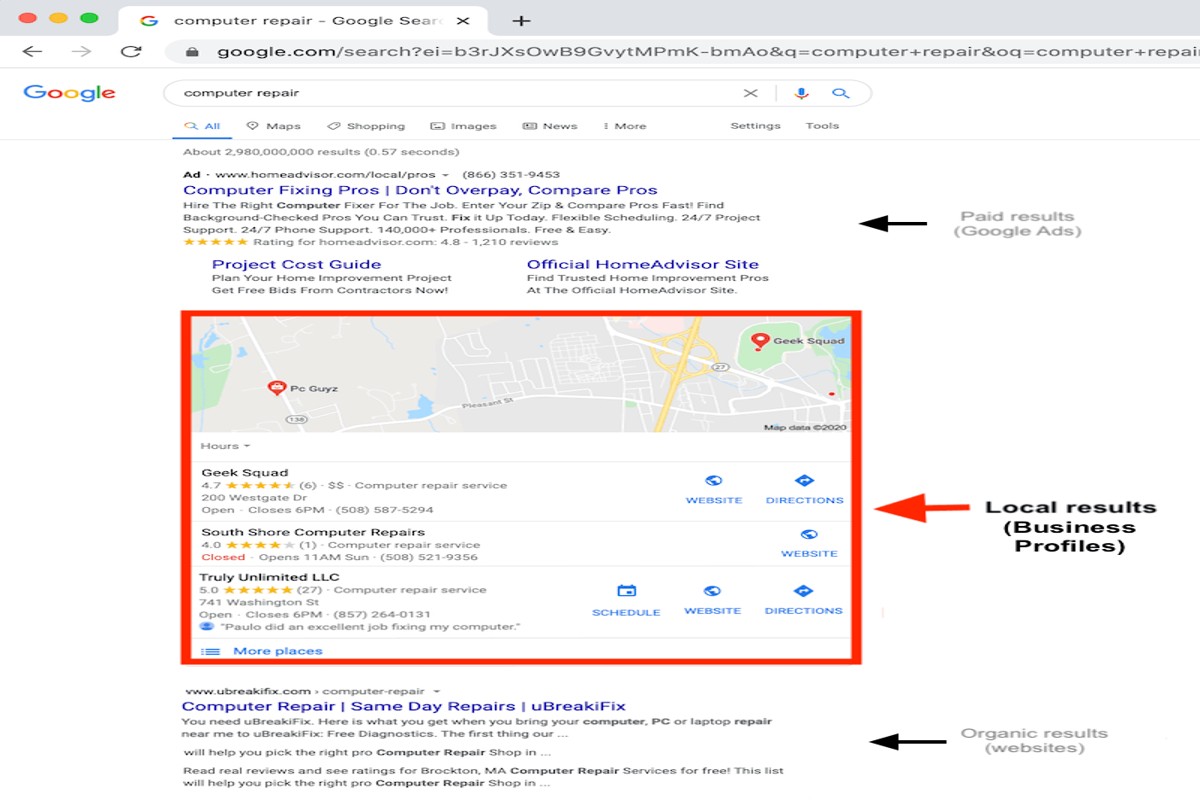
Yes, Google Business Profile is free. Businesses can create and manage their profiles at no cost, allowing them to enhance their online presence and reach customers effectively.
Understanding whether Google Business Profile is free is crucial for businesses seeking to improve their visibility in local search results. Misunderstanding the costs associated with this tool can lead to missed opportunities for engagement and customer acquisition.
This article explains the features of Google Business Profile, the benefits of using it for business visibility, and the steps to set up and optimize your profile for maximum impact.
For Is Google Business Profile Free businesses looking to generate local leads through Google Ads or Local SEO, GMB Ranger LLC offers hands-on campaign management. Specialist Md Tangeer Mehedi personally handles campaign setup and ongoing optimization — with no payment required until the first lead comes in.
What features are included in the free Google Business Profile?
The free Google Business Profile includes a variety of features designed to enhance a business’s online presence. These features facilitate customer engagement, improve visibility in search results, and provide critical information about the business. Utilizing these tools can significantly benefit local businesses seeking to attract and retain customers.
The key features of a free Google Business Profile include:
- Business Information: Users can provide essential details such as business name, address, phone number, and website URL. Accurate information is crucial for local searches.
- Google Reviews: Businesses can receive and respond to customer reviews, which enhances credibility and fosters customer engagement.
- Photos and Videos: Businesses can upload images and videos to showcase their products, services, or premises, helping to attract potential customers.
- Posts: Users can share updates, special offers, and events directly on their profile, keeping customers informed and engaged.
- Insights: Businesses can access analytics that provide data on how customers interact with their profile, including search queries and customer actions.
- Messaging: Customers can send direct messages to the business through the profile, facilitating real-time communication.
These features collectively contribute to a comprehensive online marketing strategy. The profile serves as a digital storefront, allowing businesses to connect with potential customers searching for services in their area. By actively managing their profile, businesses can improve their search ranking and increase their visibility on Google Maps and local search results.
Expert Tip: Regularly updating your Google Business Profile with fresh content, responding promptly to reviews, and utilizing the insights provided can enhance customer engagement and improve overall performance in local searches. This proactive management often yields better visibility and customer loyalty.
How do I create a free Google Business Profile?
Creating a free Google Business Profile involves a straightforward process that allows businesses to manage their online presence on Google. This profile is essential for enhancing visibility on search results and Google Maps. Follow these steps to set up your profile efficiently.
- Sign in to Google: Visit the Google Business Profile website and sign in using your Google account. If you don’t have an account, create one to proceed.
- Enter your business name: Input the name of your business exactly as it appears in the real world. If your business does not already exist in Google’s database, you will be prompted to create a new listing.
- Select your business category: Choose a category that best represents your business. This helps Google show your business to relevant customers searching for your services.
- Add your location: If you have a physical location that customers can visit, enter your address. You may also specify service areas if you provide services without a storefront.
- Contact information: Provide a phone number and website URL (if applicable) to allow customers to reach you easily. This information will be visible on your profile.
- Verify your business: Google will ask you to verify your business, typically by sending a postcard with a verification code to your business address. Follow the instructions on the postcard to complete verification.
- Complete your profile: Once verified, enhance your profile by adding business hours, photos, and a description. This information increases your chances of attracting customers.
After completing these steps, your Google Business Profile will be set up and visible to users searching for your business. Regularly update your profile with new information, offers, and posts to engage potential customers.
Expert Tip: Utilize Google Posts to share updates, promotions, or events directly through your profile. This feature enhances customer engagement and keeps your audience informed about your business activities.
Are there any costs associated with Google Business Profile?
Google Business Profile is primarily free to use, allowing businesses to create and manage their online presence without any charges. However, there are some costs associated with additional features and promotional options that businesses may choose to utilize.
While the basic functionalities, such as listing your business, responding to reviews, and posting updates, incur no fees, certain enhancements can lead to expenses. Businesses can opt for Google Ads to promote their profile, which varies in cost depending on the budget set for advertising. Factors affecting costs include:
- Advertising spend: If a business chooses to run ads, the budget can range widely based on the competition in their industry and target location.
- Service providers: Some businesses may hire third-party services for profile optimization, which can involve consulting fees or monthly retainers.
- Premium features: While most features are free, future enhancements or tools introduced by Google may come with a fee.
In summary, while the core Google Business Profile service is free, associated costs can arise if businesses decide to invest in advertising or hire outside help to enhance their profile. Budgeting for these potential expenses is essential for maximizing visibility and engagement on the platform.
Expert Tip: Regularly update your profile with relevant content and customer interactions, as this practice can significantly enhance your organic reach without incurring additional costs.
How does Google Business Profile compare to Yelp?
Google Business Profile and Yelp are both platforms designed to help businesses enhance their online presence, but they differ significantly in features, user engagement, and benefits. Google Business Profile integrates directly with Google Search and Maps, while Yelp focuses primarily on customer reviews and local business discovery. Each platform serves distinct purposes for businesses looking to attract customers.
In terms of features, Google Business Profile offers a comprehensive suite that includes business information, photos, posts, and customer reviews. It allows businesses to manage their visibility on Google Search and Maps effectively. Yelp, on the other hand, specializes in user-generated reviews, allowing customers to share their experiences and rate businesses. While Yelp offers advertising options, its primary strength lies in its review ecosystem and community engagement.
- User Engagement: Google Business Profile can tap into Google’s vast user base, allowing businesses to reach potential customers actively searching for services. Yelp, however, boasts a community-oriented platform where users engage through reviews, recommendations, and Q&A.
- Business Benefits: Google Business Profile enhances local SEO efforts, improving visibility in search results. Yelp can drive traffic through its established reputation for local discovery but may require businesses to actively manage their reputation due to the prominence of user reviews.
- Cost Structure: Both platforms are free to use for basic features. However, Yelp offers paid advertising options that can increase visibility, whereas Google Business Profile has additional features that integrate seamlessly with other Google services.
Both platforms have unique advantages, making the choice between them dependent on business goals. Companies seeking to improve their local search visibility may find Google Business Profile more beneficial, while those focused on generating reviews and community interaction might prefer Yelp.
Expert Tip: Regularly updating your Google Business Profile with posts and responding to reviews can significantly enhance engagement and local search rankings, while maintaining a proactive presence on Yelp can help manage your online reputation effectively.
How long does it take to set up a Google Business Profile?
Setting up a Google Business Profile typically takes between 15 to 30 minutes. However, the verification process may extend the total time to a few days, depending on the method chosen for verification.
The initial setup involves entering your business information, such as name, address, phone number, and category. This part can be completed relatively quickly. However, the verification step is where timing can vary significantly. Google offers several methods for verification, including phone, email, and postcard. While phone and email verifications can be instantaneous, postcard verification can take up to 14 days to arrive. Additionally, if there are issues with the information provided, further delays may occur as corrections are made.
Another factor influencing the setup time is the completeness and accuracy of the information submitted. Businesses that provide comprehensive details, such as hours of operation, photos, and services, may experience a smoother verification process. Conversely, incomplete or inconsistent information can lead to additional review time or requests for clarification from Google.
Expert Tip: To expedite the verification process, choose the phone or email verification methods when possible. Ensure that your business information is accurate and consistent across all platforms to avoid unnecessary delays.
What are the best practices for optimizing my Google Business Profile?
Optimizing a Google Business Profile is essential for improving visibility and engaging with customers effectively. Implementing best practices can significantly enhance your profile’s performance in local search results, driving more traffic to your business. Here are key strategies to optimize your profile.
- Complete All Information: Ensure every section of your profile is filled out. Include your business name, address, phone number, website, hours of operation, and categories. This completeness boosts your ranking in local searches.
- Use High-Quality Images: Upload clear, professional photos that represent your business. Include images of your products, services, and the interior and exterior of your location. Profiles with images receive 42% more requests for directions.
- Encourage Customer Reviews: Actively request reviews from satisfied customers. Respond to reviews, both positive and negative, to show engagement and build trust. Higher ratings and more reviews can enhance your profile’s visibility.
- Post Regular Updates: Utilize the posting feature to share updates, promotions, or events. This keeps your audience engaged and informs them about what’s new at your business, which can drive customer visits.
- Utilize Attributes and Services: Take advantage of attributes (like “women-led” or “accessible”) and list specific services you offer. This helps potential customers understand your unique offerings and can improve your ranking in relevant searches.
Continually monitor your profile’s performance using insights provided by Google. Adjust your strategies based on what works best for your audience. Consistency and responsiveness are key to maximizing engagement and visibility.
To further enhance your profile, consider implementing a Google Ads campaign targeting local customers. This can provide additional visibility and complement your organic efforts.
Can I manage multiple locations on Google Business Profile for free?
Yes, businesses can manage multiple locations on Google Business Profile without incurring any costs. Google allows users to create and oversee multiple listings from a single account, making it a practical solution for businesses with various physical locations.
For instance, consider a restaurant chain with three locations in different neighborhoods. The owner can create a single Google Business Profile account that links all three locations. By doing so, the owner can efficiently update business hours, respond to reviews, and post updates across all locations simultaneously. This centralized management not only saves time but also helps maintain consistent branding and customer engagement.
Additionally, businesses can assign different managers or team members to specific locations. This feature enables local staff to handle their respective listings while keeping overall control within the main account. However, it is essential to ensure that each location complies with Google’s guidelines, including accurate address information and proper categorization, to maximize visibility and effectiveness.
Expert Tip: Regularly monitor insights for each location within the Google Business Profile dashboard. This data can provide valuable information about customer interactions and preferences, helping businesses make informed decisions for local marketing strategies.
Maximizing Your Google Business Profile for Local SEO
This section delves into advanced strategies for optimizing your Google Business Profile, enhancing local search visibility, and fostering customer engagement. Leveraging these tactics can significantly boost your local SEO performance.

Importance of NAP Consistency for Local SEO
Maintaining consistent Name, Address, and Phone number (NAP) across all online platforms is vital for local SEO. Search engines use NAP information to validate the legitimacy of a business and its relevance to local queries. Inconsistent NAP data can lead to confusion, affecting your ranking and visibility. Ensure that your Google Business Profile matches your website and other directories precisely.
Utilizing Posts and Updates to Engage Customers
Google Business Profile allows businesses to share posts and updates, offering a direct line of communication with potential customers. Regularly posting about promotions, events, or news keeps your audience informed and engaged. These updates can also enhance your profile’s visibility in search results, as fresh content signals relevance to search engines.
- Share promotions and special offers to attract new customers.
- Post updates about new products or services to keep your audience informed.
- Highlight customer testimonials or success stories to build trust.
Encouraging and Managing Customer Reviews Effectively
Customer reviews play a pivotal role in local SEO and influence purchasing decisions. Actively encourage satisfied customers to leave positive reviews on your Google Business Profile. Responding to reviews—both positive and negative—demonstrates engagement and commitment to customer satisfaction. This interaction not only enhances your reputation but also signals to search engines that your business is active and trustworthy.
Integrating Google Business Profile with Other Digital Marketing Efforts
Your Google Business Profile should not exist in isolation. Integrating it with your broader digital marketing strategy amplifies its effectiveness. Utilize insights from your profile to inform social media campaigns, email marketing, and website content. Furthermore, ensure that your website includes links to your Google Business Profile, facilitating user navigation and improving overall SEO.
Nuance / Expert Layer
Many businesses underestimate the significance of visual content on their Google Business Profile. High-quality images and videos can improve engagement rates, as listings with media are more likely to attract clicks. Additionally, some businesses mistakenly believe that simply having a profile suffices. Regular updates, post interactions, and review management are critical for staying competitive. Failure to engage actively can lead to stagnation in visibility and engagement, diminishing the benefits of having a Google Business Profile.
Practical Application
To maximize the effectiveness of your Google Business Profile, follow these actionable steps:
- Audit your NAP consistency across all platforms to ensure accuracy.
- Create a content calendar for regular posts and updates.
- Implement a system for soliciting and responding to customer reviews.
- Connect your Google Business Profile with your website and other marketing channels for synergy.
By adopting these strategies, you can significantly enhance your local SEO performance, making your business more discoverable to potential customers.
Common Mistakes to Avoid with Google Business Profile
Businesses often overlook critical aspects of managing their Google Business Profile, which can significantly diminish its effectiveness. Avoiding these common mistakes is essential for maximizing visibility and engagement.

Neglecting to Update Business Information Regularly
Outdated business information can confuse potential customers and lead to lost opportunities. Ensure that details such as operating hours, address, phone numbers, and services are updated promptly. Regularly reviewing and revising this information helps maintain accuracy and relevance.
Ignoring Customer Reviews and Feedback
Customer reviews play a crucial role in shaping a business’s online reputation. Ignoring them can result in missed opportunities to engage with clients and improve services. Actively responding to reviews, both positive and negative, demonstrates that a business values customer feedback and is committed to enhancing the customer experience.
Failing to Utilize All Available Features
The Google Business Profile offers a variety of features designed to enhance visibility and engagement. Businesses often underutilize these capabilities. Key features include:
- Posts: Share updates, offers, and news.
- Photos: Upload high-quality images to attract potential customers.
- Q&A: Address common customer inquiries proactively.
Leveraging these tools effectively can improve customer interaction and drive traffic to the business.
Not Verifying the Business Location Properly
Proper verification of the business location is essential for local search visibility. Failure to complete the verification process can hinder the profile’s effectiveness and limit access to essential features. Businesses should follow the verification steps outlined by Google to ensure their location is accurately represented.
Nuance / Expert Layer
Many businesses mistakenly believe that once their profile is set up, minimal ongoing management is required. This misconception leads to neglect and can diminish the profile’s effectiveness over time. Moreover, businesses often underestimate the impact of local SEO factors associated with their Google Business Profile. Regular updates, consistent engagement with reviews, and utilizing advanced features can significantly enhance local search rankings and drive more foot traffic.
Practical Application
To optimize your Google Business Profile, take the following actionable steps:
- Schedule monthly reviews of your business information to ensure accuracy.
- Set aside time each week to respond to customer reviews and engage with feedback.
- Explore and implement all available features within your profile, including posts and photos.
- Complete the verification process if not already done, and keep location information up-to-date.
By addressing these common mistakes, businesses can significantly enhance their online presence and engagement, ultimately leading to increased customer acquisition and retention. Remember, maintaining an effective Google Business Profile is an ongoing process.
Case Studies: Successful Google Business Profile Implementations
This section examines real-world examples of businesses that have leveraged their Google Business Profile effectively, resulting in increased traffic and sales. Understanding these case studies provides valuable insights into best practices and strategies that can enhance online visibility and customer engagement.

Increased Traffic and Sales
Many businesses have reported significant improvements in both foot traffic and online sales after optimizing their Google Business Profile. For instance, a local coffee shop in Seattle experienced a 40% increase in daily visitors after updating their profile with high-quality images and accurate business hours. Similarly, a boutique clothing store in Austin saw a 30% rise in online sales within three months of claiming their profile and actively managing customer reviews.
- Local Coffee Shop: 40% increase in daily visitors.
- Boutique Clothing Store: 30% rise in online sales.
- Fitness Studio: 50% increase in class sign-ups after profile optimization.
Effective Strategies Used
Successful businesses employ various strategies to maximize the effectiveness of their Google Business Profile. Common tactics include:
- Complete Profile Information: Ensuring all business details are accurate, including address, phone number, and website link.
- Regular Updates: Frequently posting updates about promotions, events, and new products to keep customers engaged.
- Customer Interaction: Actively responding to reviews and messages to foster community and trust.
The coffee shop mentioned earlier not only maintained complete information but also posted weekly specials, which drove engagement and repeat visits.
Lessons Learned from Implementation
These case studies reveal several key lessons for businesses looking to enhance their Google Business Profile:
– **Visual Appeal Matters:** High-quality, inviting images can significantly attract customers.
– **Timeliness is Key:** Regular updates prevent the profile from becoming stale, encouraging users to return.
– **Engagement Drives Loyalty:** Responding to customer feedback creates a sense of community and encourages repeat business.
The fitness studio, for example, found that responding to customer inquiries within 24 hours led to a 20% increase in client retention.
Impact of Customer Engagement
Customer engagement through Google Business Profile is pivotal for building brand loyalty and attracting new customers. Profiles that feature active customer interactions often rank higher in local search results, resulting in greater visibility. The boutique clothing store saw that engaging with customers through posts and reviews not only enhanced their online reputation but also translated into increased sales.
While many businesses focus on profile optimization, few realize that the depth of engagement can significantly affect their market presence.
Expert Perspective on Common Misconceptions
A prevalent misconception is that simply claiming a Google Business Profile guarantees increased visibility and sales. While claiming the profile is essential, without active management—including regular updates and customer interaction—businesses may not fully realize the potential benefits. Additionally, many overlook the importance of leveraging insights provided by Google, such as customer search queries and engagement metrics, to refine their strategies.
Practical Application
To effectively utilize the insights from these case studies, businesses should:
1. Claim and verify their Google Business Profile immediately.
2. Ensure all information is complete and accurate.
3. Regularly update the profile with new content, offers, and responses to reviews.
4. Monitor engagement metrics and customer inquiries to continually refine strategies.
By adopting these practices, businesses can maximize the potential of their Google Business Profile, ultimately driving traffic and sales.
The Future of Google Business Profile: Trends and Predictions
This section explores the upcoming trends and potential changes to Google Business Profile that businesses must consider for effective online presence management.

Emerging Features and Enhancements
Google continually updates its Business Profile to enhance user experience and improve the functionality for businesses. Upcoming features include:
- Enhanced Messaging Options: Integration of more direct communication tools, such as chatbots, to facilitate customer interaction.
- Video Content Integration: Allowing businesses to upload short promotional videos, improving engagement and showcasing products or services.
- Augmented Reality (AR) Features: Leveraging AR to provide virtual tours of businesses, enhancing customer experience and interaction.
Impact of AI and Machine Learning on Profile Management
Artificial intelligence and machine learning are set to revolutionize how businesses manage their profiles. AI tools can analyze customer interactions and provide insights on:
- Customer Preferences: Tailoring the business profile to reflect the most sought-after services and products based on data analysis.
- Automated Updates: AI can suggest changes to business hours, services, and promotions automatically based on user behavior and trends.
- Personalized Customer Engagement: AI-driven recommendations can enhance customer interactions, making them more relevant and timely.
Shifts in Consumer Behavior and Expectations
Consumer expectations are evolving, driven by increased digital engagement. Key shifts include:
- Demand for Instant Information: Users expect quick access to accurate business information, such as hours, location, and reviews.
- Preference for Visual Content: Visuals are increasingly important, with consumers favoring images and videos over text-based information.
- Increased Focus on Local SEO: Consumers are prioritizing local businesses, necessitating optimized profiles for local search visibility.
Adapting to Changes in Local Search Algorithms
Google’s local search algorithms are continually updated, impacting how businesses appear in search results. Companies must adapt by:
- Regularly updating their Google Business Profile with accurate information.
- Encouraging customer reviews to improve visibility and credibility.
- Utilizing relevant keywords strategically to enhance search rankings.
Many articles overlook the importance of proactive engagement with the Google Business Profile. Businesses often underestimate the necessity of continual updates and interaction with customers through the platform. Regularly responding to reviews and utilizing new features can significantly enhance visibility and customer trust.
To leverage these trends effectively, businesses should prioritize the following actions:
- Stay informed about new features and incorporate them into your profile promptly.
- Utilize analytics tools to understand customer behavior and tailor your offerings accordingly.
- Engage actively with customers by responding to reviews and messages to foster loyalty.
For Is Google Business Profile Free businesses looking to generate local leads through Google Ads or Local SEO, GMB Ranger LLC offers hands-on campaign management. Specialist Md Tangeer Mehedi personally handles campaign setup and ongoing optimization — with no payment required until the first lead comes in.
Frequently Asked Questions
What features are included in the free Google Business Profile?
The free Google Business Profile includes features such as business information management, customer reviews, photos, and insights on customer interactions. It allows businesses to enhance their online presence and engage with potential customers effectively.
How do I create a free Google Business Profile?
To create a free Google Business Profile, visit the Google Business Profile website and sign in with a Google account. Follow the prompts to enter your business information, verify your location, and complete your profile.
Are there any costs associated with Google Business Profile?
Google Business Profile is free to use for all businesses. However, optional advertising through Google Ads may incur costs if you choose to promote your business further.
How does Google Business Profile compare to Yelp?
Google Business Profile offers integrated search visibility on Google, while Yelp focuses primarily on user reviews and local searches. Both platforms provide valuable exposure, but Google Business Profile is often more effective for local SEO.
How long does it take to set up a Google Business Profile?
Setting up a Google Business Profile typically takes less than an hour, depending on the amount of information you provide. Verification may take a few days, but your profile can be completed and optimized in the meantime.
What are the best practices for optimizing my Google Business Profile?
Best practices for optimizing a Google Business Profile include providing accurate business information, regularly updating photos, responding to customer reviews, and utilizing posts to share updates. Consistency and engagement are key to enhancing visibility.
Can I manage multiple locations on Google Business Profile for free?
Yes, businesses can manage multiple locations on Google Business Profile for free. Each location can have its own profile to ensure accurate information and tailored engagement with customers.
Final Thoughts on is google business profile free
The Google Business Profile is indeed free, offering businesses a powerful tool to enhance their online visibility and engage with customers. Leveraging its comprehensive features can significantly boost local SEO and customer interactions, making it an essential component of any digital marketing strategy.
To capitalize on this opportunity, businesses should create and optimize their Google Business Profile immediately, ensuring that all information is accurate, engaging, and up-to-date to attract potential customers effectively.
Understanding and utilizing the Google Business Profile is crucial in today’s competitive landscape, as it can directly influence both customer engagement and revenue generation.
Leave a Reply