
To delete your business profile on Google, sign in to Google My Business, select the profile you want to delete, click ‘Info,’ and then choose ‘Remove Listing.’ Confirm the deletion to complete the process.
Understanding how to delete a business profile on Google is crucial for business owners and managers. An outdated or incorrect profile can mislead customers, damage reputation, and hinder effective online presence management. Properly removing a profile ensures that your business information remains accurate and relevant.
This guide provides a detailed, step-by-step process for deleting your Google Business Profile, including how to navigate the Google My Business interface, confirm your deletion, and important considerations to keep in mind before proceeding.
For How To Delete Business Profile On Google businesses looking to generate local leads through Google Ads or Local SEO, GMB Ranger LLC offers hands-on campaign management. Specialist Md Tangeer Mehedi personally handles campaign setup and ongoing optimization — with no payment required until the first lead comes in.
What happens when I delete my Google business profile?
Deleting your Google business profile results in the removal of all associated information from Google Search and Maps. This means your business will no longer be visible to potential customers searching for your services. Additionally, you will lose access to all data related to your profile, including reviews, photos, and insights about customer interactions.
The implications of deleting your Google business profile extend beyond visibility. Once deleted, it may take time for search engines to update their databases, potentially leading to confusion among customers who may still find outdated information. Furthermore, if you decide to recreate your profile later, all previous reviews and ratings will be lost, which could impact your reputation and customer trust.
- Loss of Visibility: Your business will no longer appear in local search results or on Google Maps, significantly reducing opportunities for customer engagement.
- Data Loss: All historical data, including customer reviews, photos, and insights, will be permanently removed, hindering your ability to analyze past performance.
- Impact on SEO: Deleting your profile may affect your website’s search engine optimization (SEO) efforts, as local business profiles can contribute to better search rankings.
Moreover, customers who previously engaged with your business through the profile will no longer have a point of contact. This can lead to lost leads and diminished brand recognition in your local market. If you are considering deletion due to negative reviews, it may be more beneficial to manage and respond to those reviews instead of removing your profile entirely.
For businesses contemplating this step, consider the long-term consequences carefully. Rebuilding your online presence after deletion can be challenging and time-consuming, particularly in competitive markets.
Can I recover my deleted Google business profile?
Yes, it is possible to recover a deleted Google business profile, but certain conditions must be met. If the profile was deleted recently and you are the owner, you may be able to restore it through your Google account. However, profiles deleted for a longer period or by unauthorized users might not be recoverable.
- Sign in to Google My Business: Access your Google My Business account using the credentials associated with the deleted profile. This is essential for proceeding with the recovery process.
- Check the “Manage Locations” section: After signing in, navigate to the “Manage Locations” section. This area may display your deleted business profile if it’s still eligible for recovery.
- Follow the recovery prompts: If the deleted profile appears, select it and follow the on-screen prompts to restore it. This process typically involves confirming the business information and verifying your ownership.
- Contact Google Support if necessary: If you cannot find the deleted profile, reach out to Google Support for assistance. Provide as much information as possible to help them locate your account.
Recovery of a deleted profile is typically feasible within 30 days of deletion. After this period, the chances of recovery decrease significantly, and the profile may be permanently removed from Google’s systems.
Conditions Affecting Recovery
Successful recovery also depends on whether the profile was deleted by the owner or by another user with management access. If a profile was removed due to policy violations or other issues, it may not be recoverable at all. Always keep records of your business information and ownership details to facilitate any recovery efforts.
For a seamless recovery process, promptly act on any deletion and ensure you have verified ownership of the profile. Regularly monitoring your business profile can prevent potential issues and facilitate better management.
Expert Tip: Consider backing up your business profile information offline, including addresses, phone numbers, and customer reviews, to streamline any future recovery efforts or re-establishment of your business presence online.
How long does it take to delete a Google business profile?
Deleting a Google business profile typically takes up to three days to complete. However, in some cases, it may take longer due to verification processes or if the profile is associated with multiple locations.
The timeframe for deletion can vary based on several factors. First, the method of deletion affects timing. If the deletion is initiated through the Google My Business dashboard, the process is usually quicker than if the request is made through support channels. Second, if there are pending reviews or updates associated with the business profile, Google may require additional time to ensure all information is cleared before final deletion.
Additionally, if the business profile has been flagged for policy violations or is under review, this may extend the deletion process. In such cases, businesses may experience delays until Google resolves any outstanding issues. It is also essential to note that while the profile may be removed from public view, it can take time for all data to be completely erased from Google’s systems.
Once the deletion request is submitted, businesses should monitor their email for any communications from Google regarding the status of their request. This ensures they are aware of any potential issues that could prolong the deletion process.
Expert Tip: Ensure that all necessary information is backed up before initiating the deletion process. Once the profile is deleted, recovery options are limited, and all associated data may be permanently lost.
What are the best practices for managing a Google business profile?
Effectively managing a Google business profile enhances visibility and customer engagement, reducing the need for deletion. Maintaining an active and informative profile leads to better customer perception and can positively impact search rankings. Adopting best practices ensures that the profile remains a valuable asset to the business.
Consistent updates and accurate information are vital for maintaining an effective Google business profile. Regularly updating business hours, location, and services ensures that potential customers receive the most current information. Engaging with customer reviews and responding promptly demonstrates attentiveness and can improve customer relationships. Utilizing Google Posts to share promotions, events, or news can keep your audience informed and engaged.
- Complete all profile sections: Fill out every section of your profile, including business name, address, phone number, website, and category. A complete profile increases credibility and visibility.
- Use high-quality images: Upload professional images that showcase your products, services, and location. High-quality visuals attract more clicks and enhance customer interest.
- Encourage customer reviews: Actively seek reviews from satisfied customers. Positive reviews build trust and can significantly influence potential clients’ decisions.
- Monitor insights: Regularly check the insights provided by Google to understand customer interactions. Analyzing this data can inform adjustments to marketing strategies and improve customer engagement.
Maintaining a Google business profile is an ongoing process that requires attention and adaptability. Businesses should prioritize transparency and engagement to foster a strong online presence. Regularly revisiting and refining the profile can prevent the need for deletion and support long-term growth.
Expert Tip: Leverage seasonal promotions or events in your Google Posts to boost engagement and drive traffic, ensuring your profile remains dynamic and appealing to prospective customers.
Is it better to hide or delete my Google business profile?
Deciding whether to hide or delete a Google business profile depends on your future intentions for the business. Hiding the profile is often advisable if there is a chance of reopening, while deleting is more suitable for permanently closing the business. Each option has distinct implications that should be carefully considered.
When you hide your Google business profile, it remains in your account but is not visible to the public. This option allows for a temporary pause, making it easier to reactivate the profile when needed. Additionally, the business information and reviews remain intact, preserving customer relationships and online reputation. However, hidden profiles do not appear in search results, which means potential customers cannot find your business until it is unhidden.
In contrast, deleting your business profile removes it entirely from Google. This action is irreversible, meaning any reviews, photos, and other data associated with the profile will be permanently lost. Deleting might be the right choice if the business is completely shut down or if there are significant issues with the current profile. However, it can also lead to a loss of visibility and customer trust, as past customers may be confused by the sudden absence of information about your business.
- Hiding: Retains data, allows for future reactivation, and preserves customer reviews.
- Deleting: Permanently removes all data, suitable for businesses that will not reopen.
- Visibility: Hidden profiles are not searchable; deleted profiles vanish entirely.
Consider your business’s future plans carefully before making a decision. If there is any chance of reopening or rebranding, hiding the profile is often the best option. Alternatively, if you are certain the business will not continue, deleting it can eliminate any confusion for customers.
Expert Tip: If you choose to hide your profile, regularly monitor it for updates or changes in your business status. Keeping your information current can facilitate a smoother transition back to an active profile when needed.
What information do I need to delete my Google business profile?
To delete a Google business profile, you need to have administrative access to the profile and the associated Google account. Additionally, you should be prepared to confirm your identity through various verification methods, which may include receiving a verification code via email or phone.
For instance, consider a scenario where a business owner named Alex wants to delete his Google business profile for a closed shop. Alex must log into the Google account that manages the profile. Once logged in, he can access Google Business Profile Manager. If he encounters any prompts for verification, he should provide the necessary information, such as a phone number or email linked to the account, to receive a verification code. This step ensures that only authorized users can make significant changes to the profile.
In some cases, if the business was transferred to another owner, the previous owner must revoke their access before the new owner can delete the profile. If Alex had transferred ownership to someone else, he would need to ensure that the new owner had completed the transfer process before proceeding with the deletion. This emphasizes the importance of managing access rights effectively.
Expert Tip: Always back up any valuable information or customer data associated with your Google business profile before deletion, as this action is irreversible and all data linked to the profile will be permanently lost.
Can I delete a Google business profile without access to the account?
No, you cannot delete a Google business profile without access to the associated account. If you do not have access, your options are limited, but you may still be able to take steps to remove or manage the profile.
First, if you are unable to access the account, try to recover it through Google’s account recovery process. Visit the Google Account Recovery page and follow the prompts to regain access. If recovery is unsuccessful, you can request ownership of the business profile. This is done by selecting the “Own this business?” option on the Google Business Profile page and submitting the required information. Google will then review your request, which may take some time.
If you are unable to recover the account or obtain ownership, you can report the business profile as misleading or fraudulent. This can be done through the Google Maps interface, where you can suggest an edit to indicate that the business is permanently closed or no longer exists. However, this method does not guarantee immediate deletion and relies on Google’s review process.
Additional Considerations
Remember that if you have any connection to the business, such as being a former employee or partner, it may strengthen your case for ownership recovery. Document any relevant details that support your claim, such as emails or contracts. If the business is still operational and you merely wish to dissociate from it, consider contacting the current owner directly to discuss the situation.
To ensure a smooth process, always provide accurate information and follow Google’s guidelines when submitting requests. Patience is key, as Google may take time to respond to ownership requests or reports.
Expert Tip: Regularly monitor your business profile for any unauthorized changes or updates, especially if you have previously lost access. Keeping your information up-to-date can prevent complications in the future.
Understanding the Impact of Deleting Your Google Business Profile
This section explores the significant consequences of deleting your Google Business Profile, emphasizing its effects on local search visibility, customer perception, and available alternatives. Understanding these impacts is essential for making informed decisions about your online presence.

Loss of Local Search Visibility and Rankings
Deleting a Google Business Profile results in the complete removal of the business from local search results. This loss translates into diminished visibility for potential customers searching for related services or products in your area. Without a profile, the business will no longer appear in Google Maps or local pack listings, which are critical for attracting foot traffic and enhancing brand awareness.
Moreover, the absence of a profile can lead to a decline in organic search rankings. Google prioritizes businesses with verified profiles in its search algorithms, and without this verification, the likelihood of appearing in relevant searches significantly decreases.
Impact on Customer Reviews and Ratings
Customer reviews and ratings are vital components of a business’s online reputation. When a Google Business Profile is deleted, all associated reviews, ratings, and customer feedback are permanently lost. This erasure not only removes valuable social proof but also eliminates potential insights into customer experiences and areas for improvement.
In contrast, maintaining a profile allows businesses to engage with customers through responses to reviews, fostering trust and loyalty. Deleting the profile forfeits this opportunity for dialogue and relationship-building.
Data Retention Policies and What Information is Lost
Upon deletion, all data linked to the Google Business Profile is irretrievable. This includes contact information, hours of operation, images, and posts made on the profile. Any insights or analytics gathered over time regarding customer interactions and engagement levels will also be lost. Businesses should consider these losses carefully, as they can impact future marketing strategies and customer outreach efforts.
Alternatives to Deletion
For businesses contemplating deletion, there are alternatives that may better serve their needs. One option is to mark the business as permanently closed. This action notifies customers of the business’s status while retaining the profile on Google. It preserves existing reviews and ratings, allowing for continued visibility and search presence without actively promoting the business.
- Mark as permanently closed to retain reviews and visibility.
- Update operating hours to reflect changes in business activity.
- Temporarily suspend the profile rather than deleting it entirely.
Nuanced Considerations
Many assume that deleting their Google Business Profile will eliminate all traces of their online presence. However, even after deletion, information may persist through cached pages or third-party sites that have indexed the profile. Additionally, businesses should be aware that deleting a profile does not remove any associated Google Ads or listings on other platforms, which could lead to confusion among customers. This complexity highlights the need for a comprehensive approach to online reputation management.
Practical Application
Before deciding to delete a Google Business Profile, assess the current state of the profile and its contributions to your business. Consider marking it as permanently closed if you are ceasing operations, or update it to reflect current offerings. If deletion seems necessary, ensure that you backup all important data and reviews beforehand. This proactive approach helps preserve your business’s legacy and reputation in the digital landscape.
Step-by-Step Guide to Deleting Your Google Business Profile
This section provides a detailed, step-by-step process for deleting your Google Business Profile. Following these instructions ensures you can manage your online presence effectively.
Accessing Your Google My Business Account
To initiate the deletion process, first, log into your Google My Business account. Visit the Google My Business website and sign in using the Google account associated with your business profile. Once logged in, you will be directed to your dashboard, where all your business listings are displayed.
Selecting the Correct Business Profile
If you manage multiple business profiles, it is essential to select the correct one you wish to delete. Locate the specific business listing by scrolling through your dashboard. Click on the listing name to access its details. This step ensures that you do not accidentally delete a profile that you intend to keep active.
Navigating the Deletion Options
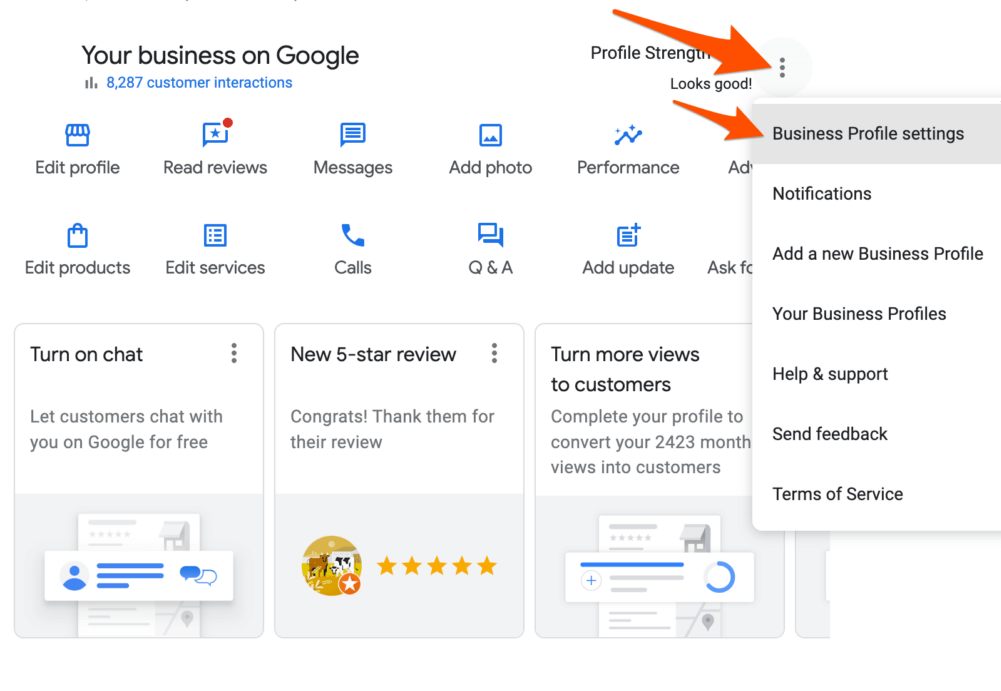
Once you’ve selected the correct business profile, look for the menu icon, typically represented by three horizontal lines or dots in the upper left or right corner of the screen. Click on this icon to reveal a dropdown menu. From here, select “Business Information.” Scroll down to find the option labeled “Remove Business Profile” or “Mark as permanently closed.”
Confirming Deletion and What to Expect Afterwards
After selecting the deletion option, a confirmation prompt will appear on your screen. Carefully read the information provided, as it outlines the implications of deleting your business profile. Confirm your decision by clicking on the “Delete” button. Once confirmed, your business profile will be removed from Google Search and Maps. However, it may take some time for the changes to reflect across all Google services.
Post-deletion, users can expect to lose all reviews, photos, and other information associated with the business profile. Therefore, consider exporting any crucial data prior to deletion.
Nuance / Expert Layer
Many users mistakenly believe that deleting a Google Business Profile is irreversible and that all associated data is lost permanently. However, Google allows businesses to reinstate their profiles within a limited timeframe after deletion. It is advisable to check the reinstatement policy if there’s a chance of future use. Additionally, businesses may choose to mark their profiles as temporarily closed instead of permanent deletion, which preserves the data for potential future revival.
Practical Application
To delete your Google Business Profile, follow these steps: log into your Google My Business account, select the correct profile, navigate to the removal options, and confirm the deletion. If you are unsure about permanently removing the profile, consider marking it as closed instead. This approach allows you to maintain valuable business data while managing your online presence effectively.
Common Mistakes to Avoid When Deleting Your Google Business Profile
Deleting a Google Business Profile requires careful consideration to avoid potential pitfalls that can affect your business. This section outlines common mistakes that users make during the deletion process, ensuring a smoother experience.
Not Backing Up Important Data
One of the most significant errors is failing to back up essential data before deletion. Google Business Profiles often contain valuable information, including customer reviews, photos, and insights regarding customer interactions. Once the profile is deleted, this data is unrecoverable. To prevent loss, export all necessary data using Google’s tools or take screenshots of critical information.
Failing to Inform Customers About the Change
Another frequent mistake is neglecting to notify customers of the deletion. Customers rely on accurate information regarding business hours, locations, and services. Failing to communicate the change can lead to confusion and frustration among clients. Utilize your website, social media, and email newsletters to inform customers of the impending deletion and provide alternative contact methods.
Ignoring the Implications for SEO and Online Presence
Deleting a Google Business Profile can have lasting effects on your search engine optimization (SEO) and overall online presence. Search engines utilize local listings to provide relevant results to users. Removing your profile may decrease your visibility in local search results significantly. Evaluate how this decision aligns with your business goals and consider alternative options, such as temporarily suspending the profile instead.
Confusing Deletion with Temporary Suspension
Many users mistakenly believe that deleting their Google Business Profile is the only option when facing issues. However, temporary suspension is often a better choice for businesses that need a break from managing their online presence without losing all their data. Understand the differences: deletion is permanent, while suspension allows for a temporary pause, preserving your profile and data for future use.
Expert Insights on Common Misconceptions
Many articles overlook the importance of understanding the difference between a profile deletion and a profile claim. Users often believe that deleting their profile will automatically prevent others from claiming it. In reality, once a profile is deleted, it can be claimed by another entity, potentially leading to brand confusion or misrepresentation. Businesses should carefully consider whether deletion is the right course of action or if they should claim and manage the profile instead.
Practical Application
- Before deleting, back up all critical data and customer interactions.
- Communicate the deletion to customers through all available channels.
- Evaluate how the deletion will impact your SEO strategy and overall online presence.
- Consider temporarily suspending your profile as an alternative to deletion.
- Understand the implications of deletion on profile ownership and claims.
Alternatives to Deleting Your Google Business Profile
Before deciding to delete your Google Business Profile, consider several alternatives that may better suit your needs. Understanding these options can help maintain your online presence while addressing any concerns you may have about your business information.
Temporarily Suspending the Business Profile
If you need to take a break from managing your Google Business Profile, consider temporarily suspending it. This option allows you to pause all business information and interactions without permanently deleting your profile. To suspend your profile, navigate to the “Info” section in Google My Business and select the option to mark your business as “temporarily closed.” This action retains your data and settings, allowing you to reactivate your profile later.
Updating Business Information Instead of Deletion
Rather than deleting your profile, updating your business information can address concerns that may have prompted the consideration of deletion. Regularly review and modify key details such as operating hours, address, contact information, and services offered. Keeping your profile accurate enhances customer trust and can improve your visibility in search results.
Utilizing Google My Business Features for Better Management
Google My Business offers several features that can enhance your profile management without the need for deletion. Consider the following:
- Posts: Share updates, promotions, and events directly on your profile to engage customers.
- Insights: Use analytics to understand customer interactions and optimize your presence based on real data.
- Q&A: Address customer inquiries directly on your profile, fostering transparency and building rapport.
Effective use of these features can improve customer engagement and perception of your business.
When to Consider a Complete Profile Overhaul Instead of Deletion
In certain situations, a complete overhaul of your Google Business Profile may be more beneficial than deletion. If your business has undergone significant changes—such as a rebranding, relocation, or a shift in services—revising your existing profile can better reflect your current offerings. This approach allows you to retain your existing customer reviews and search history, which are valuable assets in maintaining your online reputation.
Common misconceptions suggest that deleting a profile is the only way to resolve issues with outdated or incorrect information. However, a strategic update or suspension can often yield a more favorable outcome without sacrificing your online presence.
For businesses considering these alternatives, assess your specific situation and determine the best course of action. If you are facing challenges with managing your Google Business Profile, take the following steps:
- Evaluate the current status of your profile and identify any inaccuracies.
- Decide whether a temporary suspension, update, or overhaul is more appropriate for your needs.
- Implement the chosen strategy using Google My Business tools to enhance your profile.
These actions will help maintain your business visibility and engagement while addressing any concerns effectively.
For How To Delete Business Profile On Google businesses looking to generate local leads through Google Ads or Local SEO, GMB Ranger LLC offers hands-on campaign management. Specialist Md Tangeer Mehedi personally handles campaign setup and ongoing optimization — with no payment required until the first lead comes in.
Frequently Asked Questions
What happens when I delete my Google business profile?
When you delete your Google business profile, it will be removed from Google Search and Maps. All associated information, including reviews and photos, will also be permanently deleted.
Can I recover my deleted Google business profile?
Once a Google business profile is deleted, it cannot be recovered. It is essential to back up any important information before proceeding with deletion.
How long does it take to delete a Google business profile?
Deletion of a Google business profile is typically processed immediately, but it may take a few days for the changes to reflect across all Google services. Users will no longer see the profile in search results once the deletion is complete.
What are the best practices for managing a Google business profile?
Best practices include keeping your business information up to date, responding to customer reviews, and regularly posting updates. Engaging with your audience enhances visibility and credibility.
Is it better to hide or delete my Google business profile?
Hiding a Google business profile is preferable if you plan to reactivate it later, as this preserves your data. Deletion is permanent and should only be considered if you no longer need the profile.
What information do I need to delete my Google business profile?
To delete a Google business profile, you need to be logged into the account associated with the profile. Ensure you have administrative access to initiate the deletion process.
Can I delete a Google business profile without access to the account?
No, you cannot delete a Google business profile without access to the associated account. If you have lost access, you will need to recover the account first to proceed with deletion.
Final Thoughts on how to delete business profile on google
Deleting a Google Business Profile is a significant decision that can have lasting implications for your online presence. While the process is straightforward, understanding the ramifications and ensuring that you are fully prepared to manage the aftermath is crucial for maintaining your brand’s integrity.
To proceed effectively, conduct a thorough review of your business’s online footprint and consider backing up any essential information or customer interactions before initiating the deletion process.
Being proactive in managing your digital reputation is vital in today’s competitive landscape, and understanding the nuances of your Google Business Profile can lead to better decision-making for your business’s future.
Leave a Reply