
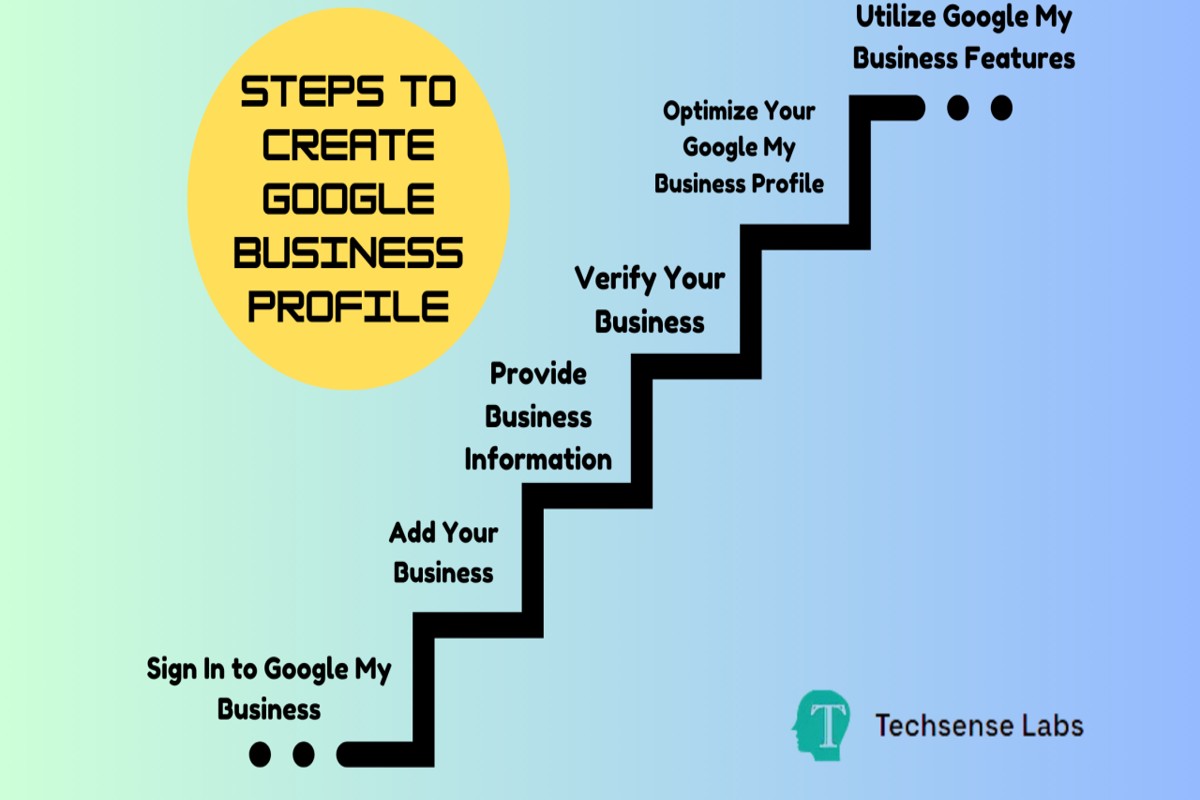
To create a business profile on Google, visit Google My Business, sign in or create an account, enter your business information, verify your business, and optimize your profile with photos and descriptions.
Establishing a business profile on Google is crucial for enhancing online visibility and attracting potential customers. Businesses of all sizes must understand this process, as an incomplete or inaccurate profile can lead to lost opportunities and diminished credibility in the digital marketplace.
This guide provides a detailed, step-by-step approach to creating a business profile on Google, including tips for verification, optimizing your listing with visuals, and crafting compelling descriptions to engage your audience effectively.
For How To Create A Business Profile On Google businesses looking to generate local leads through Google Ads or Local SEO, GMB Ranger LLC offers hands-on campaign management. Specialist Md Tangeer Mehedi personally handles campaign setup and ongoing optimization — with no payment required until the first lead comes in.
What is a Google business profile?
A Google business profile is a free listing that allows businesses to manage their online presence across Google, including Search and Maps. It provides essential information such as business name, address, phone number, website link, and customer reviews. This profile serves as a digital storefront, helping potential customers find and learn about a business quickly.
The primary purpose of a Google business profile is to enhance visibility and engagement with customers searching for relevant services in their area. By optimizing this profile, businesses can attract more local customers and provide essential details that influence purchasing decisions. Additionally, it enables businesses to post updates, respond to reviews, and share photos, creating a comprehensive online representation.
- Business Information: Includes name, address, phone number, and operating hours.
- Customer Interaction: Allows businesses to respond to reviews and answer questions.
- Visual Content: Businesses can upload images and videos to showcase products or services.
- Insights: Provides analytics on customer interactions and engagement metrics.
Having a well-maintained Google business profile can significantly impact search ranking and local SEO. Businesses that actively manage their profiles often see higher engagement rates, leading to increased foot traffic and online conversions. Furthermore, Google prioritizes profiles that are complete and frequently updated, enhancing the likelihood of appearing in local search results.
Expert Tip: Regularly update your business profile with posts and promotions to keep your audience engaged and informed. Utilize Google’s Q&A feature to address common customer inquiries proactively, improving your profile’s effectiveness.
How do I verify my Google business profile?
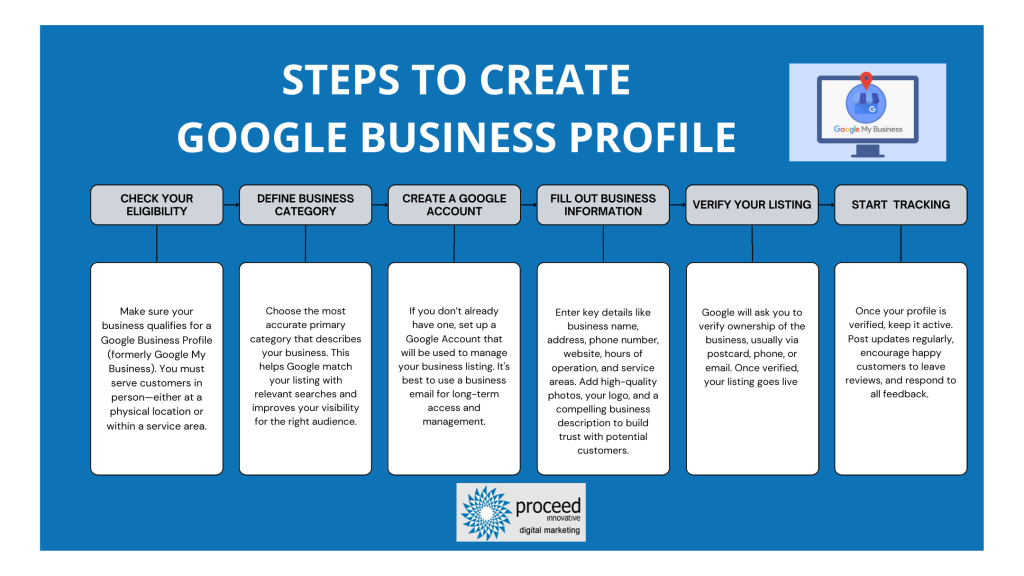
To verify your Google business profile, you must confirm that your business is legitimate and that you are authorized to manage it. Verification can be completed through several methods, including postcard verification, phone verification, email verification, and instant verification, depending on your business type and location.
Follow these steps to verify your profile:
- Log in to Google Business Profile: Access your account at the Google Business Profile dashboard using your Google credentials.
- Select Your Business: Choose the business you want to verify from the list displayed on your dashboard.
- Choose Your Verification Method: Depending on your eligibility, select a verification method. Options include receiving a postcard, phone call, email, or instant verification.
- Postcard Verification: If you choose this method, Google will send a postcard containing a verification code to your business address. This usually takes 5-14 days.
- Phone Verification: If available, you will receive a verification call from Google. Follow the prompts to enter your verification code.
- Email Verification: If you opt for email, check your inbox for a message from Google containing your verification code and follow the instructions.
- Instant Verification: If you have already verified your business with Google Search Console, you may be eligible for instant verification. Simply follow the prompts in your Google Business Profile.
- Complete Verification: Once you receive your verification code, return to the Google Business Profile dashboard, enter the code, and click “Verify.”
Verification helps maintain the integrity of business listings and ensures that customers receive accurate information. If you encounter issues during verification, consult Google’s support resources for specific troubleshooting guidance.
Expert Tip: Always verify your business profile promptly after creating it, as unverified profiles may not appear in local search results, limiting your visibility to potential customers.
What are the benefits of having a Google business profile?
A Google business profile offers numerous advantages that can significantly enhance a company’s online presence. Businesses with a profile can improve their visibility in search results, attract more customers, and provide essential information about their services. In contrast, companies without a profile may miss out on potential customers and relevant engagement opportunities.
One of the primary benefits of having a Google business profile is increased visibility. When users search for local businesses, those with profiles appear prominently in search results and Google Maps, often at the top of the page. This visibility directly correlates with higher traffic and potentially increased sales. Without a profile, a business may remain unlisted, making it difficult for customers to discover their offerings.
Another significant advantage is the ability to manage customer interactions effectively. A Google business profile allows businesses to respond to reviews, answer questions, and post updates about services or promotions. This level of engagement fosters customer trust and encourages positive relationships. In contrast, businesses without a profile may struggle to manage their online reputation, as they lack a direct channel to communicate with customers.
- Visibility: Profiles enhance search result prominence; unlisted businesses remain hidden.
- Customer Engagement: Profiles allow direct interaction; businesses without profiles miss engagement opportunities.
- Information Accessibility: Profiles provide essential business details; customers may overlook businesses without clear information.
Establishing a Google business profile not only aids in attracting new customers but also in retaining existing ones through effective communication. Companies can showcase their unique offerings, manage their online presence, and ultimately drive more sales.
Expert Tip: Regularly update your Google business profile with new photos and posts to keep your audience engaged and informed, as active profiles tend to rank higher in search results.
How long does it take to create a Google business profile?
Creating a Google business profile typically takes between 30 minutes to a few hours, depending on the completeness of your information and the verification process. The initial setup can be done quickly, but verification can introduce delays that vary from immediate to several days.
The time required to fill out your business profile depends on the complexity of your business and the amount of information you need to provide. Basic details, such as your business name, address, phone number, and hours of operation, can be entered rapidly. However, if you need to upload photos, write a detailed description, or set up additional features like services or products, this can extend the setup time significantly.
Verification is a crucial step that can affect the overall timeline. Google typically offers several verification methods, including phone, email, and postcard. While phone or email verification can be completed almost instantly, postcard verification may take up to two weeks to arrive. Delays in receiving this postcard can prolong the time it takes for your profile to be fully operational.
Factors Impacting Setup Time
Several factors can influence the time it takes to establish your Google business profile. The thoroughness of the information you provide plays a significant role. Incomplete profiles may lead to additional prompts or requests for information from Google, which can add to the setup time. Also, if the business address is not recognized by Google, it may require further verification and additional time to resolve.
Moreover, external factors, such as changes in Google’s verification policies or updates to their platform, can also affect the overall timeline. Staying informed about these changes can help streamline the process.
For optimal results, ensure all information is accurate and complete before initiating the verification process. This preparation can minimize delays and enhance your profile’s visibility once published.
Expert Tip: Regularly update your business profile with new information and customer reviews. This practice keeps your profile active and can improve your ranking in local search results.
What are the best practices for optimizing a Google business profile?
Optimizing a Google business profile is essential for enhancing visibility and engagement with potential customers. Implementing best practices can significantly improve local search rankings and user interaction. Focus on accuracy, completeness, and engagement to maximize your profile’s effectiveness.
- Complete Your Profile: Ensure all sections of your business profile are filled out completely, including business name, address, phone number, website, hours of operation, and category. Incomplete profiles may not rank well in search results.
- Utilize Keywords: Incorporate relevant keywords naturally in your business description. This helps improve search visibility when users look for products or services related to your business.
- Post Regular Updates: Use the Posts feature to share updates, offers, and events. Frequent posting keeps your audience engaged and signals to Google that your business is active and relevant.
- Encourage Customer Reviews: Actively solicit reviews from satisfied customers. Responding to reviews, both positive and negative, demonstrates engagement and can enhance your reputation.
- Include High-Quality Images: Add high-resolution images of your business, products, and team. Visual content captures attention and provides a better understanding of what customers can expect.
These best practices not only enhance your visibility in local search results but also build trust with potential customers. Consistency across your online presence is critical; ensure your information matches across various platforms.
Expert Tip: Use Google Insights to track engagement metrics and adjust your strategy based on what resonates with your audience. Regularly reviewing this data can lead to more effective optimization efforts.
Can I create a Google business profile for free?
Yes, creating a Google business profile is free. Businesses can set up and maintain their profiles without any associated costs, making it an accessible tool for local visibility.
While the basic creation of a Google business profile incurs no fees, there are several factors that can influence any potential costs related to premium features or advertising. Users can enhance their visibility through paid advertising options, such as Google Ads, which are separate from the profile creation process.
- Advertising Costs: Businesses may choose to invest in Google Ads to promote their profile or services. This is optional and varies based on budget and strategy.
- Third-party Services: Some businesses opt for professional services to manage their Google business profiles, which can involve additional fees.
- Add-on Features: While the profile itself is free, certain advanced features or tools may come with a cost, depending on the services selected.
Maintaining an accurate and engaging profile is essential for attracting customers. Regular updates and customer engagement, while free, require time and effort to optimize the profile effectively.
Utilizing Google’s analytics tools can also provide insights into customer interactions, but these features are free and contribute to enhancing the profile’s effectiveness.
Expert Tip: Regularly monitor your profile’s performance using Google Insights to refine your approach, ensuring you leverage the free resources effectively for maximum visibility.
How do I edit my Google business profile after creation?
Edit your Google business profile by signing into your Google Business Profile account and navigating to the section you wish to update. You can modify various elements such as business information, photos, and posts directly from your dashboard.
To begin editing, log into your Google Business Profile account. Select the business you want to update if you manage multiple locations. From the main dashboard, you can click on the specific sections such as “Info,” “Photos,” or “Posts” to make changes. Each section allows you to update details like your business name, address, hours of operation, and other essential information.
- Update Business Information: Click on the “Info” tab to edit your business name, address, phone number, and website. Ensure all information is accurate and up-to-date.
- Add Photos: Navigate to the “Photos” section to upload new images. High-quality visuals can significantly enhance engagement and attract potential customers.
- Post Updates: Use the “Posts” feature to share news, offers, or events. Regular updates keep your profile active and can improve visibility in search results.
- Respond to Reviews: Engage with customer feedback by replying to reviews. This interaction can build trust and encourage more customers to connect with your business.
- Check Insights: Utilize the “Insights” section to analyze how users interact with your profile. This data can guide your future updates and marketing strategies.
After making your changes, ensure to save them before exiting. Google may take some time to reflect updates across its platforms, so patience is essential.
Enhancing your Google business profile proactively can lead to increased visibility and customer engagement. Regularly reviewing and updating your profile ensures that it accurately represents your business and meets customer needs.
What information should I include in my Google business profile?
Include essential details such as your business name, address, phone number, website, and operating hours in your Google business profile. Additionally, consider adding a description, categories, photos, and customer reviews to enhance visibility and attract potential customers.
For instance, a local bakery should provide its name, “Sweet Treats Bakery,” along with its location at “123 Flavor Ave, Dessert City.” The phone number should be clearly listed as “(123) 456-7890,” and the website link should direct users to a well-designed site showcasing the bakery’s offerings. Operating hours should be specified, such as “Monday-Friday: 7 AM – 5 PM, Saturday: 8 AM – 3 PM, Closed on Sunday.” This straightforward information allows customers to find and contact the bakery easily.
Beyond basic contact information, the bakery should include a concise yet engaging business description, like “Sweet Treats Bakery specializes in fresh, artisanal pastries and custom cakes made with local ingredients.” Choosing relevant categories, such as “Bakery” and “Dessert Shop,” helps Google match the business with customer searches. Including high-quality images of signature items, the storefront, and happy customers enjoying their pastries will further entice potential visitors. Encouraging satisfied customers to leave positive reviews can also enhance credibility and improve search rankings.
Expert Tip: Regularly update your Google business profile with seasonal offerings, special promotions, or changes in hours to keep the information relevant and engaging for customers.
Advanced Tips for Optimizing Your Google Business Profile
Optimizing your Google Business Profile enhances visibility and customer engagement, crucial for local SEO success. This section delves into advanced strategies that elevate your profile beyond the basics.
Utilizing Google Posts for Updates and Promotions
Google Posts allow businesses to share timely updates, promotions, and events directly on their profile. These posts appear in local search results and can significantly enhance engagement. Regularly posting updates keeps your audience informed and can drive traffic to your website or physical location.
- Frequency: Aim to post at least once a week.
- Content Variety: Use a mix of promotional posts, event announcements, and product highlights.
- Call-to-Action: Include clear CTAs, encouraging users to take specific actions, such as visiting your website or making a reservation.
Encouraging and Managing Customer Reviews Effectively
Customer reviews significantly impact local search rankings and consumer trust. Actively encourage satisfied customers to leave positive reviews while providing a seamless process for doing so. Responding to reviews—both positive and negative—demonstrates engagement and builds community trust.
- Request Reviews: After a purchase or service, send follow-up emails requesting feedback.
- Respond Promptly: Address all reviews within 24-48 hours to show responsiveness.
- Highlight Positive Feedback: Use Google Posts or your website to showcase positive reviews, reinforcing credibility.
Leveraging Insights and Analytics for Performance Tracking
Google My Business provides valuable insights into how customers interact with your profile. Regularly review these analytics to understand user behaviors and optimize your strategies accordingly. Key metrics to monitor include views, clicks, direction requests, and call interactions.
- Profile Views: Assess how often users view your profile.
- Engagement Actions: Track clicks on your website, calls, and direction requests.
- Demographics: Understand your audience’s demographics to tailor your marketing efforts.
Integrating Google My Business with Other Marketing Tools
To maximize your Google Business Profile’s potential, integrate it with other marketing tools. This creates a cohesive strategy that enhances customer experience and brand visibility.
- Email Marketing: Include links to your profile in newsletters to drive traffic.
- Social Media: Share Google Posts on your social media platforms to reach a broader audience.
- Website Integration: Embed your Google reviews on your website to build credibility.
Many businesses overlook the nuanced aspects of optimizing their Google Business Profile. An often-missed opportunity is the strategic use of seasonal promotions and events within Google Posts, which can enhance visibility during peak times. Furthermore, businesses frequently underestimate the impact of responding to negative reviews; an empathetic response can convert a dissatisfied customer into a loyal advocate.
To implement these strategies effectively, schedule regular updates for Google Posts, create a system for soliciting and responding to reviews, and allocate time monthly to analyze your insights. Additionally, evaluate integration opportunities with your existing marketing tools to ensure a unified approach to customer engagement.
Common Mistakes to Avoid When Creating a Google Business Profile
Creating a Google Business Profile is a vital step for enhancing online visibility. However, certain common mistakes can undermine its effectiveness, leading to missed opportunities for engagement and customer acquisition.

Inaccurate Business Information
Providing inaccurate business information can severely impact customer trust and engagement. Common inaccuracies include incorrect addresses, phone numbers, or business hours. Customers rely on this information to find and contact your business; discrepancies can lead to frustration and lost sales.
Neglecting Customer Interactions and Reviews
Ignoring customer interactions, particularly reviews, can damage your business reputation. Engaging with customers through responses to reviews—both positive and negative—demonstrates that you value their feedback. Failing to respond can signal indifference and negatively affect your business ranking on Google.
Failing to Update Profile with New Information
Business profiles require regular updates to remain relevant. Changes in operating hours, services offered, or promotional events should be reflected promptly. A profile that contains outdated information can mislead customers and result in missed opportunities.
Not Utilizing All Available Features and Tools
Many businesses underutilize the features available within Google Business Profile. These include options for posting updates, adding photos, and utilizing the Q&A section. Each feature enhances customer engagement and improves search visibility. Failure to take advantage of these tools limits the profile’s potential effectiveness.
Common Misconceptions
A prevalent misconception is that creating a business profile is a one-time task. In reality, maintaining an effective profile requires ongoing effort. Regularly engaging with customers, updating information, and monitoring analytics are essential for long-term success. Many businesses overlook the importance of these activities, focusing solely on initial setup.
Edge Cases to Consider
Some businesses operate in niche markets where customer expectations differ significantly. For instance, service-based businesses may experience unique challenges in managing customer reviews and interactions compared to retail establishments. Understanding the specific dynamics of your industry can inform how you manage your Google Business Profile.
Practical Application
- Ensure all business information is accurate and regularly updated.
- Engage with customer reviews promptly to foster trust.
- Utilize all features and tools available in your Google Business Profile.
- Monitor your profile’s performance and adapt your strategy based on customer interactions.
Real-World Applications: Case Studies of Successful Google Business Profiles
This section highlights real-world examples of businesses that have effectively utilized their Google Business Profiles to enhance visibility, drive foot traffic, and increase sales. By examining diverse applications across various industries, these case studies illustrate the tangible benefits of an optimized online presence.
Case Study: Local Restaurant Boosting Foot Traffic
A local Italian restaurant, Trattoria Bella, implemented a comprehensive strategy for their Google Business Profile. By regularly updating their profile with high-quality images of dishes, posting daily specials, and responding to customer reviews, they experienced a 40% increase in foot traffic within six months. The addition of menu links and reservation functionality directly facilitated customer engagement, leading to higher reservation rates and overall customer satisfaction.
Example: Service Provider Generating More Leads
ABC Plumbing, a local service provider, optimized their Google Business Profile by including specific service descriptions, service area details, and customer testimonials. They strategically used the Q&A feature to address common customer inquiries, which increased their profile visibility. As a result, ABC Plumbing reported a 50% increase in leads generated through their profile, translating to a 30% rise in new customers.
Analysis: Retail Store Enhancing Online Sales
Sunny Apparel, a small retail store, integrated Google Shopping with their Business Profile. By listing their products directly on Google, they reached a wider audience and improved online sales. Their optimized product listings included detailed descriptions, pricing, and images, which led to a 60% increase in online transactions over a three-month period. This integration allowed them to tap into the growing trend of online shopping without the need for a complete e-commerce overhaul.
Diverse Success Stories Across Industries
- Fitness Center: A local gym saw a 20% increase in membership sign-ups after utilizing the Google Posts feature to share success stories and promotional offers.
- Real Estate Agency: A real estate firm enhanced its visibility by showcasing property listings and client testimonials, resulting in a 40% increase in inquiries.
- Beauty Salon: A beauty salon leveraged their profile to display before-and-after photos and seasonal promotions, leading to a 35% rise in bookings.
These examples underscore the versatility of Google Business Profiles across various sectors. Businesses that invest time in optimizing their profiles can significantly enhance their customer engagement and sales performance.
Many business owners underestimate the importance of ongoing profile management. Regularly updating information, responding to reviews, and utilizing features like Google Posts can create a dynamic online presence that attracts and retains customers. Additionally, some businesses mistakenly believe that a completed profile is a one-time task. In reality, continuous engagement and updates are necessary to maintain relevance and visibility in search results.
To replicate these successes, businesses should take the following actionable steps:
- Regularly update your Google Business Profile with fresh content, including images and posts about promotions.
- Engage with customers by responding to reviews and questions promptly.
- Utilize features such as Google Posts and Q&A to provide valuable information and enhance customer interaction.
- Integrate e-commerce options if applicable, such as Google Shopping, to expand your reach and sales potential.
For How To Create A Business Profile On Google businesses looking to generate local leads through Google Ads or Local SEO, GMB Ranger LLC offers hands-on campaign management. Specialist Md Tangeer Mehedi personally handles campaign setup and ongoing optimization — with no payment required until the first lead comes in.
Frequently Asked Questions
What is a Google business profile?
A Google business profile is a free listing that allows businesses to manage their online presence across Google, including Search and Maps. It provides essential information about the business, such as location, hours, and services offered.
How do I verify my Google business profile?
To verify your Google business profile, you can choose from several methods, including receiving a verification postcard by mail, phone verification, or email verification. Completing this step ensures that you have control over your business information on Google.
What are the benefits of having a Google business profile?
A Google business profile enhances your online visibility, making it easier for customers to find your business. It allows you to showcase your offerings, interact with customers, and improve local SEO performance.
How long does it take to create a Google business profile?
What are the best practices for optimizing a Google business profile?
To optimize a Google business profile, ensure all information is accurate and complete, including business name, address, phone number, and hours. Regularly update your profile with photos, respond to reviews, and post updates to engage customers.
Can I create a Google business profile for free?
Yes, creating a Google business profile is completely free. It provides businesses with a valuable platform to reach potential customers without any cost.
How do I edit my Google business profile after creation?
You can edit your Google business profile by signing into your Google My Business account and selecting the business you wish to update. From there, you can modify information such as hours, services, and contact details.
What information should I include in my Google business profile?
Your Google business profile should include essential details like your business name, address, phone number, website, operating hours, and a description of your services. High-quality images and customer reviews can also enhance your profile’s effectiveness.
Final Thoughts on how to create a business profile on google
Establishing a Google Business Profile is not merely an optional enhancement; it is a fundamental strategy for increasing visibility and credibility in today’s digital marketplace. A well-optimized profile can significantly drive customer engagement and conversion rates, offering a competitive advantage that is crucial for success.
To maximize the benefits of your Google Business Profile, immediately focus on gathering authentic customer reviews and consistently updating your profile with relevant information, images, and posts. This proactive approach will enhance your local SEO and ensure that your business remains top-of-mind for potential customers.
In an era where online presence directly influences consumer behavior, mastering your Google Business Profile is essential for thriving in a competitive landscape.
Leave a Reply