
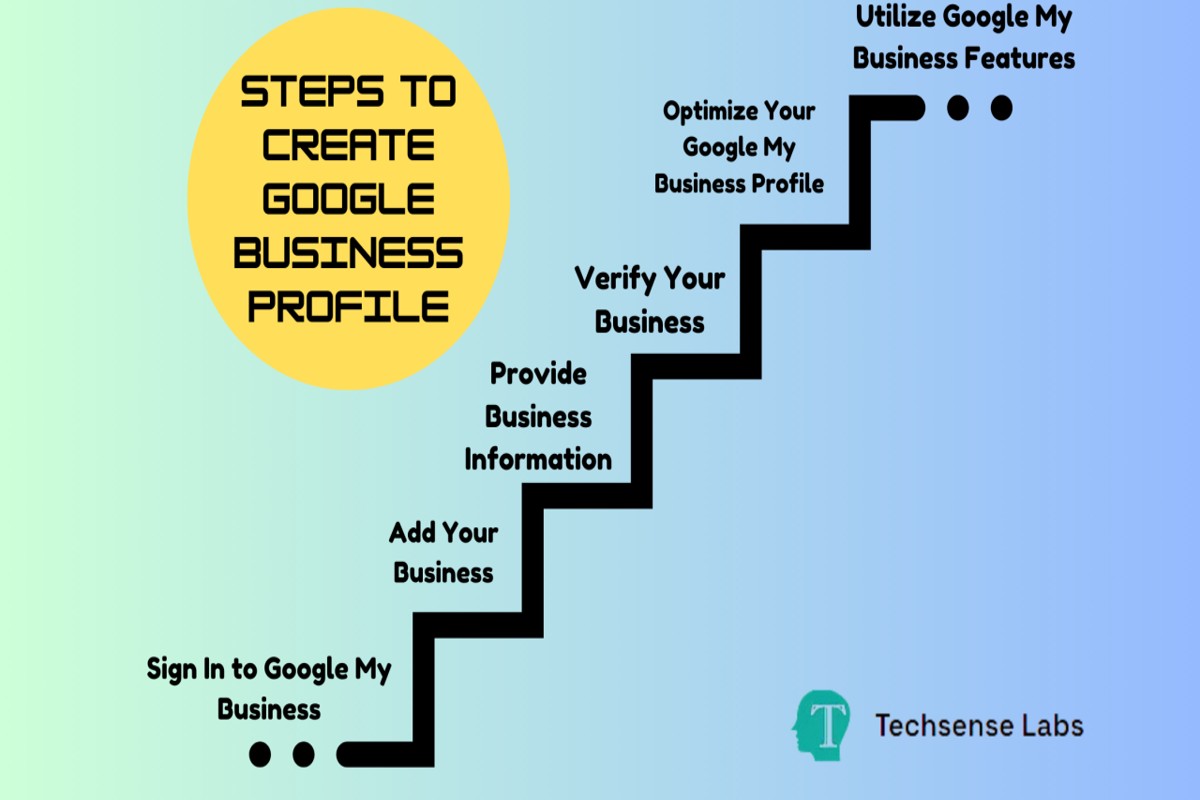
To setup a Google Business Profile, visit the Google Business Profile website, sign in or create an account, enter your business information, verify your business, and optimize your profile with photos and descriptions.
Establishing a Google Business Profile is crucial for businesses seeking online visibility and customer engagement. This profile enables potential customers to find essential information about a business, such as location, hours of operation, and services offered. Failing to set up or optimize this profile can result in lost opportunities and diminished online presence.
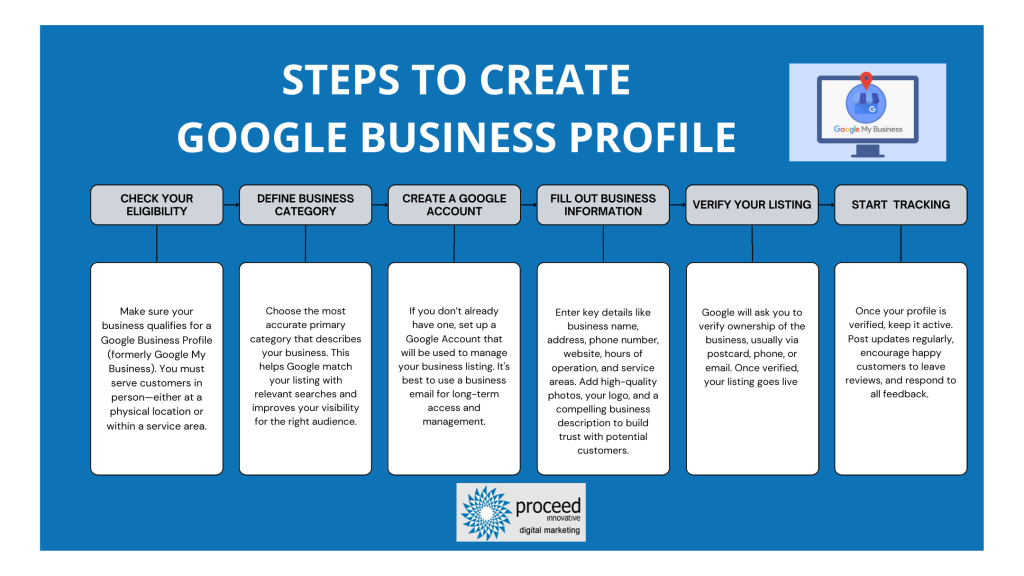
This guide will provide step-by-step instructions on setting up a Google Business Profile, including how to verify your business and tips for optimizing your profile with effective images and descriptions.
For How To Setup A Google Business Profile businesses looking to generate local leads through Google Ads or Local SEO, GMB Ranger LLC offers hands-on campaign management. Specialist Md Tangeer Mehedi personally handles campaign setup and ongoing optimization — with no payment required until the first lead comes in.
What is a Google Business Profile?
A Google Business Profile is a free tool that allows businesses to manage their online presence across Google, including Search and Maps. This profile displays essential information such as location, contact details, and hours of operation, helping customers find and engage with the business more easily.
By setting up a Google Business Profile, businesses can enhance their visibility and credibility online. The profile can include various components that contribute to a complete representation of the business, such as:
- Business Name: The official name of the business as it appears to customers.
- Address: The physical location where the business operates.
- Phone Number: A contact number for customers to reach the business directly.
- Website Link: A URL that directs customers to the business’s official website.
- Operating Hours: The days and times the business is open for service.
- Photos and Videos: Visual content that showcases products, services, and the business environment.
Having an optimized Google Business Profile is significant for local SEO, as it improves search rankings and helps attract customers in the vicinity. Additionally, it allows businesses to respond to customer reviews, post updates, and share promotions, fostering engagement and building customer loyalty.
Expert Tip: Regularly updating the Google Business Profile with accurate information and engaging content can significantly enhance customer interaction and conversion rates. Always monitor insights provided by Google to understand how customers find and interact with the profile.
How do I verify my Google Business Profile?
Verifying your Google Business Profile is essential to ensure that your business information appears accurately and prominently on Google. The verification process can be completed through several methods, including mail, phone, email, or instant verification, depending on your business type and location.
Follow these steps to verify your Google Business Profile:
- Sign in to Google Business Profile: Go to the Google Business Profile website and sign in using the Google account associated with your business.
- Select your business: From your dashboard, choose the business you want to verify. If you haven’t created a profile yet, you will need to set one up first.
- Choose a verification method: Google offers several options for verification. The most common are by postcard, phone, email, or instant verification if you have already verified your website with Google Search Console.
- Postcard verification: If you select postcard verification, Google will send a postcard containing a verification code to your business address. This can take up to 14 days.
- Phone or email verification: If eligible, you may receive a verification code via a phone call or email. Simply follow the prompts provided to complete the verification process.
- Enter the verification code: Once you receive your verification code, return to your Google Business Profile dashboard and enter the code in the designated field to complete the verification.
- Confirmation: After entering the code, you should receive a confirmation message indicating that your business profile is now verified.
Verification can take time, especially with postcard requests. If you do not receive your postcard within the expected timeframe, check your business address for accuracy and request a new postcard if necessary.
Expert Tip: Ensure that your business information is accurate and up to date before beginning the verification process, as inconsistencies can delay verification and affect your visibility on Google.
How long does it take to set up a Google Business Profile?
Setting up a Google Business Profile typically takes between 15 minutes to an hour. The actual time can vary based on the completeness of the information provided and the verification process. Factors such as the type of business and the verification method chosen can also influence the timeline.
The setup process begins with creating the profile by providing essential details like business name, address, phone number, and category. If all necessary information is readily available, this initial step can be completed quickly. However, gathering accurate data, especially for larger businesses or those with multiple locations, may extend the time required for setup.
After the profile is created, verification is necessary to confirm ownership. Google offers several verification methods, including phone verification, email verification, and postcard verification. Postcard verification can take 5-14 days for the card to arrive, adding time to the overall process. The chosen verification method significantly impacts how long it takes to fully set up the profile and make it visible to potential customers.
Factors Affecting Setup Time
- Business Type: Some businesses may require additional documentation or approvals, which can prolong the setup.
- Verification Method: As mentioned, postcard verification is the slowest option.
- Information Completeness: Providing thorough and accurate information upfront can expedite the verification process.
Ensure all information is accurate and complete before submission to streamline the setup process. Businesses that maintain updated profiles often see faster verification times.
What are the benefits of having a Google Business Profile?
A Google Business Profile enhances visibility and credibility in local searches. It allows businesses to manage their online presence across Google, including Search and Maps, which can significantly drive traffic and increase customer engagement.
One of the primary benefits is improved local SEO. A well-optimized Google Business Profile helps businesses rank higher in local search results, making it easier for potential customers to find them. Additionally, profiles display essential information like hours of operation, location, and contact details, which can influence customer decisions.
- Increase Visibility: A complete profile appears in local search results, allowing users to view your business without needing to visit your website. Ensure that your profile is fully filled out with accurate information to maximize exposure.
- Engage Customers: Utilize features like posts, Q&A, and reviews to interact with customers. Regularly updating your profile with posts about promotions or events keeps your audience informed and engaged.
- Build Trust: Customer reviews displayed on your profile can enhance your business’s credibility. Encourage satisfied customers to leave positive reviews and respond promptly to all feedback to foster trust.
- Insights and Analytics: Google provides valuable insights into how customers find and interact with your profile. Use these analytics to refine your marketing strategies and improve customer engagement.
Maintaining an updated Google Business Profile is crucial for ongoing success. Regularly check for any changes in your business information and engage with customer feedback to ensure your profile remains relevant and beneficial.
Expert Tip: Utilize the Google Posts feature to share updates, offers, or events. This not only enhances engagement but also signals to Google that your business is active, positively impacting your local search ranking.
Can I edit my Google Business Profile after setup?
Yes, you can edit your Google Business Profile after setup. Users have flexibility in updating various aspects of their profile to ensure that the information remains accurate and relevant. This includes changes to business details, photos, and service offerings.
Editing capabilities are extensive, allowing business owners to modify information such as business name, address, phone number, hours of operation, and website links. Additionally, users can add or change the business description, services offered, and categories under which the business operates. Each of these modifications can help enhance the visibility and appeal of the profile to potential customers.
- Business Information: This includes name, address, phone number, and website. Changes here are straightforward but must comply with Google’s guidelines.
- Hours of Operation: Easily adjustable to reflect seasonal hours or special events. Accurate hours are critical for customer satisfaction.
- Photos and Videos: Users can upload new images or videos to showcase products, services, or the business environment. Visual content significantly impacts customer engagement.
- Posts and Updates: Businesses can publish posts about promotions, events, or news. This feature helps keep the audience informed and engaged.
All changes made are subject to Google’s review process, which may take time. Some updates, like changing the business name or address, may require additional verification to ensure legitimacy.
Expert Tip: Regularly updating your Google Business Profile not only keeps your information accurate but can also improve your local search ranking. Engaging with customer reviews and adding posts can further enhance visibility and customer interaction.
What information should I include in my Google Business Profile?
To optimize your Google Business Profile, include essential information such as your business name, address, phone number, website, and business hours. Additionally, incorporate categories, a description, photos, and reviews to enhance visibility and customer engagement. Each element plays a crucial role in attracting potential customers and improving your search rankings.
- Business Name: Use your official business name as it appears in the real world. This helps Google match your listing with user searches effectively.
- Address: Provide a complete and accurate address. This ensures that customers can locate your business easily and helps with local SEO.
- Phone Number: Include a local phone number rather than a toll-free number. This fosters trust and makes it easier for customers to contact you.
- Website: Link to your official website. A well-maintained website can provide more detailed information and improve customer engagement.
- Business Hours: Clearly state your operating hours. This information is vital for customers planning their visits and can affect your ranking in local searches.
- Categories: Select appropriate categories that accurately describe your business. This helps Google display your listing to the right audience.
- Description: Write a concise yet informative description of your business. Highlight your unique selling points and services offered to attract potential customers.
- Photos: Upload high-quality photos of your business, products, and services. Visual content significantly boosts engagement and helps customers connect with your brand.
- Reviews: Encourage satisfied customers to leave reviews. Positive reviews enhance your credibility and can influence potential customers’ decisions.
Regularly update your Google Business Profile with any changes to your information, promotions, or new offerings. This not only keeps your profile relevant but also signals to Google that your business is active.
Expert Tip: Utilize Google Posts to share updates, offers, or events directly on your profile. This feature enhances customer interaction and keeps your audience informed about what’s happening in your business.
How much does it cost to set up a Google Business Profile?
Setting up a Google Business Profile is completely free. Businesses can create and manage their profiles without incurring any charges. However, there are optional paid features that can enhance visibility and reach.
While the basic setup costs nothing, several factors can influence potential expenses associated with optimizing a Google Business Profile. These include:
- Advertising Options: Businesses can choose to run Google Ads to promote their profile, which involves a variable cost based on the advertising budget.
- Third-Party Services: Hiring consultants or agencies to improve profile visibility or manage online reputation can incur additional fees.
- Premium Features: Some specialized features or tools may require payment, such as advanced analytics or enhanced listing options.
Businesses should weigh the benefits of investing in these additional features against their specific marketing goals. The free profile is often sufficient for many small businesses, providing essential tools to connect with customers.
Expert Tip: Regularly updating the Google Business Profile with new content, such as posts, images, and customer reviews, can significantly enhance its effectiveness without any cost, maximizing the return on your investment in free features.
What are common mistakes to avoid when setting up a Google Business Profile?
Many businesses encounter pitfalls when creating their Google Business Profile, which can hinder visibility and customer engagement. Common mistakes include inaccurate information, neglecting customer reviews, and failing to utilize all available features. Avoiding these errors can significantly enhance your business’s online presence.
Accurate and complete information is critical. Failing to provide the correct business name, address, or phone number can lead to confusion for potential customers and negatively impact search rankings. Ensure that all details are consistent with your official website and other online listings. Additionally, make sure to select the most relevant categories for your business, as this helps Google understand your services and connect you with the right audience.
- Neglecting customer reviews: Engaging with customer reviews is essential. Failing to respond to reviews, whether positive or negative, can create a perception of indifference. Actively manage your reviews by thanking customers for positive feedback and addressing any concerns raised in negative reviews to demonstrate your commitment to customer satisfaction.
- Ignoring Google Posts: Google Posts allow businesses to share updates, offers, and events directly on their profile. Many businesses overlook this feature, missing an opportunity to engage with potential customers. Regularly update your profile with relevant posts to keep your audience informed and encourage interaction.
- Inadequate use of photos: Visual content is crucial for attracting customers. Profiles with photos receive 42% more requests for directions and 35% more click-throughs to their websites. Ensure your profile includes high-quality images of your business, products, and services to create an appealing and inviting presence.
Regularly reviewing and updating your Google Business Profile is essential for maintaining accuracy and relevance. Consider setting a reminder to evaluate your profile monthly, ensuring all information is current and engaging. Quick adjustments can lead to improved performance and visibility in search results.
Expert Tip: Utilize Google Insights to track how customers interact with your profile. This data can inform your strategy, helping you identify what content resonates best with your audience and how to refine your engagement tactics.
Advanced Optimization Techniques for Your Google Business Profile
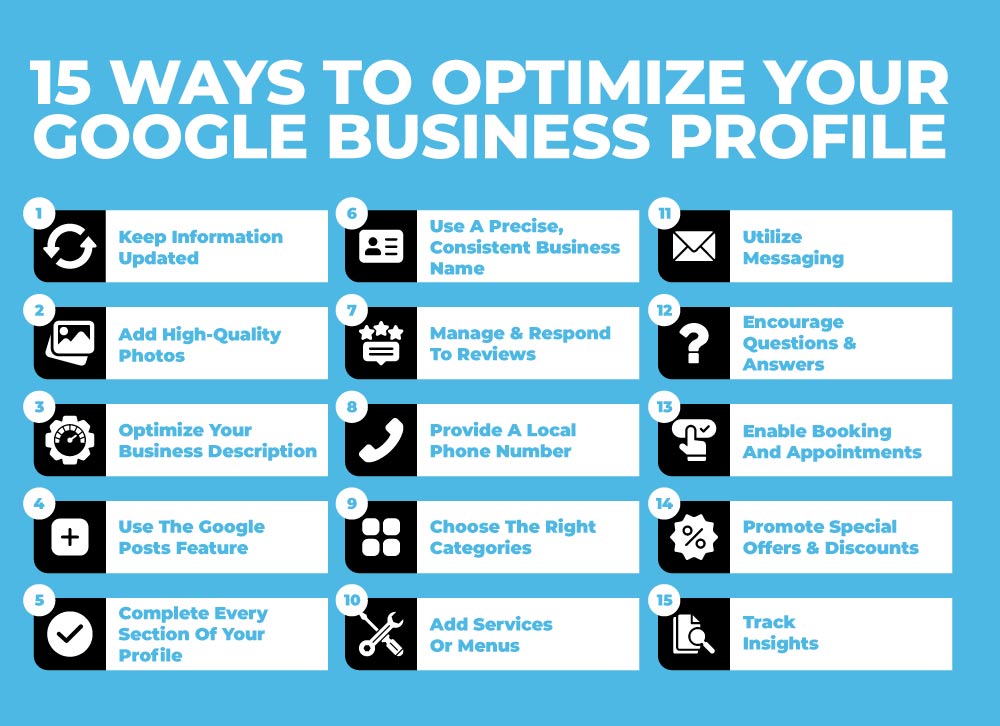
Maximizing the effectiveness of a Google Business Profile requires more than just basic setup. Advanced optimization techniques can significantly enhance visibility and engagement, driving more traffic and potential customers to your business.
Utilizing Google Posts for Updates and Promotions
Google Posts are a powerful tool for engaging with your audience directly on your business profile. These posts allow you to share updates, promotions, and events. Regularly creating Google Posts can keep your audience informed and encourage interactions. Each post can include a call-to-action (CTA), such as “Learn More” or “Sign Up,” driving traffic to your website or specific landing pages.
- Frequency: Aim to post at least once a week for maximum visibility.
- Content Variety: Utilize a mix of promotional offers, news, and customer stories.
- Visuals: Include high-quality images or videos to make posts more engaging.
Incorporating Relevant Keywords for Better Search Ranking
Incorporating relevant keywords into your Google Business Profile enhances search visibility. Use keywords that reflect your business offerings and services in your business description, services, and posts. Conduct keyword research to identify terms that potential customers are searching for.
- Identify primary and secondary keywords relevant to your business.
- Integrate these keywords naturally into your business description and services.
- Monitor performance and adjust keywords based on search trends.
Encouraging and Managing Customer Reviews Effectively
Customer reviews play a critical role in establishing trust and credibility. Actively encourage satisfied customers to leave positive reviews on your Google Business Profile. Responding to reviews—both positive and negative—demonstrates that you value customer feedback.
- Request Reviews: Ask customers for reviews post-purchase via email or in-person.
- Respond Promptly: Address reviews within 24 hours to show engagement.
- Maintain Professionalism: Always respond to negative reviews with professionalism and a willingness to resolve issues.
Leveraging Insights and Analytics for Continuous Improvement
Google My Business provides valuable insights into how customers find and interact with your profile. Regularly reviewing this data can inform your optimization strategy.
- Customer Actions: Track how many users visit your website, request directions, or call your business.
- Search Queries: Analyze the search terms that lead customers to your profile.
- Engagement Metrics: Monitor post views and interactions to evaluate content effectiveness.
Utilizing these insights can inform future marketing strategies and help refine your content for better engagement.
Advanced optimization of your Google Business Profile involves actionable steps to enhance visibility and customer interaction. Begin by implementing Google Posts regularly, integrating relevant keywords into your business information, actively managing customer reviews, and leveraging insights for continuous improvement. These strategies create a dynamic online presence that attracts and retains customers.
Real-World Case Studies: Successful Google Business Profiles
This section explores how various businesses leveraged Google Business Profiles to enhance visibility and drive tangible growth. By analyzing real-world examples, key profile features, and lessons learned, businesses can replicate these successes in their own strategies.
Examples of Businesses that Increased Foot Traffic
Numerous businesses have successfully utilized Google Business Profiles to boost foot traffic. Here are three notable examples:
- Joe’s Coffee Shop: After optimizing their Google Business Profile, Joe’s Coffee Shop saw a 30% increase in foot traffic over three months. Enhanced photos and customer reviews played a crucial role in attracting more visitors.
- Green Thumb Nursery: By regularly updating their profile with seasonal promotions and events, Green Thumb Nursery experienced a 50% rise in weekend visitors, demonstrating the effectiveness of timely updates.
- Downtown Fitness Center: With an optimized profile featuring class schedules and customer testimonials, this fitness center recorded a 40% increase in membership inquiries within two months.
Analysis of Profile Features that Contributed to Success
Several key features of Google Business Profiles contributed to the success of these businesses:
- High-Quality Images: Engaging visuals attract potential customers. Businesses that regularly update their images see higher engagement rates.
- Customer Reviews: Positive reviews enhance credibility. Profiles with a higher number of reviews tend to rank better in local search results.
- Accurate Business Information: Ensuring that hours, contact details, and services offered are up-to-date prevents customer frustration and enhances trust.
Lessons Learned from Successful Implementations
Successful businesses have identified several lessons that can be applied broadly:
- Engagement is Key: Regularly interacting with customers through Q&A and responding to reviews fosters community and loyalty.
- Utilize Posts Effectively: Businesses that utilize the post feature to share updates and promotions experience higher customer interaction.
- Monitor Insights: Analyzing performance metrics from the profile helps businesses understand customer behavior and optimize their strategies accordingly.
Impact of Local SEO on Overall Business Performance
Local SEO heavily influences the visibility of Google Business Profiles. Businesses that optimize for local search terms—such as including relevant keywords in the description—tend to rank higher in local search results. This increase in visibility directly correlates with higher foot traffic, online engagement, and, ultimately, sales. For example, businesses that implemented local SEO best practices reported an average increase of 25% in inquiries from local customers.
Many businesses mistakenly believe that simply having a Google Business Profile is sufficient. However, consistent updates, engagement, and optimization are critical to maintaining visibility and attracting customers. Furthermore, businesses often overlook the importance of local SEO strategies in their profiles, which can significantly impact their overall performance.
To leverage the insights from these case studies, businesses should take the following actionable steps:
- Regularly update your Google Business Profile with fresh content, including images and posts about promotions.
- Encourage satisfied customers to leave reviews and respond to all feedback promptly.
- Utilize insights from your profile to adapt your marketing strategies based on customer behavior.
The Future of Google Business Profiles: Trends to Watch
This section delves into the emerging trends and features that will shape Google Business Profiles in the coming years. Understanding these trends is essential for businesses aiming to stay competitive and effectively engage with their audience.
Predicted Changes in User Behavior and Search Patterns
As consumer behavior evolves, so too will the way users interact with Google Business Profiles. Data suggests a significant shift towards mobile and voice search, with approximately 50% of all searches expected to be voice-based by 2025. Users will likely demand more immediate, context-aware information, leading to an increase in local searches that prioritize proximity and relevance.
Furthermore, personalization will become increasingly important. Users will expect tailored recommendations based on their search history and preferences, prompting businesses to optimize their profiles to enhance visibility and engagement.
Innovations in Profile Features and User Engagement
Google is continuously enhancing the features of Business Profiles to improve user engagement. Anticipated innovations include augmented reality (AR) capabilities, allowing users to virtually interact with products or services before making a purchase. Additionally, features enabling real-time updates and interactive content, such as polls or Q&A sections, are likely to enhance user experience and drive engagement.
- Enhanced visual content: Profiles may increasingly incorporate videos, 360-degree images, and AR elements.
- Improved messaging tools: Real-time chat functionalities could facilitate direct communication between businesses and customers.
- Advanced analytics: Businesses may gain access to more sophisticated data insights, allowing for better decision-making and strategy adjustments.
The Role of AI in Optimizing Business Profiles
Artificial intelligence (AI) is set to play a pivotal role in the optimization of Google Business Profiles. AI algorithms may analyze user interactions and preferences to provide actionable insights for businesses. For instance, AI can suggest optimal posting times, recommend content types, and even automate responses to frequently asked questions, thus enhancing customer engagement.
Moreover, AI-driven tools could assist in maintaining up-to-date information on business hours, services, and promotions, ensuring that customers receive accurate details in real-time.
Preparing for Future Updates and Changes
Businesses must adopt a proactive approach to prepare for future updates to Google Business Profiles. Regularly reviewing and updating profile information is crucial for maintaining relevance. Additionally, engaging with customer reviews and utilizing insights from analytics can provide competitive advantages.
- Stay informed about Google’s updates and feature rollouts through official channels.
- Invest in training staff to utilize new tools and features effectively.
- Encourage customer feedback and adapt strategies based on insights gained.
Many businesses overlook the importance of consistent engagement with their Google Business Profile. Beyond merely claiming the profile, actively managing it can lead to improved visibility and customer loyalty. By anticipating user needs and preferences, businesses can tailor their profiles to enhance customer experiences.
To effectively leverage these trends, businesses should regularly audit their Google Business Profiles, experimenting with new features as they become available. Establishing a routine for monitoring engagement metrics will also provide insights into what resonates with users, allowing for timely adjustments. By prioritizing these strategies, businesses can ensure their profiles remain not only relevant but also competitive in an evolving digital landscape.
Integrating Your Google Business Profile with Other Marketing Channels
Integrating your Google Business Profile with other marketing channels enhances brand visibility and engagement. This section explores methods to create a cohesive marketing strategy that leverages your Google Business Profile alongside various digital platforms.
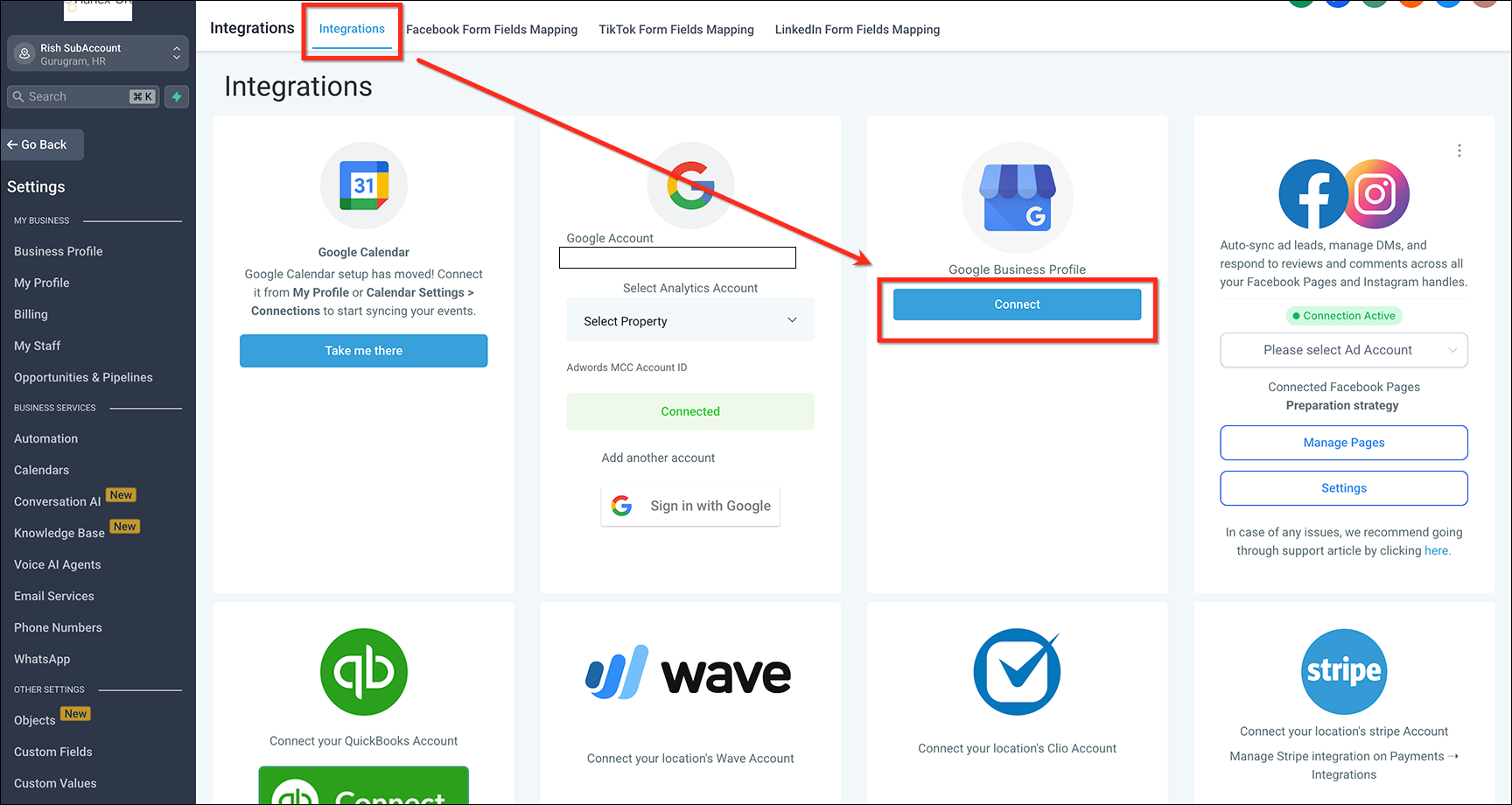
Connecting Social Media Profiles for Cohesive Branding
Linking social media profiles to your Google Business Profile creates a unified brand presence. Ensure that your profile information, including business name, address, and phone number (NAP), is consistent across all platforms. This consistency builds trust and strengthens brand recognition.
- Include direct links to your Facebook, Instagram, Twitter, and LinkedIn profiles.
- Regularly update all platforms with the same promotional content.
- Utilize platform-specific features, such as Instagram Stories or Facebook Events, to drive traffic to your Google Business Profile.
Using Google Business Profiles in Email Marketing Campaigns
Incorporating your Google Business Profile into email marketing campaigns can significantly enhance customer engagement. Include links to your profile in newsletters and promotional emails to encourage recipients to learn more about your business.
- Highlight customer reviews from your Google Business Profile to build credibility.
- Promote special offers or events listed on your profile.
- Encourage email recipients to leave their reviews on your Google profile after their visit or purchase.
Cross-Promoting Content Between Your Website and Profile
Your website and Google Business Profile should complement each other. Use your profile to drive traffic to your website and vice versa. This cross-promotion can enhance SEO and increase online visibility.
- Embed Google Maps on your website to help users locate your business easily.
- Include snippets of your Google Business Profile, such as hours of operation and contact information, on your website’s contact page.
- Utilize blog posts or articles on your website to direct readers to your Google Business Profile for more information.
Tracking Performance Across Multiple Platforms for Holistic Insights
Monitoring performance across your Google Business Profile and other marketing channels is essential for informed decision-making. Use analytics tools to gather data on customer interactions and engagement rates.
- Utilize Google Analytics to track traffic sources and user behavior related to your Google Business Profile.
- Analyze social media insights to gauge how profile links contribute to engagement.
- Evaluate email marketing metrics to measure the effectiveness of links to your profile.
Many businesses overlook the importance of integrating their Google Business Profile with other marketing efforts. Common misconceptions include the belief that maintaining a profile is sufficient on its own. In reality, seamless integration enhances visibility and customer interaction across various platforms. It’s essential to approach integration strategically, ensuring that all channels convey a consistent and recognizable brand message.
To effectively implement these strategies, consider the following actionable steps:
- Audit all your social media profiles for consistency with your Google Business Profile.
- Incorporate profile links into your next email marketing campaign.
- Regularly update your website with content that promotes your Google Business Profile.
- Set up analytics dashboards that track performance across all channels for comprehensive insights.
For How To Setup A Google Business Profile businesses looking to generate local leads through Google Ads or Local SEO, GMB Ranger LLC offers hands-on campaign management. Specialist Md Tangeer Mehedi personally handles campaign setup and ongoing optimization — with no payment required until the first lead comes in.
Frequently Asked Questions
What is a Google Business Profile?
A Google Business Profile is a free online listing that allows businesses to manage their presence on Google Search and Maps. It includes essential information such as business name, location, and hours of operation.
How do I verify my Google Business Profile?
To verify your Google Business Profile, you can choose from several methods, including postcard verification, phone verification, or email verification. Verification ensures that your business information is accurate and helps it appear in local search results.
How long does it take to set up a Google Business Profile?
Setting up a Google Business Profile typically takes about 15 to 30 minutes, depending on the completeness of your information. Verification can take a few days after setup, especially if using postcard verification.
What are the benefits of having a Google Business Profile?
Having a Google Business Profile enhances your online visibility, allowing potential customers to find your business easily. It also enables you to engage with customers through reviews, posts, and Q&A features.
Can I edit my Google Business Profile after setup?
Yes, you can edit your Google Business Profile at any time to update information such as hours, services, and photos. Regular updates help maintain accuracy and improve customer engagement.
What information should I include in my Google Business Profile?
Include essential details like your business name, address, phone number, website, hours of operation, and categories. Adding high-quality photos and a business description can also enhance your profile’s effectiveness.
How much does it cost to set up a Google Business Profile?
Setting up a Google Business Profile is completely free. There are no costs associated with creating or maintaining your profile on Google.
What are common mistakes to avoid when setting up a Google Business Profile?
Common mistakes include providing inaccurate information, neglecting to verify the profile, and failing to update hours during holidays. Ensuring consistency across platforms and responding to customer reviews is also crucial for maintaining a strong presence.
Final Thoughts on how to setup a google business profile
Establishing a Google Business Profile is not merely a technical task; it is a strategic imperative that can significantly enhance your online visibility and customer engagement. By effectively optimizing your profile, businesses position themselves advantageously in an increasingly competitive digital landscape, driving both foot traffic and online interactions.
To capitalize on these benefits, initiate the process by verifying your Google Business Profile immediately and ensure all information is accurate and up-to-date, as this lays the foundation for optimization and customer trust.
A well-managed Google Business Profile is essential in today’s marketplace, serving as a critical touchpoint for potential customers and a powerful tool for business growth.
Leave a Reply