
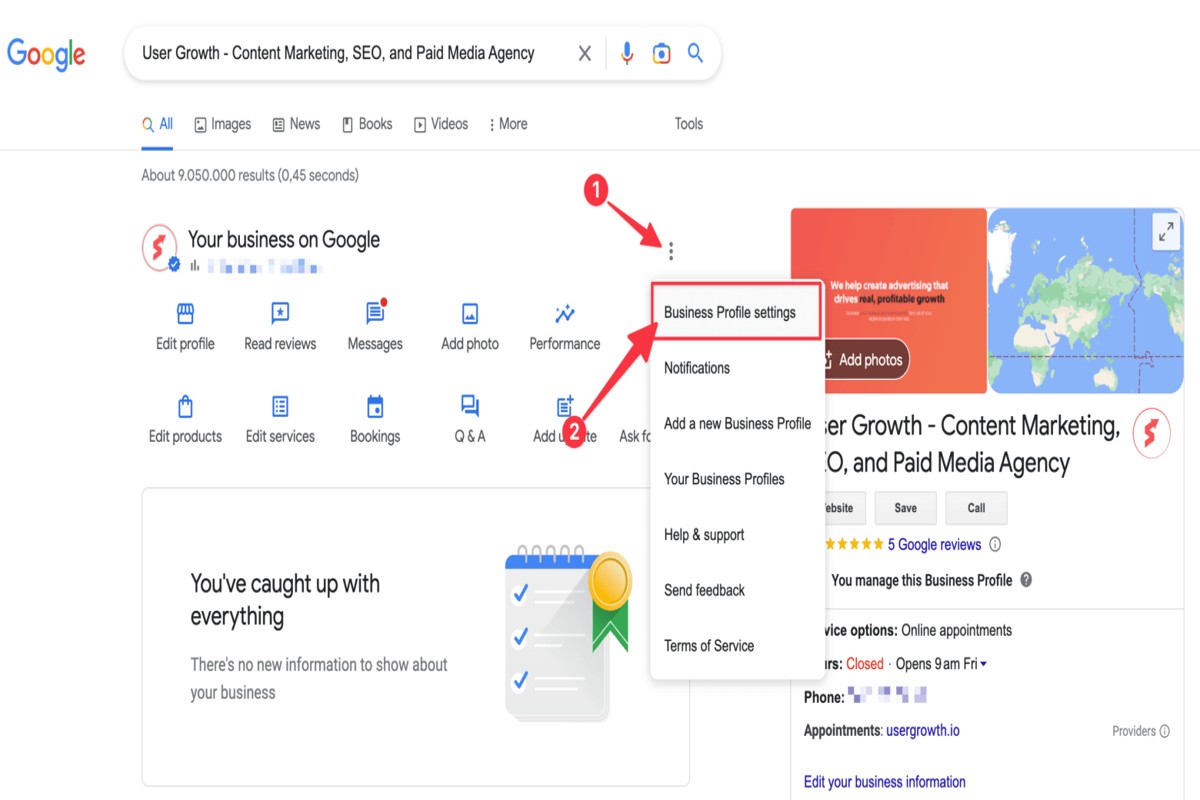
To access your Google Business Profile, visit the Google Business Profile Manager at business.google.com. Sign in with the Google account associated with your business to manage your profile.
Understanding how to access your Google Business Profile is crucial for any business owner aiming to enhance online visibility. This profile serves as a vital tool for managing customer interactions and ensuring accurate business information is displayed across Google services. Failing to effectively manage this profile can lead to misinformation and lost customer engagement.
This guide provides detailed steps on accessing your Google Business Profile, optimizing your listing, and leveraging its features to maximize your business’s online presence.
For How To Access Google Business Profile businesses looking to generate local leads through Google Ads or Local SEO, GMB Ranger LLC offers hands-on campaign management. Specialist Md Tangeer Mehedi personally handles campaign setup and ongoing optimization — with no payment required until the first lead comes in.
What is a Google Business Profile?
A Google Business Profile is a free online listing that allows businesses to manage their presence across Google Search and Maps. This profile provides essential information about the business, such as its name, address, phone number, website, and hours of operation, helping potential customers find and engage with the business more easily.
The primary purpose of a Google Business Profile is to enhance local search visibility and improve customer engagement. By providing accurate and up-to-date information, businesses can attract more customers, showcase their offerings, and respond to reviews. This tool is particularly valuable for small and medium-sized enterprises that rely heavily on local clientele.
- Business Information: Essential details like contact information, location, and operating hours.
- Customer Interaction: Enables businesses to respond to customer reviews and questions directly.
- Visual Content: Allows businesses to upload photos and videos, showcasing products or services.
- Insights: Provides analytics on how customers interact with the profile, including views and actions taken.
Additionally, a Google Business Profile can feature posts about promotions, events, and news updates, keeping customers informed and engaged. It is crucial for businesses to regularly update their profile to reflect changes in services, hours, or contact details, ensuring that customers have the most accurate information.
Expert Tip: Utilizing Google Posts within the profile can significantly enhance local SEO efforts, driving more traffic to your website and increasing customer engagement. Consistent updates and interaction can ultimately lead to better rankings in local search results.
How do I claim my Google Business Profile?
To claim your Google Business Profile, start by searching for your business on Google. Once located, follow the prompts to verify your ownership, which may include receiving a verification code via mail, phone, or email.
Begin by visiting the Google Business Profile homepage and clicking on the “Manage now” button. If your business appears in the search results, select it and click “Claim this business.” If it does not appear, you can add your business by providing the necessary details, such as the name, address, and category. Ensure that the information is accurate to avoid any verification issues.
Verification methods vary. The most common method is by postcard, where Google sends a verification code to your business address. Alternatively, you may verify via phone, email, or instant verification if you have already verified your business with Google Search Console. Choose the method that best suits your situation, and follow the on-screen instructions to complete the verification process.
After successfully verifying your ownership, you can access and manage your Google Business Profile. This includes updating business information, responding to reviews, and posting updates. Regularly maintaining your profile ensures it remains accurate and engaging for potential customers.
Expert Tip: Consider optimizing your profile with high-quality images and detailed descriptions to enhance visibility in local search results. Regular updates and customer engagement can significantly improve your business’s online presence.
What are the benefits of using a Google Business Profile?
A Google Business Profile (GBP) offers numerous advantages for businesses looking to enhance their online presence, particularly in local search results. By optimizing a GBP, businesses can improve visibility, attract more customers, and engage effectively with their audience. Key benefits include increased local SEO performance and enhanced customer interaction.
First, a well-optimized Google Business Profile significantly boosts local search rankings. When potential customers search for products or services in their vicinity, businesses with a completed and verified GBP are more likely to appear in the local pack or map results. This visibility can lead to higher foot traffic and online engagement, ultimately driving sales.
Secondly, a GBP acts as a central hub for customer information. Businesses can share essential details such as operating hours, contact information, and location. Additionally, they can post updates, offers, and events, keeping customers informed and engaged. This direct line of communication fosters trust and encourages repeat visits.
- Complete Your Profile: Ensure that all sections of your GBP are filled out, including business name, address, phone number, and website. This completeness enhances credibility and boosts local SEO.
- Utilize Customer Reviews: Actively encourage customers to leave reviews. Responding to these reviews, both positive and negative, can enhance customer trust and engagement.
- Post Regular Updates: Use the posting feature to share news, offers, or events. Regular updates keep your audience informed and can influence their decision-making.
- Monitor Insights: Regularly check the insights provided by Google to understand how customers are interacting with your profile. This data can guide future marketing strategies.
Leveraging the full capabilities of a Google Business Profile can lead to substantial growth for local businesses. Investing time in maintaining and optimizing this profile is essential for maximizing visibility and customer engagement.
How long does it take to set up a Google Business Profile?
Setting up a Google Business Profile typically takes between 15 minutes to several days, depending on various factors such as the verification method chosen. After completing the setup, verification can take up to five days, depending on whether you opt for mail or instant verification.
The initial setup is straightforward and can be completed quickly by providing essential business information, including name, address, phone number, and category. However, the time taken for verification may vary. If you choose to verify your profile via postcard, Google will send a verification code to your business address, which can take an additional 3-5 days to arrive. In contrast, some businesses may qualify for instant verification, which allows immediate access to their profile once the setup is complete.
Other factors that can influence the timeline include the accuracy of the information provided and any potential issues that may arise during the verification process. For example, if there are discrepancies in the business name or address, this may lead to delays. Additionally, businesses in certain categories may face stricter verification processes, extending the overall setup time.
Expert Tip: To expedite the verification process, ensure that your business information is consistent with other online listings and that you have access to the email or phone number associated with your Google account. This can help streamline any potential verification hurdles.
What information should I include in my Google Business Profile?
To optimize your Google Business Profile, include critical information such as your business name, address, phone number, website URL, and operating hours. Additionally, provide a detailed description of your services or products, high-quality images, and categories that accurately represent your business.
For instance, consider a local bakery named “Sweet Treats.” The bakery should list its name as “Sweet Treats,” followed by its complete address: 123 Cake Lane, Dessert City, CA 90210. Including a local phone number, such as (555) 123-4567, is vital for customer inquiries. The website URL should direct users to the bakery’s online menu and ordering system, enhancing user experience. Accurate operating hours, like Monday to Friday from 7 AM to 7 PM, ensure customers know when to visit.
Furthermore, a compelling business description can set the bakery apart. For example, “Sweet Treats specializes in handcrafted cakes and pastries using organic ingredients. We offer gluten-free and vegan options to cater to diverse dietary needs.” Including categories such as “Bakery,” “Dessert Shop,” and “Catering” will help Google categorize the business effectively, improving visibility in relevant searches. High-quality images of the bakery’s products and storefront can also attract potential customers, as visuals play a critical role in decision-making.
Expert Tip: Regularly update your Google Business Profile with seasonal offerings or special promotions to keep content fresh and engage customers effectively. This practice can enhance your search ranking and attract more local traffic.
Can I manage multiple Google Business Profiles?
Yes, businesses can manage multiple Google Business Profiles, especially if they operate in different locations or have distinct business entities. Google allows users to create and manage several profiles under a single account, making it easier to maintain visibility across various markets. However, there are specific guidelines and best practices to follow for effective management.
When managing multiple profiles, businesses should consider the following options:
- Single Location Profiles: Each profile represents a unique location of the same business. This is ideal for businesses with multiple branches in different areas.
- Different Business Profiles: Each profile represents a separate business entity. This approach is suitable when operating entirely different businesses under distinct names and branding.
- Franchise or Multi-Location Management: Franchisors may have a centralized management system for all franchise locations, allowing individual franchisees to manage their profiles while maintaining brand consistency.
The key differences lie in the management responsibilities and the level of detail required for each profile. Single location profiles require consistent branding and updates, while different business profiles necessitate unique branding strategies and content tailored to each entity. Franchise systems often involve oversight from the franchisor to ensure uniformity while allowing local management to adjust specifics based on local market needs.
All profiles must adhere to Google’s guidelines, including accurate business information and compliance with local laws. Businesses should regularly monitor and update their profiles to reflect changes in hours, services, and promotions, regardless of the number of profiles managed.
Expert Tip: Utilize Google’s bulk upload feature for managing multiple locations efficiently. This tool allows businesses to update information for several profiles simultaneously, saving time and ensuring consistency across all listings.
What is the cost of using Google Business Profile?
Google Business Profile is completely free to use for businesses. This platform allows companies to create and manage their online presence across Google, including Search and Maps, without any direct charges. However, there may be costs associated with advertising and promotional services that businesses choose to use.
While the core functionalities of Google Business Profile incur no fees, businesses can opt to enhance their visibility through Google Ads or other paid promotional strategies. These services are not required to maintain a Google Business Profile but can significantly increase exposure to potential customers. The costs for these advertising options can vary widely based on a range of factors.
- Advertising Budget: Businesses can set their own budgets for Google Ads, which can range from a few dollars a day to thousands, depending on the competitiveness of their industry.
- Geographical Targeting: Costs may increase if a business targets specific geographical areas or demographics, as these factors affect bidding in Google Ads.
- Campaign Objectives: Different goals, such as lead generation or brand awareness, may require varying levels of investment in advertising.
Businesses should assess their marketing strategy to determine if additional spending on advertisements aligns with their business goals. The free features of Google Business Profile provide a solid foundation for local SEO, while paid advertising can amplify reach and engagement.
Expert Tip: Regularly update your Google Business Profile with new content and respond to customer reviews, as this can improve your organic visibility without incurring additional costs.
How can I optimize my Google Business Profile for better visibility?
To optimize your Google Business Profile for better visibility, ensure that all information is complete and accurate. This includes business name, address, phone number, and categories. Regularly updating your profile can significantly enhance your search ranking and attract more customers.
One of the most effective strategies is to maintain consistent NAP (Name, Address, Phone) information across all online platforms. Inconsistencies can confuse search engines and potential customers, leading to lower visibility. Additionally, leveraging customer reviews is crucial; responding to reviews—both positive and negative—shows engagement and builds trust, which can positively impact your local SEO.
- Complete Business Information: Fill in all sections of your profile, including business hours, services offered, and a detailed description. Use relevant keywords naturally within your description to improve search relevance.
- Add High-Quality Photos: Regularly upload high-quality images that showcase your products, services, and premises. Profiles with images are 42% more likely to receive requests for directions and 35% more click-throughs to websites.
- Utilize Posts: Frequently post updates, offers, and events directly on your Google Business Profile. This feature not only informs customers but also signals to Google that your business is active, potentially improving your ranking.
- Engage with Customers: Encourage customers to leave reviews and make it easy for them to do so. Responding to reviews promptly can enhance your credibility and influence potential customers.
For optimal results, consider using Google Insights to track how customers interact with your profile. This data can guide your optimization efforts and help refine your strategy over time. Regularly reviewing performance metrics ensures continuous improvement and visibility in search results.
Advanced Features of Google Business Profile
This section delves into advanced features of Google Business Profile that enhance customer engagement and provide valuable insights. Mastering these tools is essential for maximizing your business’s online presence.

Utilizing Google Posts for Promotions and Updates
Google Posts allow businesses to communicate directly with customers through promotional content and updates. Posts can include announcements about upcoming events, special offers, or new products. Each post can contain images, call-to-action buttons, and links, making them versatile marketing tools.
- Promote limited-time offers to create urgency.
- Share news about product launches or services.
- Highlight upcoming events to increase attendance.
Regularly updating Google Posts keeps your audience informed and engaged, helping to drive traffic to your business.
Managing Customer Questions and Answers Effectively
The Q&A feature enables potential customers to ask questions directly on your Google Business Profile. Timely responses not only improve customer satisfaction but also enhance your profile’s visibility. It is advisable to monitor this section regularly and provide clear, concise answers.
- Set up alerts to notify you of new questions.
- Encourage satisfied customers to contribute answers.
- Use FAQs to address common concerns proactively.
By actively managing this feature, businesses can establish authority and trust with their audience.
Leveraging Messaging for Direct Customer Interaction
The messaging feature allows customers to reach out directly through your Google Business Profile. This tool facilitates real-time communication, enabling businesses to address inquiries and concerns promptly. To utilize messaging effectively, ensure that responses are quick and provide value.
- Set clear business hours for messaging availability.
- Use automated responses for common questions.
- Personalize interactions to enhance customer connection.
Effective use of messaging can lead to higher customer satisfaction and increased conversion rates.
Insights and Analytics to Track Profile Performance
Google Business Profile offers analytics tools that provide insights into how customers interact with your profile. Key metrics include views, clicks, and engagement rates. Accessing this data enables businesses to refine their strategies based on actual performance.
- Monitor the number of profile views to assess visibility.
- Evaluate customer actions, such as requests for directions or calls.
- Analyze trends over time to identify successful tactics.
Utilizing these analytics helps businesses make informed decisions and optimize their online presence.
Many articles overlook the importance of integrating these advanced features into a cohesive marketing strategy. For instance, while individual features like Posts and Q&A are beneficial, their combined use can amplify impact. A well-timed Google Post, followed by engaging responses in the Q&A section, can create a holistic customer experience that drives engagement and sales.
To effectively leverage these features, businesses should implement a regular schedule for updating Posts, monitor Q&A sections consistently, and analyze performance metrics monthly. Establishing a dedicated team or using automated tools can streamline these processes, ensuring that your Google Business Profile remains dynamic and engaging.
Common Mistakes to Avoid with Google Business Profile
This section identifies frequent errors businesses make with their Google Business Profile that can undermine its effectiveness. Understanding these pitfalls is essential for maximizing visibility and engagement.

Neglecting to Verify the Business Location
Verification of the business location is a critical step in establishing credibility on Google. Failure to verify can result in your profile being unlisted or marked as “ineligible.” This means potential customers may not find your business in search results, effectively diminishing your online presence. To verify, follow the instructions provided by Google, often requiring a postcard confirmation sent to your business address.
Inconsistent Information Across Platforms
Consistency is key in digital marketing. Discrepancies between your Google Business Profile and other platforms—such as your website, Yelp, or social media—can confuse potential customers. This inconsistency may lead to decreased trust and lower rankings in search results. Ensure that your business name, address, phone number, and operating hours are uniform across all platforms.
Ignoring Customer Reviews and Feedback
Customer reviews play a pivotal role in shaping public perception of your business. Ignoring these reviews can lead to negative impressions and missed opportunities for improvement. Engage with customer feedback by responding to reviews, both positive and negative. This interaction not only demonstrates excellent customer service but also signals to potential clients that their opinions are valued.
Failing to Keep Profile Information Up to Date
Regularly updating your Google Business Profile is essential for accuracy. Outdated information—such as incorrect hours or services offered—can frustrate customers and lead to lost sales. Create a schedule to review and update your profile information at least quarterly or whenever significant changes occur within your business.
Nuanced Considerations
Many businesses mistakenly believe that once their Google Business Profile is set up, minimal maintenance is required. This misconception can lead to missed opportunities for optimization. For instance, seasonal changes in business hours or special promotions should be reflected immediately. Moreover, not all reviews require a response; however, consistently engaging with the most impactful feedback can enhance your brand’s reputation. Additionally, businesses should consider the impact of local SEO strategies, which can be affected by how well they manage their profiles.
Practical Application
- Verify your business location through Google’s verification process.
- Audit your online presence regularly to ensure consistent information across all platforms.
- Establish a system for responding to customer reviews within 24-48 hours.
- Set reminders to check and update your profile information at least every three months.
Real-World Applications of Google Business Profile
This section explores practical examples of how businesses leverage their Google Business Profiles to drive customer engagement, increase foot traffic, and generate leads. These case studies illustrate the tangible benefits of optimizing these profiles effectively.

Case Study: Local Restaurant Boosting Foot Traffic
A local restaurant, “Bistro Delight,” implemented a comprehensive strategy utilizing its Google Business Profile. By regularly updating their profile with high-quality images of dishes and accurate information about operating hours, they saw a 30% increase in foot traffic over six months. Additionally, they utilized the Posts feature to promote weekly specials, which resulted in a direct correlation with increased reservations during peak hours.
Service Provider: Generating Leads through Optimization
“Handy Solutions,” a plumbing service, optimized their Google Business Profile by including detailed service descriptions, service areas, and customer testimonials. They also responded promptly to inquiries through the messaging feature. As a result, they experienced a 40% increase in leads within three months. This optimization made their profile more attractive and informative for potential customers, leading to higher conversion rates.
Seasonal Promotions and Engagement Impact
Seasonal promotions can significantly enhance customer engagement on Google Business Profiles. For instance, “Summer Blooms,” a local florist, launched a summer sale campaign by updating their profile with promotional banners and special offers. This strategy led to a 50% increase in user interactions on their profile during the promotion period. The florist also collected and showcased customer photos of their arrangements, further enhancing engagement and driving sales.
Success Stories: Responding to Customer Reviews
Timely responses to customer reviews can bolster a business’s reputation. “Tech Repair Hub” actively engaged with both positive and negative reviews on their Google Business Profile. By addressing customer concerns and thanking patrons for positive feedback, they improved their overall rating from 3.5 to 4.7 stars within four months. This proactive approach not only enhanced their online reputation but also increased customer trust and loyalty.
While many businesses recognize the importance of maintaining their Google Business Profiles, misconceptions often arise regarding the impact of reviews. Some believe that responding to negative reviews only amplifies criticism. However, expert analysis shows that addressing concerns transparently can enhance credibility and demonstrate commitment to customer satisfaction.
To maximize the benefits of Google Business Profiles, businesses should:
- Regularly update profiles with accurate information and engaging visuals.
- Utilize the Posts feature for promotions to attract seasonal customers.
- Respond to all customer reviews, fostering a positive brand image.
Businesses should actively monitor their profiles and leverage insights derived from customer interactions. By implementing these strategies, companies can significantly enhance their online presence and customer engagement levels. Understanding how to access Google Business Profile and optimize it effectively is crucial for driving business success.
Comparing Google Business Profile with Other Local Listing Services
This section evaluates how Google Business Profile compares to other local listing services such as Yelp and Bing Places. Understanding these differences is vital for businesses aiming to enhance their online visibility and attract local customers.
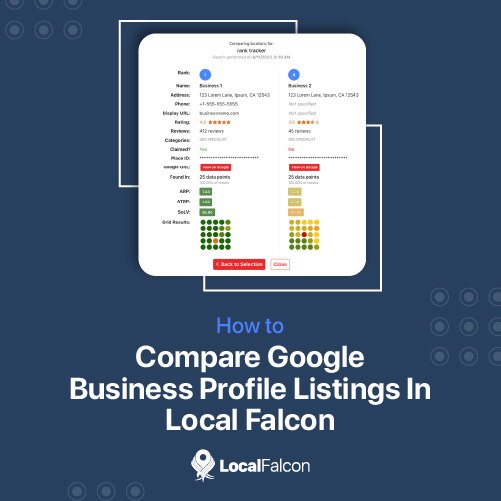
Feature Comparison Between Google Business Profile and Yelp
Both Google Business Profile and Yelp offer unique features that cater to local businesses, but they have distinct strengths. Google Business Profile integrates seamlessly with Google services, providing robust tools for managing business information, customer reviews, and insights. Yelp, on the other hand, focuses heavily on user-generated content and community engagement.
- Business Information: Google allows businesses to manage hours, locations, and services directly. Yelp provides similar features but emphasizes user reviews more prominently.
- Customer Reviews: Google aggregates reviews from various sources, while Yelp showcases its own reviews, often with a more detailed filtering system.
- Advertising Options: Google offers pay-per-click advertising and promotional tools, whereas Yelp uses a subscription model for enhanced visibility.
Pros and Cons of Using Multiple Local Listing Services
Utilizing multiple local listing services can enhance visibility, but it comes with trade-offs. The primary advantage is increased exposure across different platforms, which can attract various customer demographics. However, managing multiple listings requires time and careful attention to ensure consistency in business information.
- Pros:
- Wider reach to potential customers.
- Diverse platforms offer different user bases.
- Increased chances of appearing in local search results.
- Cons:
- Time-consuming to maintain accurate information.
- Potential for conflicting customer reviews across platforms.
- Resource allocation for advertising can be challenging.
Integration with Google Maps vs. Other Platforms
One of the standout features of Google Business Profile is its integration with Google Maps, providing instant visibility to users searching for local services. This integration enhances user experience by allowing customers to find directions, contact information, and business hours immediately. In contrast, Yelp’s integration with mapping services is less straightforward, often requiring users to navigate away from the app to access map features.
Effectiveness in Local SEO Rankings
Google Business Profile significantly influences local SEO rankings. Businesses that optimize their profiles are more likely to appear in the local pack and organic search results. This visibility is vital for attracting foot traffic and online inquiries. Conversely, while Yelp can contribute positively to SEO, its effectiveness is often overshadowed by Google’s dominance in search engine results.
Common misconceptions suggest that listing on multiple platforms guarantees better visibility. However, the quality of the listing and active engagement with customers often outweigh sheer quantity. Businesses should focus on optimizing their Google Business Profile while selectively using other platforms to complement their online presence.
To maximize the benefits of local listings, businesses should:
- Ensure consistent and accurate information across all platforms.
- Encourage customer reviews on Google and Yelp to enhance credibility.
- Monitor insights and adapt strategies based on performance data.
By strategically leveraging Google Business Profile alongside other local listing services, businesses can significantly enhance their local presence and drive customer engagement.
For How To Access Google Business Profile businesses looking to generate local leads through Google Ads or Local SEO, GMB Ranger LLC offers hands-on campaign management. Specialist Md Tangeer Mehedi personally handles campaign setup and ongoing optimization — with no payment required until the first lead comes in.
Frequently Asked Questions
What is a Google Business Profile?
A Google Business Profile is a free tool that allows businesses to manage their online presence across Google, including Search and Maps. It provides essential information about the business, such as location, hours, and services offered.
How do I claim my Google Business Profile?
To claim your Google Business Profile, visit the Google Business Profile Manager and sign in with your Google account. Follow the prompts to verify your business ownership, which may involve receiving a verification code via mail, phone, or email.
What are the benefits of using a Google Business Profile?
Using a Google Business Profile enhances online visibility, allowing potential customers to find your business easily. It also enables you to engage with customers through reviews, posts, and direct messaging.
How long does it take to set up a Google Business Profile?
Setting up a Google Business Profile can be completed in a few minutes, but verification may take several days. The duration depends on the verification method chosen and the responsiveness of the business owner.
What information should I include in my Google Business Profile?
Include essential details such as your business name, address, phone number, website, hours of operation, and a description of your services. High-quality images and posts can also enhance your profile’s appeal.
Can I manage multiple Google Business Profiles?
Yes, you can manage multiple Google Business Profiles from a single Google account. This is particularly useful for businesses with multiple locations or brands under one umbrella.
What is the cost of using Google Business Profile?
Google Business Profile is free to use for all businesses. There are no subscription fees or hidden costs associated with creating and managing your profile.
How can I optimize my Google Business Profile for better visibility?
To optimize your Google Business Profile, ensure all information is accurate and complete, use relevant keywords in your business description, and regularly update posts and photos. Encourage customer reviews and respond to them to boost engagement.
Final Thoughts on how to access google business profile
Accessing and optimizing your Google Business Profile is essential for enhancing online visibility and driving local engagement. The strategic use of this tool not only provides a competitive edge but also fosters customer trust and credibility in a digital-first marketplace.
To leverage these benefits, immediately claim your Google Business Profile and ensure that all information is accurate and complete. Regularly update your profile with engaging content and utilize advanced features to maximize your reach and impact.
In an era where digital presence dictates business success, mastering your Google Business Profile is not just beneficial; it is imperative for sustained growth and relevance.
Leave a Reply