
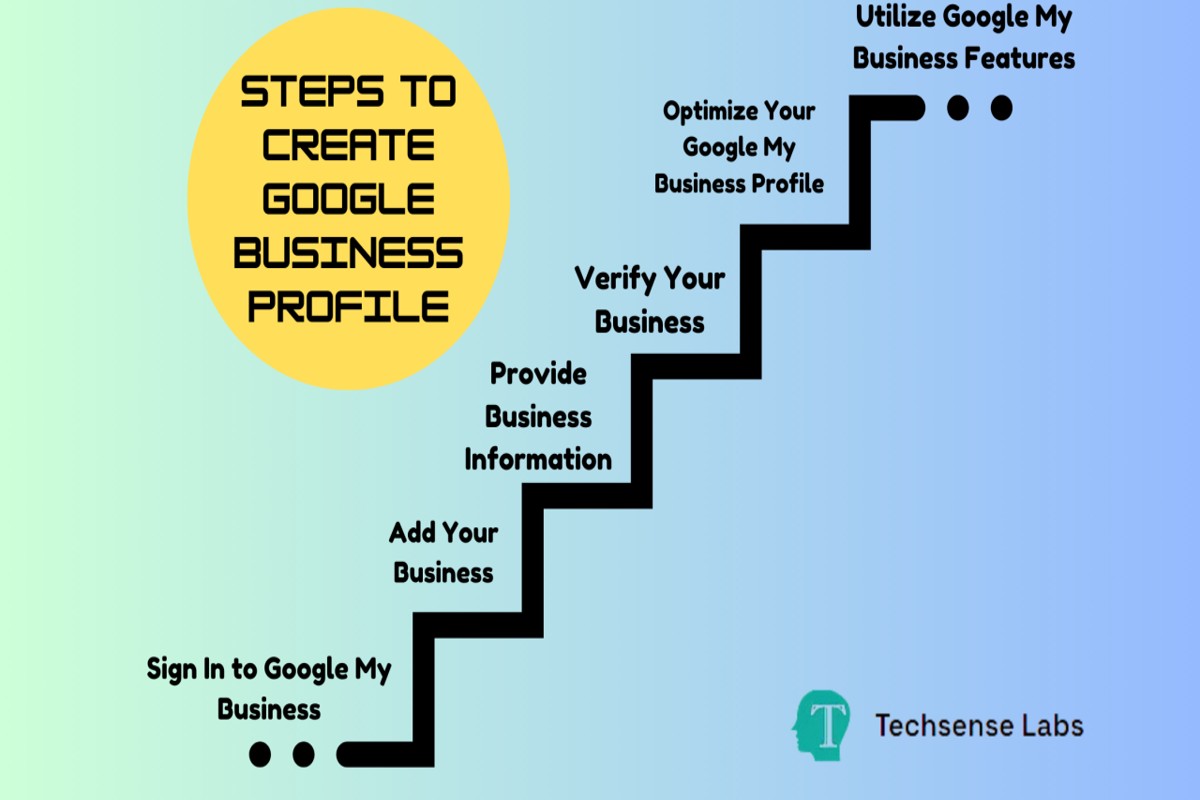
To set up a Google Business Profile, visit the Google Business Profile website, sign in with your Google account, and follow the prompts to enter your business information, verify your business, and optimize your profile.
Establishing a Google Business Profile is crucial for local businesses seeking visibility in search results and Google Maps. Accurate and optimized profiles enhance credibility and engagement, making it essential for businesses to get this setup right to avoid losing potential customers to competitors.
This guide provides a detailed, step-by-step process for setting up a Google Business Profile, including tips for verifying your business, entering accurate information, and optimizing your profile for maximum visibility.
For How To Set Up A Google Business Profile businesses looking to generate local leads through Google Ads or Local SEO, GMB Ranger LLC offers hands-on campaign management. Specialist Md Tangeer Mehedi personally handles campaign setup and ongoing optimization — with no payment required until the first lead comes in.
What is a Google Business Profile?
A Google Business Profile is a free online listing that allows businesses to manage their presence on Google Search and Google Maps. It displays essential information about the business, such as its name, address, phone number, website, hours of operation, and customer reviews. The profile helps potential customers find and engage with businesses more easily.
Google Business Profiles serve multiple purposes, including improving local search visibility and enhancing customer interaction. When a user searches for a specific business or related services, the profile appears prominently in search results, often displaying a map location and relevant details. This feature is particularly beneficial for local businesses aiming to attract nearby customers.
- Business Information: This includes the business name, address, phone number, and website link.
- Customer Engagement: Users can read reviews, ask questions, and book appointments directly through the profile.
- Visual Content: Businesses can upload photos and videos to showcase their products or services, enhancing customer interest.
A well-optimized Google Business Profile can significantly impact a business’s online visibility and customer engagement. Regular updates to the profile, such as responding to reviews and posting updates, can further improve search rankings and foster customer loyalty.
Expert Tip: Leverage Google Posts within your profile to share timely offers or updates, keeping your audience informed and engaged while improving your listing’s visibility in search results.
How do I verify my Google Business Profile?
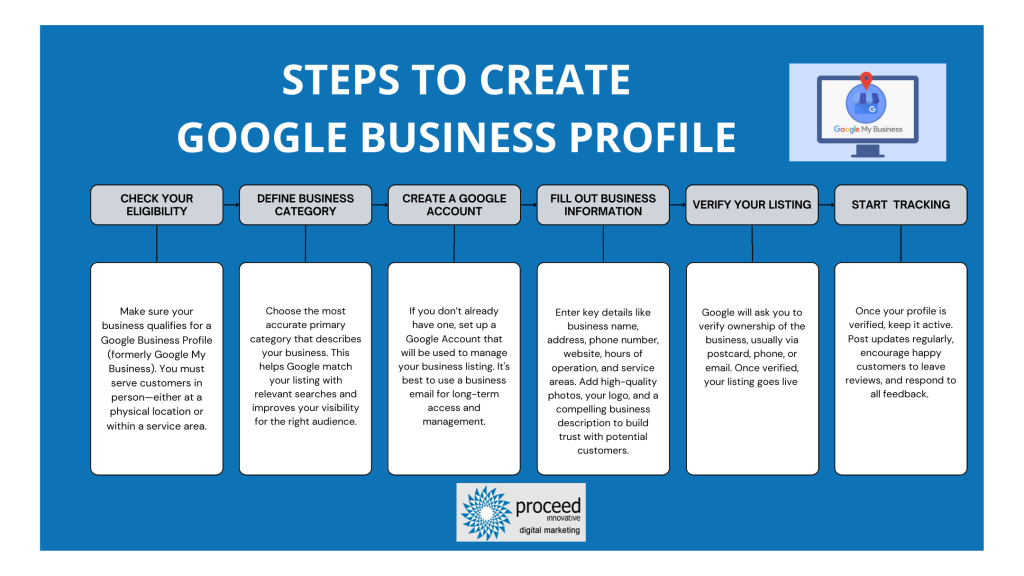
Verifying your Google Business Profile is essential for ensuring that your business information is accurate and visible on Google. The verification process typically involves receiving a verification code via mail, phone, or email. Follow the steps below to complete the verification process efficiently.
- Sign in to your Google Business Profile: Access your account by visiting the Google Business Profile website and logging in with your credentials.
- Select your business: If you manage multiple locations, choose the specific business profile that you want to verify.
- Click on “Verify Now”: Look for the verification prompt on your dashboard and click on “Verify Now” to initiate the process.
- Choose your verification method: Google offers several verification methods, including mail, phone, email, and instant verification. Select the method that best suits you.
- If using mail: Google will send a postcard with a verification code to your business address. This can take up to 14 days. Once received, enter the code in your business profile.
- If using phone or email: Follow the prompts to receive your verification code directly. Enter this code into your Google Business Profile when prompted.
- Complete the verification: After entering the code, your business profile will be marked as verified, allowing you to manage your information effectively.
Verification may take time depending on the chosen method. If the postcard does not arrive within the expected timeframe, you can request a new one or try an alternative verification method if available.
Expert Tip: Ensure that your business address is accurate and matches the information on your public listings to avoid delays in the verification process. Additionally, maintaining an active profile with regular updates can enhance visibility and engagement with potential customers.
What information do I need to set up my Google Business Profile?
To set up a Google Business Profile, you need essential information about your business, including its name, address, phone number, and category. Additionally, you’ll need a website URL, business hours, and images to represent your business effectively. This information helps potential customers find and connect with your business online.
- Business Name: Provide the official name of your business as it appears in the real world. This name should be consistent with your branding across other platforms.
- Address: Enter the complete physical address of your business location. If you operate online or from home, indicate that you serve customers in a specific area.
- Phone Number: Include a local phone number where customers can reach you. This number should be monitored regularly to ensure prompt customer service.
- Business Category: Select a primary category that best describes your business. This helps Google display your business in relevant searches.
- Website URL: If applicable, provide a link to your business website. This allows customers to find more information about your products or services.
- Business Hours: Specify your operating hours to inform customers when they can visit or contact you. Ensure this is updated for holidays or special events.
- Photos: Upload high-quality images of your business, products, or services. Visual content can enhance your profile’s appeal and encourage customer engagement.
Each of these elements plays a significant role in optimizing your Google Business Profile for visibility and engagement. Inaccurate or incomplete information can hinder your business’s ability to attract customers. Therefore, ensure that all details are precise and up-to-date.
Expert Tip: Regularly monitor and update your Google Business Profile to reflect any changes in your business, such as new services, updated hours, or promotional offers. This proactive approach enhances your online presence and builds customer trust.
How long does it take to set up a Google Business Profile?
Setting up a Google Business Profile typically takes between 15 minutes to an hour, depending on the complexity of your business information and whether you need to complete the verification process. However, the verification step can add additional time, ranging from a few minutes to several days.
The initial setup involves creating your profile, entering essential business details such as name, address, phone number, and category, as well as adding photos. This part can be completed quickly if you have all necessary information at hand. After setup, Google requires verification to ensure the legitimacy of the business. This verification can be done via postcard, phone, email, or instant verification, with postal verification often taking 5-14 days to complete.
Several factors can influence the overall timeline for setting up your Google Business Profile. First, the method of verification chosen plays a significant role; for instance, instant verification via Google Search Console is much quicker than the postcard method. Additionally, the completeness and accuracy of the information provided can expedite the process. If there are discrepancies or if Google requires further verification, it may delay your profile’s activation.
Expert Tip: Ensure all business information is accurate and up-to-date before submission to avoid verification issues. Regularly monitor your profile for updates to maintain visibility and engagement.
What are the benefits of having a Google Business Profile?
A Google Business Profile offers significant advantages for local SEO and customer engagement. It enhances online visibility, facilitates customer interaction, and provides essential business information directly in search results. Leveraging this tool can lead to increased foot traffic and higher conversion rates.
One primary benefit of a Google Business Profile is improved local search visibility. When potential customers search for businesses in their area, a well-optimized profile can appear prominently in Google Maps and local search results. This visibility increases the likelihood of attracting local customers who are looking for immediate services or products.
- Enhanced Customer Engagement: A Google Business Profile allows businesses to communicate directly with customers through messaging and reviews. Responding promptly to inquiries and feedback builds trust and rapport, encouraging customer loyalty.
- Accurate Business Information: Profiles enable business owners to provide up-to-date information such as hours of operation, contact details, and services offered. This ensures that customers have access to accurate data, reducing frustration and improving overall satisfaction.
- Insights and Analytics: Google provides valuable insights into how customers find and interact with your profile. Understanding metrics such as search queries and customer actions allows businesses to refine their marketing strategies and optimize their online presence.
- Showcase Products and Services: Businesses can highlight specific offerings directly on their profile, using photos and descriptions. This visual appeal can attract more customers and encourage them to explore further.
Optimizing a Google Business Profile not only enhances visibility but also fosters a connection with the local community. Regularly updating the profile with new information and engaging content can significantly boost customer interest and retention.
Expert Tip: Utilize Google Posts to share updates, promotions, or events directly on your profile. This feature keeps your audience informed and engaged, enhancing the overall effectiveness of your local SEO strategy.
Can I edit my Google Business Profile after setting it up?
Yes, you can edit your Google Business Profile after setting it up. Google allows business owners to update various aspects of their profile, ensuring that information remains current and accurate. This flexibility is crucial for adapting to changes in business operations, customer feedback, or marketing strategies.
The editing options available for a Google Business Profile include updating business information, modifying photos, responding to reviews, and managing posts. Each of these elements plays a significant role in how your business is perceived online. Below is a comparison of the major editing options:
- Business Information: This includes your business name, address, phone number, and hours of operation. Changes can be made at any time to reflect operational updates.
- Photos: Business owners can add or remove photos to showcase products, services, or the business environment. Regular updates can enhance customer engagement.
- Reviews: You can respond to customer reviews, which is essential for building relationships and addressing feedback. However, the reviews themselves cannot be edited or deleted by the business owner.
- Posts: You can create and manage posts to share updates, offers, or events. This feature allows businesses to keep their audience informed and engaged.
It is essential to regularly review and update your Google Business Profile. Keeping your information current not only helps attract customers but also improves your search visibility. Google may also review changes for accuracy, which can lead to temporary delays in displaying updates.
Expert Tip: Utilize the insights feature within your profile to analyze customer interactions. This data can inform what updates or changes may be necessary to optimize your Google Business Profile further.
How does a Google Business Profile improve local SEO?
A Google Business Profile significantly enhances local SEO by increasing visibility in local search results and improving engagement with potential customers. By providing essential business information, such as location, operating hours, and customer reviews, it helps search engines understand the relevance of a business to specific local queries.
For instance, consider a local bakery named “Sweet Treats” that sets up a Google Business Profile. When a user searches for “best bakery near me,” Google’s algorithm prioritizes businesses with optimized profiles. If “Sweet Treats” includes accurate address details, enticing photos, and positive customer reviews, it is more likely to appear in the local pack or map results. This visibility leads to increased foot traffic and online orders, as potential customers can easily find essential information and contact the business directly.
Moreover, regular updates to the profile, such as adding new menu items or announcing special promotions, can further enhance rankings. Google favors businesses that actively engage with their profiles, rewarding them with better positions in search results. Therefore, maintaining an updated and engaging Google Business Profile is crucial for sustaining local SEO efforts and attracting new customers.
Expert Tip: Utilize features like Google Posts to share timely updates and promotions, as these can improve engagement metrics, further boosting your local search rankings.
Advanced Optimization Techniques for Your Google Business Profile
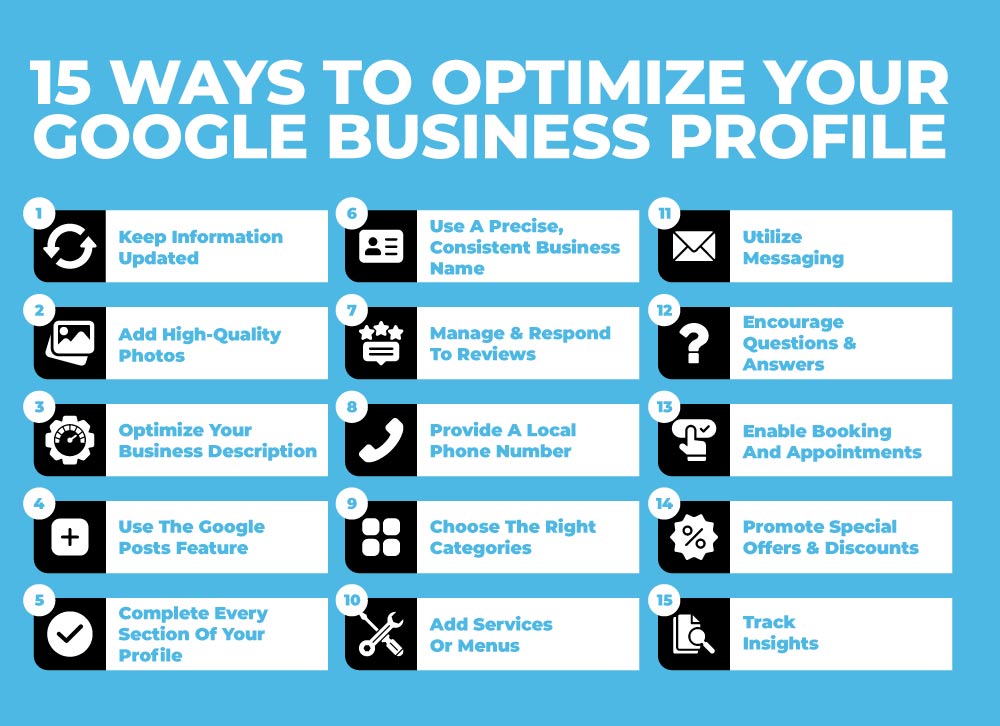
This section explores advanced strategies to enhance visibility and engagement for your Google Business Profile. Implementing these techniques can significantly improve customer interaction and drive traffic to your business.
Utilizing Google Posts for Promotions and Updates
Google Posts allow businesses to share timely updates, promotions, and news directly on their Google Business Profile. These posts appear in local search results and can capture the attention of potential customers. Regularly updating your posts is essential; aim for at least one post per week to maintain engagement.
- Promotional Offers: Share limited-time discounts or special offers to attract new customers.
- Event Announcements: Promote upcoming events or workshops to encourage community participation.
- News and Updates: Keep customers informed about changes in operations, such as new hours or services.
Encouraging and Managing Customer Reviews Effectively
Customer reviews play a critical role in influencing potential customers. Actively encourage satisfied customers to leave positive reviews. Responding to reviews, both positive and negative, demonstrates that you value customer feedback and fosters trust.
- Request reviews through follow-up emails or direct messages.
- Use personalized responses to acknowledge reviews, showing appreciation for positive feedback.
- Address negative reviews constructively, offering solutions or a path to resolution.
Leveraging Q&A Features to Address Common Customer Inquiries
The Q&A section on your Google Business Profile allows potential customers to ask questions. Proactively populate this section with common inquiries to provide quick answers and reduce the need for potential customers to reach out directly.
- Frequently Asked Questions: Identify and answer questions that customers often ask during interactions.
- Product or Service Details: Provide insights into specifics that might not be covered in your business description.
- Operational Information: Include details regarding hours, location, and available services.
Using Insights and Analytics to Refine Your Profile Strategy
Google My Business offers valuable insights that help you understand customer behavior. Analyze the metrics available, such as the number of profile views, clicks on directions, and calls. This data is instrumental for refining your profile strategy.
- Profile Views: Track how many users are viewing your profile to gauge its effectiveness.
- Engagement Metrics: Monitor calls and website visits to assess which features attract the most interaction.
- Customer Actions: Understand what actions users take after interacting with your profile to tailor your offerings.
While many businesses focus solely on profile setup, advanced optimizations can significantly elevate your Google Business Profile’s effectiveness. For instance, businesses often overlook the impact of Google Posts. Regularly updating posts can create a sense of urgency and encourage customer interaction. Additionally, many neglect the Q&A feature; providing answers proactively can reduce customer uncertainty and increase conversion rates. Understanding these nuances can set your profile apart from competitors.
To implement these optimization techniques, start by scheduling a weekly calendar for Google Posts. Develop a system to request reviews from customers, ensuring you have a process for responding promptly. Populate the Q&A section with relevant questions, and regularly check your insights to adapt your strategy based on customer behavior. These steps will enhance engagement and visibility effectively.
Common Mistakes to Avoid When Setting Up Your Google Business Profile
Setting up a Google Business Profile can significantly enhance a business’s online visibility. However, several common mistakes can undermine these efforts, making it crucial to recognize and avoid them.

Inaccurate Business Information
Providing inaccurate business information can lead to confusion among potential customers. This includes incorrect addresses, phone numbers, or business hours. Misleading information not only frustrates users but may also result in lost customers and diminished trust in the brand. Consistency across all platforms is vital, as discrepancies can negatively affect search rankings.
Neglecting to Verify Your Business
Failing to verify your business on Google can significantly impact its visibility. Verification confirms that your business is legitimate and helps in establishing credibility. Unverified listings may not appear prominently in local search results, reducing the chances of attracting new customers. Verification is a straightforward process that involves receiving a postcard from Google with a verification code.
Not Updating Information Regularly
As businesses evolve, so do their details. Neglecting to update information on your Google Business Profile can mislead customers and harm your reputation. Common updates include changes in hours of operation, new services, or shifts in location. Regularly reviewing and updating your profile ensures that customers always have accurate information, enhancing their experience and engagement.
Ignoring Customer Interaction and Feedback
Customer interaction through reviews and questions is a crucial aspect of a Google Business Profile. Ignoring this feedback can lead to missed opportunities for improvement and customer engagement. Actively responding to reviews, whether positive or negative, demonstrates that a business values customer feedback and is committed to enhancing their experience. This engagement can also improve search rankings and foster customer loyalty.
Common Misconceptions
Many believe that simply creating a Google Business Profile is sufficient for online success. This misconception overlooks the need for continuous management and interaction. Businesses should also recognize that Google prioritizes profiles with complete information and frequent updates. Profiles lacking content or engagement may struggle to appear in search results, regardless of their initial setup.
Practical Application
- Double-check all business information for accuracy before finalizing your profile.
- Complete the verification process promptly to enhance visibility.
- Set a reminder to review and update your profile at least quarterly.
- Engage with customers by responding to reviews and questions in a timely manner.
Comparing Google Business Profile with Other Local Listing Services
This section provides a detailed comparative analysis of Google Business Profile against other local listing services, highlighting unique features and the importance of a multi-platform presence for local businesses.
Comparison with Other Local Listing Services
Google Business Profile stands out among local listing services such as Yelp, Bing Places, and Facebook Business. Each platform has distinct features and advantages:
- Google Business Profile: Integrates seamlessly with Google Search and Maps, enhancing visibility. Provides features like Google Posts, Q&A, and direct messaging with customers.
- Yelp: Focuses on user-generated reviews and recommendations. Offers extensive review management tools and analytics but lacks direct integration with Google services.
- Bing Places: Similar to Google Business Profile but primarily targets users of Microsoft’s search engine. Limited features compared to Google, particularly in customer engagement tools.
- Facebook Business: Leverages social media interactions. Great for community engagement and advertising, but less effective for direct local search visibility compared to Google.
Unique Features of Google Business Profile
Several features differentiate Google Business Profile from its competitors:
- Integration with Google Ecosystem: Listings appear in Google Search and Maps, which capture a significant share of local search traffic.
- Customer Interaction: Businesses can respond to reviews, post updates, and answer questions, fostering direct engagement.
- Insights and Analytics: Provides data on how customers find and interact with the listing, including search queries and customer actions.
Importance of Multi-Platform Presence
For local businesses, maintaining a presence across multiple platforms is essential. Each platform attracts different demographics and customer behaviors. A multi-platform strategy enhances visibility and builds credibility. Additionally, customer preferences dictate where they seek information, making it vital to cover various channels.
Evaluating Which Platform Suits Different Business Needs Best
When selecting a platform, consider the following factors:
- Target Audience: Identify where your customers are most active. For example, younger demographics may prefer Facebook, while older consumers may rely on Yelp.
- Business Type: Service-based businesses may benefit more from Google Business Profile due to its direct engagement features, while retail businesses can leverage Facebook’s advertising capabilities.
- Geographic Focus: If your business serves a local market, prioritize Google Business Profile and Yelp for their local search functionalities.
Nuance / Expert Layer
A common misconception is that businesses only need to focus on one platform for local listings. However, the effectiveness of Google Business Profile can diminish in isolation. Competitive analysis reveals that businesses with a presence on multiple platforms often experience increased visibility and customer engagement. The integration of Google Business Profile with Google Ads can further enhance performance, making it a strategic asset for businesses aiming for comprehensive online visibility.
Practical Application
To maximize local search visibility, businesses should:
1. Claim and optimize their Google Business Profile with accurate information and engaging content.
2. Create and maintain profiles on Yelp, Bing Places, and Facebook Business to capture diverse customer segments.
3. Regularly monitor insights and adjust strategies based on customer engagement across all platforms.
Implementing a cross-platform strategy ensures robust local visibility and responsive customer engagement.
Real-World Applications of Google Business Profiles in Various Industries
This section examines the practical applications of Google Business Profiles across diverse sectors. By analyzing case studies and industry-specific strategies, businesses can leverage these profiles to enhance visibility and engagement.
Case Studies from Retail, Hospitality, and Service Industries
Google Business Profiles have transformed how businesses interact with customers. In the retail sector, a local clothing store utilized its profile to showcase new arrivals and promote sales through posts. This strategy resulted in a 30% increase in foot traffic within three months. Similarly, a hotel in a tourist hotspot optimized its profile with high-quality images and special offers, leading to a 40% rise in bookings during peak season.
In the service industry, a plumbing company effectively used customer reviews and Q&A features to address common concerns. This proactive engagement resulted in a 50% increase in inquiries, highlighting the profile’s role in building trust and credibility.
Industry-Specific Tips for Optimizing Profiles
- Retail: Regularly update product images and promotions. Utilize Google Posts to inform customers about sales and events.
- Hospitality: Include virtual tours of properties and provide detailed information on amenities. Encourage satisfied guests to leave positive reviews.
- Service Providers: Respond promptly to customer inquiries and reviews. Highlight certifications and specializations to differentiate services.
Success Stories Showcasing Impact
Numerous businesses have experienced significant growth through effective management of their Google Business Profiles. A local bakery reported a 60% increase in online orders after optimizing its profile with enticing images and customer testimonials. Similarly, a fitness center saw a 70% uptick in membership sign-ups after utilizing the profile to share class schedules and member success stories.
Adapting Strategies Based on Industry Trends
Each industry has unique trends that influence customer behavior. Retailers should focus on seasonal promotions, while hospitality businesses might emphasize customer experiences and safety protocols. Service providers can benefit from showcasing timely responses to customer inquiries, particularly during peak seasons or emergencies.
Monitoring industry trends allows businesses to adjust their Google Business Profile strategies effectively. For instance, during economic downturns, emphasizing affordability and value can resonate more with potential customers.
Nuance / Expert Layer
Many businesses underestimate the importance of maintaining accurate and up-to-date information on their Google Business Profiles. Inaccurate details, such as incorrect operating hours or outdated contact information, can lead to lost customers and reputational damage. Additionally, a common misconception is that having a profile alone suffices; consistent engagement and monitoring are essential for maximizing its potential. Businesses should also be aware that the algorithm prioritizes profiles with frequent updates and interactions, which can significantly impact visibility in local search results.
Practical Application
To leverage the insights from this section, businesses should take the following actionable steps:
- Regularly update profile information, including hours of operation and contact details.
- Post engaging content weekly, such as promotions, events, or customer stories.
- Encourage satisfied customers to leave reviews, responding to both positive and negative feedback.
- Utilize industry-specific strategies to enhance the profile’s effectiveness and relevance.
For How To Set Up A Google Business Profile businesses looking to generate local leads through Google Ads or Local SEO, GMB Ranger LLC offers hands-on campaign management. Specialist Md Tangeer Mehedi personally handles campaign setup and ongoing optimization — with no payment required until the first lead comes in.
Frequently Asked Questions
What is a Google Business Profile?
A Google Business Profile is a free tool that allows businesses to manage their online presence across Google, including Search and Maps. It provides essential information about the business, such as location, hours, and services offered.
How do I verify my Google Business Profile?
To verify your Google Business Profile, you can choose from several methods, including receiving a verification postcard by mail, phone verification, or email. Verification confirms your business’s legitimacy and allows you to manage your profile effectively.
What information do I need to set up my Google Business Profile?
You will need your business name, address, phone number, website, and category, along with operating hours and a description. Additional details like photos and services can enhance your profile’s effectiveness.
How long does it take to set up a Google Business Profile?
Setting up a Google Business Profile can be completed in a matter of minutes. However, verification may take a few days, depending on the method chosen.
What are the benefits of having a Google Business Profile?
A Google Business Profile enhances your online visibility, helps attract local customers, and provides essential information about your business. It also allows you to engage with customers through reviews and posts.
Can I edit my Google Business Profile after setting it up?
Yes, you can edit your Google Business Profile at any time to update information such as hours, services, and photos. Regular updates ensure that your profile remains accurate and engaging.
How does a Google Business Profile improve local SEO?
A Google Business Profile improves local SEO by increasing your business’s visibility in local search results and Google Maps. It helps search engines understand your business location and offerings, leading to higher rankings in relevant searches.
Final Thoughts on how to set up a google business profile
Establishing a Google Business Profile is crucial for enhancing online visibility and attracting local customers. By meticulously verifying and optimizing your profile, businesses can leverage this powerful tool to drive engagement and conversions effectively.
Begin by auditing your current online presence and ensuring that all essential information is accurate and up-to-date. This foundational step will not only streamline your setup process but also enhance your credibility in the eyes of potential customers.
In today’s digital landscape, a well-optimized Google Business Profile is not just an asset; it is a key driver of business success and customer engagement.
Leave a Reply