
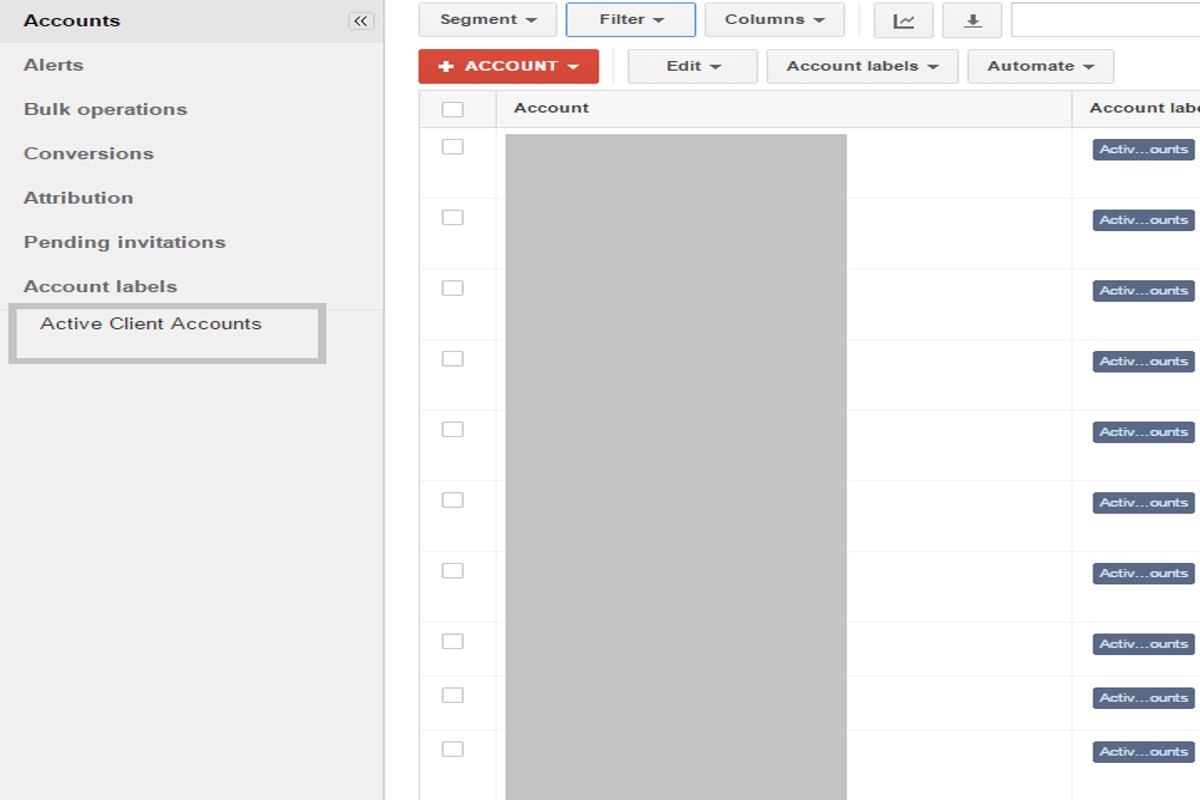
Hiding an account in Google Ads prevents it from being visible in your account interface and stops ads from being served. This feature is particularly useful for managing inactive accounts, ensuring they do not clutter your dashboard or incur unnecessary costs.
Understanding the implications of hiding an account is crucial for advertisers and agencies managing multiple accounts. Mismanagement can lead to confusion, potential loss of data, and unintended ad spending, which can significantly impact marketing strategies and budget allocations.
This article will explain the technical aspects of hiding an account, its impact on ad visibility and performance, and best practices for managing inactive accounts effectively.
What happens when you hide an account in Google Ads?
Hiding an account in Google Ads effectively makes it invisible to users and prevents any ads associated with that account from being served. This action does not delete the account, but it does restrict access to its data and settings for users who are not administrators.
When an account is hidden, all campaigns, ad groups, and ads linked to that account are paused. This means that no new impressions or clicks will be generated, which can significantly impact advertising performance if the account holds active campaigns. Additionally, the account will not appear in reporting features for users who lack appropriate permissions, which can hinder collaborative efforts or performance evaluations.
- Visibility: The account is no longer accessible to users without admin rights, limiting collaboration.
- Ad Serving: All ads associated with the hidden account are paused and will not be displayed.
- Data Access: Users without permissions cannot view account performance data or make changes.
While hiding an account may be a useful strategy for managing campaigns, it is essential to consider the implications for ongoing advertising strategies. If an account needs to be hidden temporarily, it is advisable to communicate this decision to relevant team members to avoid confusion.
Expert Tip: Always evaluate the performance of campaigns before opting to hide an account; sometimes, simply pausing individual campaigns may suffice and provide greater flexibility for future adjustments.
How do you hide an account in Google Ads?
To hide an account in Google Ads, you must navigate through the account settings. Hiding an account does not delete it; it simply makes it inactive for your view and management.
Follow these steps to effectively hide an account:
- Log in to your Google Ads account. Ensure you have the necessary permissions to manage account settings.
- In the left sidebar, click on the “Tools and settings” icon, represented by a wrench symbol.
- Select “Account access” under the “Setup” menu. This will display all accounts linked to your Google Ads manager account.
- Locate the account you wish to hide. Click on the account name to access its settings.
- In the account settings, look for the option to “Pause” or “Remove access.” Choosing to pause will hide the account from active management.
- Confirm your decision. A prompt will appear asking you to confirm that you want to hide the account. Click “Yes” to proceed.
Hiding an account is a reversible action. You can reactivate the account at any time by following similar steps and selecting the option to restore it. Ensure that you communicate with relevant stakeholders about this change to avoid confusion regarding account management.
Expert Tip: Regularly review hidden accounts to assess their relevance and performance potential. This practice helps maintain an organized account structure and ensures that no valuable advertising opportunities are overlooked.
Is hiding an account in Google Ads the same as deleting it?
Hiding an account in Google Ads is not the same as deleting it. Hiding an account merely makes it inactive and inaccessible for advertising purposes, whereas deleting an account permanently removes it and its associated data from the platform.
When an account is hidden, it retains all historical data, settings, and configurations. This allows for potential reactivation in the future without loss of important information. In contrast, deleting an account results in the complete loss of all data, including campaign performance metrics and billing information, which cannot be recovered.
- Data Retention: Hiding preserves all data, while deleting erases it permanently.
- Reactivation: A hidden account can be easily reactivated, but a deleted account cannot be restored.
- Account Status: Hiding changes the account status to inactive; deletion removes it entirely from the account list.
Businesses may choose to hide an account during periods of inactivity or when shifting focus to other campaigns. This approach allows for flexibility and strategic planning without the risk of losing valuable insights. Conversely, deletion is typically reserved for accounts that are no longer needed or are being replaced by new ones.
In managing Google Ads accounts, it is crucial to evaluate the long-term implications of account status changes. Hiding an account provides a safety net for businesses, allowing them to return to previously successful strategies without starting from scratch.
Expert Tip: Regularly review account performance and consider hiding accounts instead of deleting them, especially if there is a chance of future re-engagement. This practice preserves valuable insights that can inform future marketing strategies.
What are the benefits of hiding an account in Google Ads?
Hiding an account in Google Ads can streamline account management and enhance organizational efficiency. This action allows advertisers to focus on active campaigns while minimizing clutter from inactive or unutilized accounts. Overall, it contributes to a more effective advertising strategy.
One primary benefit of hiding an account is improved organization. By concealing accounts that are not currently in use, advertisers can reduce visual clutter in the account interface. This clarity enables teams to concentrate on accounts that are generating value, thus optimizing their workflow.
- Enhanced Focus: Hiding accounts allows teams to concentrate their efforts on active campaigns, ensuring resources are directed toward the most impactful advertising strategies.
- Reduced Risk of Error: With fewer accounts visible, the likelihood of mistakenly selecting the wrong account for campaign adjustments decreases, leading to more precise management.
- Simplified Reporting: Fewer accounts in view can streamline reporting processes, making it easier to analyze performance metrics and derive actionable insights.
- Better Team Collaboration: Teams can collaborate more effectively when there is a clear view of active accounts, reducing confusion and enhancing communication regarding campaign objectives.
While hiding an account can be beneficial, it is crucial to understand that this action does not deactivate or delete the account. Thus, advertisers can reactivate it easily when needed. This flexibility ensures that valuable historical data remains accessible for future analysis or campaign revival.
Expert Tip: Regularly review hidden accounts to assess their potential value. Reactivating accounts with past success can provide new opportunities, especially if market conditions change.
Can you unhide an account in Google Ads after hiding it?
Yes, you can unhide an account in Google Ads after it has been hidden. The process is straightforward and allows you to regain access to the account’s features and data. However, it is essential to follow specific steps to ensure the account is unhidden correctly.
- Log into your Google Ads account: Use the credentials associated with the account you wish to unhide. Ensure you have the necessary permissions to manage the account settings.
- Navigate to the account settings: Click on the “Tools and Settings” icon (the wrench icon) located in the upper right corner of the interface. From the dropdown, select “Account access” under the “Setup” section.
- Locate the hidden account: In the account access section, look for a list of hidden accounts. These accounts may be marked or categorized differently to differentiate them from active accounts.
- Select the account to unhide: Click on the account you wish to unhide. There should be an option or button labeled “Unhide” or “Restore Access.”
- Confirm the action: After selecting the unhide option, a confirmation prompt may appear. Review the information and confirm that you want to unhide the account. Once confirmed, the account will be reactivated.
Unhiding an account not only restores access but also reactivates any ongoing campaigns and ads associated with it. However, some settings may revert to their previous state, requiring review and adjustment. It is advisable to check the account thoroughly after unhiding to ensure everything functions as intended.
When managing multiple accounts, consider documenting the reasons for hiding or unhiding accounts. This practice can help maintain clarity and assist in future decision-making.
Expert Tip: Regularly review account performance and access needs to minimize the necessity of hiding accounts, as this can complicate management and reporting processes.
How long does it take for changes to reflect after hiding an account in Google Ads?
Changes made after hiding an account in Google Ads typically take effect within 24 hours. However, some updates may appear sooner, while others could take up to a week, depending on various factors.
Several elements influence the timing of these changes. Firstly, the type of account activity can impact how quickly the system processes updates. For instance, ads that are currently running may take longer to reflect the hidden status compared to paused or inactive ads. Additionally, the complexity of the account structure, including the number of campaigns and ad groups, can also delay the visibility of changes.
It is also essential to consider system processing times. Google Ads operates on a dynamic platform where changes are queued for processing. While most changes are automated, peak times or system maintenance can slow down the update cycle. Regularly checking the account status after hiding it can provide clarity on when the changes have fully taken effect.
For users who need immediate confirmation of changes, it may be beneficial to log out and log back into the Google Ads account or clear the cache to ensure the latest updates are displayed.
Expert Tip: Regularly monitor account performance metrics after hiding an account, as fluctuations may occur during the update period, affecting overall campaign effectiveness.
What common mistakes should you avoid when hiding an account in Google Ads?
When hiding an account in Google Ads, common mistakes include failing to document changes and neglecting to communicate with team members. These errors can lead to confusion and mismanagement of advertising efforts.
For example, consider a marketing team that decides to hide an underperforming account without informing other stakeholders. As a result, team members may continue to reference this account in strategy meetings or reporting, leading to discrepancies in campaign performance evaluations. To avoid this mistake, a clear communication strategy should be implemented, ensuring that all relevant parties are aware of the account’s status and the reasons behind the decision to hide it.
Another mistake is assuming that hiding an account is a permanent solution. Advertisers may hide an account to pause activities temporarily, but without a plan for reactivation, they could miss opportunities for recovery or optimization. Regularly review hidden accounts to assess their potential for future campaigns. Establishing a timeline for reevaluation can help maintain focus on overall advertising goals and prevent stagnation.
Expert Tip: Always document the rationale for hiding an account and set reminders for periodic reviews. This proactive approach ensures that valuable insights are not lost and that the account can be effectively reintroduced when needed.
What impact does hiding an account have on your Google Ads performance metrics?
Hiding an account in Google Ads primarily affects the visibility of performance metrics, which can lead to challenges in tracking overall campaign effectiveness. While the account remains functional, its data will not contribute to performance reports or metrics accessible through the Google Ads interface. This lack of visibility can hinder optimization efforts and decision-making based on incomplete data.
When an account is hidden, advertisers may experience fluctuations in costs and overall performance due to several factors:
- Data Discrepancy: Performance metrics from the hidden account will not be reflected in aggregate reports, leading to an incomplete understanding of total ad spend and effectiveness.
- Optimization Challenges: Without insights from the hidden account, advertisers may miss critical data needed for optimizing campaigns, potentially resulting in higher costs per acquisition.
- Impact on Budget Allocation: If the hidden account contained successful campaigns, the inability to analyze its performance could lead to suboptimal budget distribution across visible campaigns.
Moreover, hiding an account does not affect the actual costs incurred during advertising. Advertisers will still pay for clicks and impressions generated by the hidden account, but the lack of visibility means they may not be able to assess the return on investment effectively. This situation can create a disconnect between spending and performance evaluation.
Expert Tip: Consider using the account-level reporting features in Google Ads to gain insights before deciding to hide an account. This practice ensures that important data informing budget and strategy decisions remains accessible.
Advanced Strategies for Managing Hidden Accounts in Google Ads
Effectively managing hidden accounts in Google Ads can unlock valuable insights and strategies. This section elucidates advanced tactics that can enhance campaign performance and data utilization.
Using Hidden Accounts for Historical Data Analysis
Hidden accounts serve as a repository of historical data that can inform future campaigns. By analyzing past performance metrics, advertisers can identify trends, successful keywords, and audience preferences that may no longer be active in current campaigns. This data can be particularly beneficial when entering new markets or launching new products, as it provides a baseline for expected performance.
Best Practices for Reactivating Hidden Accounts
Reactivating a hidden account requires careful consideration to ensure successful integration back into active campaigns. Follow these steps:
- Review Historical Performance: Before reactivation, analyze the account’s historical performance data to determine its effectiveness.
- Update Ad Content: Refresh ad copy and creatives to align with current branding and market trends.
- Test in a Controlled Environment: Reactivate the account in a limited capacity to monitor performance before scaling up.
These steps help mitigate risks associated with reactivation and ensure that the account contributes positively to overall campaign goals.
Integrating Hidden Accounts into Campaign Strategies
Incorporating hidden accounts into broader campaign strategies can enhance targeting precision and budget allocation. Here are some methods to consider:
- Audience Segmentation: Utilize historical data to segment audiences based on past interactions and preferences.
- Remarketing Opportunities: Develop remarketing campaigns targeting users who engaged with ads from hidden accounts.
- Budget Allocation: Use insights from hidden accounts to inform budget distribution across active campaigns.
By leveraging the historical context of hidden accounts, advertisers can create more tailored and effective marketing strategies.
Tracking Performance Metrics of Hidden Accounts
Monitoring the performance of hidden accounts is vital for maximizing their value. Key performance indicators (KPIs) to track include:
- Click-Through Rate (CTR): Assess the engagement level of ads from hidden accounts.
- Conversion Rate: Measure how effectively past ads led to desired customer actions.
- Cost Per Acquisition (CPA): Evaluate the efficiency of spending in relation to generated leads or sales.
Regularly tracking these metrics can reveal actionable insights that guide future advertising efforts.
Many advertisers overlook the potential of hidden accounts, often viewing them as obsolete. However, these accounts can provide a wealth of data that informs strategic decisions. It’s essential to recognize that the performance of a hidden account may not reflect its current relevance. Historical performance can be skewed by factors such as market changes or shifts in consumer behavior. Therefore, an in-depth analysis is necessary to differentiate between outdated metrics and actionable insights.
To leverage hidden accounts effectively, start by conducting a thorough performance analysis of historical data. Identify key trends and audience behaviors, then develop a plan for reactivation that includes updating ad content and monitoring performance through KPIs. Integrate findings into active campaigns, ensuring that insights from hidden accounts inform decision-making. This comprehensive approach enhances the overall effectiveness of Google Ads strategies, transforming hidden accounts into valuable resources.
Comparative Analysis: Hiding vs. Deleting Accounts in Google Ads
This section examines the strategic differences between hiding and deleting accounts in Google Ads. Understanding these differences is essential for effective account management and decision-making.
Long-term Implications of Account Deletion
Deleting a Google Ads account is a permanent action. Once an account is deleted, it cannot be restored, resulting in the irreversible loss of all associated data, including campaign history, performance metrics, and billing information. This permanent deletion can hinder future marketing efforts and data analysis, making it challenging to track past performance and apply those insights to new campaigns.
Data Retention Differences
When an account is hidden, Google Ads retains all historical data associated with that account. This data can be accessed later if the account is unhidden, allowing for continuity in reporting and performance analysis. In contrast, deleting an account results in the complete loss of this data, which can have significant repercussions for businesses that rely on historical metrics for strategic planning.
Scenarios for Choosing to Hide versus Delete
- Temporary Pauses: Hiding is suitable for accounts that may be temporarily inactive but could be reactivated in the future.
- Account Restructuring: If a business is undergoing changes, hiding allows for flexibility without permanently losing data.
- Performance Issues: When facing poor performance, hiding an account can prevent further investment while preserving the ability to analyze past data.
- Final Decisions: If a business is certain it will no longer use the account, deletion may be appropriate, but this should be approached cautiously due to irreversible data loss.
Impact on Advertising History and Reporting
Hiding an account ensures that all advertising history remains intact. This is critical for generating reports and insights that inform future campaigns. Deleted accounts, however, lose all reporting capabilities, which can lead to gaps in knowledge about what strategies were effective or ineffective in the past. For businesses aiming for continuous improvement, maintaining access to historical data is invaluable.
Many believe that hiding an account is merely a temporary solution, yet it can serve as a strategic tool for managing advertising efforts over time. Hiding allows businesses to maintain a comprehensive view of their advertising history, while deletion may lead to missed opportunities for learning and growth. Furthermore, common misconceptions suggest that hiding an account may impact ad performance negatively; however, this is not the case, as hidden accounts do not affect active campaigns.
Practical Application
Businesses should evaluate their long-term advertising goals before deciding to hide or delete an account. Consider the following actions:
- Assess the reasons for account inactivity to determine if hiding or deleting is more appropriate.
- Utilize Google Ads’ reporting tools to analyze performance before making any decisions.
- Implement a regular review process to revisit hidden accounts and evaluate their potential reactivation.
By strategically deciding whether to hide or delete accounts, businesses can optimize their advertising efforts and preserve valuable historical data.
Real-World Applications: Case Studies of Hiding Accounts in Google Ads
This section explores practical examples of businesses that have chosen to hide their Google Ads accounts, analyzing the outcomes and strategic implications. Understanding these case studies can provide valuable insights for advertisers considering similar actions.
Case Study: Successful Reactivation of a Hidden Account
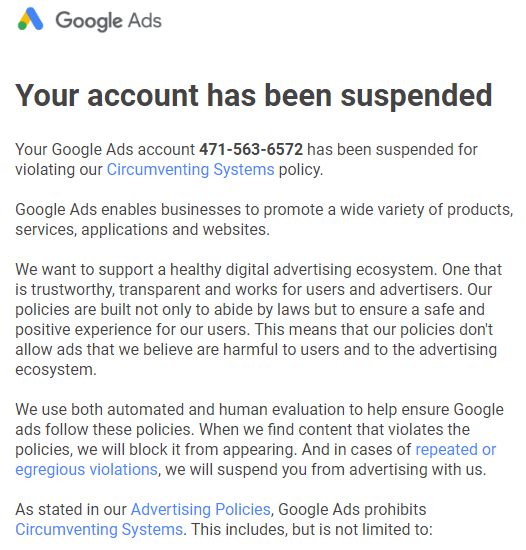
A retail company specializing in outdoor gear faced declining sales and decided to hide its Google Ads account to reassess its advertising strategy. After six months, the business reactivated the account with a refined approach, focusing on targeted keywords and audience segmentation. This led to a 150% increase in ROI within three months of reactivation. The company learned that taking a step back allowed for critical evaluation of their previous campaigns, enabling the development of a more effective digital marketing strategy.
Lessons from Ineffective Hiding of Accounts
In contrast, a local service provider opted to hide its Google Ads account due to low engagement rates. However, this decision resulted in a 30% drop in overall visibility and a prolonged absence from potential customers. The business realized that instead of hiding the account, optimizing existing campaigns with better ad copy and targeting would have been more beneficial. This case illustrates that hiding an account can sometimes exacerbate issues rather than resolve them.
Industry-Specific Strategies for Account Management
- E-commerce: Regularly analyze product performance and seasonal trends to adjust campaigns instead of hiding accounts during low sales periods.
- Local Services: Utilize geo-targeting and customer reviews to enhance visibility rather than hiding accounts in response to low engagement.
- Technology Firms: Experiment with A/B testing on ad formats and messaging instead of opting for account inactivity.
Impact on Overall Advertising Strategy and Budget Allocation
Hiding an account can significantly affect a business’s advertising strategy and budget allocation. When an account is hidden, all historical data, including successful campaigns and keyword performance, becomes inaccessible. This loss can lead to inefficient budget distribution in future campaigns. Moreover, businesses may inadvertently allocate resources to less effective channels, resulting in increased costs and decreased overall performance.
Furthermore, the time spent assessing the hidden account could have been used for optimizing active campaigns or exploring new channels. This strategic misstep can hinder a business’s ability to adapt and innovate in a competitive marketplace.
One common misconception is that hiding an account is a final solution to poor performance. In reality, addressing specific issues through optimization strategies often yields better results. Account hiding should be a last resort, not a first response.
To effectively manage Google Ads accounts, businesses should consider the following actionable steps:
- Conduct regular audits of account performance to identify areas needing improvement.
- Implement A/B testing for ad copy and targeting to refine campaigns before considering account hiding.
- Engage with Google Ads support or a digital marketing consultant to explore optimization strategies.
Understanding what does hiding an account do in Google Ads offers critical insights for advertisers. By evaluating real-world applications, businesses can make informed decisions regarding account management and strategy adjustments.
Common Pitfalls and Best Practices When Hiding Accounts in Google Ads
This section addresses the common mistakes made while hiding accounts in Google Ads and outlines best practices to enhance account management efficiency. Understanding these aspects is vital for maintaining clarity and productivity within advertising teams.
Identifying When to Hide an Account
Deciding to hide an account should stem from specific scenarios. Common reasons include:
- Underperformance: If an account consistently fails to meet KPIs, hiding it may prevent clutter in your management dashboard.
- Temporary suspension: Accounts that are undergoing significant changes or awaiting a strategic overhaul can be hidden to avoid confusion.
- Client requests: Sometimes, clients might prefer certain accounts to be hidden due to privacy concerns or strategic shifts.
Avoiding Miscommunication with Team Members
Clear communication is essential when hiding accounts. Miscommunication can lead to duplicated efforts or missed opportunities. Consider the following strategies:
- Notify the team: Ensure all relevant team members are informed when an account is hidden.
- Utilize project management tools: Document the status of hidden accounts in shared tools to maintain transparency.
- Establish protocols: Create guidelines for when and how to hide accounts, ensuring everyone is on the same page.
Ensuring Proper Documentation of Hidden Accounts
Documentation plays a crucial role in account management. Properly documenting hidden accounts aids in future reference and analysis. Best practices include:
- Maintain a log: Keep a record of all hidden accounts, including reasons for hiding and any relevant dates.
- Attach notes: Provide context or rationale in the documentation to clarify the decision-making process.
- Regular updates: Review and update the documentation periodically to reflect any changes in account status.
Regular Reviews of Hidden Account Status
Hidden accounts should not be set aside indefinitely. Regular reviews are essential to ensure they are still appropriately classified. Implement the following practices:
- Monthly reviews: Schedule monthly evaluations to assess whether hidden accounts should remain so or be reactivated.
- Performance tracking: Analyze performance data for hidden accounts to determine if conditions for reactivation are met.
- Team feedback: Gather insights from team members on the need for any hidden accounts to be made visible again.
Common misconceptions surrounding the practice of hiding accounts include the belief that hidden accounts automatically cease to incur costs or that they are permanently removed from advertising metrics. In reality, hidden accounts still exist within the Google Ads ecosystem and can be reactivated at any time. Furthermore, they still retain their historical performance data, which can be valuable for future decision-making.
To effectively manage hidden accounts, consider these actionable steps:
1. Establish a protocol for when to hide accounts.
2. Communicate with team members to prevent miscommunication.
3. Document all hidden accounts with clear reasons and dates.
4. Conduct regular reviews to reassess hidden accounts and their relevance.
Implementing these practices ensures that hiding an account remains a strategic decision rather than a reactive measure, ultimately optimizing your Google Ads management efforts.
Frequently Asked Questions
What happens when you hide an account in Google Ads?
Hiding an account in Google Ads effectively removes it from your active view, but it does not delete the account or its data. The account remains accessible for future reference or reactivation.
How do you hide an account in Google Ads?
To hide an account in Google Ads, navigate to the account settings, select the account you wish to hide, and choose the option to hide it. This action requires the appropriate administrative permissions.
Is hiding an account in Google Ads the same as deleting it?
No, hiding an account is not the same as deleting it. Hiding simply makes the account inactive in your view, while deletion permanently removes the account and its associated data.
What are the benefits of hiding an account in Google Ads?
Hiding an account allows users to declutter their dashboard and focus on active campaigns without losing any historical data. It also helps in managing multiple accounts more efficiently.
Can you unhide an account in Google Ads after hiding it?
Yes, you can unhide an account in Google Ads at any time. Simply access the account settings and select the option to unhide the desired account.
How long does it take for changes to reflect after hiding an account in Google Ads?
Changes to account visibility typically reflect immediately after the account is hidden. However, it may take a short period for the interface to update across all devices.
What common mistakes should you avoid when hiding an account in Google Ads?
Common mistakes include hiding an account that is still actively used or failing to communicate the change with team members. Always ensure that the account is truly inactive before hiding it.
What impact does hiding an account have on your Google Ads performance metrics?
Hiding an account does not affect the performance metrics of the campaigns within that account. All historical data and performance statistics remain intact and accessible for analysis.
Final Thoughts on what does hiding an account do in google ads
Hiding an account in Google Ads serves as a strategic maneuver, allowing marketers to pause operations without losing historical data or incurring the complications associated with deletion. This functionality is particularly advantageous for businesses seeking to refine their advertising strategies without permanently severing ties with past campaigns.
To optimize your Google Ads management, consider implementing a routine audit of your accounts to identify which ones can be hidden to streamline operations and focus resources effectively. This targeted approach will enhance overall campaign performance.
Understanding the implications of account management in Google Ads is crucial for maintaining a competitive edge in digital advertising.
Leave a Reply