
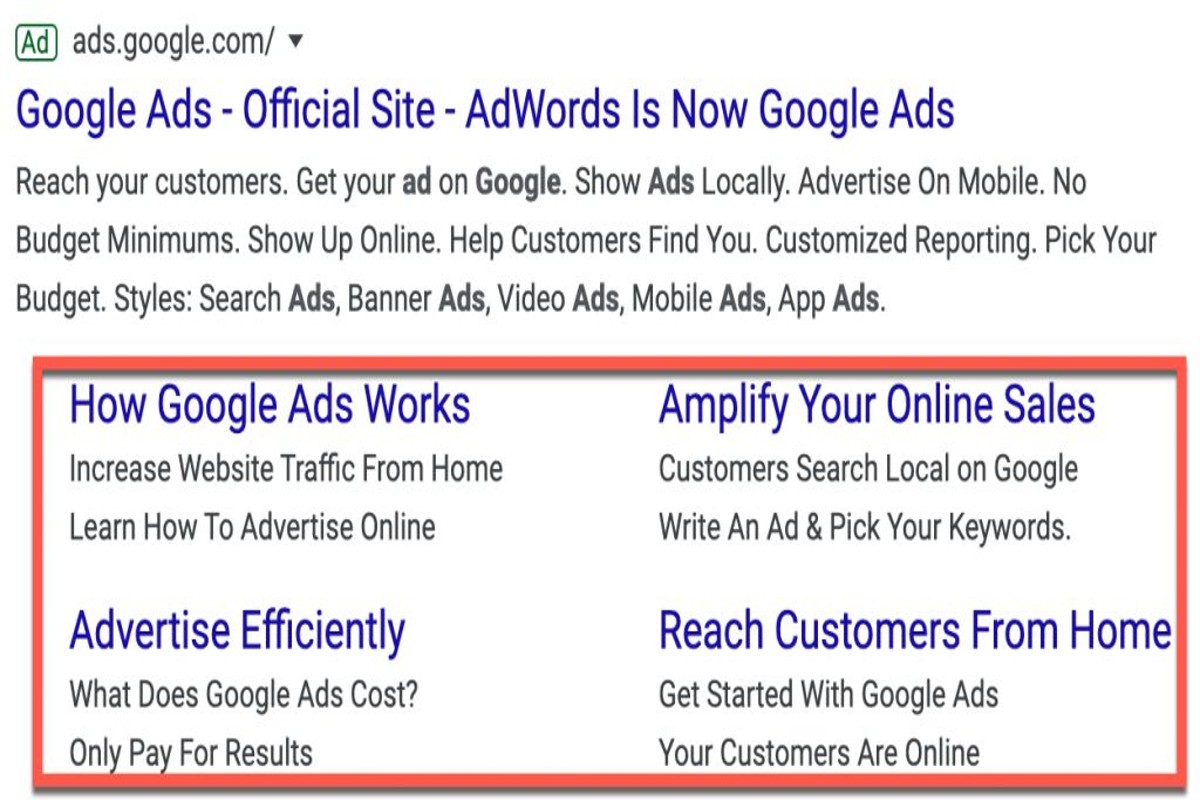
To view Google Ad sitelinks, perform a search related to your query and look for the ad section at the top of the results. Sitelinks will appear as additional links under the main ad, providing users with quick access to relevant subpages.
Understanding how to view Google Ad sitelinks is crucial for marketers and businesses aiming to enhance their online visibility. Sitelinks can increase click-through rates and improve user experience, making it essential to leverage this feature effectively.
This guide covers the specific steps to view Google Ad sitelinks, the benefits they offer, and tips for optimizing ads to include sitelinks for maximum impact.
What are Google Ad sitelinks?
Google Ad sitelinks are additional links that appear below a main ad, directing users to specific pages on the advertiser’s website. These links enhance the visibility of the ad by providing potential customers with quick access to relevant sections, such as product categories, promotions, or contact information. By presenting more options, sitelinks can increase click-through rates and improve overall ad performance.
Sitelinks can vary in number and appearance, depending on the ad’s configuration and the relevance of the linked pages. Typically, an ad may display two to six sitelinks, each accompanied by a brief description. This feature helps advertisers highlight their offerings more effectively and allows users to navigate directly to the content that interests them.
Several factors influence the display of sitelinks. Google uses algorithms to determine which sitelinks are most relevant based on user queries and browsing behavior. Advertisers can also manually set up sitelinks through Google Ads, allowing for customization to better align with marketing objectives. Overall, effective use of sitelinks can significantly enhance user engagement and drive targeted traffic to a website.
Expert Tip: Regularly review and optimize sitelinks based on performance metrics. Adjusting the links and their descriptions based on user interaction can lead to improved ad effectiveness and higher conversion rates.
How can I enable sitelinks for my Google Ads?
To enable sitelinks for your Google Ads, access your Google Ads account and go to the ‘Ads & extensions’ section. From there, select ‘Sitelink extensions’ to add and customize your sitelinks.
Follow these steps to effectively enable sitelinks:
- Log in to your Google Ads account and navigate to the ‘Ads & extensions’ section located in the left-hand menu.
- In the ‘Extensions’ tab, click on ‘Sitelink extensions’ to access the sitelink management interface.
- Select the blue plus (+) button to create a new sitelink extension or choose an existing one to edit.
- Fill in the required fields, including the sitelink text and URL, and customize any additional options such as device preferences and scheduling.
- Save your changes to ensure the sitelinks are applied to your ads.
Keep in mind that sitelinks may only appear if your ad is eligible based on quality and relevance. Regularly review and optimize your sitelink extensions to ensure they align with your advertising goals.
For optimal performance, consider using sitelinks that highlight specific products, services, or promotions. This can increase click-through rates and improve overall ad effectiveness.
Expert Tip: Monitor the performance of your sitelinks through Google Ads reports to identify which sitelinks drive the most traffic. Adjust or replace underperforming sitelinks to enhance your campaign results.
What is the benefit of using sitelinks in Google Ads?
Using sitelinks in Google Ads enhances ad performance by increasing click-through rates, providing additional information to potential customers, and improving overall ad visibility. Sitelinks allow advertisers to showcase multiple links within a single ad, directing users to specific pages on their website that may be relevant to their search queries.
One of the primary advantages of sitelinks is their ability to boost click-through rates (CTR). By offering users more options directly related to their query, advertisers can capture attention more effectively. Additionally, sitelinks can provide essential information, such as promotional offers or specific product categories, which helps users make informed decisions quickly. This not only enhances user experience but can also lead to higher conversion rates.
- Utilize relevant sitelinks: Ensure that sitelinks lead to pages that are directly relevant to the ad’s content and the user’s search intent.
- Highlight key features or offers: Use sitelinks to showcase special promotions, unique services, or important product features to entice clicks.
- Monitor performance: Regularly analyze the performance of sitelinks using Google Ads reports to identify which links drive the most traffic and conversions, allowing for data-driven optimization.
- Keep it concise: Write clear and concise sitelink text that accurately describes the linked content, ensuring it resonates with the target audience.
Incorporating sitelinks strategically can significantly enhance the effectiveness of Google Ads campaigns. Advertisers should continuously test different sitelink variations to find the optimal combination that maximizes engagement and conversions.
How do I see my competitors’ Google Ad sitelinks?
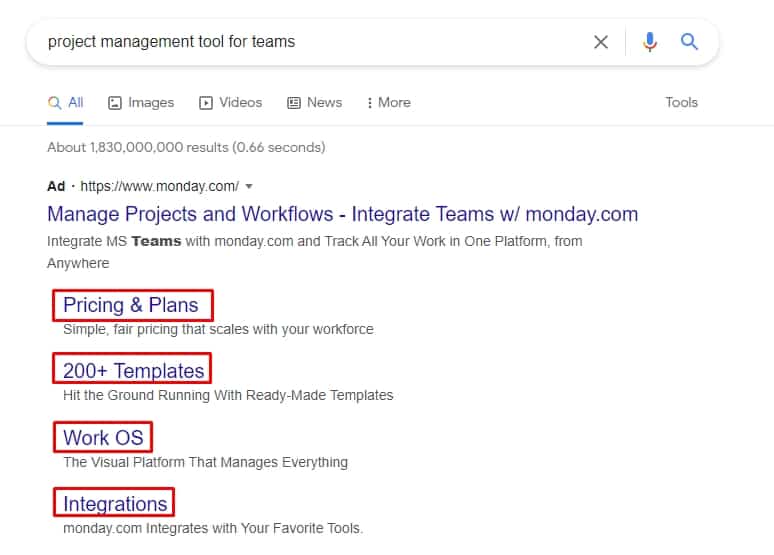
To see your competitors’ Google Ad sitelinks, conduct a search using relevant keywords that they target. The sitelinks will appear directly beneath their main advertisement, showcasing additional links that lead to specific sections of their website.
Follow these steps to effectively view your competitors’ sitelinks:
- Identify Target Keywords: Start by determining the primary keywords relevant to your industry or niche. These should be keywords that you know your competitors are likely bidding on.
- Perform a Google Search: Enter the identified keywords into Google’s search bar. Ensure to conduct the search in an incognito window to avoid personalized results that may skew your findings.
- Analyze the Search Results: Look for ads at the top of the search results page. Competitors’ ads will typically display as “Ad” or “Sponsored” at the top. Beneath these ads, you should see additional links—these are the sitelinks.
- Take Notes: Document the sitelinks offered by your competitors. Pay attention to their structure, wording, and the pages they link to, as this can provide insights into their marketing strategies.
It is essential to remember that sitelinks may vary based on the search query, user location, and time of day. Therefore, performing multiple searches can yield different results. Additionally, not all advertisers will display sitelinks consistently, as Google determines their visibility based on relevance and ad performance.
Expert Tip: Utilize tools like SEMrush or SpyFu for a more comprehensive analysis of your competitors’ Google Ads, including their sitelinks. These tools can provide historical data and performance metrics that enhance your understanding of their advertising strategies.
Are there costs associated with using sitelinks in Google Ads?
There are no additional costs for using sitelinks in Google Ads; advertisers only pay for clicks on the main ad or the sitelinks themselves. This means that sitelinks do not incur a separate charge, making them a cost-effective way to enhance ad visibility.
The primary cost associated with sitelinks is determined by the click-through rate (CTR) and the bidding strategy for the main ad. When users click on a sitelink, it is treated as a click on the main ad, which contributes to the overall costs. The actual cost per click (CPC) will depend on the competition for the selected keywords and the quality score of the ad.
- Bid Amount: The amount set for the keywords influences how much is paid per click.
- Quality Score: Higher quality scores can lead to lower CPCs. This score is based on the relevance of the ad, the expected CTR, and the landing page experience.
- Ad Rank: This determines the position of the ad on the search results page, affecting visibility and click likelihood.
Utilizing sitelinks can improve the performance of ads by providing users with more options, potentially leading to higher engagement rates. While there are no additional fees for sitelinks, optimizing the main ad and its components is essential for maximizing return on investment.
Expert Tip: Regularly monitor the performance of sitelinks through Google Ads reports to identify which links drive the most traffic and adjust your strategy accordingly to enhance overall ad effectiveness.
How long does it take for sitelinks to appear in Google Ads?
Sitelinks can appear in Google Ads within a few hours to a few days after they are set up. However, the time it takes for sitelinks to be consistently displayed can vary based on several factors, including the approval process and ad performance.
Once sitelinks are added to a Google Ads campaign, they undergo a review process to ensure compliance with Google’s advertising policies. This review typically takes a few hours but can extend to several days, especially if there are any issues or if the account has a history of policy violations. After approval, the frequency and visibility of the sitelinks are influenced by the ad’s performance metrics, such as click-through rates (CTR) and overall engagement. Higher-performing ads are more likely to display sitelinks consistently.
Additionally, the overall structure of the campaign and the relevance of the sitelinks to the keywords being targeted can impact their appearance. Google aims to provide users with the most relevant information, so sitelinks that align closely with user queries will be prioritized. Advertisers can also manually adjust settings to control when and how sitelinks are displayed, which may affect timing.
Expert Tip: Regularly monitor the performance of your sitelinks and make adjustments based on user engagement. This proactive approach can enhance visibility and ensure that sitelinks are shown more frequently.
What are common mistakes to avoid with Google Ad sitelinks?
Common mistakes with Google Ad sitelinks include using irrelevant sitelink text, neglecting mobile optimization, and failing to update sitelinks regularly. These errors can significantly undermine the effectiveness of your ads and diminish user engagement.
For instance, consider a company selling outdoor gear that uses sitelinks labeled “Latest News” or “Our Story.” These labels do not directly relate to the products offered, leading to confusion and disinterest among potential customers. Instead, using specific and relevant sitelink text like “Hiking Gear” or “Camping Essentials” would better serve the audience, improving click-through rates and overall ad performance.
Another common issue arises when advertisers do not optimize sitelinks for mobile users. If a sitelink leads to a webpage that is not mobile-friendly, this can frustrate visitors and result in high bounce rates. Regularly updating sitelinks is also critical. For example, if a promotional campaign ends and the sitelink still directs users to that promotion, it can create a negative experience and diminish credibility.
Expert Tip: Regularly analyze performance metrics for your sitelinks. A/B testing different sitelink texts and optimizing based on user engagement data can help refine your strategy and enhance ad visibility.
Advanced Strategies for Optimizing Google Ad Sitelinks
This section explores advanced techniques for maximizing the impact of Google Ad sitelinks, focusing on A/B testing, seasonal relevance, user intent alignment, and performance monitoring. Implementing these strategies can significantly enhance ad effectiveness and drive more conversions.

Utilizing A/B Testing for Optimal Sitelink Combinations
A/B testing is a powerful method for determining which sitelink combinations yield the best results. By creating multiple versions of your ad with varying sitelinks, you can identify the configurations that resonate most with your audience. Key steps include:
- Define your goals, such as click-through rates (CTR) or conversion rates.
- Create two or more ad variations with different sitelink combinations.
- Run the ads simultaneously to gather performance data over a set period.
- Analyze the results to determine the most effective sitelink strategy.
Incorporating Seasonal and Promotional Sitelinks
Seasonal and promotional sitelinks can enhance ad relevance and urgency. Tailoring sitelinks to coincide with holidays, events, or product launches can attract more clicks. Strategies include:
- Updating sitelinks to reflect current promotions, such as holiday sales or clearance events.
- Highlighting limited-time offers to create a sense of urgency.
- Utilizing sitelinks that align with seasonal trends in consumer behavior.
Aligning Sitelinks with User Intent and Search Queries
Understanding user intent is crucial for effective sitelink optimization. Align sitelinks with the specific needs and queries of potential customers. Consider the following approaches:
- Analyze search term reports to identify frequently searched queries related to your products or services.
- Develop sitelinks that directly address these queries, providing users with relevant options.
- Regularly update sitelinks based on changing search trends to maintain alignment.
Monitoring Performance Metrics for Refinement
Continuous monitoring of performance metrics is essential for refining sitelink strategies. Key metrics to track include:
- Click-through rate (CTR) to gauge the effectiveness of sitelinks.
- Conversion rate to assess the impact of sitelinks on actual sales.
- Impressions to understand visibility and user engagement.
Regularly review these metrics to make data-driven decisions about which sitelinks to keep, modify, or remove.
Many marketers overlook the nuances of sitelink optimization. A common misconception is that simply adding more sitelinks will enhance performance. However, excessive sitelinks can dilute focus and confuse users. Instead, prioritize quality over quantity by selecting sitelinks that are most relevant to your target audience and align with their intent. Additionally, consider the hierarchy of sitelinks; the most important offerings should be placed higher to capture attention effectively.
To implement these strategies effectively, begin by setting up A/B tests on your current sitelinks. Identify key seasonal opportunities and adjust sitelinks accordingly. Conduct a thorough analysis of user intent through search term reports, refining sitelinks based on these insights. Finally, establish a routine for monitoring performance metrics, allowing for agile adjustments to your sitelink strategy. By integrating these advanced techniques, you can significantly enhance the performance of your Google Ads campaigns and improve overall return on investment.
Analyzing Competitor Sitelinks for Better Performance
This section delves into strategies for analyzing competitor sitelinks, providing insights that can enhance the effectiveness of your own Google Ads campaigns. By examining competitors’ successful approaches, advertisers can refine their strategies and boost ad performance.
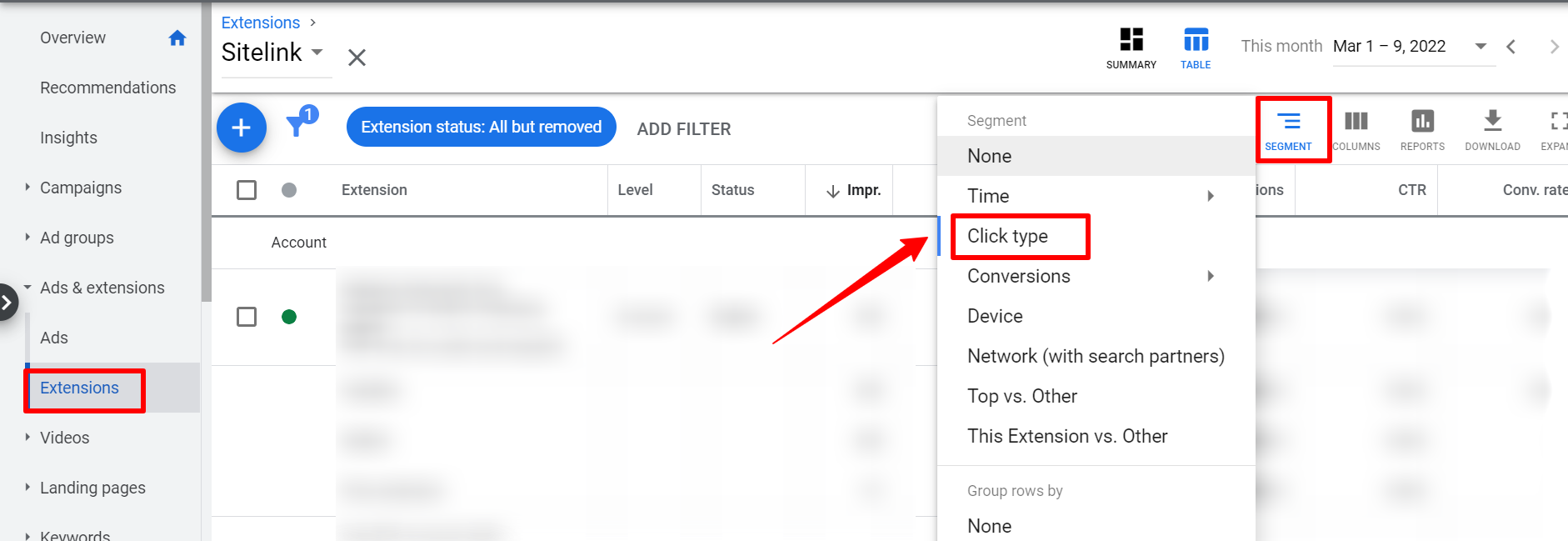
Identifying Competitors’ High-Performing Sitelinks Through Keyword Analysis
Begin by conducting thorough keyword analysis to uncover which keywords your competitors are targeting. Utilize tools like Google Keyword Planner or SEMrush to identify high-performing keywords associated with your niche. Once identified, perform a search for these keywords and examine the ads displayed. Focus on those that feature sitelinks, as these are likely optimized for visibility and engagement.
Learning From Competitors’ Ad Copy and Sitelink Structure
Analyze the ad copy and sitelink structure of competitors who consistently rank highly. Pay attention to the following elements:
- Ad Copy Style: Note the tone, language, and calls to action used.
- Sitelink Titles: Observe the naming conventions and how they relate to the main ad message.
- Sitelink Descriptions: Examine the content for clarity, relevance, and persuasive elements.
Understanding these components can provide insights into effective messaging strategies that resonate with target audiences.
Using Tools to Track Competitors’ Ad Performance
Employ competitive analysis tools to gain a deeper understanding of your rivals’ ad performance. Tools such as SpyFu, Adbeat, and iSpionage can provide detailed insights into competitors’ ad spend, keywords, and the performance of their sitelinks. Tracking these metrics allows for a comprehensive view of what works well in your industry, informing your own campaign strategies.
Adapting Insights to Improve Your Own Sitelink Effectiveness
Once you have gathered and analyzed competitor data, adapt those insights to refine your own sitelinks. Consider the following steps:
- Revise Sitelink Titles: Ensure they are clear and directly related to user intent.
- Enhance Descriptions: Use persuasive language that aligns with successful competitors.
- Test Different Formats: Experiment with various sitelink combinations and track performance to determine the most effective structure.
By integrating these strategies, advertisers can create sitelinks that not only enhance visibility but also improve click-through rates and conversion potential.
Many advertisers overlook the significance of continuous optimization based on competitive analysis. Common misconceptions include believing that once sitelinks are set, they require no further adjustment. In reality, competitor strategies evolve, necessitating regular review and adaptation of your own sitelinks. Additionally, not all competitors utilize sitelinks effectively; thus, focusing on those that do can provide clearer insights into best practices.
To leverage these insights, regularly audit competitors’ sitelinks, noting the elements that drive engagement. Implement A/B testing for your sitelinks, comparing different titles and descriptions. Utilize analytical tools to assess performance metrics, adjusting campaigns based on real-time data to maximize effectiveness. This proactive approach will ensure your sitelinks remain competitive and relevant.
Common Pitfalls in Google Ad Sitelink Management
Effective management of Google Ad sitelinks can significantly enhance ad performance. However, advertisers often encounter common pitfalls that hinder their effectiveness and overall campaign success.
Neglecting Mobile Optimization for Sitelinks
With the increasing prevalence of mobile searches, neglecting mobile optimization for sitelinks can lead to missed opportunities. Sitelinks that are not optimized for mobile devices may appear cluttered or difficult to click, resulting in a poor user experience. Ensure that sitelinks are designed to be easily navigable on smaller screens, with appropriate font sizes and spacing.
Failing to Keep Sitelinks Updated and Relevant
Stale sitelinks can detract from the ad’s relevance and impact. Advertisers often forget to update their sitelinks to reflect current promotions, product offerings, or seasonal campaigns. Regularly review and refresh sitelinks to maintain their relevance and appeal. This practice not only improves click-through rates but also aligns with user expectations.
Overlooking the Importance of Clear and Concise Text
The text used in sitelinks must be both clear and concise to convey the intended message effectively. Overly complex or lengthy descriptions can confuse potential customers, leading to reduced engagement. Aim for straightforward language that clearly states the benefit or purpose of each sitelink. Ideally, use fewer than 25 characters for each sitelink description to optimize visibility.
Not Testing Different Variations of Sitelinks Regularly
Testing different variations of sitelinks is crucial for optimizing ad performance. Many advertisers fail to conduct A/B testing, which can reveal insights into which sitelinks resonate best with the target audience. Regularly experiment with different text, formats, and combinations of sitelinks to identify the most effective options. This iterative process can lead to improved click-through rates and conversions.
Nuance in Sitelink Strategy
Many advertisers mistakenly believe that once sitelinks are established, they require no further attention. In reality, the digital marketing landscape is dynamic, and consumer preferences can shift rapidly. Advertisers should also consider the context of each sitelink. For instance, sitelinks related to promotions may perform better during specific times of the year, while informational sitelinks may have consistent relevance. Understanding these nuances can help tailor sitelink strategies for optimal performance.
Practical Application
- Regularly review and update sitelinks to reflect current offerings.
- Optimize sitelinks for mobile users by ensuring they are easily clickable and readable.
- Use clear, concise language for sitelink text, keeping descriptions under 25 characters.
- Implement A/B testing for sitelinks to identify the most effective variations.
Frequently Asked Questions
What are Google Ad sitelinks?
Google Ad sitelinks are additional links that appear beneath a main ad, directing users to specific pages on a website. They provide more options for users and enhance the visibility of the ad.
How can I enable sitelinks for my Google Ads?
To enable sitelinks, navigate to the Google Ads interface, select your campaign, and add sitelink extensions under the “Ads & extensions” tab. Ensure that your sitelinks comply with Google’s policies for approval.
What is the benefit of using sitelinks in Google Ads?
Sitelinks increase the real estate of your ad on search results, improving click-through rates by offering users more relevant content. They can also enhance ad performance by guiding users to specific areas of interest.
How do I see my competitors’ Google Ad sitelinks?
To view competitors’ sitelinks, conduct a search for relevant keywords and observe the ads displayed. Tools like SEMrush or SpyFu can also provide insights into competitors’ ad strategies, including sitelinks.
Are there costs associated with using sitelinks in Google Ads?
There are no additional costs for adding sitelinks to your Google Ads; you only pay for clicks on your ad. Sitelinks can enhance ad visibility without incurring extra fees.
How long does it take for sitelinks to appear in Google Ads?
Sitelinks can appear almost immediately after being created, but approval from Google may take a few hours to a couple of days. Once approved, they will start showing with your ads in eligible searches.
What are common mistakes to avoid with Google Ad sitelinks?
Common mistakes include using irrelevant sitelinks, not adhering to character limits, and failing to update sitelinks regularly. Ensuring relevance and compliance with Google’s guidelines is crucial for optimal performance.
Final Thoughts on how to view google ad sitelinks
Understanding how to view Google Ad sitelinks is crucial for any digital marketer aiming to enhance ad performance and visibility. By leveraging sitelinks effectively, businesses can improve click-through rates and drive more qualified traffic to their sites, ultimately leading to increased conversions.
To gain a competitive advantage, regularly analyze your competitors’ sitelinks and incorporate best practices into your own campaigns. Utilize tools like SEMrush or Ahrefs for insights and refine your sitelink strategy based on data-driven decisions.
Mastering Google Ad sitelinks is not just a tactical advantage; it’s a vital component of a successful digital marketing strategy that can significantly impact overall business growth.
Leave a Reply