
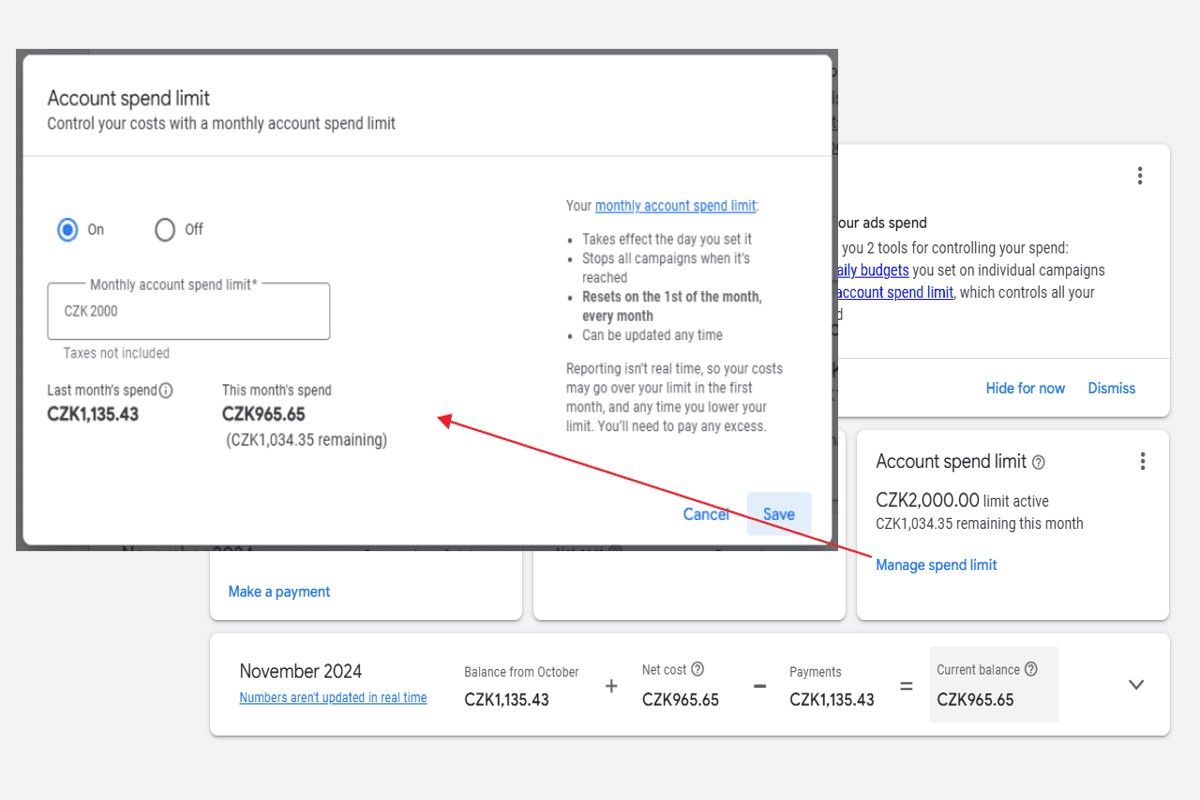
To set a budget cap in Google Ads, navigate to your campaign settings, find the ‘Budget’ section, and enter your desired daily budget limit. Save your changes to enforce the cap.
Understanding how to set a budget cap in Google Ads is essential for advertisers seeking to control their spending and maximize return on investment. Without a clear budget, campaigns can quickly overspend, leading to wasted resources and poor performance.
This guide will detail the step-by-step process for establishing a budget cap, explain how to adjust it based on campaign performance, and provide tips for optimizing your advertising spend effectively.
What is a budget cap in Google Ads?
A budget cap in Google Ads is a predefined limit on the amount of money that can be spent on advertising campaigns within a specified timeframe. This cap helps advertisers control their expenditures, ensuring that they do not overspend beyond their financial capabilities or marketing objectives. By setting a budget cap, businesses can allocate resources more effectively and make informed decisions about their advertising strategies.
The primary purpose of a budget cap is to manage ad spend while maximizing return on investment (ROI). Advertisers can set daily, monthly, or campaign-specific budget caps, which allows for flexibility based on campaign goals and performance. Moreover, the budget cap can help prevent unexpected spikes in spending due to fluctuating ad costs or increased competition in the advertising space.
- Daily Budget Cap: This limits the amount spent per day, ensuring consistent daily expenditure.
- Monthly Budget Cap: This sets a maximum spend for the entire month, allowing for broader financial planning.
- Campaign-Specific Budget Cap: This applies a cap to individual campaigns, enabling nuanced control over spending across various marketing efforts.
Budget caps also influence bidding strategies, as they can determine how aggressively an advertiser competes for ad placements. In some cases, Google Ads may allow for overspending on a daily basis, with the understanding that the monthly cap will not be exceeded. This flexibility can be beneficial for advertisers who want to capitalize on high-demand periods without breaching their overall budget limits.
Expert Tip: Regularly review and adjust your budget caps based on campaign performance data to maximize ROI. Consider seasonal trends and market conditions when setting these limits to ensure optimal ad spend efficiency.
How do I set a daily budget cap in Google Ads?
To set a daily budget cap in Google Ads, navigate to your campaign settings and adjust the budget option. This allows you to specify the maximum amount you wish to spend each day on your advertising efforts.
Follow these steps to effectively set your daily budget cap:
- Log into your Google Ads account. Access the account where you want to set the budget cap.
- Select the campaign. From the dashboard, click on the specific campaign for which you want to set the daily budget.
- Go to Settings. In the left-hand menu, click on “Settings” to access the campaign settings.
- Find the Budget section. Scroll down to locate the “Budget” option within the settings menu.
- Click on Edit. Here, you will see the current budget settings. Click on the pencil icon or the “Edit” button to modify.
- Set your daily budget cap. Enter the desired amount for your daily budget. Ensure it reflects the maximum you are willing to spend each day.
- Save your changes. After entering the amount, click on “Save” to apply the new budget cap to your campaign.
Setting a daily budget cap helps control expenses and ensures that advertising efforts remain within financial limits. Keep in mind that Google Ads may occasionally spend slightly over the daily budget due to its optimization algorithms, but it balances this out over the month.
Expert Tip: Regularly review and adjust your budget based on campaign performance metrics and market changes to ensure optimal results and cost efficiency.
Can I change my budget cap in Google Ads after setting it?
Yes, you can change your budget cap in Google Ads after it has been set. Modifying your budget cap allows for greater flexibility in managing your advertising expenses and can be adjusted based on performance or strategic shifts.
To change your budget cap, follow these steps:
- Log in to your Google Ads account and navigate to the campaign where you want to adjust the budget.
- Click on the “Settings” tab within the campaign menu to access the budget settings.
- Select the “Budget” option, where you will see the current budget cap displayed.
- Click on the budget amount to edit it, then enter your new desired budget cap.
- Save your changes to apply the new budget cap to your campaign.
Keep in mind that changes to your budget cap may take time to reflect in your campaign performance. Additionally, increasing your budget cap can lead to higher ad visibility and potentially more conversions, while decreasing it may limit your reach. Monitoring your campaign closely after adjustments ensures that spending aligns with your overall marketing goals.
Expert Tip: Regularly review your campaign performance metrics when adjusting your budget cap. This practice helps identify trends and opportunities for optimizing ad spend effectively.
What are the best practices for setting a budget cap in Google Ads?
Setting a budget cap in Google Ads requires a strategic approach to ensure that advertising expenditures align with business goals. Effective budget capping not only controls spending but also maximizes return on investment. Implementing best practices can lead to informed decision-making and improved campaign performance.
First, determine your overall marketing goals. This involves assessing your business objectives, such as increasing brand awareness, generating leads, or driving sales. Once your goals are clear, establish a budget that reflects the value of achieving those goals. Consider factors like customer lifetime value and the cost per acquisition to set realistic spending limits.
- Analyze historical data: Review past campaign performance to identify spending patterns and successful strategies. Use this data to inform your budget cap, ensuring it aligns with effective ad placements and keywords.
- Utilize daily and monthly limits: Set both daily and monthly budget caps to maintain control over spending. This allows for flexibility in adjusting budgets based on performance while preventing overspending.
- Monitor campaign performance: Regularly review your campaigns to assess how well they are meeting your objectives. Adjust your budget cap as needed based on performance metrics, such as click-through rates and conversion rates.
- Consider seasonality and trends: Be aware of seasonal fluctuations and industry trends that can impact your advertising effectiveness. Adjust your budget accordingly to take advantage of peak times and avoid overspending during slower periods.
Expert Tip: Implement automated rules to adjust your budget cap based on real-time performance metrics. This enables proactive management of your budget and ensures optimal ad spend efficiency.
How does a budget cap affect my Google Ads campaign performance?
A budget cap directly influences the performance of a Google Ads campaign by limiting the total spending and impacting ad visibility. A well-implemented budget cap can enhance cost management but may also restrict the reach and effectiveness of the campaign. Finding the right balance is crucial for maximizing return on investment (ROI).
When comparing campaigns with budget caps to those without, several key differences emerge:
- Ad Visibility: Campaigns with strict budget caps may experience reduced ad visibility. If the budget is exhausted early in the day, ads will stop displaying, leading to missed opportunities for impressions and clicks.
- Cost Control: A budget cap provides effective cost control, allowing advertisers to prevent overspending. This is particularly beneficial for businesses with limited marketing budgets, ensuring that funds are allocated as planned.
- Performance Metrics: Campaigns without budget caps often have more flexibility to test different strategies. This can lead to higher performance metrics, such as click-through rates (CTR) and conversions, as ads remain active for longer periods.
Furthermore, the impact of a budget cap can vary depending on the campaign type and goals. For instance, brand awareness campaigns might require higher budgets to ensure visibility across a broader audience. In contrast, lead generation campaigns may benefit from targeted spending, maximizing each dollar spent to acquire high-quality leads.
In practice, advertisers should regularly monitor performance metrics and adjust budget caps as needed. Utilizing tools like Google Ads Performance Planner can aid in forecasting and adjusting budgets to optimize campaign effectiveness.
Expert Tip: Set your budget cap based on historical performance data and consider implementing a daily budget strategy. This allows for more even distribution of your budget throughout the day, enhancing ad visibility during peak hours.
What is the average cost for Google Ads budget caps?
The average cost for Google Ads budget caps typically ranges from $1 to $100 per day, depending on the campaign goals and industry. Businesses can set a daily budget to control spending, but actual costs can vary widely based on several factors.
Several variables influence the cost of budget caps in Google Ads:
- Industry Competition: Highly competitive industries, such as legal and finance, often have higher costs per click (CPC), leading to increased budget requirements.
- Target Audience: The more specific the target audience, the higher the potential costs. Geographic targeting and demographics can impact CPC.
- Ad Quality and Relevance: Google rewards well-structured ads with lower CPCs. Higher quality scores can lead to better ad placements at lower costs.
- Campaign Objectives: Objectives like brand awareness may require broader reach and higher budgets, while conversions can often be managed with tighter caps.
Additionally, seasonal trends can affect advertising costs. For instance, holiday seasons typically see an increase in competition, leading to higher costs for budget caps. Businesses should regularly review and adjust their budget caps based on performance metrics and market conditions.
When setting a budget cap, consider starting with a modest daily budget. Track performance and gradually increase the budget as necessary. This approach allows for better understanding of campaign dynamics and cost efficiency.
Expert Tip: Utilize Google Ads’ built-in tools, such as the Keyword Planner, to estimate potential costs before setting your budget cap. This can help in making informed decisions about the daily budget based on expected performance.
How long does it take to see results after setting a budget cap in Google Ads?
Results from setting a budget cap in Google Ads can typically be observed within 1 to 2 weeks. However, the exact time frame can vary based on factors such as campaign type, existing data, and industry competitiveness.
Several factors influence how quickly changes are reflected in campaign performance. First, the nature of the campaign plays a significant role. For instance, campaigns with established data and historical performance may adjust more rapidly compared to new campaigns, which require time to gather data. Additionally, if the budget cap significantly alters the bidding strategy or ad placement, a period of adjustment is necessary for the algorithm to optimize accordingly.
Another key aspect is the industry competition. Highly competitive sectors may experience slower results because the budget cap can limit exposure, making it harder to gain traction against other advertisers. Conversely, less competitive industries might show faster performance changes as the budget cap allows for more efficient spending. It’s also essential to monitor other metrics, such as click-through rates (CTR) and conversion rates, during this period to gauge overall campaign health and adjust strategies as needed.
Expert Tip
Regularly reviewing campaign performance at the one-week mark can provide valuable insights, allowing for timely adjustments to bidding strategies or ad creatives based on early data trends.
What common mistakes should I avoid when setting a budget cap in Google Ads?
Common mistakes when setting a budget cap in Google Ads include underestimating your budget needs, not adjusting for seasonal fluctuations, and failing to monitor performance regularly. These errors can lead to missed opportunities or overspending, ultimately affecting campaign success.
For instance, consider a scenario where a small e-commerce business sets a daily budget cap of $20 without analyzing its average cost-per-click (CPC). If the CPC is $5, the business can only expect four clicks per day. This limitation may result in insufficient traffic and fewer conversions, especially if the product is in high demand. To avoid this mistake, conduct thorough keyword research and analyze historical data to set a budget that aligns with your business goals and expected performance.
Another frequent error is neglecting to adjust the budget during peak seasons. For example, a travel agency may set a fixed budget cap throughout the year. However, during summer months, when travel interest surges, this budget cap may restrict visibility and potential bookings. To prevent this, monitor industry trends and adjust budgets accordingly to capitalize on seasonal demand.
Finally, failing to regularly review campaign performance can lead to wasted budget. If an ad group is underperforming, leaving it funded without adjustments can drain resources. Implement a routine check to assess which campaigns yield the best return on investment and reallocate funds as necessary.
Expert Tip: Utilize Google Ads automation features, such as Smart Bidding, to dynamically adjust bids based on performance metrics. This approach can optimize spending and ensure your budget cap works effectively throughout the campaign lifecycle.
Advanced Strategies for Budget Cap Management in Google Ads
This section explores advanced techniques for budget cap management in Google Ads, focusing on optimizing campaign performance through data-driven strategies. Effective budget cap management can enhance ROI and ensure advertising dollars are spent efficiently.

Utilizing Historical Performance Data
Leveraging historical performance data is essential for setting realistic budget caps. Analyze metrics such as click-through rates (CTR), conversion rates, and cost per acquisition (CPA) to determine which campaigns yield the best results. Utilize Google Ads’ built-in reporting tools to extract data over specific time frames, helping to identify trends and seasonality in performance.
- Examine the performance of similar campaigns to benchmark expected results.
- Adjust budget caps based on the average performance of past campaigns.
- Use data segmentation to understand variances among different demographics or geographic locations.
Implementing Automated Rules
Automated rules can streamline budget management by allowing for dynamic adjustments based on real-time data. For example, set rules to increase or decrease budget caps when specific performance thresholds are met or not met. This ensures that budgets are responsive to performance fluctuations without manual intervention.
- Create rules that increase budgets by a specific percentage when CPA falls below a target.
- Set conditions to pause campaigns if the daily spend exceeds the budget cap without achieving desired performance metrics.
- Utilize alerts to notify when campaigns approach their budget caps, facilitating timely decisions.
Segmenting Campaigns for Tailored Strategies
Segmenting campaigns allows for tailored budget strategies that address the unique needs of different target audiences or product lines. By organizing campaigns based on criteria such as location, device type, or audience demographics, advertisers can allocate budgets more effectively.
- Implement separate budget caps for high-performing segments to maximize exposure.
- Consider different budget strategies for seasonal campaigns or product launches.
- Monitor performance at the segment level to adjust budgets accordingly and optimize overall spend.
Monitoring Seasonal Trends
Seasonal trends significantly impact campaign performance and should influence budget cap adjustments. By analyzing past seasonal performance, advertisers can predict periods of increased demand and adjust budgets to capitalize on these opportunities. Tools like Google Trends can provide insights into seasonal variations in search behavior.
- Review historical data from the same period in previous years to forecast expected performance.
- Adjust budget caps ahead of anticipated peak seasons, ensuring sufficient funding is available to capture increased traffic.
- Monitor real-time performance during seasonal peaks to make on-the-fly budget adjustments.
Advanced budget cap management in Google Ads requires a proactive approach. Advertisers should regularly analyze performance data, implement automated rules for dynamic adjustments, segment campaigns for targeted strategies, and stay attuned to seasonal trends. To apply these strategies effectively, begin by auditing historical performance data, setting automated rules tailored to your specific goals, and segmenting campaigns based on performance insights. Regularly review and adjust budget caps in response to real-time data, ensuring that advertising efforts remain aligned with performance targets.
Real-World Case Studies: Budget Caps in Action
This section explores practical examples of businesses that successfully implemented budget caps in Google Ads, alongside insights from campaigns that faltered due to budget mismanagement. These case studies illuminate the critical role of budget caps in optimizing ad spend and achieving desired outcomes.
Case Study: Small Business Achieving ROI with Budget Caps
A local bakery, Sweet Delights, faced challenges in managing its Google Ads budget effectively. Initially, the bakery spent $1,500 monthly without a clear budget cap, resulting in inconsistent returns. After implementing a budget cap of $500 per week, the bakery focused its ad spend on high-performing keywords. This strategic approach improved ROI from 150% to 300% within three months. By analyzing performance data weekly, Sweet Delights adjusted campaigns to maximize visibility during peak hours, ensuring every dollar spent contributed to revenue growth.
Analysis of a Large Campaign That Failed Due to Poor Budget Management
A national retail chain, Trendy Styles, launched a Google Ads campaign with a budget exceeding $50,000 but failed to set a budget cap. The lack of financial controls led to overspending, particularly on low-converting keywords. The campaign resulted in a mere 50% ROI, significantly below industry standards. Upon review, the management team realized that implementing a budget cap could have restricted spending on ineffective ads while allowing successful ones to flourish. This case underscores the necessity of budget caps, especially in large-scale campaigns.
Comparative Results Before and After Budget Cap Adjustments
- Before Budget Cap: Average ROI of 60% with erratic spending patterns.
- After Budget Cap: Stabilized spending at $1,000 per week resulted in an ROI increase to 120%.
- Key Adjustments: Focused ad groups, refined targeting, and regular performance reviews.
The analysis showed that implementing budget caps allowed for better tracking of spending and performance, leading to more strategic adjustments and higher overall returns.
Insights from Industry Experts on Effective Budget Strategies
According to industry experts, effective budget strategies involve not just setting caps but also continuous monitoring and adjustment. Expert digital marketer Jane Smith emphasizes, “A budget cap is not static; it should evolve based on performance metrics and market trends.” Similarly, analyst Mike Johnson notes that “businesses often overlook the importance of bidding strategies in conjunction with budget caps, which can significantly enhance ad efficiency.” These insights highlight the need for a dynamic approach to budget management in Google Ads.
Common misconceptions include the belief that a higher budget always leads to better results. In reality, a well-structured budget cap can yield superior outcomes by promoting focused spending and strategic ad placements.
To implement these insights, businesses should follow these steps:
- Evaluate historical campaign performance data to identify effective ad groups and keywords.
- Set a realistic budget cap based on past ROI and business goals.
- Monitor performance weekly and adjust bids and keywords as needed.
- Engage with industry experts or utilize analytics tools to refine budget strategies continuously.
Implementing a budget cap in Google Ads involves both strategic foresight and ongoing analysis. Businesses should actively refine their approach based on performance metrics to maximize returns effectively.
Common Pitfalls When Setting Budget Caps in Google Ads
Setting budget caps in Google Ads requires careful consideration to avoid common pitfalls that can hinder campaign performance. This section identifies frequent mistakes advertisers make and provides strategies to mitigate these issues.
Setting Budget Caps Too Low
One of the most prevalent mistakes is establishing budget caps that are too low. When budgets are insufficient, campaigns may not receive the necessary visibility to generate conversions. Advertisers often underestimate the cost per click (CPC) within competitive industries, leading to missed opportunities for engagement and sales. A low budget can restrict ad impressions, ultimately resulting in lower overall ROI.
Ignoring Seasonal Fluctuations
Seasonal trends significantly influence ad performance. Failing to account for these fluctuations can lead to ineffective budget caps. For instance, retail businesses often experience spikes during holidays or special sales events. Advertisers should analyze historical data to identify peak performance periods and adjust budgets accordingly. By aligning budget caps with seasonal trends, campaigns can maximize exposure and capitalize on increased consumer demand.
Neglecting Regular Review and Adjustment
Another common pitfall is the failure to review and adjust budget caps periodically. Digital advertising is dynamic, with market conditions, competition, and consumer behavior constantly evolving. Regularly monitoring campaign performance and making data-driven adjustments ensures that budget caps remain relevant and effective. Advertisers should establish a routine schedule for evaluating performance metrics, such as click-through rates (CTR) and conversion rates, to inform necessary budget changes.
Misalignment with Marketing Goals
Budget caps must align with overarching marketing objectives. Setting a budget cap without a clear understanding of campaign goals can lead to misallocated resources. For example, if the objective is brand awareness, but the budget is set too low, the campaign may not achieve sufficient reach. Advertisers should establish clear goals—whether focusing on lead generation, sales, or brand visibility—and align budget caps to support these objectives.
Nuance and Expert Insights
Many advertisers overlook the impact of audience segmentation on budget cap effectiveness. Different segments may respond uniquely to advertising efforts, requiring tailored budget strategies. For instance, high-value customers may warrant higher budget allocations due to their potential for repeat business. Additionally, misconceptions around daily budget caps can lead to confusion; advertisers should understand that the daily limit is an average, allowing for flexibility in spending. This nuanced approach enables more effective budget management and enhances overall campaign performance.
Practical Application
- Conduct a thorough analysis of historical performance data to inform budget cap decisions.
- Adjust budget caps seasonally to align with expected fluctuations in consumer behavior.
- Implement a regular review process for budget caps, ideally on a bi-weekly or monthly basis.
- Ensure that budget caps are directly linked to specific marketing goals for better resource allocation.
By avoiding these pitfalls and applying these strategies, advertisers can optimize their budget caps in Google Ads, enhancing campaign performance and achieving better results.
Comparing Budget Caps: Manual vs. Automated Strategies
This section examines manual budget management versus automated strategies in Google Ads, highlighting their respective advantages and disadvantages. Understanding the distinctions can significantly impact your ad spend efficiency and overall campaign performance.
Pros and Cons of Manual Budget Management
Manual budget management allows for greater control over ad spend. Advertisers can set specific budget caps for campaigns or ad groups, adjusting them as needed based on performance insights. However, this approach requires continuous monitoring and can lead to inefficiencies if not managed regularly.
- Pros:
- Complete control over daily and monthly spending limits.
- Ability to react quickly to campaign performance changes.
- Flexibility to allocate budgets based on specific goals or seasonal trends.
- Cons:
- Time-consuming to monitor and adjust budgets frequently.
- Potential for overspending if adjustments are not made promptly.
- Requires a strong understanding of campaign performance metrics.
Benefits of Automated Budget Adjustments
Automated budget strategies use algorithms to optimize ad spend based on real-time data. Google Ads offers several automated features that can adjust budgets dynamically, ensuring that campaigns are funded according to performance and goals.
- Benefits:
- Reduces the need for constant manual adjustments.
- Enhances efficiency by reallocating budget to high-performing ads.
- Utilizes machine learning to predict optimal spend based on historical performance.
When to Choose Manual Over Automated Budget Strategies
Choosing between manual and automated budget strategies depends on various factors, including campaign objectives, budget size, and the level of control desired. Manual strategies may be preferable for smaller budgets or niche markets where precise control is critical. Conversely, automated strategies work well for larger campaigns with extensive data that can benefit from optimization.
Tools and Features in Google Ads for Budget Automation
Google Ads provides several tools to facilitate automated budget management. Key features include:
- Smart Bidding: Adjusts bids based on the likelihood of conversion.
- Campaign Budget Optimization: Allocates budgets across multiple campaigns based on performance.
- Automated Rules: Set rules to adjust budgets automatically based on predefined criteria.
Many advertisers underestimate the impact of automated strategies. While manual control can feel safer, automation often yields better results due to its ability to process vast amounts of data quickly. Common misconceptions include the belief that automation removes all control, which is not accurate; users can still set parameters for automation to operate within.
To effectively implement these strategies, evaluate your campaign goals and performance data to determine the most suitable approach. For campaigns with consistent ad performance, consider leveraging automated tools to enhance efficiency. For smaller or specialized campaigns, maintain manual oversight to ensure precise budget management. Utilize Google Ads’ features like Smart Bidding and automated rules to optimize your budget capping strategy effectively. Regularly review performance reports to adjust your approach as necessary.
Frequently Asked Questions
What is a budget cap in Google Ads?
A budget cap in Google Ads is a limit set on the amount of money that can be spent on advertising within a specified timeframe. It helps advertisers control their spending and manage campaign costs effectively.
How do I set a daily budget cap in Google Ads?
To set a daily budget cap in Google Ads, navigate to your campaign settings and find the “Budget” section. Enter your desired daily budget amount, and save the changes to enforce the cap.
Can I change my budget cap in Google Ads after setting it?
Yes, you can change your budget cap in Google Ads at any time. Simply go back to the campaign settings, adjust the budget amount, and save your changes.
What are the best practices for setting a budget cap in Google Ads?
Best practices for setting a budget cap include analyzing historical performance data and aligning the cap with your overall marketing goals. Additionally, consider setting a cap that allows for flexibility to accommodate fluctuations in campaign performance.
How does a budget cap affect my Google Ads campaign performance?
A budget cap can limit the reach and visibility of your ads if set too low, potentially hindering performance. Conversely, an appropriate cap can help optimize spending and maximize return on investment.
What is the average cost for Google Ads budget caps?
The average cost for Google Ads budget caps varies widely based on industry, competition, and campaign goals. Advertisers typically set daily budgets ranging from a few dollars to several thousand, depending on their strategy.
How long does it take to see results after setting a budget cap in Google Ads?
Results can typically be seen within a few days after setting a budget cap, but it may take longer depending on factors such as campaign type and market conditions. Continuous monitoring and adjustments are essential for optimizing performance.
What common mistakes should I avoid when setting a budget cap in Google Ads?
Common mistakes include setting a budget cap that is too low, which can restrict ad visibility, or failing to adjust the cap based on campaign performance. Additionally, not considering seasonal trends can lead to ineffective budgeting.
Final Thoughts on how to set a budget cap in google ads
Setting an effective budget cap in Google Ads is essential for maximizing ROI while maintaining control over advertising spend. By understanding the nuances of budget management, including daily limits and strategic adjustments, advertisers can enhance campaign performance without overspending.
To implement these insights, immediately assess your current ad spend and define a clear budget cap that aligns with your overall marketing objectives, ensuring to incorporate flexibility for optimization based on performance data.
Mastering budget caps is crucial in navigating the competitive landscape of digital advertising, empowering businesses to achieve sustainable growth and profitability.
Leave a Reply