

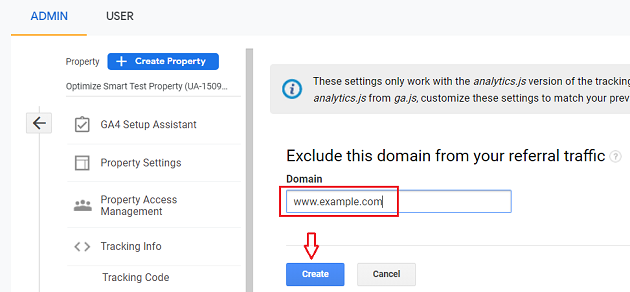
To exclude a referral URL in Google Ads, navigate to the ‘Settings’ tab of your campaign, select ‘Excluded URL’ under ‘Campaign settings’, and enter the URL you want to exclude.
Excluding referral URLs is crucial for optimizing advertising campaigns and ensuring accurate performance tracking. Advertisers who fail to manage these exclusions risk skewed data, leading to ineffective budget allocation and diminished campaign effectiveness.
This guide provides a step-by-step approach to excluding referral URLs in Google Ads, detailing the settings process, potential pitfalls, and best practices for maintaining campaign integrity.
What is a referral URL in Google Ads?
A referral URL in Google Ads is a web address from which a visitor arrives at your site after clicking on an advertisement. These URLs can originate from various sources, including affiliate sites, social media platforms, or other websites that link to yours. Understanding referral URLs is essential because they can significantly influence campaign performance and tracking accuracy.
Referral URLs are critical for analyzing traffic sources and determining the effectiveness of advertising strategies. They help identify where your traffic is coming from, which can inform optimization decisions. For example, if a particular referral URL generates low-quality traffic, excluding it can enhance your campaign’s overall performance.
- Affiliate Links: URLs from affiliate partners that direct traffic to your site.
- Social Media: Links shared on platforms like Facebook or Twitter that lead users to your site.
- Third-Party Websites: Any external site that directs traffic to your ads or website.
By excluding certain referral URLs, advertisers can improve the quality of their traffic and ultimately increase conversion rates. This process allows for more accurate data collection, ensuring that marketing budgets are allocated to high-performing sources. Proper management of referral URLs is a strategic aspect of optimizing Google Ads campaigns.
Expert Tip: Regularly audit referral traffic and analyze conversion data to identify patterns. This proactive approach can help in refining your targeting strategy and enhancing campaign effectiveness over time.
How do I exclude multiple referral URLs in Google Ads?
Excluding multiple referral URLs in Google Ads can be accomplished through the use of exclusion lists within the platform. This process helps streamline your campaigns by preventing unwanted traffic from specific sources. Follow the steps outlined below to effectively exclude multiple URLs.
- Access Your Google Ads Account: Log into your Google Ads account and navigate to the campaign or ad group that you want to modify. Ensure that you have the necessary permissions to make changes.
- Go to Settings: Click on the ‘Settings’ tab on the left-hand menu. This will take you to the configuration options for your selected campaign or ad group.
- Select Exclusions: Scroll down to the ‘Additional settings’ section. Here, you will find an option for ‘Excluded URL’ or ‘Exclude Referrals’ depending on the layout of your account.
- Add URLs to Exclude: In the exclusion field, you can input multiple URLs. Separate each URL with a comma or enter them on new lines for clarity. Ensure each URL is accurate to avoid unintentional exclusions.
- Save Changes: After entering the URLs, click on the ‘Save’ button to apply your changes. This will activate the referral exclusions immediately.
- Verify Exclusion: Once saved, monitor your campaign performance to ensure that the excluded URLs are no longer directing traffic. Adjust as necessary based on your findings.
When excluding URLs, it’s essential to be precise. Excluding a broad domain may inadvertently block legitimate traffic. Regularly review your exclusion list to ensure it aligns with your campaign goals and does not hinder potential conversions.
Expert Tip: Consider using negative keywords in conjunction with URL exclusions for a more comprehensive approach to traffic management. This can enhance your ad targeting and improve ROI.
What are the benefits of excluding referral URLs in Google Ads?
Excluding referral URLs in Google Ads can significantly enhance campaign performance by directing traffic from more relevant sources. This practice reduces wasted ad spend and improves conversion rates by ensuring that ads are shown to users who are more likely to engage with the content. Additionally, it helps in refining audience targeting for better ROI.
One of the primary benefits of excluding referral URLs is the optimization of ad budget allocation. By filtering out traffic from low-quality sources, businesses can focus their spending on high-performing channels. This ensures that resources are utilized effectively, leading to a higher return on investment. Furthermore, it allows for more accurate tracking of campaign performance, making it easier to identify which channels deliver the best results.
- Improved Conversion Rates: By excluding irrelevant referral sources, ads are displayed to users who are more likely to convert, thereby increasing the overall conversion rates of campaigns.
- Enhanced Audience Targeting: Excluding specific URLs helps refine audience segments, allowing marketers to target specific demographics or user behaviors that align more closely with their business objectives.
- Reduced Wasted Spend: Filtering out low-quality traffic minimizes ad spend on less effective channels, ensuring that budget is allocated to sources that generate meaningful engagement.
- Better Performance Tracking: Exclusion of certain referral URLs makes it easier to analyze performance metrics, as it eliminates noise from irrelevant traffic, allowing for more precise data-driven decisions.
Implementing these exclusions requires ongoing monitoring and analysis to ensure that the right sources are being filtered out. Regularly reviewing referral traffic can help identify new URLs to exclude, adapting to changes in user behavior and market dynamics.
Expert Tip: Regularly audit your referral sources and adjust exclusions based on evolving trends. This proactive approach will help maintain optimal campaign performance over time.
Can I exclude referral URLs from specific campaigns only?
Excluding referral URLs can be done at both the account and campaign levels in Google Ads. However, exclusions applied at the campaign level only affect that specific campaign, while account-level exclusions apply universally across all campaigns within the account. Understanding these differences is essential for effective campaign management.
Excluding referral URLs at the campaign level allows advertisers to tailor their exclusion strategy based on specific objectives or target audiences. For instance, if a campaign is underperforming due to traffic from a particular referral source, excluding that URL can help improve overall performance. This targeted approach provides flexibility and allows for more granular control over the advertising strategy.
In contrast, account-level exclusions provide a broader solution. When a URL is excluded at this level, it affects every campaign within the account, which can be beneficial for consistently managing unwanted traffic. However, this may inadvertently limit campaigns that could benefit from traffic from those excluded sources. Advertisers must weigh the pros and cons of each approach to determine which best suits their needs.
- Campaign-Level Exclusions: Specific to individual campaigns; allows for tailored strategies.
- Account-Level Exclusions: Affects all campaigns under the same account; provides a uniform approach.
- Flexibility vs. Consistency: Campaign-level offers flexibility; account-level ensures consistency.
Expert Tip: Regularly review referral traffic sources to identify patterns and adjust exclusions accordingly. This proactive strategy can help maintain campaign efficiency and maximize return on investment.
How long does it take for referral URL exclusions to take effect in Google Ads?
Referral URL exclusions in Google Ads typically take effect within 24 to 48 hours. However, the exact timing can vary based on several factors, including account activity and the complexity of the campaign settings. Users may see changes reflected in their campaign data once the exclusions are processed by the system.
The processing time for referral URL exclusions is influenced by Google Ads’ internal algorithms and data refresh cycles. During peak times or when significant changes are made within the account, this timeframe may be extended. Additionally, if the account experiences high traffic, the exclusion may take longer to appear in reports, as data is aggregated and analyzed.
It is also important to monitor the performance of the campaigns after making exclusions. While the exclusions will block specific referral traffic moving forward, historical data will still include interactions from the excluded URLs until the changes take effect. This means that reporting may show fluctuations based on previous interactions, but the exclusion will prevent future traffic from those sources.
Expert Tip: Regularly review your referral sources in Google Analytics alongside Google Ads to ensure exclusions are effectively blocking unwanted traffic. This proactive approach helps maintain optimal campaign performance and improves return on ad spend.
What common mistakes should I avoid when excluding referral URLs?
Common mistakes when excluding referral URLs in Google Ads include improperly configured exclusion lists and failing to monitor the impact of these exclusions. Advertisers often overlook the specific settings for their exclusion lists, leading to unintended consequences. Understanding these pitfalls is essential for optimizing ad performance.
One frequent error is excluding URLs too broadly. For example, an advertiser might exclude an entire domain when they only meant to exclude a specific subdomain. This could block valuable traffic from other parts of the site that could convert. Instead, it’s crucial to specify the exact URLs or subdomains to ensure that only the unwanted referrals are excluded while retaining potentially beneficial traffic.
Another common mistake is neglecting to regularly review and update exclusion lists. Over time, referral sources can change, and what was once a problematic URL may become a valuable traffic source. For instance, an advertiser may have excluded a URL associated with a low-performing affiliate but later discover that the affiliate has improved their marketing efforts. Regular audits of exclusion lists help maintain optimal ad performance and ensure that valuable traffic is not accidentally blocked.
Expert Tip: Always test exclusion changes on a small scale before implementing them broadly. Use A/B testing to assess the impact of exclusions on conversion rates, ensuring that your adjustments enhance rather than hinder overall campaign performance.
Is there a cost associated with excluding referral URLs in Google Ads?
No, there is no direct cost associated with excluding referral URLs in Google Ads. Excluding URLs is a feature available within the platform, and implementing it does not incur additional fees. However, the overall performance and effectiveness of campaigns may be indirectly affected.
Excluding referral URLs can influence your campaign’s cost-effectiveness in several ways. The decision to exclude certain URLs can lead to improved ad performance by preventing clicks from sources that do not convert well. This can enhance your return on investment (ROI) and reduce wasted spend on ineffective traffic.
- Quality of Excluded URLs: If the excluded URLs are driving low-quality traffic, removing them can lead to better overall campaign performance.
- Ad Spend Optimization: By focusing on high-converting sources, there is potential for lower cost-per-acquisition (CPA) and better budget allocation.
- Time and Management Resources: While there is no monetary cost, managing exclusions effectively requires time and strategic analysis to ensure optimal results.
Regular monitoring and adjustment of excluded URLs are necessary to maintain campaign efficiency. As the digital landscape evolves, the sources of traffic that perform well can change, making it essential to stay proactive in managing exclusions.
Expert Tip: Utilize Google Ads’ built-in reporting tools to analyze traffic sources regularly. This allows for data-driven decisions on which URLs to exclude, ensuring that campaign budgets are allocated efficiently to maximize potential returns.
Advanced Techniques for Excluding Referral URLs
This section explores advanced strategies for excluding referral URLs in Google Ads, emphasizing the use of scripts and automated rules for enhanced campaign management. Implementing these techniques can lead to more effective ad spend and improved campaign performance.

Using Google Ads Scripts for Bulk Exclusions
Google Ads scripts allow advertisers to automate repetitive tasks, including the bulk exclusion of unwanted referral URLs. By writing a simple script, marketers can efficiently manage large lists of exclusions without manual entry. This method is particularly useful for accounts with numerous campaigns or ad groups.
To create a script for bulk exclusions:
- Access your Google Ads account and navigate to the Scripts section.
- Write a script that identifies and excludes specified referral URLs across multiple campaigns.
- Test the script in a controlled environment to ensure it functions as intended.
- Schedule the script to run regularly, keeping your exclusions up to date automatically.
Implementing Automated Rules for Dynamic URL Management
Automated rules provide a way to dynamically manage referral URL exclusions based on predefined conditions. For example, if a specific referral source begins to generate a high bounce rate or low conversion rate, an automated rule can trigger an exclusion.
To set up automated rules:
- Go to the “Rules” section in Google Ads.
- Select “Create rule” and choose the relevant criteria, such as performance metrics.
- Specify the action to exclude the URL when the criteria are met.
- Review and activate the rule to implement dynamic exclusions.
Analyzing Traffic Sources for Effective Exclusions
Understanding which traffic sources negatively impact performance is critical for effective exclusion management. Utilize Google Analytics or Google Ads reports to analyze traffic quality from various referral URLs. Look for patterns such as low conversion rates or high bounce rates from specific sources.
Key metrics to consider include:
- Conversion rate
- Bounce rate
- Session duration
- Cost per conversion
These metrics provide insights into which sources should be excluded from your campaigns.
Testing and Optimizing Exclusions for Better Performance
Regular testing and optimization of referral URL exclusions can significantly enhance campaign effectiveness. Implement A/B testing to compare performance metrics before and after applying exclusions. Adjust exclusions based on the data collected to refine overall strategy continually.
Consider the following testing strategies:
- Test exclusions in small segments before full implementation.
- Monitor performance changes closely after exclusions are applied.
- Adjust exclusions based on seasonal traffic changes or shifts in user behavior.
Many advertisers overlook the significance of ongoing analysis in their exclusion strategies. Regularly revisiting and adjusting exclusions based on performance data can uncover new opportunities for optimization.
To apply these advanced techniques, start by implementing Google Ads scripts for bulk exclusions and setting up automated rules to manage your referral URLs dynamically. Analyze your traffic sources consistently, and be vigilant about testing the effectiveness of your exclusions. This proactive approach will lead to improved ad performance and a more efficient allocation of your advertising budget.
Real-World Case Studies on URL Exclusions
This section examines practical instances of businesses that have effectively excluded referral URLs in Google Ads, highlighting both successes and setbacks. These case studies illustrate the tangible benefits and challenges associated with implementing URL exclusions, offering insights that can inform future strategies.

Case Study: E-Commerce Brand Enhancing ROI
An e-commerce brand specializing in athletic wear implemented referral URL exclusions to improve its return on investment (ROI). Prior to exclusions, the company observed that a significant portion of its ad spend was attributed to low-converting referral traffic from discount coupon sites. By excluding these URLs, the brand redirected its budget toward higher-value traffic sources.
As a result, the company achieved a 35% increase in ROI within three months. The focus on direct and organic traffic led to higher conversion rates and reduced customer acquisition costs. This case underscores the importance of identifying and excluding underperforming referral sources.
Analysis: B2B Company Reducing Wasted Ad Spend
A B2B software provider faced challenges with wasted ad spend due to referrals from irrelevant industry forums. By conducting a thorough analysis of referral traffic, the company identified several sources that did not align with its target audience. The decision to exclude these URLs resulted in a 25% decrease in overall ad spend while maintaining lead quality.
The B2B company tracked key performance indicators (KPIs) such as cost per lead and conversion rates. The exclusion resulted in a more streamlined budget and improved performance metrics, emphasizing the value of strategic URL exclusions in optimizing ad spend.
Lessons Learned from Unsuccessful Exclusions
Not all attempts at URL exclusions yield positive results. One case involved a digital marketing agency that excluded referrals from social media platforms. The agency misjudged the value of social traffic, leading to a 40% drop in leads. This experience highlights the necessity of conducting comprehensive analysis before implementing exclusions.
- Evaluate traffic quality before exclusion.
- Consider the potential value of various referral sources.
- Monitor post-exclusion metrics closely to gauge impact.
Metrics to Track Improvements Post-Exclusion
Tracking specific metrics is essential to assess the effectiveness of URL exclusions. Key metrics include:
- Conversion Rate: Measure changes in the percentage of visitors completing desired actions.
- Return on Ad Spend (ROAS): Analyze the revenue generated compared to the cost of ads.
- Cost Per Acquisition (CPA): Track the cost of acquiring a new customer post-exclusion.
These metrics provide a clear picture of the impact of URL exclusions on overall campaign performance.
To effectively apply these insights, businesses should first identify underperforming referral URLs through data analysis. Consider implementing URL exclusions gradually, monitoring performance metrics to evaluate the impact. By focusing on high-value traffic sources, companies can maximize their advertising budgets and improve overall campaign effectiveness.
Comparative Analysis of URL Exclusion Methods
This section evaluates various methods for excluding referral URLs in Google Ads, focusing on manual versus automated exclusions, account versus campaign level exclusions, and the integration of negative keywords. Understanding these methods is essential for optimizing ad performance and budget allocation.
Manual Exclusions vs. Automated Exclusions
Excluding referral URLs can be executed through manual or automated methods.
- Manual Exclusions: Advertisers can manually add specific URLs to the exclusion list. This method allows for precise targeting and control, ensuring that only unwanted traffic is filtered out. However, it can be time-consuming and requires ongoing maintenance to keep the list updated.
- Automated Exclusions: Google Ads offers automated solutions, such as using scripts or third-party tools that can dynamically exclude URLs based on predefined criteria. This method is efficient and reduces the workload but may lack the specificity that manual exclusions provide, potentially filtering out relevant traffic.
Excluding at the Account Level vs. Campaign Level
Exclusions can be applied at either the account or campaign level, each with distinct implications.
- Account Level Exclusions: Applying exclusions at this level affects all campaigns within the account. This is beneficial for preventing unwanted traffic across multiple campaigns but may inadvertently exclude relevant traffic for specific campaigns.
- Campaign Level Exclusions: This allows for more granular control, enabling advertisers to tailor exclusions based on individual campaign objectives. While this method provides specificity, managing multiple exclusions can become complex and labor-intensive.
Use of Negative Keywords in Conjunction with URL Exclusions
Incorporating negative keywords alongside URL exclusions enhances targeting precision.
- Negative Keywords: These keywords prevent ads from being triggered by specific search terms, complementing URL exclusions by filtering out irrelevant traffic sources. For instance, if a URL is excluded due to low conversion rates, adding negative keywords related to that URL can further refine audience targeting.
- Combined Strategy: Using both methods together ensures a comprehensive approach to traffic management, enhancing overall campaign efficiency and effectiveness.
Impact on Overall Campaign Strategy
The method of exclusion selected can significantly influence a campaign’s performance and strategy.
- Performance Optimization: Effective URL exclusions can lead to improved click-through rates (CTR) and conversion rates, as undesirable traffic is filtered out. This ensures that ad spend is utilized more efficiently.
- Strategic Focus: By carefully selecting exclusion methods, advertisers can create a more focused campaign strategy that aligns with business objectives. This may involve prioritizing certain audiences or traffic sources while eliminating others.
Exclusion methods can also lead to potential pitfalls. For example, excessive exclusions may narrow the audience too much, resulting in missed opportunities for conversions. Common misconceptions include believing that URL exclusions alone can drive performance without considering the broader context of keywords and audience targeting.
To implement effective URL exclusions, advertisers should first evaluate their traffic sources and identify URLs that consistently underperform. Next, choose between manual or automated exclusions based on resource availability and desired control. Finally, integrate negative keywords into the strategy to maximize targeting efficiency and ensure that the overall campaign remains aligned with business objectives. Regularly review and adjust exclusions to adapt to changing traffic patterns and campaign goals.
Monitoring and Adjusting Excluded Referral URLs
This section outlines the essential steps for monitoring the effectiveness of excluded referral URLs in Google Ads and making adjustments based on performance data. Regular evaluation ensures optimal campaign performance and alignment with business objectives.
Setting Up Conversion Tracking
Establishing conversion tracking is fundamental for assessing the impact of excluded referral URLs. Conversion tracking allows advertisers to measure key actions taken by users after clicking on ads, such as purchases or sign-ups. This data is crucial for understanding how exclusions affect overall conversion rates. To set up conversion tracking:
- Access your Google Ads account and navigate to the “Tools & Settings” menu.
- Select “Conversions” under the “Measurement” section.
- Click the “+” button to create a new conversion action tailored to your business goals.
Using Google Analytics for Traffic Analysis
Google Analytics provides in-depth insights into traffic changes resulting from excluded referral URLs. By monitoring relevant metrics, advertisers can identify trends and anomalies. Key metrics to analyze include:
- Session Duration: Indicates user engagement levels.
- Bounce Rate: Helps assess the quality of traffic.
- Goal Completions: Tracks successful conversions.
Set up custom reports or dashboards to visualize these metrics and correlate them with the timing of URL exclusions for more nuanced insights.
Regularly Reviewing Excluded URLs
Periodic reviews of excluded referral URLs are vital for maintaining campaign effectiveness. URLs that were once deemed irrelevant may regain value over time, while others may continue to underperform. Establish a schedule to review exclusions, such as quarterly or bi-annually, to ensure ongoing relevance. Consider the following criteria during reviews:
- Changes in business strategy or target audience.
- Shifts in competitor activities or market conditions.
- Performance trends from the excluded URLs.
Adjusting Exclusions Based on Performance Data
Performance data collected through conversion tracking and Google Analytics should inform decisions about URL exclusions. If a previously excluded URL begins to show positive engagement or conversion rates, consider reinstating it. Conversely, if a currently excluded URL is still underperforming, further refine your exclusions. Implement the following steps:
- Analyze the historical performance of each excluded URL.
- Identify any new patterns or shifts in user behavior.
- Make data-driven decisions to add or remove exclusions accordingly.
Common misconceptions include believing that once URLs are excluded, they should remain excluded indefinitely. Regular adjustments based on empirical data can lead to improved campaign performance.
To effectively implement this information, advertisers should create a structured plan for monitoring and adjusting excluded referral URLs. Begin by setting up conversion tracking, leveraging Google Analytics for traffic analysis, and scheduling regular reviews of exclusions. Use performance data as a guide for making informed adjustments to optimize Google Ads campaigns.
Frequently Asked Questions
What is a referral URL in Google Ads?
A referral URL in Google Ads is the web address from which a user arrives at your site after clicking on an ad. It helps identify the source of traffic and can be used for tracking campaign performance.
How do I exclude multiple referral URLs in Google Ads?
To exclude multiple referral URLs in Google Ads, navigate to the “Exclusions” section under your campaign settings. You can add multiple URLs by separating them with a comma or entering them one by one.
What are the benefits of excluding referral URLs in Google Ads?
Excluding referral URLs helps improve the quality of your traffic by filtering out unwanted sources that may not convert. This can lead to better campaign performance and more efficient use of your ad budget.
Can I exclude referral URLs from specific campaigns only?
Yes, you can exclude referral URLs from specific campaigns in Google Ads. This allows for targeted management of traffic sources based on the performance of individual campaigns.
How long does it take for referral URL exclusions to take effect in Google Ads?
Referral URL exclusions typically take effect within a few hours after they are applied. However, it may take longer for the changes to fully reflect in campaign performance data.
What common mistakes should I avoid when excluding referral URLs?
A common mistake is not checking the format of the URLs being excluded, which can lead to incorrect exclusions. Additionally, avoid excluding URLs that may have legitimate traffic potential for your campaigns.
Is there a cost associated with excluding referral URLs in Google Ads?
There is no direct cost for excluding referral URLs in Google Ads. However, improper exclusions may lead to lost potential traffic and conversions, indirectly affecting your advertising expenditure.
Final Thoughts on how to exclude referral url in google ads
Excluding referral URLs in Google Ads is not merely a tactical adjustment; it is a strategic imperative that enhances campaign performance and optimizes budget allocation. By effectively managing referral traffic, advertisers can ensure their ads reach the most relevant audiences, thereby increasing conversion rates and overall return on investment.
Implement a comprehensive exclusion strategy by leveraging the advanced techniques discussed, particularly focusing on the most detrimental referral URLs that may be siphoning off your ad budget without yielding value. Regularly review and update your exclusion lists to adapt to changing traffic dynamics.
Understanding and controlling referral sources is essential for maximizing the effectiveness of advertising efforts, making it a cornerstone of successful digital marketing strategy.
Leave a Reply