

To run Google Ads for free, utilize promotional credits offered by Google, optimize your campaigns for lower costs, and leverage free tools like Google Analytics to track performance. These strategies can help minimize expenses while maximizing the effectiveness of your advertising efforts.
This topic is crucial for businesses and marketers looking to expand their online presence without incurring significant costs. Understanding how to effectively manage Google Ads can lead to increased visibility, better customer engagement, and ultimately, higher conversion rates.
This guide will detail how to access promotional credits, implement cost-saving optimizations, and use analytical tools to enhance campaign performance, providing actionable insights to run Google Ads effectively without spending money.
Can you run Google Ads without spending money?
Yes, it is possible to run Google Ads without spending money by utilizing promotional credits offered by Google. These credits can be obtained through various promotions, typically when signing up for a new account or through other specific marketing initiatives.
Promotional credits allow advertisers to create campaigns and run ads without incurring immediate costs. However, these credits are usually subject to certain conditions, such as a minimum spend requirement or a time limit within which they must be used. To maximize the benefit of these credits, it’s essential to understand the terms associated with them and develop a strategic advertising plan.
- New Account Credits: Often, Google offers credits to new advertisers who meet specific criteria, such as spending a certain amount within the first few weeks.
- Promotional Offers: Google may run seasonal promotions, providing credits to users who engage with their services during a designated timeframe.
- Referral Programs: Existing advertisers can sometimes receive credits by referring new clients to Google Ads, which can then be used for their campaigns.
While these promotional credits enable free ad spending, it is crucial to manage campaigns effectively to ensure that the credit is utilized efficiently. Poorly optimized ads may lead to wasted impressions and clicks, which could hinder the overall success of the advertising efforts.
Expert Tip: Always read the fine print of promotional offers to understand the requirements and limitations, as this can significantly impact the effectiveness of your advertising strategy.
What are Google Ads promotional credits?
Google Ads promotional credits are special offers provided by Google that allow advertisers to run ads without incurring direct payment. These credits are typically awarded to new users or as part of promotional campaigns and can be applied towards ad spend on the platform. By utilizing these credits, businesses can effectively test and optimize their advertising strategies without financial commitment.
Promotional credits usually come with specific terms and conditions. For instance, they may require users to spend a certain amount of their own money before the credits are activated or may only be applicable in specific regions. Additionally, these credits often have expiration dates, necessitating careful planning to maximize their use.
- New User Credits: Offered to first-time Google Ads users, typically upon reaching a minimum spend threshold.
- Seasonal Promotions: Limited-time offers that may coincide with holidays or special events, encouraging increased advertising activity.
- Referral Credits: Awarded when existing users refer new advertisers to Google Ads, incentivizing word-of-mouth promotion.
Using promotional credits effectively can lead to significant advantages for businesses looking to enhance their online visibility. Advertisers should monitor their spending closely to ensure that they meet any qualifying conditions while strategizing their campaigns to optimize the impact of these credits.
Expert Tip: To get the most out of promotional credits, consider running A/B tests on different ad formats or targeting strategies during the credit period. This approach allows for data-driven decisions that can lead to improved performance after the credits have been used.
How can I optimize my Google Ads for lower costs?
To optimize Google Ads for lower costs, focus on improving Quality Score, refining targeting, and utilizing ad scheduling. These strategies help increase ad relevance and reduce unnecessary spending while maximizing the effectiveness of available credits.
1. Improve Quality Score: Quality Score measures the relevance of your ads, keywords, and landing pages. Regularly review and enhance your ad copy and landing page experience to improve this metric, leading to lower costs per click (CPC).
2. Refine Targeting: Utilize demographic targeting to reach specific audiences more likely to convert. Narrowing down your audience can increase engagement and reduce wasted impressions, ultimately lowering costs.
3. Use Negative Keywords: Implement negative keywords to exclude irrelevant searches that may drain your budget. Regularly updating this list based on search term reports can significantly improve campaign efficiency.
4. Optimize Ad Scheduling: Analyze performance data to determine the best times and days for your ads to run. By scheduling ads during peak performance periods, you can maximize impact and minimize costs.
5. Monitor and Adjust Bids: Use automated bidding strategies that align with your campaign goals. Regularly review bid settings to ensure you are not overspending on low-performing keywords.
6. Test Ad Variations: A/B testing different ad copies and formats allows you to identify which versions perform best. This data-driven approach helps allocate budget effectively towards higher-performing ads.
Expert Tip
Consider leveraging Google Ads credits through promotions or trials. These credits can provide an opportunity to test various strategies without incurring costs, allowing for optimization insights while running ads for free.
What is the average cost of running Google Ads?
The average cost of running Google Ads can vary significantly, but businesses typically spend between $1 and $2 per click on the Google Search Network. This cost can fluctuate based on various factors including industry, competition, and the specific keywords targeted.
Several factors influence the cost of Google Ads. These include:
- Industry Competition: Highly competitive industries, like finance or legal services, often see higher costs per click due to increased bidding for popular keywords.
- Keyword Selection: The choice of keywords significantly impacts costs. Long-tail keywords tend to be cheaper, while generic, high-volume keywords can be more expensive.
- Quality Score: Google evaluates ads based on relevance and performance. A higher Quality Score can lead to lower costs per click, as Google rewards effective ads with better placement.
Additionally, the geographic targeting and time of day can influence costs. Ads targeting metropolitan areas or prime time slots may incur higher expenses due to increased user engagement during these periods.
Expert Tip
To maximize the effectiveness of your budget, focus on optimizing your Quality Score by ensuring ad relevance and improving landing page experience. This can help lower your overall costs while increasing ad visibility.
How long does it take to see results from Google Ads?
Typically, businesses can expect to see results from Google Ads campaigns within a few days to a few weeks. The exact timeframe depends on various factors, including campaign objectives, budget, and industry competition.
Initial results, such as clicks and impressions, can often be seen within 24 hours after launching a campaign. However, meaningful metrics like conversions or return on investment (ROI) may take longer, generally ranging from one to three weeks. This delay allows for data accumulation and performance optimization, which are crucial for determining the effectiveness of the ads.
Several factors influence the timing of results. First, the quality of the ad content plays a significant role; well-crafted ads that resonate with the target audience are likely to perform better and yield faster results. Second, competition in your industry can impact how quickly you see results; highly competitive markets may require more time for ads to gain traction. Additionally, the allocated budget affects ad visibility and frequency, with larger budgets typically resulting in quicker results.
Lastly, ongoing optimization based on early performance data is essential. Regularly adjusting keywords, ad placements, and bidding strategies can accelerate the achievement of desired outcomes.
Expert Tip: Implementing conversion tracking from the start can provide valuable insights into user behavior, helping to refine campaigns more effectively and potentially shorten the time to see significant results.
What are the best practices for running Google Ads?
Effective Google Ads campaigns require strategic planning and execution. Implementing best practices can significantly enhance ad performance, improve click-through rates, and maximize return on investment. Below are key strategies to consider when running Google Ads.
- Define Clear Goals: Establish specific, measurable objectives for your campaign. Whether aiming for brand awareness or lead generation, clarity in goals guides your ad creation and targeting strategies.
- Utilize Targeting Options: Take advantage of Google Ads’ extensive targeting features. Use demographic targeting, geographic locations, and keywords to reach your ideal audience. Tailor your ads to specific user segments for increased relevance.
- Craft Compelling Ad Copy: Write concise and engaging ad copy that highlights your unique selling propositions. Use action-oriented language and include a strong call-to-action to encourage clicks. Testing different headlines and descriptions can reveal what resonates best.
- Optimize Landing Pages: Ensure that the landing pages linked to your ads are relevant and user-friendly. A seamless experience from ad click to landing page can improve conversion rates and quality scores, reducing overall costs.
- Monitor and Adjust Regularly: Continuously analyze campaign performance using Google Ads analytics tools. Adjust bids, keywords, and ad copy based on data insights to optimize results and maintain budget efficiency.
Implementing these best practices helps ensure that Google Ads campaigns are not only cost-effective but also aligned with business objectives. Regularly revisiting and refining strategies based on performance data is critical for long-term success.
Expert Tip: Consider using A/B testing for your ad copies and landing pages. This method allows for data-driven decisions, enabling you to refine your approach based on real user interactions rather than assumptions.
Are there any free alternatives to Google Ads?
Yes, several free alternatives to Google Ads exist, including social media platforms, search engine optimization (SEO), and local directories. Each option offers unique features and advantages for different advertising needs. However, they also come with limitations compared to the robust targeting capabilities of Google Ads.
Social media platforms like Facebook, Instagram, and Twitter provide users with the ability to advertise for free through organic posts and community engagement. While these channels can reach a broad audience, the effectiveness largely depends on the quality of content and the frequency of engagement. Unlike Google Ads, which allows for precise targeting based on user searches, social media relies more on follower demographics and interests.
Search engine optimization (SEO) enhances a website’s visibility through organic search results. This method requires consistent effort to create valuable content and optimize site structure. While SEO does not incur direct costs, it demands time and expertise to effectively improve rankings, which can be a slow process. In contrast, Google Ads can generate immediate traffic through paid placements.
- Social Media Platforms: Free advertising through posts; relies on community engagement.
- Search Engine Optimization (SEO): Increases organic visibility; requires time and content strategy.
- Local Directories: Listings on platforms like Yelp or Yellow Pages; limited to local search visibility.
Each alternative has its pros and cons. Social media can offer immediate engagement but lacks the targeted reach of Google Ads. SEO can establish long-term traffic but requires a sustained effort. Local directories can enhance local visibility, but they do not provide the comprehensive targeting and analytics available in Google Ads.
Expert Tip: Combine these free alternatives with Google Ads for a balanced strategy. Utilize SEO to build long-term visibility while leveraging social media for immediate engagement and brand awareness.
How can I track the performance of my Google Ads for free?
Tracking the performance of Google Ads can be done effectively using free tools like Google Analytics and Google Ads’ built-in reporting features. These tools allow advertisers to analyze key metrics such as clicks, conversions, and return on investment without incurring additional costs. By leveraging these resources, users can gain valuable insights into their ad performance.
- Link Google Ads to Google Analytics: Start by linking your Google Ads account to Google Analytics. This enables seamless data sharing and allows you to track the performance of your ads directly within the Analytics dashboard.
- Set Up Goals in Google Analytics: Define specific goals within Google Analytics that align with your advertising objectives, such as form submissions or product purchases. This will help you measure conversions and understand how well your ads are performing in driving desired actions.
- Utilize UTM Parameters: Add UTM parameters to your ad URLs. These parameters will help track the source, medium, and campaign name in Google Analytics, giving you a more granular view of how users interact with your ads.
- Monitor Key Metrics: Regularly check essential metrics like click-through rates (CTR), cost per acquisition (CPA), and conversion rates. This data will inform you of your campaign’s effectiveness and highlight areas for improvement.
- Use Google Ads Reports: Explore the reporting features within Google Ads. These reports provide insights into ad performance, including impressions, clicks, and conversions, allowing for a thorough analysis of campaign performance.
Utilizing these strategies will provide a robust framework for tracking Google Ads performance without incurring costs. Regularly reviewing your data will help you make informed decisions, optimize your campaigns, and achieve better results.
Expert Tip: Focus on the quality of traffic rather than just quantity. High click-through rates may look good, but if those clicks do not convert, it indicates a potential issue with ad targeting or landing page effectiveness.
Maximizing Google Ads Promotional Credits
This section details how to effectively utilize Google Ads promotional credits, ensuring that new advertisers can leverage these opportunities for maximum impact without incurring costs.

Understanding the Eligibility Criteria for Promotional Credits
Google Ads offers promotional credits to entice new users. Eligibility typically requires the following:
- New Google Ads accounts, generally created within the last 14 days.
- Ad spend requirements, such as spending a minimum amount (e.g., $25) within the promotional period.
- Geographic limitations, as promotions may vary by region and market.
Always check the specific terms and conditions associated with your promotional credit offer, as they can differ significantly.
How to Apply and Activate Your Credits
Activating promotional credits is a straightforward process:
- Create a new Google Ads account and set up your initial campaign.
- Enter the promotional code provided by Google, either during account creation or in the billing section.
- Ensure your payment method is valid and linked to your account to trigger the credits upon meeting spending thresholds.
Once activated, promotional credits typically appear in your account balance, allowing you to allocate them toward your campaigns.
Best Practices for Spending Credits Wisely
To maximize the effectiveness of promotional credits, consider the following strategies:
- Targeted Campaigns: Focus on specific demographics or locations to optimize ad spend.
- Utilize Ad Extensions: Enhance ad visibility without additional costs by using site links, callouts, and structured snippets.
- Monitor CPC and CPA: Adjust bids based on performance metrics to ensure that spending aligns with campaign goals.
Implementing these best practices helps ensure that promotional credits yield the highest return on investment.
Monitoring Results and Adjusting Strategies Based on Performance
Continuous monitoring of campaign performance is essential. Utilize Google Ads’ reporting tools to track key metrics such as:
- Click-through rates (CTR)
- Conversion rates
- Cost per acquisition (CPA)
Based on these insights, refine your targeting, adjust bids, or experiment with different ad formats to improve results. This iterative approach is vital for optimizing the use of promotional credits.
Many new advertisers believe that promotional credits guarantee success. However, success depends on strategic implementation and ongoing optimization. Misconceptions often arise around the idea that higher spending leads to better visibility. In reality, effective targeting and relevant ad content play critical roles in campaign success.
To capitalize on promotional credits, start by ensuring eligibility and activating your credits correctly. Focus on targeted campaigns, utilize available tools to enhance visibility, and continuously monitor performance metrics. Adjust strategies based on real-time data to maximize the potential of your promotional credits and effectively learn how to run Google Ads for free.
Common Mistakes to Avoid When Running Google Ads
Running effective Google Ads requires careful strategy and execution. This section highlights common pitfalls that advertisers often encounter, providing insights to enhance campaign performance and minimize costs.
Neglecting Keyword Research and Targeting
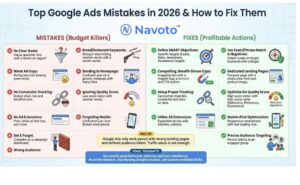
Keyword research is the foundation of any successful Google Ads campaign. Advertisers frequently skip this essential step, leading to poorly targeted ads that waste budget on irrelevant searches. Utilize tools like Google Keyword Planner to identify high-volume keywords relevant to your business. Focus on long-tail keywords, as they often yield higher conversion rates due to their specificity.
Ignoring Ad Copy Quality and Relevance
The quality and relevance of ad copy are critical for attracting clicks. Many advertisers fail to craft compelling headlines and descriptions that resonate with their target audience. Ad copy should be clear, concise, and aligned with the keywords being targeted. Incorporate strong calls to action (CTAs) and ensure that the messaging reflects the landing page content to optimize user experience and conversion potential.
Failing to Set Appropriate Budgets and Bids
Establishing a budget and bid strategy is crucial for managing ad spend effectively. Advertisers often set unrealistic budgets or fail to adjust bids based on performance insights. It is advisable to start with a daily budget that aligns with overall marketing goals and to regularly review performance metrics to fine-tune bids. Consider strategies such as automated bidding to optimize cost-per-click (CPC) based on specific campaign objectives.
Not Tracking Conversions and Performance Metrics
Without tracking conversions and performance metrics, it is impossible to gauge the effectiveness of a Google Ads campaign. Many advertisers neglect to implement conversion tracking, missing critical data that informs future decisions. Set up Google Analytics and link it to your Google Ads account to monitor key performance indicators (KPIs) such as click-through rates (CTR), conversion rates, and return on ad spend (ROAS).
Nuance / Expert Layer
Many advertisers believe that simply launching a campaign will yield results. However, ongoing optimization is essential. This includes A/B testing ad variations, analyzing competitor strategies, and adjusting targeting settings based on real-time data. Additionally, a common misconception is that higher bids always lead to better ad placements. In reality, quality score—comprising ad relevance, expected CTR, and landing page experience—plays a significant role in determining ad position and cost. A well-optimized campaign can achieve high visibility without exorbitant spending.
Practical Application
- Conduct thorough keyword research using tools like Google Keyword Planner.
- Write ad copy that is compelling, relevant, and aligned with your landing page.
- Set realistic budgets and regularly review performance to adjust bids accordingly.
- Implement conversion tracking to monitor the effectiveness of your campaigns.
By avoiding these common mistakes, advertisers can significantly improve their chances of running successful Google Ads campaigns and achieving their marketing objectives while minimizing costs.
Advanced Strategies for Cost-Effective Google Ads
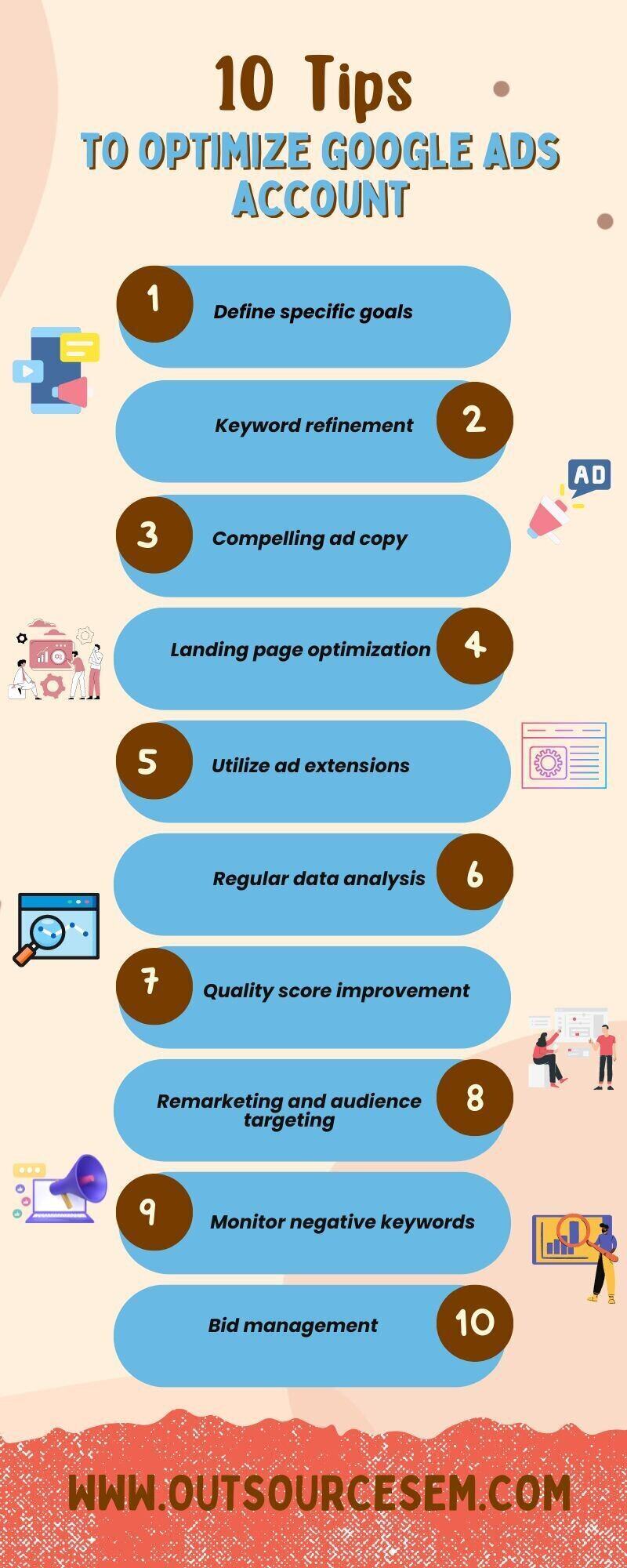
Implementing advanced strategies can significantly enhance the efficiency of Google Ads campaigns while minimizing costs. This section explores techniques such as negative keywords, remarketing, A/B testing, and location targeting to achieve superior performance without unnecessary expenditure.
Utilizing Negative Keywords to Filter Out Irrelevant Traffic
Negative keywords are a fundamental tool in refining ad targeting. By excluding specific terms, advertisers can prevent their ads from appearing in unrelated searches, thus saving budget and improving click-through rates (CTR). For instance, if selling premium shoes, adding “cheap” as a negative keyword will filter out users not aligned with the brand’s offerings.
Leveraging Remarketing to Target Previous Visitors
Remarketing allows advertisers to re-engage users who have previously interacted with their website. This strategy capitalizes on the familiarity that past visitors have with the brand, increasing the likelihood of conversion. Google Ads offers various remarketing options, including standard remarketing, dynamic remarketing, and remarketing lists for search ads. Each method can be tailored to target specific user behaviors, enhancing relevancy and effectiveness.
Implementing A/B Testing for Ad Variations
A/B testing is essential for optimizing ad performance by comparing different versions of ads to identify which elements resonate best with the audience. Variables to consider include headlines, descriptions, call-to-action buttons, and images. Conduct tests by running two versions simultaneously, monitoring key performance indicators (KPIs) such as CTR and conversion rates. This approach allows for data-driven decisions that enhance overall campaign effectiveness.
Using Location Targeting to Focus on High-Converting Areas
Location targeting enables advertisers to customize their campaigns based on geographic data, directing ads to regions where conversions are more likely. Analyze past campaign performance to identify high-converting areas, then implement geo-targeting to concentrate resources effectively. This targeted approach not only improves ad visibility but also increases the chances of capturing qualified leads.
Nuances of Advanced Strategies
Many advertisers overlook the importance of negative keywords, assuming that broad targeting will yield better results. However, improperly managed broad match keywords can lead to wasted budget and irrelevant clicks. Additionally, not all remarketing strategies are suitable for every business. Understanding the specific audience and their behavior is crucial for successful remarketing efforts. Moreover, A/B testing should be an ongoing process; continual adjustments based on real-time data yield the best long-term results.
Practical Application
- Conduct keyword research to identify and implement negative keywords in your campaigns.
- Set up a remarketing campaign targeting users who visited specific product pages but did not purchase.
- Run A/B tests on multiple ad variations, focusing on one variable at a time to assess their impact.
- Analyze geographic performance data to refine location targeting and concentrate on high-converting areas.
Real-World Case Studies of Successful Free Google Ads Campaigns
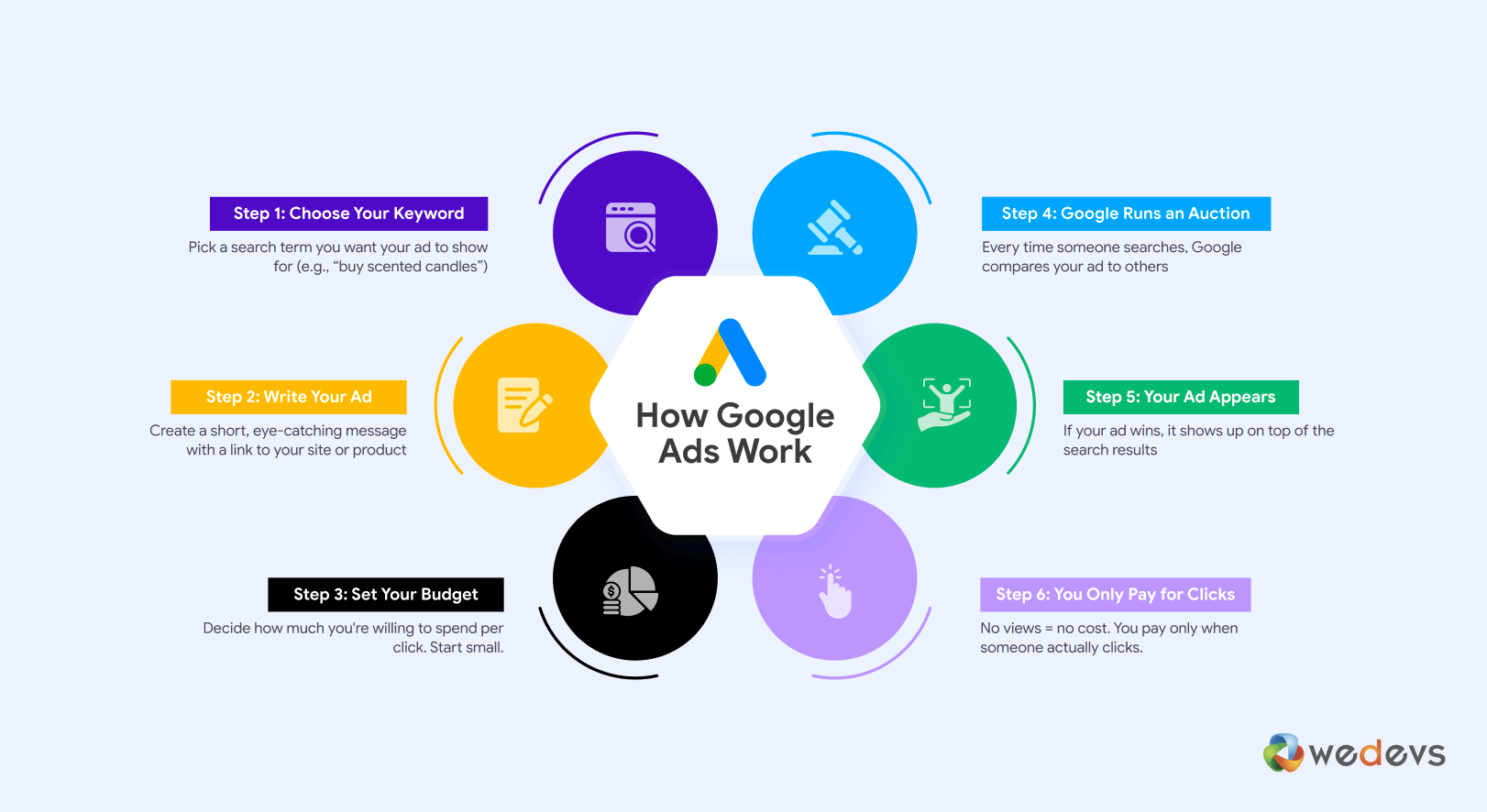
This section explores real-world examples of businesses that have effectively utilized Google Ads with little to no financial investment. Analyzing these case studies provides valuable insights and actionable strategies for implementing similar approaches in various industries.
Case Study Analysis Across Different Industries
- Local Coffee Shop: A small coffee shop in Portland leveraged Google Ads’ promotional credits. By targeting local keywords and utilizing ad extensions, they attracted significant foot traffic, resulting in a 30% increase in weekend sales.
- Online Fitness Program: A fitness coach utilized Google Ads’ free credits to promote a new online course. By focusing on customer reviews and success stories in their ad copy, they achieved a click-through rate (CTR) of 12%, leading to a 50% increase in sign-ups.
- eCommerce Store: An emerging eCommerce brand used Google Ads’ free trials and promotional credits to test various ad formats. They discovered that video ads generated higher engagement, resulting in a 40% increase in website traffic and a 20% boost in conversions.
Lessons Learned from Successful Campaigns
Successful campaigns reveal several key strategies that can be replicated:
- Target High-Intent Keywords: Focus on specific keywords that indicate strong buying intent. This approach helps in reaching potential customers who are ready to purchase.
- Optimize Ad Copy: Compelling ad copy that highlights unique selling propositions (USPs) can significantly improve CTR. Use clear calls to action (CTAs) to guide users.
- Leverage Ad Extensions: Utilizing ad extensions, such as site links and callouts, enhances visibility and provides additional information, increasing the likelihood of clicks.
Key Takeaways for Implementing Similar Strategies
To successfully implement strategies derived from these case studies, consider the following:
1. **Utilize Google Ads Credits:** Many new advertisers can access promotional credits. Use these to experiment with different ad formats and strategies without financial risk.
2. **Focus on Local Targeting:** For businesses with a local customer base, geo-targeting can yield significant returns. Tailor ads to resonate with the local audience.
3. **Analyze Performance Metrics:** Regularly track and analyze performance metrics to refine campaigns. Metrics such as CTR, conversion rates, and return on ad spend (ROAS) are critical for optimization.
Adapting Strategies to Your Business Model
Every business is unique, so it’s essential to adapt these strategies to your specific model:
– For **service-based businesses**, emphasize customer testimonials and service benefits in your ad copy.
– For **eCommerce**, highlight product features and discounts to entice clicks.
– For **local businesses**, incorporate local landmarks or community references to resonate with the target audience.
Incorporating these insights into your approach will enhance your ability to run Google Ads effectively, even with limited or no budget. Begin by assessing your current resources, identifying potential promotional credits, and refining your ad targeting strategy. Focus on creating compelling ad copy and leveraging performance metrics to ensure your campaigns achieve desired results.
Frequently Asked Questions
Can you run Google Ads without spending money?
No, running Google Ads typically requires a budget, as it operates on a pay-per-click model. However, promotional credits may allow new users to start advertising without an initial investment.
What are Google Ads promotional credits?
Google Ads promotional credits are incentives offered by Google to encourage new advertisers to start using the platform. These credits can be applied to your ad spend, allowing you to run ads without immediate costs.
How can I optimize my Google Ads for lower costs?
To optimize Google Ads for lower costs, focus on refining your keyword selection, improving ad quality, and targeting specific demographics. Regularly monitor performance metrics and adjust bids accordingly to maximize your budget.
What is the average cost of running Google Ads?
The average cost of running Google Ads varies widely based on industry, competition, and targeting options, but many businesses spend between $1 to $2 per click. Budgeting for daily and monthly limits is essential for effective management.
How long does it take to see results from Google Ads?
Results from Google Ads can often be seen within a few days, depending on the campaign’s settings and goals. However, achieving optimal performance may take several weeks of testing and adjustments.
What are the best practices for running Google Ads?
Best practices for running Google Ads include conducting thorough keyword research, writing compelling ad copy, and utilizing ad extensions. Regularly analyzing performance data and adjusting campaigns based on insights is also crucial.
Are there any free alternatives to Google Ads?
Yes, there are free alternatives to Google Ads, such as social media marketing, content marketing, and search engine optimization (SEO). These methods can help drive traffic without the direct costs associated with paid advertising.
How can I track the performance of my Google Ads for free?
You can track the performance of your Google Ads for free using Google Ads’ built-in reporting tools and Google Analytics. These platforms provide insights into clicks, conversions, and overall campaign effectiveness.
Final Thoughts on how to run google ads for free
Successfully running Google Ads without a budget hinges on strategic utilization of promotional credits and meticulous optimization of campaigns. By avoiding common pitfalls and employing advanced cost-effective strategies, advertisers can significantly enhance their return on investment, even in a constrained financial environment.
To take immediate action, set up a Google Ads account and apply for any available promotional credits; then, focus on refining your ad copy and targeting to maximize visibility and engagement without incurring additional costs.
Mastering the art of cost-free Google Ads not only empowers businesses to thrive in competitive markets but also transforms limited resources into substantial opportunities for growth.
Leave a Reply