
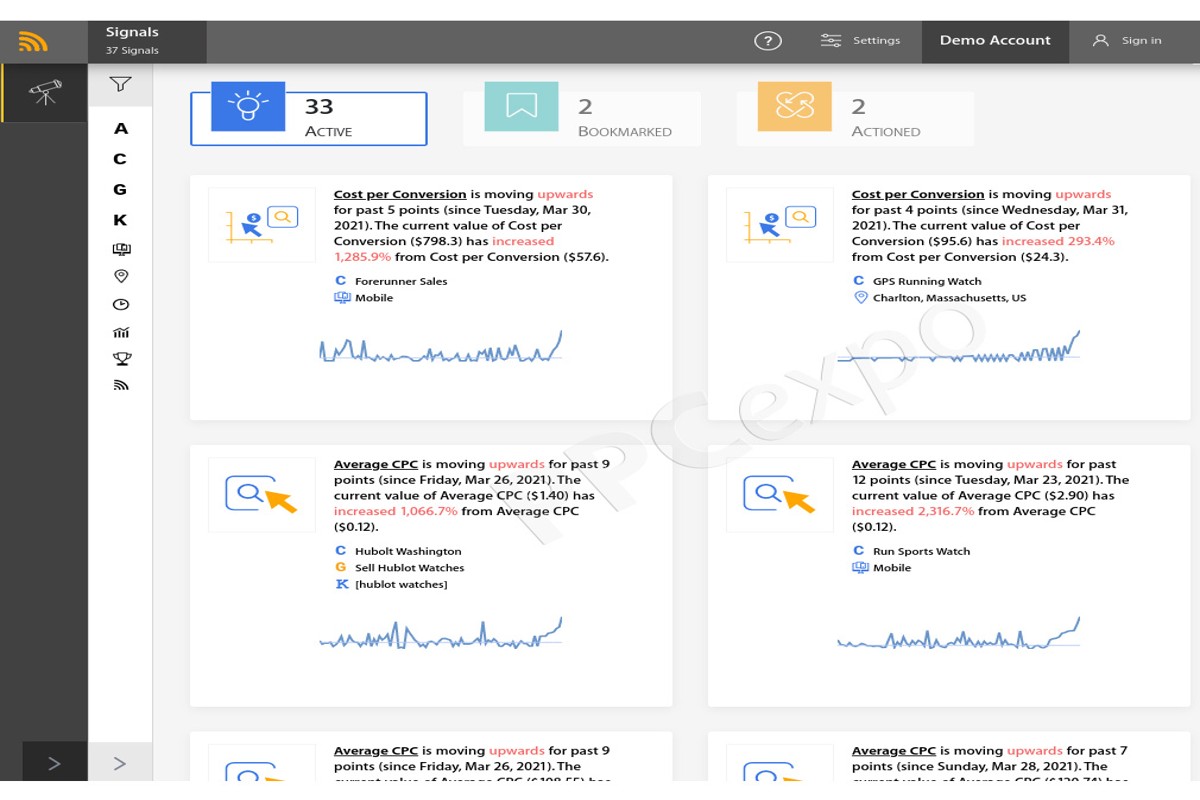
To run Google Ads for clients, start by understanding their goals, conducting keyword research, setting up campaigns, and continuously optimizing based on performance metrics. This structured approach ensures targeted advertising that aligns with client objectives.
Understanding how to run Google Ads for clients is crucial for marketing agencies and freelancers aiming to deliver effective digital advertising solutions. Mismanagement of campaigns can lead to wasted budgets and missed opportunities, impacting client satisfaction and retention.
This comprehensive guide will outline the essential steps, including goal-setting, keyword research techniques, campaign setup, and optimization strategies, providing a roadmap for successful Google Ads management.
What are Google Ads and how do they work?
Google Ads is an online advertising platform that allows businesses to display ads on Google’s search engine results pages and across its extensive network. Advertisers bid on keywords relevant to their products or services, and ads are shown to users based on their search queries. The system operates on a pay-per-click (PPC) model, where advertisers pay only when users click on their ads.
Google Ads comprises several ad types and formats, including text ads, display ads, video ads, and shopping ads. Each type serves different marketing objectives and caters to various customer interactions. Advertisers can employ various bidding strategies such as manual CPC, enhanced CPC, or target CPA to optimize their ad spend based on performance.
- Text Ads: These appear on Google search results and consist of headlines and descriptions. They aim to drive traffic to websites based on specific search queries.
- Display Ads: These visual ads are shown on websites within Google’s Display Network, targeting users based on interests and demographics.
- Video Ads: Displayed before, during, or after YouTube videos, these ads allow for rich storytelling and engagement.
- Shopping Ads: These showcase products directly in search results with images, prices, and descriptions, making them effective for e-commerce.
Targeting options in Google Ads include keyword targeting, demographic targeting, geographic targeting, and remarketing. Advertisers can refine their audience to ensure their ads reach the most relevant users. This precision increases the likelihood of conversions and maximizes return on investment.
Expert Tip: Regularly analyzing ad performance metrics, such as Quality Score and click-through rates, is essential for optimizing campaigns. Adjusting bids and targeting settings based on these insights can significantly enhance ad effectiveness and budget efficiency.
How do I set up a Google Ads campaign for a client?
Setting up a Google Ads campaign for a client involves several key steps, from creating an account to launching the ads. Follow these steps to ensure a successful campaign that meets your client’s objectives. Proper execution is essential for maximizing return on investment (ROI).
- Create a Google Ads Account: Start by setting up a Google Ads account for your client. Use their email address and ensure you have administrative access to manage campaigns effectively.
- Define Campaign Goals: Discuss with the client to establish clear goals for the campaign, such as increasing website traffic, generating leads, or boosting sales.
- Select Campaign Type: Choose the appropriate campaign type based on the identified goals. Options include Search, Display, Video, Shopping, and App campaigns.
- Set Targeting Options: Define the target audience by selecting demographics, locations, and languages. This helps in reaching the right customers effectively.
- Establish a Budget: Determine the daily or monthly budget your client is willing to spend. Set bid strategies that align with their goals, such as maximizing clicks or targeting a specific cost-per-acquisition (CPA).
- Create Ad Groups: Organize the campaign into ad groups based on themes or products. Each ad group should contain relevant keywords and ads that align with the targeting strategy.
- Write Compelling Ads: Craft engaging ad copy that highlights unique selling propositions and includes a clear call-to-action. Ensure that the ads align with the keywords in the ad group.
- Set Up Tracking: Implement conversion tracking to measure campaign effectiveness. Use Google Analytics and set up goals to track user actions that matter to your client.
- Launch the Campaign: Review all elements of the campaign for accuracy, then launch. Monitor performance closely, especially in the initial days.
Regularly review the campaign performance and make adjustments based on data insights. This iterative process will help refine targeting, ad copy, and budget allocation for optimal results.
Expert Tip: Utilize A/B testing for ad variations to determine which messaging resonates best with the target audience. Continuous testing can significantly enhance campaign performance over time.
What are the costs associated with running Google Ads for clients?
The costs associated with running Google Ads for clients can vary significantly, typically ranging from a few hundred to several thousand dollars per month. Key factors influencing these costs include the cost-per-click (CPC), budget management, and the overall campaign strategy. Understanding these elements is essential for effective client budgeting and maximizing return on investment (ROI).
One of the primary costs is the cost-per-click (CPC), which is the amount paid each time a user clicks on an ad. CPC can fluctuate based on competition within the industry, quality of the ad, and targeting settings. Other expenses may include daily or monthly budget allocations, which can range widely based on client goals and market dynamics. Clients should be prepared for initial testing phases that may incur higher costs as ad performance is optimized.
- Industry Competitiveness: Highly competitive industries tend to have higher CPC rates, driving up costs.
- Targeting Options: More specific targeting, such as geographic or demographic targeting, can increase costs but may yield better ROI.
- Ad Quality and Relevance: Higher quality ads generally cost less per click due to improved Quality Scores, leading to more effective budget utilization.
Moreover, additional costs may arise from managing the campaign itself, including fees for agency services or tools used for analytics and reporting. While these fees can seem daunting, they often provide significant value by ensuring that the campaigns are effectively optimized and monitored.
For clients, understanding these cost structures is vital for setting realistic expectations and achieving desired outcomes. Regular analysis of campaign performance against costs will help in refining strategies for better ROI.
Expert Tip: Utilize Google’s Keyword Planner to estimate CPC and potential traffic for targeted keywords, enabling more informed budget decisions and strategic planning.
How long does it take to see results from Google Ads?
Typically, businesses can expect to see initial results from Google Ads campaigns within one to three months. However, the timeframe can vary significantly based on several factors, including campaign setup, industry competition, and overall marketing strategy.
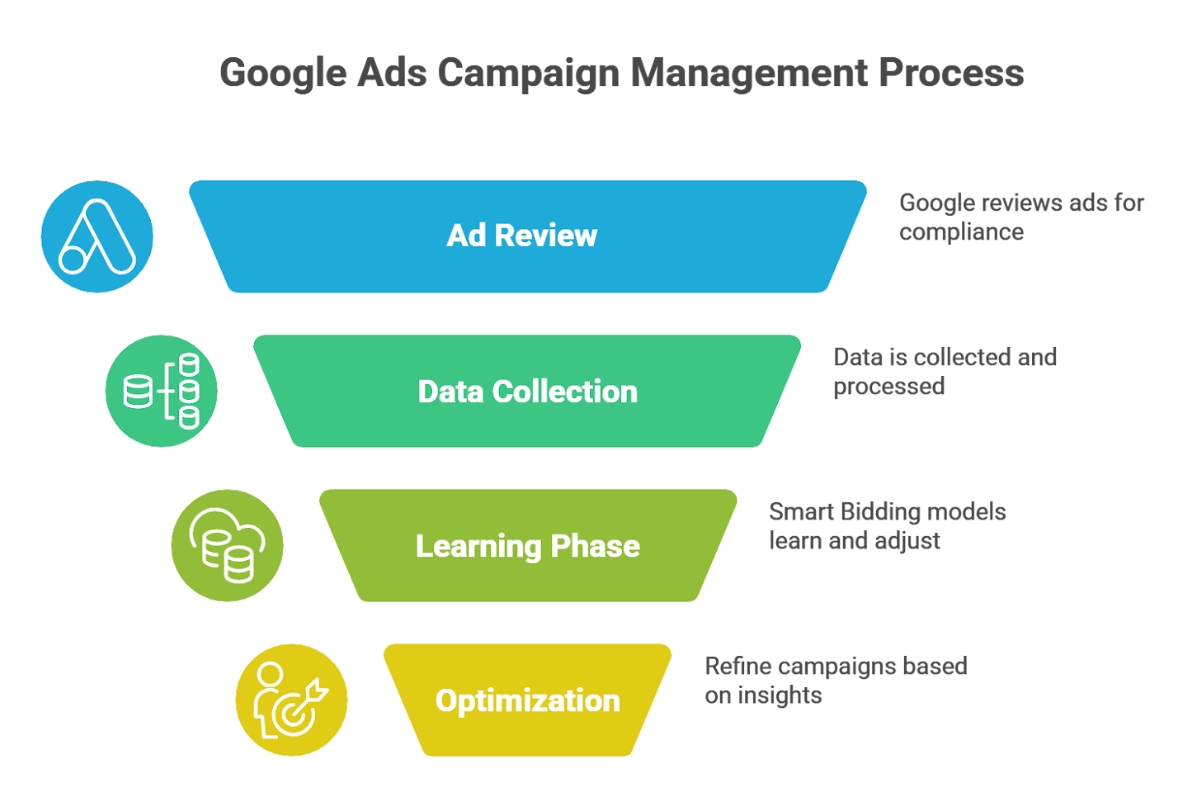
The initial few weeks after launching a campaign are often focused on data collection and optimization. During this period, Google Ads algorithms learn which keywords and ads perform best for the target audience. Advertisers may notice fluctuations in performance as the system adjusts. By the end of the first month, many businesses start to see clearer data trends that inform necessary adjustments for better performance.
Several factors influence how quickly results are realized. First, the industry plays a critical role; highly competitive sectors may take longer to yield noticeable outcomes compared to niche markets. Additionally, the budget allocated for the campaign affects visibility and traffic. A higher budget typically accelerates results by increasing ad impressions and clicks. Finally, the quality of the ad copy and landing pages can enhance conversion rates, thereby impacting how quickly tangible results are observed.
Expert Tip
Regularly monitor and optimize campaigns based on performance data. Implementing A/B testing on ads and landing pages can significantly shorten the time to achieve desired results by identifying the most effective strategies early on.
What are the best practices for managing Google Ads for clients?
Effective management of Google Ads for clients requires a structured approach that prioritizes clear communication, strategic planning, and continuous optimization. Implementing best practices ensures campaigns are not only efficient but also aligned with client objectives. Here are essential practices to enhance campaign performance and client satisfaction.
- Establish Clear Goals and KPIs: Collaborate with clients to define specific, measurable objectives. Goals could include increasing website traffic, generating leads, or boosting sales. Set Key Performance Indicators (KPIs) to track progress and adjust strategies accordingly.
- Conduct Thorough Keyword Research: Utilize tools like Google Keyword Planner to identify relevant keywords that resonate with the target audience. Focus on a mix of short-tail and long-tail keywords to capture diverse search intents and improve ad relevance.
- Implement A/B Testing: Regularly test different ad copies, headlines, and landing pages to determine what resonates best with the audience. A/B testing helps refine messaging and increases the overall effectiveness of the campaign.
- Optimize Bidding Strategies: Choose the right bidding strategy based on campaign goals. Whether it’s maximizing clicks, target CPA, or ROAS, ensure that the selected strategy aligns with the client’s objectives and budget constraints.
- Monitor and Adjust Regularly: Continually analyze campaign performance data to identify trends and areas for improvement. Make timely adjustments to bids, ad placements, and targeting to enhance performance and ROI.
Successful management of Google Ads hinges on a proactive approach to client communication. Regular updates and reports keep clients informed of progress and foster trust, which is vital for long-term partnerships.
Expert Tip: Incorporate client feedback into campaign strategies. Regularly solicit insights from clients about their target audience and industry trends, as this can provide valuable context that enhances campaign effectiveness.
How can I measure the success of Google Ads campaigns for clients?
Success in Google Ads campaigns can be measured using key performance indicators (KPIs) that align with client goals. Important KPIs include click-through rates (CTR), conversion rates, cost per acquisition (CPA), and return on ad spend (ROAS). Tracking these metrics provides insights into campaign performance and areas for improvement.
- Click-Through Rate (CTR): This metric indicates the percentage of users who click on an ad after viewing it. A higher CTR suggests that the ad is relevant and engaging to the target audience.
- Conversion Rate: This measures the percentage of visitors who complete a desired action, such as making a purchase or signing up for a newsletter. Analyzing conversion rates helps assess the effectiveness of the ad in driving valuable actions.
- Cost Per Acquisition (CPA): CPA tracks the cost associated with acquiring a new customer. By comparing CPA to the average customer lifetime value, businesses can determine the profitability of their campaigns.
- Return on Ad Spend (ROAS): This metric calculates the revenue generated for every dollar spent on advertising. A higher ROAS indicates a more effective campaign and helps clients understand the financial impact of their ads.
- Quality Score: Google assigns a Quality Score to keywords based on their relevance, CTR, and landing page experience. Improving Quality Scores can lead to lower CPCs and better ad placements.
Regularly analyzing these KPIs provides a comprehensive view of campaign performance. It is also essential to consider external factors such as seasonality, market trends, and competition, as they can influence results. Employing tools like Google Analytics can further enhance data collection and reporting efficiency.
For precise reporting, create custom dashboards that visualize these metrics over time. This approach allows for better communication with clients and helps in making data-driven decisions to optimize campaigns.
Expert Tip: Segment data by device, location, and demographics to uncover insights that can refine targeting strategies and improve campaign performance. Tailoring ads based on this analysis can significantly enhance engagement and conversion rates.
What are common mistakes to avoid when running Google Ads for clients?
Common mistakes when running Google Ads for clients include poor keyword selection, neglecting ad copy testing, and failing to optimize landing pages. These errors can lead to wasted budgets and subpar campaign performance. Avoiding these pitfalls is essential for achieving successful results.
For instance, consider a scenario where a marketing agency is tasked with managing Google Ads for a local bakery. The agency chooses broad match keywords like “bread” and “cake” without further refinement. This strategy leads to irrelevant clicks from users searching for unrelated products, resulting in low click-through rates and wasted ad spend. A better approach would involve using long-tail keywords and implementing negative keywords to filter out irrelevant traffic.
Another common mistake is not conducting A/B testing on ad copy. For example, if the agency runs a campaign with only one version of the ad, they miss the opportunity to identify which messaging resonates better with the target audience. By testing multiple headlines and descriptions, the agency can optimize performance based on real data. Additionally, neglecting the landing page experience can hinder conversion rates. If the landing page is slow or not aligned with the ad’s promise, users are likely to abandon their visit without taking action.
Expert Tip: Regularly review and adjust keyword strategies based on performance analytics, and prioritize continuous A/B testing of ad copy and landing pages to maximize campaign effectiveness and ROI.
How do Google Ads compare to other advertising platforms?
Google Ads offers a unique advertising solution compared to platforms like Facebook Ads, primarily in areas of targeting, cost, and overall effectiveness. While Google Ads focuses on search intent and keyword targeting, Facebook Ads leverages demographic and interest-based targeting. These differences significantly influence advertising strategies and outcomes.
Google Ads operates on a pay-per-click (PPC) model, allowing advertisers to bid on keywords relevant to their products or services. This platform excels in capturing users actively searching for specific information, making it particularly effective for direct conversions. In contrast, Facebook Ads relies on user behavior, interests, and demographics to display ads. This can be beneficial for brand awareness and engagement but may not yield immediate sales as effectively as Google Ads.
When comparing costs, Google Ads often requires a higher budget due to competitive keywords, especially in lucrative industries. The average cost-per-click (CPC) can range from $1 to over $50, depending on the keyword’s competitiveness. Facebook Ads, however, typically have a lower CPC, averaging between $0.50 and $2.00. This cost disparity means that businesses with limited budgets may find Facebook Ads more accessible, even if the immediate return on investment (ROI) is less tangible.
| Feature | Google Ads | Facebook Ads |
|---|---|---|
| Targeting Method | Keyword and search intent | Demographic and interest-based |
| Cost | Higher CPC ($1-$50+) | Lower CPC ($0.50-$2.00) |
| Effectiveness | Immediate conversions | Brand awareness and engagement |
Expert Tip: For clients seeking quick conversions, prioritize Google Ads by conducting thorough keyword research. Conversely, for those focused on long-term brand building and audience engagement, recommend a robust Facebook Ads strategy to leverage its demographic targeting capabilities.
Advanced Strategies for Google Ads Campaign Optimization
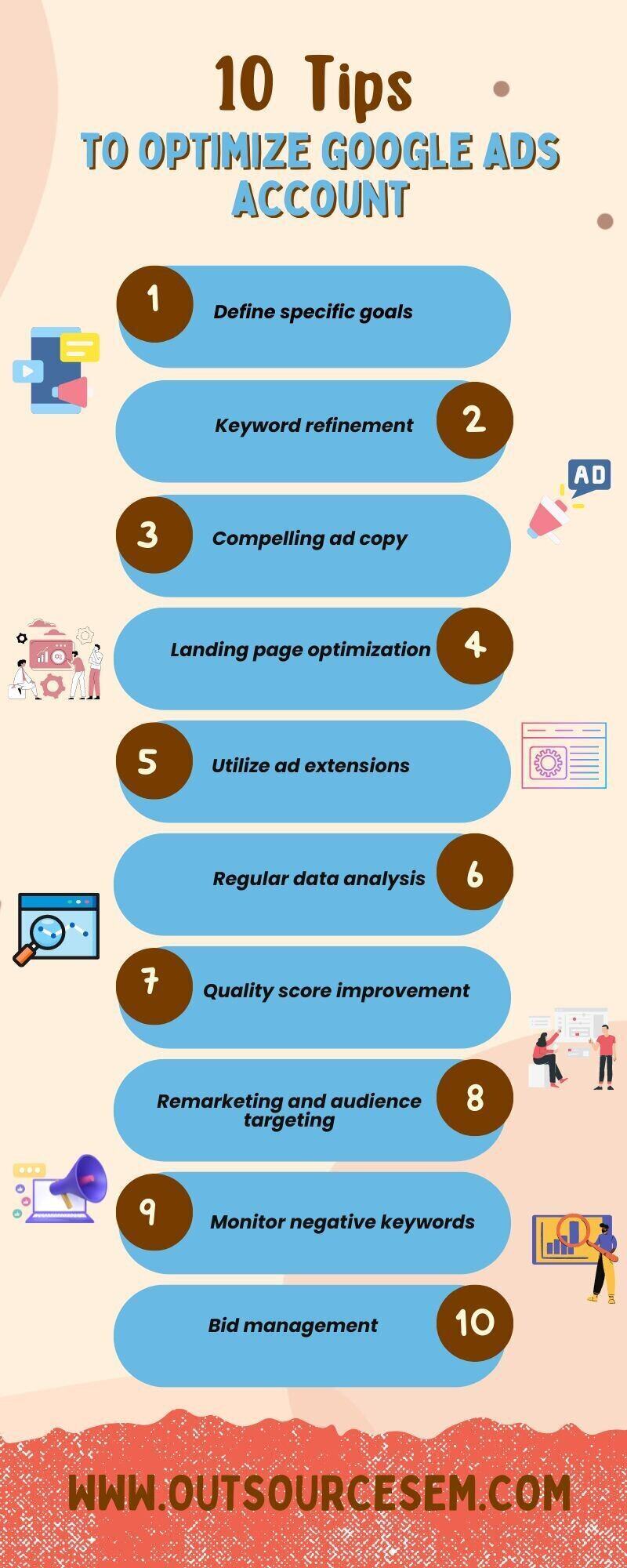
Optimizing Google Ads campaigns requires a deep understanding of advanced techniques that go beyond basic setup. Implementing these strategies can significantly enhance campaign performance and drive better results for clients.
Utilizing A/B Testing for Ad Variations
A/B testing, or split testing, is an essential method for refining ad performance. By creating two or more variations of an ad, advertisers can measure which version yields better results in terms of click-through rate (CTR) and conversions. Key elements to test include:
- Ad headlines
- Ad copy
- Call-to-action (CTA)
- Images or videos
Conduct these tests simultaneously to ensure that external factors do not skew results. Aim for statistical significance by running tests long enough to gather ample data.
Implementing Remarketing Strategies
Remarketing allows advertisers to re-engage users who have previously interacted with their website or ads. This strategy is effective because it targets users who have already shown interest, increasing the likelihood of conversion. Key steps include:
- Setting up remarketing lists based on user behavior (e.g., page visits, cart abandonment).
- Creating tailored ads that resonate with specific audience segments.
- Using frequency capping to avoid ad fatigue.
Remarketing can significantly improve return on investment (ROI) by focusing resources on warm leads.
Leveraging Audience Targeting Features
Google Ads offers robust audience targeting capabilities that allow advertisers to reach specific demographics and interests. Utilizing options such as:
- In-market audiences: Target users actively searching for products or services similar to what the client offers.
- Similar audiences: Expand reach by targeting users with behaviors similar to existing customers.
- Custom intent audiences: Create audiences based on specific keywords relevant to the client’s offerings.
Effective audience targeting can dramatically improve ad relevance, CTR, and conversion rates by ensuring the right message reaches the right people.
Optimizing Landing Pages for Conversions
The landing page plays a crucial role in the success of Google Ads campaigns. A well-optimized landing page should have a clear focus on the desired action. Key optimization techniques include:
- Ensuring fast loading times (ideally under 3 seconds).
- Creating a visually appealing design that aligns with ad messaging.
- Implementing clear CTAs that guide users toward conversion.
- Incorporating trust signals such as testimonials and security badges.
Regularly testing and refining landing page elements based on user behavior can lead to higher conversion rates and better overall campaign performance.
Many advertisers overlook the importance of testing different elements on their landing pages. A common misconception is that a single optimized page is sufficient. In reality, continuous iteration based on user feedback and analytics is critical. Expert practitioners understand that even minor adjustments to headlines or CTAs can lead to significant performance improvements.
To effectively apply these advanced strategies, advertisers should:
- Set up A/B tests for ad variations regularly and analyze results for actionable insights.
- Implement remarketing lists and tailor ads to engage previous visitors effectively.
- Utilize audience targeting features to reach specific user segments, enhancing ad relevance.
- Continuously optimize landing pages based on analytics and user feedback to maximize conversions.
By adopting these advanced techniques, advertisers can significantly improve their Google Ads campaigns and deliver exceptional results for clients.
Client Communication and Reporting Best Practices
Effective communication and transparent reporting are vital for fostering strong client relationships in Google Ads management. This section outlines best practices to enhance client interactions and ensure clarity in performance tracking.

Setting Clear Expectations from the Start
Establishing clear expectations is foundational for any successful client relationship. At the outset, discuss project goals, timelines, budget constraints, and the scope of services. Ensure the client understands the intricacies of Google Ads, including the potential for variability in results based on industry, competition, and budget allocation. A written agreement or project brief can serve as a reference point throughout the campaign.
Creating Regular Performance Reports
Regular performance reports provide clients with insight into campaign effectiveness and return on investment (ROI). Consider the following components when creating reports:
- Frequency: Set a schedule for reporting, such as weekly or monthly, based on client preference and campaign activity.
- Metrics: Include key performance indicators (KPIs) such as click-through rates (CTR), conversion rates, and cost per acquisition (CPA).
- Analysis: Provide a narrative that interprets the data, highlighting successes and areas for improvement.
Incorporating Client Feedback into Strategies
Client feedback is invaluable in refining campaign strategies. Schedule regular check-in meetings to discuss performance and gather insights on client perceptions. Involve clients in decision-making processes, such as choosing ad creatives or targeting options. This collaborative approach not only aligns campaign strategies with client expectations but also fosters a sense of ownership and investment in the campaign’s success.
Educating Clients on Google Ads Metrics
Clients often lack familiarity with Google Ads metrics, which can lead to misunderstandings about campaign performance. Take the time to explain critical metrics and their implications. Focus on:
- Impressions: The number of times ads are displayed.
- Clicks: The number of times users click on the ads.
- Conversions: The desired actions taken by users after clicking the ads.
Providing context for these metrics will help clients grasp the effectiveness of their campaigns and make informed decisions moving forward.
Nuance / Expert Layer
A common misconception is that high traffic equates to campaign success. While clicks are essential, they do not guarantee conversions. Educating clients on the importance of conversion metrics is crucial. Additionally, clients may focus too heavily on immediate results, overlooking long-term brand building and customer loyalty that can stem from a well-managed Google Ads campaign. A balanced approach that emphasizes both immediate and long-term goals is necessary for sustained success.
Practical Application
To implement these best practices, establish a structured communication plan that includes regular reporting cycles and feedback sessions. Create a glossary of key metrics for clients to reference. Develop templates for performance reports that can be customized for each client. Prioritize transparency in all communications, ensuring clients feel informed and engaged throughout the process of how to run Google Ads for clients.
Navigating Google Ads Policies and Compliance
This section outlines essential strategies for ensuring compliance with Google Ads policies, which is critical for maintaining account integrity and avoiding suspensions. Adherence to these guidelines can significantly enhance campaign performance and client satisfaction.
Understanding Prohibited Content and Practices
Google Ads has strict policies regarding prohibited content and practices. Advertisers must avoid promoting:
- Illegal products or services: This includes anything that violates local laws, such as counterfeit goods.
- Hate speech or violence: Content that promotes hate or incites violence is strictly forbidden.
- Adult content: This encompasses sexually explicit material or services.
- Misleading content: Advertisements must not misrepresent the product, service, or brand.
Familiarity with these categories is essential for maintaining compliance and ensuring that ads are approved and displayed effectively.
Keeping Up with Policy Updates
Google frequently updates its advertising policies to address emerging trends and issues. Marketers must regularly review the Google Ads Policy Center for the latest guidelines. Subscribing to updates or following industry blogs can also provide timely information on policy changes. Staying informed helps mitigate the risk of non-compliance and ensures that campaigns remain aligned with the latest standards.
Conducting Regular Account Audits
Performing regular audits of Google Ads accounts is essential for ongoing compliance. An effective audit process includes:
- Reviewing ad copy and landing pages for adherence to policies.
- Checking targeting settings to ensure they comply with demographic restrictions.
- Monitoring account performance metrics to identify irregularities or issues.
Establishing a routine for these audits can help catch potential violations before they result in account suspension.
Ensuring Ad Relevance and Quality Score
Ad relevance and Quality Score are pivotal for campaign success. Google evaluates ads based on their relevance to keywords and user intent. To improve ad relevance:
- Conduct thorough keyword research to align ad copy with user search queries.
- Create tightly themed ad groups to maintain high relevance across ads.
- Optimize landing pages to ensure they deliver what the ad promises.
A higher Quality Score can lead to better ad placements and lower costs, making compliance with relevance standards a priority.
Many advertisers mistakenly believe compliance is a one-time effort. In reality, it requires continuous attention and adaptation to changes in policies and market conditions. Regular updates from Google can shift compliance requirements, and a failure to adapt can lead to account penalties.
To implement these strategies effectively, establish a compliance checklist for each campaign. Include steps for reviewing content against Google’s policies, setting reminders for policy updates, scheduling regular audits, and ensuring that ad relevance is maintained throughout the campaign lifecycle. This proactive approach will safeguard client accounts and enhance overall campaign performance.
Real-World Case Studies of Successful Google Ads Campaigns
This section provides an in-depth exploration of successful Google Ads campaigns, analyzing their strategies, outcomes, and the lessons learned. Examining real-world examples offers valuable insights into effective tactics and potential pitfalls in managing client campaigns.

E-commerce Success: A Fashion Retailer
A fashion retailer implemented a Google Ads campaign targeting high-intent keywords related to seasonal collections. By utilizing dynamic search ads and remarketing strategies, the campaign achieved a 30% increase in conversion rates over three months. The retailer focused on tailored ad copy that reflected current trends, which resonated with the target audience.
- Ad Customization: Ads were personalized based on user behavior and preferences.
- Remarketing Lists: Targeted previous visitors with special offers to boost engagement.
- Responsive Search Ads: Leveraged machine learning to optimize ad performance dynamically.
Healthcare Sector: A Local Clinic
A local healthcare clinic aimed to increase patient bookings for specific services. The campaign utilized geo-targeting to reach potential patients within a 10-mile radius. By focusing on service-specific keywords and creating informative landing pages, the clinic saw a 50% rise in appointment requests within two months.
- Geo-targeting: Focused ads on local demographics for higher relevance.
- Sitelink Extensions: Provided additional information about services directly in ads.
- Call-Only Campaigns: Encouraged immediate contact via phone, leading to higher conversion rates.
Lessons from Failures
Not every campaign achieves success. A software company faced challenges when their ads targeted overly broad keywords, resulting in low-quality leads. The campaign wasted budget on clicks that did not convert. By analyzing performance data, the company refined its keyword strategy, focusing on long-tail keywords that better matched user intent.
Industry-Specific Strategies
Different industries require tailored approaches. In the travel sector, seasonal promotions and destination-specific keywords drive engagement. For B2B services, emphasizing case studies and testimonials can establish trust and authority. Understanding industry nuances is essential for effective campaign management.
Client Testimonials and Feedback
Client feedback provides insight into the effectiveness of campaigns. A digital marketing agency noted that clients appreciated transparency in reporting and the ability to adjust strategies based on real-time data. Regular communication and demonstrating ROI helped build long-term relationships.
Common misconceptions include the belief that higher budgets guarantee better results. Effective targeting, ad quality, and ongoing optimization play crucial roles. Additionally, many overlook the importance of continuous A/B testing to refine ad elements and improve performance.
To apply these insights, clients should initiate campaigns with clearly defined goals. Conduct thorough keyword research and develop tailored ad copy. Implement tracking mechanisms to assess performance and adjust strategies based on data. Regularly engage with clients to discuss results and optimize campaigns for sustained success.
Frequently Asked Questions
What are Google Ads and how do they work?
Google Ads is an online advertising platform that allows businesses to display ads on Google’s search results and partner websites. Advertisers bid on keywords, and ads are shown based on relevance and bid amount, driving traffic to their sites.
How do I set up a Google Ads campaign for a client?
To set up a Google Ads campaign for a client, create a Google Ads account, define campaign goals, select targeting options, and choose ad formats. Then, create compelling ad copy and set a budget before launching the campaign.
What are the costs associated with running Google Ads for clients?
Costs for running Google Ads depend on the bidding strategy, competition for keywords, and the client’s budget. Advertisers typically pay per click (CPC) or per thousand impressions (CPM), with costs varying widely based on industry.
How long does it take to see results from Google Ads?
Results from Google Ads can often be seen within a few days to weeks, depending on the campaign’s structure and budget. However, optimizing campaigns for better performance may take additional time and adjustments.
What are the best practices for managing Google Ads for clients?
Best practices include regularly monitoring performance metrics, optimizing ad copy and keywords, and adjusting bids based on data. Additionally, utilizing A/B testing can help improve ad effectiveness over time.
How can I measure the success of Google Ads campaigns for clients?
Success can be measured using key performance indicators (KPIs) such as click-through rate (CTR), conversion rate, and return on ad spend (ROAS). Google Ads also provides detailed analytics to assess campaign performance.
What are common mistakes to avoid when running Google Ads for clients?
Common mistakes include neglecting keyword research, failing to set clear objectives, and not regularly reviewing campaign performance. Additionally, poor ad targeting can lead to wasted budget and ineffective results.
How do Google Ads compare to other advertising platforms?
Google Ads typically offers a broader reach through search intent and extensive targeting options compared to other platforms. It is often favored for its measurable results and ability to drive immediate traffic, unlike some social media advertising which may focus more on brand awareness.
Final Thoughts on how to run google ads for clients
Mastering Google Ads for clients requires a strategic blend of technical expertise and effective communication. By understanding the nuances of campaign setup, cost management, and optimization strategies, professionals can drive measurable results that align with client objectives.
To elevate your Google Ads strategy, implement a robust reporting framework that not only highlights performance metrics but also translates them into actionable insights for your clients, fostering transparency and trust.
Proficiency in Google Ads is essential for delivering impactful marketing solutions that drive client success in an increasingly competitive digital landscape.
Leave a Reply