
To remove the ads from Google, you can adjust your ad settings, use an ad blocker, or opt for a premium subscription to services like YouTube. These methods limit or eliminate ad exposure.
This topic is crucial for users who seek to enhance their online experience by minimizing distractions and improving browsing efficiency. Understanding how to effectively manage ads can lead to a more streamlined and enjoyable digital environment.
This guide outlines specific strategies for removing ads from Google, including detailed instructions on adjusting ad settings, utilizing ad blockers, and exploring subscription options for ad-free experiences.
What are the different ways to remove ads from Google?
There are several effective methods to remove ads from Google, including adjusting browser settings, utilizing ad blockers, and subscribing to premium services. Each method offers varying levels of ad suppression and user experience. Below are detailed steps for each approach.
- Adjust Browser Settings: Most browsers allow users to manage privacy settings, which can limit personalized ads. Navigate to your browser’s settings and look for options related to privacy, where you can disable ad personalization.
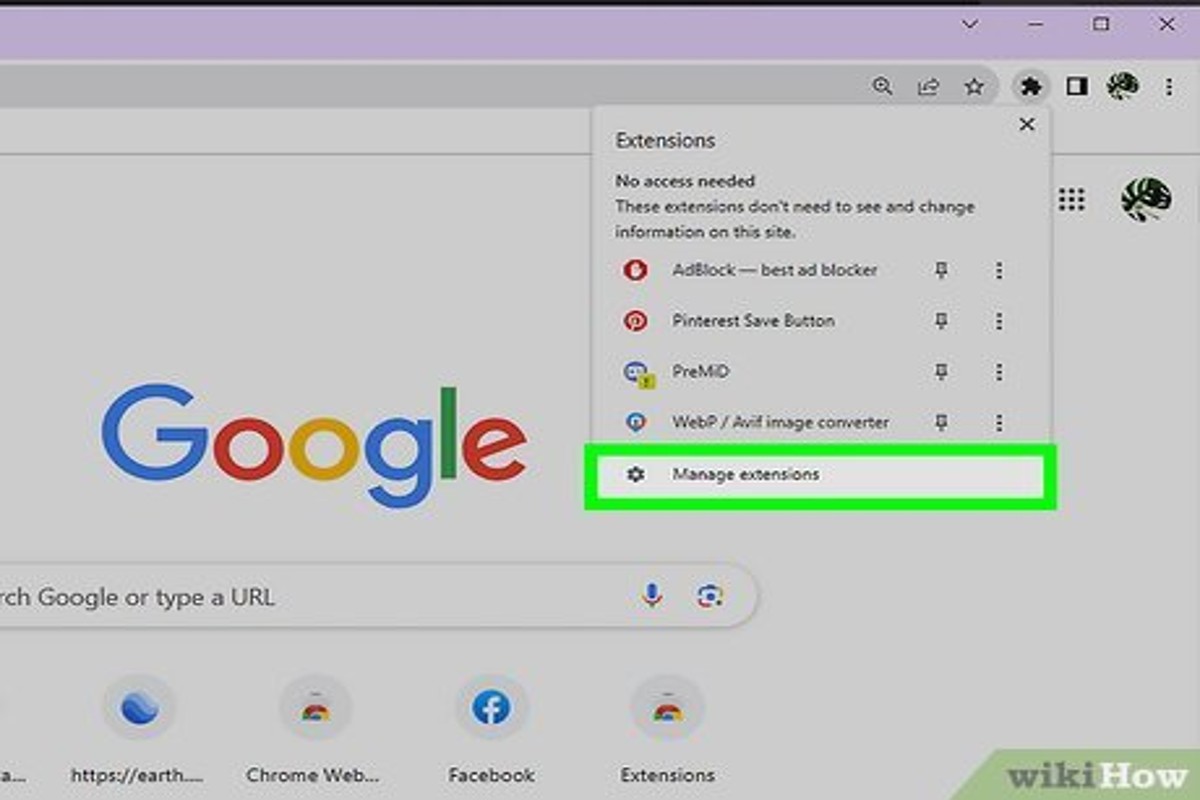
- Use Ad Blockers: Install reputable ad blocker extensions such as AdBlock or uBlock Origin. These extensions filter out ads on web pages, providing a cleaner browsing experience without ads.
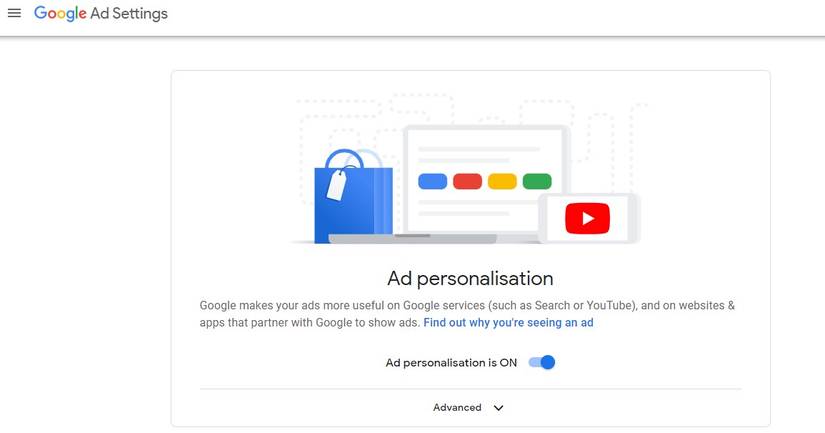
- Google Ads Settings: Visit the Google Ads Settings page to manage your ad preferences. Here, you can turn off ad personalization, which reduces the number of targeted ads displayed.
- Subscribe to Premium Services: Consider services like YouTube Premium or Google Play Music, which offer ad-free experiences. These subscriptions eliminate ads across their respective platforms.
- Use Alternative Search Engines: If ads on Google are particularly bothersome, explore alternative search engines like DuckDuckGo or Bing, which may have different advertising models.
Each method has its advantages and may suit different user needs. For instance, ad blockers are effective on most sites, but some websites may restrict access to users employing them. Similarly, adjusting browser settings may not eliminate all ads but can significantly reduce their impact.
For users concerned about privacy, it’s advisable to regularly review and update ad settings across platforms. This ensures ads remain relevant and minimizes unwanted tracking.
Expert Tip: Regularly clear your browser cache and cookies, as this can further enhance your ad-blocking efforts by removing stored data that may influence ad targeting.
Do ad blockers really work on Google?
Yes, ad blockers can effectively block many types of ads on Google. However, their effectiveness can vary based on the specific ad blocker used and the settings configured. Some ad blockers may struggle with certain ad formats or may not block all advertisements due to Google’s continuous updates and strategies.
Different ad blockers employ various methods to filter out ads. Some focus on blocking specific domains or URLs, while others use heuristic analysis to identify ad content. This leads to differences in effectiveness, especially as Google constantly evolves its ad delivery mechanisms. For instance, some ad blockers may successfully eliminate display ads but struggle with native ads integrated within content.
- AdBlock Plus: This popular ad blocker allows users to customize their settings and subscribe to various filter lists. While it effectively blocks many ads, some users report that it may allow “acceptable ads” by default unless disabled.
- uBlock Origin: Known for its lightweight performance and efficiency, uBlock Origin blocks a broader range of ads without compromising speed. Its extensive filter lists often make it more effective at blocking Google’s ads compared to others.
- Ghostery: Primarily a privacy tool, Ghostery blocks ads but also focuses on tracking scripts. While it can reduce ad visibility, its primary function is to enhance user privacy rather than solely focus on ad blocking.
Ultimately, the effectiveness of an ad blocker on Google ads can depend on user settings, the specific types of ads being served, and the ad blocker’s capability to adapt to changes in Google’s advertising strategies. Users may need to experiment with different blockers to find the most effective solution for their needs.
Expert Tip: Regularly update your ad blocker and adjust its settings to maximize effectiveness, as this can significantly improve the blocking of new ad formats introduced by Google.
Is it possible to remove ads from Google for free?
Yes, it is possible to remove ads from Google without incurring any costs. Users can leverage browser extensions and adjust settings to block or reduce ad visibility on their devices. These methods can effectively minimize the number of ads encountered during online searches.
Several free options exist for users looking to remove ads from Google. Browser extensions like AdBlock, uBlock Origin, and Privacy Badger offer robust ad-blocking capabilities. These extensions can be easily installed and configured, allowing users to tailor their ad-blocking preferences. Additionally, adjusting Google account settings can further limit personalized ads, although this may not eliminate all ad appearances.
- Browser Compatibility: Some extensions may work better on specific browsers, affecting overall performance.
- Ad Types: Different methods may target various types of ads, such as display ads or sponsored search results.
- User Behavior: How users interact with ads can influence the effectiveness of ad removal methods.
While free options are available, paid services like premium ad blockers or VPNs with ad-blocking features may offer enhanced protection and a more seamless experience. These solutions often include additional privacy features, which can justify their cost for users seeking comprehensive online protection.
For optimal results, regularly update browser extensions and review settings. This ensures that users benefit from the latest features and improvements in ad-blocking technology.
How long does it take to remove ads from Google after making changes?
The timeframe for removing ads from Google after making changes typically ranges from a few hours to several days. Factors such as the specific method used, the type of ads involved, and Google’s processing times can influence this duration.
When changes are made to ad settings through Google Ads, updates generally reflect within a few hours. However, if the adjustments are related to account suspensions or policy violations, it may take longer due to a review process. Google’s algorithms must assess the changes to ensure compliance with their advertising policies, which can extend the time needed for ads to disappear.
Another factor affecting the timing is the platform used for ad management. If alterations are made directly in Google Ads, updates are often quicker than changes made through third-party services or integrations. Additionally, if the ads are connected to a broader marketing strategy, such as retargeting or affiliate networks, the timeframe may vary as those systems must also recalibrate based on the changes made.
Expert Tip: Regularly monitor your Google Ads account and review any notifications or alerts. This proactive approach can help identify issues that may delay the removal of ads and allow for quicker resolution.
What are the best practices for minimizing ads on Google?
Minimizing ads on Google involves utilizing various strategies to reduce their visibility effectively. By employing certain tools and adjusting user settings, individuals can create a browsing environment with fewer interruptions from advertisements. Here are several best practices to consider.
- Use Ad Blockers: Install reputable ad-blocking browser extensions such as AdBlock Plus or uBlock Origin. These tools actively filter out ads on websites, providing a cleaner browsing experience.
- Adjust Google Ads Settings: Visit the Google Ads Settings page to customize ad personalization. Disable personalized ads to reduce the relevance of ads shown and potentially limit their frequency.
- Clear Browsing Data: Regularly clear cookies and cached data in your browser settings. This action can disrupt the tracking of previous ad interactions, which may lead to fewer targeted ads appearing.
- Opt-Out of Interest-Based Ads: Use the Digital Advertising Alliance’s opt-out tool to prevent companies from using your browsing habits to show you targeted ads. This can limit the number of personalized ads you encounter.
- Utilize Privacy-Focused Browsers: Consider using browsers like Brave or Firefox that prioritize user privacy and inherently limit ad tracking. These browsers often include built-in features to block unwanted ads.
Implementing these strategies not only reduces ad visibility but also enhances overall online privacy. Users should regularly review their settings and tools to ensure maximum effectiveness against unwanted advertisements. Additionally, staying informed about new ad technologies can help in adapting strategies as needed.
For optimal results, combine multiple approaches. For instance, using an ad blocker alongside privacy-focused browsing can significantly enhance your browsing experience while minimizing ad exposure.
Can I remove ads from Google on my mobile device?
Yes, you can remove ads from Google on your mobile device using various methods. These methods include adjusting settings within Google apps and utilizing ad-blocking software. Implementing these steps can significantly reduce or eliminate ads while using Google services.
- Adjust Google Account Settings: Open the Google app on your mobile device. Go to the settings menu and select “Ads.” Here, you can disable personalized ads, which may reduce the number of ads shown.
- Use Ad Blockers: Download a reputable ad blocker from your device’s app store. Popular options include AdGuard and Blockada. Once installed, follow the setup instructions to enable ad blocking across your mobile browser and apps.
- Modify Browser Settings: If you use a mobile browser like Chrome, access the settings menu. Navigate to “Site settings” and enable “Ads” to block intrusive ads. Alternatively, consider switching to a browser like Brave, which prioritizes ad blocking by default.
- Limit Ad Tracking: On your device, go to the settings menu, select “Privacy,” and choose “Advertising.” You can opt-out of personalized ads, which can help reduce the frequency of ads targeting you based on your online behavior.
- Clear Browsing Data: Regularly clear your browsing data, including cookies and cache. This can help reset ad targeting and may lead to fewer personalized ads appearing in your Google searches.
While these steps can effectively reduce ads on your mobile device, it is essential to remember that some ads may still appear due to the nature of the web and app ecosystems. Implementing multiple strategies can enhance your ad-free experience.
Expert Tip: Consider using a VPN with ad-blocking features. This can provide an additional layer of ad filtering and improve your overall online privacy while browsing.
What happens if I disable personalized ads on Google?
Disabling personalized ads on Google means that ads you see will not be tailored to your interests based on your browsing history. Instead, you will receive generic ads that may not be relevant to you. This change can significantly affect your overall browsing experience and the effectiveness of advertisements.
When personalized ads are disabled, Google will still show ads, but these will be based on contextual relevance rather than individual user data. For example, a user searching for “running shoes” may see ads for various shoe brands, but these ads will not be influenced by their previous searches or online behavior. This can result in a less engaging ad experience, as the content may not align with the user’s preferences.
- Less Relevant Advertising: Ads may become less relevant, leading to a lower likelihood of user engagement.
- Privacy Benefits: Users may feel more secure as their browsing data is not being tracked for ad personalization.
- Potentially Increased Ad Frequency: Without personalization, users might see the same ads more frequently, as the algorithm does not learn from their interactions.
Moreover, disabling personalized ads does not affect the overall number of ads displayed. Users will still encounter advertisements across various platforms, but these will lack the tailored approach that personalized ads provide. This could lead to frustration for users who prefer a more customized experience.
Expert Tip: Regularly reviewing and adjusting ad settings can enhance your browsing experience, allowing you to balance privacy with relevant advertising. Consider using ad-blocking extensions for a more ad-free experience if you find ads intrusive.
Are there any risks associated with using ad blockers?
Yes, there are several risks associated with using ad blockers, including potential privacy concerns and issues with website functionality. While ad blockers can enhance the browsing experience by removing unwanted ads, they can also lead to unintended consequences.
One significant risk is related to privacy. Some ad blockers collect data on browsing habits to improve their services or provide analytics to advertisers. For instance, a user may install an ad blocker to avoid intrusive ads but inadvertently allow the software to track their online behavior. This can lead to privacy violations, as users might not be fully aware of the extent of data collection taking place behind the scenes.
Additionally, ad blockers can disrupt the functionality of websites. Many sites rely on advertising revenue to operate, and blocking ads may prevent essential content from loading correctly. For example, a news website may use a paywall that requires users to view a certain number of ads before accessing articles. If an ad blocker is enabled, users could find themselves unable to access content, leading to frustration and potentially causing them to seek alternative sources for information.
Expert Tip: Consider whitelisting websites that provide valuable content or services to support their operations while still enjoying a reduced ad experience. This not only helps maintain website functionality but also fosters a more sustainable online ecosystem.
Understanding Google’s Ad Personalization Settings
This section delves into how Google’s ad personalization functions and the implications for user experience and privacy. By managing these settings, users can tailor their ad exposure effectively.
What is Ad Personalization?
Ad personalization refers to the practice of tailoring advertisements based on user behavior, preferences, and demographic information. Google collects data from users’ search history, location, and interactions across its services to create a profile that informs which ads are shown. This targeted approach aims to enhance user engagement by displaying ads that are more relevant to individual interests.
Accessing and Adjusting Ad Settings
- Sign in to your Google account.
- Navigate to the Google Account settings.
- Select Data & personalization from the left menu.
- Scroll to the Ad personalization section and click on it.
- Toggle the Ad Personalization switch to enable or disable personalized ads.
- For more control, click on Manage your ad settings to adjust interests and preferences.
Personalized vs. Non-Personalized Ads
Personalized ads utilize data to target users based on their interests, resulting in a more tailored advertising experience. In contrast, non-personalized ads do not rely on individual user data and instead display generic advertisements based on broader contextual factors. The choice between these two significantly impacts the relevance of ads seen by the user.
Privacy and Data Usage Implications
Ad personalization raises important privacy considerations. While personalized ads can enhance user experience, they require extensive data collection, potentially leading to concerns about how data is stored and used. Users who opt for non-personalized ads may experience less relevant advertisements but can benefit from reduced data tracking.
Common Misconceptions About Ad Personalization
One prevalent misconception is that disabling ad personalization completely eliminates ads. In reality, users will still see ads; they will just be less relevant. Additionally, many believe that personalized ads lead to increased data sharing with third parties; however, Google maintains strict controls on data usage and sharing, aligning with user privacy preferences.
Practical Application
To effectively manage ad personalization, follow these steps:
- Regularly review your ad settings in your Google Account to ensure they align with your preferences.
- Consider using browser extensions that block ads if you prefer a completely ad-free experience.
- Stay informed about your rights regarding data privacy and the implications of ad personalization.
By understanding and adjusting these settings, users can take charge of their online advertising experience and enhance their privacy. This knowledge is essential for anyone looking to control how to remove the ads from Google effectively.
Comparative Analysis of Popular Ad Blockers
This section analyzes various ad blockers available today, highlighting their features, benefits, and drawbacks to assist users in selecting the best option for their specific needs.

Overview of Popular Ad Blockers
- uBlock Origin: A lightweight, open-source ad blocker that offers extensive customization options and a low resource footprint.
- AdBlock Plus: A user-friendly blocker that allows non-intrusive ads by default, providing a balance between ad blocking and website support.
- Ghostery: Focuses on privacy by blocking trackers as well as ads, with a strong emphasis on user data protection.
- Brave Browser: A browser with built-in ad blocking features, prioritizing speed and privacy by default.
Pros and Cons of Each Ad Blocker
uBlock Origin
- Pros: Highly customizable, low CPU and memory usage, effective in blocking various types of ads.
- Cons: Initial setup can be complex for novice users, some advanced features require manual configuration.
AdBlock Plus
- Pros: Easy to install and use, supports whitelisting of sites, and has a large user community.
- Cons: Allows certain ads, which may not be preferred by all users; potential privacy concerns over data collection.
Ghostery
- Pros: Strong privacy features, blocks trackers effectively, and provides detailed analytics about blocked elements.
- Cons: Can slow down browsing on some websites, and may require user intervention for optimal performance.
Brave Browser
- Pros: Integrated ad blocking and privacy features, faster page load times, and rewards users for viewing ads.
- Cons: Limited extension support compared to traditional browsers, and some users may prefer a separate ad blocker.
User Reviews and Performance Metrics
Various studies and user reviews provide insight into the effectiveness of these ad blockers. For instance, uBlock Origin consistently ranks high in user satisfaction due to its efficiency in resource usage and ad-blocking capability. AdBlock Plus, while popular, has faced criticism for its policy on acceptable ads. Ghostery receives high marks for privacy but may deter users seeking a lightweight option. Brave excels in speed and privacy but may alienate those who prefer a more traditional browsing experience.
Recommendations for Specific Use Cases
- Mobile Users: Consider using Brave Browser or AdBlock Plus for a balance of performance and ease of use.
- Desktop Users: uBlock Origin is recommended for users seeking a customizable and resource-efficient solution.
- Privacy-Conscious Users: Ghostery is ideal for those prioritizing data protection alongside ad blocking.
Many articles fail to address the trade-offs between user experience and ad blocking effectiveness. For example, while some ad blockers may excel in blocking ads, they can also interfere with website functionality, leading to a frustrating user experience. It’s essential to select an ad blocker that not only meets ad-blocking needs but also preserves the integrity of user interactions on websites.
To apply this information, evaluate your browsing habits and select an ad blocker that aligns with your needs. For a lightweight option, install uBlock Origin. For privacy, choose Ghostery. If you prefer a comprehensive solution without additional installations, Brave Browser may be the best choice. Test the ad blockers and adjust settings to achieve optimal performance based on your preferences.
Real-World Applications: How Businesses Use Google Ads
This section examines the strategic use of Google Ads by businesses and the implications for user experience. Understanding the dynamics of ad revenue and user engagement is vital for evaluating the necessity of ad removal.

The Role of Google Ads in Business Marketing
Businesses leverage Google Ads to increase visibility and drive targeted traffic to their products and services. By using a pay-per-click (PPC) model, companies can reach potential customers through targeted keywords, ensuring that their ads appear in relevant search results. This approach allows for precise audience targeting based on demographics, interests, and online behavior.
Balancing Ad Revenue and User Experience
While Google Ads generate substantial revenue for businesses, they can also detract from user experience. Excessive or poorly targeted ads may frustrate users, leading to diminished engagement with the platform. Companies must find a balance between maximizing ad revenue and maintaining a positive interaction with their audience. A well-structured ad campaign can enhance user experience by providing relevant offers and information, while poorly executed campaigns can result in user fatigue.
Examples of Successful Ad Campaigns
- Airbnb: Implemented location-based ads that increased bookings by 30% in targeted markets.
- Amazon: Utilized Google Ads to promote seasonal sales, resulting in a 25% increase in traffic during holiday seasons.
- Dollar Shave Club: Their viral video ads on Google Ads increased subscriptions by 50% within the first month of launch.
These campaigns illustrate the potential impact of well-crafted Google Ads on business growth and market penetration.
Supporting Content Creators
Many users express a desire to remove ads from Google to improve their browsing experience. However, it is essential to recognize that ad revenue supports content creators and platforms alike. By disabling ads, users may inadvertently reduce the financial viability of their favorite websites and creators. A balanced approach could involve selectively engaging with ads that align with personal interests while supporting creators through other means, such as subscriptions or donations.
Nuances in Ad Experiences
Common misconceptions about Google Ads include the belief that all ads are intrusive or irrelevant. In reality, well-targeted ads can enhance the user experience by presenting products or services that align with user preferences. Additionally, the effectiveness of ads varies by industry; some sectors, like e-commerce, see higher conversion rates than others. Understanding these nuances helps users make informed decisions about ad interactions and removal.
Practical Application
To navigate the complexities of Google Ads while optimizing your online experience, consider the following actions:
- Assess the relevance of ads displayed to you; engage with those that interest you.
- Utilize ad-blocking tools selectively to minimize disruption without compromising content support.
- Explore subscription models for preferred content creators to support them directly.
This approach enables users to maintain a positive online experience while recognizing the role of ads in the digital ecosystem. Understanding how to remove the ads from Google can empower users to make informed decisions about their online interactions.
Common Mistakes When Trying to Remove Google Ads
This section identifies common pitfalls users encounter when attempting to block ads on Google and offers insights on how to avoid them. Addressing these mistakes can enhance your ad-blocking effectiveness and improve your browsing experience.

Misunderstandings About How Ad Blockers Work
Many users assume that ad blockers eliminate all ads uniformly. However, ad blockers utilize filters to identify and remove specific ad content. Some ads may slip through due to limitations in the filter lists. Understanding that not all ad blockers function the same way is critical. Users should research various ad blockers to find one that aligns with their needs and expectations.
Neglecting to Update Browser Settings or Ad Blocker Software
Outdated software can lead to ineffective ad blocking. Ad blocker developers regularly update their software to counteract changes made by advertising networks. Users often forget to enable automatic updates or manually check for updates, resulting in persistent ads. Regularly updating both the browser and the ad blocker ensures optimal performance and maximum ad removal.
Assuming All Ads Can Be Blocked Without Consequences
Users frequently overlook that blocking all ads may impact website functionality. Some websites rely on ad revenue to provide free content. If ad blockers are overly aggressive, they may inadvertently block essential site elements, leading to a degraded user experience. It is advisable to whitelist specific websites that offer valuable content in exchange for ad exposure.
Failing to Consider Alternative Revenue Models for Websites
Many users mistakenly believe that removing ads is a victimless act. In reality, ad revenue supports numerous online platforms. Ignoring this aspect can lead to the decline of quality content available online. Users should consider supporting their favorite websites through alternative means, such as subscriptions or donations, to ensure they can continue providing free services.
Nuanced Considerations in Ad Blocking
While ad blockers are effective, they are not infallible. Users often underestimate the complexity of digital advertising. Some ads are integrated seamlessly into web content, making them difficult to block without affecting user experience. Additionally, advanced tracking technologies can circumvent traditional ad blockers. Users should stay informed about the latest developments in digital advertising and adjust their ad-blocking strategies accordingly.
Practical Application: Steps to Enhance Ad Blocking
- Research and select an effective ad blocker that meets your needs.
- Regularly update your browser and ad blocker software to maintain effectiveness.
- Whitelist websites you value to support their content while still blocking intrusive ads.
- Consider alternative ways to support websites you frequently visit.
- Stay informed about changes in digital advertising technologies to adapt your strategies.
Frequently Asked Questions
What are the different ways to remove ads from Google?
Ads can be removed from Google by using ad blockers, adjusting ad settings in your Google account, or opting for premium services that eliminate ads. Each method varies in effectiveness and user experience.
Do ad blockers really work on Google?
Yes, ad blockers can effectively prevent ads from displaying on Google and other websites. However, their effectiveness may vary based on the specific ad blocker used and the browser settings.
Is it possible to remove ads from Google for free?
Yes, using free ad blockers or adjusting your ad preferences in your Google account can help eliminate ads without any cost. These methods provide a straightforward way to reduce ad visibility.
How long does it take to remove ads from Google after making changes?
Changes to ad settings or the implementation of ad blockers typically take effect immediately. However, some adjustments may require a brief period to fully reflect across all platforms.
What are the best practices for minimizing ads on Google?
To minimize ads on Google, regularly update ad preferences, use reputable ad blockers, and consider subscribing to ad-free services. Additionally, clearing browser cookies can help reset ad targeting.
Can I remove ads from Google on my mobile device?
Yes, ads can be removed from Google on mobile devices by using ad blocker apps or adjusting settings in the Google app. Mobile browsers also support ad-blocking extensions for enhanced ad control.
What happens if I disable personalized ads on Google?
Disabling personalized ads means Google will show generic ads not tailored to your interests. This change may result in less relevant advertising but does not eliminate ads entirely.
Are there any risks associated with using ad blockers?
Using ad blockers can lead to potential risks, such as decreased website functionality and the possibility of encountering malicious ad-blocking software. Additionally, some websites may restrict access to content for users with ad blockers enabled.
Final Thoughts on how to remove the ads from google
Removing ads from Google is not only feasible but can also enhance your browsing experience significantly. By leveraging Google’s Ad Personalization settings and utilizing effective ad blockers, users can take control of their online environment, reducing distractions and improving focus.
To achieve immediate results, adjust your Ad Personalization settings in your Google account and explore reputable ad blockers that suit your browsing habits; this dual approach will significantly reduce the ads you encounter.
Understanding how to remove ads from Google is essential in a digital landscape where attention is currency, allowing users to reclaim their online experience and prioritize what truly matters.
Leave a Reply