
How to ID verification for Google Ads involves a straightforward process where users log into their Google Ads account, navigate to the ‘Verification’ section, and follow the prompts to submit the required documents and information.
ID verification is crucial for advertisers using Google Ads, as it ensures compliance with platform policies and helps prevent fraudulent activity. Missing key details or failing to complete the verification process can lead to account suspension or limited ad visibility, impacting marketing strategies.
This guide will detail the step-by-step process for ID verification, the necessary documents required, and tips for a smooth verification experience to ensure compliance with Google Ads policies.
What is ID verification in Google Ads?
ID verification in Google Ads is a process that ensures advertisers are legitimate and comply with Google’s advertising policies. This verification helps maintain the integrity of the platform by preventing fraudulent activities and promoting transparency. Advertisers may be required to submit identification documents and additional information to confirm their identity.
The primary purpose of ID verification is to safeguard users from misleading advertisements and to uphold the quality of ads displayed across Google’s networks. Google employs various methods for verification, which may include document submission, phone verification, or even video verification, depending on the advertiser’s location and the nature of the business. The process can vary in complexity based on the specific requirements set forth by Google for different regions and industry types.
- Document Submission: Advertisers may need to provide government-issued identification, business licenses, or other official documents to prove their identity.
- Phone Verification: A phone call or SMS may be used to validate the advertiser’s contact information.
- Video Verification: Some advertisers might be required to participate in a video call to further confirm their identity.
Successful completion of ID verification is crucial for advertisers, as failure to comply can lead to account suspension or restrictions on ad campaigns. Regular updates and re-verification may also be required, especially if there are significant changes in the advertiser’s business structure or contact information.
Expert Tip: Ensure that all submitted documents are clear and legible, as poor-quality uploads can lead to delays in the verification process. Keeping your business information up to date is essential for smooth operation within Google Ads.
How do I complete ID verification for Google Ads?
To complete ID verification for Google Ads, follow a straightforward process involving document submission and account verification. This ensures compliance with advertising policies and local regulations. The verification process typically takes a few days, depending on the submitted documents.
Start by logging into your Google Ads account. Navigate to the “Settings” section and select “Account Settings.” Look for the “ID Verification” option, which may be highlighted if required. Follow the on-screen instructions to submit your identification documents, such as a government-issued ID or business registration documents. Ensure all documents are clear and legible to avoid delays.
- Access your Google Ads account: Log into your account at ads.google.com using your credentials.
- Navigate to ID Verification: Click on the “Tools & Settings” icon, then select “Setup” and find the “ID Verification” option.
- Choose your verification method: You will have options such as uploading a photo of your ID, providing business documents, or verifying your phone number.
- Submit required documents: Upload the necessary documents as prompted. Ensure they are recent and of high quality.
- Review and confirm: Double-check all submissions for accuracy and completeness, then submit your application.
- Wait for confirmation: Google will review your submission and notify you via email about the status of your verification.
Keep in mind that verification requirements may vary based on your location and account type. Some accounts may require additional documentation or steps. Always refer to the Google Ads Help Center for the most up-to-date information regarding ID verification processes.
Expert Tip: Regularly check your account notifications for any alerts regarding your verification status. Promptly addressing any issues can expedite the verification process.
What documents are needed for Google Ads ID verification?
To complete ID verification for Google Ads, users must provide specific documents that verify their identity and business information. Acceptable documents include a government-issued photo ID, utility bills, bank statements, and business registration documents. Each document must be current and clearly display the relevant details.
The primary document required is a government-issued photo ID, such as a passport or driver’s license. This document must clearly show the name and photograph of the individual associated with the Google Ads account. In addition to the ID, users may be asked to submit proof of address, which can be fulfilled by providing a recent utility bill or bank statement that includes the account holder’s name and address.
For businesses, registration documents may be required to validate the legitimacy of the organization. This can include articles of incorporation or a business license. Depending on the country or region, Google may specify additional requirements, so it is essential to review the guidelines applicable to your location before submitting documents.
Expert Tip: Ensure that all documents are scanned in high resolution and that all text is legible. This reduces the likelihood of delays in the verification process.
How long does Google Ads ID verification take?
The ID verification process for Google Ads typically takes between 1 to 5 business days. However, this timeframe can vary based on several factors, including the accuracy of submitted information and the volume of requests being handled by Google.
Several elements can influence the duration of the verification process. First, if the submitted identification documents are clear and meet Google’s requirements, the verification is likely to proceed more quickly. Conversely, if there are discrepancies or if additional documentation is needed, this can extend the verification time significantly. Furthermore, during peak periods, such as major advertising campaigns or changes in policy, processing times may be longer due to increased demand.
After submitting your ID for verification, it is advisable to monitor your email for updates from Google. If you do not receive a confirmation or any requests for additional information within the expected timeframe, following up with Google Ads support may expedite the process. Keeping your account information, including payment details and contact information, up to date can also help streamline future verifications.
Expert Tip: To minimize delays, ensure that the identification documents are high quality and clearly legible. This not only speeds up the review process but also reduces the likelihood of needing to resubmit documents.
What are the common mistakes in Google Ads ID verification?
Common mistakes during Google Ads ID verification can lead to delays or rejections. Advertisers often overlook key requirements, misinterpret guidelines, or fail to provide sufficient documentation. Understanding these pitfalls can streamline the verification process and ensure compliance.
One frequent error is submitting incomplete or inaccurate identification documents. It’s essential to provide clear, high-quality images of valid IDs, such as a passport or driver’s license. Ensure that all four corners of the ID are visible and that the details are legible. Additionally, verify that the name on the ID matches the account holder’s name exactly to avoid discrepancies.
- Neglecting Regional Requirements: Different countries have specific verification requirements. Advertisers should familiarize themselves with local regulations and ensure compliance with the documentation needed for their region.
- Ignoring Verification Emails: Once an ID is submitted, Google may send emails requesting additional information or clarifications. Promptly responding to these requests can prevent delays in the verification process.
- Submitting Multiple Requests: Sending multiple ID verification requests can confuse the review process. It is advisable to wait for the initial submission’s outcome before attempting another verification.
- Not Reviewing Google Policies: Regularly reviewing Google Ads policies regarding ID verification is crucial. Changes to guidelines may occur, and staying informed can prevent non-compliance.
Incorporating these best practices can enhance the likelihood of successful ID verification. Advertisers should consider creating a checklist of required documents and steps to ensure thorough preparation before submission.
Expert insight: Maintaining organized records of submitted documents and communications with Google can facilitate quicker resolutions if issues arise during the verification process.
Is ID verification mandatory for all Google Ads accounts?
ID verification is not mandatory for all Google Ads accounts. While it is required for certain types of advertisers, many accounts can operate without it. The necessity for ID verification varies based on specific criteria set by Google, including the nature of the business and geographical location.
Google implements ID verification to ensure compliance with local laws and regulations, as well as to enhance the security of its advertising platform. Typically, businesses in high-risk industries, such as financial services or pharmaceuticals, are more likely to require verification. Additionally, newly created accounts or those that exhibit unusual activity may trigger a verification request. On the other hand, established accounts with a history of compliance may not need to undergo this process.
- Mandatory ID Verification: Required for high-risk industries, new accounts, or accounts flagged for unusual activity.
- Non-Mandatory ID Verification: Established accounts with a clean history, businesses in low-risk sectors, and accounts not exhibiting suspicious behavior.
- Geographical Factors: Requirements may vary by country or region, with some jurisdictions imposing stricter regulations than others.
Practical implications include the potential delays in ad campaign launches for accounts requiring verification. Advertisers should be proactive in understanding whether their account will need verification based on the outlined criteria. This can facilitate smoother onboarding and compliance with Google’s policies.
Expert Tip: Regularly monitor Google Ads communications for any changes in account status or verification requirements, as these can affect campaign performance and compliance.
How does ID verification affect my Google Ads performance?
ID verification can significantly impact Google Ads performance by ensuring that only legitimate advertisers can run campaigns. This process helps maintain the integrity of the advertising ecosystem, which can enhance trust among users and improve overall ad quality. As a result, verified accounts may experience improved ad visibility and better engagement rates.
The primary implication of ID verification is the reduction of fraudulent activity and the promotion of transparency within ad campaigns. When advertisers are verified, it builds credibility, which can lead to higher conversion rates. Additionally, verified accounts are less likely to face account suspensions or disapprovals, ensuring that campaigns run smoothly without unnecessary disruptions.
- Complete the verification process promptly: Ensure all required documents are submitted as soon as possible to avoid delays in campaign launch.
- Maintain accurate information: Keep your business details up-to-date and ensure that the information matches official records to prevent verification issues.
- Monitor your account status: Regularly check the verification status within your Google Ads account to address any outstanding issues quickly.
- Leverage verified status in marketing: Use your verified status in promotional materials to enhance credibility and attract more customers.
Implementing these best practices can help ensure a smoother ad campaign experience and maintain the integrity of your Google Ads account. As a key takeaway, maintaining a verified account not only protects your campaigns from potential disruptions but also enhances consumer trust, which is essential for long-term success in digital advertising.
Understanding the Importance of ID Verification in Google Ads
ID verification in Google Ads serves as a fundamental process that bolsters the integrity of advertising campaigns. This section delves into the reasons why completing ID verification is essential for advertisers and outlines the potential repercussions of neglecting this critical step.
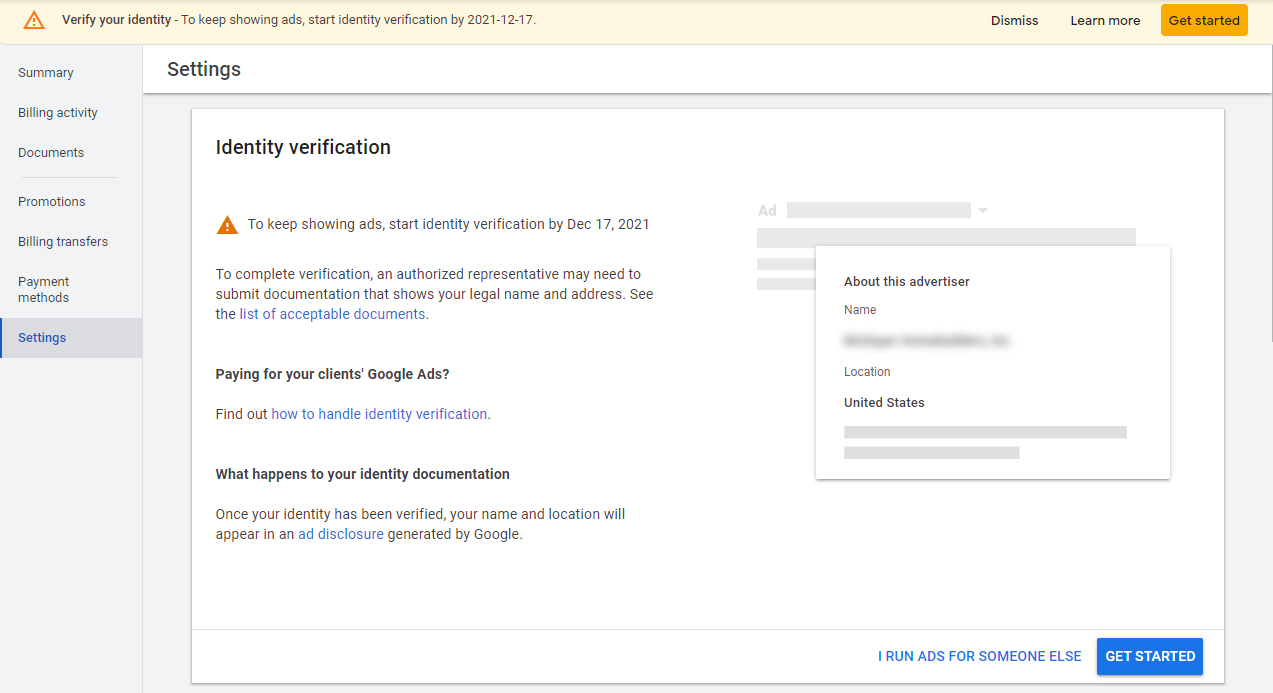
Enhancing Account Security and Trustworthiness
ID verification plays a pivotal role in enhancing the security of advertising accounts. By authenticating the identity of advertisers, Google ensures that only legitimate entities can create and manage ads. This process builds trust with users and partners, fostering a safer advertising ecosystem.
Preventing Fraudulent Activities and Ad Misrepresentation
Fraudulent activities, such as click fraud and ad misrepresentation, pose significant risks to advertisers and the overall platform. ID verification acts as a deterrent against these threats by verifying the identity of those behind the ads. A verified account is less likely to engage in deceptive practices, ensuring that users receive genuine content.
Ensuring Compliance with Advertising Policies
Google has established stringent advertising policies that all advertisers must adhere to. Completing ID verification is a step toward compliance with these policies. Failure to verify identity may result in account suspension or disapproval of ads, which can severely impact an advertiser’s visibility and reach.
Improving Overall Ad Performance and Accountability
Verified advertisers often experience improved ad performance metrics. Since ID verification fosters a trustworthy environment, users are more likely to engage with ads from verified sources. This leads to higher click-through rates and better conversion rates, ultimately enhancing the return on investment for advertising campaigns.
Nuances of ID Verification
Common misconceptions about ID verification include the belief that it is a one-time process. In reality, Google may require ongoing verification, especially if suspicious activity is detected. Additionally, some advertisers may assume that verification is solely for large businesses; however, all advertisers, regardless of size, benefit from this process. Understanding these nuances ensures that advertisers do not overlook essential compliance aspects.
Practical Application of ID Verification Insights
To leverage the benefits of ID verification, advertisers should take the following steps:
- Gather necessary identification documents, such as government-issued IDs and business licenses.
- Access the Google Ads account settings to initiate the verification process.
- Follow the prompts to submit the required documentation.
- Monitor the account for verification status updates and respond promptly to any requests for additional information.
By understanding the importance of ID verification in Google Ads, advertisers can enhance their account security, prevent fraudulent activities, and ensure compliance with Google’s advertising policies, ultimately leading to improved ad performance.
Step-by-Step Guide to Google Ads ID Verification
This section provides a detailed walkthrough of the ID verification process for Google Ads, outlining each necessary step and offering insights to enhance the experience. Completing this verification is essential for compliance and maintaining ad account integrity.
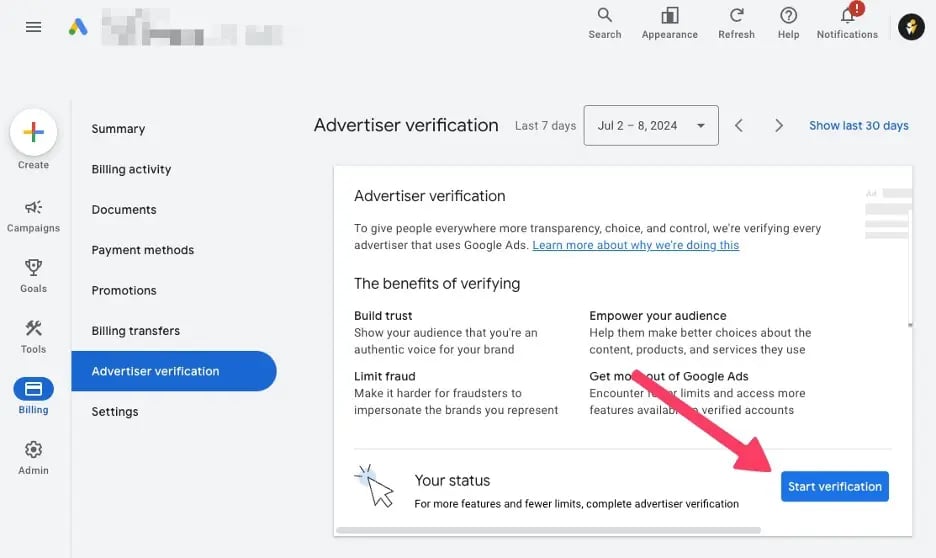
Accessing the Verification Section in the Google Ads Dashboard
To begin the ID verification process, log into your Google Ads account. Navigate to the ‘Tools & Settings’ menu located in the upper right corner of the dashboard. Under the ‘Setup’ column, select ‘Account Access’. Here, you will find the option for ‘ID Verification’. Click on this link to enter the verification section.
Submitting Required Documents and Information
Once in the ID Verification section, you will need to provide specific documentation. The required items typically include:
- A government-issued photo ID (e.g., passport, driver’s license).
- Proof of residence (e.g., utility bill, bank statement).
- Your business registration documents if applicable.
Ensure that all documents are clear and legible. Upload these documents directly through the platform. Depending on your account type and location, additional documentation may be requested.
Understanding the Review Process and Potential Follow-Ups
After submission, Google’s verification team will review the provided documents. This process typically takes between a few days to a couple of weeks. You will receive a notification via email regarding the status of your verification. In some cases, additional documentation or clarification may be required, leading to follow-up requests.
Tips for Ensuring a Smooth Verification Experience
- Double-check that your documents are current and have not expired.
- Ensure that the name on your ID matches the name associated with your Google Ads account.
- Keep your contact information up to date to avoid potential delays in communication.
Following these tips can significantly reduce the likelihood of verification issues and streamline the process.
Many users incorrectly assume that the ID verification process is only a one-time requirement. In reality, Google may request re-verification periodically, especially if there are significant changes to your account or business operations. Thus, maintaining accurate and consistent documentation is vital.
To effectively navigate the ID verification process for Google Ads, follow these actionable steps:
1. Access the verification section and familiarize yourself with the requirements.
2. Gather all necessary documents and ensure they are accurate and up to date.
3. Submit your documents through the Google Ads dashboard and monitor your email for updates.
4. Be prepared for possible follow-ups and respond promptly to any requests for additional information.
Common Pitfalls and How to Avoid Them During ID Verification
This section outlines frequent mistakes advertisers encounter during the ID verification process for Google Ads and provides effective strategies to circumvent these issues. Addressing these pitfalls ensures a smoother verification experience and compliance with Google’s requirements.

Submitting Incorrect or Outdated Documents
One of the most prevalent mistakes is submitting documents that are either incorrect or outdated. Google requires specific forms of identification, such as government-issued IDs, utility bills, or bank statements. If the documents do not match the criteria set by Google or are expired, verification will fail.
- Always check the expiration date of your documents.
- Ensure the name and address on the documents match the information in your Google Ads account.
- Use high-quality scans or photographs to prevent issues with legibility.
Ignoring Email Notifications from Google
Failure to monitor email notifications can lead to missed deadlines or additional requests for information. Google sends important updates regarding the verification status and any required actions. Ignoring these emails can delay the verification process significantly.
- Check your email regularly, including spam and promotions folders.
- Set up notifications to alert you of any messages from Google.
- Respond promptly to any requests for additional information.
Failing to Provide Complete Information
Incomplete information on the verification application can lead to automatic rejections. Advertisers must ensure that all required fields are filled out accurately. Missing details like phone numbers, addresses, or tax IDs can complicate the process.
- Double-check all entries for accuracy before submission.
- Refer to Google’s documentation for a clear understanding of required information.
- Consider using a checklist to ensure completeness.
Not Understanding the Verification Requirements for Different Regions
Verification requirements can vary significantly by region. Advertisers often overlook specific regulations or documentation standards applicable to their location, which can lead to complications during the ID verification process.
- Research the specific requirements based on your country or region.
- Stay updated with any changes in regional policies that might affect verification.
- Consult Google Ads support for clarification on regional differences.
Many advertisers assume that the ID verification process is uniform across the board, but this is a misconception. Different regions may have unique regulations, and failing to recognize these can result in unnecessary delays. For example, some countries may require additional forms of identification or specific formats for documentation that others do not. Understanding these nuances is crucial for successful verification.
To effectively utilize this information, advertisers should develop a systematic approach to ID verification. Begin by compiling all necessary documents well in advance, ensuring they are current and meet Google’s criteria. Create a monitoring system for email notifications and allocate time to review your submission for completeness. Lastly, familiarize yourself with the specific requirements pertinent to your region, and proactively reach out to Google Ads support for any uncertainties. This proactive strategy will streamline the ID verification process and enhance compliance with Google Ads standards.
Real-World Examples of Successful ID Verification in Google Ads
This section examines real-world cases of businesses effectively managing the ID verification process in Google Ads. These examples illustrate the diverse challenges and solutions encountered by both small and large enterprises.

Case Study: Small Business Success
A local coffee shop, Brewed Awakening, faced challenges in establishing its Google Ads account due to ID verification requirements. Initially, the owner submitted the necessary documents, including a business license and tax ID. However, the first verification attempt was unsuccessful due to minor discrepancies in the documentation. The owner promptly contacted Google Ads support for guidance, which provided clarity on the specific issues. After correcting the documentation, Brewed Awakening received approval within three days. This experience highlighted the importance of ensuring that all submitted documents are accurate and consistent.
Insights from a Large Corporation
Tech Giant Innovations, a multinational corporation, underwent the ID verification process to launch a targeted ad campaign. The company provided a comprehensive set of documents, including corporate registration papers and a bank statement. Despite the thoroughness, the verification took longer than expected, primarily due to the scale of the corporation and the complexity of its international operations. After several weeks, the account was finally verified. This situation emphasized the need for large companies to prepare for potential delays and maintain constant communication with Google Ads representatives.
Lessons from Failed Verification Attempts
Several businesses have faced challenges during the verification process, leading to failed attempts. Common reasons for these failures include:
- Inaccurate or outdated business information.
- Insufficient documentation, such as missing proof of address.
- Inconsistent data across different platforms (e.g., website vs. registration documents).
These failures serve as a reminder that attention to detail is paramount. Businesses that invest time in double-checking their documentation and ensuring consistency across all platforms are more likely to succeed in verification.
Best Practices Derived from Real-World Scenarios
Based on successful and unsuccessful verification experiences, several best practices have emerged:
- Gather comprehensive documentation, including business licenses and tax IDs.
- Ensure all submitted documents are current and match the information provided on your Google Ads account.
- Maintain open lines of communication with Google Ads support to clarify any issues.
- Be prepared for potential delays, especially for larger businesses with complex structures.
Implementing these practices can streamline the ID verification process and minimize disruptions to advertising efforts.
In the realm of ID verification, edge cases often arise. For instance, businesses operating in multiple countries may face unique verification requirements based on local regulations. Additionally, common misconceptions include the belief that a single document submission suffices for verification. In reality, multiple documents may be needed to establish legitimacy, particularly for international businesses. Experts recommend consulting Google Ads guidelines specific to your region to prevent unnecessary setbacks.
To effectively apply these insights, businesses should begin by auditing their current documentation processes. Ensure that all critical documents are accurate, up-to-date, and readily available. Establish a checklist to facilitate thorough preparation before submitting verification requests. Finally, consider preemptive communication with Google Ads support to clarify any uncertainties regarding documentation requirements.
Frequently Asked Questions
What is ID verification in Google Ads?
ID verification in Google Ads is a process to confirm the identity of advertisers. This ensures compliance with policies and helps maintain a safe advertising environment.
How do I complete ID verification for Google Ads?
To complete ID verification, log into your Google Ads account and follow the prompts to submit your identification documents. Google will review your submission and notify you of the outcome.
What documents are needed for Google Ads ID verification?
Required documents typically include a government-issued photo ID and proof of address, such as a utility bill or bank statement. Ensure that all documents are clear and legible for successful verification.
How long does Google Ads ID verification take?
The ID verification process can take anywhere from a few hours to several days, depending on the volume of requests. Google will notify you via email once your verification is complete.
What are the common mistakes in Google Ads ID verification?
Common mistakes include submitting unclear or outdated documents and failing to provide all required information. Double-check that your documents meet Google’s guidelines to avoid delays.
Is ID verification mandatory for all Google Ads accounts?
ID verification is not mandatory for all Google Ads accounts but is required for advertisers in certain regions or industries. Check Google’s policies to determine if your account needs verification.
How does ID verification affect my Google Ads performance?
ID verification can impact your Google Ads performance by ensuring compliance with advertising policies, which may enhance your account’s credibility. A verified account can also lead to improved ad visibility and trust among users.
Final Thoughts on how to id verification google ads
Effective ID verification is not merely a regulatory requirement; it is a critical component of maintaining trust and integrity within the Google Ads ecosystem. Completing the verification process accurately and efficiently not only enhances your advertising credibility but also ensures compliance with Google’s stringent policies, ultimately safeguarding your advertising investment.
To begin the ID verification process, gather the necessary documents and initiate your verification through your Google Ads account immediately to avoid potential delays that could impact your campaigns.
Mastering ID verification for Google Ads is essential for advertisers aiming to leverage the platform’s full capabilities and engage with their target audience confidently.
Leave a Reply