
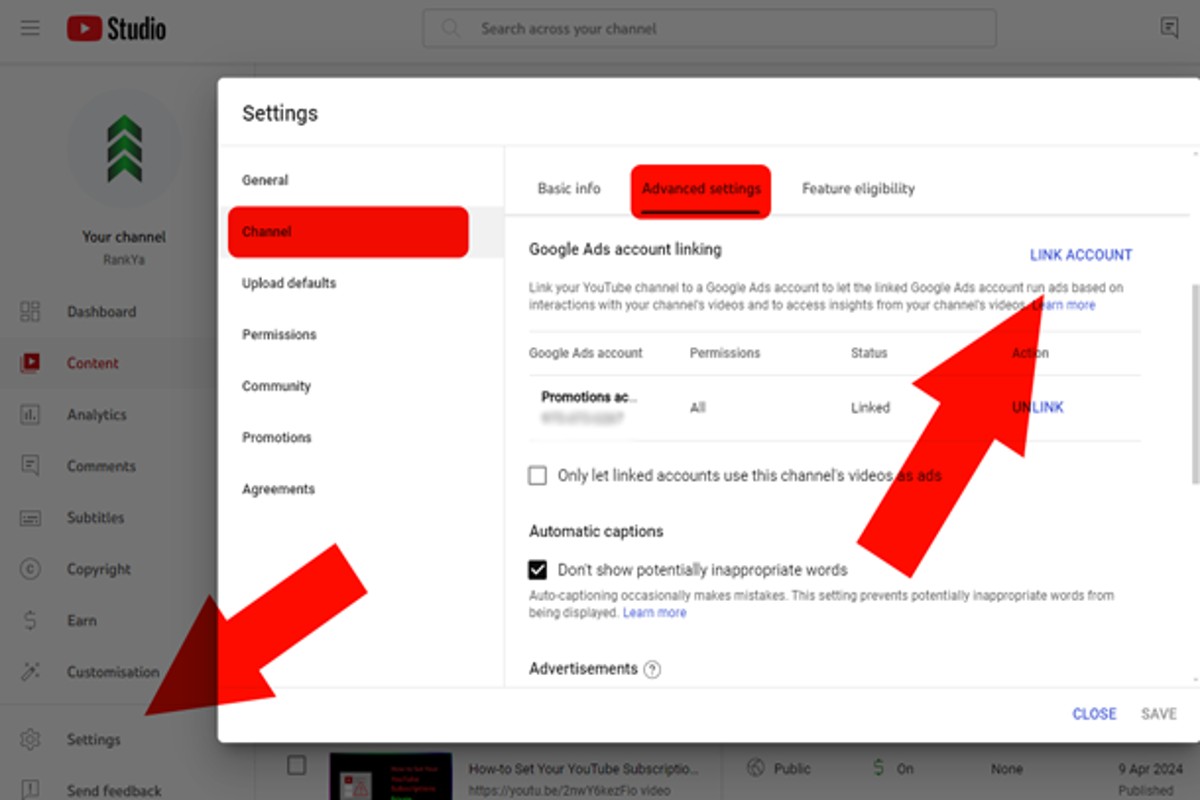
To connect Google Ads to YouTube, sign in to your Google Ads account, navigate to the ‘Tools and Settings’ section, select ‘Linked accounts’, and follow the prompts to link your YouTube channel.
Connecting Google Ads to YouTube is crucial for businesses aiming to leverage video marketing effectively. It enables advertisers to reach a broader audience, optimize ad campaigns, and track performance metrics. Failing to establish this connection can lead to missed opportunities and ineffective marketing strategies.
This guide will detail the step-by-step process for linking Google Ads to YouTube, discuss the benefits of integration, and provide best practices for managing your campaigns effectively.
What are the benefits of connecting Google Ads to YouTube?
Connecting Google Ads to YouTube offers significant advantages for marketers, primarily enhancing the reach and effectiveness of advertising campaigns. This integration allows advertisers to leverage the vast user base of YouTube while utilizing sophisticated targeting options available through Google Ads. By combining these platforms, businesses can create more engaging and impactful video ad experiences.
One of the key benefits is the ability to utilize advanced targeting options. Advertisers can target specific demographics, interests, and behaviors, ensuring that ads reach the most relevant audiences. This precision helps in maximizing return on investment (ROI) as campaigns can be tailored to attract users who are more likely to convert. Additionally, the performance metrics provided by Google Ads allow for real-time adjustments, optimizing campaigns for better results.
Another advantage is the seamless integration of various ad formats. Advertisers can choose from multiple formats such as skippable ads, non-skippable ads, bumper ads, and overlay ads, allowing for versatile marketing strategies that can fit different objectives. This flexibility enables brands to engage viewers in different ways, whether through short, impactful messages or longer storytelling formats. Furthermore, by using Google Ads, advertisers can track engagement metrics like views, clicks, and conversions, providing insights that can drive future campaign strategies.
Enhanced Brand Awareness
Connecting Google Ads to YouTube also significantly boosts brand awareness. Video content is inherently more engaging than static ads, and YouTube’s extensive reach allows brands to showcase their products or services to a wider audience. This increased visibility can lead to higher brand recall and affinity, ultimately influencing consumer behavior and driving sales.
For marketers looking to maximize their impact, it is essential to create tailored video content that resonates with the target audience. Utilizing storytelling techniques and strong calls to action can further enhance engagement and conversion rates.
Incorporating video into marketing strategies through Google Ads and YouTube can yield substantial benefits. Brands that focus on creating high-quality, relevant content while leveraging data-driven insights will likely see improved campaign performance and customer engagement.
How do I link my YouTube channel to Google Ads?
Linking your YouTube channel to Google Ads allows you to run video campaigns and access advanced analytics. Follow these steps to successfully link the two accounts.
- Sign in to Google Ads: Navigate to the Google Ads website and log in with your account credentials.
- Access Tools and Settings: In the upper right corner, click on the wrench icon labeled “Tools and Settings.”
- Select Linked Accounts: Under the “Setup” column, choose “Linked accounts” to view various linking options.
- Find YouTube: Scroll down to locate the YouTube section and click on “Details.”
- Add Your YouTube Channel: Click on the blue plus (+) button to add your YouTube channel. You can search for your channel by name or paste the URL directly.
- Choose Link Type: Select the type of link you want—either “Link” for standard access or “Promote” to run ads directly from your account.
- Confirm the Link: Review your selections and click “Continue.” You may need to verify your account through a confirmation email.
- Finish Linking: Once verified, your YouTube channel will be linked to Google Ads, allowing you to start creating campaigns.
Ensure that you have administrative access to the YouTube channel you wish to link. If you encounter any issues, double-check that your Google Ads account and YouTube channel are both set to the same Google account.
Expert Tip: Regularly review your linked accounts to ensure they are up-to-date, especially if you manage multiple channels or Google Ads accounts. This practice helps maintain campaign effectiveness and data accuracy.
Can I run ads on YouTube without Google Ads?
No, you cannot run ads on YouTube without using Google Ads. YouTube advertising is exclusively managed through the Google Ads platform, which provides the necessary tools to create, manage, and optimize ad campaigns. While there are alternative promotional methods on YouTube, they do not function as traditional ads.
When considering advertising on YouTube, it is essential to understand the differences between using Google Ads and other promotional strategies. Google Ads offers various ad formats, targeting options, and analytics capabilities specifically designed for video content. In contrast, other platforms, such as social media or influencer marketing, may allow for promotional content but lack the direct advertising capabilities provided by Google Ads.
- Google Ads: Provides comprehensive tools for targeting, budgeting, and analytics specifically for YouTube ads. Advertisers can choose from various formats, including skippable and non-skippable ads, bumper ads, and overlay ads.
- Social Media Platforms: While platforms like Facebook and Instagram allow for video promotions, they do not integrate directly with YouTube for ad placements. Advertisers can promote content but do not gain the same visibility or targeting specific to YouTube audiences.
- Influencer Marketing: Collaborating with YouTube influencers can effectively reach audiences but does not equate to running ads. This method relies on partnerships and may not provide measurable results similar to Google Ads.
While it is possible to promote content on YouTube through alternative methods, these strategies do not replace the functionality and effectiveness of ads run through Google Ads. For businesses aiming to maximize their reach and control over ad performance, using Google Ads remains the most viable option.
Expert Tip: For optimal results, combine Google Ads campaigns with influencer partnerships to leverage both paid advertising and organic reach on YouTube. This dual approach can enhance brand visibility and engagement significantly.
What is the cost of advertising on YouTube through Google Ads?
The cost of advertising on YouTube through Google Ads typically ranges from $0.10 to $0.30 per view for video ads. However, total advertising costs can vary significantly based on several factors, including the ad format, targeting options, and overall campaign strategy.
Several elements influence the pricing structure for YouTube ads. Advertisers can choose from different ad formats, such as skippable in-stream ads, non-skippable ads, and bumper ads, each with its own cost implications. Additionally, the competition for ad space in specific markets or demographics can drive prices higher, especially during peak advertising seasons.
- Ad Format: Different formats have varying costs. For instance, skippable ads may be cheaper than non-skippable ads.
- Targeting Options: More granular targeting can increase costs. Options include demographics, interests, and behavior.
- Bid Strategy: Advertisers can set their own bids, impacting how much they pay per view or click based on their budget and competition.
- Geographical Location: Advertising in high-demand areas may lead to higher costs compared to less competitive regions.
Advertisers should also consider the overall campaign budget and goals. A well-planned strategy that includes audience research and performance tracking can optimize ad spend and improve return on investment.
To maximize effectiveness, businesses should regularly analyze performance metrics and adjust targeting and bidding strategies accordingly. This iterative approach can significantly enhance the value derived from YouTube advertising efforts.
How long does it take to set up Google Ads for YouTube?
Setting up Google Ads for YouTube typically takes between 30 minutes to a few hours. This timeframe includes linking your Google Ads and YouTube accounts and creating your first ad campaign. The actual duration can vary based on your familiarity with the platforms and the complexity of your campaign.
Several factors influence the time required to complete the setup. First, ensuring your YouTube channel is fully optimized can add time to the process. A well-prepared channel with relevant content, descriptions, and branding will facilitate smoother ad creation. Additionally, if you need to create new video content specifically for advertising, this could extend the timeline significantly.
Another important consideration is the learning curve associated with Google Ads. New users may need extra time to familiarize themselves with the platform’s features, such as targeting options, budget settings, and ad formats. If your campaign requires advanced targeting or integration with other tools, the setup process can become more intricate and time-consuming.
Practical Implications
To expedite the setup process, consider pre-planning your ad strategy. Outline your campaign objectives, target audience, and budget before diving into the platform. Additionally, utilizing Google Ads templates can streamline your ad creation and help ensure consistency across campaigns.
When launching your first campaign, allow for some initial trial and error. Monitor performance and make adjustments accordingly. This ongoing optimization is crucial for maximizing your ad spend and achieving desired results.
Expert Tip: Establish clear goals for your YouTube ads upfront, as this will guide your targeting and content decisions. A well-defined strategy can significantly reduce setup time and improve campaign effectiveness.
What are the best practices for connecting Google Ads to YouTube?
To effectively connect Google Ads to YouTube, focus on optimizing your campaign structure and targeting strategies. Implementing best practices can significantly enhance your advertising reach and engagement. Consider the following actionable strategies to maximize the effectiveness of your connection.
- Link Your Accounts: Ensure that your Google Ads and YouTube accounts are properly linked. This allows for seamless campaign management and access to essential YouTube insights within Google Ads.
- Utilize Video Campaign Types: Choose the appropriate video campaign type, such as TrueView in-stream ads or bumper ads, based on your marketing goals. Each ad format serves different purposes, so align your choice with your objectives.
- Define Clear Target Audiences: Use Google Ads’ targeting options to reach specific audiences. Implement demographic targeting, interest categories, and remarketing lists to ensure your ads reach the most relevant viewers.
- Leverage YouTube Analytics: Regularly analyze performance metrics from YouTube Analytics. Monitor engagement rates, view durations, and demographics to refine your strategy and improve ad effectiveness.
- Test and Optimize Creatives: Conduct A/B testing on your video creatives to determine which versions resonate best with your audience. Continuously optimize based on performance data to enhance viewer engagement and conversion rates.
Implementing these best practices can lead to more effective advertising campaigns on YouTube, ultimately driving better results. Regularly revisiting and adjusting your strategies based on performance data is essential for long-term success.
Expert Tip: Consider creating custom audiences based on viewer interactions with your YouTube content. This allows for highly targeted retargeting campaigns that can significantly improve conversion rates.
What types of ads can I run on YouTube via Google Ads?
You can run several types of ads on YouTube through Google Ads, including TrueView ads, bumper ads, and overlay ads. Each format serves different marketing objectives, allowing advertisers to engage viewers in various ways.
For example, TrueView ads are skippable video ads that appear before, during, or after other videos. Advertisers only pay when viewers watch at least 30 seconds of the ad or interact with it. This format is ideal for brands seeking to tell a deeper story or provide more information about their products. In contrast, bumper ads are non-skippable, six-second videos that deliver concise messages, making them effective for brand awareness campaigns where quick impressions are key.
Overlay ads are another option, appearing as semi-transparent banners on the lower portion of the video. These ads can include text and images, directing viewers to websites or other content. While less intrusive than video ads, they require creative design to capture attention without disrupting the viewing experience. Each ad type has unique advantages, and selecting the right format depends on campaign goals, audience targeting, and budget.
Expert Tip: For maximum impact, consider combining different ad formats within a single campaign. This strategy can enhance audience engagement and increase overall ad effectiveness by addressing different viewer preferences and behaviors.
Advanced Strategies for YouTube Advertising with Google Ads
This section explores sophisticated techniques that enhance YouTube advertising campaigns through Google Ads. By implementing these strategies, advertisers can maximize their reach and improve overall performance.

Utilizing Audience Targeting Features
Google Ads offers a range of audience targeting options that allow advertisers to tailor their campaigns precisely. These features include:
- Demographic Targeting: Target specific age groups, genders, and parental status based on user data.
- Interest Categories: Reach users who have shown interest in specific topics or industries relevant to your brand.
- Custom Audiences: Create audiences based on website visitors, app users, or customer lists to ensure ads are seen by those already familiar with your brand.
By leveraging these targeting options, advertisers can significantly enhance their reach and engagement, leading to higher conversion rates.
Implementing Remarketing Strategies
Remarketing allows advertisers to re-engage users who have previously interacted with their content. This strategy can be particularly effective for YouTube advertising:
- Set up a remarketing list in Google Ads to track users who have visited your YouTube channel or specific videos.
- Create tailored video ads that address the interests or needs of these users, reminding them of your offerings.
- Use frequency capping to avoid overwhelming users with repetitive ads, ensuring a positive user experience.
By re-engaging previous viewers, businesses can nurture leads and drive conversions more effectively.
Leveraging Analytics for Performance Refinement
Analytics tools within Google Ads provide invaluable insights into ad performance. Key metrics to monitor include:
- View Rate: Indicates the percentage of users who watched the ad compared to those who saw it.
- Click-Through Rate (CTR): Measures how often users click on the ad after viewing it.
- Engagement Metrics: Track likes, shares, and comments to assess audience interaction.
Regularly analyzing these metrics allows advertisers to identify what works and what doesn’t, enabling continuous optimization of campaigns.
A/B Testing Different Ad Formats
A/B testing is a critical method for determining the most effective ad formats. Here’s how to conduct A/B tests for YouTube ads:
- Choose two different ad formats, such as in-stream ads versus bumper ads.
- Run both ad formats simultaneously to the same target audience, ensuring equal exposure.
- Evaluate the performance based on predefined KPIs, such as engagement rates and conversion metrics.
This systematic approach allows advertisers to identify the most impactful ad formats, leading to improved campaign results.
Common misconceptions about YouTube advertising include the belief that higher budgets guarantee better performance. In reality, focused targeting and content relevance often yield superior results regardless of budget constraints.
To implement these advanced strategies, advertisers should start by defining their audience segments using Google Ads’ targeting features. Next, create remarketing lists and develop tailored ads aimed at re-engaging past viewers. Utilize the analytics dashboard to monitor performance continuously and adjust campaigns based on data-driven insights. Finally, conduct A/B tests on different ad formats to determine which resonates most with the audience. By systematically applying these strategies, advertisers can significantly enhance their YouTube ad campaigns.
Common Mistakes When Connecting Google Ads to YouTube
This section highlights frequent errors marketers make when connecting Google Ads to YouTube, emphasizing the importance of avoiding these pitfalls to maximize advertising effectiveness.

Neglecting to Verify YouTube Channel Ownership
One of the most significant mistakes is failing to verify ownership of the YouTube channel before linking it to Google Ads. Without proper verification, advertisers cannot access essential features such as campaign performance data and advanced targeting options. Verification ensures that marketers have full control over the channel and can effectively manage their ads.
Overlooking Audience Segmentation for Targeted Ads
Marketers often overlook the importance of audience segmentation when creating YouTube ads. Utilizing Google Ads’ audience targeting features, such as demographic filters and interest categories, allows for more precise ad delivery. This oversight may lead to wasted ad spend on irrelevant audiences, ultimately reducing campaign effectiveness.
Failing to Track Conversions Accurately
Accurate conversion tracking is essential for measuring the success of YouTube ads. Many advertisers neglect to set up conversion tracking properly, which can result in misleading data regarding ad performance. Implementing Google Ads conversion tracking ensures marketers can analyze metrics such as click-through rates and return on ad spend (ROAS), leading to better-informed decisions.
Setting Unrealistic Budget Expectations
Another common mistake is setting unrealistic budget expectations without understanding the costs associated with YouTube advertising. Many marketers underestimate the necessary budget for effective reach and engagement. Establishing a clear budget based on campaign goals and audience size is critical for optimizing ad performance and achieving desired outcomes.
Nuances in Best Practices
Beyond these common mistakes, there are nuances that can significantly impact campaign performance. For instance, many marketers assume that simply linking Google Ads to YouTube will automatically optimize their campaigns. In reality, ongoing adjustments and fine-tuning based on performance metrics are necessary. Additionally, some advertisers mistakenly believe that all YouTube content is suitable for all target audiences. Understanding the context of content and aligning it with audience interests is crucial for maximizing engagement.
Practical Application
- Verify your YouTube channel ownership through the Google Ads interface before starting any campaign.
- Utilize audience segmentation tools in Google Ads to tailor your ads for specific demographics and interests.
- Set up conversion tracking in Google Ads to measure the effectiveness of your YouTube campaigns accurately.
- Establish a realistic budget based on research and expected performance metrics to avoid overspending.
Real-World Applications of Google Ads for YouTube Marketing
This section illustrates the tangible benefits of connecting Google Ads to YouTube marketing through real-world examples. Successful campaigns highlight strategies, while failures provide valuable lessons.
Case Study: Boosting Engagement with Targeted Ads
In a recent campaign, a leading athletic wear brand utilized Google Ads to target a specific demographic of fitness enthusiasts aged 18-35. By leveraging YouTube’s audience targeting capabilities, the brand delivered personalized ads showcasing their latest products. The results were impressive: engagement increased by 40% within three months, with a 25% rise in click-through rates (CTR) compared to previous campaigns. This success was attributed to the combination of engaging video content and precise targeting.
Effective Use of Video Retargeting
A notable campaign from a home improvement retailer effectively employed video retargeting. After users visited their website but did not complete a purchase, the brand targeted these individuals with ads featuring testimonials and installation tips. The outcome was a 30% increase in conversion rates among the retargeted audience. This approach demonstrated how retargeting can nurture potential customers by providing additional relevant information, ultimately guiding them back to the purchasing decision.
Insights from a Failed Campaign
Conversely, a tech startup launched a campaign that failed to resonate with its audience. The ads, featuring complex jargon and product specifications, did not connect with viewers. As a result, the campaign recorded a 20% drop in engagement and a high skip rate. The key lessons learned included the importance of simplifying messaging and ensuring that content aligns with viewer interests. Effective communication is vital for success in video advertising.
Comparison of Ad Formats and Their Effectiveness
- TrueView Ads: These ads allow viewers to choose whether to watch, often leading to higher engagement rates. Campaigns utilizing TrueView have seen a 50% increase in viewer retention.
- Pre-Roll Ads: Typically skippable, these ads can capture attention quickly. However, they may have lower engagement rates compared to TrueView.
- Bumper Ads: Short, six-second videos that convey a concise message. Brands using bumper ads reported a 30% increase in brand awareness.
Choosing the right ad format depends on campaign goals, target audience, and content strategy. Each format has distinct advantages that can be leveraged for maximum impact.
While many articles emphasize basic strategies, one common misconception is that all audience targeting is equally effective. In reality, factors such as audience interests, geographic location, and engagement history significantly influence ad performance. A nuanced approach that tailors content to specific audience segments can drive better results.
To apply these insights, brands should:
- Conduct thorough audience research to identify target demographics.
- Experiment with different ad formats to determine which resonates best with their audience.
- Utilize retargeting strategies to re-engage potential customers who have shown interest but did not convert.
- Monitor campaign performance metrics to refine messaging and targeting continuously.
Frequently Asked Questions
What are the benefits of connecting Google Ads to YouTube?
Connecting Google Ads to YouTube allows for targeted advertising, leveraging user data to reach specific demographics. It also facilitates performance tracking and optimization of ad campaigns across both platforms.
How do I link my YouTube channel to Google Ads?
To link your YouTube channel to Google Ads, navigate to the “Tools and Settings” menu in Google Ads, select “Linked accounts,” and follow the prompts to connect your channel. Ensure you are signed into the correct Google account associated with your YouTube channel.
Can I run ads on YouTube without Google Ads?
No, running ads on YouTube requires a Google Ads account as it is the platform used for managing and executing all advertising campaigns. YouTube does not offer an independent advertising solution outside of Google Ads.
What is the cost of advertising on YouTube through Google Ads?
The cost of advertising on YouTube varies based on factors like ad format, targeting options, and competition. Typically, advertisers can expect to pay on a cost-per-click (CPC) or cost-per-thousand-impressions (CPM) basis.
How long does it take to set up Google Ads for YouTube?
Setting up Google Ads for YouTube can take as little as a few hours, depending on the complexity of the campaign and the advertiser’s familiarity with the platform. Once set up, ads can start running shortly after approval.
What are the best practices for connecting Google Ads to YouTube?
Best practices include ensuring proper account linking, utilizing audience targeting effectively, and setting clear campaign objectives. Regularly monitoring performance metrics is also essential for optimizing ad effectiveness.
What types of ads can I run on YouTube via Google Ads?
You can run various ad types on YouTube, including skippable and non-skippable video ads, bumper ads, and overlay ads. Additionally, display ads can appear on the YouTube homepage and video watch pages.
Final Thoughts on how to connect google ads to youtube
Connecting Google Ads to YouTube is not merely a technical step; it is a strategic move that amplifies your marketing efforts, allowing for targeted audience engagement and enhanced ROI. By leveraging advanced advertising strategies and avoiding common pitfalls, brands can unlock the full potential of their video content and drive measurable results.
To maximize your impact, conduct a thorough audit of your existing YouTube content and define clear objectives for your advertising campaign, ensuring alignment with your broader marketing goals.
Mastering the integration of Google Ads with YouTube is essential for any brand seeking to thrive in the competitive digital landscape, where video content reigns supreme.
Leave a Reply