
To geofence Google Ads, create a new campaign, select your targeting options, and define the geographical area. Use radius targeting or custom shapes to specify the locations. This allows businesses to reach potential customers within specific physical boundaries effectively.
Understanding how to geofence Google Ads is crucial for marketers aiming to optimize their advertising strategies. Missteps in this process can lead to wasted ad spend and missed opportunities for engagement with local audiences, making precision in targeting essential for success.
This guide will detail the steps to set up geofencing in Google Ads, including campaign creation, targeting options, and defining your geographical area. It will also cover best practices to maximize the effectiveness of your geofenced campaigns.
What is geofencing in Google Ads?
Geofencing in Google Ads is a location-based marketing strategy that allows advertisers to target audiences within a specific geographic area. By defining virtual boundaries, businesses can deliver tailored ads to users who enter or reside in those areas. This technique enhances ad relevance and can significantly improve engagement and conversion rates.
Geofencing utilizes GPS, RFID, Wi-Fi, or cellular data to create a defined perimeter around a physical location. When potential customers enter this zone, they may receive targeted advertisements based on their proximity to the business. This approach is particularly effective for local businesses aiming to attract foot traffic or promote time-sensitive offers.
- Radius Targeting: Advertisers can set a radius around a specific location, such as a store or event venue, ensuring ads are shown to nearby users.
- Polygon Targeting: This method allows for more complex shapes, enabling advertisers to precisely define areas of interest, like a shopping district.
- Custom Locations: Businesses can target specific landmarks or points of interest to reach audiences in relevant settings.
Effective geofencing requires careful consideration of the target audience and the type of message being conveyed. Advertisers should also be mindful of privacy concerns and comply with regulations, such as obtaining user consent for location tracking. The success of geofencing campaigns often hinges on the quality of the ad content and the timing of delivery, making these elements critical for maximizing ROI.
Utilizing geofencing strategies can lead to improved customer engagement and higher conversion rates, especially when combined with relevant offers. Advertisers should continuously analyze campaign performance and adjust their geofencing parameters based on data insights to optimize results.
An effective geofencing campaign also considers the timing of ads. For instance, sending promotions during peak shopping hours can maximize visibility and engagement, ensuring that users receive timely and relevant information.
How do I set up geofencing in Google Ads?
To set up geofencing in Google Ads, create a new campaign and define the geographic area where you want your ads to appear. This process involves selecting specific locations and adjusting your targeting settings accordingly.
Begin by logging into your Google Ads account and clicking on the “+ New Campaign” button. Choose your campaign goal, such as “Sales” or “Leads.” After that, select the campaign type, typically “Search” or “Display,” and proceed to the campaign settings.
- Select “Locations” under the campaign settings. Here, you can input the specific areas you want to target, such as cities, regions, or custom-defined areas.
- Utilize the “Advanced search” option to draw a custom geofence on the map. This feature allows you to outline the exact boundaries of your desired advertising zone.
- Adjust your targeting settings to optimize your campaign. You can choose to include or exclude certain locations and set bid adjustments based on geographic performance.
- Finalize your ad settings, including ad copy and budget, then review your selections before launching the campaign.
Once your campaign is live, monitor its performance closely. Use Google Ads’ reporting tools to assess how well your ads are performing within the geofenced area. This data will help refine your targeting and improve results over time.
Consider using audience targeting in conjunction with geofencing for more effective ad delivery. By combining location data with demographic and interest-based criteria, ad relevance and engagement can significantly increase.
What are the benefits of geofencing in Google Ads?
Geofencing in Google Ads offers precise targeting that enhances advertising effectiveness. By defining geographic boundaries, businesses can deliver tailored ads to users within specific locations, leading to higher engagement and conversion rates.
One of the primary benefits of geofencing is its ability to increase relevance. Ads can be customized based on local events or demographics, ensuring that messages resonate with the audience. Additionally, it provides valuable data insights, allowing marketers to analyze customer behavior in specific areas and adjust strategies accordingly.
- Enhanced Targeting: Focus on specific areas where potential customers are located. This is particularly effective for brick-and-mortar businesses that want to attract foot traffic.
- Real-Time Engagement: Utilize location-based triggers to send ads when users enter a defined area. This immediate approach can capture attention at critical moments, such as when a customer is near a store.
- Cost-Effectiveness: By targeting specific locations, businesses can optimize ad spend. This reduces wasted impressions on users outside the desired area, maximizing return on investment.
- Competitive Advantage: Stand out in your local market by reaching customers with tailored messages that address local needs and preferences, making your ads more compelling.
- Improved Analytics: Track and measure the performance of geofenced campaigns to gain insights into customer behavior and preferences. This data is invaluable for refining future marketing efforts.
Implementing geofencing strategies can significantly enhance the effectiveness of Google Ads campaigns. Businesses should continuously monitor performance and adjust their geofences based on emerging trends and customer feedback to maintain relevance and engagement.
How much does geofencing cost in Google Ads?
The cost of geofencing in Google Ads typically ranges from $0.50 to $3.00 per click, depending on various factors. However, total campaign costs can vary significantly based on the specific parameters set by the advertiser, including budget, location, and targeting options.
Several factors influence the overall cost of geofencing campaigns in Google Ads:
- Geographic Area: Costs can differ dramatically based on the competition within the selected area. Urban locations often have higher costs due to increased competition among advertisers.
- Target Audience: The specificity of the target audience can affect pricing. More defined demographics may result in higher costs due to the targeted nature of the campaign.
- Ad Quality: Higher quality ads generally lead to lower costs per click. Google rewards relevant and well-structured ads with improved ad placements and reduced costs.
- Bid Strategy: The chosen bidding strategy, whether manual or automated, will impact overall spending. Bids can be adjusted based on performance metrics and campaign goals.
- Budget Allocation: The daily or monthly budget set for the campaign influences how much can be spent on geofencing. A higher budget may allow for more extensive reach and frequency.
Additionally, seasonal trends and market demand can further affect costs. Advertisers may see fluctuations in pricing based on peak shopping periods or local events that increase competition.
For optimal results, it’s advisable to continuously monitor and adjust campaigns based on performance data. This approach can help maximize return on investment and ensure that geofencing efforts remain cost-effective.
Expert Tip: Utilizing geo-targeting combined with audience segmentation can enhance campaign effectiveness and help in managing costs more efficiently. Tracking key performance indicators (KPIs) will also provide insights into optimizing bids and budget allocations over time.
How long does it take to see results from geofencing in Google Ads?
Results from geofencing in Google Ads typically become visible within 1 to 3 weeks after implementation. However, the exact timing can vary based on several factors, including campaign settings, audience size, and industry dynamics.
The initial phase often involves data collection and learning. Google Ads uses this time to analyze user behavior within the defined geofenced areas. Campaigns may not perform optimally during this learning phase, as the algorithm needs to gather enough data to make informed decisions. Advertisers should expect fluctuations in performance during this period.
Several factors influence how quickly results can be observed. First, the size of the geofenced area matters; smaller areas may yield quicker results as they attract more relevant traffic. Second, the nature of the business or industry plays a role—high-traffic locations or popular consumer goods often experience faster engagement. Lastly, the budget allocated to the campaign can expedite the process; higher budgets allow for broader reach and more impressions, enhancing data collection speed.
It is advisable to continuously monitor and optimize the campaign based on the initial data. Adjustments to ad copy, targeting parameters, and bidding strategies can significantly impact performance. Regular analysis during the first month is crucial for identifying trends and making necessary adjustments.
Expert Tip: Utilize A/B testing for different ad creatives and messages within geofenced areas to quickly determine what resonates best with your audience. This approach can accelerate performance improvements and enhance overall campaign effectiveness.
Can I use geofencing for multiple locations in Google Ads?
Yes, you can use geofencing for multiple locations in Google Ads within a single campaign. This allows advertisers to target specific geographic areas simultaneously, making it a powerful tool for localized marketing strategies.
For example, a retail chain might want to target customers within a 5-mile radius of multiple store locations in different cities. In Google Ads, the advertiser can create one campaign and set up multiple geofenced areas by selecting “Location” under the campaign settings. Each location can be defined using specific radius targeting or by entering addresses, ensuring that ads are displayed to users in those selected areas effectively.
Furthermore, advertisers can customize the messaging for each geofenced area. For instance, if one store is running a promotion on a new product, the ad for that location can highlight that specific offer, while another store may focus on a different promotion. This level of customization enhances the relevance of ads to local consumers, improving click-through rates and conversion potential.
Expert Tip: Utilize Google Ads’ location reports to analyze performance across different geofenced areas. This data can help optimize campaigns by reallocating budget to the highest-performing locations or adjusting ad copy to better resonate with local audiences.
What are common mistakes to avoid when geofencing Google Ads?
Common mistakes in geofencing Google Ads can significantly hinder campaign performance. Advertisers often misconfigure location settings, target overly broad areas, or fail to analyze results effectively. Avoiding these pitfalls is essential for maximizing the effectiveness of geofencing strategies.
One major error is misdefining the geofence parameters. Advertisers should ensure the selected boundaries align with their target audience. Instead of using generic locations, consider specific areas that are most relevant to your business. This precision enhances ad relevance and improves conversion rates.
- Avoid overly broad targeting: Targeting too large an area dilutes the effectiveness of your ads. Focus on locations where your ideal customers are most likely to engage.
- Neglecting mobile device optimization: Many users access Google Ads through mobile devices. Ensure your ads are optimized for mobile viewing to enhance user experience and engagement.
- Failing to monitor and adjust: Regularly analyze campaign performance. Use metrics such as CTR and conversion rates to adjust geofence boundaries and ad content based on what works best.
- Ignoring competitor activity: Research competitors within your geofenced area. Understanding their strategies can provide insights to differentiate your ads and improve targeting.
Implementing these best practices will help avoid common geofencing mistakes and enhance campaign performance. Continuous assessment and adjustment based on data-driven insights are vital to success in geofencing Google Ads.
Expert Tip: Utilize A/B testing on different geofenced areas to identify which locations yield the best engagement and conversion rates. This data-driven approach allows for more informed adjustments and refined targeting strategies.
How does geofencing compare to other targeting methods in Google Ads?
Geofencing offers a location-based targeting approach that differs from demographic and interest-based targeting in Google Ads. While geofencing focuses on specific geographic areas, demographic targeting targets users based on attributes such as age, gender, and household income. Interest-based targeting, on the other hand, reaches users based on their online behaviors and interests.
Geofencing is particularly effective for businesses seeking to attract customers in defined physical locations, such as stores or events. This method allows advertisers to set virtual boundaries, delivering ads to users who enter these areas. In contrast, demographic targeting provides a broader reach, allowing advertisers to target specific audience segments based on predefined characteristics. Interest-based targeting enhances engagement by focusing on users’ past behaviors and preferences, which may lead to higher conversion rates for certain campaigns.
- Geofencing: Targets users based on physical location, ideal for local businesses.
- Demographic Targeting: Targets users based on age, gender, and income levels, offering a broader audience reach.
- Interest-Based Targeting: Focuses on user interests and online behavior, providing potential for higher engagement.
The effectiveness of each targeting method varies based on campaign goals and audience. For instance, a retail store may benefit more from geofencing to attract walk-in customers, while a tech company launching a new product might find demographic or interest-based targeting more effective for reaching potential buyers online. Understanding the strengths and limitations of each method allows advertisers to devise more effective strategies.
Expert Tip: Combining geofencing with demographic or interest-based targeting can create a multi-layered approach, enhancing campaign effectiveness by not only reaching individuals in specific locations but also ensuring they fit the desired audience profile.
Advanced Strategies for Effective Geofencing
This section provides sophisticated techniques that enhance the effectiveness of geofencing in Google Ads. Leveraging data analytics, integrating marketing channels, and optimizing based on customer behavior are critical for maximizing campaign impact.
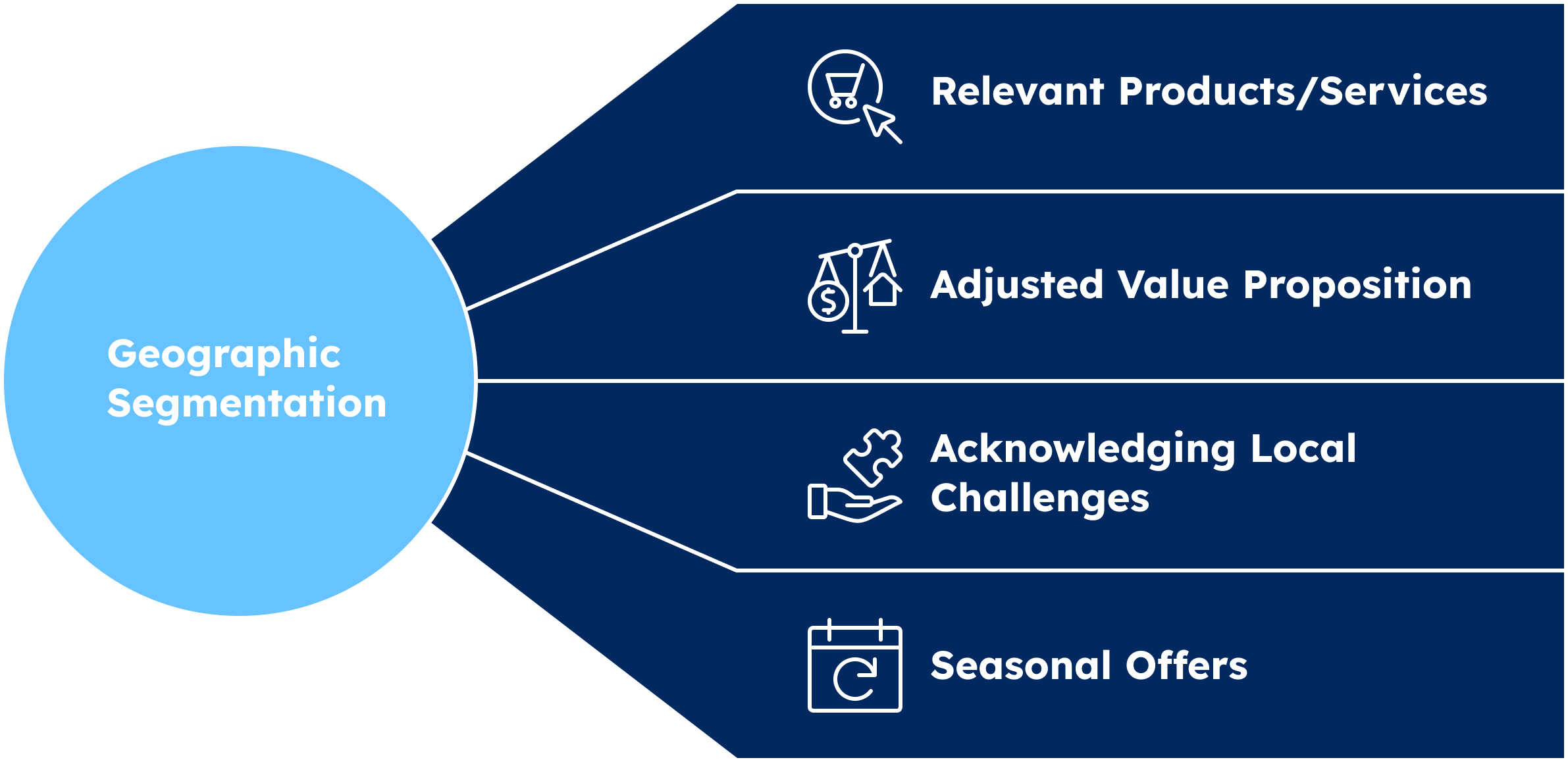
Utilizing Data Analytics for Better Targeting Decisions
Data analytics plays a pivotal role in refining geofencing strategies. By analyzing historical data from past campaigns, advertisers can identify trends and patterns in customer behavior. This enables the selection of optimal geofencing locations based on high-conversion areas. Tracking metrics such as foot traffic, dwell time, and conversion rates can reveal which zones yield the best results.
Integrating Geofencing with Other Marketing Channels
To amplify the effectiveness of geofencing, integration with other marketing channels is essential. Consider the following approaches:
- Email Marketing: Send targeted offers to users who enter geofenced areas, enhancing engagement through timely communication.
- Social Media Advertising: Utilize location-based ads on platforms like Facebook and Instagram to reach a similar audience.
- Retargeting Campaigns: Implement retargeting strategies for users who engage with ads while in the geofenced area.
This multi-channel approach ensures consistent messaging and reinforces brand presence across different touchpoints.
A/B Testing Different Geofencing Parameters
A/B testing is crucial for optimizing geofencing campaigns. Key parameters to test include:
- Geofence Size: Experiment with different radius sizes to determine which generates the highest engagement.
- Ad Formats: Test various ad formats, such as video versus static images, to find the most effective creative.
- Time of Day: Analyze performance based on different times to identify peak engagement hours.
Each test should be tracked meticulously, allowing for data-driven decisions that enhance campaign performance.
Leveraging Customer Behavior Insights for Optimization
Understanding customer behavior is vital for geofencing success. Use insights from customer interactions to refine targeting strategies. For instance, analyzing purchasing patterns can inform the timing and type of offers presented to users in specific locations. Additionally, incorporating feedback from in-store experiences can help tailor marketing efforts to meet customer expectations.
Many marketers overlook the nuances of geofencing, assuming that simply setting up a location-based campaign will yield results. However, effective geofencing requires continuous monitoring and adaptation. Misconceptions often arise around the belief that larger geofences automatically result in more engagement; however, precision in targeting often leads to higher conversion rates.
To effectively apply these advanced strategies, marketers should:
- Regularly analyze data to refine targeting decisions.
- Implement multi-channel campaigns that utilize geofencing alongside email and social media.
- Conduct A/B tests to optimize geofencing parameters continuously.
- Utilize customer behavior insights to tailor offers and messaging.
By taking these steps, companies can significantly enhance the performance of their Google Ads geofencing efforts, achieving better engagement and conversion outcomes.
Real-World Applications of Geofencing in Various Industries
This section explores the practical applications of geofencing across multiple industries, highlighting case studies that demonstrate its effectiveness in driving foot traffic and sales. Understanding these applications provides valuable insights into how geofencing can be leveraged for marketing success.
Retail Sector Innovations
Geofencing has transformed retail marketing strategies. Brands like Target and Walmart utilize geofencing to send promotional notifications to customers when they enter a defined perimeter around their stores. For instance, Target’s campaign improved in-store visits by 15% during promotional events, illustrating how precise targeting can enhance customer engagement.
- Foot Traffic Increase: Retailers report up to a 20% increase in foot traffic following targeted geofencing ads.
- Sales Growth: Brands have experienced up to a 30% increase in sales during promotional periods linked to geofencing efforts.
- Customer Retention: Personalized offers delivered via geofencing have helped improve customer loyalty and repeat visits.
Hospitality and Tourism Applications
The hospitality industry effectively uses geofencing to enhance guest experiences. Hotels like Marriott employ geofencing to provide guests with tailored offers as they approach the property. This strategy resulted in a 25% increase in bookings during specific events, showcasing the impact of timely, location-based messaging.
- Event Promotions: Geofencing allows hotels to target event attendees with special rates, maximizing occupancy during peak seasons.
- Local Attractions: Hotels can promote nearby restaurants and attractions, increasing guest engagement with local businesses.
- Feedback Collection: Geofencing enables real-time surveys to enhance service quality and guest satisfaction.
Geofencing in Events Management
Events and conferences have also harnessed geofencing technology. For example, the 2019 South by Southwest (SXSW) festival used geofencing to engage attendees with real-time updates and location-specific information. This approach resulted in a 40% increase in app engagement, demonstrating the effectiveness of geofencing in driving participation.
- Real-Time Updates: Attendees received alerts about schedule changes or nearby activities, enhancing their overall experience.
- Networking Opportunities: Geofencing facilitated targeted networking, allowing attendees to connect with relevant peers based on location.
- Post-Event Engagement: Follow-up promotions sent to attendees increased return rates for future events by 15%.
Innovative Uses in Public Services and Community Engagement
Beyond commercial applications, geofencing is being utilized in public services. Municipalities have implemented geofencing to inform residents about local events, road closures, and emergency alerts. For instance, a city in California saw a 50% increase in community event participation after launching a geofencing initiative.
- Emergency Alerts: Geofencing enables timely notifications during natural disasters, improving public safety communication.
- Community Engagement: Local governments can promote community initiatives and services effectively through targeted messaging.
- Feedback Mechanisms: Residents receive surveys based on their location, allowing for more relevant feedback on public services.
Successful geofencing campaigns reveal critical lessons for implementation. Businesses should prioritize data privacy and transparency to build customer trust. Additionally, integrating geofencing with other marketing strategies, such as social media and email, can amplify impact. Testing different geofence sizes and messaging strategies is essential to optimize results.
To effectively employ geofencing in your marketing strategy, begin by identifying key locations relevant to your target audience. Establish clear objectives for your campaign and select appropriate metrics to measure success. Utilize A/B testing to refine your messaging and ensure compliance with local regulations regarding data privacy.
Measuring Success: Metrics and KPIs for Geofencing Campaigns
This section outlines the essential metrics and key performance indicators (KPIs) necessary for evaluating the effectiveness of geofencing campaigns. Accurate measurement is critical for optimizing advertising efforts and achieving marketing objectives.
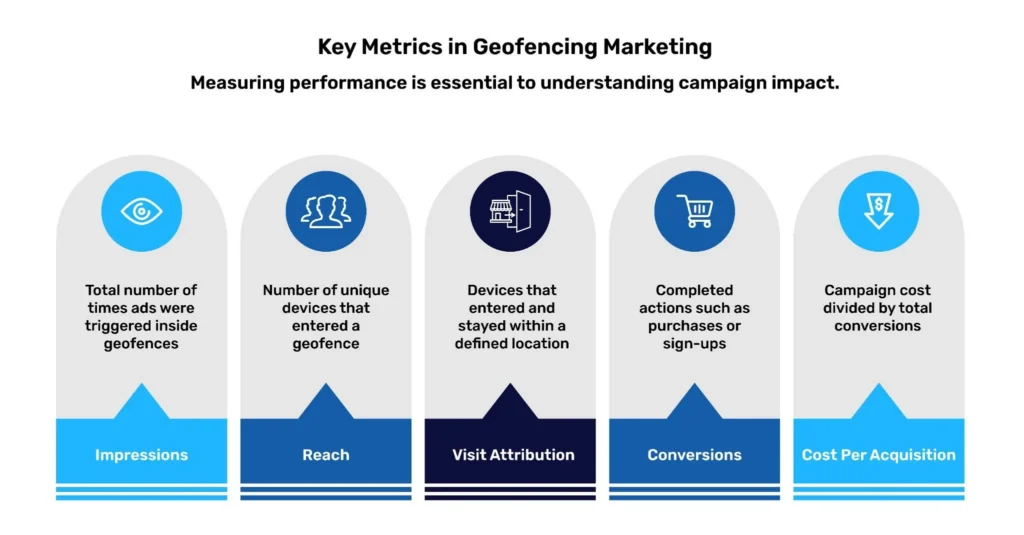
Key Performance Indicators to Track for Geofencing
- Impressions: The number of times your ads are displayed to users within the geofenced area.
- Click-Through Rate (CTR): The percentage of users who clicked on your ad compared to the total impressions.
- Conversion Rate: The percentage of users who completed a desired action, such as making a purchase or signing up for a newsletter.
- Foot Traffic: The increase in customers visiting your physical location as a result of the campaign.
- Engagement Metrics: Includes likes, shares, and comments on social media ads associated with the geofenced area.
Tools and Analytics for Measuring Campaign Success
To accurately measure the success of geofencing campaigns, utilize a combination of tools and analytics platforms, including:
- Google Ads: Offers built-in reporting features to track impressions, clicks, and conversions.
- Google Analytics: Provides insights into website traffic and user behavior, enabling tracking of conversions from geofenced ads.
- Location Analytics Tools: Platforms like Placed or Foursquare can offer data on foot traffic linked to geofencing efforts.
- CRM Systems: Integrating customer relationship management tools can help correlate ad campaigns with sales data.
Interpreting Data to Refine Future Campaigns
Analyzing the collected data is vital for refining future campaigns. Look for patterns and trends in user engagement and conversion rates. For instance, if certain demographics show higher engagement, consider targeting them more aggressively. Additionally, evaluate the performance of different geofenced locations to identify which areas yield the highest return on investment (ROI).
Setting Realistic Goals and Benchmarks
Establishing achievable goals is essential for assessing campaign performance. Start by defining specific, measurable objectives aligned with overall business targets. For example:
- Increase CTR by 15% over the next quarter.
- Generate a 10% increase in foot traffic within three months.
- Aim for a conversion rate of at least 5% for specific promotions.
Benchmarks can be drawn from industry standards or historical campaign performance to provide context for success.
Nuance / Expert Layer
Many marketers underestimate the value of cross-channel attribution in geofencing campaigns. The ability to track user interactions across multiple touchpoints—such as mobile, social media, and email—can provide a more comprehensive view of campaign effectiveness. Additionally, many campaigns fail to account for external factors like local events or seasonal trends that can significantly influence foot traffic and conversion rates. Incorporating these variables into strategy and analysis can yield deeper insights and more effective targeting.
Practical Application
To leverage these insights effectively, marketers should:
1. Regularly monitor key performance indicators and adjust campaigns based on performance data.
2. Utilize analytics tools to track foot traffic and conversions tied to geofencing.
3. Set clear benchmarks and compare performance against these goals to gauge success.
4. Experiment with different geofencing strategies and demographics to identify the most effective approaches.
Implementing these practices will enhance the effectiveness of efforts in how to geofence Google Ads and improve overall campaign performance.
Future Trends in Geofencing and Google Ads
This section explores emerging trends and technologies that will significantly influence the future of geofencing in advertising. Understanding these developments is essential for marketers aiming to leverage location-based strategies effectively.

The Role of AI and Machine Learning in Geofencing
Artificial Intelligence (AI) and machine learning are transforming geofencing by enhancing data analysis and targeting precision. These technologies can analyze vast amounts of geolocation data to identify patterns in consumer behavior, allowing advertisers to create highly personalized campaigns. For instance, AI can predict when a consumer is most likely to engage with an ad based on their past behavior, ultimately improving conversion rates.
Predicted Changes in Consumer Behavior and Preferences
As consumers become more tech-savvy, their expectations for personalized marketing experiences are evolving. Future trends indicate a shift towards hyper-personalization, where consumers expect ads tailored not only to their location but also to their preferences and past interactions. This shift necessitates a more nuanced approach to geofencing, requiring marketers to gather and analyze richer data sets to meet these expectations.
Potential Regulatory Impacts on Geofencing Practices
Regulations surrounding data privacy are likely to impact geofencing practices significantly. Laws such as the General Data Protection Regulation (GDPR) in Europe and the California Consumer Privacy Act (CCPA) in the United States emphasize consumer consent and data protection. Advertisers must adapt their strategies to comply with these regulations, which may include obtaining explicit consent for location tracking and providing transparency about data usage.
Innovations in Location-Based Marketing Technologies
- Beacon Technology: Beacons enable precise location tracking by sending notifications to users’ smartphones as they enter a specific area.
- Augmented Reality (AR): AR enhances user engagement by overlaying digital content on the real world, creating immersive advertising experiences linked to specific locations.
- Geofencing with IoT: The Internet of Things (IoT) can provide real-time data from connected devices, allowing for more dynamic and responsive geofencing campaigns.
Additionally, advancements in mobile technology are leading to more sophisticated geofencing capabilities, such as real-time analytics and automated ad adjustments based on foot traffic data.
The integration of AI, evolving consumer preferences, and regulatory landscapes represents a complex environment for geofencing in advertising. One common misconception is that geofencing solely relies on GPS data. In reality, effective geofencing may also incorporate Wi-Fi triangulation, Bluetooth signals, and other location technologies to enhance accuracy and engagement.
Marketers should take proactive steps to stay ahead of these trends. Begin by investing in AI-driven tools to analyze consumer data more effectively. Regularly update privacy policies to ensure compliance with current regulations, and explore innovative technologies such as beacons and AR to enrich consumer interactions. By embracing these advancements, brands can enhance their geofencing strategies and drive more effective advertising outcomes.
Frequently Asked Questions
What is geofencing in Google Ads?
Geofencing in Google Ads is a location-based targeting technique that allows advertisers to deliver ads to users within a specific geographic area. This method utilizes GPS or RFID technology to define virtual boundaries around locations.
How do I set up geofencing in Google Ads?
To set up geofencing in Google Ads, navigate to the campaign settings and select the “Locations” option. From there, you can define your target area using radius targeting or specific addresses.
What are the benefits of geofencing in Google Ads?
Geofencing in Google Ads enhances targeting precision, allowing businesses to reach potential customers in specific locations. This can lead to higher engagement rates and improved return on investment (ROI) for ad campaigns.
How much does geofencing cost in Google Ads?
The cost of geofencing in Google Ads varies based on factors such as location size, competition, and bidding strategy. Advertisers typically pay on a cost-per-click (CPC) or cost-per-impression (CPM) basis, similar to standard Google Ads campaigns.
How long does it take to see results from geofencing in Google Ads?
Results from geofencing in Google Ads can vary, but many advertisers start to see engagement within a few days of launching their campaigns. However, significant performance insights may take weeks to gather, depending on traffic and ad spend.
Can I use geofencing for multiple locations in Google Ads?
Yes, geofencing can be applied to multiple locations in Google Ads. Advertisers can create different geofenced areas within the same campaign or across multiple campaigns to target various audiences.
What are common mistakes to avoid when geofencing Google Ads?
Common mistakes include setting overly broad geofences, neglecting to analyze performance data, and failing to adjust bids based on location performance. It’s essential to monitor and optimize geofencing strategies regularly for effectiveness.
How does geofencing compare to other targeting methods in Google Ads?
Geofencing offers a more precise targeting option compared to demographic or interest-based methods, as it focuses on users’ physical locations. This can result in higher relevance and engagement, particularly for local businesses.
Final Thoughts on how to geofence google ads
Geofencing in Google Ads represents a pivotal shift in targeted marketing, enabling businesses to connect with potential customers in precise locations. By leveraging this technology, advertisers can enhance engagement, optimize ad spend, and drive foot traffic, ultimately leading to greater ROI.
To capitalize on the benefits of geofencing, initiate a pilot campaign focusing on a specific geographic area relevant to your target audience, and utilize A/B testing to refine your messaging and audience targeting based on real-time data.
In an increasingly competitive digital landscape, mastering geofencing is essential for businesses seeking to harness location-based marketing effectively.
Leave a Reply