
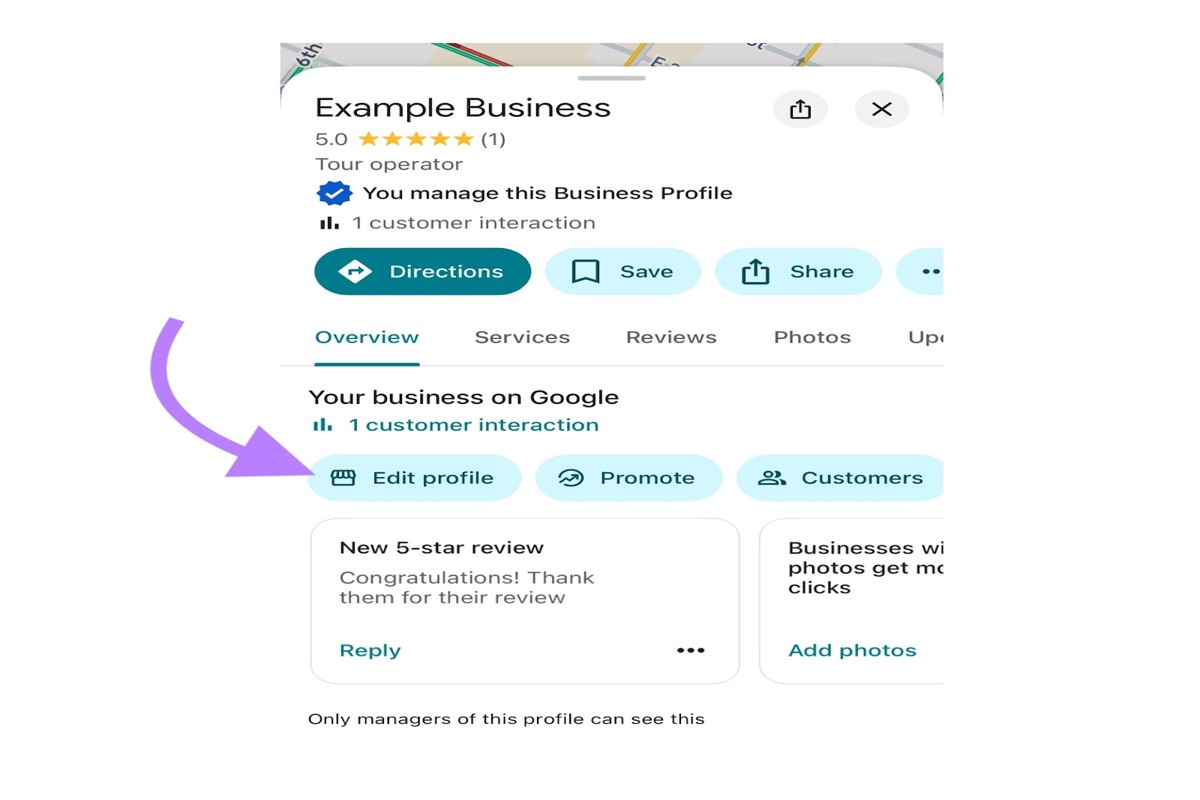
To edit your Google Business Profile, sign in to Google My Business, select your business, and click ‘Info’ to update details like address, hours, and services.
Understanding how to edit a Google Business Profile is crucial for any business owner or manager looking to maintain an accurate online presence. Incorrect or outdated information can mislead customers, potentially resulting in lost revenue and diminished trust in the brand.
This guide will detail the step-by-step process for editing your Google Business Profile, including how to change your business information, update photos, and manage customer reviews effectively.
For How To Edit Google Business Profile businesses looking to generate local leads through Google Ads or Local SEO, GMB Ranger LLC offers hands-on campaign management. Specialist Md Tangeer Mehedi personally handles campaign setup and ongoing optimization — with no payment required until the first lead comes in.
What is a Google Business Profile?
A Google Business Profile is a free tool that allows businesses to manage their online presence across Google, including Search and Maps. It provides essential information such as business name, location, hours, and services, helping potential customers find and engage with businesses more easily. This profile is crucial for local SEO and enhances visibility in search results.
The primary purpose of a Google Business Profile is to connect businesses with customers searching for relevant services in their area. By optimizing their profiles, businesses can showcase key details, respond to reviews, post updates, and share photos, all of which enhance customer interaction and trust. Moreover, the profile allows businesses to track important metrics, such as how customers found them and what actions they took.
- Business Information: Includes name, address, phone number, and website URL.
- Hours of Operation: Displays when a business is open and any special hours for holidays.
- Customer Engagement: Businesses can post updates, respond to reviews, and answer frequently asked questions.
- Insights: Provides analytics on customer interactions, including how many people viewed the profile and requested directions.
Furthermore, a Google Business Profile can help businesses stand out in a competitive market by featuring photos and offers, which can attract more customers. Regularly updating the profile with fresh information and engaging content is essential for maintaining visibility and relevance.
Expert Tip: Consistently monitor and respond to customer reviews on your profile; this not only enhances customer relations but also signals to Google that your business is active and engaged, potentially improving your search rankings.
How do I edit my Google Business Profile?
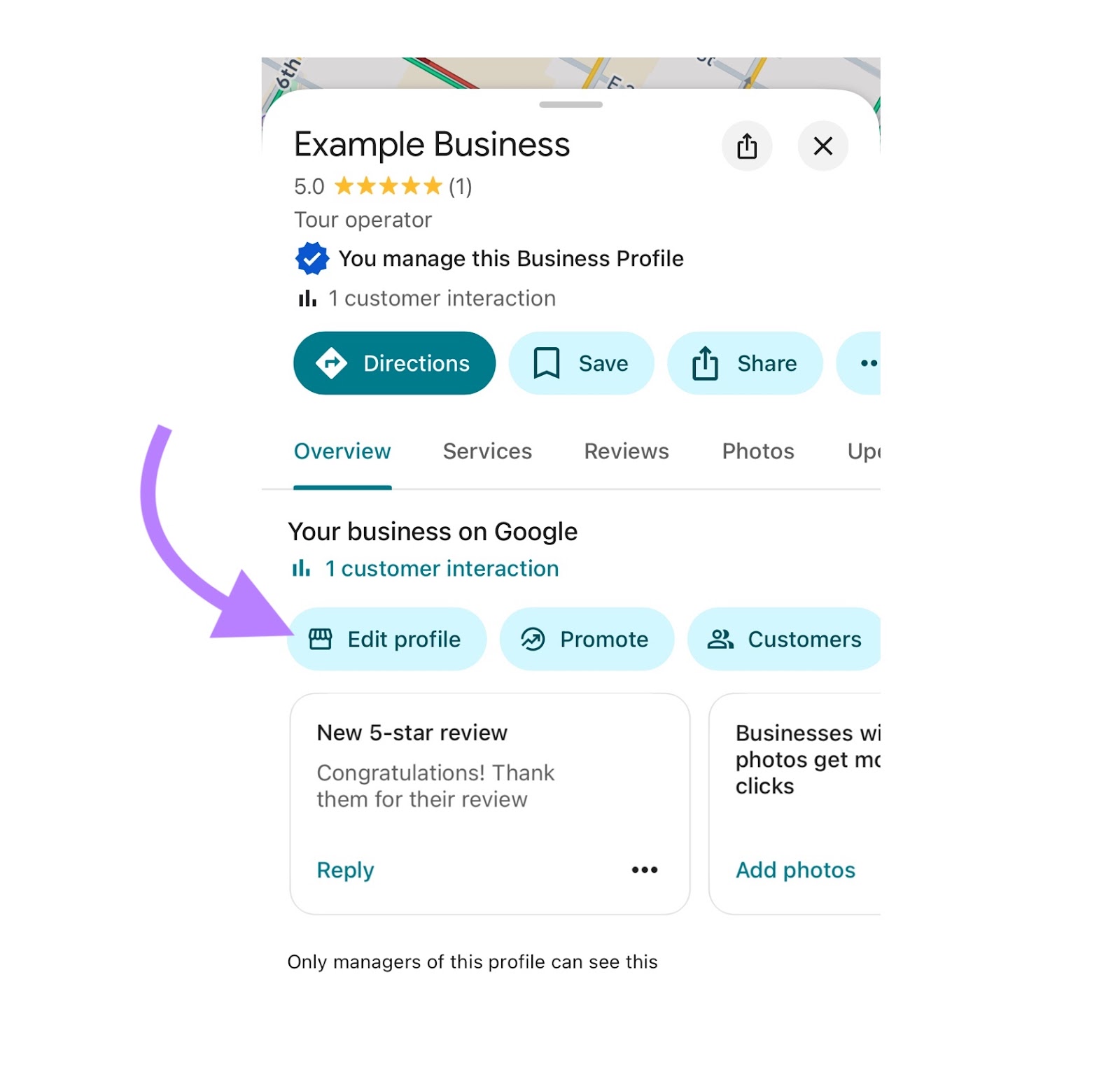
To edit your Google Business Profile, access your profile through Google Search or the Google Maps app. You can update essential information such as your business name, address, phone number, and hours of operation directly from these platforms.
Begin by signing in to your Google account associated with your business. If using Google Search, type your business name in the search bar. Click on the business profile that appears on the right side of the search results. If using Google Maps, search for your business, click on it, and look for the “Edit” button. Both methods will lead you to the profile editing interface.
- Access your Google Business Profile: Use Google Search or Google Maps to find your business. Ensure you are logged into the correct Google account.
- Click on “Edit Profile”: In the profile overview, find the “Edit” button, usually located next to your business information. This will direct you to the editing options.
- Update your information: Modify the necessary fields, such as business name, address, phone number, website, and operating hours. Ensure all changes comply with Google’s guidelines.
- Add photos or videos: Enhance your profile by uploading high-quality images or videos that showcase your business. Visuals can significantly impact customer engagement.
- Save your changes: After making all necessary edits, ensure to click “Save” to apply the updates. You may need to verify some changes, especially if they involve critical information.
Regularly updating your Google Business Profile is essential to maintain accurate information for potential customers. Consistency across all platforms helps improve your business’s online visibility and credibility.
Expert Tip: Utilize Google’s insights feature to track how customers interact with your profile. This data can guide future updates and help optimize your business listing for better engagement.
What are the benefits of editing my Google Business Profile?
Editing your Google Business Profile offers significant advantages for local SEO and customer engagement. An updated profile enhances visibility in search results and provides accurate information that attracts potential customers. Regular updates can lead to increased trust and credibility for your business.
Maintaining an accurate and comprehensive Google Business Profile is essential for improving local search rankings. Search engines prioritize updated content, which means that businesses with current information are more likely to appear higher in search results. This visibility translates into more foot traffic and online inquiries, ultimately boosting revenue.
- Enhance Customer Engagement: Regularly updating your profile with new photos, posts, or offers can engage customers and encourage them to interact with your business. Highlighting promotions or events keeps your audience informed and interested.
- Improve Trust and Credibility: Accurate and timely information, such as hours of operation and contact details, builds trust with potential customers. A well-maintained profile signals professionalism and reliability.
- Respond to Customer Feedback: Editing your profile allows you to address reviews and feedback directly. Prompt responses to customer reviews can foster positive relationships and encourage more feedback, enhancing your reputation.
- Showcase Products or Services: Regularly updating your offerings and descriptions helps potential customers understand what you provide. This clarity can influence their decision to choose your business over competitors.
Incorporating these practices not only optimizes your profile for search engines but also creates a more engaging experience for customers. Businesses that prioritize profile updates often see a direct correlation between their efforts and increased customer inquiries.
Expert Tip: Utilize Google Posts to share timely updates and promotions directly on your profile, as this feature can significantly boost visibility and customer interaction.
How often should I update my Google Business Profile?
Businesses should update their Google Business Profile at least once a month, or more frequently if there are significant changes. Factors such as new services, changes in business hours, or seasonal promotions can necessitate immediate updates. Regular interaction with customers can also guide the frequency of updates.
The nature of your business greatly influences how often updates are required. For instance, restaurants or retail stores may need to update their profiles weekly to reflect menu changes or sales events. In contrast, service-based businesses might find monthly updates sufficient unless they introduce new offerings or experience changes in operating hours. Monitoring customer interactions through reviews and questions can also indicate when updates are needed, particularly if customers are asking about specific services or features.
Additionally, Google favors active profiles in search rankings. Regular updates not only keep your information current but also enhance visibility in local search results. Engaging with customers by updating your profile can lead to increased trust and a stronger online presence, which are essential for attracting new clients in a competitive market.
Expert Tip: Utilize insights from Google My Business to determine how often customers interact with your profile. If you notice spikes in engagement or inquiries, consider increasing the frequency of your updates to capture that interest effectively.
Are there costs associated with editing a Google Business Profile?
Editing a Google Business Profile is completely free. However, while the act of making changes to your profile incurs no charges, there may be associated costs if you choose to utilize additional services or features.
Several factors can influence potential costs related to your Google Business Profile:
- Advertising Services: If you decide to run Google Ads to promote your business, this will incur costs based on your advertising budget and campaign settings.
- Third-party Tools: Some businesses use third-party software for advanced analytics, reputation management, or additional marketing features. These tools often require a subscription or one-time payment.
- Professional Assistance: Hiring a marketing agency or a consultant to optimize your Google Business Profile can involve fees. These professionals may provide services ranging from profile setup to ongoing management.
While basic edits are free, understanding these potential costs is essential for budgeting your marketing efforts effectively. Regular updates and accurate information can enhance your visibility, leading to increased customer engagement without any direct fees.
Expert Tip: Regularly monitoring and adjusting your profile can lead to improved local search rankings, providing a cost-effective way to attract new customers without incurring additional expenses.
What common mistakes should I avoid when editing my Google Business Profile?
Common mistakes when editing a Google Business Profile include neglecting to verify information, using inconsistent business names, and failing to respond to customer reviews. These errors can lead to confusion for potential customers and may adversely impact search rankings.
One frequent error occurs when businesses fail to verify their location. For example, a local coffee shop updates its address but does not verify it through Google. As a result, customers continue to visit the old location, leading to frustration and lost business. To prevent this, always ensure that the new address is verified by requesting a postcard from Google and confirming the change within the profile settings.
Another common mistake is using different variations of a business name across platforms. For instance, a retail store might use “Best Deals Store” on its website but list “Best Deals” on its Google Business Profile. This inconsistency confuses customers and can hurt local SEO. To avoid this, maintain uniformity in the business name, address, and phone number (NAP) across all online platforms.
Lastly, neglecting to engage with customer reviews can diminish the business’s online reputation. If a restaurant receives a negative review and fails to respond, potential diners may perceive a lack of care for customer feedback. Regularly monitor and respond to reviews to foster trust and show that customer opinions matter.
Expert Tip: Regularly audit your Google Business Profile for accuracy and consistency, ideally on a quarterly basis, to ensure that all information remains up to date and reflects your business accurately.
How does a Google Business Profile affect local SEO?
A well-managed Google Business Profile significantly enhances local SEO by improving search visibility and driving customer engagement. Businesses with optimized profiles are more likely to appear in local search results and attract potential customers. Key factors include accurate information, customer reviews, and engagement metrics.
Local SEO relies heavily on factors that influence how businesses rank in geographic searches. A complete and verified Google Business Profile serves as a critical element in this ranking algorithm. Profiles that include essential details—such as business name, address, phone number, hours of operation, and categories—help search engines understand the business’s relevance to user queries.
- Accuracy: Profiles with consistent and accurate information across all platforms improve credibility, leading to higher rankings.
- Customer Reviews: Positive reviews and high ratings not only enhance reputation but also signal trustworthiness to search engines, boosting local rankings.
- Engagement: Features like posts, Q&A, and photos increase user interaction, which can positively influence local SEO by demonstrating active business engagement.
Furthermore, Google prioritizes businesses that actively update their profiles. Regularly adding new content, responding to customer inquiries, and utilizing available features can signal to search engines that a business is relevant and active. This can lead to improved visibility in local search results, making it essential for businesses to maintain their profiles diligently.
Expert Tip: Regularly monitor and analyze your Google Business Profile insights to identify which aspects drive the most engagement. Adjust strategies based on this data to maximize local SEO performance.
Can I edit my Google Business Profile from the mobile app?
Yes, you can edit your Google Business Profile directly from the mobile app. The app provides a user-friendly interface that allows business owners to manage their profiles efficiently. This feature is particularly useful for those who need to make quick updates on the go.
- Download and open the Google Business Profile app on your mobile device. Sign in with the Google account associated with your business.
- Once logged in, select the business you wish to edit from the list of profiles. If you manage multiple locations, ensure you choose the correct one.
- Tap on the “Profile” tab at the bottom of the screen. Here, you will see various sections that can be edited, including business name, address, phone number, and hours of operation.
- To edit a specific section, tap on the relevant area (e.g., “Address” or “Hours”). Make the necessary changes and ensure accuracy.
- After making changes, tap “Save” to apply your edits. You will receive a confirmation once your updates have been submitted.
Using the mobile app allows for real-time updates and quick adjustments, ensuring your business information remains accurate and accessible. Regularly check your profile to keep your information current, as this can impact your visibility in search results.
Expert Tip: Utilize the app’s notification feature to stay informed about customer reviews and questions. Responding promptly can enhance customer engagement and improve your business’s reputation.
Advanced Tips for Optimizing Your Google Business Profile
To maximize your visibility and engagement on Google, optimizing your business profile requires more than basic edits. Implementing advanced strategies can significantly enhance your online presence and customer interaction.
Utilizing Keywords Effectively in Your Business Description
Incorporating relevant keywords into your business description is essential for improving search visibility. Focus on terms that potential customers are likely to use when searching for your products or services. Aim for a natural flow rather than keyword stuffing, as Google favors quality content. Research tools like Google Keyword Planner can help identify effective keywords.
Adding High-Quality Images to Attract More Customers
Visual content plays a crucial role in attracting potential customers. Upload high-resolution images that showcase your products, services, and premises. Aim for a mix of images, including logos, team photos, and action shots of your services in use. Profiles with images receive 42% more requests for directions and 35% more click-throughs to their websites.
Leveraging Customer Reviews to Boost Credibility
Customer reviews are a powerful tool for establishing credibility. Encourage satisfied customers to leave positive reviews on your Google Business Profile. Responding to reviews, both positive and negative, demonstrates engagement and builds trust. Highlighting testimonials in your profile can enhance your brand’s reputation and influence potential customers’ decisions.
Setting Up Messaging and Q&A Features for Better Interaction
Google Business Profile offers messaging and Q&A features that facilitate direct interaction with customers. Enable the messaging option to allow customers to reach out with inquiries. Additionally, monitor the Q&A section to address common questions proactively. Providing timely responses can improve customer satisfaction and increase conversion rates.
Nuance / Expert Layer
Many businesses overlook the importance of local SEO when optimizing their Google Business Profile. Beyond basic keyword usage, understanding local search trends is critical. For instance, incorporating geo-specific keywords can enhance relevance in local searches. Additionally, businesses should regularly update their profiles to reflect changes in services or offerings, as stagnant content may lead to decreased visibility.
Practical Application
- Conduct keyword research to refine your business description.
- Upload at least 5 high-quality images that represent your brand.
- Implement a strategy to encourage and respond to customer reviews.
- Activate messaging and monitor the Q&A section for customer inquiries.
By taking these steps, you can effectively enhance your Google Business Profile, driving more traffic and engagement.
Common Mistakes When Editing Google Business Profiles
This section identifies frequent pitfalls that can undermine the effectiveness of a Google Business Profile. Addressing these mistakes can significantly enhance online visibility and customer engagement.

Neglecting to Verify Business Information Regularly
Regular verification of business information is essential. Inaccurate details, such as address, phone number, or operating hours, can lead to customer frustration and lost opportunities. Businesses should conduct routine checks, ideally every month, to ensure that all information is up-to-date.
Overlooking the Importance of Responding to Reviews
Ignoring customer reviews can damage a business’s reputation. Engaging with customers through responses—both positive and negative—demonstrates commitment to service and can improve overall ratings. A study found that responding to reviews can increase customer trust by up to 70%. Allocate time weekly to address new reviews, fostering a positive community around the business.
Failing to Use the Post Feature for Updates and Promotions
The Google Business Profile allows businesses to post updates, offers, and events. Failing to utilize this feature means missing out on an opportunity to engage customers. Posts can include seasonal promotions, new product launches, or business news. Regularly creating posts can boost visibility in local search results, as Google prioritizes active profiles.
Inconsistent Information Across Different Platforms
Inconsistencies between the Google Business Profile and other online platforms can confuse customers and harm search rankings. Ensure that business information is uniform across all platforms, including social media, websites, and directories. Use tools like Moz Local or Yext to monitor and correct discrepancies.
Expert Layer: Common Misconceptions
Many businesses believe that once their Google Business Profile is set up, it requires little maintenance. This misconception can lead to outdated information and missed opportunities for customer interaction. Additionally, some assume that responding only to negative reviews suffices; however, engaging with all reviews fosters a balanced reputation. Understanding these nuances is vital for maintaining an effective profile.
Practical Application
To optimize your Google Business Profile, implement the following actions:
- Schedule monthly reviews of your business information.
- Allocate time each week to respond to customer reviews.
- Post updates or promotions at least twice a month.
- Regularly check for consistency across all online platforms.
Taking these steps will enhance the profile’s effectiveness and improve customer engagement.
Real-World Examples of Effective Google Business Profiles
This section analyzes successful Google Business Profiles, emphasizing the strategic edits that enhanced visibility and engagement. By examining real-world case studies, businesses can learn actionable tactics to optimize their own profiles.

Case Studies of Businesses That Improved Their Visibility
Several businesses have effectively leveraged their Google Business Profiles to boost visibility and attract new customers. For instance, a local bakery in Austin, Texas, implemented several key changes:
- Enhanced Descriptions: The bakery updated its description to include specific keywords related to its products and services, improving search relevance.
- Regular Updates: By regularly posting updates about new menu items, they maintained customer interest and engagement.
- High-Quality Images: The addition of professional photos of their baked goods increased click-through rates significantly.
After these changes, the bakery reported a 60% increase in foot traffic within three months.
Analysis of Profiles with High Engagement Rates
Profiles with high engagement rates often share common characteristics. For example, a landscaping company in Florida experienced a remarkable 200% increase in calls after optimizing its profile. Key factors included:
- Customer Reviews: They actively encouraged satisfied customers to leave positive reviews, enhancing credibility.
- FAQs Section: The business addressed common customer inquiries directly on the profile, which reduced barriers to contact.
- Service Area Details: By clearly defining their service areas, they attracted local clients more effectively.
Comparative Analysis of Profiles Before and After Optimization
A comparative analysis of profiles before and after optimization often reveals stark differences in performance. For instance, a dental practice in Chicago made several strategic edits:
- Before Optimization: Limited business description, few images, and no posts.
- After Optimization: Comprehensive business description, regular posts about dental health tips, and a gallery of before-and-after treatment photos.
This practice saw a 75% increase in appointment requests within two months of these enhancements.
Lessons Learned from Successful Google Business Profiles
Successful profiles share several key lessons that can be applied across various industries:
- Consistency is Key: Regular updates and consistent information help build trust and visibility.
- Visual Appeal Matters: High-quality images are crucial for attracting potential customers.
- Engagement Drives Results: Actively responding to reviews and inquiries fosters a sense of community and encourages further interaction.
While many articles focus on the basics of optimizing a Google Business Profile, they often overlook the significance of ongoing engagement and adaptation. Businesses should continuously monitor their profiles, adjusting strategies based on seasonal trends and customer feedback. This proactive approach can lead to sustained visibility and customer loyalty.
To apply these insights, businesses should conduct a thorough audit of their current Google Business Profiles. Focus on enhancing descriptions, improving visual content, and engaging with customers through posts and reviews. Consistent monitoring and iterative improvements will yield the best results in optimizing a Google Business Profile.
The Impact of Google Business Profile on Local SEO Strategy
This section examines the critical role a well-maintained Google Business Profile plays in enhancing local SEO efforts. A comprehensive understanding of this impact can significantly improve visibility in local searches.
Understanding Local Search Ranking Factors
Local search ranking is influenced by several key factors that determine how businesses appear in search results. The primary factors include:
- Relevance: How closely a business profile matches a user’s search intent.
- Distance: The proximity of the business to the searcher’s location.
- Prominence: The overall reputation of the business, which can be enhanced by online reviews and backlinks.
A well-optimized Google Business Profile directly affects these factors, making it essential for local SEO success. Properly filled-out profiles increase relevance, while consistent updates can enhance prominence through engagement.
The Role of Google Business Profile in Local Pack Results
The local pack is a prominent feature in Google search results that displays a map and a list of businesses relevant to the user’s query. A well-optimized Google Business Profile is crucial for appearing in this local pack. Key elements influencing visibility include:
- Accurate Business Information: Ensuring that name, address, and phone number (NAP) are consistent across all platforms.
- Categories: Selecting appropriate categories that reflect the services or products offered.
- Photos and Posts: Regularly updating images and creating posts can enhance engagement and visibility.
Businesses that actively manage their profiles are more likely to rank in the local pack, driving higher traffic and potential customers.
Integrating Profile Management with Broader SEO Tactics
Integrating Google Business Profile management with overall SEO strategies can maximize visibility and engagement. This can be achieved through:
- Keyword Optimization: Incorporate relevant keywords in the business description to improve search relevance.
- Link Building: Encourage backlinks from local websites to boost authority.
- Review Management: Actively soliciting and responding to reviews can enhance reputation and ranking.
By aligning profile management with these tactics, businesses can create a cohesive approach that strengthens their local SEO strategy.
Measuring the Impact of Profile Edits on Local Search Performance
Measuring the effectiveness of edits made to a Google Business Profile is essential for refining strategies. Key metrics to monitor include:
- Search Impressions: The number of times the profile appears in local search results.
- Click-Through Rate (CTR): The percentage of users who click on the profile after seeing it in search results.
- Customer Actions: The actions taken by users, such as calls or visits, after interacting with the profile.
Regular analysis of these metrics can provide insights into which edits are effective and which areas require further improvement.
Many articles simplify the importance of Google Business Profiles, neglecting the intricate relationship between local SEO and profile management. For instance, while reviews are often emphasized, the role of consistent NAP details is equally vital. Inaccurate or inconsistent information can lead to a decline in local rankings, a factor frequently overlooked.
To leverage this information effectively, businesses should take the following actionable steps:
- Regularly update business information to ensure accuracy.
- Engage with customers by responding to reviews and posting updates.
- Monitor local search performance metrics to assess the impact of changes made to the profile.
Implementing these practices can significantly enhance local search visibility and overall business performance.
For How To Edit Google Business Profile businesses looking to generate local leads through Google Ads or Local SEO, GMB Ranger LLC offers hands-on campaign management. Specialist Md Tangeer Mehedi personally handles campaign setup and ongoing optimization — with no payment required until the first lead comes in.
Frequently Asked Questions
What is a Google Business Profile?
A Google Business Profile is a free tool that allows businesses to manage their online presence across Google, including Search and Maps. It provides essential information such as business name, location, hours, and customer reviews.
How do I edit my Google Business Profile?
To edit your Google Business Profile, sign in to your Google Business Profile account and select the location you want to manage. From there, you can update information like your address, phone number, and business hours.
What are the benefits of editing my Google Business Profile?
Editing your Google Business Profile ensures that customers receive accurate and up-to-date information about your business. This can lead to increased visibility, customer engagement, and potentially higher foot traffic or online inquiries.
How often should I update my Google Business Profile?
Your Google Business Profile should be updated regularly, especially when there are changes in hours, services, or contact information. Frequent updates help maintain accuracy and enhance customer trust.
Are there costs associated with editing a Google Business Profile?
Editing your Google Business Profile is free of charge. Businesses can update their profiles without incurring any fees, making it a cost-effective way to manage online presence.
What common mistakes should I avoid when editing my Google Business Profile?
Common mistakes include providing inaccurate information, neglecting to respond to reviews, or failing to update seasonal hours. Ensuring consistency and accuracy is crucial for maintaining credibility and customer trust.
How does a Google Business Profile affect local SEO?
A well-optimized Google Business Profile can significantly enhance local SEO by improving visibility in local search results. Accurate information and customer engagement signals help search engines rank your business higher in relevant searches.
Can I edit my Google Business Profile from the mobile app?
Yes, you can edit your Google Business Profile using the Google My Business mobile app. The app allows you to manage your business information, respond to reviews, and post updates on the go.
Final Thoughts on how to edit google business profile
Editing your Google Business Profile is not merely a task; it is a strategic imperative that can significantly enhance your online presence and customer engagement. By consistently optimizing your profile, you ensure that your business stands out in a competitive digital landscape, ultimately driving more foot traffic and conversions.
To maximize your impact, immediately audit your current Google Business Profile for accuracy and completeness, ensuring that all information is up-to-date and reflective of your brand identity. This proactive approach will position your business for sustained success.
Your Google Business Profile is a cornerstone of your digital marketing strategy, and its optimization can dramatically influence your business growth and visibility.
Leave a Reply