
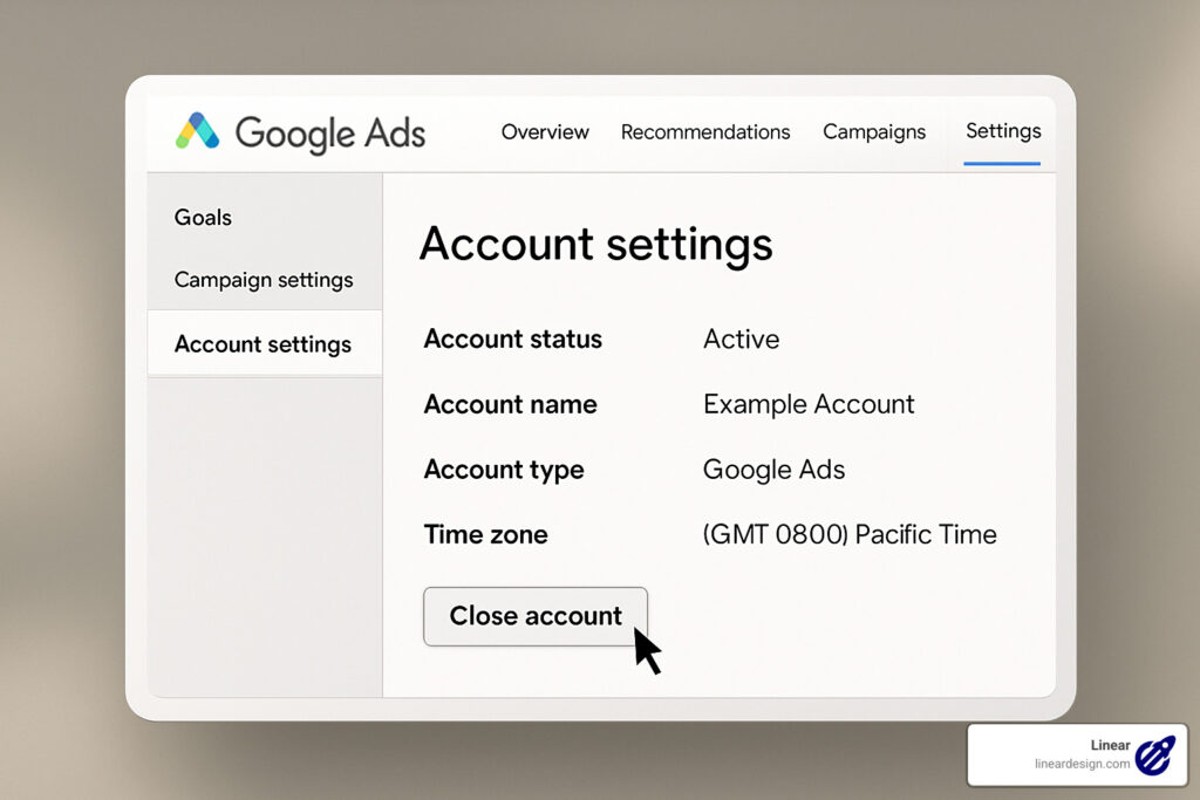
To delete your Google Ads account, sign in to your account, navigate to ‘Account Settings’, and select ‘Cancel Account’. Follow the prompts to complete the deletion.
Understanding how to delete a Google Ads account is crucial for businesses and marketers looking to manage their online advertising effectively. Incorrectly handling account deletion can result in unintended consequences, such as loss of valuable data or ongoing charges.
This guide provides a clear, step-by-step process for successfully deleting your Google Ads account, including important considerations and potential implications of account cancellation.
What happens when you delete your Google Ads account?
When you delete your Google Ads account, all associated campaigns, ads, and data will be permanently removed. This action cannot be undone, and you will lose access to your advertising history and performance metrics.
Deleting your account has several implications, particularly regarding data loss and future advertising efforts. Once the account is deleted, all campaign data, including conversion tracking and performance reports, will no longer be accessible. This loss can hinder future marketing strategies, as historical data often informs decision-making and optimizations.
- Campaign Deactivation: All active campaigns will stop running immediately.
- Data Loss: Historical performance data, including impressions, clicks, and conversions, will be lost.
- Account Recovery: Deleted accounts cannot be recovered, and re-establishing a new account will require setting up new campaigns from scratch.
Additionally, any linked Google products, such as Google Analytics, may also lose data connections, making it difficult to track website performance in relation to past ad campaigns. If you have future advertising plans, consider pausing campaigns as an alternative to deletion, allowing for the preservation of data and settings for later use.
Expert Tip: Before deleting your Google Ads account, export important data and reports to retain valuable insights for future marketing strategies. This proactive step can provide a reference point for performance benchmarks and help inform your advertising approach moving forward.
How long does it take to delete a Google Ads account?
Deleting a Google Ads account typically takes effect within a few hours to a couple of days. However, the account will remain in a suspended state for a period of 30 days, during which you can reactivate it if needed.
The timing of the deletion process can be influenced by several factors. Once a user initiates the deletion from the Google Ads interface, the request is processed promptly. Users will receive a confirmation email, signaling that the account has been suspended. However, the actual removal of all account data takes longer, as Google retains certain information for compliance and auditing purposes.
During the 30-day suspension period, the account is not accessible for advertising purposes, and no new ads can be served. If the account holder decides to change their mind, they can easily reactivate the account before the 30-day period ends. After this time frame, the account and its associated data will be permanently deleted, and recovery will not be possible.
It’s also essential to consider that any pending payments or outstanding balances must be settled before the account can be fully deleted. Failure to address these financial obligations could delay the deletion process.
Expert Tip: Always back up any important data or reports from your Google Ads account before initiating the deletion process, as this information will be permanently lost after the account is fully deleted.
Can you recover a deleted Google Ads account?
Yes, a deleted Google Ads account can be recovered within a specific timeframe. Google allows account restoration if the deletion occurred within the last 20 days. After this period, the account and its associated data are typically permanently lost.
To recover a deleted Google Ads account, follow these steps:
- Log in to your Google Ads account using the same email address associated with the deleted account.
- Upon logging in, you will see a message indicating that your account has been deleted and the option to restore it.
- Click on the “Restore” button to initiate the recovery process.
- Follow any additional prompts to confirm the restoration and ensure your account settings are correct.
If more than 20 days have passed since deletion, recovery is not possible through the standard methods. In such cases, contacting Google Ads support may provide alternative solutions, but success is not guaranteed.
Considerations for Recovery
Account recovery is subject to specific conditions. If the account was suspended or violated Google Ads policies before deletion, recovery may not be possible. Furthermore, any campaigns, ads, or historical data may not be available once the account is restored, depending on the nature of the deletion.
Always ensure any important data is backed up and stored externally before deleting an account. This practice minimizes potential data loss and eases the transition should a restoration be necessary.
For effective management of your Google Ads, consider regularly reviewing account settings and performance metrics. This proactive approach can help avoid the need for recovery in the first place.
Are there any costs associated with deleting a Google Ads account?
There are no direct costs associated with deleting a Google Ads account. However, stopping ads can lead to financial implications based on your existing campaigns and billing cycle.
When you delete your Google Ads account, you will not incur any fees for the deletion itself. However, you should consider the following factors that may impact your overall financial situation:
- Outstanding Balances: If there are any pending payments or outstanding balances, these must be settled before account deletion.
- Campaign Performance: Stopping ads can result in lost revenue opportunities, especially if your campaigns were generating leads or sales.
- Billing Cycle: If you delete your account before the end of the billing cycle, charges for ads served prior to the deletion will still apply.
In addition, it’s essential to evaluate the long-term effects of discontinuing advertising. The absence of ads may impact your brand visibility and market presence, leading to potential revenue declines over time. If budget constraints are the reason for deletion, consider adjusting your campaigns instead of complete account termination.
Expert Tip: Before deleting your account, analyze performance data and explore budget adjustments or pausing campaigns. This approach allows for strategic financial management without losing the benefits of advertising entirely.
What are the best practices for deleting a Google Ads account?
Before deleting a Google Ads account, it is essential to follow best practices to ensure a smooth and informed process. Proper preparation can help avoid unintended consequences, such as losing valuable data or impacting other linked accounts. Here are key practices to consider before proceeding with account deletion.
- Back up account data: Export all campaign performance data, including reports and insights, that may be useful for future reference. This data can be vital for understanding past performance or for a potential reactivation of campaigns.
- Review billing and payments: Ensure all outstanding payments are settled and review the billing history. Deleting an account with unpaid charges may lead to complications or additional fees.
- Assess linked accounts: Determine if the Google Ads account is linked to other Google services, such as Google Analytics or Google My Business. Deleting the account may affect data tracking and reporting across these platforms.
- Consider account suspension: If unsure about permanent deletion, consider suspending the account instead. This action allows for a temporary pause in advertising without losing data or settings.
- Communicate with stakeholders: Inform any team members or stakeholders about the decision to delete the account. This ensures that everyone is aligned and that there are no surprises regarding the loss of advertising capabilities.
Following these best practices can mitigate risks associated with deleting a Google Ads account. A careful approach ensures that all relevant information is retained and that necessary actions are taken to protect linked services.
Expert Tip: Always consider documenting the reasons for account deletion and any insights gained from the campaigns. This documentation can serve as a valuable reference for future marketing strategies.
How to pause a Google Ads account instead of deleting it?
Pausing a Google Ads account allows you to temporarily halt all advertising activities without permanently deleting your account. This can be a strategic choice if you plan to return to advertising in the future, as it retains all your campaign data and settings.
To pause your Google Ads account, follow these steps:
- Sign in to your Google Ads account using your credentials.
- In the left menu, click on “Settings” to access your account settings.
- Look for the “Account status” section, where you will see the option to pause your account.
- Click on the “Pause” button, and confirm your choice when prompted.
- Once paused, your campaigns will stop running, and no charges will accrue until you reactivate the account.
Pausing your account does not delete any of your campaigns, ad groups, or ads. All data remains intact, allowing for easy reactivation later. Additionally, consider that while your account is paused, it will not accrue any costs, but you will also not receive any traffic or impressions.
During the pause, it is advisable to review your campaigns and analyze their performance. This insight can guide future advertising strategies and budget allocations when you decide to resume.
Expert Tip: Regularly monitor your account even when paused, as reviewing past performance can provide valuable insights for future campaigns. If you anticipate a long-term break from advertising, consider setting reminders to evaluate your strategy periodically.
What information do you need before deleting your Google Ads account?
Before deleting your Google Ads account, you need to gather specific information to ensure a smooth process. This includes understanding your billing details, any outstanding balances, and the impact on your advertising campaigns. Additionally, consider whether you need to back up any data from your account.
For example, if a business owner plans to delete their Google Ads account, they should first check if there are any remaining charges. Outstanding balances must be settled to avoid complications. Furthermore, they should review performance data and reports, as this information may be valuable for future marketing strategies. If the owner wishes to keep records of campaign performance, they should export necessary data before proceeding with deletion.
Another crucial aspect is the implications for linked services. If the Google Ads account is linked to other Google services, such as Google Analytics or Google Merchant Center, consider how deletion might affect those accounts. Disconnecting or adjusting settings may be required to maintain functionality in related platforms.
Expert Tip: Always download a comprehensive report of your campaigns and ad performance data. This information can be essential for future reference, especially if you plan to re-enter the advertising space later.
How does deleting a Google Ads account affect linked services?
Deleting a Google Ads account can significantly impact any linked services, particularly those integrated with Google’s ecosystem. When an account is deleted, all associated data and settings are also removed, which can affect reporting, billing, and advertising capabilities across other platforms. Users should be aware of how this action influences their use of Google services.
Several services may be affected, including Google Analytics, Google Merchant Center, and Google My Business. Each of these platforms interacts with Google Ads in unique ways:
- Google Analytics: Deleting your Google Ads account will sever the integration between Google Ads and Google Analytics. This means that future ad performance data will not be available in Analytics, limiting insights into user behavior and conversion tracking.
- Google Merchant Center: If an e-commerce business relies on Google Ads to promote products listed in the Merchant Center, deleting the Ads account will halt paid advertising efforts. This can significantly impact product visibility and sales.
- Google My Business: While the deletion of a Google Ads account does not directly affect a Google My Business profile, any advertisements linked to the profile will cease, reducing local visibility and engagement.
Additionally, if the Google Ads account is linked to any third-party applications or services, those integrations may also be disrupted. For instance, automated reporting tools that pull data from Google Ads will no longer function as intended, potentially leading to gaps in marketing analysis and strategy.
Restoring a deleted Google Ads account is not straightforward. Google retains account data for a limited time, but once the account is permanently deleted, recovery is impossible. Therefore, businesses must consider these implications carefully before proceeding with deletion.
Expert Tip: Before deleting a Google Ads account, back up any essential data or reports that may be needed for future analysis. This proactive measure can prevent loss of critical insights and help maintain continuity in marketing efforts.
Understanding the Implications of Deleting Your Google Ads Account
This section outlines the long-term effects of deleting a Google Ads account, emphasizing the critical consequences for your advertising history and associated data.

Loss of Campaign Data and Performance Metrics
Deleting a Google Ads account results in the irreversible loss of all campaign data and performance metrics. This includes historical data on impressions, clicks, conversions, and cost per acquisition (CPA). Once the account is deleted, all data is permanently removed from Google’s servers, making it impossible to retrieve any past performance insights. Advertisers rely on this data to evaluate the success of previous campaigns and inform future decisions; therefore, losing this information can significantly hinder strategic planning.
Impact on Linked Google Services
When a Google Ads account is deleted, it can affect other linked Google services such as Google Analytics. If the account is tied to Analytics, the data flow between these platforms ceases, resulting in incomplete reporting and analysis. Advertisers who use these services for comprehensive tracking and performance measurement must consider the ramifications of severing this connection. Additionally, any custom audiences or conversion tracking set up through Google Ads will also be lost, further complicating future advertising efforts.
Considerations for Future Advertising Strategies
The decision to delete a Google Ads account should not be made lightly. Advertisers must consider how this action will influence their future advertising strategies. Without access to historical data, it becomes challenging to identify trends or previously successful tactics. Moreover, rebuilding brand awareness and customer engagement may require additional time and resources. For businesses planning to return to Google Ads in the future, consider retaining the account in a paused state to preserve historical data while stopping active campaigns.
- Evaluate current advertising goals before deletion.
- Assess the importance of historical data for future campaigns.
- Consider temporarily pausing campaigns instead of complete deletion.
Many advertisers mistakenly believe that deleting their Google Ads account is a straightforward solution to address performance issues. However, this action can have far-reaching consequences that extend beyond immediate campaign performance. It is often more beneficial to analyze and optimize current campaigns rather than deleting the account entirely.
To effectively navigate the implications of deleting your Google Ads account, assess your advertising strategy comprehensively. Before proceeding with deletion, back up relevant data and consider pausing campaigns to maintain access to performance metrics. This approach allows for a more informed decision regarding future advertising efforts while preserving valuable insights.
Step-by-Step Guide to Deleting Your Google Ads Account
This section provides a detailed, actionable guide for users to delete their Google Ads account. Following these steps ensures a smooth cancellation process while highlighting critical considerations.
Accessing Account Settings
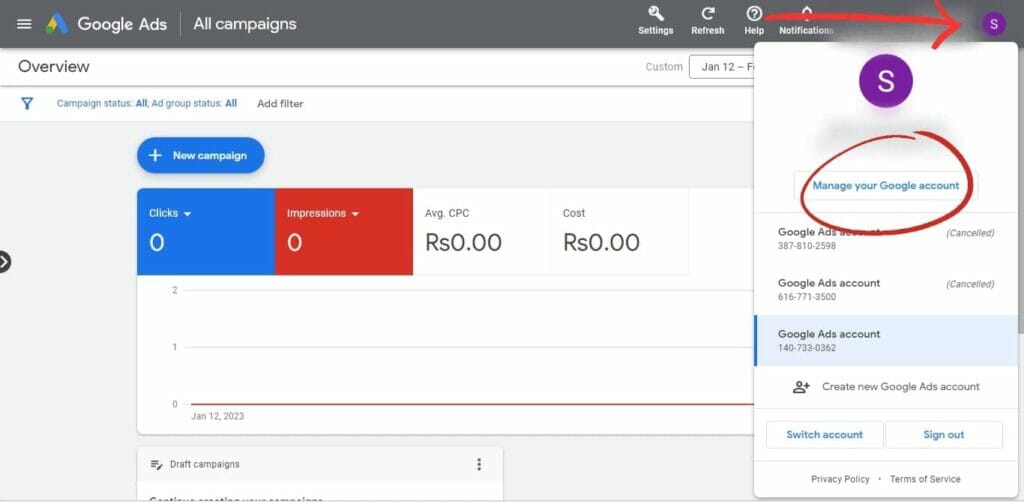
To begin, log into your Google Ads account at ads.google.com. Once logged in, locate the tools icon in the upper right corner of the dashboard. Click on the icon, which will reveal a dropdown menu, then select “Account settings” from the options provided. This section contains various account management features, including the cancellation option.
Navigating the Cancellation Process
- In “Account settings,” scroll down to the section labeled “Account status.”
- Click on “Cancel my account.” This will take you to the cancellation confirmation page.
- Review the information provided about the implications of account deletion, including the loss of access to your ads, data, and any remaining balance.
- To proceed, check the acknowledgment box confirming that you understand the consequences, then click the “Cancel Account” button.
Confirming Deletion and What to Expect
After clicking the cancellation button, a confirmation dialog will appear. This dialog serves as a final verification step. Review the information carefully before confirming your decision. Once confirmed, your account will be scheduled for deletion, and you will receive an email notification detailing the status of your account. Expect a grace period during which you may still access your account before final removal.
Common Misconceptions and Expert Insights
Many users believe that canceling their Google Ads account is reversible. However, once the account is deleted, all campaign data is permanently lost, and restoration is not possible. Additionally, some users may assume that they can simply stop their ads without formally canceling their account. This approach can lead to ongoing charges if any automated features are still active. Understanding the complete ramifications of account deletion is essential for making an informed decision.
Practical Application
To effectively delete your Google Ads account, ensure to follow these steps methodically. Before proceeding, download any necessary data or reports you wish to retain. If you manage multiple accounts, verify that you are deleting the correct one. After cancellation, monitor your email for confirmation and check your billing statements to ensure no further charges occur.
Common Mistakes to Avoid When Deleting Your Google Ads Account
Deleting a Google Ads account can be a straightforward process, but several common mistakes can lead to unintended consequences. Awareness of these pitfalls can help users avoid regret and ensure a more effective account management strategy.
Not Backing Up Important Data
One of the most critical errors is failing to back up valuable data prior to deletion. Google Ads accounts often contain historical data on campaigns, keywords, and performance metrics that can be highly beneficial for future reference. Once an account is deleted, this data is irretrievable. Users should export reports and save essential insights before proceeding with the deletion process.
Misunderstanding the Difference Between Pausing and Deleting
Many users confuse the options of pausing a campaign with permanently deleting an account. Pausing allows for temporary halting of ads without losing any data or settings. Deleting an account, however, is irreversible and can lead to the loss of all associated information. Before making a decision, consider whether a pause might suffice instead of a complete deletion.
Ignoring the Implications for Linked Accounts
Google Ads accounts are often linked to other Google services, such as Google Analytics or Google Merchant Center. Deleting the Ads account may impact these linked services and their data. For instance, if Google Analytics is tied to a Google Ads account, the loss of the Ads account could result in a gap in tracking ad performance data. Users should review all linked accounts and understand the ramifications before proceeding with deletion.
Failing to Consider Account Recovery Options
Another common mistake is not considering recovery options. Google allows users to reactivate a deleted account within a specific timeframe, typically 20 days. However, this grace period may not be sufficient for those who realize their mistake after the fact. It is advisable to assess the necessity of deletion thoroughly before initiating the process.
Overlooking Financial Implications
Users should also be mindful of the financial impacts of account deletion. Outstanding balances or pending payments may complicate the deletion process. Ensure that all financial obligations are settled to avoid potential issues. Additionally, consider whether any active promotions or credits will be forfeited upon deletion.
To avoid these common pitfalls when deleting a Google Ads account, follow these actionable steps:
- Back up all important data and reports.
- Determine whether pausing campaigns is a better option than deletion.
- Examine linked accounts to understand the implications of deletion.
- Consider the possibility of account recovery and its associated timeline.
- Ensure all financial obligations are met before proceeding.
By being aware of these potential mistakes and taking proactive measures, users can navigate the account deletion process more effectively and avoid future regrets related to their Google Ads account management.
Alternatives to Deleting Your Google Ads Account
Before opting to delete a Google Ads account, users should consider several alternatives that can help manage their advertising efforts effectively. These options can provide flexibility and cost control without the need for permanent account deletion.
Pausing Campaigns Instead of Deletion
One of the simplest alternatives is to pause existing campaigns. This option allows users to temporarily halt their advertising efforts without losing account data or settings. Pausing campaigns can be beneficial during seasonal lulls or when budgets are tight. Users can resume campaigns at any time, preserving historical performance data and settings.
- To pause a campaign, navigate to the “Campaigns” tab in Google Ads.
- Select the campaigns you want to pause.
- Click on the “Edit” button, then choose “Pause.”
Adjusting Account Settings to Reduce Costs
Modifying account settings can significantly reduce advertising costs while maintaining a presence on Google Ads. Users can adjust their daily budget, bid strategies, and targeting options to better align with their current marketing goals. For instance, switching to a more conservative bidding strategy, such as “Maximize Clicks,” can help control spending.
- Set a daily budget that reflects your current financial capacity.
- Utilize negative keywords to avoid irrelevant clicks and conserve budget.
- Limit targeting to specific geographic areas or demographics to optimize ad spend.
Using Account Management Tools for Better Control
Google Ads offers various management tools that can enhance control over campaigns and spending. Tools such as Google Ads Editor allow bulk changes, making it easier to manage multiple campaigns efficiently. Additionally, features like automated rules can help optimize performance by adjusting bids or budgets based on specific criteria.
- Explore Google Ads Editor for offline editing and bulk changes.
- Set automated rules to adjust bids based on performance metrics.
- Utilize the “Recommendations” tab for insights on improving campaign efficacy.
Nuance / Expert Layer
Many users mistakenly believe that deleting their Google Ads account will eliminate all associated costs. However, outstanding invoices or accrued charges may still require payment. Furthermore, deleting an account results in the permanent loss of campaign data, which can hinder future advertising efforts. Instead, consider comprehensive account management strategies that can provide flexibility and control while maintaining access to valuable historical data.
Practical Application
Users contemplating account deletion should first evaluate these alternatives. Begin by pausing campaigns that are underperforming or not currently needed. Next, adjust budget settings and explore Google Ads management tools to optimize spending. By implementing these strategies, users can maintain their Google Ads account and ensure that they are making the most of their advertising investment.
Frequently Asked Questions
What happens when you delete your Google Ads account?
Deleting your Google Ads account will remove all your campaigns, ads, and associated data. You will no longer be able to run ads or access account information.
How long does it take to delete a Google Ads account?
The deletion process for a Google Ads account is typically immediate once the request is confirmed. However, it may take some time for all associated data to be fully removed from Google’s systems.
Can you recover a deleted Google Ads account?
Once a Google Ads account is deleted, it cannot be recovered. Users should consider pausing their account if they may want to reactivate it in the future.
Are there any costs associated with deleting a Google Ads account?
There are no fees for deleting a Google Ads account. However, any outstanding balances must be settled before the account can be fully deleted.
What are the best practices for deleting a Google Ads account?
Before deleting, ensure that all campaigns are paused and data is backed up if needed. Review any linked services to avoid unintended consequences.
How to pause a Google Ads account instead of deleting it?
To pause a Google Ads account, navigate to the account settings and select the option to pause campaigns. This allows for temporary suspension without losing account data.
What information do you need before deleting your Google Ads account?
Before deleting, gather account details such as billing information and campaign performance data for future reference. Ensure all necessary backups are completed.
How does deleting a Google Ads account affect linked services?
Deleting a Google Ads account may impact any linked services, such as Google Analytics or Google Merchant Center, by removing access to campaign data. Review linked accounts to understand potential effects.
Final Thoughts on how to delete google ads account
Deleting a Google Ads account is a significant decision that carries implications for your advertising strategy and data management. Understanding the process and consequences is crucial to ensure that you make an informed choice that aligns with your business goals.
To proceed effectively, take the time to review your current advertising needs and assess whether account deletion is truly necessary; if so, follow the outlined steps meticulously to avoid common pitfalls.
This knowledge empowers businesses to manage their online presence strategically, ensuring that their marketing efforts are both effective and aligned with their overarching objectives.
Leave a Reply