
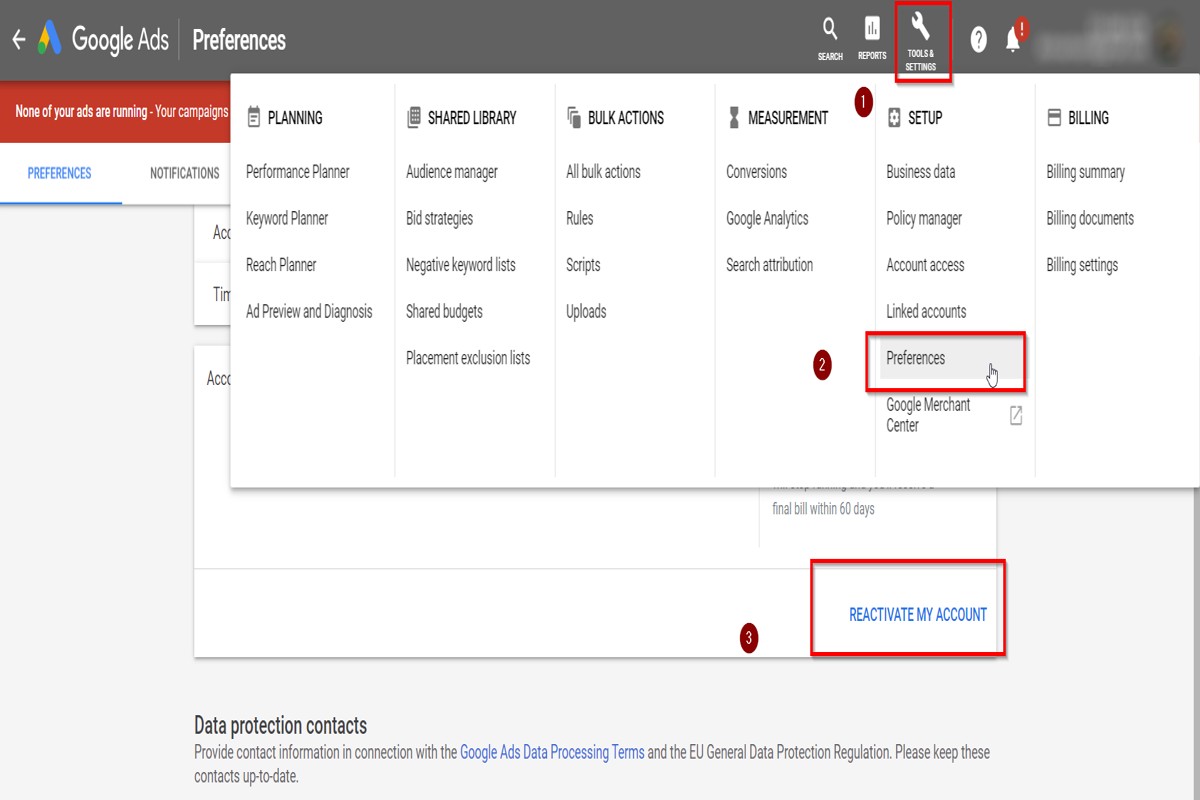
To deactivate Google Ads, sign in to your Google Ads account, click on the ‘Tools’ icon, select ‘Preferences’, and turn off your campaigns. This process allows users to manage their advertising efforts effectively, ensuring that no unwanted ads are running.
Understanding how to deactivate Google Ads is crucial for businesses and marketers who need to control their advertising budget and strategy. Failing to deactivate campaigns properly can lead to unnecessary expenses and ineffective ad placements, impacting overall marketing performance.
This guide provides a detailed, step-by-step approach to deactivating Google Ads, including how to manage campaigns, adjust preferences, and ensure that your advertising efforts align with your business goals.
What happens when you deactivate Google Ads?
When you deactivate Google Ads, your advertisements will stop appearing across Google’s advertising networks, leading to a complete loss of visibility for your brand or product. This action also halts any ongoing ad spend, meaning you will no longer incur costs for clicks or impressions. Additionally, any active campaigns will be paused, impacting your overall marketing strategy.
Deactivating Google Ads can have significant implications for your business. First, the immediate loss of visibility can result in decreased website traffic and potential sales, as your ads are no longer reaching your target audience. Furthermore, if your campaigns were generating valuable leads or conversions, those opportunities will cease until you reactivate your ads.
- Budget Impact: Deactivation stops any further expenditure, which can be beneficial if budget constraints are a concern. However, it also means you are not utilizing a potentially profitable channel.
- Data Loss: While your campaign data will be retained in your Google Ads account, you will miss out on collecting additional performance metrics during the deactivation period. This can hinder future campaign optimization.
- Long-Term Strategy: Depending on the length of deactivation, your brand may lose competitive positioning in search results, making it harder to regain traction when campaigns are reactivated.
Moreover, if you plan to reactivate Google Ads later, be aware that it may take time for your ads to gain traction again, as the system needs to reestablish performance metrics and relevance. This delay can affect your short-term marketing goals.
Expert Tip: Consider pausing your campaigns instead of deactivating them completely if you need a temporary break. This allows you to retain your settings and data while minimizing disruptions to your marketing efforts.
How do I temporarily pause a Google Ads campaign?
To temporarily pause a Google Ads campaign, navigate to the “Campaigns” tab in your Google Ads account. From there, select the campaign you wish to pause and click on the status toggle to change it from “Enabled” to “Paused.”
Follow these steps to effectively pause your Google Ads campaign:
- Log in to your Google Ads account and select the “Campaigns” tab from the left-hand menu.
- Locate the campaign you want to pause in the list of campaigns displayed.
- Click on the checkbox next to the campaign name to select it.
- Look for the status column, where you will see a pencil icon or a status toggle. Click on it.
- Select “Pause” from the dropdown menu that appears. The campaign status will change to “Paused.”
Pausing a campaign is a straightforward process, but it is essential to understand its implications. When a campaign is paused, ads will not run, and no costs will accrue. However, all historical data and settings will remain intact, allowing for easy reactivation later. This feature is particularly useful for seasonal campaigns or when budget adjustments are necessary.
Moreover, it is advisable to monitor the performance of paused campaigns. Historical performance data can provide insights into the best times to reactivate campaigns based on past results. Regularly reviewing paused campaigns ensures that marketing strategies remain aligned with business objectives.
Expert Tip: Consider setting reminders to review and reactivate paused campaigns to capitalize on potential opportunities without missing out on valuable traffic.
Is it cheaper to deactivate Google Ads or pause them?
Pausing Google Ads is generally cheaper than deactivating them, as pausing allows you to retain your existing settings and data without incurring costs. Deactivating campaigns, on the other hand, may lead to loss of historical performance data and could require extra effort to restart campaigns later.
When you pause a campaign, you stop the ad delivery temporarily, but your settings, targeting, and historical data remain intact. This means that when you resume the campaign, it can immediately start running without additional setup costs. Additionally, pausing can help manage your budget more effectively, allowing for a more controlled approach to spending during slower business periods.
In contrast, when you deactivate a campaign, it is completely turned off, and you lose all associated data. Reactivating the campaign may involve additional time to reconfigure settings and may lead to delays in campaign performance while the ads regain their positioning in the auction. Furthermore, deactivation can impact your Quality Score negatively if the campaign is down for an extended period, which could lead to higher costs when you reactivate it.
- Cost Management: Pausing maintains budget control, while deactivating may require new budget allocations.
- Data Retention: Pausing keeps historical data, crucial for optimizing future campaigns; deactivation results in data loss.
- Reactivation Effort: Restarting paused campaigns is simpler and faster than reactivating deactivated ones.
In essence, pausing Google Ads is the more cost-effective option for budget management and preserving campaign history. It allows for flexibility and easier adjustments when market conditions change.
Expert Tip: Regularly review your paused campaigns to ensure they align with your current marketing strategy, as reactivating outdated campaigns can lead to inefficiencies and unnecessary spending.
How long does it take to deactivate Google Ads?
Deactivating Google Ads typically takes less than 24 hours. However, the actual time may vary based on several factors including the number of active campaigns and the specific settings in your account.
The deactivation process usually begins immediately after you select to pause or delete your campaigns. Once completed, ads will stop appearing across Google’s network. However, it may take up to 24 hours for all ads to be fully removed from the system. During this time, there may be a brief period where ads continue to show due to caching or pre-scheduled placements.
Additionally, if your account is linked to other services or if there are billing issues, these factors can introduce delays. For instance, if you have ongoing promotional campaigns or automated rules set up, these could affect the timing of deactivation. It’s advisable to monitor your account closely after initiating the deactivation to ensure that all ads have been effectively removed.
Expert Tip: For a seamless deactivation process, ensure that all automated rules are disabled before initiating the deactivation. This step can help prevent any unexpected ad displays during the transition period.
What are the best practices for managing Google Ads?
Effective management of Google Ads requires a strategic approach to optimize performance and budget. Implementing best practices ensures campaigns are both efficient and profitable. Regular evaluation and adjustment are essential to achieving desired outcomes.
Begin by setting clear goals for each campaign. These goals should be specific, measurable, achievable, relevant, and time-bound (SMART). Knowing the objectives helps in selecting appropriate keywords, ad formats, and targeting options. Additionally, regularly reviewing campaign performance metrics allows for data-driven decisions.
- Conduct Thorough Keyword Research: Utilize tools like Google Keyword Planner to identify relevant keywords with high search volume and low competition. Regularly update keyword lists based on trends and seasonal changes.
- Optimize Ad Copy and Landing Pages: Write compelling ad copy that includes targeted keywords and clear calls-to-action. Ensure landing pages are relevant and provide a seamless user experience to improve conversion rates.
- Use A/B Testing: Experiment with different ad variations to determine which perform best. Test headlines, descriptions, and visuals to enhance engagement and click-through rates. Analyze results and implement the most effective elements.
- Monitor and Adjust Bids: Regularly review bidding strategies and adjust based on performance. Consider using automated bidding options to maximize conversions while staying within budget.
- Deactivate or Pause Underperforming Campaigns: Identify campaigns or ad groups that do not meet performance benchmarks. Pausing or deactivating them can redirect budget to more successful efforts, improving overall ROI.
Consider leveraging remarketing strategies to target users who have previously interacted with your ads or website. This can significantly increase conversion rates by keeping your brand top-of-mind.
Expert Tip: Utilize Google Ads Scripts to automate routine tasks, such as pausing underperforming ads or adjusting bids based on time of day. This can save time and enhance campaign efficiency.
Can I reactivate my Google Ads after deactivation?
Yes, it is possible to reactivate your Google Ads after deactivation. The process is straightforward, allowing you to resume your advertising campaigns without starting from scratch.
To reactivate your Google Ads account, log into your Google Ads dashboard. Navigate to the “Account” section, where you will find the option for “Account Status.” If your account is deactivated, you will see a prompt to reactivate it. Simply click the “Reactivate” button. Your ads will be reviewed to ensure compliance with Google’s policies, and if everything is in order, your campaigns can go live again within a few hours.
However, it’s essential to be aware of potential limitations. If your account was deactivated due to policy violations, you may need to address those issues before reactivation. Additionally, if your account has been inactive for an extended period, some settings or historical data might be lost, which could affect your campaign performance. As a practical example, a business that paused its ads for a few months to reassess its marketing strategy can quickly reactivate its account and continue from where it left off, provided there are no policy violations.
Expert Tip: Regularly monitor your Google Ads account and address any policy notifications promptly to ensure a smooth reactivation process if needed. Keeping your account in good standing can prevent complications during reactivation.
Why would someone want to deactivate Google Ads?
Individuals or businesses may choose to deactivate Google Ads for several reasons, including budget constraints and unsatisfactory campaign performance. Deactivating ads can help manage costs and refocus marketing strategies when ads are not delivering expected results.
One common reason for deactivation is budget limitations. Many advertisers operate within strict financial constraints, and if ad spend exceeds the planned budget without yielding sufficient returns, it becomes necessary to pause or deactivate campaigns. Additionally, fluctuating market conditions or unexpected expenses can compel advertisers to reassess their advertising investments.
Another significant factor is campaign performance. If an ad campaign is not meeting its key performance indicators (KPIs), such as click-through rates or conversion rates, advertisers may reconsider their approach. In some cases, the target audience may not align well with the ad content, leading to ineffective outreach. By deactivating underperforming ads, businesses can allocate resources to more effective strategies or campaigns.
Additional Considerations
Seasonality also plays a role in deciding whether to deactivate Google Ads. For instance, businesses may choose to pause ads during off-peak seasons to conserve budget and reactivate them when demand increases. Moreover, changes in business focus or product lines may lead to temporary deactivation as companies refine their marketing goals.
Ultimately, evaluating the reasons for deactivating Google Ads can provide insights into improving future advertising efforts. Regular monitoring and analysis of campaign metrics are essential to inform these decisions effectively.
Expert Tip: Conducting a thorough analysis of ad performance before deactivation can reveal valuable insights. Consider running A/B tests to identify which elements of your ads are underperforming, allowing for more strategic adjustments rather than complete deactivation.
Understanding the Impact of Deactivating Google Ads
This section analyzes the broader implications of deactivating Google Ads, focusing on effects on website traffic, brand visibility, and alternative strategies to maintain presence in the digital marketplace.

Effects on Website Traffic and Lead Generation
Deactivating Google Ads can lead to a significant decline in website traffic. Businesses that rely on paid advertising often experience a drop in visitor numbers immediately after discontinuation. This decrease can impact lead generation, as fewer visitors translate to fewer potential customers. For instance, companies may observe a reduction of 30-50% in website traffic within the first month of deactivation.
Long-Term Consequences for Brand Visibility
The long-term consequences of deactivating Google Ads extend beyond immediate traffic loss. Brands risk losing visibility in a competitive landscape where organic search results may not suffice. Without ads, a brand may fall behind competitors actively investing in paid search, leading to decreased brand recognition and awareness. Over time, this can weaken the brand’s market position, as potential customers may gravitate toward more visible alternatives.
Impact on Ad Performance Metrics
When Google Ads are deactivated, performance metrics such as click-through rates (CTR) and conversion rates are affected. These metrics reflect user engagement and the effectiveness of advertising strategies. A sudden stop in ad campaigns can lead to a drop in these metrics, making it challenging to gauge future ad performance accurately. Advertisers may also lose valuable historical data that can inform future campaigns.
- Click-Through Rate (CTR): Typically drops significantly, affecting overall campaign performance.
- Cost per Acquisition (CPA): Increases if users cannot be directed to the site via ads.
- Quality Score: May decline due to the lack of ad engagement, impacting future ad costs.
Alternatives to Deactivation That Maintain Visibility
Rather than fully deactivating Google Ads, businesses can explore several alternatives to maintain visibility without incurring high costs. Options include:
- Adjusting Budget: Reduce the ad spend rather than stopping it entirely. This allows for continued visibility while managing costs.
- Targeting Specific Audiences: Narrow down targeting parameters to focus on high-value segments, enhancing the effectiveness of existing ads.
- Using Remarketing Campaigns: Engage previous visitors through remarketing, which can maintain brand presence without extensive budgets.
Nuance / Expert Layer
A common misconception is that deactivating Google Ads has a uniform impact across all businesses. In reality, the effect varies significantly based on factors such as industry, existing organic search rankings, and alternative marketing strategies in place. For instance, businesses with strong organic visibility may experience a less dramatic decline in traffic. Conversely, companies relying heavily on paid traffic may face severe consequences. Additionally, some brands might benefit from a temporary hiatus if they are re-evaluating their marketing strategies or testing new channels.
Practical Application
To mitigate the risks associated with deactivating Google Ads, businesses should consider the following actions:
– Assess current traffic sources and identify reliance on paid ads.
– Explore budget adjustments and targeted campaigns to maintain visibility.
– Monitor performance metrics closely during and after any changes to ad strategies.
– Investigate alternative marketing channels, such as social media or content marketing, to complement or replace Google Ads.
Step-by-Step Guide to Managing Google Ads Campaigns
This section provides a comprehensive approach to effectively managing Google Ads campaigns, focusing on the processes for pausing and deactivating campaigns. Understanding these processes is essential for optimizing ad performance and budget allocation.
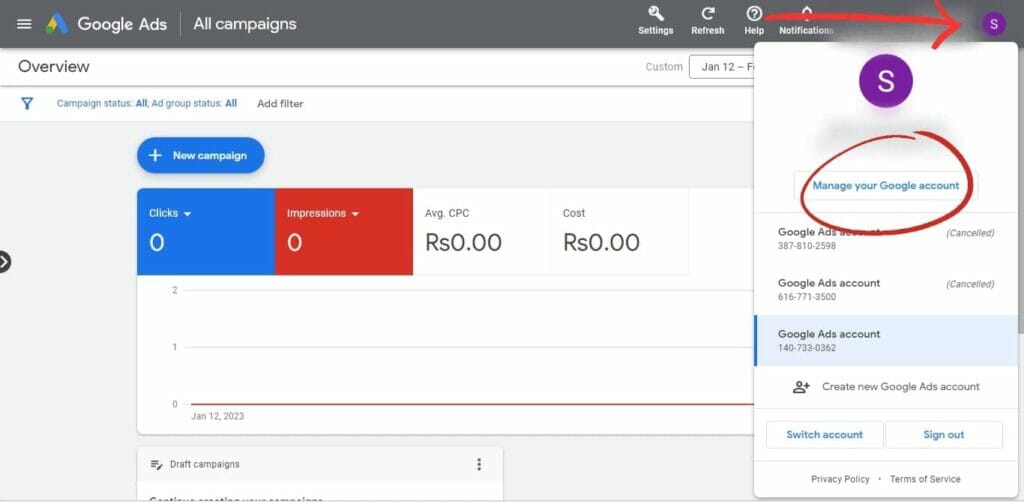
Pausing vs. Deactivating Campaigns
Pausing a campaign allows advertisers to temporarily stop ads from running while keeping the settings intact. This is useful for short-term adjustments or seasonal campaigns. In contrast, deactivating a campaign removes it from active status, making it unavailable for future use unless reactivated. When deactivating, all settings and performance history remain available for reference, but the campaign will not run or accrue costs.
Steps to Monitor Campaign Performance Before Deactivation
- Access Campaign Dashboard: Log into your Google Ads account and navigate to the Campaigns tab.
- Review Key Metrics: Analyze performance indicators such as click-through rate (CTR), conversion rate, and cost-per-click (CPC). Focus on trends over the last 30 days.
- Evaluate ROI: Calculate the return on investment for the campaign. If the ROI is negative or below expectations, consider pausing or deactivating.
- Gather Insights: Use Google Ads insights and reports to identify which ads or keywords underperform. This data informs whether to pause specific elements or the entire campaign.
Using Google Ads Tools for Better Management
Google Ads offers several tools to enhance campaign management. The Ad Preview and Diagnosis Tool allows users to see how ads appear in search results without affecting performance metrics. The Keyword Planner helps identify high-performing keywords, while the Performance Planner assists in forecasting campaign outcomes based on historical data.
Best Times to Consider Deactivation or Pausing
- Seasonality: Consider pausing campaigns during off-peak seasons when demand is low.
- Budget Constraints: If budget cuts occur, prioritize high-performing campaigns and pause those yielding low returns.
- Rebranding or Strategy Shifts: When launching a new brand strategy, deactivate campaigns that no longer align with business goals.
Many advertisers mistakenly believe that deactivating a campaign permanently erases its performance data. In reality, both paused and deactivated campaigns retain historical data, allowing for analysis and potential reactivation in the future. Additionally, while pausing is reversible and allows for quick adjustments, deactivation requires a more deliberate decision, often based on strategic shifts.
To effectively manage Google Ads campaigns, regularly assess performance metrics and utilize available tools for insights. When considering pausing or deactivating campaigns, evaluate seasonality, budget constraints, and alignment with business objectives. By implementing these practices, advertisers can optimize their ad spend and ensure campaigns are aligned with their marketing strategies.
Common Mistakes When Deactivating Google Ads
Deactivating Google Ads requires careful consideration to avoid pitfalls that can negatively impact advertising strategies. This section highlights common mistakes made during the deactivation process and offers guidance on how to prevent them.
Not Analyzing Campaign Performance Before Deactivation
Many advertisers deactivate campaigns without fully analyzing their performance. This oversight can lead to the loss of valuable insights regarding which ads were effective and which were not. Before proceeding with deactivation, conduct a thorough review of key performance metrics, such as click-through rates (CTR), conversion rates, and overall return on ad spend (ROAS). Understanding these factors helps in making informed decisions about future campaigns.
Failing to Communicate Changes with the Team
Effective communication is vital when making changes to advertising strategies. Failing to inform team members about the deactivation can lead to confusion, misaligned efforts, and potential disruptions in workflow. Ensure that all relevant stakeholders are updated about the decision to deactivate specific campaigns and the reasons behind it. This fosters a collaborative environment and maintains consistency in marketing efforts.
Ignoring the Impact on Remarketing Lists
Deactivating Google Ads can significantly affect remarketing lists that rely on previous campaign data. Advertisers often overlook this relationship, which can disrupt future remarketing efforts. Before deactivation, assess how the change will impact existing remarketing strategies. It may be necessary to adjust or create new lists to ensure continuity in targeting previous visitors and maintaining engagement.
Overlooking Budget Adjustments Post-Deactivation
After deactivating campaigns, advertisers frequently neglect to reallocate budgets appropriately. This can result in underfunded campaigns that are still active or wasted budget on campaigns that are no longer viable. Following deactivation, conduct a budget review to determine how funds can be optimally distributed among remaining campaigns. This ensures that advertising efforts remain effective and aligned with business goals.
Nuance / Expert Layer
One common misconception is that deactivating a campaign is a straightforward task that requires minimal forethought. However, it is essential to recognize that deactivation can have long-term repercussions on brand visibility and customer engagement. For instance, if a high-performing ad group is deactivated without proper analysis, it may create gaps in market presence, allowing competitors to fill the void. Advertisers should also consider seasonal trends and upcoming promotions that may warrant the continuation of certain campaigns, even if they seem underperforming at the moment.
Practical Application
- Before deactivating any campaign, analyze performance metrics to understand its impact.
- Communicate changes to all team members involved in advertising efforts.
- Evaluate and adjust remarketing lists to ensure continued engagement.
- Reassess and redistribute budgets to maximize the effectiveness of ongoing campaigns.
Reactivating Google Ads: What You Need to Know
This section details the steps and considerations for reactivating a deactivated Google Ads campaign. Understanding this process is essential for optimizing your advertising efforts and regaining momentum in your marketing strategy.
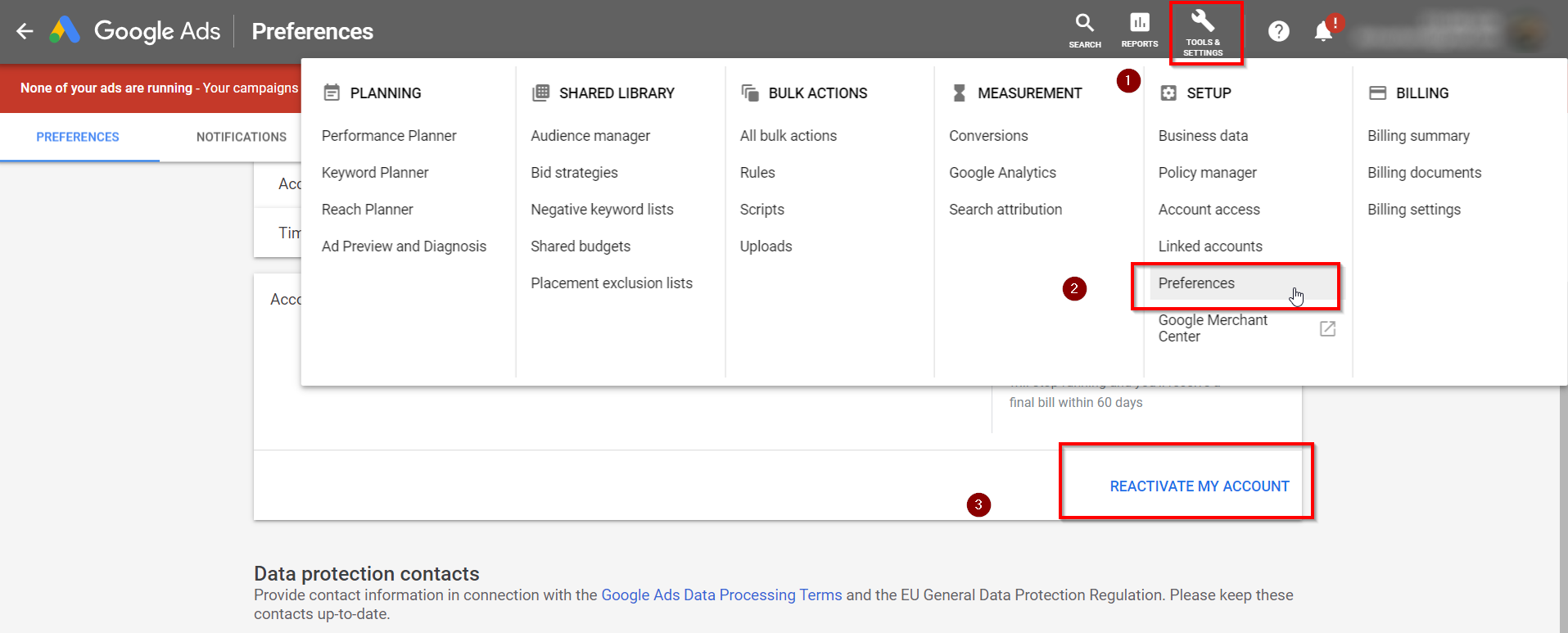
Steps to Reactivate a Deactivated Campaign
- Sign in to your Google Ads account.
- Navigate to the “Campaigns” tab on the left-hand menu.
- Locate the deactivated campaign you wish to reactivate.
- Click on the status dropdown menu next to the campaign name.
- Select “Enable” to reactivate the campaign.
Considerations for Budget and Targeting
Before reactivating your campaign, evaluate your existing budget and targeting settings. Ensure that your budget aligns with your current marketing goals. Consider the following:
- Budget Adjustments: Review your daily budget to ensure it meets your expected traffic and conversion goals.
- Targeting Settings: Reassess your targeting options, including demographics, locations, and devices, to maximize ad reach.
- Ad Schedule: Check your ad scheduling to align with peak engagement times for your audience.
Timing for Reactivation After a Pause
The timing for reactivating a campaign can significantly impact its performance. Generally, it is advisable to wait at least 24 hours after pausing a campaign before reactivating it. This allows Google’s algorithm to recalibrate and adapt to the changes. However, if the campaign has been paused for an extended period, consider running a test campaign first to gauge performance before full reactivation.
Potential Changes in Ad Performance After Reactivation
Reactivating a Google Ads campaign can result in fluctuations in performance metrics. Factors to consider include:
- Quality Score: A decline in Quality Score may occur if the ad has been inactive, affecting ad rank and cost-per-click.
- Ad Fatigue: If the same ad creatives are used after a long pause, they may not perform as well due to audience fatigue.
- Competition Changes: The competitive landscape may have shifted during the campaign’s inactivity, impacting bid strategies and positioning.
Many advertisers underestimate the potential impact of these changes. Testing new ad creatives or adjusting bidding strategies upon reactivation can help mitigate performance issues and improve engagement with your ads.
To effectively reactivate your Google Ads campaign, follow the outlined steps, reassess your budget and targeting, and be mindful of timing and performance changes. Make necessary adjustments based on current market conditions and consider running a test campaign to optimize results before fully reengaging your audience. This strategic approach will enhance the likelihood of a successful reactivation.
Frequently Asked Questions
What happens when you deactivate Google Ads?
When you deactivate Google Ads, your campaigns stop running, and your ads will no longer be displayed. You will not incur any additional charges during the deactivation period.
How do I temporarily pause a Google Ads campaign?
To temporarily pause a Google Ads campaign, navigate to the campaign in your account and toggle the status from “Enabled” to “Paused.” This action halts ad serving without deleting the campaign.
Is it cheaper to deactivate Google Ads or pause them?
Pausing Google Ads is generally cheaper because it allows for the resumption of campaigns without incurring new setup costs. Deactivating may lead to additional expenses if campaigns need to be recreated later.
How long does it take to deactivate Google Ads?
Deactivating Google Ads is typically instantaneous; changes take effect immediately. However, it may take a short time for all ads to stop appearing across platforms.
What are the best practices for managing Google Ads?
Best practices for managing Google Ads include regularly reviewing campaign performance, optimizing keywords, and adjusting bids based on data. Consistent monitoring ensures efficient budget use and maximizes ROI.
Can I reactivate my Google Ads after deactivation?
Yes, Google Ads can be reactivated after deactivation. Simply navigate to the campaign settings and toggle the status back to “Enabled” to resume ad serving.
Why would someone want to deactivate Google Ads?
Individuals may choose to deactivate Google Ads to reduce costs during low-demand periods or to reassess their advertising strategy. Additionally, it allows for time to analyze performance without incurring expenses.
Final Thoughts on How To Deactivate Google Ads
Deactivating Google Ads requires careful consideration of its potential effects on your marketing strategy and budget. Understanding the nuances between deactivation and temporary pausing is crucial, as the latter allows for flexibility without losing historical data or ad performance insights.
Now is the time to evaluate your current campaign goals and budgetary constraints; if you decide to deactivate, ensure you download all relevant performance reports to inform future strategies.
The ability to manage your Google Ads effectively is essential for optimizing your advertising spend and maximizing ROI in an ever-evolving digital landscape.
Leave a Reply