
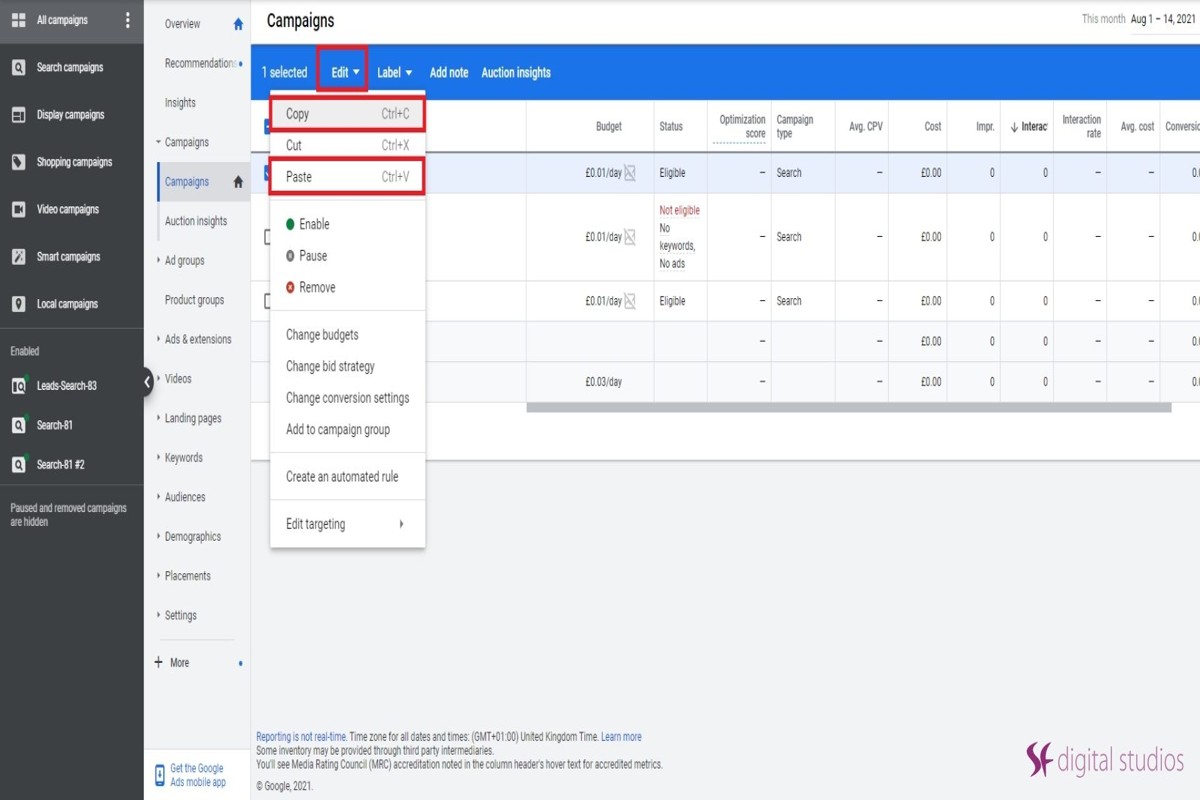
To copy a campaign in Google Ads, navigate to the campaign you want to duplicate, click on ‘Edit’, then select ‘Copy’. After that, click ‘Paste’ to create a new campaign with the same settings.
Understanding how to copy a campaign in Google Ads is essential for marketers aiming to optimize their advertising efforts. This process allows for efficient duplication of successful campaigns, saving time and reducing the risk of errors. Failing to execute this correctly can lead to wasted resources and ineffective ad strategies.
This guide details the precise steps to copy a campaign, including tips on adjusting settings for the new campaign and best practices for maintaining performance metrics.
What is the process to copy a campaign in Google Ads?
To copy a campaign in Google Ads, navigate to the campaign you wish to duplicate and use the copy function available in the interface. This process allows for efficient replication of settings, ads, and targeting options for new campaigns.
- Sign in to your Google Ads account. Access your account using the appropriate credentials to view your campaigns.
- Select the campaign to copy. From the left-hand menu, click on “Campaigns,” then locate and click on the specific campaign you want to duplicate.
- Click on the “Edit” dropdown menu. This option is typically located at the top of the campaign overview page, allowing you to access various editing features.
- Choose “Copy.” In the dropdown menu, select the “Copy” option to duplicate the selected campaign.
- Paste the copied campaign. Return to the “Edit” dropdown menu and select “Paste.” This action creates a new campaign with the same settings as the original.
- Modify the new campaign as needed. Review all elements of the newly created campaign, including budget, targeting, and ads, to ensure they align with your current strategic goals before launching.
Copying a campaign can save time, especially when managing multiple similar campaigns. However, be mindful that certain elements, such as campaign IDs and specific targeting settings, may require adjustments to avoid conflicts or inefficiencies.
Expert Tip: Regularly review copied campaigns to ensure they are optimized for current market conditions. Adjust bids and targeting based on performance data to maximize effectiveness.
Can I copy a campaign and make changes to it?
Yes, you can copy a campaign in Google Ads and make changes to it afterward. This feature allows users to duplicate existing campaigns and then modify various settings as needed. This flexibility is beneficial for testing variations and optimizing performance.
When copying a campaign, you have the option to retain or alter key settings, such as budget, targeting, and ad creatives. The primary difference lies in the degree of modification allowed after duplication. Below is a comparison of the options available when copying a campaign:
- Exact Copy: This option duplicates the campaign with all original settings intact. Any changes will need to be made manually after the copy is created.
- Selective Copy: This allows you to choose specific elements to copy, such as ads or ad groups, while leaving others, like budget or targeting, unchanged.
- Template Copy: You can create a template from an existing campaign, which can be reused for future campaigns. This option streamlines the process for similar campaigns.
Each of these options provides a different level of control over the duplicated campaign. An exact copy might be ideal for campaigns that require minimal adjustments, while a selective copy is better for campaigns needing significant customization. Using template copies can save time when launching similar campaigns regularly.
Expert Tip: Regularly test variations of your campaigns by copying them. This practice helps identify which elements perform best and can lead to improved overall campaign effectiveness.
Are there any costs associated with copying a campaign in Google Ads?
Copying a campaign in Google Ads incurs no additional costs. The action of duplicating a campaign is free; however, costs arise when the new campaign is activated and begins running.
When a copied campaign goes live, several factors will influence its overall cost. These include the bid strategy selected, the budget allocated, and the competitiveness of the targeted keywords. Each of these elements plays a crucial role in determining how much the campaign will ultimately cost.
- Bid Strategy: The choice of bid strategy, such as manual CPC or automated bidding, directly impacts how much you spend per click or impression.
- Daily Budget: Setting a higher daily budget will increase potential spend, while a lower budget will limit exposure and cost.
- Keyword Competition: Targeting highly competitive keywords typically results in higher costs per click due to increased demand.
Moreover, factors like ad scheduling, geographic targeting, and audience targeting can also affect the total expenditure. Adjustments to these parameters after copying the campaign can lead to fluctuations in cost as well.
Expert Tip: To manage costs effectively, consider running A/B tests on different bid strategies within the copied campaign to identify the most cost-efficient approach before fully scaling your budget.
How long does it take to copy a campaign in Google Ads?
Copying a campaign in Google Ads typically takes between 5 to 15 minutes, depending on the complexity and size of the campaign. The process is straightforward and can be completed quickly, especially for simpler campaigns with fewer settings and assets.
The time required can vary based on several factors. For instance, if the campaign includes numerous ad groups, keywords, and ads, it may take longer to replicate all settings accurately. Additionally, if specific adjustments are needed after copying, such as changing targeting options or budgets, this can extend the time required. Users should also consider the speed of their internet connection and the responsiveness of the Google Ads interface, as these technical factors can influence the overall experience.
Another aspect that may affect timing is the user’s familiarity with the Google Ads platform. Experienced users may navigate the process more quickly than those who are less familiar with campaign settings and options. It is also worth noting that while the copying process itself is relatively quick, reviewing and optimizing the new campaign post-copy can take additional time.
Expert Tip: For more efficient campaign management, consider using Google Ads Editor, a tool that allows for bulk changes and can streamline the copy process even further. This can save time, especially for advertisers managing multiple campaigns.
What are the best practices for copying campaigns in Google Ads?
To copy campaigns in Google Ads effectively, implement systematic strategies that enhance campaign performance and management. Best practices ensure that duplicated campaigns maintain effectiveness without unnecessary redundancy or inefficiencies. Following these guidelines can lead to better-targeted ads and improved return on investment.
First, always review and adjust settings post-duplication. Settings such as bid strategies, targeting options, and ad schedules may not transfer effectively and require fine-tuning. Ensure that the copied campaign aligns with current objectives and market conditions to maximize relevance and performance.
- Analyze Previous Performance: Before copying, evaluate the performance metrics of the original campaign. Identify successful elements, such as keywords and ad copy, and consider which should be retained or modified in the new campaign.
- Modify Ad Copy and Creative: Alter the ad copy and visuals to reflect any changes in messaging or promotions. Avoid duplicating creative assets verbatim, as fresh content can improve engagement and click-through rates.
- Update Targeting Parameters: Ensure the targeting settings, including demographics, locations, and devices, are appropriate for the new campaign’s goals. Tailoring these parameters can enhance audience reach and improve overall effectiveness.
- Implement Campaign Experiments: Utilize Google Ads’ experiments feature to test variations of the copied campaign. This approach allows for data-driven adjustments while minimizing risk and optimizing performance over time.
- Document Changes: Keep a record of the adjustments made during the copying process. This documentation can provide insights for future campaigns and help in analyzing the impact of changes on performance.
Expert insight: Regularly revisit and optimize copied campaigns based on performance data and market shifts. Continuous analysis ensures that campaigns remain relevant and effective in achieving desired outcomes.
How can I copy multiple campaigns at once in Google Ads?
You can copy multiple campaigns in Google Ads using the Google Ads Editor or the online interface for bulk actions. Both methods allow for efficient duplication of campaigns, saving time and ensuring consistency in settings and ads.
To copy campaigns using Google Ads Editor, follow these steps:
- Download and install Google Ads Editor if you haven’t already.
- Open your account in Google Ads Editor and select the campaigns you want to copy from the Campaigns tab.
- Right-click on the selected campaigns and choose “Copy” from the context menu.
- Right-click in the Campaigns tab again and select “Paste” to create duplicates of the selected campaigns.
- Edit the copied campaigns as needed, adjusting budgets, targeting, and other settings.
- Finally, click “Post” to upload the changes back to your Google Ads account.
Alternatively, if you prefer to use the online interface, you can select multiple campaigns from the Campaigns section, click on the “Edit” menu, and choose “Copy.” Then, navigate to where you want to paste them, click “Edit” again, and select “Paste.” This method is straightforward but less efficient for large numbers of campaigns compared to Google Ads Editor.
Using Scripts for Bulk Actions
For more advanced users, Google Ads scripts can automate the copying of multiple campaigns. Scripts can be customized to replicate campaigns based on specific criteria, allowing for greater flexibility and efficiency in campaign management.
To maximize efficiency, consider creating a template campaign that can be easily copied and modified. This approach reduces the need for repetitive adjustments and ensures that all campaigns maintain a consistent structure and settings.
What common mistakes should I avoid when copying campaigns in Google Ads?
Common mistakes when copying campaigns in Google Ads include failing to adjust targeting settings, neglecting to review ad extensions, and not updating budgets or bids. Each of these oversights can lead to ineffective ad performance and wasted budget.
For instance, consider a scenario where an advertiser duplicates a successful campaign but forgets to change the location targeting. The original campaign might have been set to target a specific geographic area while the copied campaign retains the broader settings. This can dilute the effectiveness of the ads as they may reach the wrong audience, resulting in lower click-through rates and conversions.
Another frequent error is overlooking ad extensions. When copying campaigns, extensions such as site links or callouts may not automatically transfer, or they may still reference the previous campaign’s offerings. If these are not updated, the ads may provide outdated information to potential customers, which could deter them from engaging. Additionally, not revising the budget or bid strategies can lead to overspending or underperforming ads, as the copied settings might not align with the new campaign’s goals.
Expert Tip: Always conduct a thorough review of all campaign settings after duplication. This includes ensuring that ad copy is relevant, keywords are optimized for the new target audience, and performance metrics are closely monitored to facilitate necessary adjustments.
Advanced Techniques for Effective Campaign Duplication
This section explores advanced methods and tools for efficiently duplicating campaigns in Google Ads. Mastery of these techniques ensures streamlined operations and optimal campaign management.

Utilizing Google Ads Editor for Bulk Actions
Google Ads Editor is a powerful desktop application that allows for bulk editing of campaigns. Users can download their account data, make multiple changes offline, and then upload the changes back to Google Ads. This tool is particularly useful for copying campaigns, as it supports mass duplication of ad groups, keywords, and settings.
- Download your account: Access the Google Ads Editor and download your account to get the latest campaign data.
- Select campaigns: Navigate to the campaigns tab, select the desired campaign(s), and use the ‘Duplicate’ feature.
- Modify as needed: Adjust campaign details such as budget, targeting, and ad copy directly within the editor.
- Upload changes: Once adjustments are complete, upload the changes to implement the new campaigns.
Leveraging Scripts for Automation
Google Ads scripts enable users to automate repetitive tasks, including campaign duplication. These JavaScript-based scripts can be customized to fit specific needs, allowing for greater efficiency. For example, a script can be written to duplicate a campaign, adjust its budget, or change targeting settings based on performance metrics.
- Access scripts: Navigate to the ‘Bulk actions’ section in Google Ads and select ‘Scripts’ to create a new script.
- Write or modify a script: Use existing templates or write a custom script that defines the duplication process.
- Test and run: Always test scripts in a controlled environment before full implementation to prevent unintended changes.
Integrating Third-Party Tools for Enhanced Management
Several third-party tools offer advanced features that enhance campaign management in Google Ads. Tools like Optmyzr, WordStream, and SEMrush provide functionalities for bulk editing, performance tracking, and campaign duplication with added analytics.
- Optmyzr: Offers a suite of tools for campaign management, including one-click duplication.
- WordStream: Provides automated suggestions and performance insights which can inform duplication strategies.
- SEMrush: Features tools for competitive analysis, enhancing the effectiveness of duplicated campaigns.
Understanding Campaign Structure for Better Duplication
A comprehensive understanding of campaign structure is essential for effective duplication. Each campaign consists of ad groups, keywords, and ads, each with its settings and performance metrics. When copying campaigns, maintaining the hierarchy and ensuring that all components are aligned is crucial for achieving desired outcomes.
- Identify key metrics: Analyze the performance of the original campaign to inform changes in the duplicated version.
- Maintain consistency: Ensure that all ad groups within the duplicated campaign reflect the original’s structure for coherence.
- Adjust targeting: Tailor audience targeting and geographic settings based on insights gained from the original campaign.
Advanced techniques for duplicating Google Ads campaigns involve leveraging tools like Google Ads Editor and automation scripts, along with understanding campaign structure. To implement these strategies, users should first familiarize themselves with the bulk actions in Google Ads Editor, explore available scripts for automation, consider third-party tools for enhanced management, and analyze existing campaign structures for optimal duplication. By doing so, marketers can significantly improve efficiency and campaign performance.
Real-World Applications of Campaign Duplication
This section explores practical scenarios where duplicating campaigns in Google Ads can enhance efficiency and resource management. Understanding these applications can lead to significant time savings and improved campaign performance.

Duplicating Seasonal Campaigns for Efficiency
Duplicating seasonal campaigns allows advertisers to streamline their efforts during peak times. For instance, a retail business can replicate its holiday campaign from the previous year, adjusting only the dates and any promotional offers. This method ensures that successful strategies are reused, saving time on campaign setup while maintaining brand consistency.
- Time Savings: Quickly replicate existing campaigns rather than starting from scratch.
- Consistency: Maintain messaging and branding across different seasonal efforts.
- Performance Data: Leverage historical data to refine targeting and bidding strategies.
Creating Variations for A/B Testing
Duplicating campaigns is essential for A/B testing, a crucial strategy for optimizing ad performance. By creating variations of a campaign, advertisers can test different ad copies, visuals, or targeting parameters to identify which performs best.
Consider the following elements to test:
- Ad Copy: Test different headlines or descriptions to find the most compelling message.
- Visual Elements: Experiment with various images or videos to see which generates higher engagement.
- Targeting Options: Adjust demographics or geographic targeting to refine audience reach.
Scaling Successful Campaigns Quickly
When a campaign demonstrates strong performance, duplicating it allows for rapid scaling. Advertisers can create multiple instances of a successful campaign to increase reach without losing the effectiveness of the original strategy. This approach is particularly beneficial for businesses entering new markets or expanding product lines.
- Geographic Expansion: Duplicate a successful campaign and target different regions.
- New Products: Adapt an existing campaign to promote newly launched products while leveraging proven strategies.
- Budget Allocation: Scale up budgets across duplicated campaigns to maximize reach and impact.
Adapting Campaigns for Different Target Audiences
Different segments of the target audience may respond better to tailored messaging. Duplicating campaigns allows advertisers to customize content based on audience preferences, demographics, or behaviors. This targeted approach can significantly enhance engagement and conversion rates.
Strategies to consider include:
- Demographic Targeting: Adjust campaigns to speak directly to different age groups or genders.
- Behavioral Targeting: Create campaigns based on user behavior, such as previous purchases or browsing history.
- Interest-Based Targeting: Duplicate campaigns to cater to specific interests or hobbies, enhancing relevance.
While duplicating campaigns offers numerous advantages, it is crucial to monitor performance closely. Regular analysis can uncover insights that should inform ongoing adjustments and optimizations. Advertisers must remain vigilant against the misconception that duplication guarantees success; continuous refinement is essential.
To implement these strategies effectively, begin by identifying a high-performing campaign. Duplicate it using the steps outlined in this article, then tailor it to meet specific objectives, whether for seasonal events, A/B testing, scaling, or audience adaptation. This structured approach will enhance both efficiency and campaign effectiveness.
Common Pitfalls When Copying Campaigns and How to Avoid Them
This section addresses frequent mistakes advertisers encounter when copying campaigns in Google Ads and provides actionable solutions to mitigate these issues. Recognizing and avoiding these pitfalls can significantly enhance campaign performance and efficiency.

Overlooking Ad Group Settings
When copying a campaign, many advertisers forget to review the settings of each ad group. Ad group settings encompass crucial elements such as ad rotation, targeting, and bidding strategies. Neglecting these can lead to suboptimal performance. Ensure that each ad group’s structure aligns with the specific goals of the new campaign.
Failing to Adjust Targeting Options
Targeting options, including geographic location, demographics, and device preferences, should be tailored for each campaign. Advertisers often copy the original targeting settings without considering changes in the target audience or market conditions. This oversight can limit reach and effectiveness. Always assess and modify targeting options to reflect current objectives and audience insights.
Neglecting Budget Considerations
Budget allocation is critical when copying campaigns. Many advertisers simply replicate the budget settings from the original campaign without evaluating the financial context of the new campaign. This can result in overspending or inadequate funding. Analyze historical performance metrics and adjust budgets to align with the expected outcomes of the new campaign.
Ignoring Performance Metrics from the Original Campaign
Performance metrics from the original campaign provide valuable insights that inform the copying process. However, advertisers frequently overlook these metrics, missing opportunities for optimization. Key performance indicators (KPIs) such as click-through rates (CTR), conversion rates, and cost-per-acquisition (CPA) should guide adjustments in the new campaign. Leverage these insights to enhance ad copy, targeting, and bidding strategies.
Nuance: Understanding the Campaign Ecosystem
Many articles on how to copy campaigns in Google Ads fail to emphasize the interconnectedness of campaign elements. Each component—ad groups, targeting, budget, and performance metrics—interacts within a broader ecosystem. For example, a high-performing ad group may require a different budget allocation or targeting strategy based on recent trends. Therefore, a holistic approach is essential. By viewing the campaign as an integrated system, advertisers can make more informed decisions that enhance overall effectiveness.
Practical Application
- Review and adjust ad group settings thoroughly before launching the copied campaign.
- Analyze and update targeting options based on the latest audience data.
- Reassess budget allocations using data from the original campaign’s performance metrics.
- Utilize insights from KPIs to inform adjustments in ad copy and bidding strategies.
Comparative Analysis: Copying Campaigns vs. Creating New Campaigns
This section provides an in-depth comparison between copying existing Google Ads campaigns and creating new ones from scratch. Understanding the benefits and drawbacks of each approach is essential for optimizing advertising strategies and improving overall performance.
Pros and Cons of Copying vs. Creating New Campaigns
- Copying Campaigns:
- Pros: Time-efficient, maintains existing settings, and leverages proven strategies.
- Cons: Risk of duplicating underperforming elements, potential for outdated targeting, and less opportunity for innovation.
- Creating New Campaigns:
- Pros: Fresh approach, tailored targeting, and the ability to implement new strategies.
- Cons: Time-consuming, requires extensive research, and may lead to initial performance fluctuations.
When to Choose One Method Over the Other
Selecting between copying a campaign and starting anew largely depends on the context of the advertising goals. Copying is advantageous when:
– The original campaign has performed well and requires minor adjustments.
– There is a need to quickly replicate a successful strategy across multiple regions or products.
Conversely, creating a new campaign is preferable when:
– The market landscape has changed significantly, necessitating a fresh targeting approach.
– New products or services are being introduced that require unique messaging and positioning.
Impact on Performance and Optimization
The choice between copying and creating can significantly affect campaign performance. Copying campaigns may lead to quicker deployment, allowing advertisers to capitalize on existing insights. However, if the copied campaign includes ineffective elements, it may hinder performance.
On the other hand, new campaigns offer the opportunity for optimization based on the latest data and trends. Implementing new keywords, ad copy, and targeting strategies can lead to improved engagement and conversion rates.
Case Studies of Successful Campaign Strategies
Several businesses have successfully navigated the decision between copying and creating campaigns:
– **E-commerce Brand A** copied its high-performing holiday campaign to target different geographic markets, resulting in a 25% increase in sales.
– **Tech Company B** launched a new product and opted for a fresh campaign, employing innovative video ads that led to a 15% higher engagement rate compared to previous campaigns.
Nuance and Expert Layer
A common misconception is that copying campaigns always leads to suboptimal results. In reality, copying can be strategic when adjustments are made to address specific market changes or to refine targeting. For instance, while retaining successful keywords, advertisers can adapt ad copy to resonate with local audiences. Additionally, blending elements from both approaches—copying successful aspects while introducing new creative elements—can yield superior results.
Practical Application
When considering how to copy a campaign in Google Ads, assess the performance data of existing campaigns. Determine if the elements that contributed to success can be effectively replicated. For new initiatives, conduct thorough market research to craft campaigns tailored to current trends and audience preferences. Utilize A/B testing to refine strategies, whether copying or creating, ensuring continuous improvement and optimization.
Frequently Asked Questions
What is the process to copy a campaign in Google Ads?
To copy a campaign in Google Ads, navigate to the campaign you wish to duplicate, select it, and click on the “Edit” dropdown. Then, choose “Copy” and “Paste” to create a duplicate campaign.
Can I copy a campaign and make changes to it?
Yes, after copying a campaign in Google Ads, you can make modifications to the new campaign as needed. This allows for adjustments in targeting, budget, and ad creatives.
Are there any costs associated with copying a campaign in Google Ads?
There are no direct costs associated with copying a campaign in Google Ads. However, any ads running in the duplicated campaign will incur standard advertising costs once activated.
How long does it take to copy a campaign in Google Ads?
The process of copying a campaign in Google Ads is nearly instantaneous. However, the time it takes to set up and configure the new campaign may vary based on the user’s adjustments.
What are the best practices for copying campaigns in Google Ads?
Best practices include reviewing the settings of the original campaign, ensuring targeting aligns with your goals, and adjusting budgets based on performance. Additionally, consider updating ad creatives to keep content fresh.
How can I copy multiple campaigns at once in Google Ads?
To copy multiple campaigns, select the campaigns you wish to duplicate from the campaign list, then use the “Edit” dropdown to choose “Copy” and “Paste.” This allows for efficient duplication of several campaigns simultaneously.
What common mistakes should I avoid when copying campaigns in Google Ads?
Avoid neglecting to review the settings and targeting of the copied campaign, as they may not align with your current objectives. Additionally, ensure that you update any ad creatives to avoid redundancy.
Final Thoughts on how to copy campaign in google ads
Mastering the process of copying campaigns in Google Ads is essential for optimizing advertising strategies and scaling efforts efficiently. By understanding the nuances of campaign duplication, including potential pitfalls and advanced techniques, marketers can enhance performance while saving valuable time and resources.
To maximize the effectiveness of your next campaign duplication, conduct a thorough analysis of existing campaigns before copying, ensuring that adjustments align with your current objectives and target audience.
Effective campaign duplication not only streamlines advertising processes but also empowers marketers to leverage data-driven insights for sustained growth and competitive advantage.
Leave a Reply