
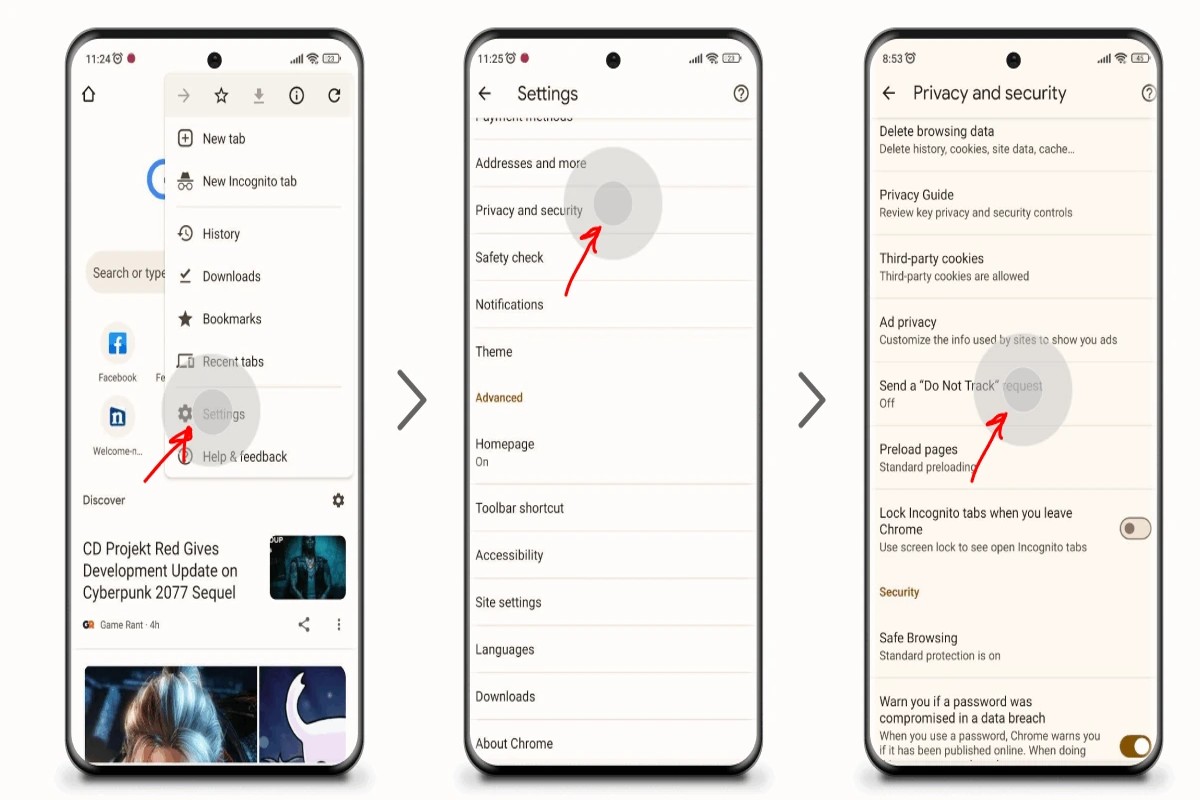
To block Temu ads on Google, adjust your ad settings by visiting Google Ads Settings and disabling personalized ads. Additionally, consider using ad blockers for a more comprehensive solution.
This topic is crucial for users who want to maintain control over their online experience and limit intrusive advertising. Failing to manage ad settings can lead to an overwhelming number of unwanted ads, impacting user satisfaction and privacy.
This guide provides step-by-step instructions on modifying Google ad settings, utilizing ad blockers, and understanding the implications of personalized advertising.
What are Temu ads on Google?
Temu ads on Google are promotional advertisements for the online marketplace Temu, which features a wide range of products at discounted prices. These ads appear in various formats, including sponsored listings in search results and display ads on websites that use Google’s advertising network.
Temu, a subsidiary of PDD Holdings, leverages targeted advertising to reach potential customers through Google’s extensive platform. The ads are designed to attract users looking for budget-friendly options across categories such as fashion, electronics, and home goods. They often feature eye-catching visuals and competitive pricing to entice clicks.
- Search Ads: These are text-based ads that appear at the top or bottom of Google search results when certain keywords are queried.
- Display Ads: These visually appealing ads show up on various websites within the Google Display Network, targeting users based on their browsing behavior.
- Shopping Ads: These ads showcase specific products from Temu, including images, prices, and product descriptions, and appear in Google Shopping search results.
Temu ads utilize sophisticated algorithms to reach users who have previously searched for similar products or demonstrated interest in comparable online shopping experiences. This targeted approach increases the likelihood of user engagement and conversions.
For users who prefer not to see these ads, various methods exist to block or limit their appearance on Google, including adjusting ad settings and using ad-blocking tools.
Expert Tip: Regularly updating your ad preferences on Google can enhance your experience by filtering out unwanted ads effectively, ensuring that your browsing aligns with your interests.
How can I stop seeing Temu ads on Google?
You can stop seeing Temu ads on Google by adjusting your ad settings and using browser tools. This involves managing your ad preferences and blocking specific advertisers. Follow the steps below to effectively reduce or eliminate these ads from your browsing experience.
- Adjust Ad Personalization Settings: Go to your Google Account and navigate to the “Data & personalization” section. Under “Ad personalization,” you can turn off ad personalization entirely, which will reduce targeted ads based on your interests.
- Block Specific Ads: When a Temu ad appears, click on the three dots in the corner of the ad. Select “Stop seeing this ad” or “Why this ad?” to provide feedback, which helps Google refine your ad experience.
- Use Ad Blockers: Install a reputable ad blocker extension in your web browser. These tools can effectively block most ads, including those from Temu, providing a cleaner browsing experience.
- Clear Browsing Data: Regularly clear your browser’s cache and cookies. This can reset ad tracking and may reduce the recurrence of Temu ads based on previous browsing history.
- Opt-out of Interest-Based Advertising: Visit the Digital Advertising Alliance (DAA) and the Network Advertising Initiative (NAI) websites to opt-out of interest-based advertising from participating companies, including Temu.
These methods will help you manage and limit the visibility of Temu ads across Google. Using a combination of these strategies can enhance your browsing experience and provide greater control over the advertisements you encounter.
Expert Tip: Regularly review your ad settings and preferences, as advertisers may update their targeting strategies. Staying proactive in managing your preferences will ensure you maintain a browsing experience free from unwanted ads.
Are there effective ad blockers for Temu ads?
Yes, there are several effective ad blockers that can specifically target Temu ads on Google. Options include browser extensions, built-in browser features, and privacy-focused browsers. Each option has unique capabilities and effectiveness in blocking unwanted advertisements.
Popular ad blockers such as uBlock Origin, AdBlock Plus, and Ghostery offer varying levels of customization and effectiveness. uBlock Origin is known for its minimal resource usage and extensive filter lists, making it particularly effective against a wide range of ads, including those from Temu. AdBlock Plus allows users to enable or disable specific types of ads, providing flexibility but potentially less thorough blocking. Meanwhile, Ghostery focuses on privacy and tracking prevention, which can also limit ad exposure but may not be as comprehensive in blocking all Temu ads.
- uBlock Origin: Lightweight, customizable, effective against a broad range of ads.
- AdBlock Plus: User-friendly, allows selective ad blocking, may miss some ads.
- Ghostery: Emphasizes privacy, blocks trackers and ads, might not block all Temu ads.
In addition to these browser extensions, users can consider browsers like Brave, which automatically blocks ads and trackers by default. This built-in feature can provide a seamless experience without the need for additional extensions. However, the effectiveness of each option can vary based on user settings and the specific ads being targeted.
When selecting an ad blocker, consider your browsing habits and the level of customization you desire. Some blockers may require regular updates to maintain effectiveness against new ad strategies employed by companies like Temu.
Expert Tip: Regularly review and update the filter lists in your ad blocker to ensure optimal performance against evolving ad tactics. This proactive approach enhances the effectiveness of your chosen ad blocker.
What is the cost of ad-blocking software?
The cost of ad-blocking software can range from free options to premium subscriptions priced between $20 and $50 per year. Free ad-blockers often rely on donations or offer limited features, while paid versions typically provide advanced functionalities and support.
Several factors influence the cost of ad-blocking software:
- Type of Software: Free ad-blockers usually have basic features, while paid versions offer additional tools like customizable filters and enhanced privacy settings.
- Device Compatibility: Some ad-blockers are designed for specific platforms, such as browsers or mobile devices, which can affect pricing. Cross-platform solutions may come at a premium.
- Subscription Model: Many ad-blockers operate on a subscription basis, charging annual fees. Others may require a one-time purchase or offer lifetime licenses, impacting overall costs.
Additionally, the reputation and effectiveness of the software can play a significant role in its pricing. Established brands with proven track records often command higher prices due to their reliability and customer support.
When considering ad-blocking software, users should evaluate their specific needs. A basic free option may suffice for casual users, while frequent internet shoppers or privacy-conscious individuals may benefit from investing in a premium service.
Expert Tip: Look for ad-blockers that offer trial periods. This allows users to assess the software’s effectiveness and features before committing to a purchase.
How long does it take to block Temu ads?
Blocking Temu ads on Google can take anywhere from a few minutes to a couple of days, depending on the methods employed and the specific settings in your Google account. If using browser extensions or ad blockers, the implementation is almost instantaneous. More complex adjustments, such as modifying account settings or utilizing Google’s ad personalization options, may require additional time for changes to take effect.
The time required to block Temu ads can vary based on several factors. First, the method selected plays a significant role. For instance, adding a browser extension specifically designed to block ads can be completed within minutes. Conversely, customizing Google Ads settings or opting out of personalized ads involves navigating through multiple menus, which may take longer to adjust and fully implement.
Another consideration is the effectiveness of the blocking measures. Some methods, such as using built-in ad preferences in your Google account, may take 24 to 48 hours to reflect changes in the types of ads displayed. Additionally, if you are using multiple devices, settings may need to be replicated across each one, potentially extending the overall time to achieve a complete block on Temu ads.
For users who encounter persistent ads despite making adjustments, clearing browser cache and cookies can help expedite the process. This action ensures that the browser recognizes the new settings effectively, further reducing the time needed to block unwanted ads.
Expert Tip: Regularly monitor your ad preferences and update your blocking techniques to stay ahead of any changes in advertising strategies employed by Temu or similar companies. This proactive approach can significantly enhance your ad-blocking effectiveness.
What are the best practices for blocking ads online?
Blocking ads online effectively requires a combination of tools and settings adjustments. Implementing specific strategies can significantly enhance your browsing experience by minimizing unwanted advertisements.
- Utilize Ad Blockers: Install reputable ad-blocking browser extensions such as AdBlock Plus or uBlock Origin. These tools automatically filter out ads from websites, including those from Temu, providing a cleaner browsing experience.
- Adjust Browser Settings: Most modern browsers have built-in settings to block pop-ups and ads. Navigate to your browser’s privacy or security settings to enable these features, which can help minimize intrusive advertising.
- Opt-Out of Personalized Ads: Use the ad settings on platforms like Google and Facebook to opt out of personalized advertising. This can reduce the frequency of targeted ads, including those from Temu, by limiting data collection.
- Clear Browser Data Regularly: Regularly clearing your browser’s cookies and cached data can reset ad targeting algorithms. This practice may help in reducing the number of ads displayed based on your previous browsing behavior.
- Consider Alternative Browsers: Some browsers, such as Brave or DuckDuckGo, are designed with built-in ad-blocking features. Switching to these options can enhance your ad-free experience right from the start.
Implementing these best practices can significantly reduce the number of ads encountered while browsing. Each method offers a unique approach, catering to different user preferences and technical capabilities.
The effectiveness of these strategies may vary based on individual browsing habits and the specific ads being targeted. Regularly reviewing and updating your ad-blocking tools and settings can further optimize your ad-free experience.
Utilizing a combination of these practices will not only block Temu ads on Google but also enhance overall online privacy and security.
Can I block Temu ads on mobile devices?
Yes, it is possible to block Temu ads on mobile devices through various methods. This can be done using browser settings, app settings, or third-party applications designed to manage ad preferences. The effectiveness of these methods may vary based on the device and the specific applications being used.
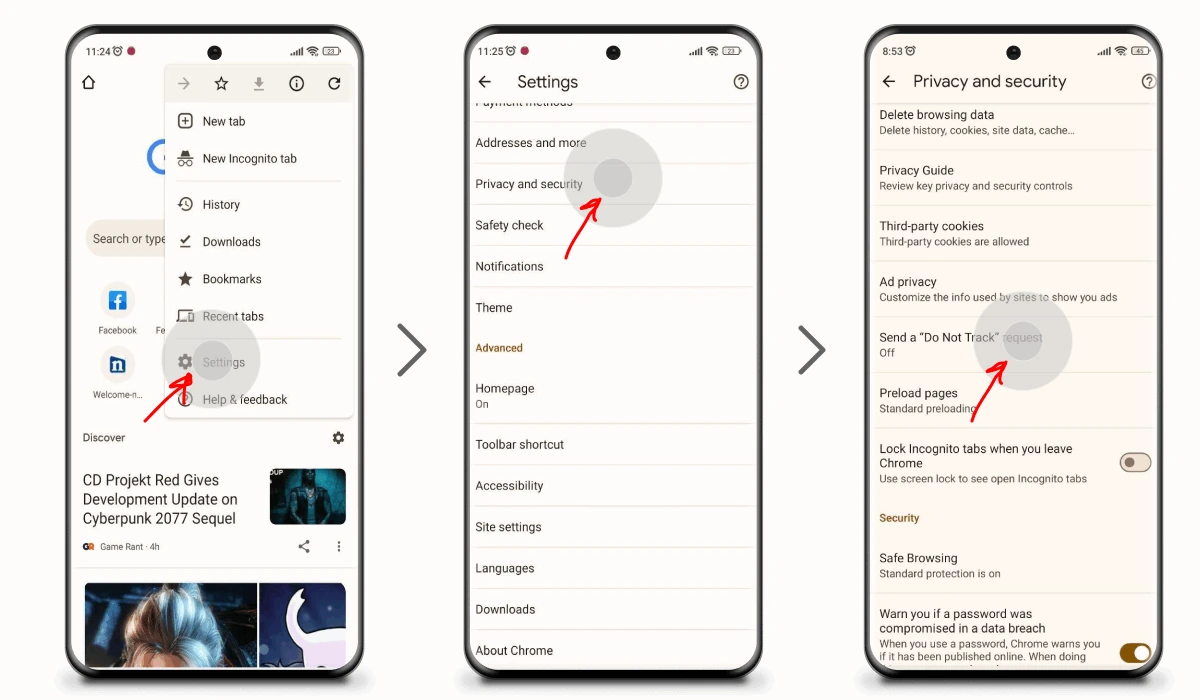
To begin, mobile browsers like Google Chrome and Safari allow users to adjust their ad preferences. In Chrome, navigate to Settings > Privacy and Security > Ad Privacy, where you can manage ad personalization and blocking options. Safari users can go to Settings > Safari > Block All Cookies to limit tracking and ad serving from various sources, including Temu. Additionally, some mobile apps may have their own ad settings that can be adjusted to limit or block specific ads.
- Adjust Google Account Ad Settings: Visit the Google Ads Settings page in your mobile browser. Here, you can turn off ad personalization, which will reduce targeted ads like those from Temu.
- Use a Mobile Ad Blocker: Install a reputable ad-blocking app from your device’s app store. These apps can effectively block ads across various applications and browsers.
- Modify App Notifications: If you encounter Temu ads within specific apps, check the app settings. Some apps allow you to manage ad preferences or opt out of targeted advertising.
Blocking ads on mobile devices may not guarantee complete removal of Temu ads, as some platforms might still display them based on other targeting methods. Regularly reviewing and adjusting your privacy settings can enhance your ad-blocking effectiveness over time.
Expert Tip: Consider using a VPN with ad-blocking capabilities to further limit exposure to targeted ads. This not only helps with ad blocking but also enhances privacy and security during online browsing.
Why am I still seeing Temu ads after blocking them?
Even after blocking Temu ads, users may still encounter them due to a variety of reasons. Common factors include the ad settings not being properly updated, the use of multiple devices, or the presence of cookies that store ad preferences.
For instance, consider a scenario where a user blocks Temu ads using their Google account settings on a desktop. If they later access the same account on a mobile device without ensuring that the settings are synchronized, they may still see Temu ads. Additionally, ads can be targeted based on cookies stored in the browser. If these cookies are not cleared or if the user has not opted out of personalized ads, Temu ads may continue to appear.
Another reason could be the existence of multiple ad networks. If Temu is utilizing different platforms to serve ads, blocking ads on Google may not affect ads appearing through other networks. Users should also consider that ad-blocking software may require updates or configuration changes to effectively block all instances of Temu advertisements.
Expert Tip: Regularly clear browser cookies and cache to ensure that old ad preferences do not interfere with your current settings. Additionally, review ad preferences across all devices to ensure consistent blocking of unwanted ads.
Advanced Techniques for Blocking Temu Ads
This section delves into advanced strategies for effectively blocking Temu ads on Google. By implementing these methods, users can gain greater control over their online advertising experience.
Utilizing Browser Extensions for Ad Blocking
Browser extensions offer one of the most effective methods for blocking unwanted ads, including Temu advertisements. Popular extensions like **AdBlock**, **uBlock Origin**, and **AdGuard** are designed to filter out intrusive ads and trackers.
- AdBlock: This extension allows users to customize filters, enabling the blocking of specific sites and ad types.
- uBlock Origin: Known for its lightweight performance, this tool offers advanced features for tech-savvy users, including dynamic filtering.
- AdGuard: In addition to ad blocking, AdGuard provides privacy protection features, safeguarding users from tracking.
Installing any of these extensions typically requires just a few clicks. Once installed, users can configure settings to tailor their ad-blocking experience further.
Configuring Privacy Settings in Your Google Account
Google provides various privacy settings that can limit personalized ad targeting. To enhance ad control, users can follow these steps:
- Log in to your Google account.
- Navigate to the “Data & Personalization” section.
- Under “Ad personalization,” toggle the setting to “Off.”
Disabling ad personalization prevents Google from using browsing history to tailor ads, which can reduce the visibility of Temu ads.
Employing DNS Services to Block Ad Domains
Using a DNS service specifically designed to block ad domains can significantly reduce unwanted ads. Services like **AdGuard DNS** and **NextDNS** provide customizable filtering options. To implement this:
- Select a DNS provider that offers ad-blocking features.
- Change your device’s DNS settings to the recommended server addresses.
- Test the configuration to ensure ads are being blocked.
These DNS services filter out requests to known ad-serving domains, effectively blocking many ads before they reach the browser.
The Role of Cookies and Tracking in Ad Visibility
Cookies and tracking technologies play a crucial role in how ads are served. Advertisers use cookies to collect data on user behavior, which informs targeted advertising. To mitigate this:
- Regularly clear cookies and cache from your browser settings.
- Utilize browsers with built-in tracking protection, such as **Brave** or **Firefox**.
- Consider using private browsing modes to limit cookie tracking while surfing.
Understanding and managing cookies can drastically reduce the frequency of personalized ads, including those from Temu.
Nuances and Expert Insights
Many users assume that installing a single ad blocker will suffice for comprehensive protection. However, multiple layers of defense are often necessary. For example, while a browser extension blocks many ads, it may not handle all tracking effectively. Combining browser extensions with DNS-level blocking and rigorous privacy settings creates a robust shield against Temu ads on Google. Furthermore, users should be aware that some websites may restrict access when ad blockers are detected, leading to a potential trade-off between ad-free browsing and site usability.
Practical Application
To effectively block Temu ads on Google, users should:
1. Install a reputable ad-blocking browser extension.
2. Configure Google account privacy settings to disable ad personalization.
3. Set up a DNS service that blocks ad domains.
4. Regularly manage cookies and utilize privacy-focused browsers.
Implementing these strategies collectively enhances control over ad visibility and improves the overall online experience.
Common Mistakes When Blocking Ads
Many users encounter challenges while trying to block Temu ads on Google due to common missteps. Recognizing these errors is essential for effective ad blocking and enhancing the online experience.
Ignoring Browser Settings
Browser settings play a crucial role in ad visibility. Users often overlook options that can enhance their ad-blocking efforts. For instance, enabling “Do Not Track” requests can help reduce targeted advertising. Additionally, adjusting privacy settings to restrict third-party cookies can limit data collection and subsequently decrease the number of personalized ads displayed.
Not Updating Ad-Blocking Software
Ad-blocking software requires regular updates to maintain efficacy. Developers frequently release updates that improve the software’s ability to identify and block new ad formats. Failing to update can result in a resurgence of unwanted ads, including Temu ads, as the software may not recognize new ad scripts. Ensure that auto-update features are enabled or check for updates manually at least once a month.
Neglecting Cache and Cookies
After making changes to ad-blocking settings or installing new software, it is vital to clear the browser’s cache and cookies. Cached files can hold onto outdated ad data, making it difficult for new settings to take effect. Regularly clearing these can enhance performance and ensure that ad-blocking measures are fully operational.
Underestimating Privacy-Focused Browsers
Many users stick to mainstream browsers without considering privacy-focused alternatives. Browsers like Brave or Firefox with enhanced tracking protection offer built-in ad-blocking features that can be more effective than traditional ad blockers. Switching to a privacy-centric browser can significantly reduce the number of ads encountered, including Temu ads.
Common Misconceptions
A prevalent misconception is that simply installing an ad blocker guarantees the complete elimination of ads. While ad blockers are effective, they are not infallible. Some ads, particularly those integrated into the content or those that use advanced tracking techniques, may still bypass blockers. Users should adopt a multi-faceted approach that includes adjusting browser settings and utilizing privacy-focused tools.
Actionable Steps to Improve Ad Blocking
- Review and adjust browser privacy settings to enhance ad-blocking capabilities.
- Regularly update ad-blocking software to keep pace with new ad formats.
- Clear cache and cookies frequently, especially after making changes to settings.
- Consider switching to a privacy-focused browser for improved ad blocking.
By addressing these common mistakes, users can significantly improve their ability to block Temu ads on Google and enjoy a more streamlined browsing experience. Implementing these strategies ensures that ad-blocking efforts are effective and up-to-date.
Real-World Applications: Success Stories
This section examines user experiences in successfully blocking Temu ads on Google, highlighting effective strategies and their impact on online browsing. Real-life case studies provide insight into practical applications and community-driven recommendations.

User Experiences with Different Ad Blockers
Users have reported diverse experiences with various ad blockers, each yielding different levels of success in blocking Temu ads. Popular choices include:
- uBlock Origin: Known for its lightweight performance and extensive filter lists, many users found it effective in eliminating Temu ads.
- AdBlock Plus: This widely-used blocker offers customizable settings, allowing users to tailor their ad-blocking experience specifically for Temu.
- Ghostery: In addition to blocking ads, Ghostery provides tracking protection, which users appreciated for enhancing privacy alongside ad blocking.
Before and After Scenarios Demonstrating Effectiveness
Many users reported significant improvements in their browsing experience after implementing ad blockers. For instance, one user noted that prior to using uBlock Origin, Temu ads cluttered their search results, leading to frustration and distraction. Post-installation, they experienced a cleaner interface, allowing for more efficient navigation and focus on desired content.
Another user shared that switching from AdBlock to uBlock Origin resulted in a noticeable decrease in unwanted ads overall, including Temu. They reported a 70% reduction in ad visibility, enhancing their online experience.
Community Recommendations and Shared Tips
The online community has been instrumental in sharing strategies for effectively blocking Temu ads. Some widely recommended tips include:
- Regularly update ad blocker settings to ensure the latest filters are applied.
- Utilize browser-specific features, such as Chrome’s built-in ad blocking, in conjunction with third-party extensions.
- Join forums or discussion groups focused on ad blocking to stay informed about new techniques and filter lists.
Impact of Ad Blocking on Overall Browsing Experience
The impact of blocking Temu ads extends beyond mere aesthetics. Users reported faster page loading times, as ads often contribute to slower performance. Moreover, many noted an enhanced focus on content without the distractions of intrusive advertisements. This improvement has led to increased satisfaction with online shopping and browsing activities.
Nuance / Expert Layer
While many users successfully block ads, some may encounter challenges. For instance, certain ad blockers can inadvertently block essential website functionalities, leading to a compromised browsing experience. Additionally, some users mistakenly believe that all ad blockers provide the same level of protection. In reality, effectiveness can vary significantly based on the ad blocker’s filter lists and user configurations. It’s crucial to regularly review and customize settings to ensure optimal performance.
Practical Application
To effectively block Temu ads on Google, users should take the following steps:
- Select an ad blocker that suits individual preferences, such as uBlock Origin or AdBlock Plus.
- Install the chosen ad blocker and configure its settings to maximize Temu ad filtering.
- Regularly update the ad blocker and participate in community forums for ongoing tips and support.
By following these steps, users can significantly enhance their online experience, free from the distractions of unwanted advertisements.
Comparative Analysis of Ad-Blocking Tools
This section evaluates various ad-blocking tools to determine their effectiveness in blocking Temu ads on Google. By examining features, user feedback, and compatibility, readers can make informed decisions about which tool best suits their needs.
Feature Comparison of Top Ad-Blocking Extensions
- AdBlock Plus: Offers customizable filters, whitelisting options, and social media integration. Supports a range of devices and browsers.
- uBlock Origin: Lightweight and efficient, uBlock Origin blocks ads using a variety of filter lists. It provides advanced customization options for tech-savvy users.
- Ghostery: Focuses on privacy alongside ad-blocking. It includes tracker blocking and performance optimization features, making it ideal for users concerned about data privacy.
- Privacy Badger: Automatically learns to block invisible trackers based on user interactions. It is particularly useful for those who prioritize online privacy.
User Reviews and Ratings for Each Tool
User feedback highlights differences in performance and user experience. According to user reviews:
- AdBlock Plus: Rated 4.5/5, praised for its user-friendly interface but criticized for occasional ad slip-through.
- uBlock Origin: Achieves a 4.8/5 rating, known for its efficiency and low resource usage.
- Ghostery: Holds a 4.3/5 rating, appreciated for privacy features but noted for a slightly steeper learning curve.
- Privacy Badger: Rated 4.6/5, commended for its automatic learning capabilities but may require manual adjustments for optimal performance.
Cost vs. Effectiveness Analysis
Most ad-blocking tools offer free versions, with some providing premium features for a fee:
- AdBlock Plus: Free with an optional donation model.
- uBlock Origin: Completely free with no premium version.
- Ghostery: Free basic version; premium version available at $4.99/month.
- Privacy Badger: Free, funded by the Electronic Frontier Foundation.
Effectiveness varies, with uBlock Origin often cited as the most efficient for blocking ads without significant browser slowdown. Ghostery’s premium features may justify its cost for users who prioritize privacy.
Compatibility with Different Browsers and Devices
Compatibility is crucial for users looking to block Temu ads on Google:
- AdBlock Plus: Available on Chrome, Firefox, Safari, and Opera.
- uBlock Origin: Works with Chrome, Firefox, Edge, and Opera.
- Ghostery: Compatible with Chrome, Firefox, Safari, and Opera.
- Privacy Badger: Works on Chrome, Firefox, and Opera, but not yet available for Safari.
Most tools support multiple platforms, but users should verify compatibility with their specific browser versions to ensure optimal performance.
While many articles may focus solely on the basic features of these ad-blockers, they often overlook the importance of user experience and ongoing support. Users should consider not only the immediate effectiveness but also the community and developer support behind each tool. Additionally, some users mistakenly believe that all ad-blockers function identically; however, performance can vary significantly based on the underlying technology and filter lists utilized by each tool.
To effectively block Temu ads on Google, users should evaluate their specific needs—whether prioritizing speed, privacy, or user-friendliness. Start by installing a free ad-blocking extension like uBlock Origin for its high efficiency. For those interested in enhanced privacy features, consider Ghostery or Privacy Badger. Assess performance over time and adjust settings as necessary to ensure a tailored browsing experience.
Frequently Asked Questions
What are Temu ads on Google?
Temu ads on Google are promotional advertisements for the online shopping platform Temu, which appear in search results and across various Google services. These ads aim to attract users to Temu’s offerings and drive traffic to the site.
How can I stop seeing Temu ads on Google?
To stop seeing Temu ads on Google, you can adjust your ad settings in your Google account to limit personalized ads. Additionally, you may clear your browsing history and cookies to reset ad targeting.
Are there effective ad blockers for Temu ads?
Yes, there are several effective ad blockers available that can help block Temu ads, such as uBlock Origin and AdBlock Plus. These browser extensions can filter out unwanted advertisements across various websites, including Google.
What is the cost of ad-blocking software?
Many ad-blocking software options are free to use, while some premium versions may charge a subscription fee for additional features. Users can choose based on their needs and the level of protection they desire.
How long does it take to block Temu ads?
Blocking Temu ads can be almost instantaneous once an ad blocker is installed and activated. However, it may take some time for the ad blocker to filter out ads on sites you visit regularly.
What are the best practices for blocking ads online?
Best practices for blocking ads include using reputable ad blockers, regularly updating your browser and extensions, and adjusting privacy settings. Additionally, avoiding suspicious websites can reduce exposure to unwanted ads.
Can I block Temu ads on mobile devices?
Yes, you can block Temu ads on mobile devices by using ad-blocking apps available for iOS and Android. Many browsers also offer built-in ad-blocking features that can help minimize ads while browsing.
Why am I still seeing Temu ads after blocking them?
You may still see Temu ads if the ad blocker is not properly configured or if you are using a site that bypasses ad blockers. Additionally, some ads may still appear due to non-traditional advertising methods that do not get filtered out.
Final Thoughts on how to block temu ads on google
Effectively blocking Temu ads on Google requires a multifaceted approach that combines the use of ad-blocking software, browser settings adjustments, and awareness of common pitfalls. By implementing these strategies, users can significantly enhance their online experience and regain control over the content they see.
To take immediate action, install a reputable ad-blocking extension such as uBlock Origin or AdGuard and customize its settings to filter out Temu ads specifically. This proactive step will provide a robust barrier against unwanted advertisements while browsing.
Understanding how to block Temu ads is essential in today’s digital landscape, where targeted advertising can intrude on personal preferences and browsing experiences.
Leave a Reply