
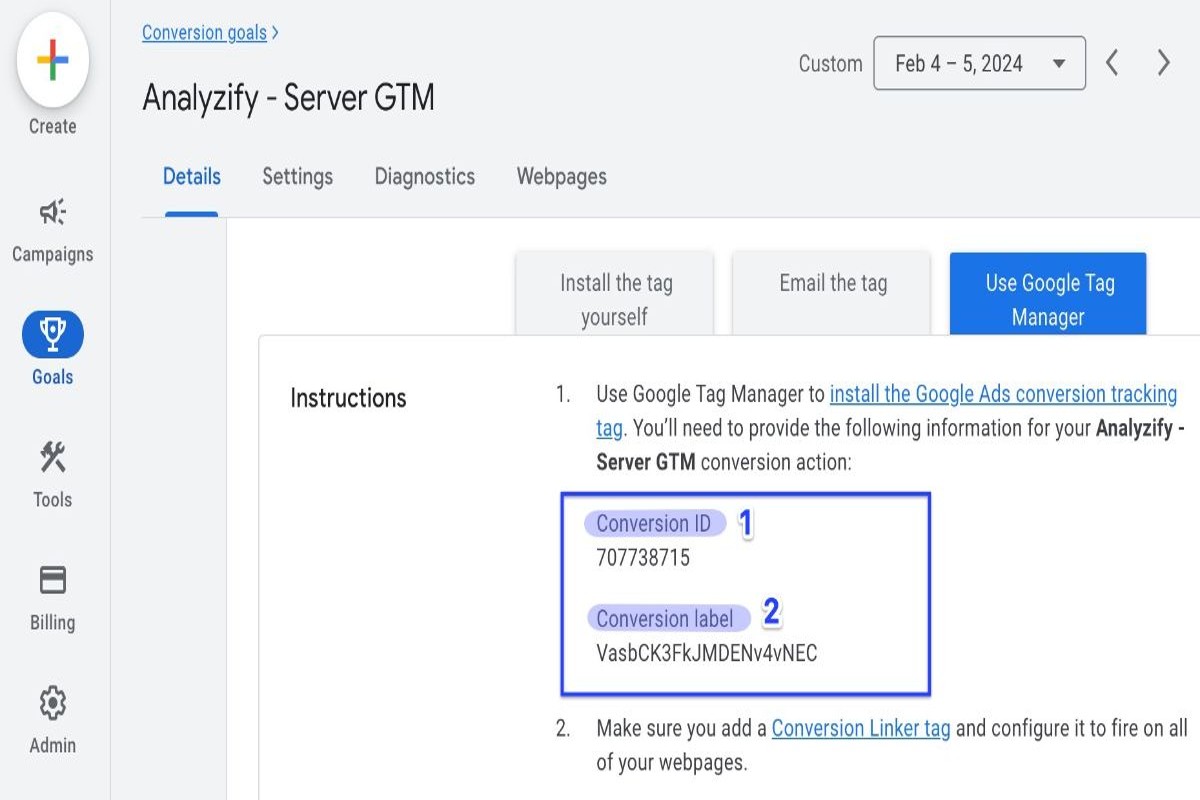
To find your conversion ID in Google Ads, navigate to the ‘Tools & Settings’ menu, select ‘Conversions’ under ‘Measurement’, and choose the relevant conversion action to view its ID.
Understanding where to find conversion ID in Google Ads is crucial for marketers aiming to track and optimize their advertising performance. Accurate conversion tracking informs decision-making, budget allocation, and campaign effectiveness, making it essential for businesses to grasp this aspect of their Google Ads strategy.
This guide will detail the step-by-step process for locating your conversion ID, explain its significance in tracking conversions, and outline best practices for using this information to enhance your advertising efforts.
What is a conversion ID in Google Ads?
A conversion ID in Google Ads is a unique identifier assigned to each conversion action you set up within your account. This ID allows Google Ads to track specific conversions, linking them to the appropriate advertising campaigns and their performance metrics. By using conversion IDs, marketers can analyze the effectiveness of their ads in generating desired actions from users, such as purchases or sign-ups.
Each conversion ID is associated with a specific conversion action, which is defined by the user. Conversion actions can include a variety of user interactions, such as form submissions, product purchases, or app installations. By utilizing these unique identifiers, advertisers can gain insights into which ads are driving valuable actions, enabling them to optimize their campaigns accordingly.
- Types of conversion actions: These may include website actions, app actions, phone calls, and imported conversions from other systems.
- Tracking scope: The conversion ID helps distinguish between different conversion actions, allowing for precise tracking and reporting.
- Data integration: Conversion IDs facilitate the integration of conversion data with Google Analytics and other platforms, enhancing overall data analysis.
Incorporating conversion IDs into Google Ads campaigns enhances tracking accuracy and provides actionable insights. This enables marketers to allocate resources more effectively and improve return on investment (ROI) through targeted strategies.
Expert Tip: Regularly review and update conversion actions associated with their respective IDs to ensure that tracking remains aligned with current business objectives, as this can significantly impact campaign performance analysis and optimization efforts.
How do I find my conversion ID in Google Ads?
To find your conversion ID in Google Ads, navigate to the “Tools & Settings” menu and select “Conversions” under the “Measurement” section. Each conversion action you set up will display its unique conversion ID alongside other details.
Follow these steps for a clear process:
- Log into your Google Ads account. Ensure you have the necessary permissions to access conversion settings.
- Click on the “Tools & Settings” icon, represented by a wrench in the upper right corner of the interface.
- In the dropdown menu, locate the “Measurement” section and select “Conversions.” This will direct you to a page listing all your conversion actions.
- Find the specific conversion action for which you want the ID. Click on its name to open the details.
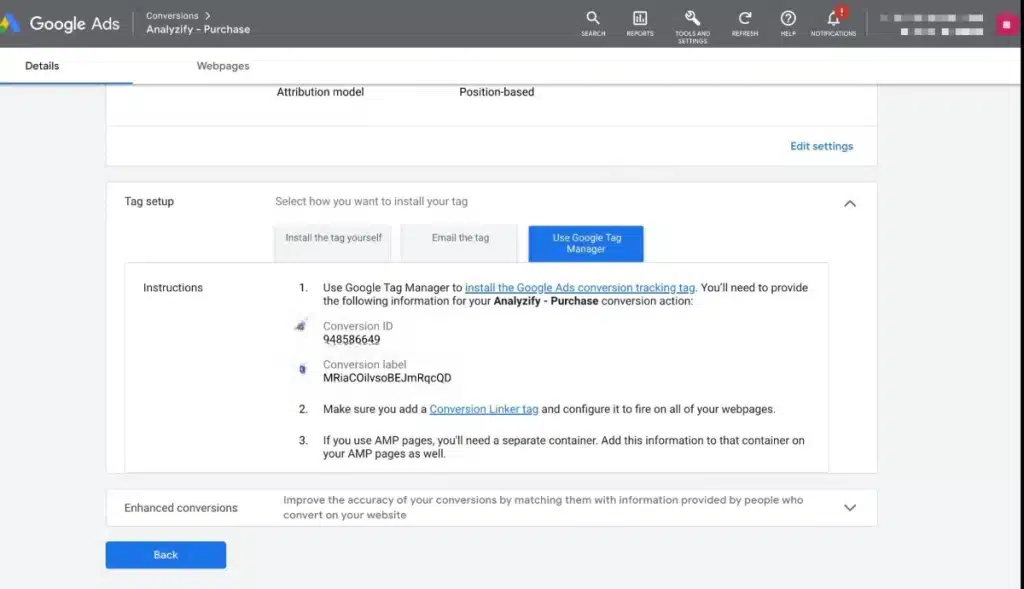
- In the conversion action details, you will see the “Conversion ID” listed prominently. This ID is essential for implementing tracking on your website or app.
Remember that each conversion action has its own unique ID, so ensure you are selecting the correct one for your tracking needs. If you have multiple accounts or conversion actions, double-check to avoid confusion.
To ensure accurate tracking, regularly review your conversion settings and IDs, especially after significant changes to your website or marketing strategies.
Expert Tip: When integrating your conversion ID with a third-party platform or analytics tool, verify that the implementation aligns with your tracking goals to avoid discrepancies in data reporting.
Why is the conversion ID important in Google Ads?
The conversion ID in Google Ads is essential for accurately tracking and measuring the effectiveness of advertising campaigns. It serves as a unique identifier for each conversion action, enabling advertisers to attribute conversions to specific ads and optimize their performance based on real data.
Understanding the significance of the conversion ID enhances campaign management and reporting. It allows businesses to analyze which ads drive the most valuable actions, such as purchases or sign-ups. This data-driven approach leads to more informed decisions about budget allocation and ad targeting, ultimately improving return on investment (ROI).
- Set Up Conversion Tracking Correctly: Ensure that conversion tracking is properly configured in Google Ads. This involves linking the conversion ID with your website’s tracking code for accurate data collection.
- Use Different Conversion IDs for Various Actions: If your business has multiple conversion types (e.g., newsletter sign-ups and product purchases), assign distinct conversion IDs to each. This granularity helps in analyzing specific performance metrics.
- Regularly Review Conversion Data: Monitor conversion data frequently to identify trends and performance fluctuations. This allows for timely adjustments to campaigns, ensuring that ads remain relevant and effective.
- Integrate with Google Analytics: Link Google Ads with Google Analytics to get a comprehensive view of user behavior post-click. The integration allows for deeper insights into how well ads convert and the overall customer journey.
- Optimize Based on Conversion Performance: Use the insights gained from conversion data to optimize ad copy, targeting, and bidding strategies. Focus on the ads and keywords that yield the highest conversion rates.
Leveraging the conversion ID effectively can significantly enhance campaign performance. Advertisers should continually experiment with different strategies based on conversion data to stay ahead of competition and maximize advertising efficacy.
Can I use multiple conversion IDs in Google Ads?
Yes, you can use multiple conversion IDs in Google Ads. This feature allows advertisers to track different types of conversions separately, which is beneficial for optimizing campaigns and measuring performance across various goals. Utilizing multiple conversion IDs can enhance reporting and provide deeper insights into user behavior.
When comparing the use of single versus multiple conversion IDs, the key distinction lies in tracking flexibility and data granularity. A single conversion ID typically measures one specific action, such as a purchase or sign-up, which simplifies analysis but limits insight into the performance of various conversion types. In contrast, multiple conversion IDs enable the tracking of diverse actions, such as downloads, form submissions, and purchases, allowing for a more comprehensive understanding of customer interactions.
- Single Conversion ID: Tracks one type of conversion, ideal for straightforward campaigns with clear goals.
- Multiple Conversion IDs: Facilitates tracking of various conversions, useful for complex campaigns with multiple objectives.
- Custom Conversion IDs: Tailored to specific business needs, allowing for unique conversion tracking aligned with distinct marketing strategies.
Implementing multiple conversion IDs can be particularly advantageous for businesses with layered marketing funnels or varied customer journeys. For example, an e-commerce site may want to track both purchases and newsletter sign-ups to evaluate the effectiveness of different marketing channels. This approach enables marketers to allocate budgets more efficiently and optimize campaigns based on detailed performance metrics.
Expert Tip: Regularly review and adjust your conversion tracking setup to ensure it aligns with evolving business goals and marketing strategies. This iterative process will help maximize the effectiveness of your campaigns and improve ROI.
How long does it take to see conversions after setting up the conversion ID?
Typically, it takes anywhere from a few hours to several days to start seeing conversions after setting up the conversion ID in Google Ads. The exact timing can vary based on several factors, including traffic volume, campaign settings, and user behavior.
Several factors influence how quickly conversions are recorded. First, the amount of traffic your ads receive plays a significant role. If your campaign is new or has limited reach, it may take longer to accumulate data. Conversely, campaigns with high traffic can generate conversions more rapidly. Additionally, the type of conversion action you are tracking can affect timing; for example, online purchases may occur more quickly than lead form submissions, which can have longer decision-making cycles.
Moreover, the settings within your Google Ads account can impact conversion tracking. Ensure that the conversion actions are correctly configured and that the conversion window is appropriately set. A longer conversion window allows for more time for users to complete the desired actions after clicking on an ad. Also, consider seasonal trends and market dynamics, as these can influence consumer behavior and the speed at which conversions occur.
Expert Tip: Regularly monitor your conversion reports in Google Ads to assess performance early. If conversions are not being recorded as expected, review your tracking setup and consider optimizing your campaigns for better visibility and engagement.
What are common mistakes to avoid when setting up conversion IDs?
Common mistakes during conversion ID setup include incorrect tracking code implementation, failure to link Google Ads and Google Analytics accounts, and neglecting to verify conversion actions. These errors can lead to inaccurate data collection and ineffective advertising strategies.
For example, consider a marketer who sets up a conversion ID for tracking online purchases but forgets to place the tracking code on the order confirmation page. As a result, no conversions are recorded, leading to misguided decisions based on incomplete data. To avoid this, ensure that the tracking code is correctly implemented on the designated pages and thoroughly test it using Google Tag Assistant or similar tools.
Another frequent mistake is failing to link the Google Ads account with Google Analytics. When these accounts are not connected, conversion data may not be shared between the platforms, causing discrepancies in reported performance. To prevent this, verify the linking process by navigating to the “Linked Accounts” section in Google Ads and confirming that the necessary permissions are granted.
Expert Tip: Regularly audit conversion tracking setups to ensure all codes are functioning correctly. Changes to website structure or updates to Google Ads can disrupt tracking, making periodic checks essential for maintaining accurate data collection.
How do conversion IDs affect tracking in Google Ads?
Conversion IDs are unique identifiers assigned to each conversion action in Google Ads, allowing advertisers to track specific user actions effectively. These IDs facilitate the association of conversions with corresponding ad interactions, enabling precise measurement of campaign performance. By using conversion IDs, marketers can analyze which ads lead to valuable actions, such as purchases or sign-ups.
The role of conversion IDs in tracking is multifaceted. They help in:
- Attribution: Conversion IDs enable advertisers to attribute conversions to the correct campaigns and keywords, providing insight into the effectiveness of various marketing strategies.
- Optimization: By analyzing data linked to specific conversion IDs, advertisers can refine their ad targeting and bidding strategies to maximize return on investment.
- Reporting: Conversion IDs are critical for generating accurate reports, as they ensure that all conversions are tracked consistently across different campaigns and platforms.
Moreover, the implementation of conversion IDs can impact the overall tracking mechanism in Google Ads. If conversion actions are not correctly tagged or if there are discrepancies in ID usage, it can lead to inaccurate data reporting. This, in turn, affects the ability to make informed decisions based on tracking metrics. Advertisers should regularly audit their conversion tracking setup to ensure that all conversion IDs are functioning correctly and aligned with their marketing objectives.
Expert Tip: To enhance tracking accuracy, consider implementing Google Tag Manager, which allows for easier management and deployment of conversion IDs across various digital assets, ensuring that every conversion is captured effectively.
Advanced Techniques for Tracking Conversions Using IDs
This section delves into sophisticated methods for leveraging conversion IDs in Google Ads, enhancing tracking capabilities and optimizing campaign performance. By employing these advanced techniques, marketers can gain deeper insights into user behavior and conversion efficiency.

Utilizing Conversion Tracking Templates for Dynamic IDs
Conversion tracking templates enable advertisers to dynamically insert conversion IDs into URLs. This approach allows for precise tracking of various conversion actions. To set up a tracking template:
- Navigate to the specific campaign or ad group in Google Ads.
- Select “Settings” and locate the “Tracking” section.
- Enter a tracking template using the appropriate ValueTrack parameters, such as {conv_id} for dynamic conversion IDs.
Dynamic IDs facilitate the tracking of multiple conversions across different ad formats or campaigns, providing a comprehensive view of conversion performance.
Integrating Conversion IDs with Google Analytics for Enhanced Insights
Integrating Google Ads conversion IDs with Google Analytics allows for a more nuanced analysis of user interactions. This integration can be achieved by:
- Linking Google Ads and Google Analytics accounts.
- Importing goals and transactions from Google Analytics into Google Ads.
- Utilizing the “Source/Medium” report in Google Analytics to analyze traffic sources along with conversion performance.
This integration enhances the understanding of customer journeys and enables advertisers to refine their strategies based on detailed behavioral data.
Setting Up Cross-Domain Tracking with Conversion IDs
For businesses operating across multiple domains, establishing cross-domain tracking is essential for accurate conversion tracking. This process involves:
- Configuring Google Analytics settings to recognize multiple domains.
- Updating the tracking code on all domains to include the same property ID.
- Employing the linker plugin to ensure conversion IDs are passed between domains.
Implementing cross-domain tracking allows for a cohesive view of user interactions, ensuring conversions are accurately attributed regardless of where they occur.
Analyzing Conversion Data to Drive Campaign Strategy
Effective analysis of conversion data is critical for optimizing campaign performance. Marketers should focus on the following aspects:
- Segmenting conversion data by device, location, and time to identify patterns.
- Utilizing attribution models to understand the impact of various touchpoints on conversions.
- Regularly reviewing conversion rates and adjusting bids and budgets accordingly.
By systematically analyzing conversion data, marketers can make informed decisions that enhance overall campaign effectiveness.
Many articles on conversion tracking overlook the complexities of integrating multiple data sources. A common misconception is that conversion IDs alone suffice for tracking. In reality, combining conversion IDs with comprehensive analytics and multi-domain tracking is necessary for a complete understanding of user behavior. Optimizing for edge cases, such as users switching devices or browsers, is essential for accurate conversion tracking.
To apply these advanced techniques, implement dynamic conversion tracking templates, link Google Ads with Google Analytics, set up cross-domain tracking, and continuously analyze conversion data. Establish a routine for reviewing these metrics to adapt strategies, ensuring campaigns are aligned with user behaviors and preferences.
Common Pitfalls in Conversion ID Implementation
Effective conversion tracking is fundamental for optimizing Google Ads campaigns. However, marketers often encounter common pitfalls that can lead to inaccurate data and ineffective ad strategies.
Incorrectly Configuring Conversion Actions
One of the most frequent errors is the improper configuration of conversion actions. This can occur due to misaligned settings such as choosing the wrong conversion type (e.g., purchases instead of sign-ups) or failing to set the correct conversion window. Such mistakes can significantly skew conversion data, leading to misguided marketing decisions.
Neglecting to Test Conversion Tracking Setups
After setting up conversion tracking, it is critical to test the implementation. Failing to verify that conversions are being tracked accurately can result in lost opportunities. Use Google Tag Assistant or similar tools to ensure that the conversion ID is firing correctly and that data is being sent to Google Ads as intended.
Failing to Update IDs After Changes in Campaign Structure
Campaign structures evolve over time, whether through new ad groups, changes in targeting, or the introduction of new products. If conversion actions are not updated to reflect these changes, the data will not accurately represent current performance. Always review and adjust conversion IDs when significant campaign modifications occur.
Misunderstanding the Reporting of Conversion Data
Marketers often misinterpret the data reported in Google Ads. For example, the distinction between “All conversions” and “Converted clicks” can lead to confusion. The former includes multiple actions by the same user, while the latter counts only the first interaction that led to a conversion. Understanding these metrics is essential for accurate performance analysis.
Additional Considerations
Beyond the basic pitfalls, there are nuanced challenges that can arise during the implementation of conversion IDs. For instance, cross-device tracking can complicate the accuracy of conversion reporting. Users may interact with ads on one device and convert on another, making it difficult to attribute conversions accurately. Additionally, privacy regulations and ad blockers can impact data collection, leading to underreporting of conversions.
Practical Application
- Regularly audit your conversion actions to ensure they are configured correctly.
- Utilize testing tools to confirm that your conversion tracking is functioning as intended.
- Update conversion IDs promptly following any campaign structure changes.
- Familiarize yourself with the different metrics in Google Ads reporting to avoid misinterpretation.
By addressing these common pitfalls, marketers can enhance the accuracy of their conversion tracking and ultimately improve campaign performance.
Real-World Applications of Conversion IDs in Campaigns
This section explores the practical implementations of conversion IDs in Google Ads campaigns, highlighting their impact on performance and optimization. Real-world case studies and expert insights illustrate the tangible benefits of utilizing conversion IDs effectively.
Case Study: E-Commerce Success with Conversion IDs
One notable example is a mid-sized e-commerce retailer that integrated conversion ID tracking into their Google Ads strategy. By setting up conversion actions linked to specific products, the retailer achieved a 30% increase in sales within three months. The conversion ID allowed them to attribute sales accurately to different campaigns, enabling precise adjustments. This data-driven approach facilitated optimized bidding strategies, resulting in a 25% reduction in cost per acquisition (CPA).
Comparative Analysis: Campaigns with vs. without Conversion ID Tracking
A comparative analysis of two similar campaigns reveals significant differences in performance metrics. Campaign A, which utilized conversion ID tracking, recorded a 40% higher conversion rate compared to Campaign B, which did not implement conversion IDs. Additionally, Campaign A saw a 20% increase in return on ad spend (ROAS), showcasing the importance of tracking conversions accurately. The absence of conversion ID tracking in Campaign B resulted in unclear attribution and less effective budget allocation.
Expert Insights on Optimizing Conversions with IDs
Industry experts emphasize the role of conversion IDs in refining marketing strategies. According to a digital marketing strategist, “Conversion IDs not only provide clarity on performance but also enable advertisers to test and iterate effectively.” This sentiment is echoed by PPC specialists who stress that detailed tracking allows for granular analysis of user behavior, leading to improved ad targeting and enhanced customer journeys.
Practical Tips for Troubleshooting Conversion ID Issues
- Verify Implementation: Ensure that conversion IDs are correctly implemented in the website’s code. Use Google Tag Assistant to check for errors.
- Regular Audits: Conduct regular audits of conversion actions to confirm they are tracking accurately and reflect current business goals.
- Consult Documentation: Refer to Google Ads documentation for troubleshooting common issues related to conversion ID tracking.
Marketers recommend maintaining open lines of communication with web developers to swiftly address any technical challenges that may arise with conversion IDs.
Common misconceptions include the belief that conversion IDs are only necessary for large businesses. In reality, even small campaigns benefit significantly from accurate conversion tracking. Additionally, some advertisers overlook the importance of tracking multiple conversion actions; however, this granularity provides insights into different aspects of customer behavior and campaign performance.
To leverage conversion IDs effectively, marketers should focus on the following actionable steps:
- Identify key actions you want to track, such as purchases, sign-ups, or downloads.
- Implement conversion IDs accurately in your Google Ads account and website.
- Regularly analyze conversion data to refine targeting and bidding strategies.
- Adjust campaigns based on insights derived from conversion tracking.
Utilizing conversion IDs is essential for optimizing Google Ads campaigns. By understanding their applications, marketers can significantly enhance their advertising effectiveness.
Frequently Asked Questions
What is a conversion ID in Google Ads?
A conversion ID in Google Ads is a unique identifier assigned to each conversion action you set up. It helps track and measure the effectiveness of your advertising campaigns.
How do I find my conversion ID in Google Ads?
To find your conversion ID, navigate to the “Tools & Settings” menu, select “Conversions,” and click on the specific conversion action. The conversion ID will be displayed in the conversion action settings.
Why is the conversion ID important in Google Ads?
The conversion ID is crucial for accurately tracking conversions associated with your ads. It enables Google Ads to link user interactions with your ads to specific conversion actions.
Can I use multiple conversion IDs in Google Ads?
Yes, you can use multiple conversion IDs in Google Ads to track different conversion actions. This allows for more granular analysis of your advertising performance.
How long does it take to see conversions after setting up the conversion ID?
Conversions can start appearing in your Google Ads reports within a few hours after setting up the conversion ID. However, it may take up to 24 hours for all data to be fully processed and displayed.
What are common mistakes to avoid when setting up conversion IDs?
Common mistakes include not properly configuring the conversion action settings or forgetting to implement the conversion tracking tag on your website. Ensuring accurate setup is essential for effective tracking.
How do conversion IDs affect tracking in Google Ads?
Conversion IDs directly impact tracking accuracy by linking specific user actions to your ads. They ensure that conversions are correctly attributed, allowing for better optimization of your campaigns.
Final Thoughts on where to find conversion id in google ads
Understanding where to find your conversion ID in Google Ads is crucial for precise tracking and optimization of marketing efforts. This unique identifier not only enables accurate measurement of campaign effectiveness but also facilitates advanced conversion tracking strategies.
To enhance your advertising performance, immediately access your Google Ads account and navigate to the ‘Conversions’ section to retrieve your conversion ID. Ensure that all relevant campaigns are aligned with these IDs for optimal tracking.
Mastering the use of conversion IDs is essential for any advertiser aiming to maximize ROI and drive successful outcomes in a competitive digital landscape.
Leave a Reply