
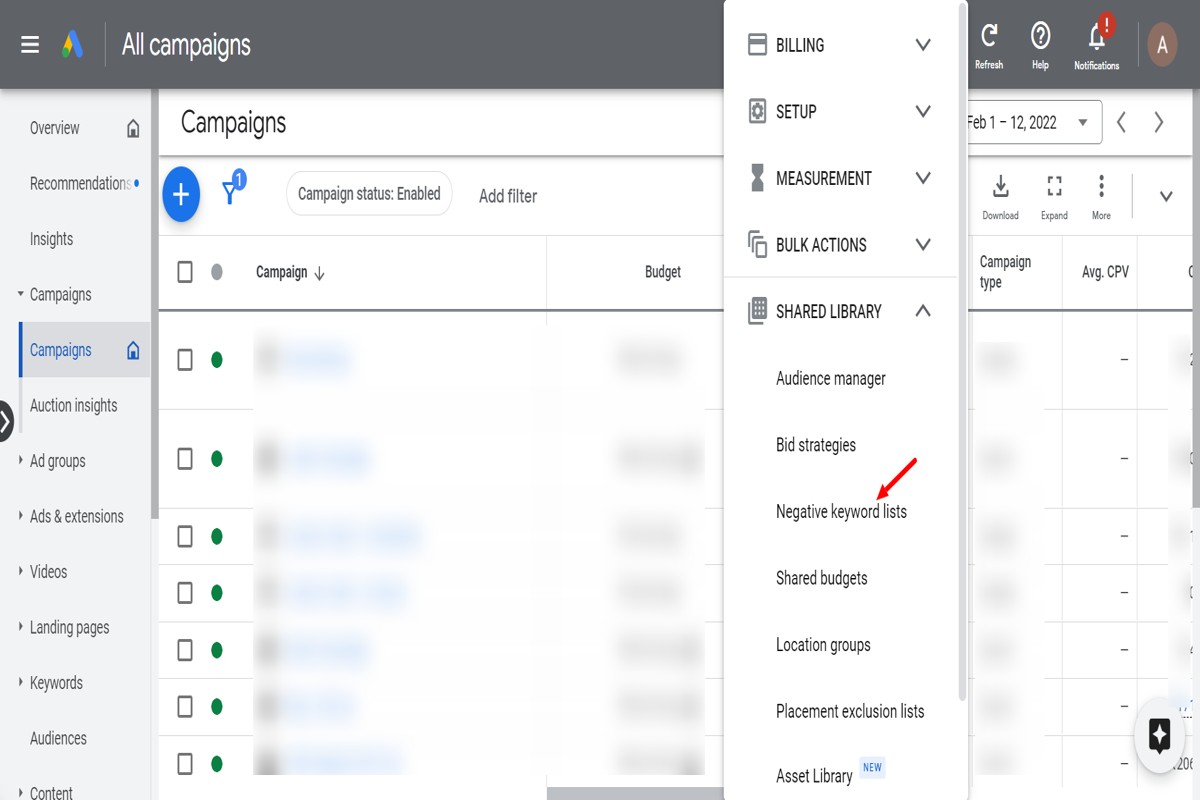
To add negative keywords in Google Ads, navigate to your campaign or ad group, click on ‘Keywords’, then select ‘Negative Keywords’. Here, you can add your desired negative keywords to prevent your ads from showing for those terms.
Understanding how to add negative keywords in Google Ads is crucial for optimizing advertising campaigns. Advertisers who fail to implement negative keywords risk wasting budget on irrelevant searches, which can lead to lower click-through rates and diminished return on investment.
This guide provides a step-by-step process for adding negative keywords, tips for selecting effective terms, and best practices to enhance your campaign’s performance.
What are negative keywords in Google Ads?
Negative keywords in Google Ads are specific terms or phrases that prevent ads from being triggered by certain search queries. By using negative keywords, advertisers can refine their targeting to exclude irrelevant traffic, ensuring that their ads only appear to users who are more likely to convert.
These keywords are crucial for optimizing ad campaigns, as they help reduce wasted ad spend and improve click-through rates (CTR). For example, if a business sells luxury watches, it may want to add “cheap” as a negative keyword to avoid attracting users looking for low-cost options. This approach allows advertisers to reach a more relevant audience, ultimately leading to better campaign performance.
- Types of Negative Keywords: Broad match, phrase match, and exact match.
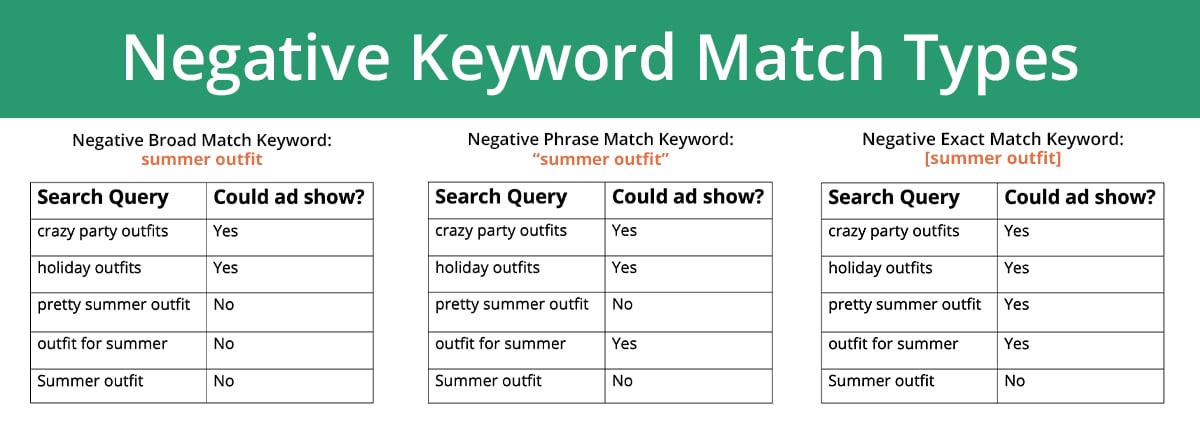
- Broad Match: Excludes any search that includes the negative keyword or its variations.
- Phrase Match: Excludes searches that contain the exact phrase of the negative keyword.
- Exact Match: Excludes searches that match the negative keyword exactly.
Incorporating negative keywords into an ad strategy not only enhances targeting accuracy but also improves the overall return on investment (ROI). Advertisers should regularly review their search term reports to identify new negative keywords based on user behavior and search trends. This proactive approach aids in maintaining campaign efficiency over time.
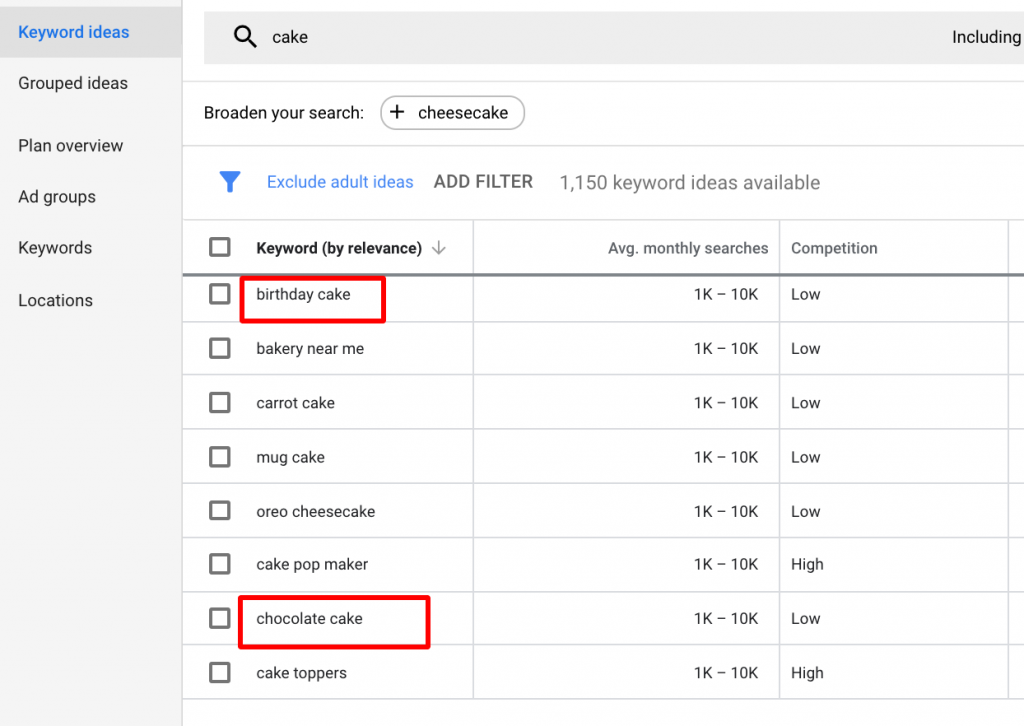
Expert Tip: Utilize tools like Google’s Keyword Planner to identify potential negative keywords based on relevant search queries in your industry. Implementing a well-researched list of negative keywords can significantly enhance the effectiveness of your Google Ads campaigns.
How do I find negative keywords for my Google Ads?
Identifying negative keywords for Google Ads involves using various tools and methods to prevent your ads from showing on irrelevant searches. This process is essential for optimizing your campaigns and improving return on investment (ROI). By targeting the right negative keywords, advertisers can enhance their ad relevance and reduce wasted spend.
Here are effective methods to find negative keywords:
- Review Search Terms Report: Access the Search Terms Report in Google Ads to see the actual queries that triggered your ads. Identify irrelevant terms and add them as negative keywords to refine your targeting.
- Use Keyword Research Tools: Leverage tools like Google Keyword Planner, SEMrush, or Ahrefs to discover keywords and search queries related to your products or services. Look for keywords with low relevance or high competition that can be excluded.
- Analyze Competitor Ads: Examine competitor ads and their keywords. Tools like SpyFu or AdBeat can provide insights into what competitors are bidding on. Identify terms that do not align with your offerings and consider them for exclusion.
- Consult Customer Feedback: Gather insights from customer inquiries and feedback. Common questions or misconceptions can highlight terms that should be excluded to avoid attracting irrelevant traffic.
- Utilize Negative Keyword Lists: Create and maintain lists of negative keywords that can be applied across multiple campaigns. This ensures consistency and saves time when managing various ad groups.
Regularly updating and refining your negative keyword strategy is crucial as market trends and consumer behavior change. Continuous monitoring will help maintain the effectiveness of your campaigns.
Expert Tip: Prioritize long-tail negative keywords, as they often capture specific phrases that indicate low intent. This can significantly reduce the chances of your ads being shown to users who are unlikely to convert.
What is the difference between negative keywords and regular keywords?
Negative keywords and regular keywords serve distinct purposes in Google Ads campaigns. Regular keywords trigger ad visibility based on user search queries, while negative keywords prevent ads from appearing for specific terms. This fundamental difference shapes how advertisers target their audience and manage their ad spend.
Regular keywords are terms that advertisers select to match with user searches. These keywords can be broad, phrase, or exact match types, allowing ads to show when users search for relevant terms. In contrast, negative keywords are terms that advertisers specify to exclude from triggering their ads. By using negative keywords, advertisers can filter out irrelevant traffic, ensuring that their ads are only displayed to a more targeted audience.
- Purpose: Regular keywords aim to attract potential customers, while negative keywords aim to filter out unwanted traffic.
- Impact on Ad Spend: Regular keywords can increase costs if irrelevant clicks occur, whereas negative keywords help reduce wasted ad spend by preventing ads from showing for certain queries.
- Ad Visibility: Regular keywords increase visibility in search results, while negative keywords decrease it for specific terms.
Practical implications of these differences are significant. For instance, without appropriate negative keywords, an ad might appear for searches that include unrelated terms, leading to poor click-through rates (CTR) and higher costs. Advertisers must continuously monitor and refine their keyword lists to optimize performance.
Implementing a robust strategy for negative keywords can lead to better targeting and improved ROI. Regularly updating negative keywords based on search term reports can help advertisers stay relevant and efficient in their campaigns.
Advertisers should prioritize researching potential negative keywords during campaign setup to avoid costly mistakes. Utilizing tools like the Google Ads Keyword Planner can help identify terms that may not be relevant to the target audience.
How much can using negative keywords save me in Google Ads?
Using negative keywords in Google Ads can save businesses anywhere from 10% to 30% on their advertising costs. The actual savings depend on various factors, including the industry, the competitiveness of keywords, and the effectiveness of the negative keyword strategy implemented.
Negative keywords prevent ads from being shown for irrelevant search queries. This not only reduces wasteful spending but also enhances ad relevance, leading to a higher click-through rate (CTR) and improved Quality Score. A well-structured negative keyword list can significantly impact campaign performance by filtering out non-converting traffic and directing budget towards more relevant searches.
- Keyword Competitiveness: Highly competitive keywords may result in higher costs per click (CPC), making it essential to block irrelevant terms that could drain the budget.
- Industry Type: Some industries experience more pronounced savings. For example, e-commerce businesses may see greater reductions in wasted spend compared to B2B services where targeting is often more precise.
- Ad Relevance: The more relevant the ads are to search queries, the lower the CPC tends to be. Negative keywords improve relevance, enhancing overall campaign efficiency.
Implementing a negative keyword strategy not only protects budget but also enhances the return on investment (ROI) from Google Ads campaigns. Regularly updating negative keyword lists based on performance data can lead to ongoing improvements and cost savings over time.
Expert Tip: Utilize tools like Google’s Keyword Planner and Search Terms Report to identify potential negative keywords effectively. Regular analysis of search query reports can help refine your strategy and further optimize your ad spend.
How long does it take to see results from adding negative keywords?
Typically, it takes anywhere from a few hours to a couple of weeks to observe measurable changes in ad performance after adding negative keywords. The exact timeframe can vary based on factors such as campaign size, existing keyword competition, and the frequency of ad impressions.
The immediate impact of negative keywords can often be seen within a few hours, especially if the keywords you added were previously leading to unwanted impressions or clicks. However, the full effect may take longer to manifest as ad algorithms adjust and optimize based on the new settings. For campaigns with a high volume of traffic, changes can be observed quickly; conversely, lower-traffic campaigns might take longer to show significant results.
Another influencing factor is the overall structure of the Google Ads account. Campaigns that have been finely tuned and monitored regularly may respond more swiftly to changes in negative keyword settings. Additionally, the competition for keywords plays a role; if competitors are bidding aggressively on similar terms, it may take longer for your ads to gain traction after implementing negative keywords. Seasonal trends and market fluctuations can also affect how quickly you see improvements in metrics such as click-through rates (CTR) and conversion rates.
Expert Tip: Regularly review your search term report to identify new opportunities for negative keywords. This proactive approach will help sustain optimal ad performance over time and mitigate wasted spend.
What are the best practices for adding negative keywords in Google Ads?
Incorporating negative keywords effectively can significantly improve the performance of Google Ads campaigns. Best practices include identifying irrelevant search terms, regularly updating the negative keyword list, and utilizing match types strategically. These steps help enhance targeting and reduce wasted ad spend.
- Conduct thorough keyword research: Use tools like Google Keyword Planner or search term reports to uncover irrelevant keywords that trigger your ads. This proactive approach helps identify terms that do not align with your campaign goals.
- Organize negative keywords into lists: Create separate lists based on themes or campaigns. This organization makes it easier to manage and apply them across different ad groups, ensuring that irrelevant searches are consistently filtered out.
- Utilize different match types: Implement broad, phrase, and exact match types for negative keywords. Broad match will exclude variations of the term, while phrase and exact match provide more precise control over what is excluded from your campaigns.
- Regularly review and update your list: Periodically analyze search term reports to identify new irrelevant queries and adjust your negative keyword list accordingly. This ongoing maintenance helps maintain campaign efficiency as market trends and user behavior evolve.
- Test and measure results: After adding negative keywords, monitor the performance metrics of your campaigns. Evaluate changes in click-through rates (CTR) and conversion rates to assess the impact of your negative keywords on overall campaign effectiveness.
Adding negative keywords is not a one-time task; it’s an ongoing process that requires vigilance and adaptability. Regular adjustments based on performance data can yield significant improvements in campaign ROI.
Expert insight: Leveraging the negative keyword tool in Google Ads can streamline the process of adding multiple keywords simultaneously, thereby saving time and ensuring a more comprehensive approach to negative keyword management.
Can I use negative keywords at the campaign level in Google Ads?
Yes, negative keywords can be applied at the campaign level in Google Ads. This allows advertisers to exclude specific search terms from triggering their ads, thus improving targeting and reducing wasted spend.
For example, consider a campaign for a high-end shoe retailer. If the retailer wants to avoid showing ads for budget shoes, they can add “cheap” and “discount” as negative keywords at the campaign level. This action ensures that whenever users search for terms like “cheap running shoes” or “discount sneakers,” the retailer’s ads will not appear, effectively narrowing the audience to those more likely to purchase premium products.
Additionally, applying negative keywords at the campaign level streamlines management for broader campaigns. If multiple ad groups within the same campaign focus on different shoe categories, using campaign-level negative keywords prevents irrelevant searches across all ad groups. However, it’s essential to regularly review and update these keywords to adapt to changing market dynamics and customer behavior.
Expert Tip: Utilize the Search Terms report to identify irrelevant queries that should be added as negative keywords. This report provides insights into actual searches triggering your ads, allowing for more precise optimizations.
Advanced Strategies for Using Negative Keywords
This section delves into sophisticated tactics for optimizing negative keyword usage in Google Ads. Implementing these strategies can significantly enhance the efficiency of ad campaigns and improve return on investment.
Leveraging Search Term Reports
Utilizing search term reports is crucial for refining negative keyword lists. These reports provide insights into actual queries that triggered your ads. Analyzing this data allows advertisers to identify irrelevant search terms that may be wasting budget. Regularly reviewing search term reports can uncover new negative keywords that should be added, ensuring that ad spend is focused on high-performing queries.
Using Broad Match Negative Keywords
Incorporating broad match negative keywords expands the exclusion criteria for your ads. This match type prevents ads from displaying for any search term that includes the negative keyword in any order. For instance, adding “free” as a broad match negative keyword will exclude searches containing “free,” “free trial,” or “free delivery.” This strategy helps filter out a wider range of irrelevant traffic and improves overall ad relevance.
Implementing Negative Keywords with Audience Targeting
Combining negative keywords with audience targeting can further refine the effectiveness of ad campaigns. By targeting specific audiences while simultaneously excluding certain keywords, advertisers can tailor their messaging to the right users. For example, if targeting a premium product, using negative keywords to exclude budget-oriented phrases can help ensure that the ad reaches an audience more likely to convert.
Regularly Updating Negative Keywords
Performance data should drive the regular updating of negative keywords. Trends in consumer behavior can shift, making previously relevant keywords obsolete. Establish a routine to review and adjust negative keywords—ideally on a monthly basis. This proactive approach helps maintain campaign health and efficiency over time.
Common misconceptions include the belief that once negative keywords are set, they do not need revisiting. In reality, continuous monitoring and adjustment are essential for maximizing ad performance.
Another misconception is that broad match negative keywords can lead to overly restrictive exclusions. While this can happen, careful selection and regular monitoring can mitigate such risks, ensuring that valuable traffic is not inadvertently blocked.
Practical Application
- Review search term reports weekly to identify new negative keywords.
- Incorporate broad match negative keywords to enhance exclusion criteria.
- Align negative keywords with audience targeting strategies for more refined ad delivery.
- Set a monthly schedule to analyze and update your negative keyword list based on performance data.
By applying these advanced strategies, advertisers can effectively enhance their Google Ads campaigns, ensuring that every dollar spent contributes to meaningful engagement and conversions.
Common Mistakes to Avoid When Adding Negative Keywords
Adding negative keywords to a Google Ads campaign can significantly enhance targeting efficiency. However, certain common mistakes can undermine the effectiveness of this strategy, leading to lost opportunities and wasted budget.
Overusing Broad Match Negative Keywords
Utilizing broad match negative keywords can result in excessive exclusions of potentially relevant traffic. When broad match negatives are applied, any search term that includes the negative keyword will be excluded, regardless of context. This can inadvertently eliminate valuable prospects that may be searching for related products or services. For instance, adding “free” as a broad match negative keyword could exclude users searching for “best free trial,” which might be a valuable lead.
Neglecting to Review and Update Negative Keyword Lists
Failing to regularly review and update negative keyword lists can lead to outdated exclusions that no longer align with current marketing objectives. Market dynamics change, as do customer behaviors. Regular audits ensure that the negative keyword strategy remains relevant and effective. A monthly review is advisable to identify any new terms that could be added or existing ones that should be removed.
Ignoring Keyword Context
When adding negative keywords, it is essential to consider the context of the keywords in relation to the overall campaign. For example, the term “cheap” may be perceived negatively in some contexts but can be a driving factor for budget-conscious consumers in others. Understanding the intent behind keywords helps prevent the exclusion of terms that could attract high-quality traffic.
Not Utilizing Account-Level Negative Keyword Lists
Many advertisers overlook the advantages of using negative keyword lists at the account level. Implementing negative keywords at this level ensures consistency across campaigns and ad groups, reducing the risk of excluding relevant traffic inadvertently. Instead of duplicating negative keywords across various campaigns, a centralized list can streamline management and enhance overall campaign performance.
Nuanced Considerations
One common misconception is that negative keywords are a one-time setup. In reality, they require ongoing management. The importance of context cannot be overstated; for example, a term that is a negative for one campaign could be a positive for another. Additionally, advertisers often neglect the potential of using phrase and exact match negative keywords, which can provide more control over exclusions while still allowing relevant variations of keywords to trigger ads.
Practical Application
To effectively manage negative keywords, implement the following steps:
- Conduct a thorough audit of current negative keywords and their performance.
- Identify new keywords to add based on recent search term reports.
- Utilize account-level negative keyword lists to enhance consistency.
- Regularly review the impact of negative keywords on campaign performance.
- Consider the context of keywords before adding them as negatives.
By avoiding these common mistakes and regularly refining the negative keyword strategy, advertisers can significantly improve the efficiency and effectiveness of their Google Ads campaigns.
Real-World Case Studies: Impact of Negative Keywords
This section presents case studies that illustrate the effectiveness of negative keywords in Google Ads. By examining real-world examples, businesses can understand the tangible benefits of implementing negative keyword strategies.

Retail Business: Reducing Irrelevant Clicks
A leading retail company specializing in outdoor gear faced challenges with high click-through rates but low conversion rates. The issue stemmed from irrelevant clicks generated by broad match keywords. After a thorough analysis, the company identified specific terms that attracted unqualified traffic, such as “cheap” and “free.” By adding these as negative keywords, the retailer reduced irrelevant clicks by 30% within two months. Consequently, the conversion rate improved by 25%, demonstrating how negative keywords can refine targeting and enhance ad performance.
Service Provider: Improving Lead Quality
A digital marketing agency aimed to attract high-quality leads but struggled with inquiries from clients seeking free services. The agency implemented negative keywords like “free,” “cheap,” and “low-cost” to filter out these unqualified leads. As a result, the agency experienced a 40% increase in qualified lead submissions. The conversion rate for new clients rose from 10% to 18%, highlighting how negative keywords can significantly enhance lead quality and overall campaign effectiveness.
Campaign Analysis: Before and After Implementation
Consider a software company that initially ran a campaign without negative keywords. The campaign attracted a wide audience but resulted in a high bounce rate and low engagement. After adding negative keywords related to irrelevant industries, such as “gaming” and “education,” the company saw a marked improvement. The bounce rate decreased from 70% to 40%, and engagement metrics, including time on site, increased by 50%. This analysis underscores the importance of regularly reviewing and optimizing keyword strategies.
Lessons from Failed Campaigns
Some campaigns fail to achieve their goals due to the absence of a negative keyword strategy. For instance, a home improvement contractor targeting “kitchen remodeling” attracted numerous clicks from users looking for DIY resources. Without implementing negative keywords, the contractor wasted budget on non-converting traffic, leading to a 60% average cost per acquisition (CPA). This case illustrates that failing to exclude irrelevant terms can result in wasted ad spend and suboptimal performance.
Many advertisers mistakenly believe that negative keywords limit exposure. In reality, they refine the audience by excluding unqualified traffic, ultimately enhancing overall ad performance. Properly implemented negative keyword strategies can lead to improved conversion rates and reduced costs.
To effectively use this information, businesses should conduct a comprehensive keyword audit. Identify terms that attract non-converting clicks and implement them as negative keywords. Regularly review campaign performance and adjust negative keywords as needed to ensure optimal targeting. By doing so, businesses can maximize their return on investment and enhance the effectiveness of their Google Ads campaigns.
Comparative Analysis: Negative Keywords vs. Other Targeting Strategies
This section delves into how negative keywords compare with other targeting strategies in Google Ads. A nuanced understanding of these comparisons can enhance campaign effectiveness and overall ad performance.
Negative Keywords vs. Keyword Match Types
Keyword match types dictate how closely a user’s search query must match a keyword for an ad to display. The three primary match types—broad match, phrase match, and exact match—allow varying degrees of flexibility. Negative keywords, however, serve a different purpose by excluding specific search terms, thus refining traffic. The effectiveness of negative keywords lies in their ability to prevent irrelevant clicks, ensuring that ads are shown only to the most relevant audience.
Effectiveness of Negative Keywords vs. Audience Targeting
Audience targeting focuses on demographics, interests, and behaviors to reach potential customers. While this strategy enhances the targeting precision, it may overlook specific, unwanted search queries. Negative keywords complement audience targeting by filtering out irrelevant traffic, thereby optimizing the budget and improving conversion rates. For instance, a campaign targeting fitness enthusiasts can use negative keywords to exclude terms related to “free” or “cheap,” thereby attracting a more qualified audience willing to pay for premium services.
The Role of Negative Keywords in a Comprehensive PPC Strategy
A comprehensive PPC strategy integrates various targeting methods, including keyword targeting, audience segmentation, and negative keywords. Negative keywords act as a safeguard against wasted ad spend and irrelevant clicks. By regularly updating the list of negative keywords, advertisers can adapt to changing market trends and user behavior, ensuring that the strategy remains effective over time. This adaptability is crucial for maintaining a competitive edge in the dynamic world of online advertising.
Impact on Ad Relevance and Quality Score
Ad relevance directly affects the Quality Score, a critical metric in Google Ads. A high Quality Score can lead to lower costs per click and better ad placements. By incorporating negative keywords, advertisers can enhance ad relevance by ensuring that ads are only displayed to users whose search queries align with the intended message. This relevance not only improves the Quality Score but also boosts click-through rates, ultimately leading to better campaign performance.
Common misconceptions about negative keywords include the belief that they only serve to limit reach. In reality, they are instrumental in refining audience targeting and improving overall ad effectiveness. Advertisers often overlook the strategic potential of negative keywords, focusing solely on positive keyword selection rather than the broader implications of excluding irrelevant terms.
To leverage negative keywords effectively, take the following steps:
- Conduct a thorough keyword analysis to identify potential negative keywords.
- Regularly review search term reports to find irrelevant queries that may trigger your ads.
- Update your negative keyword list consistently to adapt to changing search behaviors.
Incorporating negative keywords into your targeting strategy will enhance campaign efficiency, reduce wasted spend, and improve ad relevance. This strategic addition is essential for any successful Google Ads campaign.
Frequently Asked Questions
What are negative keywords in Google Ads?
Negative keywords in Google Ads are specific terms that prevent your ads from being shown for certain search queries. They help refine targeting by excluding irrelevant traffic, improving ad performance.
How do I find negative keywords for my Google Ads?
To find negative keywords, analyze your search term reports to identify irrelevant queries that triggered your ads. Additionally, use keyword research tools to uncover terms that may not align with your campaign goals.
What is the difference between negative keywords and regular keywords?
Regular keywords trigger your ads when users search for those terms, while negative keywords prevent your ads from appearing for specific queries. This distinction helps optimize your ad spend and improve overall campaign efficiency.
How much can using negative keywords save me in Google Ads?
Using negative keywords can significantly reduce wasted ad spend by filtering out irrelevant traffic. The exact savings vary by campaign, but many advertisers report improved ROI and lower cost-per-click rates.
How long does it take to see results from adding negative keywords?
Results from adding negative keywords can be seen within a few days to a couple of weeks, depending on your campaign’s traffic volume. Monitoring performance metrics will help gauge the effectiveness of your changes.
What are the best practices for adding negative keywords in Google Ads?
Best practices include regularly reviewing search term reports, grouping negative keywords by theme, and using broad match for general exclusions. Consistent updates will enhance targeting and optimize ad performance.
Can I use negative keywords at the campaign level in Google Ads?
Yes, negative keywords can be applied at both the campaign and ad group levels in Google Ads. This flexibility allows for more precise control over which queries trigger your ads across different segments of your campaigns.
Final Thoughts on how to add negative keywords in google ads
Incorporating negative keywords into your Google Ads strategy is not merely a best practice; it is essential for optimizing campaign performance and maximizing ROI. By effectively filtering out irrelevant traffic, advertisers can focus their budgets on high-intent searches, resulting in more conversions and lower costs.
To implement this, conduct a thorough analysis of your existing campaigns and identify common search queries that do not align with your target audience. Create a comprehensive list of negative keywords and integrate them into your campaigns immediately to see an impact on your ad efficiency.
Mastering negative keywords is critical for any serious advertiser aiming to stay competitive in an increasingly complex digital landscape.
Leave a Reply