
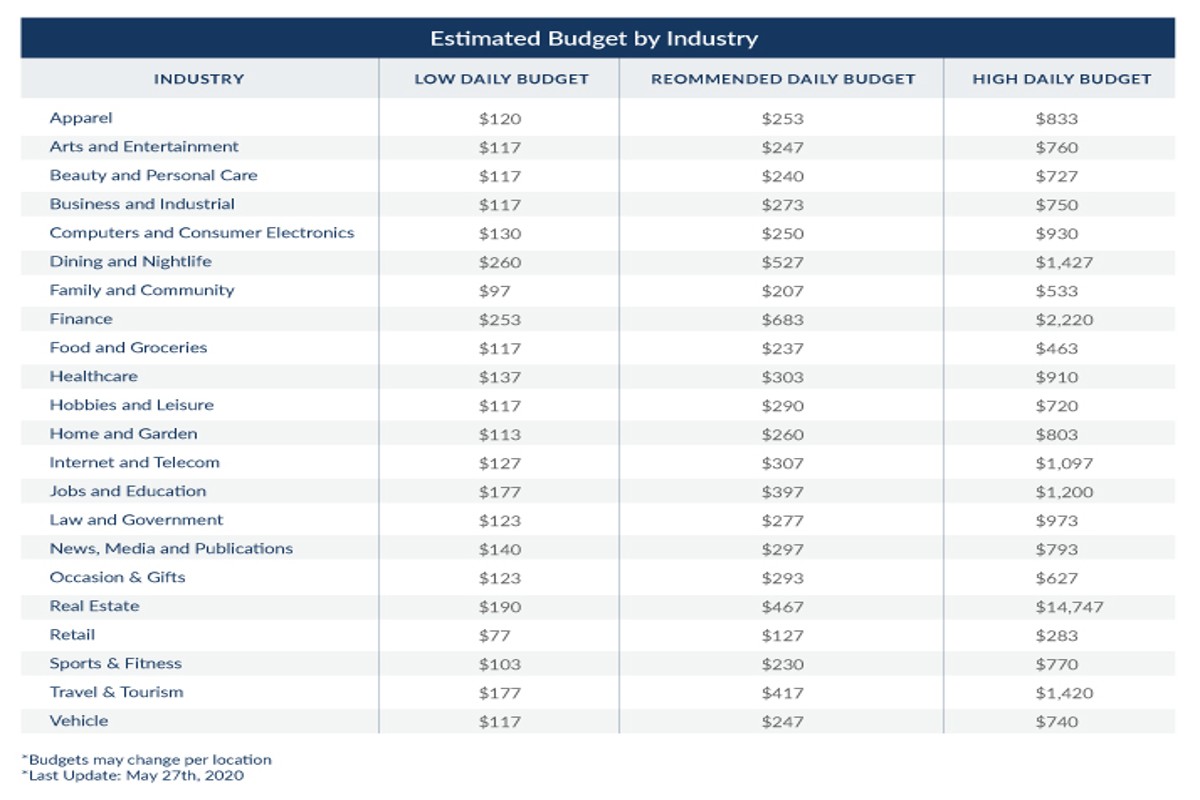
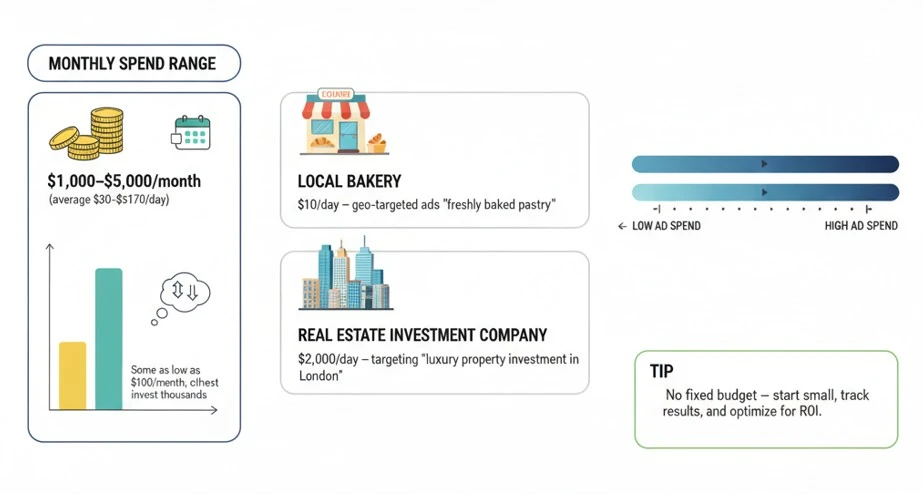
How much should I spend on Google Ads per month depends on your business goals and industry. A common recommendation is to start with a budget of $1,000 to $2,500 monthly and adjust based on performance. Effective budgeting is crucial for maximizing advertising return on investment.
This topic is important for businesses aiming to leverage online advertising effectively. Understanding the right budget can significantly impact campaign success, customer acquisition, and overall profitability. Misestimating ad spend can lead to wasted resources or missed opportunities.
This article will provide detailed insights into determining your Google Ads budget, including factors that influence spending, industry benchmarks, and strategies for budget optimization based on performance metrics.
What is a good monthly budget for Google Ads?
A good monthly budget for Google Ads typically ranges from $1,000 to $10,000, depending on various factors such as business size and industry. Smaller businesses might find effective campaigns with a budget of $500 to $2,000, while larger enterprises may allocate $10,000 or more for comprehensive advertising strategies.
Several factors influence the appropriate budget for Google Ads, including the level of competition in the industry, target audience demographics, and specific marketing goals. For instance, industries like legal services and finance often have higher costs per click (CPC), necessitating larger budgets. Conversely, niche markets may allow for effective advertising on lower budgets.
- Competition: High competition in your industry can drive up CPC, requiring a higher budget to maintain visibility.
- Target Audience: The geographical location and demographics of your target audience can affect costs, as more affluent areas often have higher CPCs.
- Campaign Objectives: Specific goals such as brand awareness, lead generation, or sales conversions will influence how much you should invest.
Businesses should also consider their overall marketing strategy when determining their Google Ads budget. Integrating Google Ads with other marketing channels can improve overall effectiveness and ROI. Testing different budget levels can yield insights into the most effective spend for your specific needs.
Expert Tip: Regularly analyze campaign performance metrics to adjust your budget dynamically. This ensures you are not only spending effectively but also maximizing your return on investment through data-driven decisions.
How do I determine my Google Ads budget?
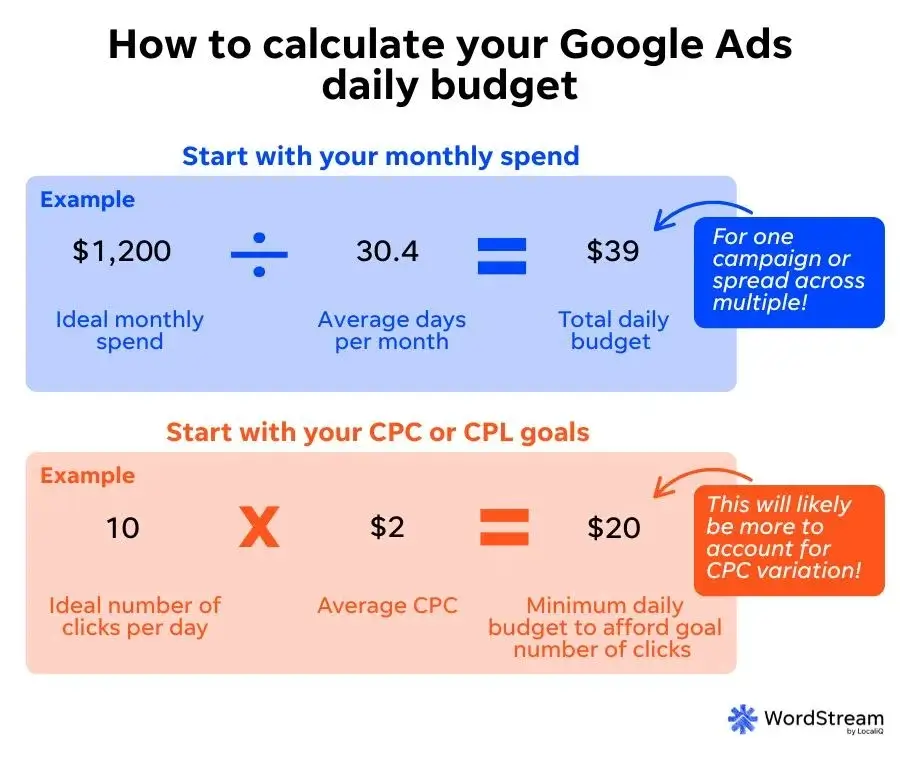
To determine your Google Ads budget, start by defining your advertising goals and understanding your target audience. This will help you allocate an appropriate amount based on expected returns and industry benchmarks.
Begin by identifying your specific objectives, such as increasing website traffic, generating leads, or boosting sales. Each goal may require different budget allocations. Next, analyze your target audience and the competitive landscape. Knowing your audience’s behavior and the costs associated with reaching them will inform your budget decisions.
- Set Clear Objectives: Define what success looks like for your campaign. Whether it’s clicks, conversions, or brand awareness, your goal will dictate budget requirements.
- Research Industry Benchmarks: Investigate average costs per click (CPC) in your industry. Use tools like Google Ads Keyword Planner to find relevant keywords and their associated costs.
- Calculate Desired Outcomes: Estimate how many conversions or leads you want to achieve. Use your sales funnel to determine how many clicks are needed to reach your conversion goal.
- Determine Your Maximum CPC: Based on your desired outcomes and conversion rates, set a maximum CPC that aligns with your budget. This figure should balance your goals with potential returns.
- Adjust for Seasonality: Consider fluctuations in demand throughout the year. If your business experiences seasonal trends, adjust your budget accordingly to maximize results during peak times.
Regularly review and adjust your budget based on campaign performance. This allows you to optimize spending and improve ROI over time.
When setting your budget, consider using a percentage of your expected revenue from online sales. A common practice is to allocate 5-10% of anticipated revenue, ensuring your budget scales with your business growth.
What factors influence Google Ads spending?
Several key factors influence how much a business should spend on Google Ads each month, including competition, industry, and target audience. Each of these elements can significantly impact the cost-per-click (CPC) and overall advertising budget. Understanding these factors helps businesses allocate their resources effectively.
First, competition plays a vital role in determining ad spend. In highly competitive industries, such as finance or legal services, the CPC tends to be higher due to numerous advertisers vying for the same keywords. Conversely, in less competitive markets, CPCs are generally lower, allowing businesses to achieve more clicks for the same budget. Therefore, businesses in competitive sectors may need to allocate a larger monthly budget compared to those in niche markets.
Next, the industry itself influences spending patterns. Certain industries have established benchmarks for ad spending based on historical performance. For example, e-commerce businesses often invest more in Google Ads during peak shopping seasons, while service-oriented businesses may have a steadier monthly budget. Additionally, seasonal trends can impact costs, with some industries experiencing higher CPCs during specific times of the year.
Finally, the target audience significantly affects Google Ads spending. Advertisers targeting a broader audience may face higher costs, as they need to bid on more competitive keywords. In contrast, businesses focusing on a specific demographic or geographic area might achieve better returns with lower bids. This targeted approach often results in a more efficient use of advertising funds.
Comparison of Factors Influencing Google Ads Spending
| Factor | Impact on Spending |
|---|---|
| Competition | Higher CPC in competitive industries, lower in niche markets. |
| Industry | Varied benchmarks; certain industries require more aggressive spending. |
| Target Audience | Broader audiences generally incur higher costs than targeted demographics. |
Expert Tip: Regularly analyze your Google Ads performance metrics and adjust your budget based on changing market conditions. Employing A/B testing can provide valuable insights for optimizing your ad spend effectively.
Is it worth spending more on Google Ads?
Yes, spending more on Google Ads can be worth it if it leads to a higher return on investment (ROI). Increased ad spend often results in greater visibility and more conversions, but the effectiveness hinges on various factors such as industry, competition, and campaign strategy.
Higher ad spend can enhance your visibility in competitive markets. As bidding for keywords increases, a larger budget allows for higher ad placements, which typically translates to more clicks and impressions. However, simply increasing the budget without a well-defined strategy may not yield proportional gains. Focus on optimizing ad copy, targeting, and landing pages to ensure that increased visibility converts into actual sales.
- Analyze your target audience: Invest in research to understand your audience’s behaviors and preferences. This can help tailor your ads and improve conversion rates.
- Utilize A/B testing: Experiment with different ad variations. Allocate a portion of your budget to test headlines, descriptions, and calls to action to identify what resonates best with your audience.
- Monitor performance metrics: Regularly review key performance indicators (KPIs) such as click-through rates (CTR) and conversion rates. Adjust your spending based on which campaigns perform best.
- Consider seasonal trends: Some industries experience fluctuations in demand. Allocate more budget during peak seasons to capitalize on increased consumer interest and potential ROI.
Expert insights suggest that aligning ad spend with marketing goals is essential. For example, businesses aiming for rapid growth may benefit from a higher budget, while those focused on brand awareness can manage with less. Tailoring the budget to specific objectives can optimize overall campaign effectiveness.
How can I optimize my Google Ads budget?
To optimize your Google Ads budget, focus on strategies that enhance ad performance while controlling expenses. Effective budget management involves continuous monitoring, strategic adjustments, and leveraging available tools. By implementing targeted strategies, advertisers can maximize their return on investment (ROI).
1. Conduct Thorough Keyword Research: Identify high-performing keywords that align with your target audience. Utilize tools like Google Keyword Planner to discover search volume and competition levels, allowing for more informed bidding strategies.
2. Set Clear Campaign Goals: Define specific objectives for each campaign, such as increasing website traffic or generating leads. Clear goals help allocate budget effectively and measure performance against those objectives.
3. Utilize Negative Keywords: Regularly update your negative keyword list to exclude irrelevant searches. This prevents wasted ad spend on clicks that are unlikely to convert, ensuring your budget is spent on high-quality traffic.
4. Implement Ad Scheduling: Analyze performance data to determine peak engagement times. Adjust your ad schedule to show ads during these high-traffic periods, optimizing visibility when potential customers are most active.
5. Monitor and Adjust Bids: Use automated bidding strategies to optimize bids based on performance. Regularly review and adjust your bids for keywords that are underperforming to improve overall campaign efficiency.
6. Test Ad Variations: Continuously A/B test different ad copy and formats. This helps identify which variations perform best, allowing you to allocate more budget to the highest-performing ads.
Expert Tip
Consider using remarketing campaigns to re-engage previous visitors. This strategy often yields higher conversion rates at a lower cost, effectively stretching your Google Ads budget further.
How long does it take to see results from Google Ads?
Typically, businesses can expect to see measurable results from Google Ads within 1 to 3 months of launching a campaign. However, the exact timeframe can vary significantly based on several factors, including campaign objectives, industry competition, and budget allocation.
Several elements influence how quickly results can be observed. First, the complexity of the campaign plays a role. Simple campaigns with clear objectives and targeted keywords may yield faster results, while more complex strategies involving multiple ad groups and extensive targeting may take longer to optimize. Additionally, the learning phase of Google Ads, which usually lasts about two weeks, allows the platform to gather data and optimize ad performance. This initial period is crucial for establishing effective bidding strategies and audience targeting.
Another significant factor is market competition. In highly competitive industries, achieving visibility and clicks may require a larger budget and more time to refine ad copy and targeting. Conversely, in niche markets with less competition, results may be more immediate. Budget also plays a critical role; a higher spend can lead to faster data collection and optimization, thereby speeding up the results timeline. Finally, ongoing monitoring and adjustments to the campaign based on performance metrics can enhance results over time.
Expert Tip: To maximize the effectiveness of your Google Ads campaigns, invest time in thorough keyword research and continuous A/B testing of ad variations. This approach can significantly accelerate the optimization process and improve overall campaign performance.
What are common mistakes in Google Ads budgeting?
A common mistake in Google Ads budgeting is underestimating the necessary budget for competitive keywords. Many advertisers set a low monthly budget based on initial assumptions, which often leads to limited visibility and poor campaign performance. This can result in missed opportunities, as ads may not appear frequently enough to generate leads or conversions.
For example, consider a small business in the highly competitive home improvement industry. If the owner allocates only $500 per month for Google Ads, they may find that the average cost per click (CPC) for relevant keywords is around $10. This budget would only allow for approximately 50 clicks, which may not be sufficient to achieve meaningful engagement or conversions. Instead, a more effective approach would involve conducting thorough keyword research and competitor analysis to determine a more realistic budget, possibly ranging from $1,500 to $3,000 per month, depending on the business’s goals and market competition.
Another frequent error is failing to set clear performance metrics and adjusting the budget accordingly. Without tracking conversions and return on ad spend (ROAS), businesses may continue to invest in underperforming campaigns. Regularly reviewing campaign performance allows advertisers to reallocate funds toward higher-performing ads and optimize overall spending. Implementing a dynamic budgeting strategy, where budgets are adjusted based on real-time performance data, enhances the effectiveness of Google Ads campaigns.
Expert Tip: Always allocate a portion of your budget for testing new ad groups or campaigns. This experimentation can uncover high-performing keywords or audience segments that can significantly improve overall ad performance.
Understanding Your Business Goals and Their Impact on Ad Spend
This section examines how various business objectives shape Google Ads budget decisions, emphasizing the need for alignment between ad spend and strategic goals.
Aligning Ad Spend with Sales Targets and Lead Generation Goals
Businesses must align their Google Ads budget with specific sales targets and lead generation objectives. For instance, if a company aims to increase sales by 20% over the next quarter, the ad spend should reflect the necessary investment to achieve that target. This involves calculating the conversion rate and determining the average cost per acquisition (CPA) to establish a baseline budget.
The Importance of Understanding Customer Lifetime Value
Customer Lifetime Value (CLV) is a critical metric that helps define how much to invest in Google Ads. CLV represents the total revenue a business can expect from a customer throughout their relationship. By understanding CLV, businesses can determine how much they are willing to spend on acquiring new customers. For example, if the CLV is $1,000, a budget of $200 per acquisition may be justified, allowing for a profitable return on investment.
Setting Specific, Measurable Objectives for Ad Campaigns
Establishing clear, measurable objectives is vital for effective ad campaigns. These objectives should be specific (e.g., increase website traffic by 30% within three months) and quantifiable. Setting measurable goals allows for performance tracking and budget adjustments based on real-time data. For example, a business might allocate $1,000 for a campaign aimed at generating 100 leads, thus providing a clear target to evaluate success.
Adjusting Budgets Based on Seasonal Trends and Market Changes
Market dynamics can significantly impact the effectiveness of ad spend. Seasonal trends, such as holidays or industry-specific events, may necessitate temporary budget increases to capitalize on heightened demand. Conversely, during off-peak seasons, businesses should consider reducing ad spend to maintain profitability. Regular analysis of market conditions and performance data helps inform these budget adjustments.
Many businesses overlook the necessity of flexibility in their advertising budgets. Sticking rigidly to a predetermined budget can hinder opportunities for growth, especially in competitive markets where responsiveness is key. Understanding the nuances of market fluctuations and consumer behavior can enhance the effectiveness of ad spend.
Practical Application
- Calculate your sales targets and align your Google Ads budget accordingly.
- Determine your Customer Lifetime Value to establish a profitable acquisition budget.
- Set specific objectives for each ad campaign and monitor performance against these goals.
- Stay informed about seasonal trends and be prepared to adjust your budget to maximize ROI.
By integrating these strategies, businesses can make informed decisions about how much to spend on Google Ads per month, ensuring alignment with broader goals and optimizing advertising effectiveness.
Advanced Budgeting Strategies for Google Ads Success
This section explores advanced strategies to maximize the effectiveness of your Google Ads budget. By employing automated bidding, A/B testing, and strategic budget allocation, advertisers can achieve better results and optimize their spending.
Utilizing Automated Bidding Strategies for Cost Efficiency
Automated bidding strategies leverage Google’s algorithms to optimize bids in real-time, ensuring that every dollar spent is aimed at achieving specific goals. Options include Target CPA, Target ROAS, and Maximize Conversions. Each strategy focuses on different objectives, allowing advertisers to select one that aligns with their unique business goals.
- Target CPA: Sets bids to achieve the lowest cost per acquisition.
- Target ROAS: Aims for a specific return on ad spend.
- Maximize Conversions: Automatically sets bids to get the most conversions within the budget.
Implementing these strategies can reduce manual effort while improving cost efficiency, making it easier to manage larger budgets effectively.
Leveraging A/B Testing to Optimize Ad Performance
A/B testing allows advertisers to compare different ad variations to determine which performs best. This process involves creating two or more ads with slight variations—such as headlines, visuals, or calls to action—and running them simultaneously.
Steps to implement A/B testing include:
1. Define a clear objective for the test, such as higher click-through rates (CTR) or conversion rates.
2. Create variations of the ad, ensuring that only one element changes between them.
3. Run the ads concurrently for a specified period to gather sufficient data.
4. Analyze performance metrics to determine the winning ad.
Regular A/B testing can lead to incremental improvements in ad performance, ultimately maximizing the return on ad spend.
Implementing Budget Allocation Across Campaigns and Channels
Strategic budget allocation is essential for optimizing overall ad performance. Instead of a one-size-fits-all approach, consider the following strategies:
- Prioritize High-Performing Campaigns: Allocate more budget to campaigns that yield higher returns.
- Test New Channels: Experiment with different platforms (e.g., YouTube, Display Network) and adjust budgets based on performance.
- Seasonal Adjustments: Increase spending during peak seasons or promotional periods when consumer demand is higher.
This tailored approach ensures that funds are directed where they can generate the most impact, fostering more effective use of resources.
Monitoring and Adjusting Based on Performance Metrics
Continuous monitoring of campaign performance is vital. Key performance indicators (KPIs) to track include CTR, conversion rates, and cost per click (CPC). By analyzing these metrics, advertisers can identify underperforming areas and make necessary adjustments.
Steps for effective performance monitoring involve:
1. Setting up conversion tracking to measure KPIs accurately.
2. Reviewing performance data regularly, ideally on a weekly basis.
3. Making data-driven decisions to adjust bids, reallocate budgets, or pause underperforming ads.
Regular adjustments based on real-time data can significantly enhance campaign effectiveness.
Advanced budgeting strategies for Google Ads success require a combination of automated tools, rigorous testing, and strategic allocation. Advertisers should implement automated bidding, conduct A/B tests, adjust budgets according to performance, and monitor metrics consistently. By applying these advanced techniques, businesses can maximize their ad spend and achieve their marketing objectives more effectively.
Case Studies: Real-World Examples of Google Ads Budgeting
This section presents practical insights through case studies of businesses that have effectively managed their Google Ads budgets. By examining success stories and failures, readers can gain a clearer understanding of how to allocate their own advertising funds.

Success Stories of Small Businesses
Small businesses often operate on tight budgets yet can achieve significant results with strategic Google Ads spending. For example, a local bakery in Austin allocated $500 per month to target nearby customers. By focusing on specific keywords such as “artisan bread near me,” they achieved a 25% increase in foot traffic within three months. Their strategy involved:
- Geo-targeting ads to maximize local visibility.
- Utilizing ad extensions to highlight promotions.
- Setting daily budgets to prevent overspending.
Analysis of Larger Enterprises
Larger enterprises, such as a national retail chain, often adjust their Google Ads budgets based on seasonal trends and sales forecasts. For instance, during holiday seasons, they increased their monthly spend from $50,000 to $75,000 to capture higher consumer demand. This adjustment was based on:
- Historical performance metrics indicating increased click-through rates during holidays.
- Enhanced bidding strategies to compete for top ad placements.
- A dedicated budget for new product launches aligned with seasonal shopping behavior.
Lessons from Failed Campaigns
Not all Google Ads campaigns succeed. A tech startup spent $10,000 on broad keywords without proper targeting and saw minimal engagement. This failure stemmed from:
- Lack of keyword research leading to irrelevant traffic.
- Failure to set up conversion tracking to measure success.
- Ignoring ad quality scores, which negatively impacted their ad placement.
Such examples highlight the critical importance of a well-structured budget and targeted strategies.
Comparative Analysis of Industry-Specific Budgeting Approaches
Budgeting for Google Ads can vary significantly by industry. For instance:
- Retail: Typically allocates 10-20% of revenue to digital advertising, with a focus on promotional campaigns.
- Healthcare: Often spends 15-25% of their marketing budget on Google Ads to attract new patients, emphasizing local SEO.
- Technology: May invest upwards of 30% in ads to drive leads in a highly competitive market.
This variation underscores the need for businesses to tailor their budgets according to industry standards and competition levels.
Common misconceptions include the belief that high spend guarantees success. Effective campaigns often rely more on strategy and optimization rather than sheer budget. Businesses must understand their unique market dynamics and set budgets that reflect their specific goals and audience behaviors.
To effectively apply these insights, businesses should:
- Conduct thorough keyword research to identify the most relevant terms for their products or services.
- Monitor campaign performance continuously and adjust budgets based on real-time data.
- Consider seasonal trends and historical data to inform monthly spending decisions.
By implementing these strategies, businesses can optimize their Google Ads budget effectively and achieve better ROI.
Tools and Resources for Managing Google Ads Budgets
This section outlines essential tools and resources that facilitate effective budget management for Google Ads campaigns. Utilizing these resources can enhance decision-making and optimize advertising spend.
Google Ads Tools for Budget Tracking
Google Ads offers several built-in features specifically designed for budget management. These tools help advertisers monitor spending, set limits, and assess the performance of their campaigns.
- Google Ads Budget Planner: This tool allows users to forecast potential performance based on budget allocation. It provides insights into expected clicks, impressions, and conversions.
- Campaign Manager: Integrated within Google Ads, this tool offers real-time budget tracking, allowing advertisers to see current spend against set budgets.
- Automated Rules: Advertisers can set rules to adjust budgets based on performance metrics, ensuring efficient allocation of funds throughout the month.
Third-Party Tools for Analytics and Performance Monitoring
While Google Ads provides robust tools, third-party applications can offer additional insights and analytics that enhance budget management.
- SEMrush: This tool provides competitive analysis and keyword tracking, allowing advertisers to adjust budgets based on competitor performance.
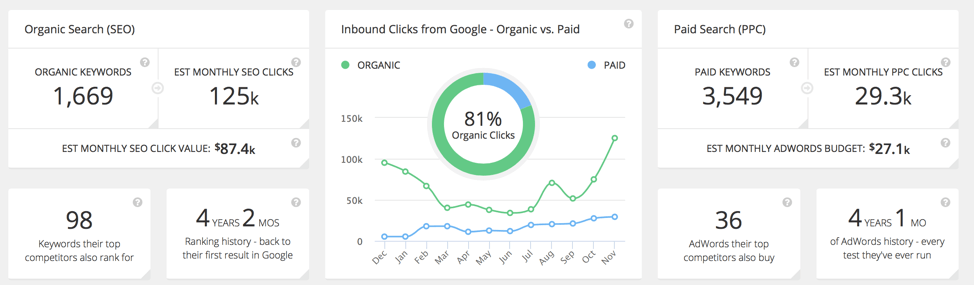
- WordStream: Offering a comprehensive dashboard, WordStream simplifies budget tracking and provides actionable recommendations for optimizing ad spend.
- SpyFu: This tool enables users to analyze competitors’ ad strategies and budgets, facilitating informed budget adjustments based on market trends.
Resources for Ongoing Education and Updates in Google Ads
Staying informed about updates and changes in Google Ads is crucial for effective budget management. There are several resources available for continuous learning.
- Google Skillshop: Offers free courses on Google Ads, covering budgeting strategies, campaign management, and more.
- Google Ads Help Center: A comprehensive resource that includes articles and guides on budget management and best practices.
- Industry Webinars and Blogs: Many digital marketing experts and agencies host webinars and publish blogs that focus on the latest trends and strategies in Google Ads.
Community Forums and Support for Budget Management Tips
Engaging with community forums can provide valuable insights and tips from experienced advertisers regarding budget management.
- Google Ads Community: A platform where users can ask questions and share experiences related to budget management and campaign optimization.
- Reddit (r/PPC): A subreddit dedicated to pay-per-click advertising, where members share strategies and challenges related to Google Ads budgeting.
- Facebook Groups: Many groups focus on digital marketing and Google Ads, offering a space for members to exchange tips and best practices.
Many advertisers overlook the importance of continuous education and community engagement. Regularly updating knowledge and participating in discussions can lead to more informed budget decisions. It is also vital to assess performance data frequently to adjust budgets effectively based on real-time insights.
To leverage these tools and resources effectively, start by integrating Google Ads features into your daily management routine. Experiment with third-party tools to uncover additional insights and stay updated through educational resources. Engage with community forums to exchange strategies and seek advice tailored to specific budget management challenges.
Frequently Asked Questions
What is a good monthly budget for Google Ads?
A good monthly budget for Google Ads typically ranges from $1,000 to $10,000, depending on your business size and goals. Small businesses may start with $500 to $1,000 to test the waters.
How do I determine my Google Ads budget?
To determine your Google Ads budget, consider your overall marketing goals, target audience, and the cost-per-click (CPC) in your industry. Analyze past performance data to set a realistic budget that aligns with your objectives.
What factors influence Google Ads spending?
Google Ads spending is influenced by factors such as industry competition, keyword selection, campaign goals, and geographic targeting. Additionally, your Quality Score and ad relevance can affect costs.
Is it worth spending more on Google Ads?
Spending more on Google Ads can be worth it if it leads to higher visibility, increased traffic, and better conversions. Evaluate the return on investment (ROI) to determine if a higher budget yields significant results.
How can I optimize my Google Ads budget?
To optimize your Google Ads budget, focus on high-performing keywords, adjust bids based on performance, and use negative keywords to filter out irrelevant traffic. Regularly analyze campaign data to refine your strategy.
How long does it take to see results from Google Ads?
Results from Google Ads can typically be seen within a few days to weeks, depending on the campaign type and budget. However, significant trends and insights may take several weeks of consistent data collection.
What are common mistakes in Google Ads budgeting?
Common mistakes in Google Ads budgeting include setting an unrealistic budget, neglecting to track performance, and failing to adjust bids based on results. Additionally, not utilizing negative keywords can lead to wasted spend.
Final Thoughts on how much should i spend on google ads per month
Determining your Google Ads budget is not a one-size-fits-all endeavor; it requires a nuanced understanding of your business goals, market dynamics, and the competitive landscape. A well-calibrated budget, aligned with strategic objectives, can significantly enhance ROI and drive meaningful growth.
To optimize your Google Ads spending, conduct a thorough analysis of your previous campaign performance and identify key performance indicators that matter to your business. This data-driven approach will enable you to allocate resources more effectively and adjust your budget in accordance with real-time insights.
Investing wisely in Google Ads is crucial for maintaining a competitive edge in today’s digital marketplace.
Leave a Reply