
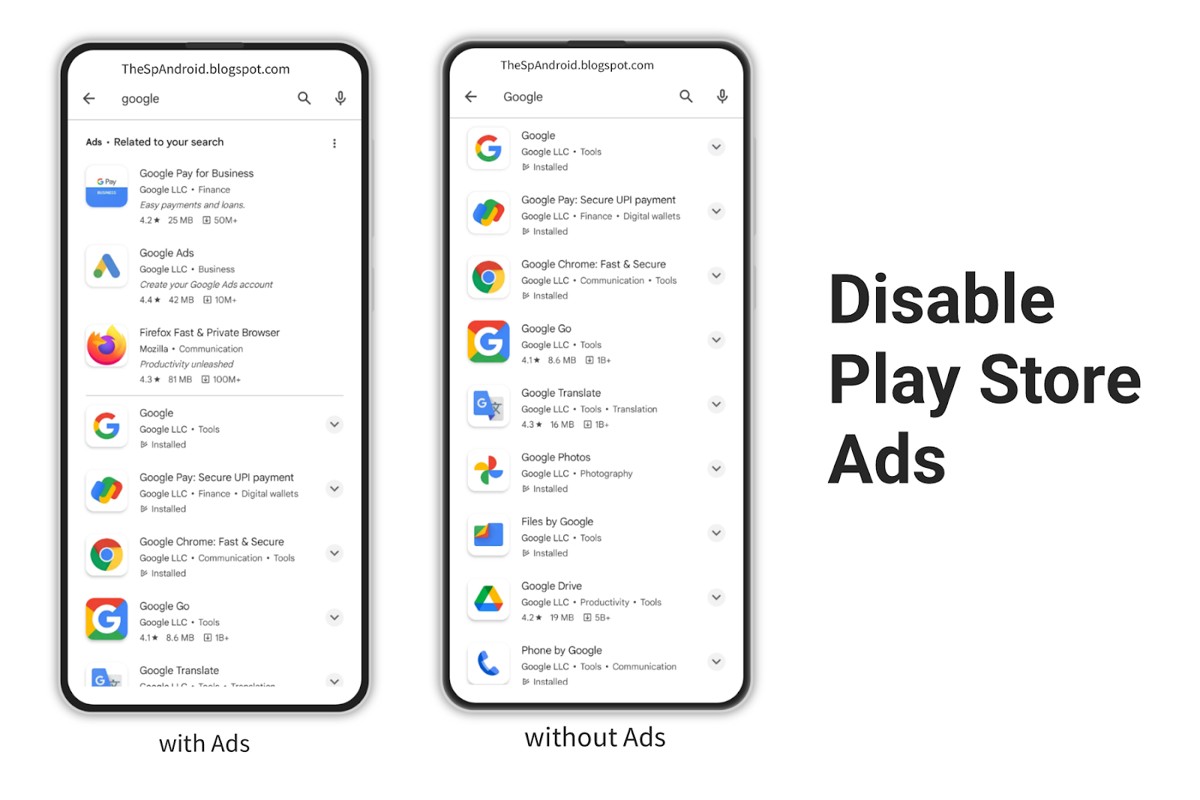
To stop ads from Google Play, you can adjust your ad settings in your Google account, disable personalized ads, or uninstall ad-supported apps. These steps can help reduce ad interruptions.
This topic is significant for users who frequently encounter unwanted ads while using apps from Google Play. Understanding how to manage ads is essential to enhance user experience and privacy, as failure to do so can lead to frustration and excessive data usage.
This guide will provide detailed instructions on adjusting ad settings, disabling personalized ads, and identifying ad-supported apps to help you minimize intrusive advertising effectively.
How do I turn off ads in Google Play apps?
To turn off ads in Google Play apps, users can adjust settings within individual apps and modify their Google account preferences. While there is no universal switch to eliminate all ads, following these steps can significantly reduce ad frequency and improve your experience.
- Check In-App Settings: Open the specific app displaying ads and navigate to its settings menu. Look for options related to ads or privacy, where you may find the ability to disable personalized ads or opt for a paid version of the app without ads.
- Adjust Google Account Ad Settings: Visit the Google Ad Settings page by going to your Google account. Here, you can turn off ad personalization, which limits the targeted ads you see across Google services, including apps.
- Limit Data Sharing: Within your Google account, you can also manage your activity settings. Reducing the amount of data shared with Google can help decrease the relevance of ads you receive, potentially leading to fewer ad impressions.
- Use Ad Blockers: Consider using ad-blocking applications that are compatible with your device. These tools can help reduce or eliminate ads in various applications, including those downloaded from Google Play.
- Consider Subscription Models: Many apps offer subscription services or one-time purchases that remove ads entirely. Evaluate whether paying for an ad-free experience aligns with your usage of the app.
By implementing these strategies, users can effectively manage and reduce the number of ads encountered in Google Play apps. It’s essential to remember that the effectiveness of these methods can vary based on the app and the specific ad types presented.
Expert Tip: Regularly review app permissions and settings, as developers frequently update their policies and features. Staying informed can help maintain an optimal ad-free experience.
What are personalized ads on Google Play?
Personalized ads on Google Play are advertisements tailored to individual users based on their interests, demographics, and behavior. These ads leverage data collected from user interactions with apps, searches, and online activities to deliver relevant content. In contrast, non-personalized ads do not consider user data, leading to generic advertisements that may not resonate with the viewer.
Personalized ads utilize algorithms to analyze user data, which may include app usage patterns, search history, and location information. This enables advertisers to create targeted marketing campaigns that align closely with user preferences. For example, a user frequently searching for fitness apps may receive ads for workout gear or health supplements, while a user interested in gaming might see promotions for the latest video games.
Non-personalized ads, on the other hand, are displayed without regard for individual user data. These ads are often based on broader categories or general trends and may not effectively capture the viewer’s attention. While personalized ads are generally more effective in driving engagement, users may prefer non-personalized ads for privacy reasons, as they do not rely on personal data.
Expert Tip: Users concerned about privacy can limit personalized ads by adjusting their Google account settings, thereby reducing the amount of data that is collected and used for ad targeting.
Are there any costs associated with stopping ads on Google Play?
Yes, there can be costs associated with stopping ads on Google Play, primarily through in-app purchases or subscriptions for ad-free versions of apps. Prices for these options can vary significantly based on the app and its developer.
The costs typically depend on several factors, including:
- App Type: Gaming apps often have different pricing structures for ad removal compared to utility or productivity apps.
- Developer Pricing Strategy: Some developers may choose a one-time purchase model, while others might offer a subscription service that requires ongoing payments.
- Regional Pricing: Prices can vary by country or region due to local economic conditions and market strategies.
Additionally, some apps may offer a limited-time promotion or discounts, which can affect the overall cost. It is also important to consider that not all apps provide an option to remove ads, making it essential to check the app’s details before proceeding.
Practical Implications
Investing in ad-free versions can enhance user experience, allowing uninterrupted use of the app. However, users should evaluate whether the benefits justify the costs, especially for free apps that generate revenue through advertisements. Assessing the value derived from the app can help in making an informed decision.
Expert Tip: Always check user reviews and ratings for the ad-free version before purchasing. This can provide insights into whether the investment is worthwhile and if the app meets user expectations without ads.
How long does it take to stop seeing ads on Google Play?
It typically takes between 24 hours to a week to stop seeing ads on Google Play after making relevant adjustments. The exact timeframe varies based on the changes made and the nature of the ads being displayed.
Several factors influence how quickly ads cease to appear. First, if you adjust your Google account settings, such as opting out of personalized ads or changing ad preferences, these changes can take effect within a day. However, if you are uninstalling apps that serve ads or changing devices, it may take longer for the ad serving system to fully recognize these changes.
Additionally, the type of ads you see impacts the timeframe. Ads related to your recent app usage or browsing history may take longer to drop off, as they are often tied to your activity and preferences. Moreover, if you’re part of a beta testing group for certain applications, ads may still persist until the beta phase concludes and the app is officially updated.
Practical Steps to Reduce Ad Exposure
To effectively reduce the number of ads you see, consider implementing multiple strategies. Start by adjusting your ad settings in your Google account, opting out of personalized ads, and managing your app permissions. Regularly reviewing and uninstalling apps that you no longer use can also significantly decrease ad exposure.
Lastly, clearing your app cache and data may help reset any ad preferences that have been established over time. This can provide a fresh start for your ad experience on Google Play.
Expert Tip: Regularly review your Google ad settings and app permissions to maintain control over your ad experience. Staying proactive can help minimize unwanted ads more effectively.
What is the best practice to avoid ads in Google Play apps?
To effectively minimize ads in Google Play apps, users can implement several strategies. These practices focus on selecting the right apps, adjusting settings, and utilizing ad-blocking tools. By following these guidelines, users can significantly reduce ad exposure while using mobile applications.
One of the primary methods to avoid ads is to choose apps that offer an ad-free experience. Many applications provide a premium version for a one-time fee or subscription that eliminates ads entirely. When downloading new apps, look for user reviews and ratings that mention ad frequency, as this can help identify apps that are less intrusive.
- Use Ad-Free Apps: Opt for applications that are explicitly labeled as ad-free or offer a premium version. This investment can enhance user experience significantly.
- Check App Permissions: Some apps may request permissions that allow them to display ads. Review app permissions and restrict any unnecessary access to personal data or device functionalities.
- Adjust Google Play Settings: Navigate to your Google Play account settings to manage ad personalization. Disabling personalized ads can reduce the relevance of advertisements, potentially minimizing their frequency.
- Utilize Ad-Blocking Software: Consider using reputable ad-blocking applications or VPN services that include ad-blocking features. These tools can help eliminate ads across various apps and browsers.
By implementing these strategies, users can create a more enjoyable and uninterrupted mobile experience. Regularly reviewing app settings and permissions is also essential, as developers may change their ad policies over time.
Expert Tip: Be cautious of free apps that rely heavily on ads for revenue. Often, these apps may compromise user experience or privacy, making it worthwhile to invest in reputable alternatives.
Can I block ads on Google Play without rooting my device?
Yes, it is possible to block ads on Google Play without rooting your device. Users can employ various methods, including adjusting settings, using ad-blocking apps, or leveraging built-in features in some applications. These options provide effective ways to minimize or eliminate ads without compromising device security.
Blocking ads without rooting focuses on user-friendly methods that maintain the integrity of the device’s operating system. Common approaches include using ad-blocking applications available on the Google Play Store, configuring privacy settings, and utilizing features in web browsers that filter out ads. However, these methods may have limitations regarding the types of ads they can block and their overall effectiveness compared to rooting.
In contrast, rooting a device allows for deeper modifications, enabling users to install more powerful ad-blocking tools that can eliminate ads system-wide. Rooted devices can employ advanced solutions like custom ROMs or specialized ad-blocking apps that provide greater control over ad content. However, rooting carries risks, such as voiding warranties and exposing devices to security vulnerabilities.
- Methods without Rooting: Use ad-blocking apps, adjust privacy settings, and utilize browser features.
- Methods with Rooting: Install advanced ad-blocking tools, use custom ROMs, or modify system files for complete ad removal.
- Key Differences: Non-rooting methods are safer and easier, while rooting offers more comprehensive ad-blocking capabilities but carries risks.
Choosing between these methods depends on user preference for convenience versus control. Those seeking a straightforward solution may prefer non-rooting methods, while advanced users might opt for rooting to gain enhanced functionality.
Expert Tip: Regularly update any ad-blocking applications to ensure optimal performance and protection against new advertising methods. This proactive approach can significantly enhance the effectiveness of ad blocking on Google Play.
Why am I still seeing ads after adjusting settings on Google Play?
Even after adjusting your settings to limit ads on Google Play, you may still encounter advertisements. This can occur due to several factors, including cached data, app-specific ad settings, or the nature of the apps you are using.
For example, if you have modified your ad settings in your Google account but are still seeing ads, the issue may lie with individual apps. Many applications have their own ad preferences independent of Google Play settings. If an app does not honor your global ad settings, it may continue to display ads based on its own policy. Users often overlook this when trying to manage their ad experience.
Another reason could be the cached data stored on your device. Even after making changes, your device might still show old ads until the cache is cleared. To troubleshoot, clear the cache of the Google Play Store and the affected apps. This can help refresh the ad settings and remove any lingering advertisements that should no longer appear.
Expert Tip: Regularly review and update both your Google account settings and the settings within individual apps to ensure a consistent ad experience. Additionally, consider using ad-blocking apps or browser extensions for further ad control, keeping in mind the policies of the apps you use.
Understanding Google Play Ads and Their Impact
This section explores the mechanics of Google Play ads, their types, and how they influence user experience and app performance. A clear understanding of these elements is vital for users seeking to manage their ad exposure effectively.
Overview of How Google Play Ads Work
Google Play ads function primarily through a network of advertisers who bid for ad placements within mobile applications. These ads are displayed based on algorithms that consider user behavior, interests, and demographics. Advertisers pay for clicks or impressions, allowing developers to monetize their apps without charging users directly.
Types of Ads Commonly Found in Apps
- Banner Ads: These are rectangular ads that appear at the top or bottom of the app screen, often remaining visible while users interact with the app.
- Interstitial Ads: Full-screen ads that cover the interface of the app, typically displayed at natural transition points, such as between levels in a game.
- Rewarded Ads: Users can voluntarily watch these ads in exchange for in-app rewards, such as extra lives or currency.
- Natively Integrated Ads: These ads blend seamlessly with the app content, making them less intrusive and more engaging.
User Data Collection for Personalized Ads
Google Play utilizes data collection techniques to serve personalized ads. This process involves gathering information regarding user preferences, app usage, and location data. The insights gained allow advertisers to target specific demographics effectively. While this can enhance the relevance of ads, it raises privacy concerns among users.
Impact of Ads on App Performance and User Satisfaction
Ads can significantly impact both app performance and user satisfaction. While they provide a revenue stream for developers, excessive or poorly placed ads can lead to a negative user experience. Studies show that apps with too many ads report higher uninstall rates and lower user retention. Balancing ad placements is crucial; developers must ensure that monetization does not compromise usability.
Moreover, the presence of ads can affect app loading times and responsiveness, potentially frustrating users. Users may experience interruptions that detract from the app’s primary function, leading to dissatisfaction and decreased engagement.
One common misconception is that all ads are harmful to user experience. In fact, well-integrated ads can provide valuable content and offers relevant to users’ interests. Developers must focus on quality and placement to enhance the overall experience.
Practical Application
To manage ad exposure effectively, users can take specific actions. Consider adjusting the settings in the Google Play app to limit personalized ads. Additionally, explore the option to use ad-blocking applications or consider subscribing to premium versions of apps that offer ad-free experiences. Understanding how do I stop ads from Google Play helps users make informed choices about their app usage and ad interaction.
Advanced Techniques to Reduce Ads on Google Play
This section provides expert strategies for minimizing ad exposure on Google Play beyond basic settings. By employing advanced techniques, users can significantly enhance their app experience and mitigate unwanted distractions.
Using Ad Blockers and VPNs Effectively
Ad blockers are software tools designed to prevent advertisements from displaying in apps and browsers. Some popular ad blockers, such as AdGuard and Blokada, can effectively filter ads across various applications. To maximize their effectiveness, ensure that the ad blocker is configured correctly to monitor app traffic.
In conjunction with ad blockers, Virtual Private Networks (VPNs) can provide an additional layer of protection. VPNs encrypt internet traffic and can obscure user data, making it difficult for advertisers to target specific individuals. When selecting a VPN, consider options that explicitly mention ad blocking features to enhance performance.
Choosing Ad-Free Alternatives to Popular Apps
Many popular applications offer ad-free versions or alternatives that do not display advertisements. Users can explore the following categories:
- Streaming Services: Platforms like YouTube Premium or Spotify Premium provide ad-free experiences.
- Productivity Apps: Consider using open-source productivity tools such as LibreOffice or alternatives that offer paid versions without ads.
- Games: Many mobile games have ad-free versions available for a nominal fee or offer in-app purchases to disable ads.
Transitioning to these alternatives not only reduces ad exposure but also often enhances overall user experience.
Adjusting Device Settings for Better Control
Device settings play a crucial role in managing ad exposure. Users should navigate to their device’s settings and adjust the following:
- Ad Personalization: Turn off ad personalization in Google settings to limit targeted ads.
- App Notifications: Disable notifications from apps that frequently push ads.
- Background Data: Restrict background data for apps that consume excessive bandwidth for ad delivery.
These adjustments can significantly reduce the frequency and intrusiveness of ads encountered while using various applications.
Understanding App Permissions and Their Role in Ad Delivery
Many applications request permissions that may not be essential for their core functionality. These permissions can enable ad tracking and delivery. Users should critically evaluate the permissions requested by apps and consider revoking those that are unnecessary. Common permissions to scrutinize include:
- Location Access: Used for targeted advertising based on user location.
- Contacts: Some apps use contact information for targeted ads.
- Camera and Microphone: Rarely necessary for many apps, but can be exploited for profiling.
Revoking excessive permissions can help mitigate the amount of personal data available to advertisers, thereby reducing ad exposure.
Advanced strategies for minimizing ads on Google Play involve a multi-faceted approach. Users can implement ad blockers and VPNs, select ad-free app alternatives, adjust device settings, and evaluate app permissions critically. To take action, begin by installing a reputable ad blocker and a VPN, exploring ad-free app options, and systematically reviewing app permissions on your device. By executing these strategies, users can effectively reduce their ad exposure and enhance their overall experience on Google Play.
Common Mistakes When Trying to Stop Ads on Google Play
Users often encounter pitfalls when attempting to reduce or eliminate ads from Google Play. Recognizing these common mistakes can lead to more effective strategies for managing in-app advertisements.

Ignoring App-Specific Settings for Ad Preferences
Many users overlook the fact that individual apps often have their own settings for managing ad preferences. Each application may provide options to limit personalized ads or opt out of targeted marketing. Accessing these settings is crucial for tailoring your ad experience and reducing unwanted advertisements.
Overlooking Subscription Options for Ad-Free Experiences
Several apps and games offer subscription models that provide ad-free experiences. Users frequently miss these options, which can significantly enhance their enjoyment of the app. Subscribing to an ad-free version typically involves a monthly or annual fee, but the investment can lead to a more streamlined and enjoyable user experience.
Failing to Update Apps for Optimal Ad Management
Keeping applications updated is essential for optimal performance, including ad management. Developers regularly release updates that may contain improvements in ad handling and user settings. Users who neglect these updates may face outdated ad configurations that lead to increased ad frequency and intrusiveness.
Assuming All Ads Can Be Completely Eliminated
Many users mistakenly believe that all ads can be completely removed from their experience on Google Play. While certain strategies can reduce ad visibility, a complete elimination is often unrealistic. Understanding the limits of ad-blocking measures and the role of free apps in supporting developers through advertising is vital.
- Check app-specific settings regularly.
- Explore subscription options for an ad-free experience.
- Keep apps updated to benefit from the latest features.
- Adjust expectations regarding the complete removal of ads.
While attempting to stop ads from Google Play, users should be aware of these common mistakes. By actively managing app settings, considering subscription options, keeping apps updated, and adjusting expectations, users can create a more enjoyable experience.
Most articles on this topic tend to focus on generic solutions without addressing unique scenarios. For instance, some apps may offer promotional periods where ads are temporarily removed. Users should remain vigilant and take advantage of these opportunities to enhance their ad experience.
To effectively manage ads on Google Play, users should follow these actionable steps:
- Review and adjust ad preferences in each app’s settings.
- Explore subscription options for apps that frequently display ads.
- Regularly update all applications to access the latest ad management features.
- Balance expectations regarding ad removal, understanding that some ads may always be present.
Real-World Applications: User Experiences and Solutions
This section delves into real user experiences regarding effective ad management on Google Play. By examining testimonials, community solutions, and comparative analyses, users can better understand how to minimize ad exposure and enhance their app experience.

User Testimonials on Effective Ad Management
User feedback often highlights various strategies for managing ads effectively. Many users have reported success by utilizing ad-blocking apps or opting for premium versions of their favorite applications. For instance, one user noted a significant reduction in interruptions after switching to ad-free versions of popular games, leading to a more enjoyable experience.
- Ad-Blocking Apps: Users have shared positive experiences with apps designed to block ads, claiming these tools can significantly enhance app performance.
- Subscription Services: Many testimonials indicate that subscribing to ad-free tiers of apps leads to a smoother user experience and often additional features.
- Customized Settings: Adjusting in-app settings to limit personalized ads has also shown effectiveness, according to several users.
Comparative Analysis of Ad-Supported vs. Ad-Free Apps
Choosing between ad-supported and ad-free apps can greatly influence user experience. A study conducted in 2022 revealed that users of ad-free applications reported 70% higher satisfaction rates compared to those using ad-supported versions. While ad-supported apps are often free, the trade-off includes constant interruptions and potential data privacy concerns.
In contrast, ad-free applications may require an upfront purchase or subscription fee, but they offer uninterrupted access and often enhanced functionality. This investment frequently results in long-term user retention and loyalty.
Community-Driven Solutions and Tips
The online community has developed various methods to combat intrusive ads. Forums and social media platforms provide a wealth of information on user experiences and solutions. Commonly shared tips include:
- Utilizing VPNs: Some users advocate using VPN services that filter ads at the network level, providing a seamless browsing experience.
- Adjusting Device Settings: Modifying settings to limit ad tracking can decrease the number of targeted ads displayed.
- Engaging with Developer Feedback: Users often recommend providing feedback to app developers regarding ad frequency and placement to encourage improvements.
Long-Term Benefits of Reducing Ad Exposure
Reducing ad exposure leads to several long-term benefits. Users often report increased productivity and focus when using ad-free applications, as distractions diminish. Moreover, less ad exposure can contribute to a more pleasant user experience, promoting overall satisfaction with app usage. Enhanced data privacy is another critical advantage; users can minimize their digital footprint by opting for ad-free environments.
While many articles focus on the immediate steps to manage ads, it’s essential to recognize that proactive measures can foster a healthier digital experience. Users should be aware of the potential for ad fatigue, which can lead to frustration and disengagement from applications.
To effectively manage ads on Google Play, users are encouraged to:
- Consider subscribing to ad-free versions of frequently used apps.
- Explore ad-blocking solutions that align with their needs.
- Engage with community forums to stay updated on new strategies and tools.
Frequently Asked Questions
How do I turn off ads in Google Play apps?
To turn off ads in Google Play apps, navigate to your device’s Settings, select Google, then Ads. From there, you can opt out of personalized ads which may reduce ad frequency.
What are personalized ads on Google Play?
Personalized ads on Google Play are advertisements tailored to your interests based on your activity and preferences. These ads aim to enhance user experience by showing relevant content.
Are there any costs associated with stopping ads on Google Play?
There are no costs associated with opting out of personalized ads on Google Play. Users can adjust their advertising settings for free through their device settings.
How long does it take to stop seeing ads on Google Play?
Changes to ad settings may take a few hours to take effect, but it can vary. Users may still see some ads until the new settings are fully implemented.
What is the best practice to avoid ads in Google Play apps?
The best practice to avoid ads in Google Play apps is to opt out of personalized ads in your Google account settings. Additionally, consider using ad-blocking applications for a more ad-free experience.
Can I block ads on Google Play without rooting my device?
Yes, ads can be blocked on Google Play without rooting your device by adjusting your ad settings. Utilizing ad-blocking apps available on the Play Store can also help reduce ad visibility.
Why am I still seeing ads after adjusting settings on Google Play?
Seeing ads after adjusting settings may occur because it can take time for changes to fully apply. Additionally, some apps may display ads regardless of your ad preferences due to their monetization model.
Final Thoughts on how do i stop ads from google play
Effectively managing ads on Google Play requires a nuanced understanding of both app settings and personalized ad features. By taking proactive measures, users can significantly reduce ad interruptions and enhance their digital experience without incurring additional costs.
To begin seeing results, immediately access your Google account settings and disable personalized ads, ensuring a more tailored approach to your app usage moving forward.
Addressing unwanted ads is essential for maintaining a focused and enjoyable app environment, underscoring the importance of user agency in a landscape increasingly dominated by digital advertising.
Leave a Reply