
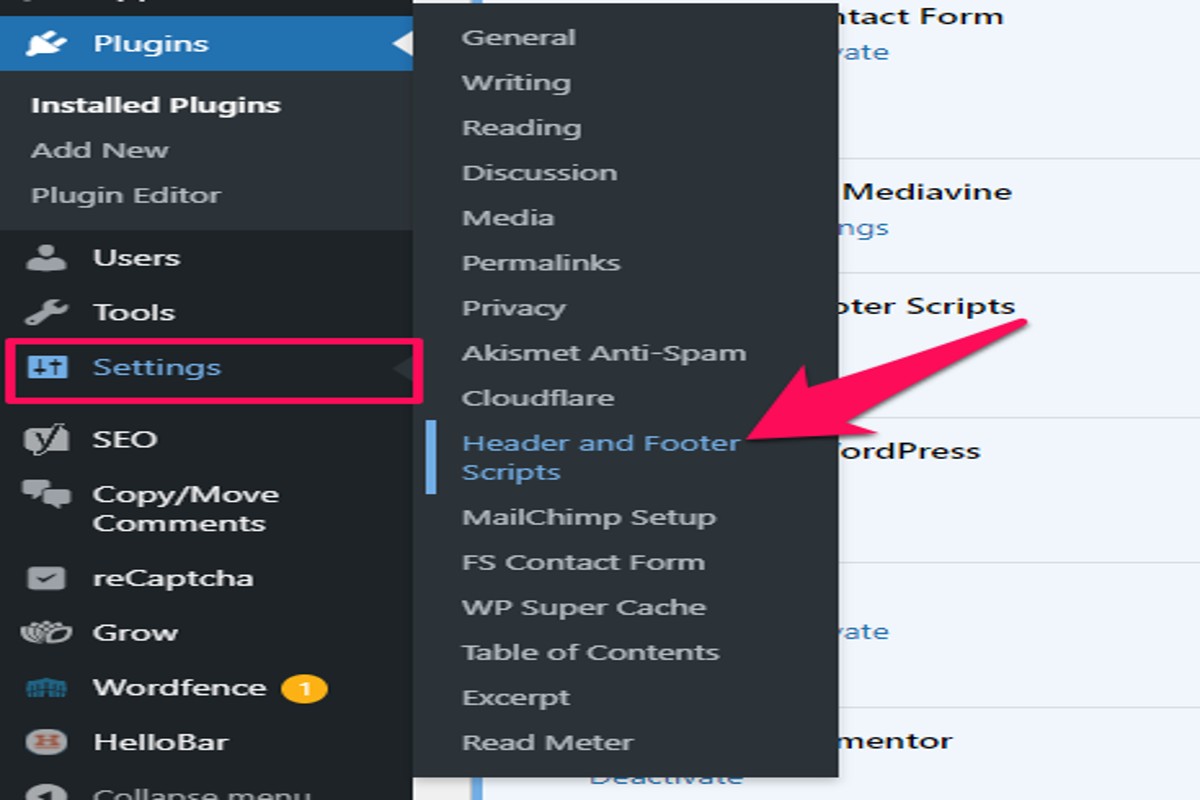
To add Google Ads to WordPress, sign up for a Google AdSense account, generate ad code, and insert it into your WordPress site using a widget or plugin.
Understanding how to add Google Ads to WordPress is crucial for website owners aiming to monetize their content effectively. Proper implementation ensures optimal ad placement and compliance with Google’s policies, which can significantly impact revenue generation and user experience.
This guide provides a detailed, step-by-step process for setting up Google Ads on your WordPress site, including account creation, ad code generation, and integration methods through widgets or plugins.
What is Google Ads and how does it work?
Google Ads is an online advertising platform that enables businesses to display ads across Google’s vast network, including search results and partner websites. The primary purpose of Google Ads is to help advertisers reach potential customers while generating revenue for website owners through ad placements. Advertisers pay to have their ads shown based on a bidding system, which can be influenced by various factors such as keywords and targeting options.
At its core, Google Ads operates on a pay-per-click (PPC) model, meaning advertisers are charged only when users click on their ads. This system allows businesses of all sizes to effectively manage their advertising budgets while targeting specific audiences. Google Ads campaigns can be tailored to achieve various objectives, including increasing website traffic, enhancing brand awareness, or generating leads.
- Search Ads: Text-based ads that appear in Google search results when users search for specific keywords.
- Display Ads: Visual ads that appear on websites within Google’s Display Network, which includes millions of sites.
- Video Ads: Ads displayed on YouTube and across the web that can include skippable and non-skippable options.
Advertisers can also use advanced targeting options, such as demographic targeting, geographic targeting, and remarketing, to reach users more effectively. The success of a Google Ads campaign often relies on continuous monitoring and optimization, as well as understanding the competitive landscape within specific industries.
Expert Tip: To maximize the effectiveness of Google Ads, regularly analyze your campaign performance data and conduct A/B testing on ad copy and landing pages. This approach helps in identifying what resonates best with your audience, ultimately leading to better ROI.
How do I sign up for Google Ads on WordPress?
To sign up for Google Ads, visit the Google Ads website and create an account. This process involves providing basic information about your business and payment details. Once your account is set up, you can link it to your WordPress site for ad placement.
- Visit the Google Ads Website: Go to ads.google.com and click on the “Start now” button to begin the registration process.
- Sign In or Create an Account: If you already have a Google account, sign in. If not, follow the prompts to create a new Google account.
- Set Up Your Ads Account: Fill in the necessary details, including your business name, website URL, and billing information. Ensure that the information is accurate to avoid issues later.
- Select Your Advertising Goals: Choose the goals for your advertising campaign, such as increasing website traffic or promoting a product. This will help Google tailor your setup.
- Create Your First Campaign: Follow the prompts to create your initial ad campaign. Select your target audience, budget, and ad formats to align with your marketing strategy.
- Link Google Ads to WordPress: Once your campaign is set up, you can integrate Google Ads with WordPress using a plugin, such as Ad Inserter or Site Kit by Google, to manage ad placements effectively.
After completing these steps, monitor your campaigns regularly to assess performance and make adjustments as necessary. This ensures that your ads are effective and aligned with your business objectives.
Expert Tip: Utilize Google Ads’ built-in analytics tools to track the performance of your ads. Regularly reviewing these metrics will help refine your strategy and maximize ROI.
What are the best practices for placing Google Ads on WordPress?
The best practices for placing Google Ads on WordPress focus on optimizing ad visibility while maintaining a positive user experience. Effective ad placement can enhance revenue without compromising site usability. This balance is critical for long-term success.
Consider the following best practices:
- Above the Fold Placement: Position ads in areas that users see without scrolling, such as the header or top of the sidebar. This increases visibility and click-through rates.
- Responsive Ad Units: Utilize responsive ad formats that automatically adjust to different screen sizes. This ensures optimal viewing on mobile devices, which account for a significant portion of web traffic.
- Content Integration: Place ads within or near relevant content. Ads that blend seamlessly with the surrounding text can lead to higher engagement, as they appear more contextually relevant.
- A/B Testing: Regularly test different ad placements, sizes, and formats to identify what works best. Use Google Analytics to monitor performance and adjust strategies based on data-driven insights.
- Limit Ad Load: Avoid overwhelming users with too many ads. A cluttered interface can lead to higher bounce rates and negatively impact user experience. Aim for a balanced ratio of content to ads.
Maintaining user experience while maximizing revenue requires continual adjustments based on user behavior and feedback. Regularly review analytics to stay updated on trends and optimize ad performance accordingly.
Expert Tip: Implement lazy loading for ads to improve page load speeds. This technique ensures ads load only when they are in the user’s viewport, enhancing both performance and user satisfaction.
How much does it cost to use Google Ads on WordPress?
Using Google Ads on WordPress is free to set up, but costs are incurred when users click on your ads. The actual expense varies widely depending on your specific advertising strategy, market competition, and targeted keywords.
Several factors can influence the cost of Google Ads:
- Cost-per-click (CPC): This is the amount you pay each time someone clicks your ad. CPC can range from a few cents to several dollars, depending on the competitiveness of your chosen keywords.
- Ad quality and relevance: Google uses a Quality Score to determine the effectiveness of your ads. Higher quality ads can lead to lower CPCs and better ad placements.
- Targeting options: The more specific your targeting (such as demographics, location, and interests), the more or less you may pay. Highly targeted ads may have higher costs due to increased competition for a niche audience.
Additionally, you can set a daily budget and maximum bid limit, which allows you to control your overall spending. This makes it possible to run Google Ads campaigns at various budget levels, accommodating different business sizes and goals.
Revenue Potential
While there are costs associated with running Google Ads, effective campaigns can generate significant revenue. It’s essential to track performance metrics such as click-through rates (CTR) and conversion rates to ensure a positive return on investment (ROI).
Expert Tip: To optimize your spending, regularly review and refine your ad campaigns based on performance data. Consider A/B testing different ad copies and landing pages to identify the most effective strategies for your audience.
How long does it take to set up Google Ads on WordPress?
Setting up Google Ads on WordPress typically takes between 30 minutes to a few hours. This timeframe includes account creation, ad setup, and the potential waiting period for ad approval. The total time may vary based on individual familiarity with the platform and specific site configurations.
Several factors can influence the overall setup time. First, creating a Google Ads account requires entering payment information and selecting campaign settings, which can take 10 to 30 minutes. Once the account is established, setting up your ads involves designing ad content, choosing target keywords, and selecting ad placements—this step can take an additional 20 to 60 minutes, depending on how detailed the campaigns are. If you are using a plugin to integrate ads into WordPress, installation and configuration of that plugin may add another 10 to 20 minutes.
After the ads are set up, there is typically a waiting period for Google to review and approve them. This review process can take anywhere from a few hours to up to three business days. During this time, ads will not display on your site, potentially delaying when you can start earning revenue. Additionally, if issues arise during the review, it may extend the approval period further.
For optimal results, ensure that your website complies with Google Ads policies before submission. This proactive approach can help avoid potential rejections that would delay the process.
Expert Tip: Regularly monitor your ad performance and adjust your campaigns to optimize click-through rates and conversion rates. This ongoing optimization can significantly impact your revenue potential over time.
What are common mistakes to avoid when adding Google Ads to WordPress?
Common mistakes when adding Google Ads to WordPress include improper ad placement, failing to comply with Google policies, and neglecting site speed. These errors can lead to reduced ad performance and potential penalties from Google. Avoiding these pitfalls is crucial for maximizing ad revenue and maintaining compliance.
One frequent mistake is placing ads in locations that disrupt user experience. For instance, if ads are positioned directly in the middle of content, users may find them intrusive. This can lead to higher bounce rates and lower engagement. A better approach is to integrate ads into the layout naturally, such as placing them in sidebars or within content at strategic points. This not only keeps the user experience pleasant but also enhances ad visibility.
Another common error is not adhering to Google’s advertising policies. For example, failing to disclose sponsored content or using prohibited content can lead to account suspension. To prevent this, thoroughly review Google’s policies and guidelines before setting up ads. Regularly checking compliance will help maintain account standing and ensure that ads are displayed without issues.
Lastly, neglecting the impact of ad load on site speed is a significant oversight. Excessive ads can slow down a website, negatively affecting SEO and user experience. Utilizing tools like Google PageSpeed Insights can help identify issues related to ad load time, allowing for timely adjustments.
Expert Tip: Regularly monitor ad performance through Google AdSense reports to identify trends and optimize placements effectively. Making data-driven adjustments can significantly enhance revenue potential.
Can I use Google Ads without a website?
No, you cannot use Google Ads without a website. A website is essential for running ads through Google’s platform, as it serves as the landing page for users who click on your advertisements. Google Ads requires a destination URL to direct traffic, which cannot be fulfilled without a website.
While it is technically possible to create ads that lead to social media profiles or apps, such approaches may not yield the same effectiveness as a dedicated website. Without a website, advertisers miss out on the opportunity to provide a comprehensive user experience and track conversions accurately.
- Google Ads with a Website: Ads direct traffic to a dedicated site, allowing for better tracking, user engagement, and conversion optimization.
- Google Ads with Social Media: Ads can link to social profiles, but this typically limits user interaction and data collection.
- Other Advertising Options: Platforms like Facebook and Instagram allow ads without a website, directing users to app downloads or profiles, but often lack the depth of engagement a website provides.
Having a website enhances credibility and allows for more in-depth analytics. Advertisers can implement tracking tools like Google Analytics to measure performance and make data-driven decisions. This capability is significantly reduced if relying solely on social media or other platforms.
Expert Tip: Consider building a simple landing page if creating a full website is not feasible. Even a basic page can improve user experience and provide valuable tracking capabilities, enhancing the effectiveness of your Google Ads campaigns.
What plugins can help integrate Google Ads into WordPress?
Several plugins can assist in integrating Google Ads into WordPress, streamlining the process for users. Key options include Ad Inserter, Advanced Ads, and WP Quads. Each plugin offers unique features that cater to different needs and levels of expertise.
Ad Inserter is a versatile plugin that allows users to insert ads at various positions in their content. It supports multiple ad types, including Google AdSense, and offers advanced features like conditional display options and ad rotation. This makes it suitable for both novice and experienced users looking for customization.
Advanced Ads is designed specifically for managing ad placements and optimizing performance. It includes features such as ad scheduling, A/B testing, and integration with Google Analytics. Its intuitive interface is user-friendly, making it an excellent choice for those who prefer a straightforward approach to ad management.
WP Quads focuses on simplicity while providing essential features for ad placement. It allows users to insert ads into posts, pages, and widget areas with ease. While it may not have as many advanced features as the other two plugins, its lightweight design ensures quick loading times and minimal impact on site performance.
- Ad Inserter: Versatile with advanced features and customization options.
- Advanced Ads: User-friendly with ad optimization features like A/B testing.
- WP Quads: Simple and lightweight, ideal for basic ad placements.
Expert Tip: When selecting a plugin, consider your specific needs, such as the level of customization required and your familiarity with ad management. Testing multiple plugins may reveal which one best aligns with your website’s goals and user experience.
Advanced Techniques for Optimizing Google Ads Performance
Enhancing the performance of Google Ads on your WordPress site involves strategic techniques beyond basic implementation. These methods can significantly increase your ad revenue and improve user engagement.
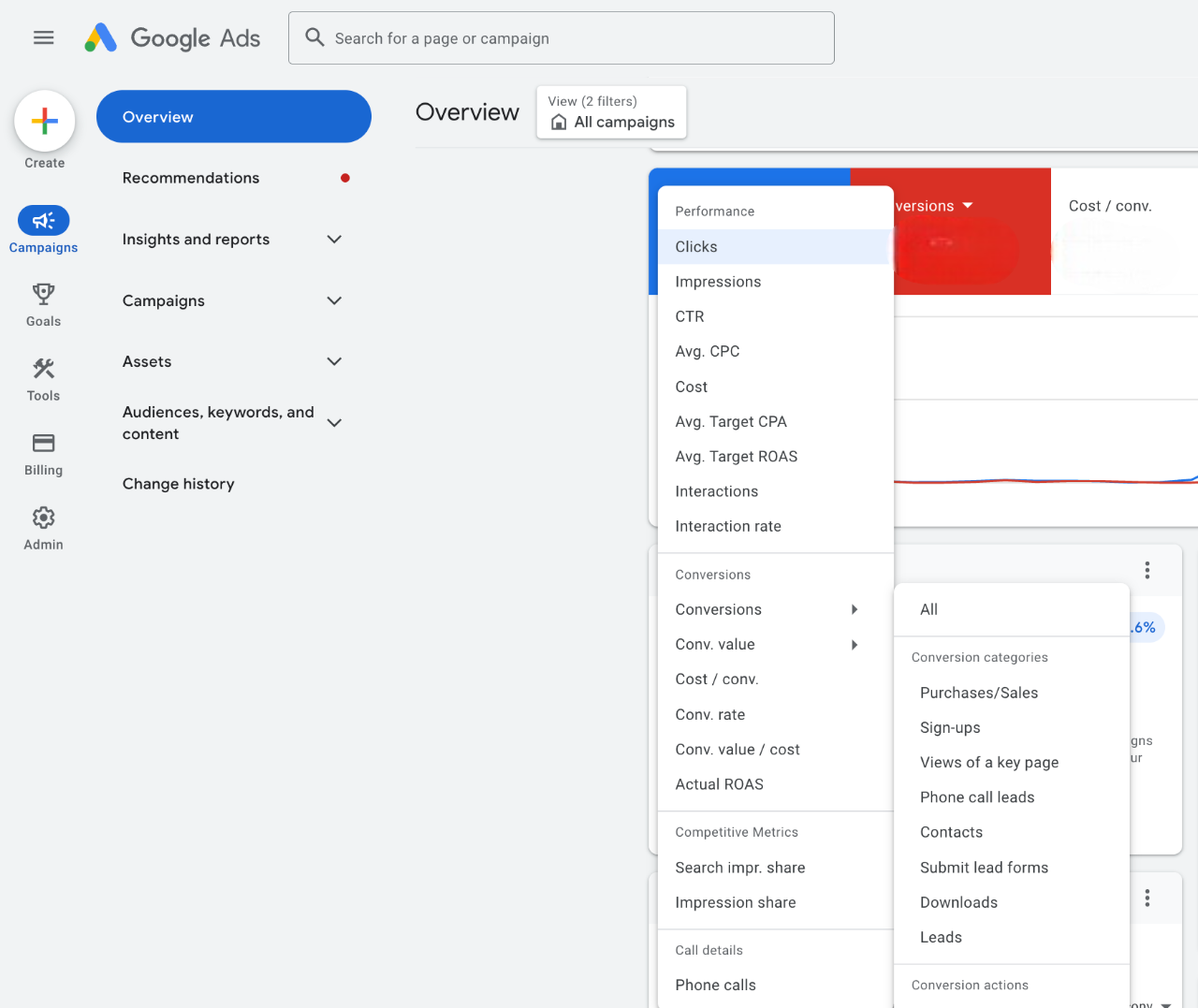
Utilizing A/B Testing to Find the Best-Performing Ads
A/B testing allows advertisers to experiment with different ad variations to identify which ones yield the best results. By creating two or more versions of an ad, you can test elements such as headlines, images, and call-to-action phrases. Run these variations simultaneously and monitor their performance metrics, such as click-through rates (CTR) and conversion rates.
- Define clear goals for your tests, such as increasing CTR or maximizing revenue.
- Use Google Ads’ built-in A/B testing tools or external plugins that integrate with WordPress.
- Analyze the results to inform future ad design and strategy.
Leveraging Google Analytics for Insights on Ad Performance
Google Analytics provides in-depth insights into user behavior and ad performance. Integrating Google Analytics with your WordPress site enables you to track metrics related to ad impressions, clicks, and conversions. Set up conversion tracking to gain visibility into how ads contribute to your overall site goals.
- Monitor user engagement metrics such as bounce rates and average session duration to assess the effectiveness of your ads.
- Utilize custom reports to focus on specific ad campaigns or demographics.
- Adjust your ad strategy based on the insights gathered to better target your audience.
Adjusting Ad Placements Based on User Behavior Analytics
Understanding how users interact with your site allows for strategic ad placement optimization. Use heatmaps and session recordings to visualize user behavior and identify high-traffic areas on your pages.
- Place ads in locations with higher visibility, such as above the fold or within content.
- Consider the impact of mobile versus desktop placements, adjusting accordingly for different devices.
- Regularly reassess ad placements based on changes in user behavior and site layout.
Implementing Responsive Ads for Better Adaptability Across Devices
Responsive ads automatically adjust their size, appearance, and format to fit any available ad space. This flexibility ensures that ads look appealing across various devices, enhancing user experience and potentially increasing engagement.
- Activate responsive ads in your Google Ads settings to allow for automatic adjustments.
- Test different formats and sizes to determine which combinations perform best on your site.
- Monitor performance across devices to optimize for both mobile and desktop users.
Advanced techniques for optimizing Google Ads performance include continuous testing, detailed analytics, strategic placements, and responsive design. Many advertisers overlook the importance of A/B testing and user behavior analytics, assuming that basic setups will suffice. However, these techniques can significantly amplify ad effectiveness.
To implement these strategies effectively, start by conducting A/B tests on your current ads and utilize Google Analytics to gather performance data. Adjust your ad placements based on user interaction insights, and switch to responsive ads to ensure compatibility across devices. Regularly revisit these strategies to adapt to changing trends and user behaviors.
Understanding Google Ads Policies and Compliance
This section details the essential Google Ads content policies and compliance requirements that every WordPress site owner must follow. Adhering to these guidelines is vital for ad approval, site eligibility, and maintaining a healthy account status.

Overview of Google Ads Content Policies and Restrictions
Google Ads enforces a set of content policies designed to ensure a safe and respectful advertising environment. Key restrictions include:
- Prohibited Content: Ads must not promote illegal products or services, adult content, or dangerous goods.
- Restricted Content: Certain topics such as alcohol, gambling, and healthcare have specific regulations that must be followed.
- Misleading Claims: Ads should not contain deceptive or misleading information about products or services.
Common Reasons for Ad Disapproval and How to Avoid Them
Ad disapproval can significantly impact revenue. Common reasons include:
- Violation of Policies: Failing to comply with Google’s content policies is a primary cause of disapproval.
- Insufficient Landing Page Quality: The landing page must provide relevant content and a good user experience.
- Improper Use of Trademarks: Ads must not misuse trademarked terms without proper authorization.
To avoid disapproval, carefully review Google’s advertising policies and ensure that both ad content and landing pages comply with these standards.
Guidelines for Maintaining a Compliant Website
Compliance extends beyond ad content to the entire website. Key guidelines include:
- Content Quality: Ensure that the website contains original, valuable content that aligns with the ad’s message.
- User Experience: Optimize the site for fast loading times and mobile responsiveness.
- Transparency: Provide clear information about products, services, and any applicable terms.
Impact of Policy Violations on Account Status and Revenue
Violating Google Ads policies can lead to serious consequences, including:
- Account Suspension: Repeated violations may result in temporary or permanent suspension of the ad account.
- Loss of Revenue: Disapproved ads directly affect potential income and overall ad performance.
- Damaged Reputation: Continuous policy violations may tarnish the site’s reputation, affecting user trust.
Maintaining compliance is essential for long-term success in Google Ads. Regularly review and update website content to align with Google’s evolving policies.
Expert Consideration: Many site owners overlook the importance of their website’s overall quality and user experience in relation to ad approval. A common misconception is that only the ads themselves need to be compliant; however, Google evaluates the entire ecosystem of ads and landing pages. This means that even minor issues on your website can lead to disapproval. Investing in quality content and a seamless user experience is not only beneficial for compliance but also enhances user engagement and conversion rates.
To ensure compliance, regularly audit your website and ad content against Google’s policies. Set up alerts for policy updates and adapt your content strategy accordingly. Create a checklist for ad submissions that includes reviewing the landing page for relevance, ensuring compliance with prohibited and restricted content, and confirming that all claims are substantiated. This proactive approach will help mitigate risks associated with ad disapproval and maintain a healthy ad account.
Real-World Case Studies: Success Stories with Google Ads on WordPress
This section explores practical examples of websites successfully integrating Google Ads into their WordPress platforms. By examining different strategies employed across various niches, valuable insights emerge for optimizing ad revenue.
Case Study: A Blog Boosting Revenue Through Strategic Ad Placement
A travel blog, “Wanderlust Adventures,” implemented Google Ads with a focus on strategic placement within their content. By embedding ads within relevant articles, the blog saw a 50% increase in monthly revenue within three months. The key was ensuring that ads complemented the content, maintaining user engagement while driving clicks.
Analysis: E-Commerce Site Utilizing Google Ads for Product Promotion
An e-commerce site, “Gadget Hub,” effectively used Google Ads to promote seasonal sales and new product launches. By creating targeted ad campaigns around specific products, Gadget Hub achieved a 30% increase in conversion rates. They optimized their landing pages to match the ad content, enhancing the user experience and encouraging purchases.
Lessons Learned from Failed Ad Campaigns
Not all campaigns yield positive results. The website “Fashion Trends” launched a Google Ads campaign that failed to resonate with their audience, resulting in a 25% drop in traffic. The analysis revealed poor targeting and irrelevant ad content. Recovery strategies involved revising the targeting parameters and focusing on customer demographics, leading to a 45% improvement in subsequent campaigns.
Insights from Successful Site Owners
- Ad Placement: Position ads above the fold to increase visibility without disrupting content flow.
- A/B Testing: Regularly test different ad formats and placements to determine what resonates best with the audience.
- Analytics Utilization: Use Google Analytics to track ad performance and make data-driven adjustments.
Site owners emphasize the importance of creating a seamless experience. Balancing ad visibility with user engagement is crucial for maximizing revenue without alienating visitors.
Common misconceptions include the belief that more ads lead to higher revenue. In reality, excessive ad placement can detract from user experience, leading to increased bounce rates. Instead, focusing on quality over quantity tends to yield better results.
For practical application, website owners should:
- Identify key content areas for ad placement that align with user interests.
- Conduct A/B testing on ad formats and placements to find optimal configurations.
- Utilize analytics tools to monitor performance and adjust strategies accordingly.
By implementing these strategies, site owners can effectively enhance their understanding of how to add Google Ads to WordPress, driving increased revenue while maintaining a positive user experience.
Troubleshooting Common Issues with Google Ads on WordPress
This section addresses frequent challenges users face when integrating Google Ads with WordPress, focusing on solutions to enhance ad performance and revenue generation.

Resolving Issues with Ad Visibility on Different Devices
Ad visibility can vary significantly across devices, affecting user experience and revenue. Common reasons for this include responsive design issues and ad format incompatibility. Ensure your WordPress theme is mobile-friendly and test ad placements on various devices.
- Check the ad format: Use responsive ad units that automatically adjust to different screen sizes.
- Utilize Google’s Mobile-Friendly Test tool to assess your website’s compatibility.
- Consider using plugins that enhance mobile responsiveness for ads.
Fixing Slow Loading Times Caused by Ads
Ads can slow down page loading, impacting user experience and SEO rankings. To mitigate this, implement the following strategies:
- Optimize images and other media files before uploading them to your site.
- Leverage lazy loading for ads, loading them only when they enter the viewport.
- Utilize a content delivery network (CDN) to improve load times for users worldwide.
Regularly monitor your site’s performance using tools like Google PageSpeed Insights to identify and resolve speed issues related to ads.
Addressing Account Suspension and Reactivation Processes
Account suspension can arise from policy violations or invalid traffic. To prevent this, adhere to Google Ads policies and regularly review your traffic sources. If suspended, follow these steps for reactivation:
- Review the suspension email from Google to understand the reason.
- Rectify any violations, providing necessary documentation if required.
- Submit an appeal through the Google Ads support page, detailing corrective actions taken.
Managing Ad Blocking Software and Its Impact on Revenue
Ad blockers can significantly reduce ad visibility and revenue. To address this, consider these approaches:
- Implementing a notice for users with ad blockers, encouraging them to whitelist your site.
- Using alternative monetization strategies, such as affiliate marketing or sponsored content.
- Regularly analyzing user behavior to understand the extent of ad blocker usage on your site.
Many users mistakenly believe that ad blockers primarily affect desktop traffic. However, mobile ad blockers are becoming increasingly popular. Understanding this can help you adjust your ad strategy accordingly.
To effectively apply this information, ensure your ads are optimized for both visibility and performance. Regularly audit your site for mobile responsiveness, speed issues, and compliance with Google Ads policies. Engage with your audience to understand their preferences and adapt your strategies to maximize revenue while enhancing user experience.
Frequently Asked Questions
What is Google Ads and how does it work?
Google Ads is an online advertising platform that allows businesses to create ads that appear in Google search results and on partner websites. Advertisers bid on keywords, and ads are displayed based on relevance and bid amount.
How do I sign up for Google Ads on WordPress?
To sign up for Google Ads, create an account on the Google Ads website and follow the setup instructions. After setting up your account, you can integrate it with your WordPress site using plugins or manual code insertion.
What are the best practices for placing Google Ads on WordPress?
Best practices include placing ads above the fold, ensuring they are relevant to your content, and not overwhelming visitors with too many ads. Additionally, monitor performance and adjust placements based on user engagement.
How much does it cost to use Google Ads on WordPress?
The cost of Google Ads varies based on your bidding strategy, competition for keywords, and budget settings. You can set a daily budget, and costs are typically calculated on a pay-per-click basis.
How long does it take to set up Google Ads on WordPress?
Setting up Google Ads can take as little as a few hours, depending on your familiarity with the platform and your website. After initial setup, ads may take a few hours to start running once approved by Google.
What are common mistakes to avoid when adding Google Ads to WordPress?
Common mistakes include not optimizing ad placements, failing to target the right keywords, and neglecting to track ad performance. Additionally, avoid cluttering your site with too many ads, which can deter visitors.
Can I use Google Ads without a website?
While having a website is highly recommended for Google Ads, you can run ads that link to other online properties, such as social media profiles. However, a dedicated website typically provides better control and tracking capabilities.
What plugins can help integrate Google Ads into WordPress?
Popular plugins for integrating Google Ads into WordPress include Ad Inserter, Advanced Ads, and WP Quads. These plugins simplify ad placement and management directly from the WordPress dashboard.
Final Thoughts on how to add google ads to wordpress
Integrating Google Ads into a WordPress site can significantly enhance revenue streams when executed with precision and adherence to best practices. The key to success lies in not only understanding the platform’s mechanics but also in continuously optimizing ad placements and analyzing performance metrics to adapt strategies effectively.
To maximize your results, begin by conducting thorough keyword research and implementing targeted ad campaigns that align with your site’s content, ensuring relevancy and higher engagement rates.
Mastering Google Ads is crucial for any WordPress site aiming to leverage advertising as a sustainable income source, making it an essential component of digital growth strategies.
Leave a Reply