
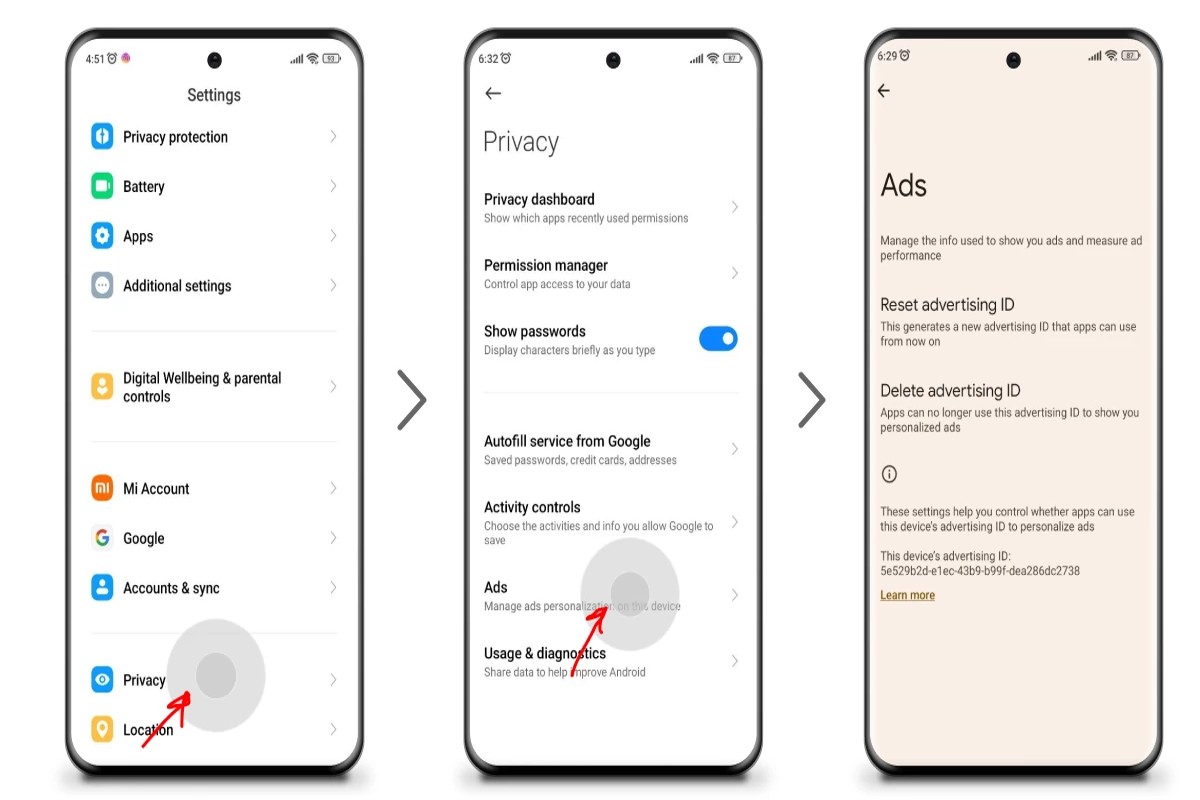
To get rid of Google Ads, you can adjust your ad settings, use ad blockers, or opt for premium services that eliminate ads. These methods help reduce ad visibility and enhance your online experience.
Understanding how to manage Google Ads is crucial for users seeking a more streamlined and less intrusive browsing experience. Failure to address unwanted ads can lead to frustration, distractions, and even hinder productivity.
This article outlines effective strategies for reducing or eliminating Google Ads, including step-by-step instructions for adjusting settings, recommendations for reliable ad blockers, and insights into premium services that offer ad-free browsing.
What are Google Ads and how do they work?
Google Ads is an online advertising platform that allows businesses to display ads on Google’s search engine results pages and across its advertising network. This system operates on a pay-per-click (PPC) model, where advertisers bid on keywords relevant to their products or services. When users search for these keywords, Google displays the most relevant ads, generating traffic to the advertisers’ websites.
Google Ads serves multiple purposes, primarily to increase visibility and drive targeted traffic to businesses. Advertisers can create various types of ads, including text, display, video, and shopping ads. Each ad type is designed to reach users at different stages of their purchasing journey. The effectiveness of Google Ads is influenced by several factors, including bid amounts, ad quality, and relevance to user search queries.
- Search Ads: Text-based ads that appear at the top of Google search results when users query specific keywords.
- Display Ads: Visual ads that appear on websites within Google’s Display Network, targeting users based on their interests and online behavior.
- Video Ads: Ads that appear before, during, or after YouTube videos, offering businesses a way to engage with potential customers through visual storytelling.
- Shopping Ads: Product-based ads that showcase items directly in search results, complete with images and prices, aimed at driving online sales.
The Google Ads auction determines ad placement, balancing the bid amount against the ad’s quality score, which takes into account relevance, click-through rates, and landing page experience. Advertisers can refine their targeting by demographics, locations, and user behavior to enhance ad performance and return on investment.
Expert Tip: To maximize the effectiveness of Google Ads, regularly analyze performance metrics and adjust bidding strategies accordingly. Utilizing A/B testing for ad copy and targeting can also lead to improved engagement and conversion rates.
How can I stop seeing Google Ads on my browser?
To stop seeing Google Ads on your browser, you can adjust your browser settings or use ad-blocking software. Both methods can effectively reduce or eliminate the ads that appear while you browse. Follow the steps outlined below to implement these solutions.
- Adjust Google Ads Settings: Visit the Google Ads Settings page at adssettings.google.com. Here, you can turn off personalized ads, which will limit the number of targeted ads you see.
- Clear Browsing Data: Open your browser settings and navigate to the privacy section. Clear your browsing history and cookies, which can reset ad preferences and reduce targeted advertising.
- Use an Ad Blocker: Install a reputable ad blocker extension such as AdBlock, uBlock Origin, or AdGuard. After installation, configure the settings to block ads on all websites.
- Disable JavaScript: For advanced users, disabling JavaScript in your browser settings can block many ads. However, this may also affect website functionality.
- Switch Browsers: Consider using privacy-focused browsers like Brave or Firefox with privacy settings enabled. These browsers often have built-in ad-blocking features.
Implementing these steps can significantly reduce or eliminate Google Ads from your browsing experience. However, it’s essential to balance ad-blocking with website support, as many sites rely on ad revenue.
Expert Tip: Regularly review and update your ad-blocker settings, as advertisers continuously evolve their strategies. Staying informed about the latest privacy tools can enhance your ad-free experience.
Are there any costs associated with getting rid of Google Ads?
Yes, there can be costs associated with getting rid of Google Ads, particularly if you choose to use premium ad-blocking services or software. Prices for these services typically range from free options to subscription fees of $5 to $15 per month, depending on the features offered.
Several factors can influence the cost of ad-blocking solutions:
- Type of Service: Free ad blockers are widely available but may offer limited features. Paid options usually provide enhanced functionality, such as advanced tracking protection and multi-device support.
- Subscription Plans: Many premium services operate on a subscription model. Monthly or annual fees can vary, with some services charging between $5 and $15 per month.
- Device Compatibility: Costs may increase if a service is needed for multiple devices or platforms, such as desktop and mobile. Some providers offer family plans or multi-device discounts.
Additionally, some web browsers come with built-in ad-blocking features, which can be a cost-effective way to eliminate Google Ads without additional expenses. However, these features may not be as robust as dedicated ad-blocking software.
When selecting an ad-blocking solution, consider both the financial cost and the potential impact on your browsing experience. While free options can be effective, investing in a premium service may provide better performance and user experience.
Expert Tip: Regularly update your ad-blocking software to ensure optimal performance and protection against evolving ad technologies. This proactive approach can help maintain a clutter-free browsing experience.
What are the best ad blockers for removing Google Ads?
Several effective ad blockers can help remove Google Ads from your browsing experience. These tools vary in features, effectiveness, and ease of use. Below are some of the top ad blockers to consider.
- uBlock Origin: This open-source ad blocker is highly customizable and efficient. It blocks ads and trackers without consuming significant system resources, making it ideal for users looking for a lightweight solution.
- Adblock Plus: One of the most popular ad blockers, Adblock Plus allows users to create custom filters. It also supports an easy-to-use interface and can block various types of ads, including video ads on platforms like YouTube.
- Ghostery: Known for its privacy features, Ghostery blocks ads while tracking and blocking trackers that collect user data. Its dashboard offers insights into the trackers found on websites, enhancing both speed and privacy.
- Brave Browser: While not a traditional ad blocker, Brave automatically blocks ads and trackers by default. It also features built-in privacy tools and rewards users with cryptocurrency for viewing privacy-respecting ads.
- AdGuard: This comprehensive solution offers both a browser extension and a standalone application. AdGuard provides extensive filtering options, parental controls, and user-friendly features to enhance the browsing experience.
When selecting an ad blocker, consider compatibility with your preferred browser, the level of customization you need, and any additional features like privacy protection. Some ad blockers, such as uBlock Origin and Adblock Plus, are particularly effective for general use, while browsers like Brave offer a more integrated solution for users prioritizing both speed and privacy.
For optimal performance, regularly update your ad blocker and review any filter lists it uses. This ensures maximum effectiveness against evolving ad strategies and improves your online experience.
Expert Tip: Combining an ad blocker with a VPN can further enhance privacy and security, preventing tracking and unwanted ads from multiple sources. This dual approach offers a comprehensive solution for users serious about their online experience.
How long does it take to stop seeing Google Ads after making changes?
After making changes to your Google Ads settings or installing ad blockers, it typically takes 24 to 48 hours for the changes to take effect. However, the exact timeframe can vary based on several factors, including the type of changes made and the specific settings of your Google account.
When adjusting settings such as ad personalization or opting out of targeted ads, the process is usually quicker. Users may notice a reduction in ads shortly after saving changes. In contrast, if you are using ad-blocking software, the effectiveness may depend on the software’s update schedule and how it interacts with different browsers. Some ad blockers require periodic updates to maintain their effectiveness against new ad formats.
Additionally, if you are using multiple devices, changes made on one device may not immediately reflect on others until synced. Clearing your browser cache and cookies can also expedite the process of stopping Google Ads. Be aware that it may take longer for ads to disappear completely if you have a history of browsing that aligns with the targeted ads, as Google’s algorithms may continue to serve similar ads based on your previous online behavior.
Expert Tip: Regularly review your ad settings and browser configurations to ensure that you maintain an ad-free experience. Keeping your ad-blocking software up to date is crucial for optimal performance against evolving advertising strategies.
Can I still use Google services if I block ads?
Yes, you can still use Google services if you block ads. Blocking ads does not prevent access to Google services like Search, Gmail, or YouTube. However, the user experience may be altered, and some features may be limited.
When using Google services with ads blocked, the key difference lies in the functionality and personalization of these services. For example, Google Search results may still be relevant, but the absence of personalized ads could affect how you receive recommendations. Furthermore, some features, like YouTube’s premium content, may require a subscription if ads are blocked entirely.
- With Ads: Access to personalized content, recommendations, and features that may rely on advertising revenue.
- Without Ads: Uninterrupted browsing experience, but potential limitations on personalized features and content access.
- Ad Blockers: Effective at removing ads, but may occasionally disrupt service functionality and lead to unwanted pop-ups or requests to disable the blocker.
Blocking ads can enhance the user experience by reducing distractions; however, it may also limit access to certain features that rely on ad revenue. Some Google services offer subscription models that allow for ad-free experiences while still providing full functionality.
Expert Tip: Consider using Google’s own subscription services, such as YouTube Premium or Google One, for an ad-free experience while maintaining full access to features and personalized content.
What are the privacy implications of using ad blockers?
Using ad blockers can enhance user privacy by limiting data tracking and reducing exposure to targeted advertisements. However, they can also create a false sense of security, as not all ad blockers prevent all forms of data collection.
For instance, consider a user browsing an online news site with an ad blocker enabled. The ad blocker successfully removes intrusive ads, but the user may not realize that the site still collects data through embedded tracking scripts or cookies. These scripts can monitor user behavior, such as page visits and interaction patterns, even without displaying ads. In this scenario, the ad blocker does not fully protect the user’s privacy; it merely reduces the visibility of advertisements.
Moreover, some ad blockers rely on whitelists, allowing certain advertisers to bypass filtering. This can lead to selective data tracking, where users may unknowingly consent to data collection from specific sources while blocking others. Users should be aware that while ad blockers can mitigate some privacy risks, they are not a comprehensive solution. The effectiveness of an ad blocker in safeguarding privacy largely depends on its configuration and the user’s understanding of its limitations.
Expert Tip: Regularly review the settings and permissions of your ad blocker, and consider using additional privacy tools, such as browser extensions that block trackers or VPN services, for enhanced protection against data collection.
Advanced Techniques for Customizing Google Ad Preferences
This section delves into sophisticated methods for managing Google ad preferences, enabling users to tailor their ad experience beyond basic settings. Employing these strategies can significantly reduce the visibility of unwanted ads and enhance overall browsing satisfaction.

Utilizing Google Account Settings
Access your Google Account settings to customize your ad experience. Navigate to Ads Settings, where you can manage your ad personalization options. This area allows users to adjust the types of ads they see based on their interests and online activity.
Adjusting Ad Personalization
Within the Ads Settings, users can toggle ad personalization on or off. By opting to turn it off, Google will no longer tailor ads based on your activity. Alternatively, you can refine your interests by reviewing and editing the categories listed. This adjustment can help eliminate irrelevant ads that do not align with your preferences.
Browser Extensions for Enhanced Control
Consider utilizing browser extensions designed to block or manage ads more effectively. Popular options include:
- AdBlock Plus: Blocks ads on websites, including Google ads.
- uBlock Origin: A lightweight ad blocker that is customizable and resource-efficient.
- Privacy Badger: Focuses on preventing tracking by blocking third-party ads.
These extensions enhance user control over the ad experience, allowing for a more streamlined browsing experience without intrusive advertisements.
Exploring Alternative Search Engines
For those seeking a completely ad-free experience, consider using alternative search engines. Options such as:
- DuckDuckGo: Prioritizes user privacy and does not display personalized ads.
- Startpage: Offers Google search results without tracking user activity or displaying ads.
- Qwant: A privacy-focused search engine that does not track users or show personalized ads.
Shifting to these platforms can significantly reduce exposure to Google ads while maintaining effective search capabilities.
Many users mistakenly believe that simply disabling ads in their Google settings is sufficient. However, ads may still appear based on cookies and tracking data that remain active on their devices. Clearing cookies or using incognito modes can further minimize unwanted ads.
To effectively implement these strategies, follow these actionable steps:
- Access your Google Account and navigate to Ads Settings to manage ad personalization.
- Turn off ad personalization if desired, or refine your interests to improve ad relevance.
- Install a browser extension like AdBlock Plus or uBlock Origin for enhanced ad control.
- Explore alternative search engines and consider making one your default to avoid Google ads entirely.
By taking these steps, users can significantly reduce the prevalence of unwanted Google ads, tailoring their online experience to better meet their preferences.
Common Mistakes When Trying to Block Google Ads
Blocking Google Ads effectively requires a strategic approach. Many users unknowingly make mistakes that diminish their ad-blocking efforts, leading to frustration and continued exposure to unwanted advertisements.
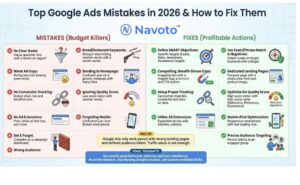
Neglecting to Update Ad Blocker Software Regularly
Ad blocker software requires regular updates to maintain effectiveness. Developers frequently release updates to counter new advertising techniques and bypass methods used by ad networks. Failing to keep the software current may result in vulnerability to ads that were previously blocked. Users should enable automatic updates or check manually at least once a month to ensure optimal performance.
Overlooking Browser Settings That Allow Ads
Most web browsers come with built-in settings that manage how ads are displayed. Users often overlook these settings, which can inadvertently allow ads to appear even when an ad blocker is installed. It is essential to review browser privacy settings and ensure that options related to ad blocking, tracking protection, and pop-up management are correctly configured. Specific settings may vary by browser, so consulting the help documentation for the respective browser is advisable.
Using Ineffective or Outdated Ad Blocker Tools
Not all ad blockers are created equal. Some tools may lack the necessary features to block newer ad formats or may not support certain websites. Using outdated or less effective ad blockers can result in a significant number of ads slipping through. Researching and selecting a reputable ad blocker with regular updates and positive reviews can enhance the ad-blocking experience. Popular options include uBlock Origin and AdGuard, known for their comprehensive blocking capabilities.
Failing to Understand the Difference Between Ads and Sponsored Content
Users often confuse traditional ads with sponsored content, which may not be blocked by standard ad blockers. Sponsored content typically appears as articles or posts that are paid for by advertisers but masquerade as regular content. Recognizing this distinction is crucial for users who want to avoid all forms of advertising. Manual filtering of certain sites or using browser extensions designed to identify sponsored content can help in mitigating exposure to these types of ads.
Common Misconceptions
Many users believe that simply installing an ad blocker will eliminate all ads. In reality, some ads may still be displayed due to the reasons outlined above. Additionally, some websites employ anti-ad-blocking techniques that can bypass standard ad blockers. Understanding these nuances can lead to more effective strategies for reducing ad exposure.
Practical Application
- Regularly update your ad blocker software to ensure it can combat new ad strategies.
- Review and adjust your browser settings to maximize ad-blocking capabilities.
- Select a reputable, actively maintained ad blocker that suits your browsing habits.
- Educate yourself on the differences between traditional ads and sponsored content, and consider additional filtering tools if necessary.
Real-World Applications of Ad Blocking: Case Studies
This section presents real-world examples of individuals and businesses who effectively reduced their exposure to Google Ads through various ad-blocking strategies. These case studies illustrate the tangible benefits and considerations of implementing ad-blocking tools.

Case Study: Enhanced Browsing Experience for a User
A user named Sarah, a frequent browser of news websites, experienced frustration due to intrusive Google Ads disrupting her reading. By implementing an ad blocker, she reported a significant improvement in her online experience. The ad blocker eliminated not only ads but also reduced page load times by approximately 40%, allowing her to access content more seamlessly.
Post-ad blocker installation, Sarah noted several key changes:
- Decreased distraction from content, enhancing focus.
- Fewer pop-ups and interruptions, improving overall satisfaction.
- Increased time spent on pages, leading to more thorough reading.
Business Analysis: Cost Reduction through Eliminating Paid Ads
A local retail business, ABC Electronics, previously relied heavily on Google Ads for customer acquisition. After assessing their return on investment, they decided to shift their strategy by employing organic marketing tactics and optimizing their website for search engines. This change resulted in a 30% reduction in advertising costs over six months.
Key outcomes of this strategic pivot included:
- Increased organic traffic by 50% through enhanced SEO efforts.
- Improved customer engagement with targeted content marketing.
- Strengthened brand loyalty, as customers appreciated the absence of disruptive ads.
Impact of Ad-Blocking on User Engagement and Website Traffic
The implementation of ad-blocking technology has broader implications for user engagement. Studies indicate that websites with high ad density often see a drop in user retention rates. A comparative analysis of websites before and after users adopted ad blockers showed:
- A 20% increase in average session duration post-ad blocker usage.
- Higher page views per session, indicating improved user interaction.
- A notable decline in bounce rates, suggesting users were more willing to explore content.
Comparative Study: User Experiences Pre- and Post-Ad Blocker
In a survey conducted among 500 participants, users reported their experiences with ad blockers. Before using ad blockers, 70% expressed frustration over the abundance of ads, while 80% reported a better browsing experience after implementation. Specific findings included:
- 90% of users felt less overwhelmed by distractions.
- 75% stated they were more likely to engage with content without ads.
- 65% reported a better perception of the websites they frequented.
While these case studies highlight the positive impacts of ad-blocking, it is essential to acknowledge that not all websites can sustain their operations without ad revenue. Many content creators rely on advertising to fund their work, raising ethical considerations regarding ad-blocking practices.
For individuals and businesses looking to implement these strategies, consider the following actions:
- Research and select reputable ad-blocking tools tailored to specific browsing needs.
- Evaluate the financial implications of reducing reliance on paid ads versus organic traffic generation.
- Monitor user engagement metrics to assess the effectiveness of ad-blocking technologies.
Comparing Free vs. Paid Solutions for Ad Blocking
This section examines the differences between free and premium ad-blocking options, highlighting their features, limitations, and long-term value for users seeking to eliminate Google Ads effectively.
Popular Free Ad Blockers and Their Limitations
Free ad blockers are widely accessible and include popular options such as Adblock Plus, uBlock Origin, and Ghostery. While these tools effectively block many ads, they often have limitations:
- Limited Features: Free versions may lack advanced functionalities, such as real-time protection against malware or tracking.
- Performance Issues: Some free ad blockers can slow down browsing speeds or lead to compatibility issues with certain websites.
- Inconsistent Updates: Free solutions may not receive regular updates, potentially resulting in gaps in ad-blocking capabilities.
Benefits of Investing in Premium Ad-Blocking Software
Premium ad-blocking solutions, such as AdGuard or NordVPN’s CyberSec, offer several advantages over free options:
- Comprehensive Protection: Paid software typically includes additional features like privacy protection, anti-tracking, and VPN services.
- Ad-Free Experience: Users often report a significantly enhanced browsing experience, with fewer interruptions from ads.
- Customer Support: Premium services generally provide dedicated customer support, ensuring timely assistance for any issues that arise.
User Testimonials: Free vs. Paid Solutions
User experiences vary significantly between free and paid ad blockers. Many users of free ad blockers express frustration with ads that occasionally slip through filters or the lack of customer support. In contrast, testimonials from users of premium solutions often highlight satisfaction with seamless browsing experiences and the added security features. For example, one user noted, “Switching to a premium ad blocker reduced my ad exposure and significantly improved page load times.”
Long-Term Cost Analysis
When evaluating the cost-effectiveness of free versus paid ad-blocking options, consider the following:
- Initial Investment: Free ad blockers require no financial commitment, while premium options typically range from $30 to $100 annually.
- Potential Savings: Paid solutions may save users money in the long run by reducing data usage and improving website performance, which can lead to less frustration and increased productivity.
- Value Over Time: The enhanced features of premium software can justify the expense, particularly for frequent internet users who prioritize a smooth browsing experience.
Many overlook the hidden costs associated with ads, such as decreased productivity and increased frustration. An effective ad blocker can mitigate these issues, making a premium investment worthwhile for heavy users.
To effectively eliminate Google Ads, consider your browsing habits and needs. For casual users, a free ad blocker may suffice. However, frequent users who prioritize speed and security may find that investing in a premium solution yields a more satisfactory experience. Evaluate both options based on features, user reviews, and long-term benefits before making a decision.
Frequently Asked Questions
What are Google Ads and how do they work?
Google Ads is an online advertising platform where businesses pay to display ads on Google’s search results and other websites. Advertisers bid on keywords, and ads are shown based on relevance and budget.
How can I stop seeing Google Ads on my browser?
You can stop seeing Google Ads by adjusting your ad settings in your Google account or by using ad-blocking browser extensions. Clearing your browsing data and cookies may also help reduce personalized ads.
Are there any costs associated with getting rid of Google Ads?
Using ad blockers is typically free, but some premium ad-blocking services may charge a subscription fee. Adjusting settings in your Google account incurs no cost.
What are the best ad blockers for removing Google Ads?
Popular ad blockers include uBlock Origin, Adblock Plus, and Ghostery. These tools effectively block Google Ads and enhance browsing speed.
How long does it take to stop seeing Google Ads after making changes?
Changes to ad settings or the installation of ad blockers can take effect immediately, but it may take a few hours for personalized ads to diminish. Regular browsing without ads should become noticeable shortly after.
Can I still use Google services if I block ads?
Yes, you can continue to use Google services while blocking ads. However, some features may be affected, and you might miss out on personalized content.
What are the privacy implications of using ad blockers?
Ad blockers can enhance privacy by preventing tracking scripts from collecting user data. However, some ad blockers may collect their own data, so reviewing their privacy policies is essential.
Final Thoughts on how can i get rid of google ads
Effectively minimizing Google Ads requires a combination of strategic ad preferences customization, employing robust ad blockers, and understanding the underlying mechanisms of online advertising. By taking a proactive approach, individuals can significantly enhance their browsing experience while maintaining control over their digital environment.
To begin, install a reputable ad blocker such as uBlock Origin or AdGuard, which will effectively filter out unwanted Google Ads and improve page load times, ensuring a more streamlined online experience.
Mastering the art of ad management is essential in today’s digital landscape, where user autonomy and a clutter-free browsing experience are paramount.
Leave a Reply