
Yes, ad blockers can strip UTM parameters from Google Ads links. This action can hinder the tracking of campaign performance, making it challenging for marketers to assess the effectiveness of their advertising efforts.
This topic is crucial for digital marketers and businesses that rely on accurate analytics to inform their strategies. Failure to understand how ad blockers interact with UTM parameters can lead to misguided decisions based on incomplete data.
This article examines how ad blockers affect UTM parameters, the implications for campaign tracking, and strategies to mitigate these challenges for more reliable performance measurement.
What are UTM parameters in Google Ads?
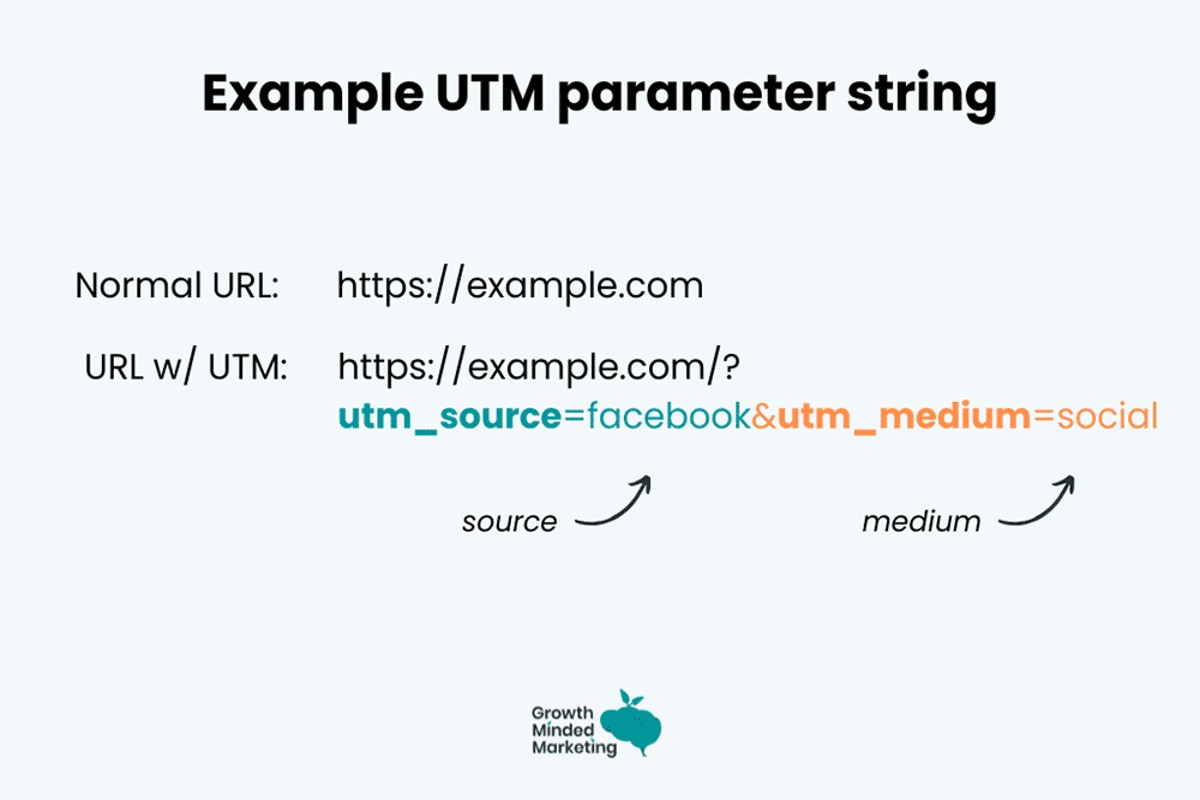
UTM parameters are specific tracking codes added to URLs that help marketers identify the effectiveness of their campaigns in Google Ads and other marketing channels. These parameters enable the collection of detailed data on website traffic sources, user behavior, and conversion metrics, providing insights into how well different marketing efforts perform.
UTM stands for “Urchin Tracking Module,” a name derived from the original software that Google acquired to enhance its analytics capabilities. UTM parameters typically include five components: utm_source, utm_medium, utm_campaign, utm_term, and utm_content. Each of these parameters serves a distinct purpose in tracking and attributing traffic to specific campaigns, allowing marketers to analyze the effectiveness of their strategies.
- utm_source: Identifies the source of the traffic (e.g., Google, Facebook).
- utm_medium: Describes the medium used (e.g., CPC, email).
- utm_campaign: Names the specific campaign (e.g., spring_sale).
- utm_term: Used to identify paid search keywords.
- utm_content: Differentiates similar content or links within the same ad.
These parameters are appended to the end of a URL, allowing Google Analytics and other tracking tools to collect data on user interactions. When users click on a link with UTM parameters, the information is sent back to the analytics platform, enabling detailed reporting and analysis of marketing performance. This tracking is essential for optimizing campaigns and understanding customer journeys.
Effective use of UTM parameters can significantly enhance marketing insights by providing clarity on which channels and campaigns yield the best results. Marketers should consistently apply UTM parameters across their campaigns to ensure comprehensive data collection and analysis.
Expert Tip: Consistent naming conventions for UTM parameters can prevent data discrepancies and improve the accuracy of campaign performance reports.
How do ad blockers affect website analytics?
Ad blockers can significantly impact website analytics by preventing tracking tools from collecting data on user interactions. This leads to data loss, as user behavior may go unrecorded, skewing insights and analytics reports. Consequently, businesses may struggle to understand the effectiveness of their marketing campaigns.
- Ad blockers typically block scripts from tracking tools, including Google Analytics, which means visits from users with ad blockers may not be recorded. This results in a reduced overall traffic count and can mislead marketers about their audience size.
- When users click on links with UTM parameters, ad blockers may strip these parameters from the URLs. This prevents the tracking of campaign performance, making it challenging to attribute conversions or sales to specific marketing efforts.
- The impact of ad blockers varies by user demographics and industry. Some audiences, particularly younger and tech-savvy users, are more likely to use ad blockers, leading to greater data discrepancies for businesses targeting these groups.
Additionally, the reliance on cookies for tracking can exacerbate data loss, as many ad blockers also target cookie-based tracking. This means that even if basic site visits are recorded, essential data about user behavior and engagement may still be absent.
Mitigating Data Loss
To address the challenges posed by ad blockers, businesses can implement server-side tracking solutions. These alternatives can capture user interactions without relying on client-side scripts, thus minimizing the impact of ad blockers on analytics.
Integrating user consent mechanisms can also improve the accuracy of analytics data. By obtaining explicit permission from users to track their activity, companies may find that fewer users opt-out of tracking, thus preserving valuable data.
Implementing first-party tracking solutions can help mitigate the effects of ad blockers. By focusing on direct relationships with users, businesses can gather more reliable data while respecting user privacy.
Can I prevent UTM parameters from being stripped?
While it is not possible to completely prevent ad blockers from stripping UTM parameters, there are strategies to mitigate their effects and ensure better tracking of your campaigns. Implementing these best practices can help maintain the integrity of your tracking links and optimize your marketing efforts.
One effective approach is to use server-side tracking. By collecting data directly on your server, you reduce reliance on client-side scripts that ad blockers target. This method involves sending UTM data to your server via API calls, allowing you to track users without relying on UTM parameters in the URL. Additionally, consider using first-party cookies for tracking instead of UTM parameters, as they are less likely to be blocked by ad blockers.
- Implement Link Shorteners: Use a link shortener like Bitly or TinyURL that can mask UTM parameters. This can make it less likely for ad blockers to strip the parameters, as they focus on well-known tracking URLs.
- Utilize Redirects: Create redirects on your server that capture incoming traffic. When users click on the ad, they are redirected through your server, which can log the UTM parameters before sending them to the final destination.
- Monitor Traffic Sources: Use alternative traffic source monitoring techniques, such as pixel tracking or fingerprinting, which can provide insights into user behavior without relying solely on UTM parameters.
- Customize Campaign URLs: Instead of standard UTM parameters, consider using unique identifiers or custom parameters that are less recognizable to ad blockers, reducing the likelihood of them being stripped.
Applying these strategies can enhance the robustness of your tracking efforts. However, continuous monitoring and adaptation to evolving ad blocker technologies will be necessary to maintain effective tracking.
What is the cost of using UTM parameters in campaigns?
The cost of using UTM parameters in marketing campaigns is generally minimal, often amounting to no direct monetary expense. However, organizations may incur indirect costs related to implementation and analysis, which can vary based on several factors.
Key costs associated with UTM parameters include:
- Time for Setup: Creating and managing UTM parameters requires time investment. This includes training staff, designing the tracking strategy, and ensuring consistency across campaigns.
- Tools and Software: While basic UTM tracking can be done with free tools like Google Analytics, advanced analytics platforms may incur subscription fees. These tools can enhance data reporting and insights but come at a cost.
- Data Analysis: Analyzing the data collected from UTM parameters may require additional resources. This could involve hiring data analysts or using external services to interpret the results effectively.
Additionally, the scale of the marketing campaign influences the overall cost. Larger campaigns with multiple channels and numerous UTM parameters may require more extensive tracking systems, leading to increased complexity and related costs. Conversely, smaller campaigns may find that the costs associated with UTM implementation are negligible.
Organizations should evaluate their specific needs and resources when deciding to implement UTM parameters. They must balance the potential benefits of enhanced tracking and insights against the indirect costs incurred during the process.
Expert Tip: Regular audits of UTM parameters can optimize tracking efficiency and reduce unnecessary overhead costs. This ensures that each parameter serves a clear purpose and contributes to actionable insights.
Do all ad blockers strip UTM parameters?
No, not all ad blockers are designed to strip UTM parameters from Google Ads links. The effectiveness of ad blockers in this regard varies significantly based on their specific features and user configurations. While some ad blockers focus on removing tracking elements, others may not affect UTM parameters at all.
Ad blockers can be broadly categorized into three types: those that block ads and trackers, those that block only ads, and browser privacy settings that limit tracking. The following comparison illustrates how different ad blockers handle UTM parameters:
- uBlock Origin: This open-source ad blocker is highly customizable and can effectively strip UTM parameters if configured to block specific scripts and trackers. Users can modify filter lists to include rules for removing UTM parameters.
- AdBlock Plus: Primarily focused on blocking ads, this tool does not inherently strip UTM parameters. However, users can add custom filters to achieve this, making it less effective out of the box.
- Ghostery: While Ghostery is designed to enhance privacy by blocking trackers, it does not specifically target UTM parameters. Its primary function is to block tracking scripts, which means UTM parameters may still be present in links.
Additionally, the effectiveness of ad blockers can be influenced by user settings, such as the level of privacy protection enabled or the specific filter lists applied. Users should be aware that even if an ad blocker does not strip UTM parameters, other browser extensions or privacy settings may still impact how these parameters are managed.
For optimal UTM parameter stripping, users should consider using ad blockers that allow for extensive customization, like uBlock Origin, and regularly review their filter settings. Implementing additional privacy measures, such as browser extensions focused on tracking protection, can further enhance link privacy.
For those concerned with tracking through UTM parameters, understanding the configuration options of their chosen ad blocker and the potential for custom filters is essential for effective link management.
How long do UTM parameters stay in the URL?
UTM parameters remain in the URL until the link is navigated away from or manually altered by the user. If a user clicks on a link with UTM parameters, those parameters will persist in the URL as long as the page is open or until the user navigates to a different page that does not include them.
The duration of UTM parameters in a URL is primarily influenced by user behavior. For instance, if a user accesses a page via a link that contains UTM parameters, those parameters will be visible in the URL until the user either refreshes the page, navigates to a different URL, or the session times out. In cases where users bookmark the page, the UTM parameters will be retained as part of the bookmarked link. However, if the URL with UTM parameters is shared or the page is reloaded without those parameters, they will be removed from the visible URL.
Another factor that may affect the retention of UTM parameters is the website’s configuration. Some sites may automatically strip UTM parameters after a certain period or redirect users to a cleaner URL without them. This practice is common for enhancing user experience and reducing URL clutter. Additionally, if a user shares the link, it may be altered by the sharing platform, potentially leading to the removal of UTM parameters.
Expert Tip: To ensure effective tracking, it is advisable to monitor UTM parameters closely and implement strategies to maintain their presence in URLs, especially on landing pages intended for marketing campaigns.
What are common mistakes with UTM parameters?
Marketers often make several common mistakes when using UTM parameters in their campaigns, which can lead to inaccurate tracking and misinterpretation of data. These mistakes include inconsistent naming conventions, missing parameters, and incorrect URL encoding.
One frequent error is the inconsistency in naming conventions. For instance, if a marketer uses “Facebook” in one link and “facebook” in another, the analytics will treat these as separate sources. This discrepancy can skew campaign performance data, making it difficult to assess the effectiveness of social media efforts. Another example is failing to include essential parameters like “utm_medium” or “utm_campaign,” which are crucial for identifying the traffic source and campaign accurately. Without these, it becomes impossible to analyze which marketing efforts are driving results.
Incorrect URL encoding is another prevalent issue. For example, if a marketer includes spaces or special characters in UTM parameters without proper encoding, the entire URL may break, leading to tracking failures. A scenario might involve a UTM parameter like “utm_content=spring sale” where the space is not encoded, resulting in a link that does not function correctly when clicked. This misstep can lead to lost data, making it challenging to attribute conversions accurately.
Expert Tip: Implement a standardized template for UTM parameters across all campaigns to minimize errors. Regular audits of your links can also help catch inconsistencies before they impact your analytics.
Understanding the Impact of Ad Blockers on UTM Tracking
This section explores how ad blockers operate and their specific influence on UTM parameters in Google Ads links, highlighting the significance of accurate tracking in digital marketing efforts.

Mechanisms of Ad Blockers and Their Filtering Capabilities
Ad blockers utilize various methods to filter content and enhance user privacy. Primarily, they work by blocking requests to known ad servers and scripts, which can include tracking parameters in URLs. These tools often leverage lists of known advertising domains and tracking scripts to identify and eliminate unwanted content.
Key mechanisms include:
- URL filtering: Blocking requests based on specific keywords or patterns in URLs, which can include UTM parameters.
- Element hiding: Preventing certain elements from being displayed on a webpage, which may indirectly affect how UTM parameters are processed.
- Script blocking: Disabling JavaScript or other scripts that collect or transmit tracking data.
Specific Examples of Ad Blockers That Strip UTM Parameters
Several popular ad blockers have demonstrated the capability to strip UTM parameters from URLs. Notable examples include:
- AdBlock Plus: This tool can block specific URL patterns, including those containing UTM parameters.
- uBlock Origin: Known for its extensive filter lists, it may remove UTM parameters if configured to do so.
- Ghostery: While primarily focused on tracking protection, it can also interfere with URL parameters used for analytics.
Potential Consequences for Marketers and Data Accuracy
The stripping of UTM parameters by ad blockers can lead to significant ramifications for marketers. When UTM parameters are removed, it becomes difficult to accurately attribute traffic sources and measure campaign effectiveness. This lack of data can:
- Skew analytics reports, leading to misguided marketing strategies.
- Reduce the effectiveness of A/B testing by obscuring the source of traffic.
- Complicate audience segmentation, making it challenging to tailor messages based on user behavior.
Real-World Case Studies Illustrating the Impact
Several organizations have reported challenges stemming from ad blockers stripping UTM parameters. For instance, a major e-commerce platform noted a 30% drop in conversion attribution accuracy after implementing UTM links. Similarly, a digital marketing agency found that clients using ad blockers saw a significant increase in unexplained traffic, which hindered their ability to optimize campaigns.
Nuance / Expert Layer
A common misconception is that all ad blockers indiscriminately strip all parameters from URLs. In reality, many ad blockers allow users to customize their filtering settings. Some users may whitelist certain sites or disable ad blockers for specific domains, allowing UTM parameters to pass through. Furthermore, not all ad blockers uniformly handle UTM parameters; some may only target specific types of tracking links, while others might ignore them entirely.
Practical Application
Marketers should consider implementing strategies to mitigate the impact of ad blockers on UTM tracking. Suggested actions include:
- Educating users on the importance of UTM parameters and encouraging whitelisting of key domains.
- Using server-side tracking solutions to capture user interactions without relying solely on URL parameters.
- Monitoring analytics closely to identify patterns that may indicate data loss due to ad blockers.
By understanding the influence of ad blockers on UTM parameters, marketers can better adapt their strategies to maintain data integrity and improve campaign performance.
Best Practices for Maintaining UTM Parameter Integrity
Ensuring the integrity of UTM parameters is essential for accurate tracking and effective marketing analytics. This section outlines proven strategies to maintain UTM parameters in the face of potential stripping by ad blockers.

Techniques for URL Shortening
Utilizing URL shortening services can help mitigate the risk of UTM parameters being stripped. Shortened URLs can disguise the original link structure, making it less recognizable to ad blockers. Consider these approaches:
- Custom Short Links: Use a branded URL shortener to create memorable links that still include UTM parameters.
- Redirects: Implement server-side redirects to mask the original URL, keeping UTM parameters intact.
- Link Management Platforms: Employ platforms that allow for robust tracking and management of shortened URLs, ensuring UTM parameters remain functional.
Using Server-Side Tracking
Server-side tracking can effectively bypass client-side ad blockers that strip UTM parameters. By processing tracking data on the server, you eliminate reliance on the user’s browser, which may block scripts or parameters. Consider the following methods:
- Database Logging: Capture UTM parameters directly into a database upon user redirection, allowing you to track source data without relying on client-side scripts.
- API Integrations: Use server-to-server API calls to send tracking information, bypassing the browser entirely.
- Tag Management Solutions: Implement server-side tag management systems that assist in maintaining UTM integrity.
Educating Users on UTM Parameters
Educating stakeholders about the importance of UTM parameters can lead to better practices across your organization. When users understand how UTM parameters affect tracking and analytics, they are more likely to implement them correctly. Consider hosting workshops or creating informational content that highlights:
- The role of UTM parameters in marketing attribution.
- How accurate tracking impacts decision-making.
- Best practices for constructing UTM links.
Testing and Monitoring UTM Performance
Regular testing and monitoring of UTM performance are crucial for identifying potential issues early. Implement these practices:
- Periodic Audits: Conduct audits of UTM parameters to ensure they are being captured accurately across campaigns.
- Performance Analysis: Use analytics tools to track traffic sources and confirm that UTM parameters are functioning as intended.
- A/B Testing: Experiment with different URL formats to determine which configurations work best without being stripped by ad blockers.
Ad blockers can strip UTM parameters from Google Ads links, potentially skewing analytics. To maintain UTM integrity, implement URL shortening techniques, leverage server-side tracking, educate users about their importance, and conduct regular performance testing. By employing these strategies, marketers can enhance the accuracy of their tracking efforts and ensure reliable data collection.
Comparative Analysis of Ad Blockers and Their Effectiveness
This section examines various ad blockers, their features, and their effectiveness in stripping UTM parameters from Google Ads links. Understanding these elements is crucial for marketers who rely on accurate tracking for campaign performance.
Overview of Popular Ad Blockers and Their Features
Several ad blockers dominate the market, each with unique features aimed at enhancing user privacy and browsing speed. Key players include:
- AdBlock Plus: Offers customizable filters and allows users to whitelist specific sites.
- uBlock Origin: Known for its lightweight design and extensive filter lists, it blocks ads, trackers, and even some scripts.
- Ghostery: Focuses on blocking trackers and provides insights into who is tracking users on websites.
- Brave Browser: Integrates ad blocking natively, aiming to improve site loading times and user privacy.
Analysis of User Preferences and Ad Blocker Usage Statistics
User preferences for ad blockers vary based on factors such as ease of use, effectiveness, and additional privacy features. According to recent statistics, approximately 42% of internet users employ ad blockers, with a notable increase among younger demographics. Preferences often skew towards blockers that offer a blend of performance enhancement and privacy protection.
Impact on Different Browsers and Devices
The effectiveness of ad blockers can differ significantly across browsers and devices. For example:
- Chrome: Popular ad blockers function well, but users may encounter compatibility issues with certain extensions.
- Firefox: Offers built-in tracking protection, enhancing the effectiveness of external ad blockers.
- Safari: Known for robust privacy features, it restricts third-party cookies, impacting ad tracking.
- Mobile Devices: Ad blockers on mobile browsers can effectively strip ads, though their impact on UTM parameters varies.
Recommendations for Marketers Based on Blocker Effectiveness
Marketers should consider the following strategies when navigating ad blocker environments:
- Utilize UTM parameters that are less likely to be stripped by ad blockers.
- Monitor traffic sources closely to identify discrepancies caused by ad blockers.
- Engage users with clear messaging that encourages whitelisting for a better experience.
Understanding how ad blockers interact with UTM parameters is vital. Many marketers assume that all ad blockers universally strip UTM parameters, but the reality is nuanced. While some blockers focus on ad content, others specifically target tracking scripts. This distinction can lead to misconceptions about the effectiveness of UTM tracking in campaigns. Additionally, users often do not realize that by blocking ads, they may inadvertently limit their access to tailored content and offers, which could affect overall engagement.
Marketers should actively test their campaigns across different browsers and devices to gauge the impact of ad blockers. Implementing a robust analytics strategy that accounts for potential data loss due to ad blockers will help maintain accurate performance tracking. Consider employing server-side tracking methods and exploring alternative attribution models to mitigate the effects of ad blockers on data collection.
Future Trends: The Evolution of Ad Blocking and Tracking
This section examines the anticipated advancements in ad blocking technology, user behavior shifts regarding advertisements, and the emerging tracking technologies designed to counteract ad blockers. Understanding these trends is essential for digital marketers aiming to adapt their strategies effectively.
Advancements in Ad Blocker Technology
Ad blocker technology continues to evolve, with enhancements focused on user privacy and experience. Future advancements may include:
- AI-driven filters: Utilizing machine learning algorithms to identify and block ads more effectively while allowing relevant content.
- Context-aware blocking: Ad blockers may analyze user context to determine which ads to block, potentially allowing non-invasive ads through.
- Enhanced privacy features: Increased emphasis on protecting user data may lead to stricter blocking of tracking scripts, including those associated with UTM parameters.
Predicted Changes in User Behavior
User behavior regarding ads is shifting as awareness of data privacy increases. Several trends are emerging:
- Growing acceptance of ad blockers: More users are installing ad blockers, leading to a significant decline in ad visibility.
- Demand for transparency: Users increasingly prefer brands that disclose their data practices and respect privacy.
- Preference for ad-free experiences: Many users are opting for subscription services that offer ad-free experiences, further reducing the effectiveness of traditional advertising.
Emerging Tracking Technologies
In response to the rise of ad blockers, marketers are developing new tracking technologies that aim to circumvent these barriers. Key innovations include:
- First-party data strategies: Brands are focusing on collecting data directly from their customers through loyalty programs and direct engagements, reducing reliance on third-party tracking.
- Cookie-less tracking solutions: Technologies such as fingerprinting and server-side tracking are gaining traction to bypass traditional cookie-based methods.
- Privacy-focused analytics: New analytics platforms that prioritize user privacy are emerging, providing insights without compromising user data.
Long-Term Strategies for Marketers
To thrive in an ad-blocked environment, marketers must adopt proactive, innovative strategies. Consider the following approaches:
- Invest in content marketing: Creating valuable content that engages users can enhance brand loyalty and reduce the reliance on ads.
- Enhance user experience: Focus on delivering seamless, non-intrusive ads that respect user preferences, which may lead to higher engagement rates.
- Leverage social media: Utilize social media platforms for direct engagement and advertising, as these channels may face less resistance from users.
Implementing these strategies can help marketers adapt their campaigns to a landscape where ad blockers increasingly challenge traditional methods. By focusing on building relationships with users and prioritizing privacy, brands can continue to thrive despite the potential for ad blockers to strip UTM parameters from Google Ads links.
Frequently Asked Questions
What are UTM parameters in Google Ads?
UTM parameters are tags added to a URL that help track the performance of campaigns in Google Ads and other marketing platforms. They provide insights into traffic sources, medium, and campaign effectiveness.
How do ad blockers affect website analytics?
Ad blockers can prevent tracking scripts from executing, which may lead to incomplete or inaccurate website analytics. This can hinder the ability to measure the effectiveness of marketing campaigns, including those using UTM parameters.
Can I prevent UTM parameters from being stripped?
While it is challenging to fully prevent UTM parameters from being stripped by ad blockers, using server-side tracking can help mitigate this issue. Additionally, educating users about the importance of UTM parameters may encourage them to disable ad blockers on your site.
What is the cost of using UTM parameters in campaigns?
Using UTM parameters is free and does not incur any additional costs for campaigns. However, improper implementation can lead to data inaccuracies, which may affect overall campaign performance and ROI.
Do all ad blockers strip UTM parameters?
Not all ad blockers strip UTM parameters, but many do target tracking links and URLs. The extent of this behavior varies by the specific ad blocker and its settings.
How long do UTM parameters stay in the URL?
UTM parameters remain in the URL until the user navigates away from the page or the URL is modified. They will persist as long as the user stays on the same page or interacts with the same link.
What are common mistakes with UTM parameters?
Common mistakes include inconsistent naming conventions, using too many parameters, and failing to test links before deployment. Such errors can lead to confusion in analytics and misinterpretation of campaign performance.
Final Thoughts on can ad blockers strip utm parameters from google ads link
The integrity of UTM parameters is crucial for accurate tracking and analytics in digital marketing, and ad blockers can indeed interfere with this data by stripping these parameters from links. Marketers must recognize this challenge and implement strategies to mitigate the impact on campaign performance and data accuracy.
To safeguard UTM parameter integrity, consider implementing server-side tracking solutions that do not rely solely on client-side URL parameters, thereby ensuring that critical data remains intact regardless of ad blocker usage.
Understanding the implications of ad blockers is essential for optimizing marketing strategies and ensuring that data-driven decisions are based on reliable analytics.
Leave a Reply