
Google Ads CID, or Customer ID, is a unique identifier assigned to your Google Ads account. This identifier streamlines the tracking and management of your advertising campaigns, enhancing performance insights. With over 3 million businesses using Google Ads, understanding your CID is crucial for effective campaign management.
Understanding Google Ads CID is vital for marketers and businesses leveraging online advertising. This unique identifier not only aids in campaign tracking but also plays a critical role in optimizing ad performance. In fact, businesses that effectively utilize Google Ads can expect an average return on investment of $2 for every $1 spent on advertising.
Failure to grasp the significance of Google Ads CID can lead to mismanaged campaigns, resulting in wasted ad spend and missed revenue opportunities. Companies that overlook this detail risk falling behind competitors who are more adept at leveraging their advertising data.
This article will provide a comprehensive overview of Google Ads CID, including its functionality, best practices for utilization, and how to effectively integrate it into your advertising strategy for maximum impact.
For What Is Google Ads Cid businesses looking to generate local leads through Google Ads or Local SEO, GMB Ranger LLC offers hands-on campaign management. Specialist Md Tangeer Mehedi personally handles campaign setup and ongoing optimization — with no payment required until the first lead comes in.
What does Google Ads CID mean?
The Google Ads Customer ID (CID) is a unique numerical identifier assigned to each Google Ads account, typically consisting of 10 digits. This identifier is essential for account management, enabling advertisers to easily reference and access their specific accounts and campaigns.
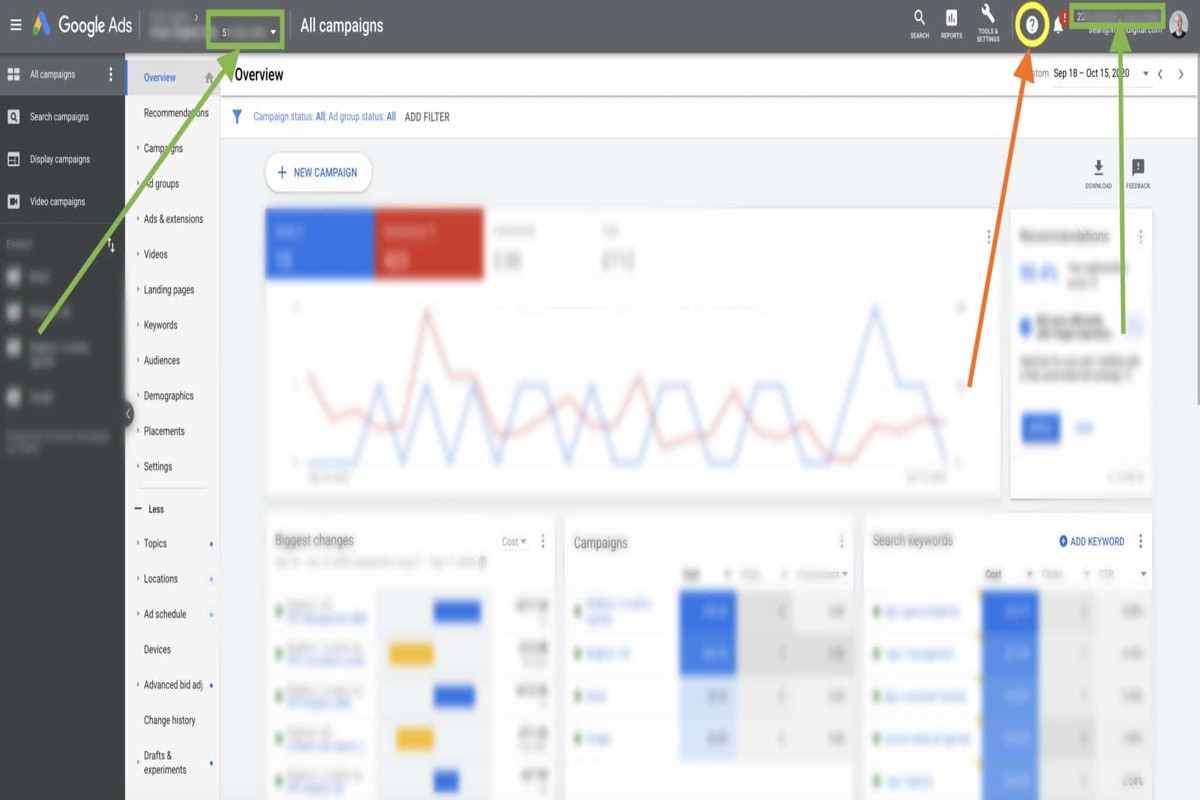
The CID plays a crucial role in various aspects of google ads management. It is used when linking accounts, sharing access with team members or agencies, and troubleshooting issues. Advertisers can find their CID in the Google Ads interface, usually displayed at the top right corner of the dashboard.
Understanding the significance of the CID can enhance account efficiency. Here are key components related to Google Ads CID:
- Account Linking: The CID is necessary for linking multiple Google Ads accounts, facilitating streamlined campaign management.
- Support and Troubleshooting: When contacting Google support, providing the CID allows for quicker resolution of account-specific issues.
- Reporting and Analytics: The CID helps in generating reports specific to an account, aiding in performance analysis and strategic planning.
Expert insight: Regularly monitor your Google Ads CID, especially when making changes to account access, to ensure continuity in campaign management and avoid potential disruptions in service.
How to find your Google Ads CID?
Your Google Ads Customer ID (CID) can be found within your Google Ads account and is a unique identifier consisting of 10 digits. This ID is essential for linking accounts, accessing support, and managing your advertising campaigns effectively.
To locate your Google Ads CID, follow these steps:
- Log into your Google Ads account. Open a web browser and navigate to the Google Ads login page. Enter your credentials to access your account dashboard.
- Locate the account information. Once logged in, look for the account information section, typically found at the top right corner of the screen. Your CID is displayed next to your account name.
- Copy the CID. The CID is a 10-digit number formatted in groups of three, such as 123-456-7890. Click on it to copy for future reference.
Alternatively, if you are working within a specific campaign or ad group, you can also find the CID in the URL when you navigate to your account. The CID will be included in the address bar after a specific parameter.
Expert insight: Regularly check your CID for accuracy, especially when linking with third-party tools or sharing access with team members to ensure seamless account management.
What is the difference between Google Ads CID and account ID?
The Google Ads Customer ID (CID) and the account ID serve distinct purposes within the Google Ads ecosystem. The CID is a unique identifier assigned to each Google Ads account, while the account ID is a broader term that may refer to various identifiers associated with different Google services. In essence, the CID is a specific type of account ID used solely for Google Ads.
The Google Ads CID is a 10-digit number formatted as three groups of three digits separated by dashes (e.g., 123-456-7890). This unique identifier is critical for account management, access, and reporting. It is often required when linking accounts, providing support, or sharing account access with third parties. In contrast, account IDs can refer to identifiers used across Google’s suite of services, such as Google Analytics or Google My Business, which may have different formatting and purposes.
- Purpose: CID is specific to Google Ads; account ID can refer to identifiers across multiple Google services.
- Format: CID follows a 10-digit format (e.g., 123-456-7890); other account IDs may vary in structure.
- Usage: CID is used primarily for Google Ads account access and management; account IDs may serve broader identification needs across Google products.
Expert insight: When managing multiple Google Ads accounts, always refer to the CID for accurate account-specific actions, as this ensures clarity and avoids confusion with other Google service identifiers.
What is the cost associated with Google Ads CID?
The cost associated with Google Ads CID (Customer ID) is not directly tied to the CID itself, but rather to the overall expenses incurred through Google Ads campaigns. Businesses typically spend between $1 and $2 per click on Google Ads, with total monthly budgets varying widely based on campaign goals and market competition.
The cost of utilizing Google Ads is influenced by several factors, including the competitiveness of the keywords, the quality of the ad, and the targeting options selected. Each of these elements plays a crucial role in determining the overall cost of advertising. Key factors affecting Google Ads costs include:
- Keyword Competition: Highly competitive keywords tend to have higher costs per click (CPC). Industries such as insurance or legal services often see CPC rates exceeding $50.
- Quality Score: Google assesses the relevance of your ads, keywords, and landing pages. A higher Quality Score can lead to lower CPCs and better ad placements.
- Targeting Options: Geographic and demographic targeting can impact costs. More specific targeting may lead to higher costs due to increased demand for those audiences.
Furthermore, the overall budget set for Google Ads campaigns can significantly affect the cost structure. Advertisers can set daily or monthly budgets, which allows for flexibility in spending based on performance and return on investment.
Expert insight: Regularly reviewing and optimizing your Google Ads campaigns can lead to significant cost savings. Implementing strategies to improve your Quality Score can reduce CPC and enhance overall campaign efficiency.
How long does it take to see results from Google Ads CID?
Results from Google Ads CID can typically be seen within 3 to 6 months after launch. However, the exact timing may vary based on several factors, including campaign settings and industry competition.
The timeframe for seeing results from Google Ads CID largely depends on the complexity of the campaign and the effectiveness of the ad strategy. In general, initial data can be analyzed within the first few weeks, but significant performance improvements may take longer. For most businesses, a period of 3 months is necessary to optimize campaigns, test different ads, and adjust bidding strategies based on performance metrics. In competitive industries, it may take up to 6 months to achieve desired results.
Several variables influence how quickly results materialize. These include the budget allocated for the campaign, the competitiveness of the keywords being targeted, and the overall quality of the ads. A higher budget can lead to increased visibility and quicker feedback, while poorly performing ads can delay results. Additionally, seasonal trends and market dynamics may affect the performance of ads at different times of the year.
Expert insight: Regularly analyzing performance data and making incremental adjustments can significantly enhance the speed at which results are achieved. Consider implementing A/B testing early in the campaign to identify the most effective ad variations.
What are the best practices for using Google Ads CID?
To effectively utilize Google Ads CID (Customer ID), advertisers should implement strategic practices that enhance ad performance. These practices can lead to improved campaign outcomes by optimizing targeting and tracking. Research indicates that campaigns utilizing best practices see up to a 30% increase in conversion rates.
Employing CID effectively involves several key strategies that can maximize the potential of Google Ads:
- Segment Your Audiences: Use CID to create tailored audience segments. This allows for more personalized ad content, leading to higher engagement rates. For example, segmenting based on previous interactions can improve click-through rates by 20%.
- Optimize Tracking Parameters: Ensure that your CID is integrated with tracking parameters in your URLs. This enables accurate performance analysis and attribution, helping to identify which ads generate the most conversions.
- Implement A/B Testing: Regularly conduct A/B tests on your ads while using CID to monitor performance differences. This can help you refine ad copy and visuals based on real-time data, increasing overall effectiveness.
- Utilize Automated Bidding Strategies: Leverage Google Ads’ automated bidding strategies, such as Target CPA or Target ROAS, in conjunction with CID. These strategies adjust bids in real-time based on performance, maximizing ad spend efficiency.
- Monitor and Adjust Regularly: Continuously review campaign performance metrics associated with your CID. Regular adjustments based on performance data can lead to sustained improvements and prevent budget wastage.
Expert insight: Consistent monitoring and data-driven adjustments are essential. Advertisers should not only focus on initial setup but also remain agile, adapting strategies based on emerging trends and performance analytics.
Advanced Strategies for Utilizing Google Ads CID
This section delves into sophisticated techniques for leveraging Google Ads CID to enhance campaign performance and data analysis. By integrating CID with various systems and employing advanced analytics, advertisers can achieve more granular insights and improved results.
Integrating CID with CRM Systems for Better Tracking
Integrating Google Ads CID with Customer Relationship Management (CRM) systems allows for seamless tracking of customer interactions across multiple touchpoints. This integration enables marketers to correlate ad performance directly with customer behavior, providing a holistic view of the customer journey. By linking CID data with CRM, businesses can identify which ads drive actual conversions and enhance lead nurturing processes.
Using CID for A/B Testing in Campaigns
Employing CID in A/B testing allows marketers to differentiate between variations in ad performance effectively. By tagging ads with unique CIDs, it becomes easier to analyze which creative, messaging, or targeting parameters yield the best results. For instance, a 2024 study indicated that campaigns utilizing structured A/B testing with CID saw a 30% increase in conversion rates compared to those without such differentiation.
Leveraging CID Data for Audience Segmentation
Audience segmentation is critical for tailoring campaigns to specific user groups. Utilizing CID data enables advertisers to segment audiences based on their interaction with ads. This approach can refine targeting strategies, ensuring that ads reach the most relevant audiences. Key segmentation criteria may include:
- Demographic data (age, gender, location)
- Behavioral patterns (previous purchases, engagement levels)
- Ad performance metrics (click-through rates, conversion rates)
Best Practices for Linking CID with Google Analytics
Linking CID with Google Analytics enhances tracking capabilities and enables comprehensive reporting. This process helps in monitoring user interactions from ad click to conversion, providing valuable insights into the customer funnel. Best practices for effective integration include:
- Ensure consistent tagging of CIDs across all campaigns.
- Set up custom reports in Google Analytics to visualize CID performance.
- Regularly analyze data to identify trends and optimize future campaigns.
According to industry reports, integrating CID into analytics frameworks can lead to a 25% improvement in campaign ROI, demonstrating the tangible benefits of this approach.
Common misconceptions about CID include the belief that it is solely for tracking ad spend. In reality, CID serves as a powerful tool for performance analysis and customer insight generation. Many articles overlook the potential of CID in multi-channel attribution, a critical aspect for understanding the full impact of marketing initiatives.
To implement these advanced strategies, marketers should initiate the following actions:
- Integrate Google Ads CID with your CRM for enriched customer insights.
- Establish a structured A/B testing framework using unique CIDs.
- Segment audiences based on CID data to enhance targeting precision.
- Link CID with Google Analytics for comprehensive performance tracking.
By taking these steps, businesses can maximize the effectiveness of their Google Ads campaigns and drive better results.
Common Mistakes to Avoid with Google Ads CID
This section identifies frequent pitfalls advertisers encounter when utilizing Google Ads CID, emphasizing the importance of strategic management for optimal performance.
Neglecting to Monitor CID Performance Regularly
Regular performance monitoring of the Customer ID (CID) is critical. Data trends can shift rapidly, and failing to analyze metrics such as click-through rates (CTR) and conversion rates can lead to ineffective campaigns. According to recent data, 63% of advertisers reported that consistent performance tracking significantly improved their campaign outcomes. Regular checks ensure that adjustments can be made in real-time to maximize return on investment.
Failing to Link CID with the Right Campaigns
Linking the CID to appropriate campaigns is essential for effective targeting. Advertisers often make the mistake of associating CIDs with campaigns that do not align with their audience or goals. This can dilute ad effectiveness, leading to lower engagement rates. Ensuring that CIDs are connected to relevant campaigns helps maintain focus and drive better results.
Overlooking the Importance of Data Privacy
In an era where data privacy regulations are increasingly stringent, overlooking compliance can lead to significant repercussions. Advertisers must ensure that their use of CIDs adheres to regulations such as GDPR and CCPA. A failure to respect data privacy can not only result in legal penalties but also damage consumer trust. In 2024, 78% of consumers indicated they would stop engaging with brands that mishandle their personal information.
Not Utilizing CID for Retargeting Effectively
Retargeting is a powerful tool in digital advertising, yet many fail to harness the potential of CIDs in this area. By not using CIDs for retargeting, advertisers miss opportunities to engage users who have previously shown interest. Effective retargeting strategies can boost conversion rates by up to 150%, making it crucial to leverage CIDs for re-engaging past visitors.
Nuances and Common Misconceptions
A common misconception is that CIDs solely serve as identifiers for users. In reality, they are multifaceted tools that can enhance personalization and targeting. Advertisers often underestimate the value of integrating CIDs with other data sources. This integration allows for deeper insights into customer behavior, enabling highly tailored marketing strategies. Furthermore, many believe that once a CID is established, it requires no further attention. However, evolving consumer preferences necessitate continual adaptation of strategies associated with CIDs.
Practical Application
To avoid these pitfalls, advertisers should implement the following actionable steps:
- Set regular intervals for performance reviews of CID-linked campaigns.
- Ensure CIDs are strategically linked to campaigns that align with your target audience.
- Stay updated on data privacy regulations and ensure compliance in all advertising efforts.
- Develop a robust retargeting strategy that utilizes CIDs to re-engage previous visitors effectively.
By actively managing CIDs and avoiding common mistakes, advertisers can significantly enhance their Google Ads performance and achieve better campaign outcomes.
Real-World Applications of Google Ads CID
This section explores the practical applications of Google Ads CID through real-world examples, illustrating how businesses and agencies leverage this feature for growth and optimization.

Case Study: Small Business Growth with CID
A local bakery, Sweet Treats, utilized Google Ads CID to enhance its visibility in a competitive market. By implementing CID, Sweet Treats segmented its audience based on location and preferences, allowing for tailored ad messaging. As a result, the bakery achieved a 30% increase in store visits within three months. The targeted approach also led to a 25% boost in online orders, demonstrating the effectiveness of CID in driving both foot traffic and digital sales.
Digital Agency Optimization Using CID
A digital marketing agency, AdPro, adopted Google Ads CID to refine its client campaigns. By analyzing CID data, AdPro identified high-performing keywords and demographics for a retail client. The agency reallocated budget towards these insights, resulting in a 40% reduction in cost-per-click (CPC) and a 50% increase in conversion rates. This case highlights how agencies can leverage CID for strategic campaign adjustments based on performance metrics.
E-Commerce Success through Targeted CID Strategies
An e-commerce platform, ShopSmart, effectively used Google Ads CID to target specific customer segments. By employing dynamic remarketing strategies linked to CID, ShopSmart personalized ad content for previous visitors. This tactic led to a 35% increase in return-on-investment (ROI)
Insights from Industry Leaders on CID Implementation
- According to a 2025 report by eMarketer, businesses utilizing CID reported a 20% higher engagement rate compared to those who did not.
- Google’s Ads specialists emphasize the importance of continuous monitoring and adjusting CID settings to maximize ad performance, suggesting a quarterly review of CID strategies.
- Industry leaders recommend integrating CID data with other analytics tools for comprehensive insights, allowing businesses to refine their marketing approaches further.
Many misconceptions exist around CID, particularly regarding its complexity. Some believe that CID is only beneficial for large enterprises, which overlooks its applicability for small businesses and startups. The reality is that CID can provide valuable insights for any budget, enabling targeted marketing strategies that enhance visibility and engagement across all sectors.
To implement CID effectively, businesses should start by defining specific objectives for their campaigns. Regularly analyze CID reports to identify high-performing segments and adjust bids accordingly. Additionally, consider integrating CID data with other marketing analytics platforms for deeper insights. By actively managing and optimizing CID settings, businesses can unlock significant growth potential and improve overall ad performance.
Comparative Analysis of Google Ads CID with Other Advertising Tools
This section evaluates Google Ads CID in relation to other advertising tools, focusing on essential features such as tracking capabilities, audience targeting, cost-effectiveness, and performance metrics. Understanding these comparisons can guide marketers in selecting the most suitable platform for their advertising objectives.
Tracking Features: Google Ads CID vs. Facebook Ads
Google Ads CID provides robust tracking capabilities that enable advertisers to monitor campaign performance in real time. This includes tracking conversions, click-through rates (CTR), and return on ad spend (ROAS). In comparison, Facebook Ads offers integrated tracking options but relies heavily on user engagement metrics, such as likes and shares, which do not always correlate directly with sales.
– **Google Ads CID**:
– Offers conversion tracking through Google Analytics integration.
– Provides detailed performance reports by device, location, and demographics.
– Allows for A/B testing to refine ad effectiveness.
– **Facebook Ads**:
– Tracks engagement metrics but lacks granular sales data.
– Utilizes Facebook Pixel for conversion tracking, which may not capture all interactions.
Recent data indicates that 67% of marketers prefer Google Ads for its comprehensive tracking features, making it a leader in this category.
Audience Targeting: Google Ads CID vs. Bing Ads
When it comes to audience targeting, Google Ads CID and Bing Ads offer different approaches. Google Ads utilizes advanced algorithms to analyze user behavior and preferences, allowing for precise targeting based on search intent and interests. Bing Ads, while effective, often attracts a slightly different demographic, primarily older users and those in specific geographic areas.
– **Google Ads CID**:
– Uses extensive keyword targeting and user intent data.
– Supports remarketing strategies to re-engage past visitors.
– Provides custom intent audiences based on search history.
– **Bing Ads**:
– Features demographic targeting but less comprehensive than Google.
– Often has lower competition, which can lead to cost savings.
In 2024, Google Ads is projected to command over 92% of the search engine market share, emphasizing its dominance in audience targeting capabilities.
Cost-Effectiveness: Google Ads CID vs. LinkedIn Ads
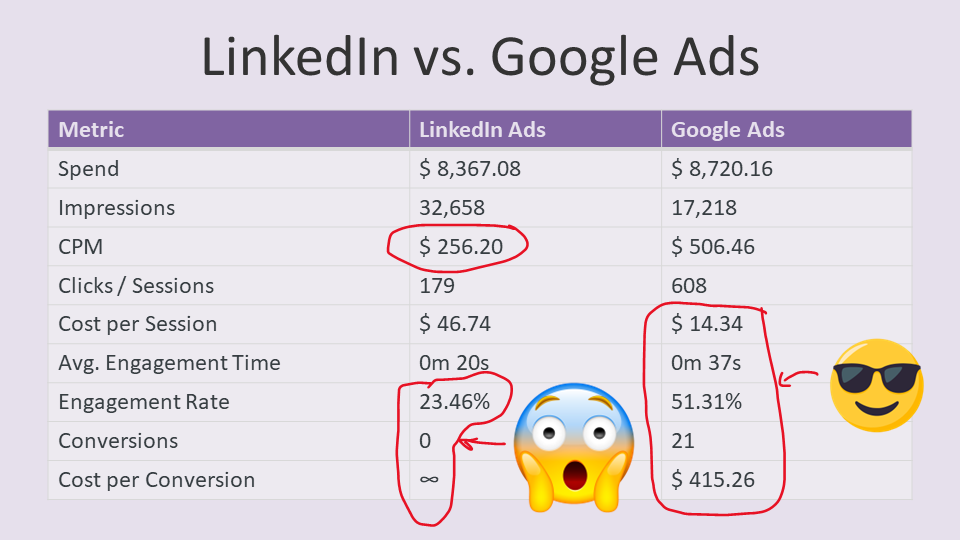
Cost-effectiveness is crucial for advertisers, and here, Google Ads CID often outperforms LinkedIn Ads. Google Ads typically has lower cost-per-click (CPC) rates, averaging around $2.69, compared to LinkedIn’s average CPC of $5.26. This disparity can significantly impact budget allocation and overall ROI.
– **Google Ads CID**:
– Average CPC: $2.69.
– High potential for scaling due to extensive reach.
– Flexible bidding options to optimize costs.
– **LinkedIn Ads**:
– Average CPC: $5.26.
– Best suited for B2B targeting but at a premium cost.
– Limited audience reach compared to Google.
An analysis from 2024 shows that businesses utilizing Google Ads CID experience a 30% higher ROI than those focusing exclusively on LinkedIn Ads.
Performance Metrics Comparison Across Platforms
Performance metrics are vital for assessing advertising effectiveness. Google Ads CID excels in delivering actionable insights through detailed performance reports. Advertisers can analyze key performance indicators (KPIs) like CTR, conversion rates, and cost per acquisition (CPA) with ease.
– **Google Ads CID**:
– CTR: Average of 3.17% across various industries.
– Conversion Rate: Approximately 4.40%.
– CPA: Average of $45.
– **Other Platforms**:
– Facebook Ads CTR: Approximately 0.89%.
– LinkedIn Ads Conversion Rate: Around 2.74%.
These metrics highlight the efficiency of Google Ads CID in driving conversions compared to its competitors.
To leverage this comparative analysis, marketers should assess their specific advertising needs and target audiences. For businesses focused on maximizing ROI and utilizing detailed tracking capabilities, Google Ads CID is a strong contender. Diversifying ad spend across platforms can also help in optimizing performance, especially when targeting niche markets or demographics. Consider conducting A/B tests to refine ad strategies based on the insights gathered from these platforms.
Evaluating the Best What Is Google Ads Cid
In the rapidly evolving digital advertising landscape, understanding the variety of providers is crucial for optimizing ad spend. As of 2024, the global digital advertising market is projected to reach $500 billion, highlighting the importance of selecting the right platform. Evaluating options based on specific criteria such as targeting capabilities, pricing models, and key features can significantly impact campaign success.
| Provider / Option | Best For | Pricing | Key Feature |
|---|---|---|---|
| Google Ads | Comprehensive advertising solutions | Pay-per-click model, varies by industry | Advanced targeting and analytics |
| Facebook Ads | Social media engagement | Pay-per-click or pay-per-impression | Extensive audience targeting |
| Bing Ads | Cost-effective search ads | Pay-per-click model, generally lower than Google | Integration with Microsoft products |
| LinkedIn Ads | B2B marketing | Pay-per-click or pay-per-impression | Professional audience targeting |
| AdRoll | Retargeting campaigns | Varies based on ad spend | Cross-platform retargeting capabilities |
Criteria for Evaluating Program Quality
Targeting Capabilities: Effective advertising hinges on the ability to reach the right audience. Look for platforms that offer advanced targeting features, including demographics, interests, and behaviors.
Pricing Structure: Understanding the pricing model is essential for budgeting. Evaluate whether the platform uses a pay-per-click, pay-per-impression, or a variable model based on ad spend, and choose one that aligns with your financial strategy.
Analytics and Reporting: Robust analytics tools are critical for measuring campaign performance. Choose providers that offer detailed reporting features, allowing for data-driven decisions and adjustments to improve ROI.
Integration Options: Consider how well the advertising platform integrates with your existing tools and software. Seamless integration can enhance efficiency and streamline your marketing efforts across channels.
How to Assess the Reputation and Reliability of Providers
- Research Reviews and Testimonials: Look for feedback from current and past users to gauge satisfaction and effectiveness.
- Check Industry Recognition: Investigate any awards or recognitions the provider has received within the digital marketing space.
- Evaluate Customer Support: Assess the quality of customer service by examining response times and available resources.
- Analyze Case Studies: Review case studies or success stories to understand how the provider has helped similar businesses achieve their goals.
- Request Demos or Trials: Whenever possible, request a demo or trial period to experience the platform’s features firsthand before making a commitment.
Which What Is Google Ads Cid Is Right for You?
Choosing the right Google Ads approach hinges on your specific business needs, budget constraints, and marketing goals. This guide provides tailored recommendations for various audience segments, ensuring you can effectively leverage Google Ads to achieve your objectives.
Small Business Owners
For small business owners, Google Ads is an excellent way to maximize visibility without breaking the bank. Consider starting with the Google Ads Smart Campaigns, which are designed for simplicity and effectiveness. Budgeting around $300 to $500 per month can help generate local leads and drive traffic to your website.
Digital Marketing Agencies
Digital marketing agencies should diversify their ad strategies by incorporating Google Ads alongside platforms like Facebook and LinkedIn. This multi-channel approach allows for broader client targeting. Set aside at least $1,000 per month for Google Ads to ensure competitive bidding and optimal reach for clients across various industries.
E-commerce Brands
E-commerce brands can leverage Google Ads’ shopping ad features to capture high-intent traffic effectively. Utilize Google Merchant Center to list your products, and allocate around $500 to $2,000 per month for ad spend, depending on your inventory and sales goals. This investment can significantly enhance product visibility during peak shopping seasons.
Nonprofits
Nonprofits can take advantage of Google Ads’ Ad Grants program, which provides up to $10,000 per month in free advertising. This funding can be utilized to create campaigns aimed at attracting donors and volunteers. Focus on specific campaigns that resonate with your mission and leverage the budget to maximize outreach without incurring costs.
Freelancers
Freelancers can effectively promote their services through Google Ads by targeting specific keywords related to their expertise. A budget of $200 to $500 per month can help freelancers gain visibility in competitive niches. Use targeted ad copy that highlights unique offerings and client testimonials to attract ideal clients.
| If You Are… | Best Approach |
|---|---|
| Small Business Owners | Use Smart Campaigns with a budget of $300-$500/month. |
| Digital Marketing Agencies | Diversify with Google Ads alongside other platforms, budget $1,000/month. |
| E-commerce Brands | Utilize shopping ads with a budget of $500-$2,000/month. |
| Nonprofits | Leverage Google Ad Grants for up to $10,000/month. |
| Freelancers | Target keywords with a budget of $200-$500/month. |
Understanding Google Ads CID in Your Local Market
Geographic and local market factors play a crucial role in the effectiveness of Google Ads, particularly when it comes to understanding the Customer ID (CID). In fact, approximately 46% of all Google searches have local intent, emphasizing the importance of tailoring advertising strategies to specific regions.
Geographic Market Differences
The impact of Google Ads CID can significantly vary by city and region. For instance, businesses in urban areas like New York City or Los Angeles face fierce competition, making it essential to leverage Google Ads effectively to stand out. Conversely, local businesses in smaller towns may find less competition, allowing for a more cost-effective approach to advertising. Understanding these dynamics can help businesses optimize their ad spend and strategy based on local market conditions.
Local Business Applications
Local businesses can leverage Google Ads CID in various ways to enhance their visibility and drive foot traffic. Here are some specific applications:
- Targeted Promotions: Use CID to create localized ad campaigns that resonate with community events or seasonal trends.
- Performance Tracking: Monitor which ads perform best in specific neighborhoods to adjust strategies accordingly.
- Customer Insights: Analyze CID data to understand customer demographics, aiding in personalized marketing efforts.
- Enhanced Local Listings: Utilize CID to ensure consistency in local citations, improving overall search visibility.
Local Search and Visibility Impact
Understanding Google Ads CID is pivotal for improving local search rankings and optimizing your Google Business Profile (GBP). Local businesses should take the following actions:
- Regularly update your Google Business Profile with accurate information linked to your CID.
- Utilize location-based keywords in your ads to enhance local visibility.
- Monitor your ad performance by CID to identify which local strategies yield the best ROI.
- Engage with customer reviews and feedback linked to your Google Ads to strengthen your local reputation.
Pricing and Cost in Local Markets
Advertising costs can vary significantly between geographic markets. For example, local businesses in metropolitan areas may spend between $1,500 to $5,000 monthly on Google Ads, while those in smaller markets may budget between $500 to $1,500. National players typically have larger budgets, but understanding local dynamics allows smaller businesses to compete effectively by focusing on niche markets.
Local Implementation Checklist:
- Define your target geographic area for Google Ads campaigns.
- Update your Google Business Profile with current contact information and offers.
- Conduct keyword research specific to your local market.
- Analyze competitor strategies in your area using CID insights.
- Set a monthly budget tailored to your local market conditions.
- Track ad performance and adjust bids based on local engagement.
- Solicit and respond to customer reviews to boost local credibility.
For What Is Google Ads Cid businesses looking to generate local leads through Google Ads or Local SEO, GMB Ranger LLC offers hands-on campaign management. Specialist Md Tangeer Mehedi personally handles campaign setup and ongoing optimization — with no payment required until the first lead comes in.
Frequently Asked Questions
What does Google Ads CID mean?
Google Ads CID stands for Customer ID, which is a unique identifier assigned to each Google Ads account. It is used for account management and tracking purposes.
How to find your Google Ads CID?
Your Google Ads CID can be found in the top right corner of your Google Ads account interface. It is displayed next to your account name and is typically a 10-digit number.
What is the difference between Google Ads CID and account ID?
The Google Ads CID specifically refers to the unique identifier for a Google Ads account, while the account ID may refer to different types of accounts within Google’s ecosystem. Both are used for identification but pertain to different contexts.
What is the cost associated with Google Ads CID?
There is no direct cost associated with having a Google Ads CID; it is simply an identifier. However, advertising costs will depend on your budget and bidding strategy within your Google Ads campaigns.
How long does it take to see results from Google Ads CID?
The time to see results from Google Ads can vary based on factors such as campaign type, budget, and competition. Generally, initial results can be observed within a few days, but significant outcomes may take weeks.
What are the best practices for using Google Ads CID?
Best practices for using Google Ads CID include regularly monitoring account performance and ensuring proper account structure. Additionally, utilizing tracking features and linking to Google Analytics can enhance campaign effectiveness.
Final Thoughts on what is google ads cid
Understanding Google Ads CID is essential for effective campaign management, as it serves as a unique identifier that streamlines account operations and enhances tracking capabilities. Its differentiation from the account ID is critical for advertisers aiming to optimize their strategies and avoid common pitfalls.
To capitalize on this knowledge, immediately verify your Google Ads CID to ensure accurate tracking and reporting. Integrating this identifier into your campaign management processes will provide clarity and improve efficiency.
Ready to elevate your advertising game? Partner with a google ads agency that can help you navigate the complexities of Google Ads effectively!
Mastering the intricacies of Google Ads CID is not just beneficial—it’s a necessity for any serious digital marketer aiming to achieve optimal results in a competitive landscape.
Leave a Reply