
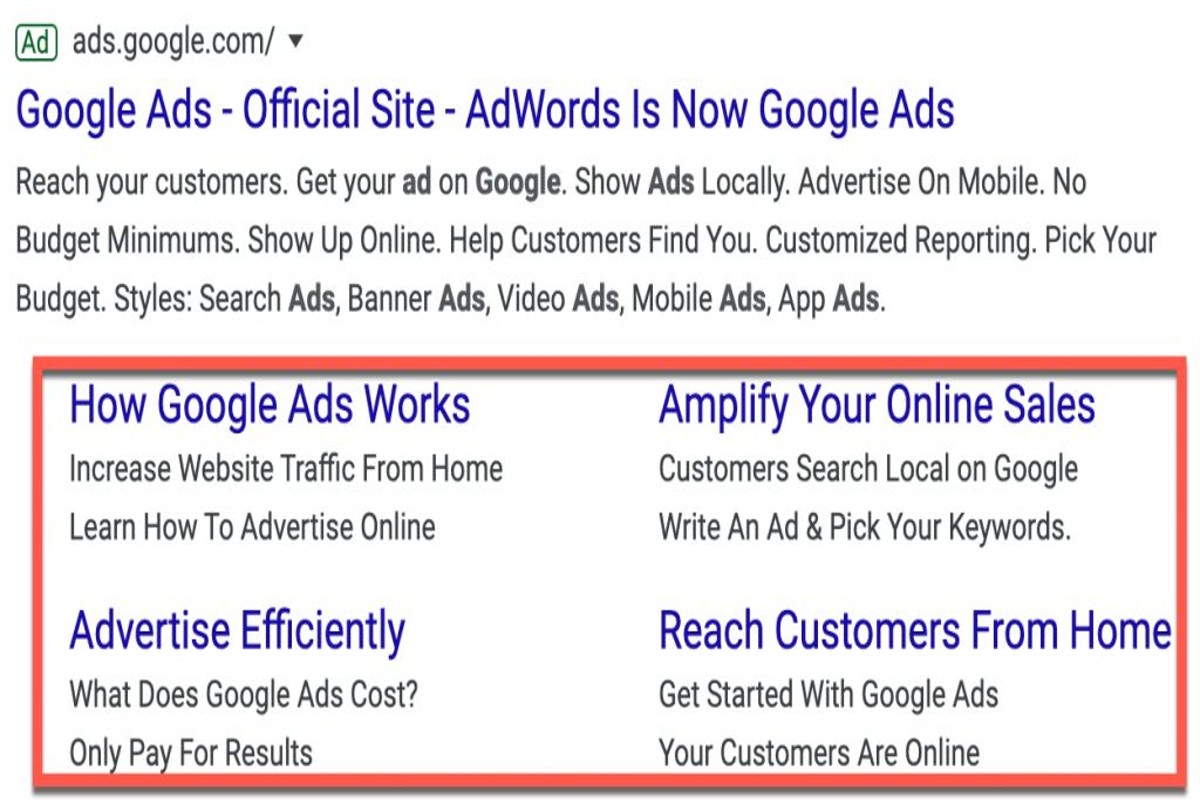
Sitelinks in Google Ads are additional links that appear beneath your ad, directing users to specific pages on your website. They enhance visibility and improve click-through rates, providing valuable shortcuts for potential customers.
Understanding sitelinks is crucial for advertisers aiming to maximize their ad performance and ROI. Effective use of sitelinks can significantly impact user engagement and conversion rates, making it essential for marketers to implement them correctly.
This guide covers the structure and benefits of sitelinks, best practices for implementation, and tips for optimizing their performance within your Google Ads campaigns.
For What Are Sitelinks In Google Ads businesses looking to generate local leads through Google Ads or Local SEO, GMB Ranger LLC offers hands-on campaign management. Specialist Md Tangeer Mehedi personally handles campaign setup and ongoing optimization — with no payment required until the first lead comes in.
What are sitelinks in Google Ads?
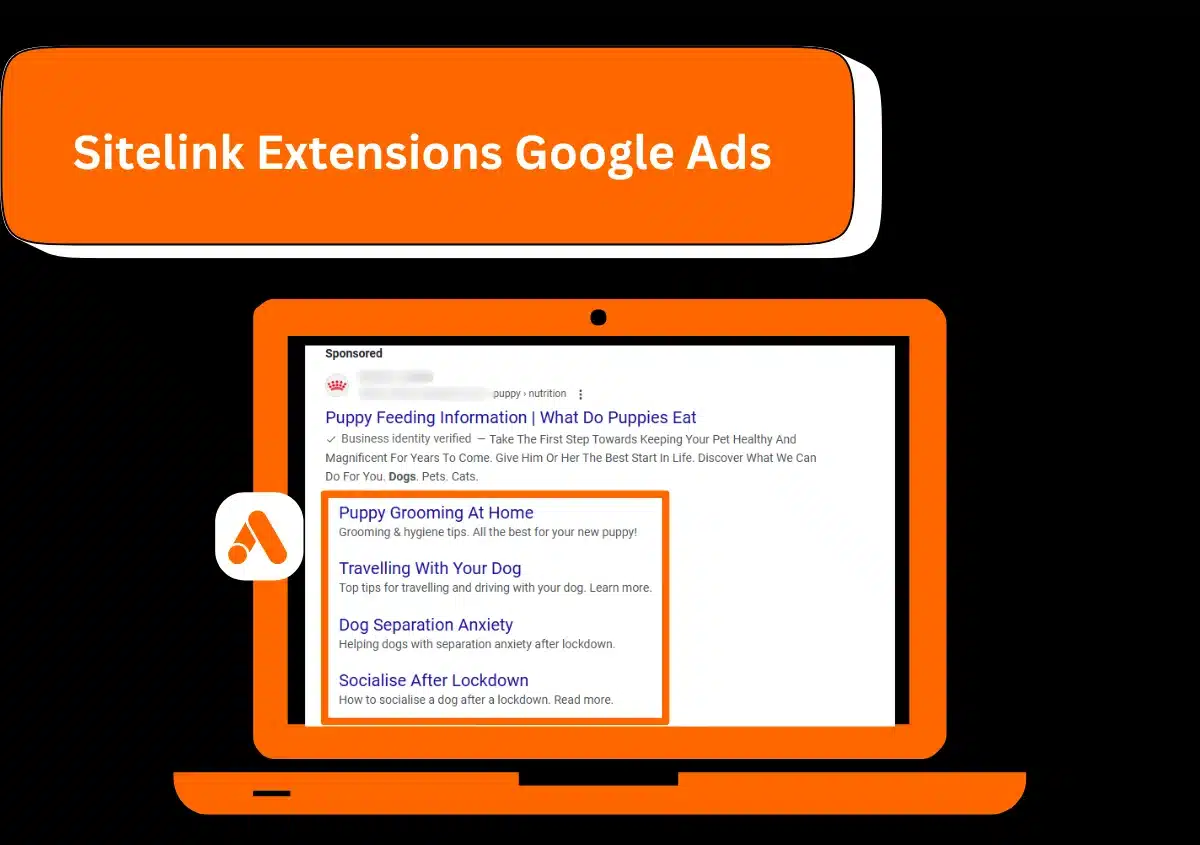
Sitelinks in Google Ads are additional links that appear beneath a main ad, directing users to specific pages on a website. They enhance ad visibility and provide potential customers with more options, improving click-through rates and overall ad performance.
Sitelinks serve multiple purposes in advertising. By allowing advertisers to showcase various sections of their website, they facilitate a more tailored user experience. For example, a retailer could link directly to product categories, special offers, or customer service pages, making it easier for users to find relevant information quickly.
- Types of Sitelinks: Advertisers can create different types of sitelinks, including standard, callout, and structured snippet sitelinks, each designed to highlight specific aspects of their offerings.
- Customization: Sitelinks can be customized based on device type, allowing for different links to appear on mobile versus desktop searches.
- Performance Tracking: Google Ads provides performance metrics for sitelinks, enabling advertisers to assess their effectiveness and make data-driven adjustments.
Implementing sitelinks can significantly improve ad efficiency. They not only increase the amount of space an ad occupies on the search results page but also enhance user engagement by providing direct access to relevant content. This can lead to higher conversion rates as users are more likely to click on ads that offer multiple pathways to their desired information.
Expert Tip: Regularly review and update sitelinks to align with current promotions and seasonal offerings. This ensures that ads remain relevant and maximizes the likelihood of clicks from potential customers.
How do I add sitelinks to my Google Ads?
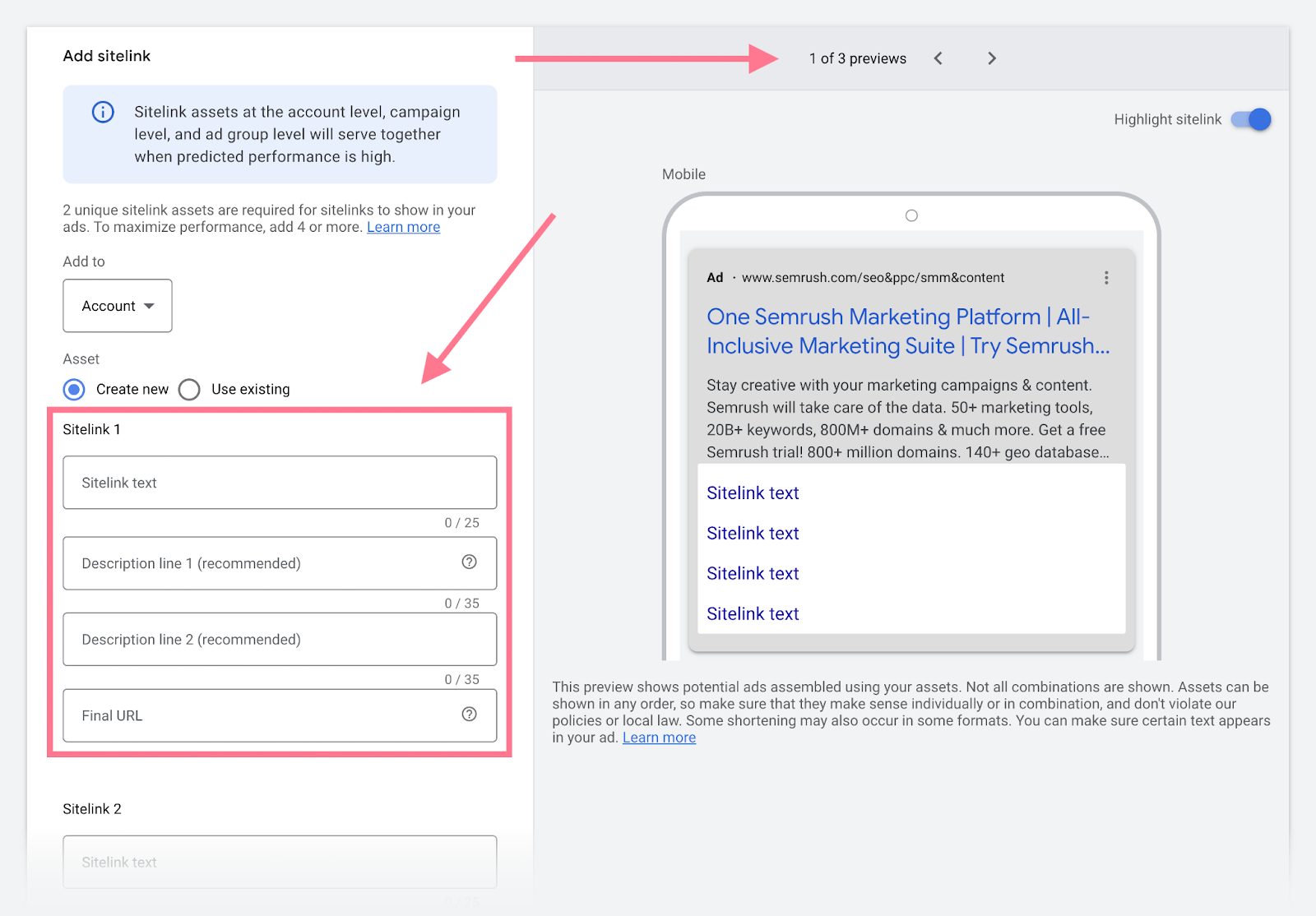
To add sitelinks to your Google Ads campaigns, access your campaign settings and navigate to the “Ads & extensions” section. From there, you can create new sitelinks or edit existing ones to enhance your ad visibility and provide additional navigation options for users.
- Sign in to your Google Ads account. Navigate to the campaign where you want to add sitelinks.
- Select “Ads & extensions.” In the menu on the left side, find and click on “Ads & extensions.” This will open the extensions panel.
- Click on “Extensions.” Here, you will see the option to add various ad extensions, including sitelinks.
- Choose “Sitelink extension.” Click on the “+” button to create a new sitelink extension. This allows you to enter the details for each sitelink.
- Fill in the sitelink information. Enter the text for the sitelink, the URL it should direct to, and optional descriptions that can provide more context to users.
- Set scheduling and device preferences. You can specify when the sitelink should appear and whether it should be served on mobile devices, desktops, or both.
- Save your sitelinks. Review all entered details for accuracy and click “Save” to finalize the addition of the sitelinks to your campaign.
After adding sitelinks, monitor their performance in the Google Ads dashboard. Adjustments may be necessary to optimize their effectiveness based on user engagement.
Expert Tip: Regularly review the performance metrics of your sitelinks, such as click-through rates and conversion rates. This data can inform adjustments to sitelink text and URLs, ensuring they remain relevant and effective over time.
What are the benefits of using sitelinks in Google Ads?
Sitelinks in Google Ads enhance the visibility of your ads by providing additional links to specific pages on your website. These links can significantly improve click-through rates (CTR) and user experience by directing potential customers to relevant content that matches their search intent.
One of the primary benefits of sitelinks is the increased real estate they provide for your ad. By including multiple links, you can showcase various aspects of your offerings, allowing users to choose the most relevant option. This not only enhances visibility but also increases the likelihood of clicks, as users are more likely to engage with ads that present them with multiple pathways to explore.
- Improve CTR: Ads with sitelinks typically see higher click-through rates. Users are more inclined to click on an ad that offers multiple options, leading to increased traffic to your site.
- Enhance User Experience: Sitelinks guide users directly to specific content, reducing the number of clicks needed to find what they’re searching for. This streamlined navigation improves overall satisfaction.
- Showcase Key Offerings: Use sitelinks to highlight promotions, popular products, or essential services. This targeted approach ensures users see the most relevant parts of your business upfront.
- Increase Ad Real Estate: More links mean more visibility on the search results page. Sitelinks can push competitors further down, making your ad stand out more prominently.
- Provide Additional Context: Each sitelink can include a short description, giving users more information about what to expect when they click, which can further entice clicks.
Implementing sitelinks effectively requires ongoing optimization. Regularly reviewing performance metrics can help identify which links are driving traffic and which may need adjustments. A/B testing different sitelink options can also yield valuable insights into what resonates with your audience.
To maximize the impact of sitelinks, ensure that the linked pages are mobile-friendly and load quickly. This is crucial, as a seamless mobile experience can significantly influence user engagement and conversion rates.
How do sitelinks affect Google Ads cost?
Sitelinks can influence Google Ads cost by enhancing ad visibility and potentially lowering cost-per-click (CPC). Although sitelinks themselves do not incur additional charges, their performance can affect overall ad spend. The effectiveness of sitelinks in improving click-through rates (CTR) can lead to more efficient ad campaigns.
The impact of sitelinks on cost is primarily driven by several factors:
- Click-Through Rate (CTR): Higher CTR from sitelinks can lead to a lower CPC, as Google rewards ads that perform well with reduced costs.
- Ad Rank: Sitelinks can improve the ad rank by providing more relevant information to users, which can also lower costs. A higher ad rank can lead to better ad placements and lower CPC.
- Quality Score: Sitelinks contribute to the overall quality score of an ad. A higher quality score indicates a more relevant ad, which can reduce the cost of clicks.
Additionally, the effectiveness of sitelinks may vary based on the industry and competitive landscape. In highly competitive sectors, well-crafted sitelinks can differentiate an ad from others, driving more clicks without significantly increasing costs. Conversely, if sitelinks are poorly designed or irrelevant, they may not provide the desired effect.
Expert Tip: Regularly analyze the performance of sitelinks in your campaigns. Use A/B testing to refine your sitelinks and optimize their impact on your overall ad strategy, as even small improvements in CTR can lead to substantial cost savings over time.
Can sitelinks improve my ad’s performance?
Sitelinks can significantly enhance ad performance by increasing visibility and engagement. Advertisements with sitelinks typically experience higher click-through rates (CTR) and improved conversion rates compared to those without. These enhancements arise from the additional information and options provided to users, encouraging more clicks and interactions.
When comparing ads with and without sitelinks, several key metrics can be analyzed:
- Click-Through Rate (CTR): Ads featuring sitelinks generally see a CTR increase of 10-20%. This boost occurs because sitelinks offer users more relevant options, making it easier for them to find what they’re looking for.
- Conversion Rate: The conversion rate for ads with sitelinks can be 5-15% higher. This improvement is often attributed to the targeted nature of the sitelinks, allowing users to navigate directly to specific pages that meet their needs.
- Quality Score: Google considers sitelinks when calculating an ad’s Quality Score. Higher CTRs and better user engagement from sitelinks can lead to a better Quality Score, resulting in lower costs per click (CPC) and improved ad positioning.
However, the effectiveness of sitelinks can vary based on the industry, target audience, and the relevance of the sitelink content. For example, an e-commerce business may benefit more from sitelinks than a local service provider. Testing and optimizing sitelinks are crucial for maximizing their potential impact on performance metrics.
Key Takeaway: Continually monitor and adjust sitelink strategies based on performance data to ensure they align with user preferences and maximize overall ad effectiveness.
How long does it take for sitelinks to appear in Google Ads?
Sitelinks in Google Ads typically take between one to three business days to appear after submission. The timeline can vary based on several factors, including the approval process and the quality of the submitted sitelinks.
The approval process for sitelinks involves Google reviewing the submitted links to ensure they comply with its advertising policies. If the sitelinks meet all criteria, they can be approved swiftly. However, if there are any issues—such as policy violations or technical errors—the approval can be delayed. Advertisers should also consider that changes to existing sitelinks may require re-approval, which can extend the timeline.
Another factor that influences the appearance of sitelinks is the overall performance and relevance of the ad campaign. Google prioritizes ads that demonstrate strong engagement and relevance, which can expedite the approval and display of sitelinks. Additionally, accounts with a history of compliant advertising practices may experience quicker approvals compared to new or problematic accounts.
Expert Tip: Regularly monitor the performance of your sitelinks and optimize them based on user engagement. Keeping sitelinks relevant and updated can enhance their visibility and effectiveness in your Google Ads campaigns.
What are common mistakes to avoid with sitelinks?
Common mistakes with sitelinks in Google Ads include neglecting to optimize link relevance, failing to update links regularly, and underutilizing description fields. Each of these errors can diminish the effectiveness of sitelinks, leading to wasted ad spend and reduced click-through rates.
For example, consider a retail shoe store that uses sitelinks to promote specific product categories, such as “Men’s Sneakers” and “Women’s Boots.” If the store fails to update these sitelinks seasonally, potential customers may encounter outdated promotions or products that are no longer available. This not only frustrates users but also negatively impacts the store’s credibility and ad performance. Regularly reviewing and refreshing sitelinks ensures that they remain relevant and enticing to potential customers.
Another frequent mistake is providing generic or vague descriptions for sitelinks. For instance, if the shoe store uses the description “Click here for more,” it does not communicate what users can expect when they click the link. Instead, a more descriptive approach, such as “Explore our latest styles of Men’s Sneakers,” can significantly enhance user engagement. Clear and specific descriptions guide users effectively, leading to higher conversion rates.
Expert Tip: Regularly analyze performance metrics for sitelinks to identify which links drive the most traffic and conversions. A/B testing different sitelink variations can also provide insights that help refine your strategy over time.
Advanced Strategies for Optimizing Sitelinks
This section delves into advanced techniques for maximizing the effectiveness of sitelinks in Google Ads. By employing these strategies, advertisers can drive higher engagement and conversion rates while enhancing their overall campaign performance.
A/B Testing for Optimal Sitelink Combinations
A/B testing is a powerful method for determining the most effective sitelink combinations. By creating multiple variations of sitelinks, advertisers can analyze which combinations yield the highest click-through rates (CTR) and conversions. Implement the following steps for effective A/B testing:
- Identify key variables, such as sitelink text, descriptions, and URLs.
- Create at least two distinct groups of sitelinks to compare.
- Run tests over a sufficient period to gather reliable data.
- Analyze performance metrics to determine the winning combination.
Tailoring Sitelinks for Audience Segmentation
Customizing sitelinks to specific audience segments can significantly improve relevance and engagement. Use audience insights to inform sitelink content. For example, create separate sitelinks for different demographics or interests. Consider the following approaches:
- Use location-based sitelinks to target users in specific geographic areas.
- Develop sitelinks that appeal to different user intents, such as informational, navigational, or transactional.
- Incorporate seasonal themes or promotions relevant to particular audience segments.
Incorporating Sitelinks into Seasonal Campaigns
Seasonal campaigns present an opportunity to leverage sitelinks effectively. By aligning sitelinks with current events, holidays, or sales, advertisers can capture timely interest. Strategies include:
- Updating sitelink text to reflect seasonal promotions or offers.
- Highlighting relevant products or services that align with seasonal trends.
- Creating urgency by using time-sensitive language in sitelinks.
Monitoring Performance Metrics for Refinement
Continuous monitoring of performance metrics is essential for refining sitelink strategies. Key metrics to track include:
- Click-through rate (CTR) for each sitelink.
- Conversion rates associated with sitelinks.
- Engagement metrics, such as time on site and bounce rates.
Regularly reviewing these metrics allows for data-driven adjustments to sitelink content, ensuring ongoing optimization.
Many articles on sitelinks in Google Ads overlook the significance of context. For instance, while most advertisers focus solely on optimizing sitelinks for CTR, they often neglect the importance of user intent. Understanding the specific needs and motivations of your target audience can lead to more effective sitelink strategies, ultimately enhancing campaign success. Additionally, consider the impact of ad position; sitelinks may perform differently depending on their placement on the search results page.
To apply these advanced strategies effectively, begin by setting up A/B tests for your current sitelinks. Analyze the results to identify high-performing combinations. Next, segment your audience and tailor sitelinks to their specific preferences and needs. As seasons change, adjust your sitelinks to align with relevant promotions. Finally, establish a routine for monitoring performance metrics, enabling you to refine your approach continuously. Following these steps will enhance the effectiveness of your sitelinks and contribute to better overall campaign performance.
Analyzing the Impact of Sitelinks on User Behavior
This section delves into how sitelinks in Google Ads affect user engagement and conversion rates. Understanding their influence is essential for optimizing ad campaigns and maximizing return on investment.
Click-Through Rate Improvements
Incorporating sitelinks can significantly enhance the click-through rate (CTR) of ads. Studies indicate that ads with sitelinks can achieve an increase of up to 30% in CTR compared to those without. This improvement arises from the additional options presented to users, allowing them to engage with specific content relevant to their interests.
User Navigation Patterns
When users encounter sitelinks, their navigation behavior shifts. Instead of clicking on the main ad link, they often select a sitelink that corresponds to their immediate needs. This behavior demonstrates a more targeted approach to navigating through options. Common navigation patterns include:
- Directing users to specific product categories
- Leading to promotional offers or discounts
- Facilitating access to customer service or support pages
These patterns not only improve user experience but also increase the likelihood of conversions, as users find what they need more efficiently.
Measuring the Impact on Campaign ROI
Evaluating the effectiveness of sitelinks requires analyzing their contribution to overall campaign ROI. Metrics to consider include:
- Conversion rate of users who clicked on sitelinks versus those who clicked the main ad.
- Cost per acquisition (CPA) for conversions driven by sitelinks.
- Engagement metrics, such as time spent on site and pages viewed after clicking a sitelink.
By assessing these metrics, advertisers can determine the financial viability of using sitelinks and adjust their strategies accordingly.
Utilizing Analytics Tools
Tracking user interactions with sitelinks is crucial for refining ad strategies. Google Ads provides built-in analytics tools, allowing advertisers to monitor performance metrics. Key features to leverage include:
- Performance reports that highlight the effectiveness of each sitelink.
- User behavior tracking to understand how sitelinks influence engagement.
- Testing capabilities to experiment with different sitelink variations and measure their impact.
These analytics enable data-driven decisions, ensuring that sitelinks contribute positively to campaign goals.
The common misconception is that sitelinks are merely additional links without significant impact. In reality, their strategic placement can lead to enhanced user experience, increased CTR, and improved ROI. Furthermore, not every sitelink will perform equally; thus, continuous testing and optimization are essential for maximizing their effectiveness.
To leverage the insights from this analysis, advertisers should implement sitelinks in their campaigns and monitor performance closely. Consider conducting A/B tests to compare different sitelink configurations. Utilize Google Analytics to track user behavior and engagement metrics. Regularly review and adjust sitelinks based on performance data to ensure ongoing optimization and improved conversion rates.
Real-World Case Studies of Successful Sitelink Implementation
This section examines real-world examples of brands that effectively utilized sitelinks in Google Ads to enhance their marketing campaigns. By analyzing these case studies, valuable insights can be gleaned on how to optimize sitelinks for improved performance.

Retail Brand Success: Increasing Sales through Sitelinks
A well-known retail brand, XYZ Apparel, implemented sitelinks to promote specific product categories during a seasonal sale. By adding sitelinks for “Men’s Clothing,” “Women’s Clothing,” and “Sale Items,” they provided users with quick access to relevant sections of their site. This strategic approach led to a 25% increase in click-through rates (CTR) and a 15% boost in sales during the campaign period. The targeted sitelinks guided users directly to their interests, enhancing the shopping experience and driving conversions.
Service-Based Business: Improving Lead Generation
ABC Plumbing Services focused on generating leads using sitelinks that highlighted their core offerings such as “Emergency Services,” “Residential Plumbing,” and “Commercial Plumbing.” By tailoring these sitelinks to specific customer needs, they experienced a 40% increase in lead generation over three months. The targeted nature of the sitelinks allowed potential customers to find exactly what they were looking for, significantly shortening the decision-making process.
Lessons from Unsuccessful Sitelink Campaigns
Not all sitelink campaigns yield positive results. A case study involving DEF Electronics revealed that irrelevant sitelinks led to a 30% drop in CTR. Their sitelinks included generic terms that did not resonate with the audience, such as “Latest Products” without specifics. This misalignment caused clicks but failed to convert. Pivoting their strategy to focus on more relevant, product-specific sitelinks restored their CTR by 20% within weeks.
Best Practices for Successful Sitelink Implementation
- Relevance: Ensure sitelinks are directly related to the ad content and user intent.
- Clear Call-to-Action: Use actionable language, such as “Shop Now” or “Get a Quote,” to encourage clicks.
- Regular Testing: Continuously A/B test different sitelink variations to identify what resonates best with the audience.
Incorporating these best practices can significantly enhance the effectiveness of sitelinks across various industries, ensuring that campaigns not only attract clicks but also drive conversions.
Many articles about sitelinks focus solely on their basic functionality. However, a nuanced understanding reveals the importance of aligning sitelinks with specific customer journeys. For instance, while a retail brand may benefit from product-specific sitelinks, a service-based business should prioritize geographic targeting to attract local customers. This distinction is crucial for maximizing the potential of sitelinks in Google Ads.
To leverage these insights effectively, businesses should begin by analyzing their current sitelink performance metrics. Identify which sitelinks drive the most traffic and conversions. Subsequently, refine the sitelinks by implementing the best practices outlined, focusing on relevance and testing. This approach will enhance the overall performance of Google Ads campaigns, driving both traffic and conversions.
For What Are Sitelinks In Google Ads businesses looking to generate local leads through Google Ads or Local SEO, GMB Ranger LLC offers hands-on campaign management. Specialist Md Tangeer Mehedi personally handles campaign setup and ongoing optimization — with no payment required until the first lead comes in.
Frequently Asked Questions
What are sitelinks in Google Ads?
Sitelinks in Google Ads are additional links that appear below your ad, directing users to specific pages on your website. They enhance visibility and provide more options for users to engage with your content.
How do I add sitelinks to my Google Ads?
To add sitelinks, navigate to the “Ads & extensions” section in your Google Ads account and select “Extensions.” From there, choose “Sitelink extension” and fill in the required information for each link.
What are the benefits of using sitelinks in Google Ads?
Sitelinks increase the visibility of your ads and improve click-through rates by offering users more choices. They can also enhance ad relevance and provide additional information about your offerings.
How do sitelinks affect Google Ads cost?
Sitelinks do not directly affect the cost-per-click (CPC) of your Google Ads. However, they can improve your ad’s performance, potentially lowering your overall costs through higher quality scores.
Can sitelinks improve my ad’s performance?
Yes, sitelinks can significantly enhance ad performance by providing users with more relevant options, leading to higher click-through rates. This increased engagement can also contribute to better quality scores.
How long does it take for sitelinks to appear in Google Ads?
Sitelinks may take a few hours to a few days to start appearing after they have been added to your campaign. Approval times can vary based on Google’s review process.
What are common mistakes to avoid with sitelinks?
Common mistakes include using irrelevant sitelinks, failing to update them regularly, and not optimizing for mobile users. Ensuring that sitelinks are relevant and functional is crucial for maximizing their effectiveness.
Final Thoughts on what are sitelinks in google ads
Sitelinks in Google Ads represent a powerful tool for enhancing ad visibility and improving click-through rates, offering users direct access to relevant pages. By strategically implementing sitelinks, advertisers can not only optimize their campaigns but also significantly influence user behavior, leading to increased conversions and better return on investment.
To maximize the benefits of sitelinks, immediately assess your current ad campaigns and identify opportunities to add relevant sitelinks that align with user intent and enhance the overall ad experience.
Mastering sitelinks is essential for any digital marketing strategy, as they not only drive traffic but also elevate brand presence in a competitive landscape.
Leave a Reply