
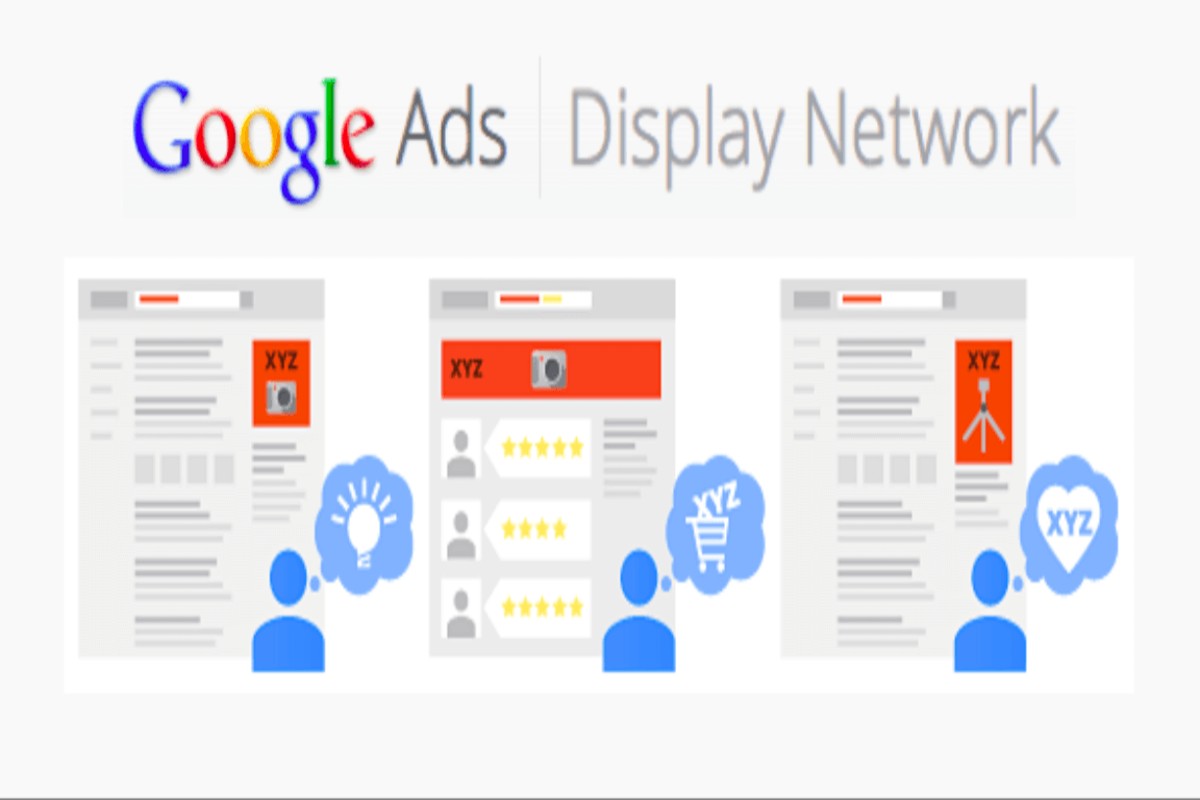
Google Display Ads are visual advertisements that appear on websites within Google’s Display Network. These ads enable businesses to engage with a vast audience, as over 90% of internet users encounter them, significantly enhancing brand visibility.
Understanding Google Display Ads is crucial for businesses aiming to expand their online presence and connect with potential customers. With the digital advertising market expected to reach $600 billion by 2024, mastering this advertising format can lead to substantial growth and engagement. Failure to utilize Google Display Ads effectively can result in missed opportunities and reduced brand awareness in an increasingly competitive landscape.
Businesses that overlook the significance of Google Display Ads risk incurring substantial costs in missed revenue and wasted marketing resources. Without a strategic approach to display advertising, companies may fall behind competitors who leverage these tools for maximum visibility and customer engagement.
This article will provide a comprehensive overview of Google Display Ads, including a comparison of top providers, a detailed cost breakdown, best practices for effective campaigns, and insights into integrating local SEO strategies for enhanced performance.
For What Are Google Display Ads businesses looking to generate local leads through google ads or Local SEO, GMB Ranger LLC offers hands-on campaign management. Specialist Md Tangeer Mehedi personally handles campaign setup and ongoing optimization — with no payment required until the first lead comes in.
What are Google Display Ads?
Google Display Ads are visual advertisements that appear on websites within Google’s Display Network, which includes millions of sites and apps. These ads can take the form of images, videos, or rich media and are designed to attract potential customers as they browse online. In 2024, Google Display Ads reached over 90% of internet users worldwide, making them a powerful tool for brand visibility.
Google Display Ads serve to increase brand awareness and drive conversions by targeting users based on their interests, demographics, and online behavior. Advertisers can create tailored campaigns that reach specific audiences at various stages of the buying journey. The primary components of Google Display Ads include:
- Image Ads: Static or animated images that catch the viewer’s attention.
- Video Ads: Short video clips that can be displayed on websites and apps.
- Responsive Ads: Automatically adjust their size, appearance, and format to fit available ad spaces.
The effectiveness of Google Display Ads is influenced by several factors including ad quality, targeting options, and bidding strategies. Advertisers can utilize Google’s machine learning algorithms to optimize their campaigns for better performance. Additionally, the ability to retarget users who have previously interacted with a brand enhances conversion rates and overall return on investment (ROI).
Expert insight: To maximize the impact of Google Display Ads, focus on high-quality visuals and precise audience targeting, as these elements significantly influence engagement and conversion rates.
How do Google Display Ads work?
Google Display Ads operate by utilizing a network of websites and apps where businesses can showcase their advertisements to a targeted audience. These ads appear in various formats, including banners, videos, and interactive content, reaching over 90% of internet users through more than two million sites as of 2024.
To set up and manage a Google Display Ads campaign effectively, follow these steps:
- Define Your Campaign Goals: Clearly outline what you want to achieve, such as increasing brand awareness, generating leads, or driving sales.
- Identify Your Target Audience: Utilize Google’s targeting options, including demographics, interests, and behaviors, to reach the right users.
- Create Compelling Ad Creatives: Design visually appealing ads with concise messaging. Use high-quality images and strong calls to action to engage viewers.
- Set Your Budget: Determine a daily or monthly budget for your campaign. Google allows you to choose between cost-per-click (CPC) or cost-per-thousand impressions (CPM) payment models.
- Choose Your Bidding Strategy: Select a bidding strategy that aligns with your goals, such as manual bidding for control or automated bidding for optimization.
- Launch Your Campaign: Once all settings are configured, launch your campaign to start displaying your ads across the Google Display Network.
- Monitor and Optimize: Regularly review performance metrics, such as click-through rates (CTR) and conversion rates. Adjust your targeting, creatives, and bidding strategies based on data insights.
Effective management requires continuous analysis and adjustments to ensure that advertisements perform optimally and meet campaign objectives.
Expert insight: Utilize A/B testing for your ad creatives to determine which versions resonate best with your audience, thereby maximizing engagement and return on investment.
What is the cost of Google Display Ads?
The cost of Google Display Ads typically ranges from $0.10 to $3.00 per click, depending on various factors. On average, businesses can expect to pay around $0.58 per click for display advertising. However, actual costs can vary widely based on targeting and competition.
Several elements influence the pricing of Google Display Ads. Key factors include:
- Targeting Options: More specific targeting criteria, such as demographics or interests, may increase costs due to competition for those audiences.
- Ad Format: Different ad formats, such as responsive display ads or rich media ads, can have varying costs associated with their production and placement.
- Bidding Strategy: Advertisers can choose between different bidding strategies, such as cost-per-click (CPC) or cost-per-thousand impressions (CPM), which will affect overall spending.
- Industry Competition: High-demand industries often face higher costs due to increased competition for ad placements.
- Geographic Targeting: Ads targeting high-value regions may incur higher costs compared to broader geographic campaigns.
The budget for Google Display Ads can also be set on a daily or monthly basis, allowing for flexibility in spending. Advertisers can adjust bids based on performance metrics to optimize their campaigns. Monitoring these key factors will help in effectively managing advertising costs while maximizing reach and engagement.
Expert insight: Regularly reviewing and adjusting targeting options and bidding strategies can lead to more cost-effective campaigns, ensuring optimal return on investment in Google Display Ads.
How long does it take to see results from Google Display Ads?
Typically, advertisers can expect to see initial results from Google Display Ads within 1 to 3 weeks after launching a campaign. However, achieving optimal performance can take 3 to 6 months as data accumulates and adjustments are made.
Several factors influence the timeframe for seeing results from Google Display Ads. First, the campaign objectives play a significant role; for instance, campaigns aimed at brand awareness may yield quicker visibility but slower conversion rates, while those focused on direct sales may take longer to optimize effectively. Additionally, the budget allocated to the campaign impacts results; higher budgets can generate data and insights faster, leading to quicker adjustments and improvements.
The target audience’s size and the ad creative’s effectiveness also affect timing. A well-targeted campaign using compelling visuals and messaging can lead to faster engagement and conversions. Furthermore, the competitive landscape within the chosen industry can either expedite or delay results, as more competition may require additional time to establish a foothold in the market.
Expert insight: Regularly monitor campaign performance and adjust targeting and creative elements based on real-time data to enhance results over time. Consistent optimization is key to reducing the time it takes to achieve desired outcomes.
What are the best practices for Google Display Ads?
The best practices for Google Display Ads focus on creating visually appealing, targeted, and data-driven campaigns that engage users effectively. Brands that follow these practices can improve click-through rates (CTR) by as much as 50%, leading to increased conversions and brand awareness.
Successful Google Display Ads require a multifaceted approach. First, it is essential to focus on the design elements of the ads. High-quality images, clear branding, and concise messaging can significantly impact user engagement. Ads should adhere to Google’s design guidelines, ensuring they are visually appealing and easily readable on various devices. A/B testing different designs can also help identify the most effective visuals.
- Targeting the Right Audience: Utilize Google Ads’ targeting options, including demographics, interests, and remarketing lists. Tailoring ads to specific audiences increases the likelihood of engagement. For example, targeting users who have previously visited your website can boost conversion rates.
- Utilizing Responsive Display Ads: These ads automatically adjust their size, appearance, and format to fit available ad spaces. By providing multiple headlines, descriptions, and images, advertisers can allow Google’s machine learning to optimize performance across the Display Network.
- Incorporating Strong Calls-to-Action (CTAs): A clear and compelling CTA can significantly enhance the effectiveness of display ads. Phrases like “Shop Now” or “Learn More” encourage users to take the desired action, improving CTR and conversion rates.
- Monitoring and Adjusting Campaigns: Regularly analyze performance metrics, such as CTR, conversion rates, and viewability. Use this data to refine targeting, ad creatives, and bidding strategies. Continuous optimization is key to maximizing return on investment.
Expert insight: Always align your display ad campaigns with broader marketing objectives. This ensures that the ads not only drive traffic but also enhance overall brand messaging and customer experience.
How do Google Display Ads compare to search ads?
Google Display Ads and Search Ads serve different purposes in online advertising. Display Ads use visual elements to capture attention across various websites, while Search Ads appear in response to user queries on Google Search. In 2024, Display Ads accounted for approximately 60% of Google’s advertising revenue, highlighting their significant role in digital marketing.
Google Display Ads are designed to reach potential customers while they browse online, often targeting users based on their interests, demographics, or online behavior. This allows advertisers to create brand awareness and engage with users at various stages of the buying journey. In contrast, Search Ads are intent-driven, targeting users who are actively searching for specific products or services. This intent-based approach often results in higher conversion rates for search ads, as they connect with users already interested in a particular topic.
- Targeting Methods: Display Ads utilize contextual, interest-based, and demographic targeting, while Search Ads primarily focus on keyword targeting based on user search queries.
- Ad Format: Display Ads can include images, videos, and rich media, enhancing visual engagement. Search Ads consist of text-based ads, which directly address user queries.
- Cost Structure: Display Ads typically operate on a cost-per-thousand-impressions (CPM) basis, while Search Ads often utilize a cost-per-click (CPC) model, which can lead to different budgeting strategies.
Expert insight: Businesses should integrate both ad types into their marketing strategies. Use Display Ads for brand awareness and prospecting, while leveraging Search Ads for targeting high-intent users ready to convert.
Advanced Targeting Techniques for Google Display Ads
This section delves into advanced targeting techniques for Google Display Ads, focusing on strategies that enhance ad relevance and performance. Mastering these techniques can significantly improve campaign effectiveness and ROI.
Custom Affinity and In-Market Audiences
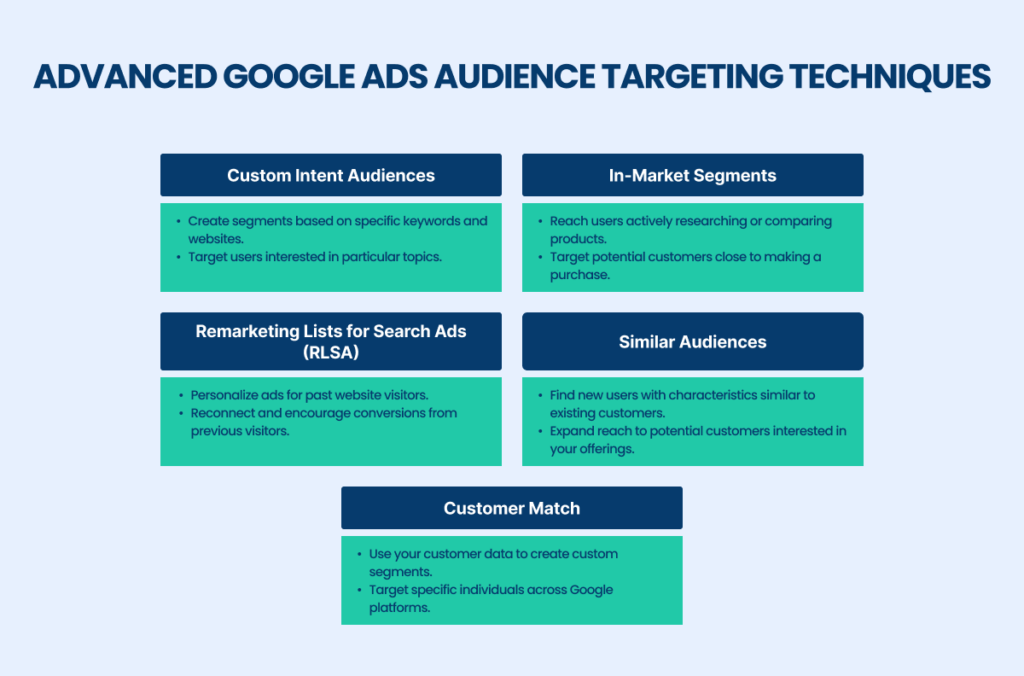
Custom affinity audiences allow advertisers to create tailored audiences based on specific interests, behaviors, and lifestyle choices, enhancing ad relevance. By defining particular interests related to the product or service, businesses can reach users who are more likely to engage. For instance, a company selling eco-friendly products could target users interested in sustainability, organic foods, and green living.
In-market audiences, on the other hand, target users who are actively researching or considering purchasing specific products or services. This targeting method leverages Google’s data on user behavior, allowing advertisers to reach potential customers at crucial decision-making moments. Statistics indicate that campaigns utilizing in-market audiences experience a 20% increase in conversion rates compared to standard targeting options.
Implementing Remarketing Strategies Effectively
Remarketing is a powerful technique that targets users who have previously interacted with a brand but did not convert. By displaying tailored ads to these users across the Google Display Network, advertisers can re-engage potential customers and drive them back to their websites. Effective remarketing strategies include segmenting audiences based on their previous interactions, such as page visits or cart abandonment.
- Dynamic remarketing: Show personalized ads featuring products users viewed.
- Frequency capping: Limit the number of times an ad is shown to avoid ad fatigue.
- Exclusion lists: Exclude users who have converted to focus on those still in the consideration phase.
Remarketing can increase conversion rates by as much as 400% when executed with precision.
Utilizing Contextual Targeting for Better Relevance
Contextual targeting matches ads with content that is relevant to the audience’s current interests based on the context of the page they are visiting. This method involves analyzing keywords, topics, and the overall theme of web pages to serve ads that align with the content users are consuming. For example, an ad for hiking gear displayed on an outdoor adventure blog can significantly enhance engagement.
Google’s machine learning algorithms continually refine contextual targeting, improving accuracy over time. Advertisers can expect a higher click-through rate (CTR) when ads are contextually relevant, with some studies showing up to a 30% improvement in CTR compared to non-targeted ads.
Leveraging Lookalike Audiences to Expand Reach
Lookalike audiences enable advertisers to reach new users who share similar characteristics with their existing customer base. This targeting option utilizes data from current audiences to identify potential customers who are likely to be interested in the brand’s offerings. By expanding reach to these lookalike segments, businesses can effectively tap into new markets and increase brand visibility.
Research shows that campaigns targeting lookalike audiences can yield a 15% increase in conversions, making this a valuable strategy for growth-oriented campaigns.
Many advertisers underestimate the potential of advanced targeting techniques, often relying solely on basic demographic filters. Misconceptions include the belief that all audience targeting must be broad to be effective. However, precise targeting can lead to higher engagement and conversion rates, as demonstrated by various case studies.
To implement these advanced targeting techniques effectively, advertisers should:
- Analyze existing customer data to define custom affinity and in-market audiences.
- Set up segmented remarketing campaigns based on user behavior and engagement.
- Utilize contextual targeting by selecting relevant keywords and topics for ad placements.
- Identify and create lookalike audiences based on existing customer profiles.
By systematically applying these strategies, advertisers can optimize their Google Display Ads campaigns, leading to improved performance and a higher return on investment.
Common Mistakes to Avoid with Google Display Ads
This section highlights frequent pitfalls advertisers encounter when using Google Display Ads and outlines strategies to avoid them. Understanding these common mistakes can significantly enhance campaign effectiveness and ROI.
Ignoring Ad Quality and Relevance
High-quality ads that are relevant to the target audience are crucial for success. Google’s algorithms favor ads that engage users, leading to better placement and lower costs. Advertisers often overlook the significance of compelling visuals and clear messaging, which can result in low click-through rates (CTR). According to recent data, ads with high relevance scores can achieve up to 50% higher CTR compared to those that are generic.
Neglecting A/B Testing of Ads
A/B testing, or split testing, is essential for optimizing ad performance. Many advertisers fail to test different ad formats, visuals, and messaging, leading to missed opportunities for improvement. Running A/B tests allows advertisers to identify which elements resonate most with their audience. Implementing systematic testing can increase conversion rates by an average of 30%, providing significant advantages over competitors who do not test.
Failing to Track Conversions Properly
Conversion tracking is fundamental to evaluating the effectiveness of Google Display Ads. Advertisers often neglect proper tracking setups, leading to inaccurate data and misguided strategies. Utilizing Google Ads conversion tracking tools ensures that every conversion is accounted for, allowing for better budget allocation and campaign adjustments. In 2024, businesses that actively tracked conversions reported a 25% higher return on ad spend (ROAS) than those who did not.
Overlooking Mobile Optimization
With mobile devices accounting for over 60% of online ad impressions, neglecting mobile optimization is a critical mistake. Ads that are not optimized for mobile viewing can lead to poor user experience and high bounce rates. Advertisers should ensure that their creatives are responsive and load quickly on mobile devices. Implementing mobile-friendly designs can enhance engagement and drive conversions, as mobile-optimized ads typically perform 20% better than their desktop counterparts.
Beyond these common pitfalls, advertisers often underestimate the importance of audience segmentation. Many campaigns fail to achieve desired outcomes due to a one-size-fits-all approach. Effective targeting is not merely about demographics but also involves understanding user behaviors and interests. Misconceptions about audience targeting can lead to wasted ad spend and missed opportunities for engagement.
To maximize the effectiveness of Google Display Ads, advertisers should implement the following actionable strategies:
- Regularly update and refine ad creatives to maintain relevance.
- Conduct A/B tests systematically to optimize ad performance.
- Set up robust conversion tracking to accurately measure success.
- Ensure all ads are mobile-optimized for seamless user experience.
- Utilize audience insights to create tailored ad campaigns.
Real-World Case Studies: Successful Google Display Ads Campaigns
This section presents real-world examples of successful Google Display Ads campaigns, illustrating effective strategies across various sectors. These case studies highlight both the potential of display advertising and the lessons learned from both successes and failures.
Case Study: Retail Brand’s Successful Retargeting
A leading retail brand implemented a retargeting campaign that focused on users who had previously visited their website but did not complete a purchase. By using Google Display Ads, they created visually engaging ads that featured products the users had browsed. The campaign achieved a remarkable
25% increase in conversion rates within a three-month period. Additionally, the brand saw a 30% reduction in cost-per-acquisition (CPA), demonstrating the effectiveness of targeted ad placements.
Service-Based Business: Lead Generation through Display Ads
A local service-based business, specializing in home renovations, utilized Google Display Ads to generate leads. They crafted compelling ads that offered free consultations, targeting homeowners in specific geographic areas. This approach resulted in a 40% increase in inquiries and a 15% boost in overall sales over six months. By combining demographic targeting with appealing ad copy, the business successfully converted impressions into actionable leads.
Non-Profit Organization: Awareness Campaign Insights
A non-profit organization aimed to raise awareness for their environmental initiative through a Google Display Ads campaign. They designed visually striking banners that conveyed their mission and included a clear call-to-action for donations. The campaign reached over 500,000 impressions, resulting in a 20% increase in donations compared to the previous year. This case illustrates the power of display ads in driving social impact and community engagement.
Lessons from Failed Campaigns
Not all campaigns yield positive results. A tech startup launched a Google Display Ads campaign but faced disappointing outcomes due to poorly defined target audiences and weak ad designs. The company learned several critical lessons:
- Define Audience Clearly: Understanding the target demographic is essential to tailor messages effectively.
- Test Ad Creatives: A/B testing different ad designs can reveal what resonates best with the audience.
- Monitor Performance Metrics: Regularly analyzing click-through rates (CTR) and conversion rates can help identify issues early.
By addressing these shortcomings, the startup revamped its approach, ultimately leading to improved campaign performance the following quarter.
Common misconceptions about Google Display Ads include the belief that they are only suitable for large brands. In fact, small to medium-sized businesses can leverage display ads effectively with strategic targeting and budget management. Furthermore, many assume retargeting is intrusive; however, when executed thoughtfully, it enhances user experience by presenting relevant content.
To apply these insights, businesses should:
- Identify clear objectives for their display ad campaigns.
- Segment their audience based on behavior and demographics.
- Utilize A/B testing to optimize ad creatives and messaging.
- Regularly analyze performance metrics to adjust strategies accordingly.
Implementing these strategies can lead to more successful Google Display Ads campaigns, maximizing return on investment and enhancing brand visibility.
Integrating Google Display Ads with Other Marketing Channels
This section explores the strategic integration of Google Display Ads with various marketing channels to enhance overall campaign effectiveness. A cohesive approach amplifies brand visibility and drives engagement across platforms.

Combining Display Ads with Email Marketing
Integrating Google Display Ads with email marketing can significantly improve engagement rates. When recipients see display ads that complement the content of their emails, brand recognition increases, and the likelihood of conversion rises. A study in 2024 found that campaigns utilizing both display and email marketing saw a 30% increase in click-through rates compared to those relying on email alone.
Using Social Media Ads Alongside Display Advertising
Social media platforms offer an excellent opportunity to reach users who may not engage with display ads. By running social media ads concurrently with Google Display Ads, marketers can target specific demographics and interests more effectively. For instance, a campaign that uses targeted Facebook ads alongside Google Display Ads can enhance brand recall, as users encounter the brand across multiple platforms.
Cross-Promoting Content Through Various Platforms
Cross-promotion is a powerful tactic that leverages multiple channels to disseminate content. Brands can utilize Google Display Ads to promote blog posts, videos, or webinars on other platforms. This strategy not only drives traffic but also establishes authority in the industry. For example, businesses that consistently cross-promote content across social media, email, and display ads experience a 25% higher engagement rate on their content.
Tracking Performance Across Channels for Holistic Insights
Effective integration necessitates robust tracking of performance across all marketing channels. Utilizing tools like Google Analytics allows marketers to measure the impact of Google Display Ads alongside other initiatives. This data provides a comprehensive view of customer interactions, enabling marketers to optimize campaigns based on performance metrics. A recent report indicated that brands that analyze cross-channel performance see a 20% increase in ROI on their ad spend.
While combining various marketing channels can enhance effectiveness, it is essential to understand the nuances of audience behavior across platforms. Misconceptions arise when marketers assume that simply running ads on multiple channels guarantees success. Each channel has unique user engagement patterns, requiring tailored messaging and creative approaches for optimal results.
To effectively implement an integrated marketing strategy, consider the following actionable steps:
- Develop cohesive messaging that aligns across display ads, email campaigns, and social media promotions.
- Utilize retargeting strategies to reinforce brand presence across channels.
- Regularly analyze performance metrics from all channels to identify trends and adjust campaigns accordingly.
- Test different combinations of messaging and creative assets to determine what resonates best with your audience.
By adopting an integrated approach, marketers can leverage the strengths of Google Display Ads in conjunction with other channels, resulting in enhanced brand visibility and improved campaign outcomes.
Evaluating the Best What Are Google Display Ads
Comparing different advertising providers is essential for businesses aiming to maximize their online visibility and return on investment. According to a report by Statista, the global digital advertising market is projected to reach $786.2 billion by 2026, highlighting the growing importance of effective ad strategies. Evaluating options based on specific criteria such as cost, features, and target audiences can help businesses make informed decisions.
| Provider / Option | Best For | Pricing | Key Feature |
|---|---|---|---|
| Google Ads | All business sizes | Pay-per-click, average $1-$2 per click | Extensive reach and targeting options |
| AdRoll | Retargeting campaigns | Starting at $300/month | Cross-platform retargeting |
| Facebook Ads | Social media integration | Average $0.97 per click | High engagement on social platforms |
| Taboola | Content promotion | Pay-per-click, average $0.10-$0.50 | Native advertising focus |
| Bing Ads | Cost-effective PPC | Pay-per-click, average $1-$2 per click | Lower competition than Google |
Criteria for Evaluating Program Quality
- Target Audience: Identify which provider best aligns with your target demographic. Different platforms cater to varying audiences, influencing the effectiveness of your campaigns.
- Cost Structure: Evaluate the pricing models offered by each provider. Understanding whether they operate on a pay-per-click basis or a monthly subscription can impact your budget planning.
- Key Features: Assess the unique features of each platform, such as targeting options and analytics capabilities. These can significantly enhance campaign performance and ROI.
- Integration Capabilities: Consider how well the advertising provider integrates with your existing marketing tools and platforms. Seamless integration can streamline your workflow and improve efficiency.
How to Assess the Reputation and Reliability of Providers
- Research Online Reviews: Look for user feedback and testimonials on platforms like Trustpilot or G2 to gauge customer satisfaction and potential issues.
- Check Industry Certifications: Verify if the provider has relevant certifications or partnerships, indicating credibility and adherence to industry standards.
- Evaluate Customer Support: Reach out to their support team with questions to assess their responsiveness and helpfulness before committing to a provider.
- Analyze Case Studies: Review case studies or success stories to understand how the provider has helped other businesses achieve their advertising goals.
Which What Are Google Display Ads Is Right for You?
The best option for utilizing Google Display Ads hinges on your specific business needs, budget, and marketing goals. This decision guide will help you identify the most effective advertising approach tailored to your audience segment.
Small local businesses
For small local businesses, google ads is a powerful tool to boost foot traffic and enhance brand awareness within the community. Utilizing location-based targeting, businesses can create ads that appear to users in their vicinity. A typical budget for local campaigns can range from $300 to $1,000 per month, depending on competition and desired reach.
E-commerce brands
E-commerce brands should consider AdRoll for retargeting customers who have previously engaged with their site. This platform specializes in displaying personalized ads across the web, reminding potential customers of products they viewed. E-commerce businesses can expect to invest between $500 to $2,000 monthly, depending on their product range and customer base size.
Content creators
Content creators aiming to promote their articles and videos should utilize Taboola for native advertising. This platform allows creators to place their content in front of users on popular publisher sites, enhancing visibility and engagement. A budget of $100 to $500 per campaign is typical, allowing for effective audience targeting and performance tracking.
Digital marketing agencies
For digital marketing agencies, Facebook Ads is an excellent choice for leveraging social media in client campaigns due to its advanced targeting capabilities. Agencies can create highly segmented ads based on user demographics, interests, and behaviors. Monthly ad spend can vary widely, with effective campaigns typically starting at around $1,000 to $5,000, depending on client goals and audience size.
| If You Are… | Best Approach |
|---|---|
| Small local businesses | Google Ads for local targeting (Budget: $300-$1,000/month) |
| E-commerce brands | AdRoll for retargeting (Budget: $500-$2,000/month) |
| Content creators | Taboola for native ads (Budget: $100-$500/campaign) |
| Digital marketing agencies | Facebook Ads for social targeting (Budget: $1,000-$5,000/month) |
Local Insights on Google Display Ads and Their Impact
Understanding the nuances of Google Display Ads is crucial for local businesses aiming to reach their target audience effectively. With 46% of all Google searches seeking local information, businesses that tailor their ad strategies to local markets can significantly increase their visibility and engagement.
Geographic Market Differences
In larger metropolitan areas like New York City or Los Angeles, competition for display ad space is fierce, which means businesses need to invest more in targeted strategies to stand out. Conversely, in smaller towns, local businesses may find it easier to capture attention with less investment. For example, a coffee shop in a small town may benefit from lower costs and less competition, while a tech startup in a major city must optimize ad spend to remain competitive.
Local Business Applications
Local businesses can leverage Google Display Ads in several impactful ways:
- Targeting local demographics: A fitness studio can create ads that specifically appeal to local health enthusiasts.
- Promoting local events: A restaurant can advertise a special event or menu directly to nearby residents.
- Driving foot traffic: A boutique can use geo-targeting to reach potential customers who are currently in the vicinity.
- Boosting online visibility: A local service provider can enhance brand awareness by displaying ads on websites frequented by their target audience.
Local Search and Visibility Impact
Google Display Ads can enhance local search visibility by driving traffic to a business’s Google Business Profile (GBP). Businesses should consider the following actions:
1. Ensure that their GBP is fully optimized and linked to their display ads.
2. Use location-based targeting to reach potential customers within a specific radius.
3. Regularly update ad content to reflect local promotions or seasonal offerings.
4. Monitor ad performance and adjust strategies based on local engagement metrics.
5. Incorporate local keywords in ad copy to improve relevance and click-through rates.
Pricing and Cost in Local Markets
Costs for Google Display Ads can vary significantly by geographic market. In competitive urban areas, businesses may see CPC (cost-per-click) rates ranging from $1.50 to $3.00, whereas smaller markets may have CPC rates as low as $0.50 to $1.00. Local businesses should budget approximately $500 to $2,000 per month, depending on their market size and competition level, compared to national brands that might spend upwards of $10,000 monthly.
Local Implementation Checklist:
- Optimize your Google Business Profile with accurate information.
- Identify and target your local audience with tailored ad content.
- Set a budget based on your geographic market’s competitive landscape.
- Incorporate local keywords into your display ad copy.
- Monitor and adjust your campaigns based on local engagement metrics.
- Promote local events or special offers through targeted ads.
- Regularly assess the performance of your ads and refine your strategies.
For What Are Google Display Ads businesses looking to generate local leads through Google Ads or Local SEO, GMB Ranger LLC offers hands-on campaign management. Specialist Md Tangeer Mehedi personally handles campaign setup and ongoing optimization — with no payment required until the first lead comes in.
Frequently Asked Questions
What are Google Display Ads?
Google Display Ads are visual advertisements that appear on websites within the Google Display Network. They can include images, videos, and rich media formats to engage users across various online platforms.
How do Google Display Ads work?
Google Display Ads work by targeting specific audiences based on demographics, interests, and online behavior. Advertisers create campaigns in Google Ads, choosing placements and bidding strategies to optimize visibility and engagement.
What is the cost of Google Display Ads?
The cost of Google Display Ads varies based on factors such as targeting options, bidding strategies, and competition. Advertisers typically pay on a cost-per-click (CPC) or cost-per-thousand-impressions (CPM) basis.
How long does it take to see results from Google Display Ads?
Results from Google Display Ads can be seen within a few days, but significant insights may take a few weeks. The timeline depends on campaign settings, budget, and audience engagement levels.
What are the best practices for Google Display Ads?
Best practices for Google Display Ads include using eye-catching visuals, clear calls-to-action, and targeting the right audience. Regularly analyzing performance metrics helps optimize campaigns for better results.
How do Google Display Ads compare to search ads?
Google Display Ads focus on visual engagement across websites, while search ads appear on Google search results based on keyword queries. Display ads are effective for brand awareness, whereas search ads target users with specific intent.
Final Thoughts on what are google display ads
Google Display Ads offer a powerful avenue for brands to engage with their target audiences through visually compelling ads placed across a vast network of websites. Their effectiveness hinges on advanced targeting techniques and a clear understanding of costs and performance timelines, enabling advertisers to optimize campaigns for maximum impact.
To leverage the full potential of Google Display Ads, marketers should implement A/B testing on their ad creatives and targeting strategies, allowing for data-driven adjustments that enhance campaign performance and ROI.
Ready to take your advertising to the next level? Discover how a google ads agency can help you effectively utilize Google Display Ads today!
Mastering Google Display Ads is essential for any digital marketing strategy, as it not only broadens reach but also fosters brand recognition in an increasingly competitive landscape.
Leave a Reply