
GCLID stands for Google Click Identifier, which is primarily used in Google Ads to track ad performance. While it is mainly associated with Google Ads, GCLID can also be utilized in other Google marketing platforms for tracking purposes.
Understanding GCLID is crucial for marketers and businesses that rely on Google Ads for their advertising strategies. Misinterpretation or misuse of GCLID can lead to inaccurate tracking and reporting, ultimately affecting campaign performance and ROI.
This article explains the role of GCLID in Google Ads, its applications across other Google marketing platforms, and best practices for effectively utilizing GCLID for tracking and analytics.
What is GCLID and how does it work?
GCLID, or Google Click Identifier, is a unique tracking parameter generated by Google Ads when a user clicks on an ad. This parameter enables advertisers to monitor and analyze the performance of their ad campaigns by linking clicks to specific user interactions on their websites. When a user clicks an ad, the GCLID is appended to the URL, allowing for detailed tracking of conversions and return on investment.
The primary function of GCLID is to facilitate Google Ads’ automatic tracking features, enhancing campaign measurement. It helps in connecting click data to Google Analytics and other tools, providing insights into user behavior post-click. Advertisers can utilize this data to optimize their campaigns effectively.
- Tracking Conversions: GCLID allows advertisers to see which ads lead to specific actions on their site, such as purchases or sign-ups.
- Integration with Google Analytics: By passing the GCLID to Google Analytics, advertisers gain access to in-depth reports about user interactions after clicking an ad.
- Attribution Modeling: GCLID aids in attributing conversions to the right campaigns, ad groups, and keywords, enhancing the accuracy of ROI calculations.
While GCLID is primarily associated with Google Ads, it’s essential to recognize that it is not used in other advertising platforms. This specificity can lead to a more streamlined analysis for campaigns exclusively run on Google. However, GCLID requires proper setup and integration to function effectively across various platforms and tools.
Expert Tip: Ensure that your website is equipped to capture GCLID parameters in order to maximize the effectiveness of your tracking and reporting. This will allow for a more comprehensive view of your advertising performance and its impact on your business goals.
Can GCLID be used outside of Google Ads?
GCLID, or Google Click Identifier, is primarily associated with Google Ads, but it can have broader applications under certain conditions. While its main use is for tracking conversions from Google Ads campaigns, it can also be integrated into other platforms and systems that support URL tagging and tracking methodologies.
GCLID is a unique identifier generated by Google Ads for each click on an ad. It helps advertisers track user interactions and conversions that stem from their advertising efforts. However, its utility can extend beyond Google Ads, particularly when integrated with analytics tools and customer relationship management (CRM) systems. For instance, organizations can utilize GCLID in their marketing automation platforms to measure the effectiveness of campaigns that may involve multiple advertising channels.
In a practical context, the key differences between GCLID and other tracking identifiers are as follows:
- GCLID vs. UTM Parameters: UTM parameters are customizable tags that can be used across various platforms, while GCLID is specifically tied to Google Ads and cannot be modified.
- GCLID vs. Other Ad Platforms: Other advertising platforms, such as Facebook Ads, utilize their own tracking identifiers (e.g., fbclid), making GCLID specific to Google Ads.
- Integration with Analytics Tools: GCLID can be integrated into web analytics tools like Google Analytics, allowing for enhanced tracking of user behavior and conversion metrics.
While GCLID is fundamentally a Google Ads feature, its integration potential with various analytics and marketing platforms expands its applicability. This versatility can enhance the understanding of customer journeys across different channels.
Expert Tip: Ensure your tracking setup is well-structured, as improper implementation of GCLID can lead to data discrepancies, complicating the analysis of campaign performance.
How does GCLID affect conversion tracking?
GCLID (Google Click Identifier) plays a critical role in conversion tracking by enabling advertisers to attribute conversions directly to their Google Ads campaigns. When a user clicks on an ad, the GCLID is appended to the URL, allowing Google Analytics and other tracking tools to capture detailed performance data. This information is essential for optimizing ad performance and understanding user behavior post-click.
The GCLID ensures that every click can be tracked back to its originating campaign, ad group, and keyword. This granularity allows advertisers to analyze which elements of their campaigns are driving conversions. By linking GCLID data with conversion actions, marketers can assess the effectiveness of their advertising strategies and make data-driven decisions to enhance ROI.
- Enable auto-tagging: Ensure that auto-tagging is enabled in your Google Ads account. This feature automatically appends the GCLID to the URLs of your ads, facilitating seamless tracking in Google Analytics.
- Link Google Ads and Analytics: Connect your Google Ads and Google Analytics accounts. This integration allows for the smooth transfer of GCLID data, enabling detailed insights into user behavior and conversion paths.
- Set up conversion actions: Define and configure conversion actions in Google Ads and Google Analytics. By establishing what constitutes a conversion, you can accurately track how GCLID influences these actions across your ad campaigns.
- Analyze performance metrics: Use Google Analytics to analyze conversion metrics associated with GCLIDs. Focus on key performance indicators (KPIs) such as conversion rate, cost per conversion, and return on ad spend to gauge the effectiveness of your campaigns.
Importance of Accurate Attribution
Accurate attribution is essential for effective marketing strategies. GCLID provides a reliable means to track user interactions from ad clicks to conversions, ensuring that marketing efforts are properly evaluated. This precision helps in allocating budget effectively across different campaigns and optimizing future ad spend.
To maximize the benefits of GCLID, it is crucial to maintain data integrity. Consistently monitor your tracking setup and ensure all URLs are correctly tagged. This diligence will enhance the reliability of your conversion data and support informed decision-making.
Implementing GCLID effectively not only improves tracking accuracy but also enhances the overall performance of advertising campaigns. Regularly reviewing and optimizing based on GCLID data can lead to significantly better marketing outcomes.
Are there any costs associated with using GCLID?
The GCLID (Google Click Identifier) itself does not incur any direct costs. It is a tracking parameter used within Google Ads to measure the effectiveness of ad campaigns. However, costs arise from the Google Ads platform where GCLID is utilized for tracking conversions and performance.
While GCLID is free to use, the overall expenses depend on several factors related to your Google Ads campaigns. The following elements can influence your costs:
- Bid Strategy: The type of bidding strategy chosen (e.g., manual CPC, target CPA) affects the cost per click and overall ad spend.
- Ad Quality: Higher quality ads often lead to lower costs per click due to improved Quality Scores, which is influenced by relevance and performance.
- Competition: The level of competition in your industry or target keywords can drive up costs, particularly in highly competitive markets.
Moreover, GCLID is specifically designed for Google Ads and is not applicable to other advertising platforms. This means any costs associated with GCLID are inherently linked to your Google Ads expenditures. Businesses using GCLID can benefit from detailed insights into their ad performance, enabling more informed budgeting decisions.
Expert Tip: Regularly reviewing campaign performance data linked to GCLID can help optimize ad spend. Adjusting bids based on performance metrics can lead to more cost-effective advertising strategies.
What are best practices for using GCLID in campaigns?
GCLID, or Google Click Identifier, is essential for tracking the performance of Google Ads campaigns. To maximize its effectiveness, marketers should implement best practices that ensure accurate data collection and analysis. This enables better decision-making and optimization of advertising efforts.
One of the primary best practices is to ensure that GCLID tracking is properly set up across all relevant platforms. This includes enabling auto-tagging in Google Ads and ensuring that the website can capture GCLID parameters. Additionally, integrating GCLID data with Google Analytics provides deeper insights into user behavior and campaign performance.
- Enable Auto-Tagging: Always use the auto-tagging feature in Google Ads. This automatically appends the GCLID to your URLs, ensuring seamless tracking without manual errors.
- Link Google Ads and Google Analytics: Connect your Google Ads account with Google Analytics. This allows for a comprehensive analysis of user interactions post-click and helps in understanding the overall effectiveness of campaigns.
- Utilize URL Parameters: If using third-party tracking tools, ensure that GCLID is included as part of the URL parameters. This ensures that all tracking mechanisms can capture the necessary data for reporting.
- Monitor Data Consistency: Regularly review GCLID data for accuracy. Check for discrepancies in conversion tracking and ensure that all interactions are being recorded properly, which helps in maintaining data integrity.
- Educate Your Team: Train your marketing team on the importance of GCLID and its role in digital advertising. This ensures that everyone understands how to utilize this data effectively in campaign analysis and optimization.
Implementing these practices can significantly enhance the quality of data collected from Google Ads campaigns. By ensuring that GCLID tracking is robust and integrated with other analytics tools, marketers can make informed decisions that drive better results.
Expert Tip: Regularly audit GCLID data against conversion metrics to identify any gaps in tracking. This proactive approach can uncover potential issues early, allowing for timely adjustments to campaigns.
How long does GCLID data remain accessible?
GCLID (Google Click Identifier) data remains accessible within Google Ads for up to 90 days from the date of the click. After this period, the data is no longer available for reporting and analysis purposes.
The retention period is primarily dictated by Google Ads’ data policies, which aim to balance user privacy with the need for advertisers to analyze campaign performance. While the GCLID itself may be stored in your own systems for longer, the associated data in Google Ads will be purged after 90 days. This limitation can affect how advertisers assess long-term trends and the effectiveness of their campaigns.
Furthermore, the retention of GCLID data may be impacted by specific features or settings within Google Ads. For instance, if an advertiser utilizes conversion tracking, they can access performance data related to GCLID for the duration of the conversion window, which can vary. This means that while raw GCLID data may expire, the insights drawn from conversions tied to those GCLIDs could be available for a longer period, depending on the tracking configurations in place.
Advertisers should be mindful of the 90-day limit when planning their data analysis strategies. Regularly exporting GCLID-related data before the retention period ends is advisable to maintain historical insights.
Expert Tip: For comprehensive analysis, integrate GCLID data with a Customer Relationship Management (CRM) system to track user interactions beyond the 90-day window. This approach provides deeper insights into customer behavior and campaign effectiveness over time.
What common mistakes should be avoided with GCLID?
Marketers often make several mistakes when implementing GCLID that can lead to inaccurate tracking and reporting. One common error is neglecting to ensure GCLID parameters are properly appended to all relevant URLs. This oversight can result in lost data and misattributed conversions.
For instance, consider a scenario where an e-commerce site runs Google Ads campaigns and uses GCLID for tracking. If the marketing team fails to append the GCLID to the landing page URLs, any traffic driven by these ads will not be tracked properly in Google Analytics. As a result, the team may mistakenly believe that their ads are underperforming, leading to ill-informed decisions about budget allocation and campaign strategy.
Another frequent mistake is not properly configuring Google Analytics to recognize and process GCLID data. If the tracking settings are misconfigured, GCLID information may not be recorded or analyzed accurately. This can lead to discrepancies in conversion data, making it difficult to evaluate the effectiveness of advertising efforts. Regular audits of both Google Ads and Google Analytics settings can help prevent this issue.
Expert Tip: Always test your URLs after implementing GCLID to ensure that tracking is functioning as intended. Use tools like Google Tag Assistant to verify that GCLID parameters are being captured correctly, which can save time and resources in the long run.
Advanced Tracking Techniques with GCLID
This section delves into advanced applications of GCLID, illustrating how it transcends its basic function in Google Ads tracking. By leveraging GCLID effectively, marketers can enhance their attribution models, optimize campaigns, and refine customer insights.
Utilizing GCLID for Multi-Channel Attribution
GCLID facilitates multi-channel attribution by providing a unique identifier for each click on a Google Ad. This allows marketers to track the user journey across various touchpoints, linking ad interactions to conversions on different platforms. By integrating data from social media, email campaigns, and direct traffic, businesses can create a comprehensive view of their marketing performance.
- Cross-Channel Insight: Capture user engagement from multiple sources.
- Enhanced Reporting: Generate detailed reports reflecting the impact of each channel on conversions.
- Attribution Models: Employ advanced models like linear or time decay to evaluate channel effectiveness.
Integrating GCLID with CRM Systems for Enhanced Insights
Connecting GCLID to Customer Relationship Management (CRM) systems transforms raw data into actionable insights. When GCLID data is integrated into a CRM, it enriches customer profiles with ad interaction history, facilitating personalized marketing efforts.
- Lead Scoring: Use GCLID data to score leads based on their ad engagement.
- Segmentation: Create targeted segments based on user behavior linked to GCLID.
- Personalization: Tailor communications based on previous ad interactions.
Using GCLID in A/B Testing for Better Campaign Optimization
GCLID can significantly enhance A/B testing methodologies. By tagging different variations of ads with unique GCLIDs, marketers can assess which version drives higher engagement and conversion rates. This precise tracking allows for data-driven decisions in campaign optimization.
- Control Groups: Establish control and test groups with distinct GCLIDs to measure efficacy.
- Performance Metrics: Analyze performance metrics such as click-through rates and conversions for each variant.
- Iterative Testing: Implement continuous testing cycles based on GCLID data insights.
Leveraging GCLID in Remarketing Strategies
Remarketing campaigns benefit greatly from GCLID tracking, as it allows marketers to create tailored audiences based on their previous interactions with ads. By identifying users who clicked on specific GCLIDs, businesses can serve personalized ads that resonate with their interests.
- Dynamic Remarketing: Utilize GCLID to display products previously viewed by users.
- Audience Segmentation: Segment audiences based on their interaction history linked to GCLID.
- Customized Messaging: Craft personalized messages to re-engage users effectively.
While GCLID is primarily associated with Google Ads, its application extends to diverse marketing strategies. One common misconception is that GCLID is merely a tracking tool for Google Ads performance. In reality, its potential for multi-channel attribution, CRM integration, A/B testing, and remarketing exemplifies its versatility in digital marketing. Marketers should also be aware that improper handling of GCLID data may lead to inaccuracies in tracking and reporting.
To maximize the benefits of GCLID, marketers should implement the following actionable steps:
1. Integrate GCLID with CRM systems to enrich customer profiles.
2. Utilize GCLID for segmenting audiences in remarketing efforts.
3. Conduct A/B testing with GCLID tagging to identify high-performing ad variations.
4. Regularly analyze multi-channel attribution reports to refine marketing strategies.
GCLID vs Other Tracking Parameters: A Comprehensive Comparison
This section delves into the distinctions between GCLID and other tracking parameters, such as UTM tags. Understanding these differences is crucial for optimizing marketing strategies and accurately assessing campaign performance.
Differences Between GCLID and UTM Parameters
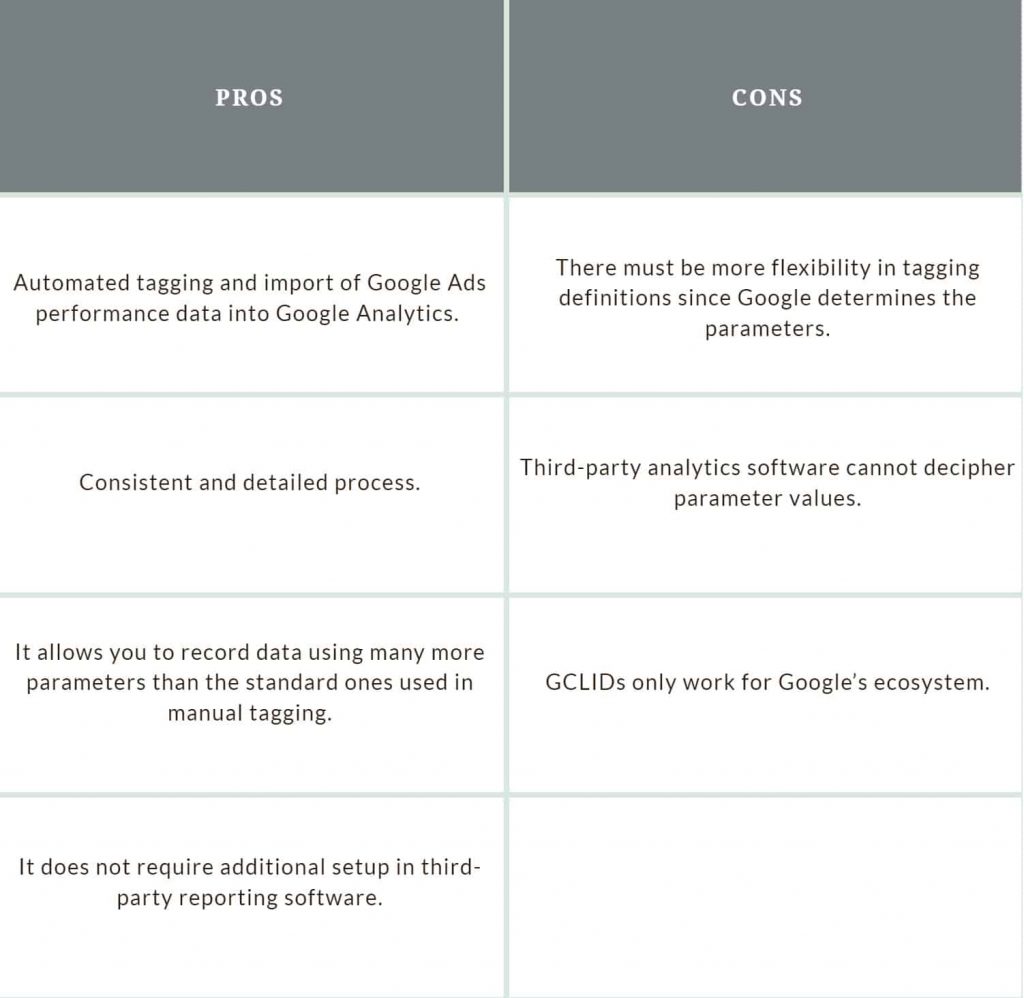
GCLID (Google Click Identifier) and UTM (Urchin Tracking Module) parameters serve different purposes in tracking and analytics. GCLID is automatically generated by Google Ads and is primarily used to identify click-through data from Google Ads campaigns. In contrast, UTM parameters are manually created and can be used across various platforms, allowing marketers to track the performance of specific campaigns, sources, and mediums.
- Format: GCLID is a unique alphanumeric string, while UTM parameters consist of key-value pairs (e.g., utm_source, utm_medium).
- Integration: GCLID integrates seamlessly with Google Ads and Google Analytics, whereas UTM parameters can be used across diverse analytics platforms.
- Scope: GCLID focuses exclusively on paid Google Ads traffic, while UTM parameters can track organic traffic, email campaigns, and more.
When to Use GCLID Over Other Tracking Methods
Utilizing GCLID is particularly beneficial for businesses heavily invested in Google Ads. Its ability to track detailed performance metrics tied to specific ads allows for precise attribution modeling. If a campaign’s success relies on understanding user interactions from Google Ads, GCLID is the preferred choice. For campaigns that span multiple channels or require broader tracking capabilities, UTM parameters may be more appropriate.
Impact of Using Multiple Tracking Parameters
Incorporating multiple tracking parameters can lead to enhanced data granularity. However, it can also create confusion if not managed properly. When GCLID is used alongside UTM parameters, it is essential to ensure that data from both sources is integrated effectively within analytics platforms. Misalignment in data can lead to inaccurate reporting and decision-making.
- Ensure clear documentation of each parameter’s purpose.
- Regularly audit tracking setups to avoid data discrepancies.
- Establish a naming convention for UTM parameters to maintain consistency.
Best Practices for Combining GCLID with UTM for Analytics
Combining GCLID with UTM parameters can enhance tracking capabilities and provide deeper insights. Follow these best practices to maximize effectiveness:
- Use UTM parameters for campaigns outside Google Ads to maintain a comprehensive tracking strategy.
- Link GCLID with corresponding UTM tags when running integrated campaigns to unify data sources.
- Analyze data from both GCLID and UTM parameters in Google Analytics to gain insights into user behavior and conversion paths.
A common misconception is that GCLID is only Google Ads, limiting its perceived utility. In reality, GCLID can be part of a broader tracking ecosystem when combined thoughtfully with UTM tags. This combination allows marketers to leverage the strengths of both systems, improving overall campaign analysis.
To implement these insights, marketers should develop a tracking plan that incorporates GCLID for Google Ads campaigns and UTM parameters for all other marketing efforts. Regularly reviewing and refining this plan will ensure accurate data collection and effective marketing strategy optimization.
Real-World Applications of GCLID in Digital Marketing
This section explores real-world case studies and examples demonstrating how businesses leverage GCLID to optimize their digital marketing efforts. Understanding these applications highlights the significance of GCLID beyond just Google Ads.
Case Studies of Successful Campaigns Using GCLID
Several companies have effectively utilized GCLID to enhance their marketing strategies. For instance, a leading e-commerce retailer integrated GCLID tracking to analyze customer journeys across multiple channels. By correlating GCLID data with sales conversions, the retailer identified high-performing keywords and adjusted their bidding strategies, resulting in a 30% increase in conversion rates over six months.
Another example involves a B2B software company that used GCLID to track the performance of their Google Ads campaigns. By analyzing the data, they discovered that specific ad variations led to a 25% lower cost per lead compared to others. This insight enabled them to allocate budgets more effectively, enhancing their overall return on investment (ROI).
Impact of GCLID on ROI for Businesses
Implementing GCLID can significantly impact a company’s ROI. Businesses that effectively utilize GCLID tracking often report a clearer understanding of which campaigns yield the highest returns. For example, a travel agency that tracked GCLID data saw a direct correlation between ad spend and bookings, allowing them to optimize their campaigns and achieve a 40% increase in overall sales.
- Enhanced tracking of customer interactions across various platforms.
- Improved attribution models leading to more informed marketing decisions.
- Increased efficiency in budget allocation based on performance insights.
Lessons Learned from GCLID Implementation
Several key lessons emerge from businesses that have implemented GCLID tracking. First, the importance of integrating GCLID data with analytics platforms cannot be overstated. Companies that connect GCLID with tools like Google Analytics gain deeper insights into user behavior and campaign performance.
Second, training marketing teams on interpreting GCLID data is essential. Organizations that invest in education around data analytics often see better outcomes from their campaigns. Finally, ongoing testing and optimization based on GCLID insights lead to continual improvement in marketing effectiveness.
Future Trends in Tracking with GCLID
The future of GCLID tracking appears promising, particularly with advancements in artificial intelligence and machine learning. These technologies will enable marketers to analyze GCLID data more efficiently, providing predictive insights that can inform campaign strategies. Additionally, as privacy regulations evolve, businesses will need to adapt their tracking methods while maintaining the effectiveness of GCLID.
Moreover, integrating GCLID with customer relationship management (CRM) systems will likely become more prevalent. This integration will allow businesses to track the entire customer journey from ad interaction to final sale, enhancing personalization and targeting efforts.
Practical Application
To leverage GCLID effectively, businesses should take the following steps:
- Ensure GCLID tracking is enabled in Google Ads and linked to analytics platforms.
- Train marketing teams on how to analyze and interpret GCLID data.
- Regularly test and optimize campaigns based on GCLID insights.
By implementing these practices, organizations can maximize the benefits of GCLID, improving their overall marketing effectiveness and ROI. Understanding that GCLID is not solely linked to Google Ads opens new avenues for strategic marketing initiatives.
Frequently Asked Questions
What is GCLID and how does it work?
GCLID, or Google Click Identifier, is a unique tracking parameter used by Google Ads to identify clicks on ads. It helps in attributing conversions to specific ad interactions, enabling advertisers to analyze campaign performance effectively.
Can GCLID be used outside of Google Ads?
GCLID is primarily designed for use within Google Ads and Google Analytics. It is not intended for tracking campaigns outside of the Google ecosystem.
How does GCLID affect conversion tracking?
GCLID enhances conversion tracking by linking clicks on ads directly to conversions in Google Analytics. This allows advertisers to measure the effectiveness of their campaigns and optimize accordingly.
Are there any costs associated with using GCLID?
There are no additional costs specifically associated with using GCLID itself. However, advertisers incur costs for the Google Ads campaigns that generate GCLIDs through ad clicks.
What are best practices for using GCLID in campaigns?
Best practices for using GCLID include ensuring proper integration with Google Analytics and avoiding URL modifications that can strip the GCLID. Additionally, keeping tracking parameters consistent helps in accurate data collection.
How long does GCLID data remain accessible?
GCLID data is retained in Google Analytics for as long as the associated user data is preserved, typically up to 26 months. Advertisers should regularly review their data retention settings for compliance.
What common mistakes should be avoided with GCLID?
Common mistakes include failing to link Google Ads and Google Analytics accounts, which can result in lost GCLID data. Additionally, altering URLs that contain GCLID parameters can disrupt tracking and data accuracy.
Final Thoughts on is gclid only google ads
GCLID is not limited to Google Ads; it serves as a pivotal tool for tracking user interactions across various digital marketing channels, enhancing conversion tracking and providing invaluable insights. Its integration into broader marketing strategies can significantly optimize performance measurement and campaign effectiveness.
To leverage the full potential of GCLID, implement it in your website’s analytics framework, ensuring that all relevant campaigns are set up to capture and analyze GCLID data for comprehensive performance insights.
Understanding and utilizing GCLID effectively can transform how businesses approach their marketing efforts, driving better decisions and outcomes in an increasingly data-driven landscape.
Leave a Reply