
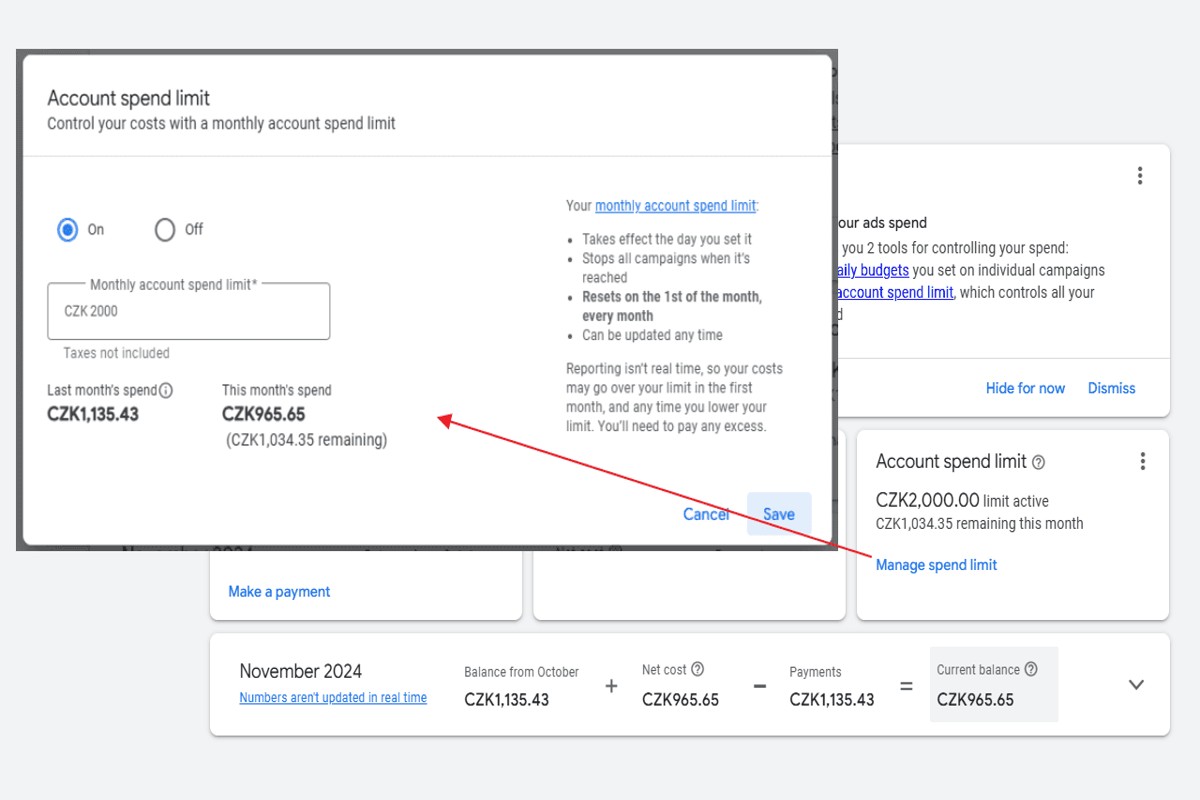
To set a monthly spending limit in Google Ads, navigate to your account settings, select ‘Billing’, and adjust your budget settings to specify a monthly cap. Save the changes to enforce your limit.
Understanding how to set a monthly spending limit in Google Ads is crucial for businesses seeking to manage their advertising budgets effectively. Without proper budget controls, companies risk overspending, which can lead to financial strain and hinder overall marketing strategy.
This guide provides a clear, step-by-step process for setting a monthly spending limit in Google Ads, including how to access billing settings, adjust budget parameters, and save changes to ensure compliance with your financial goals.
What is a monthly spending limit in Google Ads?
A monthly spending limit in Google Ads is a cap set by advertisers on the total amount they wish to spend on advertising within a calendar month. This limit helps advertisers manage their budgets effectively by ensuring they do not exceed their financial constraints while running ad campaigns.
The primary purpose of a monthly spending limit is to provide greater control over advertising expenditures, allowing businesses to allocate funds in a structured manner. By establishing this limit, advertisers can avoid unexpected charges and maintain their overall marketing budgets. Google Ads automatically adjusts ad delivery based on the budget, ensuring that the set limit is not surpassed.
- Flexibility: Advertisers can modify their monthly spending limit at any time based on their changing needs or performance metrics.
- Performance Tracking: Setting a limit allows businesses to analyze the effectiveness of their ad spend, refining strategies based on the return on investment (ROI).
- Ad Delivery: Google Ads may pace ad delivery throughout the month to ensure that spending aligns with the set limit, potentially affecting visibility during peak times.
While a monthly spending limit is a powerful budgeting tool, it’s essential to monitor campaign performance continuously. Advertisers should be prepared to adjust their limits based on market trends and campaign efficacy to optimize their advertising strategies further.
Expert Tip: Regularly review and analyze your ad performance metrics against the monthly spending limit to identify opportunities for increasing or reallocating your budget for better results.
How do I change my monthly spending limit in Google Ads?
To change your monthly spending limit in Google Ads, access your account settings and navigate to the billing section. Here, you can adjust your spending limit based on your advertising needs and budget constraints.
Follow these steps for a seamless adjustment process:
- Log in to your Google Ads account and click on the tools icon in the upper right corner.
- Under the “Billing” section, select “Settings” to view your current payment settings.
- Locate the “Monthly spending limit” option, which displays your existing limit.
- Click on the pencil icon or “Edit” button next to the monthly spending limit.
- Enter your desired new spending limit and save the changes.
- Review your updated limit to ensure it reflects the changes you made.
Keep in mind that some account types, such as those on a promotional offer, may have restrictions regarding changes to the spending limit. Additionally, increasing your limit may take effect immediately, while lowering it could take up to 24 hours to process.
To maximize your advertising effectiveness, regularly assess your spending and adjust your limits based on performance metrics. Monitoring your campaigns closely can help ensure that your budget aligns with your marketing objectives.
Setting a monthly spending limit allows for better financial control, but ensure that it supports your overall advertising strategy to achieve optimal results.
Can I set a daily budget instead of a monthly limit in Google Ads?
Yes, you can set a daily budget in Google Ads instead of a monthly limit. A daily budget controls how much you spend on ads each day, while a monthly limit caps your total spending over a month. Both options offer different advantages and implications for managing your advertising costs.
A daily budget allows for more flexibility and can help with pacing your spending throughout the month. For example, if a particular day generates more traffic, your ads can receive additional funding without exceeding the daily limit. However, this method may lead to underutilization of your budget, especially on days with lower traffic. In contrast, a monthly spending limit ensures that your total expenditure is capped, regardless of daily fluctuations, providing a clearer overview of your monthly budget. This can simplify cash flow management but may restrict ad visibility on high-traffic days if the cap is reached early.
- Flexibility: Daily budgets allow for adjustments based on daily performance.
- Control: Monthly limits provide a clear maximum expenditure for the entire month.
- Pacing: Daily budgets may lead to unused funds if traffic is inconsistent.
Choosing between a daily budget and a monthly limit depends on your advertising strategy and cash flow needs. Businesses focused on maximizing ad visibility on high-traffic days may prefer daily budgets, while those needing strict expenditure control may opt for monthly limits.
For optimal performance, consider using daily budgets during peak seasons or special promotions while maintaining a monthly limit for overall financial discipline.
What happens if I reach my monthly spending limit in Google Ads?
If you reach your monthly spending limit in Google Ads, your ads will stop running for the remainder of the month. This means that you will not receive any additional clicks or impressions until the start of the next billing cycle, effectively pausing your advertising efforts.
For example, consider a business that has set a monthly spending limit of $1,000. If the ads run continuously and the limit is reached by the 20th of the month, the ads will cease to be displayed, resulting in a halt of traffic to the business’s website. This cessation can impact both visibility and potential sales, especially if the business relies heavily on online advertising for revenue generation.
Moreover, it is crucial to monitor the performance of your campaigns as you approach your spending limit. If your ads are performing well, you might want to consider increasing that limit to maintain momentum. Conversely, if you notice diminishing returns, it may be prudent to reevaluate your ad strategy to avoid overspending without adequate results.
Expert Tip: Regularly analyze your campaign performance and adjust your monthly spending limit based on seasonal trends or specific promotional periods. This proactive approach can help maximize your advertising budget while ensuring consistent visibility in the competitive online landscape.
How much should I set as my monthly spending limit in Google Ads?
A recommended monthly spending limit for Google Ads typically ranges from $500 to $5,000, depending on your business goals and industry. Smaller businesses may start at the lower end, while larger enterprises or competitive sectors may require higher budgets to achieve visibility. Your specific limit should align with your marketing objectives and expected return on investment.
Several factors influence the appropriate monthly spending limit for Google Ads. Consider the following:
- Industry Competition: Highly competitive industries, such as finance or legal services, often require larger budgets to secure ad placements and maintain visibility.
- Target Audience: The more specific and targeted your audience, the higher the potential costs. Niche markets may have lower costs compared to broad, general audiences.
- Campaign Goals: If your goal is brand awareness, you might allocate more budget for reach. Conversely, if you’re focused on conversions, a different allocation strategy may be necessary.
- Geographical Scope: Local campaigns may require less investment than national or international campaigns, which can drive up costs due to broader competition.
Evaluating past performance metrics will also help in setting a realistic spending limit. Analyze data such as cost per click (CPC), conversion rates, and overall campaign performance to adjust your budget accordingly.
Expert Tip: Regularly review and adjust your spending limit based on performance trends; flexibility can lead to better ROI by allowing you to capitalize on successful strategies while minimizing losses in underperforming areas.
How long does it take to set a monthly spending limit in Google Ads?
Setting a monthly spending limit in Google Ads typically takes less than 10 minutes. The process is straightforward, involving a few simple steps to access your account settings and input your desired budget.
Several factors can influence the time required to establish this limit. If you are already familiar with the Google Ads interface, the process will be quicker. However, if you are new to Google Ads, you may need additional time to navigate the platform and understand its features. Familiarity with your campaign objectives and spending patterns can also expedite the decision-making process.
Technical issues, such as slow internet connectivity or Google Ads platform updates, may also affect the time it takes to set the limit. Additionally, if you are managing multiple accounts or campaigns, it may take longer to set individual spending limits for each one. Ensuring that you have all necessary information and access rights in advance can streamline the process significantly.
Expert Tip: Regularly review your monthly spending limit and adjust it based on campaign performance and business objectives. This proactive approach helps optimize advertising spend and improves overall campaign efficacy.
What are the best practices for managing spending limits in Google Ads?
Effectively managing spending limits in Google Ads involves a combination of strategic planning and continuous monitoring. Implementing best practices ensures that ad spend aligns with business goals while maximizing return on investment. Here are key strategies to consider.
- Set Realistic Goals: Define clear advertising objectives that correspond to your budget. Consider factors such as target audience size, campaign type, and expected conversion rates to determine an achievable monthly spending limit.
- Utilize Automated Rules: Leverage Google Ads’ automated rules to adjust bids and spending based on performance metrics. This allows for flexibility, ensuring that campaigns stay within budget while optimizing for high-performing ads.
- Monitor Performance Regularly: Conduct weekly or bi-weekly reviews of campaign performance. Analyze metrics such as click-through rates, cost-per-click, and conversion rates to identify trends and make adjustments to spending limits accordingly.
- Implement Shared Budgets: Use shared budgets for multiple campaigns targeting similar audiences. This approach allows for more efficient allocation of funds and ensures that high-performing campaigns receive adequate funding without overspending.
- Adjust Based on Seasonality: Consider seasonal trends and market fluctuations when setting monthly limits. Increase spending during peak times when conversions are likely to rise, and reduce budgets during slower periods to maintain cost-effectiveness.
Regularly assessing these factors allows for adjustments that can significantly enhance campaign performance. Adapting spending limits based on real-time data and market conditions ensures that advertising efforts remain effective and efficient.
Expert Tip: Utilize Google Ads’ forecasting tools to project potential performance and adjust your spending limits proactively. This data-driven approach can help optimize your budget allocation for better results.
Advanced Strategies for Optimizing Your Monthly Budget
This section delves into sophisticated techniques for maximizing Google Ads performance while adhering to your monthly spending limit. Effective budget management not only enhances ad efficiency but also drives higher returns on investment.

Utilizing Automated Bidding Strategies
Automated bidding strategies in Google Ads allow advertisers to optimize their spending without constant manual adjustments. These strategies use machine learning to set bids for each auction, aiming to achieve specific goals such as maximizing conversions or achieving a target return on ad spend (ROAS). Key automated bidding strategies include:
- Target CPA (Cost Per Acquisition): Sets bids to help get as many conversions as possible at a specified cost per acquisition.
- Target ROAS: Optimizes bids to achieve a desired return on ad spend.
- Maximize Conversions: Automatically sets bids to get the most conversions within your budget.
Segmenting Campaigns for Better Budget Allocation
Segmenting campaigns based on different criteria—such as demographics, geography, or product categories—enables more effective budget allocation. By understanding which segments perform best, advertisers can allocate more budget to high-performing campaigns and reduce spend on underperformers. Consider the following segmentation strategies:
- Demographic Targeting: Adjust budgets based on age, gender, or household income to reach your ideal audience.
- Geographic Targeting: Allocate budget based on location performance, focusing on regions that yield the highest conversions.
- Device Targeting: Differentiate budgets for mobile, desktop, and tablet users based on their performance metrics.
Monitoring Performance Metrics for Dynamic Adjustments
Continuous monitoring of key performance metrics is essential for effective budget management. Metrics such as click-through rate (CTR), conversion rate, and cost per conversion provide insights into campaign performance. By regularly analyzing these metrics, advertisers can make informed decisions to adjust spending dynamically. Establish a routine for:
- Weekly performance reviews to identify trends.
- Setting alerts for significant performance changes.
- Adjusting budgets based on seasonal trends or market changes.
Implementing A/B Testing to Refine Ad Effectiveness
A/B testing allows advertisers to compare different versions of ads to determine which performs better. By systematically testing various elements—such as headlines, images, and calls to action—advertisers can identify the most effective combinations. For effective A/B testing, follow these guidelines:
- Test one variable at a time to isolate effects.
- Run tests for a predetermined duration to gather sufficient data.
- Use statistically significant results to inform budget reallocation.
Many advertisers overlook the importance of adjusting their campaigns based on external factors. For instance, shifts in market demand or competitor activity can significantly impact ad performance. Regularly revisiting your strategy and being flexible with budget allocations can prevent overspending during low-performance periods. Moreover, it is a common misconception that increasing budget guarantees better results; however, without strategic management, additional spend can lead to diminishing returns.
To implement these strategies effectively, start by setting clear performance goals for each campaign. Utilize automated bidding to streamline your bidding process while segmenting campaigns for targeted budget allocation. Regularly review performance metrics and conduct A/B tests to refine your ads. By following these actionable steps, you can enhance your Google Ads effectiveness while strictly adhering to your monthly spending limit.
Common Mistakes When Setting Spending Limits
Setting a monthly spending limit in Google Ads is a crucial aspect of managing advertising budgets effectively. However, advertisers often make common mistakes that can hinder campaign performance and result in lost opportunities.
Setting Limits Too Low
Establishing a spending limit that is too low can severely restrict your campaign’s reach and visibility. Advertisers may miss out on valuable impressions and clicks, ultimately diminishing potential revenue. A conservative budget may seem prudent, but it can lead to underperformance, especially in competitive markets. Regularly analyze your return on investment (ROI) to ensure your budget aligns with your advertising goals.
Neglecting Performance Data
Failing to review performance data regularly is another common error. Google Ads provides robust analytics that can inform adjustments to spending limits. Without ongoing analysis, advertisers may overlook trends indicating that their campaigns are either underperforming or exceeding expectations. Establish a routine to evaluate key performance indicators (KPIs) such as click-through rates (CTR) and conversion rates, and adjust your spending limits accordingly.
Ignoring Seasonal Fluctuations
Seasonal fluctuations can significantly impact demand for products and services. Advertisers often set static spending limits that do not account for these variations. For example, retail businesses may experience higher demand during holiday seasons, necessitating increased budgets. Conversely, during off-peak seasons, lowering limits may optimize spending. Conduct market research to identify seasonal trends and adjust your budgets proactively.
Overlooking Ad Quality
The quality of ads directly influences budget efficiency. Advertisers frequently underestimate the importance of ad relevance and engagement. A higher quality score can lead to lower costs per click (CPC) and better ad placements, maximizing the effectiveness of your budget. Invest time in optimizing ad copy, targeting, and landing pages to improve quality scores, which can enhance overall campaign performance without necessarily increasing spending limits.
Nuances and Expert Insights
Many advertisers mistakenly believe that simply setting a budget will ensure optimal performance. However, the interplay between budget and ad quality is crucial. A high spending limit does not guarantee success if the ads themselves are not compelling. Furthermore, some advertisers may ignore the potential for automated bidding strategies that can optimize spending in real-time based on performance. Embracing these advanced strategies can significantly enhance budget management and campaign effectiveness.
Practical Application
- Regularly assess performance data to identify trends and adjust budgets accordingly.
- Research seasonal trends relevant to your industry and adjust spending limits accordingly.
- Focus on improving ad quality to enhance cost efficiency and ROI.
- Consider utilizing automated bidding strategies to optimize your budget dynamically.
Real-World Applications of Monthly Spending Limits
This section examines practical examples of how businesses manage their advertising budgets effectively using monthly spending limits in Google Ads. Understanding these real-world applications provides valuable insights into budget management strategies across various sectors.

Case Study: Small Business Success
A local bakery, Sweet Treats, implemented a monthly spending limit of $500 on Google Ads to promote its new line of gluten-free products. By closely monitoring ad performance and adjusting keyword bids, they effectively controlled costs while maximizing reach. The bakery experienced a 30% increase in foot traffic and a 25% boost in online orders within the first three months. This case exemplifies how small businesses can leverage monthly spending limits to grow while maintaining budgetary discipline.
Large Campaigns with Variable Budgets
A national fitness brand launched a seasonal campaign targeting different demographics across multiple regions. The initial monthly spending limit was set at $50,000, with adjustments made based on performance metrics. By using data-driven insights, the brand shifted funds dynamically, increasing the budget for high-performing ads while reducing spend on underperforming ones. This approach allowed them to maximize ROI, ultimately resulting in a 40% increase in online sales during the campaign period.
Lessons from Failed Campaigns
Several companies have faced challenges due to improper budget management. One notable example involved an e-commerce retailer that set a monthly limit without considering seasonality. During peak shopping months, their budget fell short, leading to missed opportunities and a significant decrease in market share. This failure highlights the necessity of aligning budget limits with business cycles and market trends to prevent overspending or underutilization of ad resources.
Industry-Specific Budget Strategies
- Retail: Allocate higher budgets during holidays and sales events to capture increased consumer interest.
- Service Providers: Focus on local targeting with adjustable monthly limits based on seasonal demand fluctuations.
- Tech Companies: Invest in long-term campaigns with gradual budget increases as brand awareness grows.
These industry-specific strategies demonstrate how businesses can tailor their spending limits to enhance advertising effectiveness based on market characteristics.
Monthly spending limits are not only about capping expenses; they require ongoing analysis and adjustments. Common misconceptions include the belief that once a limit is set, no further changes are needed. In reality, continuous monitoring of ad performance, seasonal trends, and competitive landscape is essential to maximize advertising efficiency.
To effectively apply this knowledge, businesses should regularly review their Google Ads performance metrics and adjust spending limits accordingly. Implement a process for monthly evaluations, considering factors such as seasonality and campaign performance. Additionally, use A/B testing to determine which ads yield the highest ROI, allowing for informed budget reallocation. Establishing a dynamic budget strategy will enhance overall advertising outcomes and ensure that spending aligns with business goals.
Frequently Asked Questions
What is a monthly spending limit in Google Ads?
A monthly spending limit in Google Ads is the maximum amount you are willing to spend on advertising within a calendar month. This limit helps manage your advertising budget effectively and prevents overspending.
How do I change my monthly spending limit in Google Ads?
To change your monthly spending limit, navigate to the “Billing” section in your Google Ads account. From there, you can adjust the limit according to your budgetary needs.
Can I set a daily budget instead of a monthly limit in Google Ads?
Yes, Google Ads allows you to set a daily budget instead of a monthly spending limit. This option provides flexibility in managing your ad spend on a daily basis.
What happens if I reach my monthly spending limit in Google Ads?
If you reach your monthly spending limit, your ads will stop running until the start of the next month. This ensures that you do not exceed your predefined budget.
How much should I set as my monthly spending limit in Google Ads?
Your monthly spending limit should reflect your overall advertising goals and financial capacity. Consider factors such as your target audience, campaign objectives, and historical performance when determining this amount.
How long does it take to set a monthly spending limit in Google Ads?
Setting a monthly spending limit in Google Ads can be done instantly through your account settings. Changes take effect immediately, allowing for immediate budget adjustments.
What are the best practices for managing spending limits in Google Ads?
Best practices include regularly reviewing performance metrics, adjusting limits based on campaign results, and aligning your budget with business goals. Consistent monitoring ensures that your spending remains effective and efficient.
Final Thoughts on how to set monthly spending limit in google ads
Establishing a monthly spending limit in Google Ads is crucial for maintaining budget control while maximizing advertising effectiveness. A well-calibrated limit not only safeguards against overspending but also aligns ad expenditures with business goals, empowering advertisers to make informed decisions based on performance data.
To enhance your advertising strategy, immediately analyze your historical ad performance and adjust your monthly spending limit based on seasonal trends and campaign objectives, ensuring optimal resource allocation.
Mastering your budget in Google Ads is essential for sustainable growth and competitive advantage in the digital marketplace.
Leave a Reply