
To delete your Google Business Profile, sign in to your Google My Business account, select the profile you want to remove, click on ‘Info’, and then choose ‘Remove listing’. Follow the prompts to complete the deletion.
Understanding how to delete a Google Business Profile is crucial for business owners who wish to manage their online presence effectively. Incorrectly handling this process can lead to confusion among customers, potential loss of business credibility, and complications in re-establishing a new profile if needed.
This guide provides a detailed, step-by-step approach to deleting your Google Business Profile, including essential precautions and tips to ensure a smooth process. Key aspects covered include accessing your account, navigating the interface, and confirming the deletion.
For How To Delete Google Business Profile businesses looking to generate local leads through Google Ads or Local SEO, GMB Ranger LLC offers hands-on campaign management. Specialist Md Tangeer Mehedi personally handles campaign setup and ongoing optimization — with no payment required until the first lead comes in.
What happens when you delete your Google Business Profile?
Deleting your Google Business Profile results in the permanent removal of your business listing from Google Search and Maps. This action leads to a significant loss of visibility, as potential customers can no longer find your business through these platforms. Additionally, all associated data, including reviews, photos, and insights, will be irretrievably lost.
When a Google Business Profile is deleted, the immediate impact is a decline in online presence. Businesses rely on their profiles for customer engagement and visibility. Without a profile, customers cannot access information such as contact details, hours of operation, or service offerings. Furthermore, any existing reviews that contribute to your business’s reputation will no longer be accessible, potentially affecting your brand’s credibility.
- Loss of visibility: Your business will no longer appear in local search results or on Google Maps, significantly reducing potential customer interaction.
- Data loss: All collected customer insights, reviews, and media associated with the profile will be permanently deleted.
- Impact on SEO: The absence of a Google Business Profile can negatively affect your website’s search engine optimization, as local SEO relies heavily on accurate business listings.
Businesses considering deletion should also be aware that re-establishing the profile after deletion may pose challenges, including the risk of losing the original listing and having to start from scratch. It is advisable to explore other options, such as temporarily marking the business as closed, if the intention is to pause operations rather than permanently delete the profile.
Expert Tip: Before proceeding with deletion, download all valuable data from your profile, including customer interactions and analytics, to retain crucial information that can inform future business strategies.
How can I temporarily hide my Google Business Profile?
You can temporarily hide your Google Business Profile by marking it as “temporarily closed” instead of deleting it. This option allows you to pause your business visibility without losing your listing entirely. It is especially useful for businesses undergoing renovations, seasonal closures, or other temporary circumstances.
- Sign in to Google Business Profile: Access your Google Business Profile account using the appropriate credentials associated with your business listing.
- Select your business: From the dashboard, locate and click on the business you wish to mark as temporarily closed.
- Update business information: Navigate to the “Info” section on the left-hand menu. Here, you will find the option to edit your business status.
- Mark as temporarily closed: Find the “Close this business” option and select “Temporarily closed.” This will inform customers that your business is not currently operational.
- Save changes: After marking your business as temporarily closed, ensure that you hit the “Apply” or “Save” button to confirm the changes.
Marking your business as temporarily closed is a straightforward process that maintains your online presence. It allows customers to see that you’re not operating temporarily while preserving your business information for when you are ready to reopen. Be aware that this status will be visible to anyone searching for your business on Google.
For businesses that are frequently closed for longer periods, consider updating your business hours instead of marking it as temporarily closed. This way, customers can still find relevant information about your business, even if you are not operating regularly.
Expert Tip: Regularly check your Google Business Profile for customer inquiries or messages. Maintaining communication during temporary closures can help retain customer loyalty and trust.
Is it free to delete a Google Business Profile?
Yes, deleting a Google Business Profile is completely free. There are no fees associated with this process, allowing users to manage their online presence without financial concern.
When deciding to delete a Google Business Profile, it is essential to understand that the service itself does not incur any costs. Users can remove their profiles without worrying about hidden charges. However, there may be circumstances that affect associated costs indirectly, such as:
- Advertising expenses: If the business has been running Google Ads linked to the profile, those charges will continue until the ads are paused or stopped.
- Third-party services: Some businesses may use external services for managing their online reputation or listings, which could have their own fees independent of the Google Business Profile.
- Unresolved customer inquiries: Deleting a profile may lead to potential loss of leads or customer queries that could have resulted in sales, impacting revenue.
Once a Google Business Profile is deleted, it may take some time for the changes to reflect across all Google services. Users should ensure they have backed up any necessary information before proceeding with deletion, as this action is irreversible.
Expert Tip: Regularly audit your Google Business Profile to ensure it reflects accurate and current information. This practice can help determine if deletion is necessary or if updates can better serve your business needs.
How long does it take to delete a Google Business Profile?
Deleting a Google Business Profile typically takes effect immediately, but it may take up to 24 hours for changes to fully propagate across Google services. Users may still see remnants of the profile during this time due to caching and indexing delays.
When a business profile is deleted, it is removed from Google Search and Maps, but the visibility of the deletion can vary. Factors influencing this include the frequency of Google’s crawlers updating their indexes and the user’s location. In some instances, users may find that the deleted profile still appears in search results for a short period, especially if the deletion coincides with peak search activity.
Additionally, if the business has a significant online presence or has been featured in various places, it might take longer for all references to be updated or removed. Google may also retain some information for backup or historical purposes, which means that while the profile is no longer active, certain data could remain accessible to Google.
Expert Tip: For businesses considering deletion, ensure that all associated data is backed up, as once the profile is deleted, recovery is not possible.
Can I recover my deleted Google Business Profile?
Yes, it is possible to recover a deleted Google Business Profile, but there are specific conditions and limitations. If the profile was deleted within the last 30 days, recovery is usually straightforward. However, once this period has passed, options for recovery become limited.
When attempting to recover a deleted profile, users have a few options to consider:
- Recover within 30 days: If the profile was deleted less than 30 days ago, users can restore it directly through the Google Business Profile Manager. This is the simplest method and does not require further verification.
- Contact Google Support: For profiles deleted more than 30 days ago, contacting Google Support can be an option. However, recovery is not guaranteed, and users may need to provide additional verification of ownership.
- Create a new profile: If recovery is not possible, users can create a new Google Business Profile. This means starting from scratch, which may affect online visibility and reviews.
The primary difference among these options lies in the timeframe and the recovery process. Recovering a profile within 30 days is efficient and straightforward, while contacting support can be time-consuming and may yield uncertain results. Creating a new profile, although always an option, means losing the established history and reviews associated with the original profile.
Expert Tip: To avoid complications, regularly back up important business information and monitor your Google Business Profile for any unauthorized changes. This proactive approach can facilitate easier recovery if a deletion occurs.
What are the best practices for managing a Google Business Profile before deletion?
Before deleting a Google Business Profile, it’s essential to manage the transition effectively. This involves notifying customers, updating crucial information, and ensuring a smooth handover of communications. Proper preparation can help mitigate potential disruptions and maintain customer trust.
Start by informing your customers about the impending deletion of your business profile. This can be done through a direct message on your profile, social media announcements, or email newsletters. Clearly state the reason for the deletion and provide any alternative contact methods or new business locations, if applicable. This transparency can help retain customer loyalty even after the profile is removed.
- Update Business Information: Ensure that your business hours, contact details, and address are accurate before deletion. This helps customers reach you easily during the transition.
- Respond to Customer Queries: Address any outstanding customer inquiries or reviews. Engaging with customers demonstrates your commitment to service and can leave a positive impression even post-deletion.
- Backup Business Data: Download important data such as reviews, photos, and posts from your Google Business Profile. This information may be valuable for future reference or for any new business ventures.
- Redirect Traffic: If possible, create a redirect to your new business location or website. This ensures that customers can still find you after the profile is deleted.
Managing a Google Business Profile before deletion is not only about the act of removal but also about maintaining customer relationships. By effectively communicating changes and preparing your business for the transition, you can preserve your reputation and ensure a seamless experience for your customers.
Expert Tip: Consider providing a timeline for the deletion process, allowing customers to adjust to the change gradually. This can further enhance customer satisfaction and reduce confusion.
Why would a business want to delete its Google Business Profile?
A business may choose to delete its Google Business Profile for several reasons, including closure, rebranding, or a shift in business focus. Deleting the profile ensures that outdated information does not mislead potential customers and maintains the integrity of the business’s online presence.
For example, consider a local bakery that has permanently closed due to financial difficulties. Once the decision to close is made, the owner recognizes that an active Google Business Profile might lead to confusion for customers searching for their products. By removing the profile, the owner prevents potential customers from visiting an address that no longer serves their needs, thereby avoiding negative experiences and maintaining the bakery’s reputation.
Another scenario involves a company undergoing significant rebranding. A small tech firm might decide to change its name and logo to better reflect its new direction and services. In this case, the existing Google Business Profile may contain outdated information that could hinder brand recognition. Deleting the old profile and creating a new one with updated branding ensures that customers receive accurate information and helps establish a fresh identity in search results.
Expert Tip: When deleting a Google Business Profile, it is advisable to inform existing customers through other channels, such as email or social media, to ensure they are aware of the changes and to maintain customer relationships during the transition.
Understanding the Implications of Deleting Your Google Business Profile
Deleting your Google Business Profile can have significant long-term effects on your business’s online visibility and customer engagement. This section analyzes the implications of such an action, highlighting critical aspects that business owners must consider.
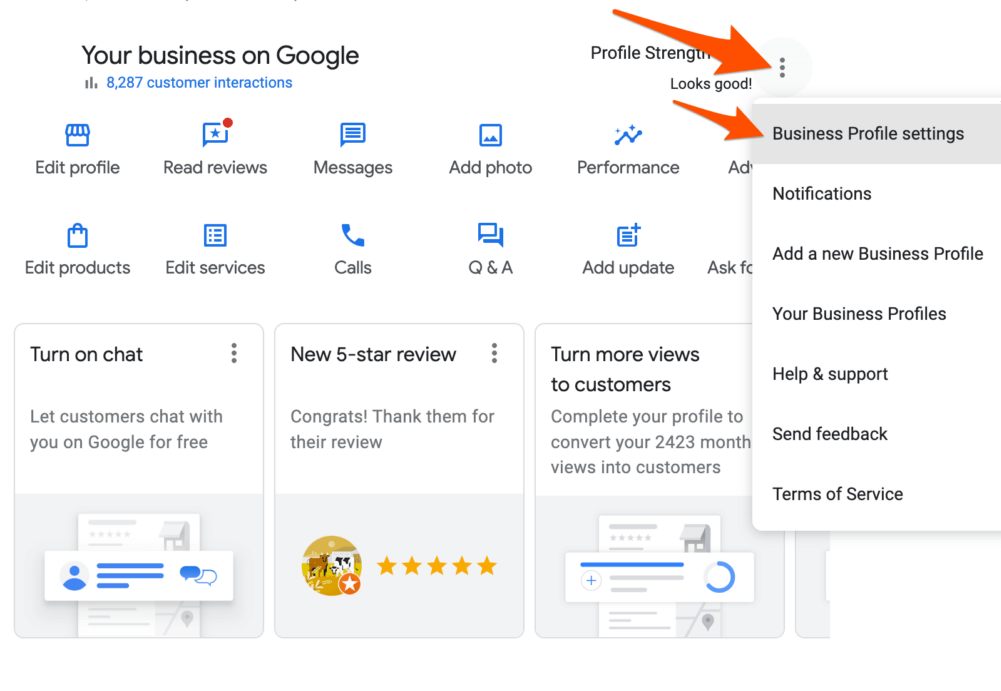
Impact on Local SEO Rankings
Removing your Google Business Profile can adversely affect your local search engine optimization (SEO) rankings. Google uses various signals to determine the relevance and authority of a business in local search results. When a profile is deleted, the associated signals, including location data and business categories, are lost, leading to a potential drop in search visibility. Studies suggest that businesses with active profiles often rank higher in local searches, making deletion a counterproductive decision for those seeking to attract local customers.
Loss of Customer Reviews and Insights
One of the most significant repercussions of deleting your Google Business Profile is the loss of customer reviews. Reviews play a critical role in influencing potential customers’ decisions. Deleting the profile means losing all accumulated reviews, which can lead to a decrease in trust and credibility. Additionally, insights regarding customer interactions, such as how customers found your business and their search behaviors, will no longer be accessible. This data is invaluable for refining marketing strategies.
Effect on Google Maps Visibility
Google Maps serves as a primary tool for users searching for local businesses. Deleting your Google Business Profile results in the removal of your business from Google Maps, significantly reducing visibility. Potential customers searching for services in your area will no longer see your business listed, which can lead to a decline in foot traffic and online inquiries. Maintaining an active profile ensures your business remains easily discoverable on this essential platform.
Alternatives to Deletion for Managing Your Profile
Before opting to delete your Google Business Profile, consider alternatives that allow for better management of your online presence. Options include:
- Updating Information: Ensure that your business information is accurate and up-to-date to avoid customer confusion.
- Responding to Reviews: Engage with customers by responding to reviews, both positive and negative, to demonstrate active customer service.
- Temporarily Marking as Closed: If necessary, you can mark your business as temporarily closed instead of deleting the profile entirely.
These alternatives can help maintain your online presence and mitigate potential negative impacts associated with deletion.
Finally, it is essential to recognize that deleting a Google Business Profile is a significant decision. Businesses should weigh the benefits of maintaining an active profile against the reasons for deletion. Factors such as changing business models or temporary closures can often be addressed without resorting to deletion.
For businesses contemplating deletion, consider conducting a thorough evaluation of your online strategy. Assess whether the current profile meets your business needs or if adjustments can be made to enhance its effectiveness. Engaging in regular profile management and customer interaction can yield better results than deletion.
Step-by-Step Process for Deleting Your Google Business Profile
This section outlines the precise steps to delete your Google Business Profile, ensuring a straightforward and effective process. Properly managing your business listing is essential to maintaining your online presence.

Accessing Your Google My Business Account
Begin by logging into your Google My Business account. Visit the Google My Business homepage and click on the “Sign In” button. Enter your Google account credentials associated with the business profile you wish to delete. Once logged in, you will be directed to the dashboard containing your business listings.
Navigating the Interface for Deletion
On the dashboard, locate the business profile you intend to delete. Click on the business name to open its management page. Look for the “Info” tab in the left-hand menu. Scroll down to find the option for “Remove listing.” This option allows you to initiate the deletion process.
Confirming the Deletion Process
After clicking “Remove listing,” a prompt will appear asking you to confirm your decision. Google will provide information regarding the implications of deletion, such as the loss of reviews and visibility in search results. To proceed, click on “Confirm.” Your business profile will then be marked for deletion, and you will receive a notification indicating the status.
Troubleshooting Common Issues
If you encounter problems during the deletion process, consider the following:
- Access Denied: Ensure you are logged in with the correct Google account that has administrative access to the business profile.
- Missing Options: If the “Remove listing” option is not visible, verify that you have the necessary permissions. Only the primary owner can delete the profile.
- Technical Glitches: Refresh the page or try using a different browser. Clearing cache and cookies may also resolve interface issues.
Expert Insights on Deletion
Many users mistakenly believe that deleting a Google Business Profile is irreversible. While the profile will be removed from public view, Google retains the data for a period, allowing for potential restoration if needed. This is crucial for businesses that may reconsider their online presence later. Additionally, users often overlook the impact of deletion on local SEO; a deleted profile can affect search rankings and visibility in local searches, which may hinder future marketing efforts.
Practical Application
After completing the deletion process, ensure to inform your stakeholders about the change. If applicable, update your website and social media platforms to reflect the removal of the business profile. For those reconsidering their online strategy, explore alternatives such as updating the profile or transferring ownership rather than outright deletion. This approach maintains your online presence while allowing for adjustments to business operations.
Common Mistakes to Avoid When Deleting a Google Business Profile
Deleting a Google Business Profile can have significant implications for both the business and its customers. This section highlights common pitfalls that can complicate the deletion process or result in unintended consequences.
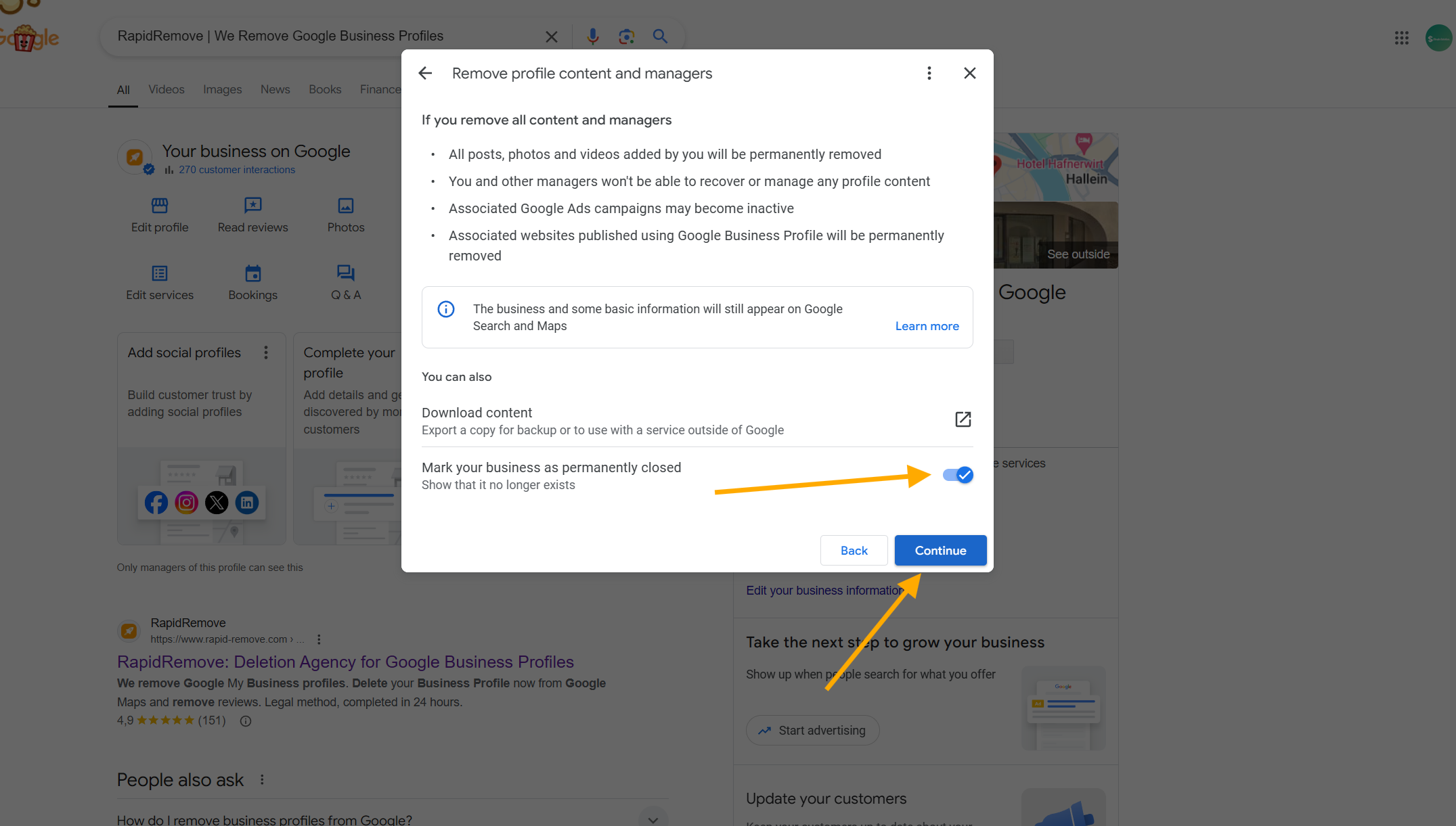
Not Backing Up Important Data
Before deleting a Google Business Profile, it is essential to back up all relevant data, including customer reviews, photos, and any insights or analytics. Once the profile is deleted, this information becomes irretrievable. Failure to secure this data can lead to a loss of valuable customer feedback and marketing material that may be useful for future endeavors.
Failing to Notify Customers Beforehand
Informing customers about the impending deletion of a Google Business Profile is a critical step. Lack of communication can result in confusion and frustration among loyal customers who may attempt to reach the business through the now-deleted profile. Consider using email newsletters, social media announcements, or website notifications to ensure customers are aware of the change.
Ignoring the Implications for SEO
Deleting a Google Business Profile can negatively impact local SEO rankings. This action removes a significant source of visibility in local search results. It is crucial to understand that the profile plays a role in how the business appears in Google Maps and search listings. Businesses should evaluate alternative strategies to maintain or enhance their online presence before proceeding with deletion.
Misunderstanding the Difference Between Deletion and Suspension
Many users confuse the concepts of deletion and suspension. Deleting a profile is permanent and irreversible, whereas suspension is a temporary measure that can be lifted. If a business faces issues with its profile, such as policy violations, opting for suspension may be a better solution, allowing the business to address the concerns without losing the profile entirely.
Expert Insights
Many businesses underestimate the long-term consequences of deleting their Google Business Profile. For instance, while some may believe that deleting the profile will eliminate negative reviews, it may instead create a lack of online presence, harming potential customer trust. Additionally, businesses that operate in a competitive market may find it challenging to regain visibility after deletion; thus, maintaining a profile—even with negative reviews—can be more beneficial in the long run.
Practical Application
To avoid common mistakes when deleting a Google Business Profile, follow these actionable steps:
- Backup all vital data, including reviews and insights.
- Notify customers about the deletion through multiple communication channels.
- Assess the potential impact on local SEO and consider alternatives to deletion.
- Clarify whether suspension might be more appropriate than permanent deletion.
By following these guidelines, businesses can ensure a smoother transition and mitigate potential negative consequences associated with deleting their Google Business Profile.
Alternatives to Deleting Your Google Business Profile
For businesses reconsidering the complete removal of their Google Business Profile, several effective alternatives exist. These options allow for better management of online presence while addressing specific needs without resorting to deletion.
Marking the Business as Permanently Closed
If a business is no longer operational, marking the profile as permanently closed is a straightforward approach. This action informs potential customers that the business is no longer active, preventing confusion and maintaining transparency. To do this:
- Log into your Google Business Profile account.
- Select the location you wish to mark as closed.
- Click on the “Info” tab, and scroll to the “Close this business on Google” section.
- Follow the prompts to confirm the closure.
Updating Business Information for a Rebrand
Businesses undergoing a rebrand can update their Google Business Profile to reflect new branding elements. This includes changing the business name, logo, address, and contact information. Keeping the profile current helps retain customer trust and improves SEO rankings. To update information:
- Access your Google Business Profile.
- Choose the location to update.
- Edit the necessary fields, including name, description, and categories.
- Save the changes and monitor for updates.
Using the ‘Temporarily Closed’ Feature
For businesses that need to pause operations without permanent closure, the temporarily closed feature is ideal. This option communicates to customers that the business will resume operations without the need for a complete profile deletion. To set your business as temporarily closed:
- Log into your Google Business Profile.
- Select the relevant location.
- Go to the “Info” tab and find the “Close this business temporarily” section.
- Confirm the status change.
Managing Online Reputation Without Deletion
Active management of online reputation is essential for businesses, especially those with negative reviews or outdated information. Instead of deleting the profile, businesses can:
- Respond to customer reviews to demonstrate engagement.
- Regularly update business information to reflect current offerings.
- Post updates or promotions to keep the profile active and relevant.
Effective management helps mitigate the impact of negative feedback and enhances overall visibility in search results. Regular interaction with customers fosters a positive online image.
Many assume that deleting a Google Business Profile is the only solution to poor performance or a negative reputation. However, businesses can often address underlying issues through proactive measures. For instance, responding to reviews or enhancing profile content can significantly improve public perception without the need for deletion. Additionally, some businesses mistakenly believe that a low rating necessitates deletion; instead, maintaining an active presence allows for improvement over time.
To apply these strategies, businesses should assess their current profile status and determine the most suitable action. Begin by marking the profile as closed if necessary, or update information to reflect changes. Utilize the temporarily closed feature when appropriate, and prioritize online reputation management through engagement and content updates. By implementing these alternatives, businesses can maintain a positive online presence while avoiding the irreversible step of deletion.
For How To Delete Google Business Profile businesses looking to generate local leads through Google Ads or Local SEO, GMB Ranger LLC offers hands-on campaign management. Specialist Md Tangeer Mehedi personally handles campaign setup and ongoing optimization — with no payment required until the first lead comes in.
Frequently Asked Questions
What happens when you delete your Google Business Profile?
When you delete your Google Business Profile, it will no longer appear in Google Search or Maps. All customer reviews, photos, and other information associated with the profile will also be removed permanently.
How can I temporarily hide my Google Business Profile?
You can temporarily hide your Google Business Profile by marking it as “permanently closed” in your account settings. This action will prevent it from appearing in search results while allowing you to reactivate it later.
Is it free to delete a Google Business Profile?
Yes, deleting a Google Business Profile is completely free. There are no charges associated with the deletion process.
How long does it take to delete a Google Business Profile?
The deletion of a Google Business Profile is typically processed immediately, but it may take a few days for the changes to reflect across all Google services. Users will receive a confirmation once the profile is deleted.
Can I recover my deleted Google Business Profile?
Once a Google Business Profile is deleted, it cannot be recovered. It is essential to back up any important information before proceeding with deletion.
What are the best practices for managing a Google Business Profile before deletion?
Before deletion, ensure all customer interactions are addressed and inform clients about the change. Additionally, consider updating your business information to reflect any new contact methods or locations.
Why would a business want to delete its Google Business Profile?
Businesses may choose to delete their Google Business Profile due to closure, rebranding, or a shift in focus. Deletion can also occur if the profile is no longer relevant to the business’s current operations.
Final Thoughts on how to delete google business profile
Deleting your Google Business Profile is a significant decision that can impact your online presence and visibility. Understanding the implications and following the correct procedures is essential to ensure that your business information is accurately managed. The process is straightforward, but attention to detail is crucial to avoid common pitfalls.
To proceed effectively, assess your business’s current needs and consider temporarily hiding your profile if you are unsure about permanent deletion. This allows for flexibility while you evaluate your options.
Managing your online presence is vital in today’s digital landscape; ensuring that your business profile accurately reflects your current status can make all the difference in attracting and retaining customers.
Leave a Reply