
To delete a Google Business Profile, sign in to your Google Business account, select the profile you want to remove, click ‘Info’, and then select ‘Remove listing’. Follow the prompts to confirm the deletion.
Understanding how to delete a Google Business Profile is crucial for business owners and marketers managing their online presence. Incorrectly handling this process can lead to potential confusion for customers and may result in lost visibility in search results.
This guide provides a step-by-step approach to deleting a Google Business Profile, detailing each action required and offering tips for ensuring a smooth removal process.
For How To Delete A Google Business Profile businesses looking to generate local leads through Google Ads or Local SEO, GMB Ranger LLC offers hands-on campaign management. Specialist Md Tangeer Mehedi personally handles campaign setup and ongoing optimization — with no payment required until the first lead comes in.
What happens when you delete a Google Business Profile?
When you delete a Google Business Profile, it removes your business listing from Google Search and Maps, effectively severing your online presence on these platforms. This action can lead to a significant loss of visibility and customer engagement, as potential customers will no longer be able to find your business information. Additionally, any reviews, photos, and posts associated with the profile will also be permanently deleted.
The consequences of deleting your Google Business Profile extend beyond mere visibility. Your business may experience a decline in customer inquiries and foot traffic, as many users rely on Google for local business searches. Furthermore, deleting the profile means losing valuable customer insights and analytics that can inform business decisions. As a result, the decision to remove a profile should be weighed carefully, considering the potential impact on overall business operations.
- Loss of Online Visibility: Your business will no longer appear in local search results, reducing opportunities for attracting new customers.
- Impact on Customer Interactions: Customers will be unable to leave reviews or ask questions, hindering engagement and feedback.
- Deletion of Content: All associated reviews, photos, and posts will be permanently lost, which can affect your business’s reputation and historical context.
Moreover, if you decide to re-establish a presence on Google later, you may face challenges in regaining your previous ranking and visibility. The competitive landscape of local search means that other businesses may fill the gap left by your absence, complicating future efforts to attract customers.
Expert Tip: Before deleting a Google Business Profile, consider temporarily suspending it instead. This allows you to maintain your data and visibility while reassessing your business strategy without permanently losing your online presence.
How long does it take to delete a Google Business Profile?
Deleting a Google Business Profile typically takes up to three days to process. However, this timeframe can vary based on several factors, including account verification status and any pending changes.
The deletion process begins once the request is submitted through the Google Business Profile interface. Once initiated, the profile will be marked for deletion. Users may still see the profile in their account during this period until the deletion is fully processed. If the profile has been verified and is in good standing, the deletion is usually swift. However, issues such as ongoing suspensions or disputes can delay the process significantly.
Additionally, if the business profile is associated with multiple locations or linked to other Google services, the timeline may extend further. Users should also consider that once a profile is deleted, it may take additional time for the information to be removed from Google search results and Maps. Therefore, while the initial request may be processed quickly, complete removal from all Google platforms can take longer, potentially up to several weeks.
Expert Tip: To ensure a smooth deletion process, confirm that all outstanding issues with your profile are resolved before submitting the deletion request. This minimizes delays and allows for a more efficient removal from Google’s systems.
Can you recover a deleted Google Business Profile?
Yes, it is possible to recover a deleted Google Business Profile, but there are specific conditions and timeframes for doing so. If the profile was deleted within the last 30 days, recovery is generally straightforward. However, if more than 30 days have passed since deletion, recovery options become limited and may not be possible.
To recover a deleted profile within the 30-day window, the business owner must sign into their Google Business Profile account and follow the prompts to restore the listing. If the profile was deleted by someone else with access, the original owner may need to reach out to Google support for assistance. It’s vital to have the necessary verification information ready to expedite the recovery process.
- Sign in to Google Business Profile: Use the same Google account that was associated with the deleted profile to log in.
- Access the ‘Manage locations’ section: Navigate to the ‘Manage locations’ section to see if the deleted profile appears in the list of locations.
- Follow recovery prompts: If the profile is listed, click on it and follow the recovery prompts provided by Google.
- Contact Google Support (if needed): If the profile does not appear, contact Google Support for further assistance. Be prepared to verify your identity and ownership of the business.
- Monitor for confirmation: After initiating recovery, monitor your email for confirmation from Google regarding the status of your profile.
Once deleted, a Google Business Profile remains in a suspended state for a limited time. If the profile cannot be recovered, a new profile can be created, but it will not retain previous reviews or rankings.
For optimal management of a Google Business Profile, regularly monitor access permissions and ensure all account credentials are secure. This proactive approach can help prevent accidental deletions in the first place.
Is it better to hide or delete a Google Business Profile?
Choosing between hiding or deleting a Google Business Profile depends on your long-term intentions for the business. Hiding is a temporary measure that maintains your data, while deletion is permanent and removes all associated information. Each option has distinct implications that can affect your business visibility and reputation.
When you hide a Google Business Profile, the profile remains accessible to you, but it will not be visible to the public. This option is beneficial if you plan to reactivate the profile later or if you want to prevent customer interactions temporarily. Hiding allows you to retain reviews, photos, and other data, making it easier to restore the profile without losing valuable content. However, customers will not be able to find your business during the hiding period, which could result in lost opportunities.
On the other hand, deleting a Google Business Profile permanently removes all information associated with it. This option is suitable if the business has closed or if you no longer wish to manage the online presence. Once deleted, all data, including reviews and images, is irretrievable. This can be detrimental if there are positive reviews or customer interactions that could have been leveraged in the future. Furthermore, deleting the profile may impact your overall online reputation and search visibility.
- Hiding: Temporary solution, retains data, can reactivate later, but not visible to customers.
- Deleting: Permanent removal, no data retention, suitable for closed businesses, but may harm reputation.
Consider the long-term implications of each option before making a decision. If uncertain, hiding may be the safer route, allowing you to reassess your business’s needs later without losing valuable information.
Expert Tip: Regularly monitor your Google Business Profile even if hidden. Customer interactions can provide insights into your brand’s perception that may influence future decisions.
What are the steps to delete a Google Business Profile?
To delete a Google Business Profile, follow a straightforward process through your Google account. This involves accessing your business information, selecting the appropriate option, and confirming the deletion. The following steps will guide you through this procedure effectively.
- Sign in to Google My Business: Go to the Google My Business website and log in using the account associated with the business profile you wish to delete.
- Select the business profile: From your dashboard, locate and select the specific business profile you intend to remove. If you manage multiple locations, ensure you choose the correct one.
- Access the settings: In the profile management area, click on the “Info” section. Here, you will find various options related to your business details.
- Delete the profile: Scroll down to the “Remove listing” option. Click on it, and then follow the prompts to confirm that you want to delete the profile.
- Confirm deletion: Google will ask you to confirm your decision. Review the information provided, as deleting the profile is permanent and cannot be undone.
Deleting a Google Business Profile will remove it from Google Search and Maps, affecting visibility and customer interaction. Ensure that this action aligns with your business strategy, as it may impact your online presence significantly. If you only wish to hide the profile temporarily, consider marking it as permanently closed instead.
Expert Tip: Before deleting, download any important data or reviews associated with your profile. This information can provide valuable insights for future business strategies or rebranding efforts.
Are there any costs associated with deleting a Google Business Profile?
There are no direct costs associated with deleting a Google Business Profile. The process is free of charge and does not require any payment to Google or related services.
While the deletion itself incurs no fees, there are several factors to consider that may indirectly affect your business:
- Loss of Customer Engagement: Deleting a profile may lead to loss of visibility and customer interaction, which can affect revenue.
- Reputation Management: If your business has a significant online presence, removing your profile could impact how customers perceive your brand.
- Future Business Needs: If you anticipate needing a business profile in the future, deleting it now could result in the time and effort needed to set up a new profile later.
In addition, if your business relies heavily on local search traffic, the loss of your profile could significantly reduce your discoverability online. This can lead to diminishing returns on marketing investments, as potential customers may not find your business easily.
It’s essential to weigh these considerations before proceeding with deletion. Once a Google Business Profile is deleted, restoring it is not possible; hence, careful evaluation is necessary.
Expert Tip: Consider temporarily disabling your profile instead of deleting it. This allows you to retain your data and re-activate the profile if needed without starting from scratch.
What information do you need to delete a Google Business Profile?
To delete a Google Business Profile, you need access to the account associated with that profile. This includes the email address used for registration and any necessary verification methods, such as a phone number or recovery email. Ensure you have the correct account credentials before proceeding.
Before initiating the deletion process, it is essential to gather specific information and prepare adequately. This will help avoid complications and ensure that the deletion is carried out smoothly. The following best practices are recommended:
- Account Access: Confirm that you can log into the Google account linked to the business profile. If you have forgotten your password, reset it beforehand.
- Business Ownership Verification: Ensure you are the verified owner of the business profile. Only verified owners can delete the profile, so check your Google My Business account status.
- Backup Important Data: Before deletion, download any important information related to your business, such as reviews, photos, and insights. Once the profile is deleted, this data will be permanently lost.
- Notify Stakeholders: Inform any relevant stakeholders, such as employees or partners, about the deletion process. This ensures everyone is aligned and avoids confusion after the profile is removed.
- Check Google Policies: Review Google’s policies regarding business profile deletion. Understand the consequences and ensure that deletion is the most appropriate course of action for your business.
Taking these preparatory steps will facilitate a smoother deletion process and minimize potential issues. Additionally, if the business may operate under a different name or location in the future, consider temporarily suspending the profile instead of outright deletion.
For businesses considering a rebranding or relocation, suspending the profile might preserve valuable data while allowing for future adjustments.
Understanding the Implications of Deleting Your Google Business Profile
This section examines the long-term consequences of deleting a Google Business Profile and its significance for your business’s online presence and reputation.
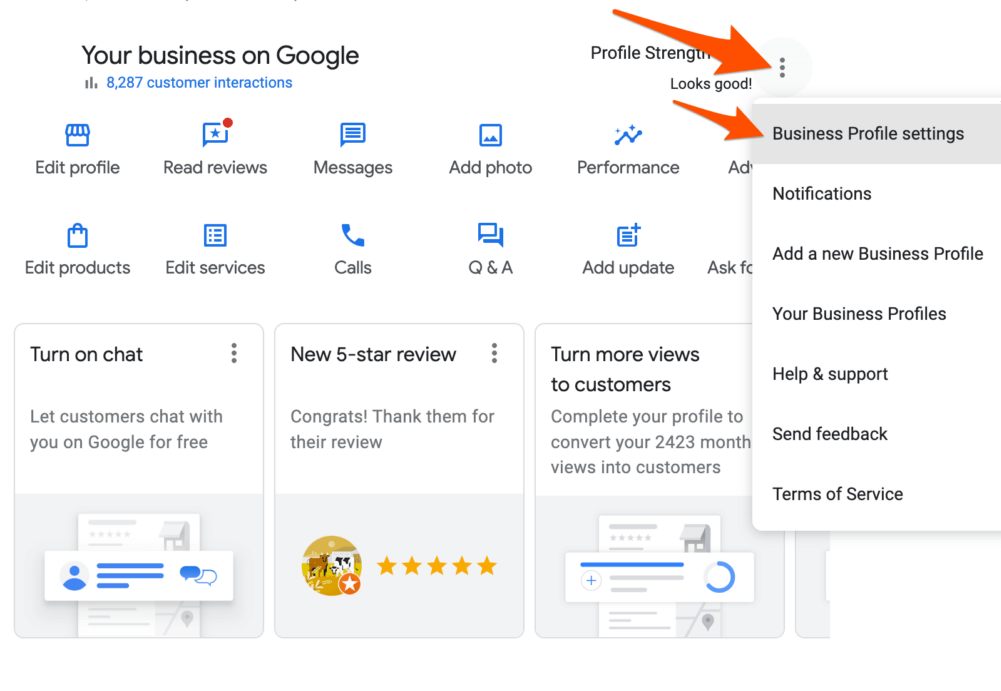
Impact on Local SEO Rankings
Deleting a Google Business Profile can significantly hinder local search engine optimization (SEO) efforts. A business’s visibility in local search results is often tied to its Google Business Profile, which provides crucial information such as location, hours of operation, and contact details. The absence of this profile may lead to a decline in search rankings, resulting in fewer customers finding your business. Research indicates that businesses with optimized profiles appear in 70% of local searches, highlighting the critical role these profiles play in attracting local clientele.
Loss of Customer Reviews and Feedback
Customer reviews are a vital component of online reputation management. Deleting your Google Business Profile results in the permanent loss of all customer reviews and feedback associated with it. This not only erases positive testimonials that can influence potential customers but also removes valuable insights that can help improve services or products. A survey by BrightLocal found that 79% of consumers trust online reviews as much as personal recommendations, underscoring the impact of losing this social proof.
Effects on Google Maps Visibility
Google Maps integration is a key feature of Google Business Profiles, enhancing your business’s discoverability. Deleting the profile removes your business from Google Maps, which can lead to decreased foot traffic and diminished brand awareness. Furthermore, without a presence on Google Maps, potential customers may turn to competitors who maintain active profiles, thereby reducing your market share.
Alternatives to Deletion for Managing Your Profile
Before opting to delete your Google Business Profile, consider alternative management strategies. Options include:
- Updating Information: Regularly update business details to reflect changes in hours, services, or offerings.
- Responding to Reviews: Engage with customers by responding to reviews, showing that you value their feedback.
- Temporarily Hiding the Profile: If necessary, you can mark your profile as permanently closed instead of deleting it, allowing for potential reactivation in the future.
Nuance / Expert Layer
Many businesses mistakenly believe that deleting their Google Business Profile will resolve negative feedback or a poor online reputation. However, this action often exacerbates the issue by removing the opportunity to address concerns publicly. Instead, businesses should focus on actively managing their profiles, responding to negative reviews, and soliciting new positive feedback. This proactive approach not only mitigates potential damage but can also enhance customer trust and loyalty over time.
Practical Application
Before deciding to delete your Google Business Profile, evaluate the potential impacts on SEO, customer reviews, and visibility. If you choose to proceed with deletion, ensure that you have a comprehensive strategy in place for managing your online reputation and consider alternative measures to protect your business’s digital footprint. Regularly engaging with customers and maintaining an updated presence can yield substantial benefits in the long run.
Step-by-Step Guide to Deleting Your Google Business Profile
This section provides a detailed walkthrough on how to delete a Google Business Profile. Each step is essential for ensuring the profile is removed correctly, preventing future complications.

Access Your Google Business Account
Begin by logging into your Google account associated with your business. Visit the Google Business Profile Manager at business.google.com. Ensure you are using the correct account, as profiles are linked to specific Google accounts.
Locate Your Business Profile
Once logged in, you will see a dashboard displaying your business locations. If you manage multiple locations, select the one you wish to delete. Click on the business name to access its profile settings.
Initiate the Deletion Process
- Scroll down the left sidebar and click on the “Info” section.
- In the Info section, look for the option labeled “Remove listing.”
- Click on “Remove listing” to proceed to the next step.
Confirm Deletion
A confirmation dialog will appear, outlining the implications of deleting your profile. Carefully read this information, as deletion may affect your business’s visibility on Google. To confirm the deletion, click on the “Delete” button. You will receive a notification confirming that your business profile has been removed.
Troubleshooting Common Issues
If you encounter issues during the deletion process, consider the following steps:
- Ensure you have the correct permissions to delete the profile.
- Check if any outstanding verifications or alerts are preventing deletion.
- Clear your browser cache or try a different browser if the page appears unresponsive.
Expert Considerations
Many users mistakenly believe that deleting a Google Business Profile is irreversible. In reality, while the profile will no longer be visible to the public, the data may still be retained by Google for a period. Additionally, if the profile is linked to a Google Ads account, deleting it could impact ongoing advertising campaigns. Always ensure to back up any essential data or reviews before proceeding with deletion.
Practical Steps After Deletion
After successfully deleting your profile, consider the following actions:
- Inform your customers about the change through social media or email.
- Monitor your online presence to ensure no cached versions of your profile are still visible.
- If you plan to reopen or change your business, create a new profile to reflect the updates.
Common Mistakes to Avoid When Deleting a Google Business Profile
Deleting a Google Business Profile can be a straightforward process, but several common mistakes can complicate matters. This section outlines frequent pitfalls to help ensure a smooth deletion.
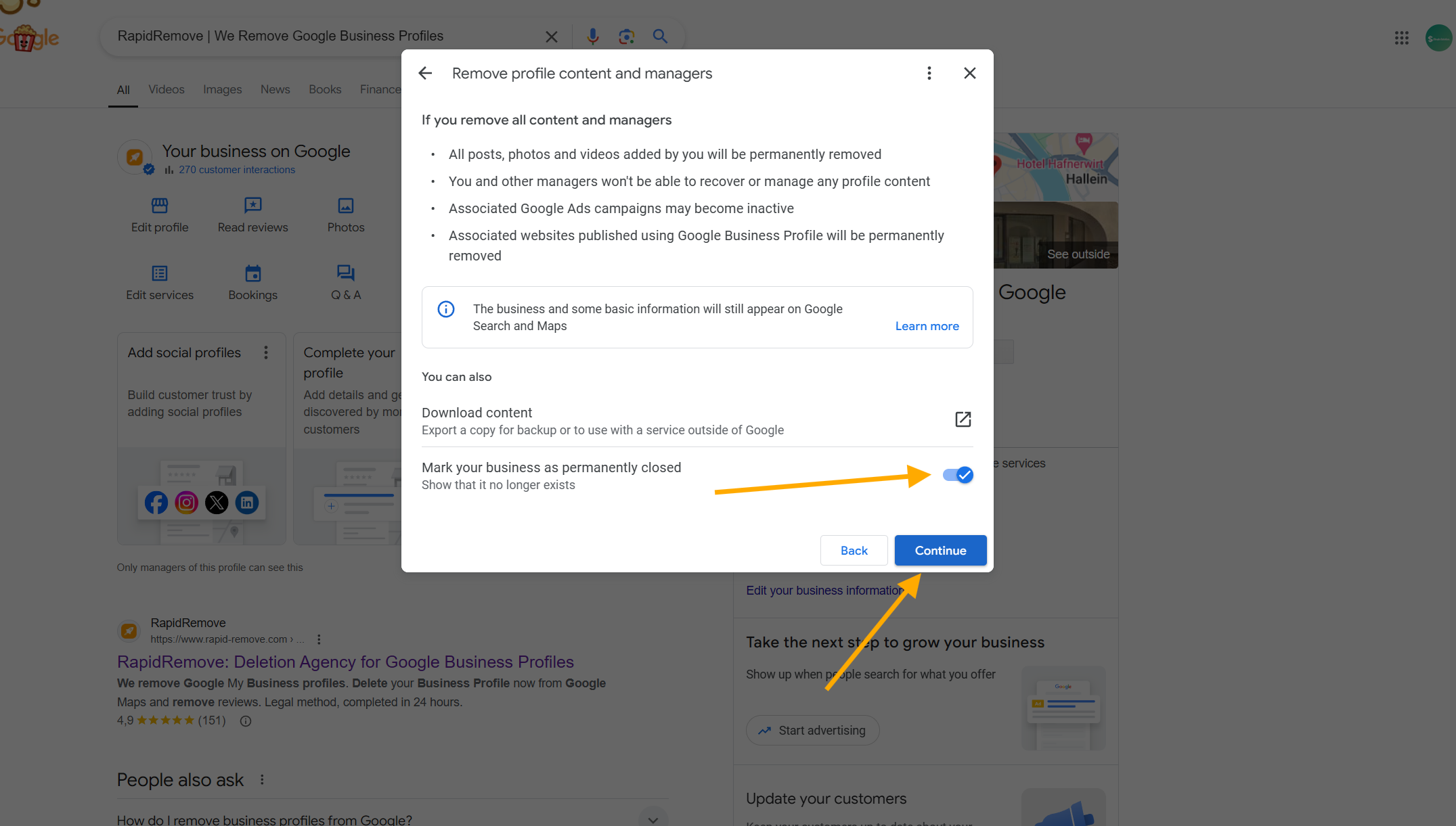
Not Backing Up Important Information
Before initiating the deletion process, users often overlook the importance of backing up vital data. This includes customer reviews, photos, and business insights that can provide valuable feedback and analytics. Without a backup, losing this information is permanent, which can hinder future business decisions or customer engagement efforts.
Confusing Deletion with Suspension
Many users mistakenly believe that deleting a Google Business Profile and suspending it are the same. In reality, deletion is irreversible and removes the profile entirely, while suspension temporarily hides the listing without deleting it. Understanding this distinction is crucial for businesses that may wish to reactivate their profile later.
Ignoring Recovery Options
After deletion, recovery options are limited. Users frequently overlook Google’s recovery process, which allows for reinstating a profile within a certain timeframe. Familiarizing oneself with these options before proceeding with deletion can save time and effort if the decision needs to be reversed.
Failing to Inform Customers About the Change
When a business deletes its Google Business Profile, failing to inform customers can lead to confusion and dissatisfaction. Establishing clear communication through email, social media, or website updates is essential. This ensures customers are aware of the change and can adjust their expectations accordingly.
Practical Application
- Backup all critical data, including customer reviews and business insights, before deletion.
- Understand the difference between deleting and suspending your profile to avoid irreversible decisions.
- Review Google’s recovery options to know your possibilities if you change your mind.
- Communicate the deletion to customers to maintain transparency and trust.
By being aware of these common pitfalls, businesses can navigate the deletion process more effectively and minimize negative impacts. Ensure that all necessary steps are taken before proceeding with how to delete a Google Business Profile.
Real-World Scenarios: When to Delete vs. Keep Your Google Business Profile
This section analyzes various business scenarios that can influence the decision to delete or maintain a Google Business Profile. Understanding these circumstances is essential for optimizing your online presence and ensuring accurate information is available to potential customers.
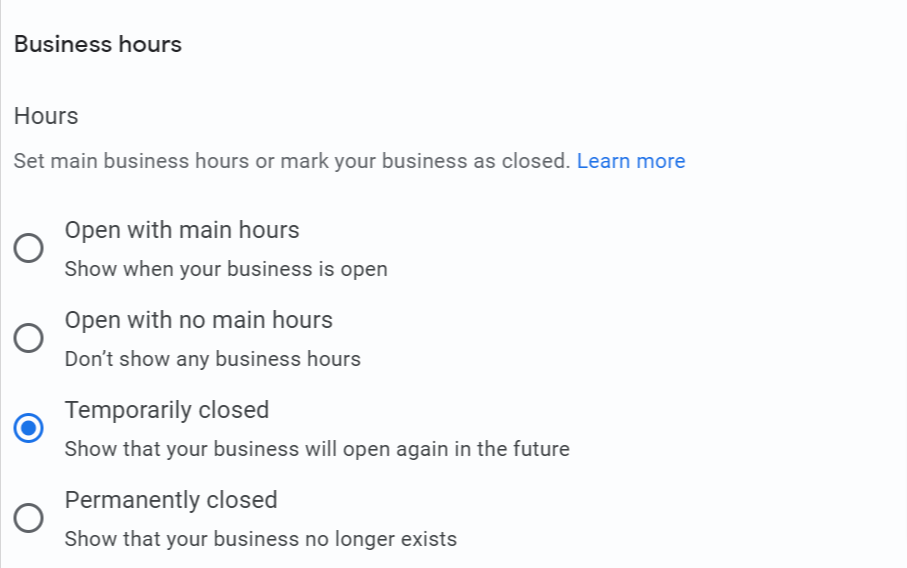
Closing a Business vs. Relocating
Deciding whether to delete a Google Business Profile often hinges on the future of the business. If a business is permanently closing, deleting the profile is appropriate. This action prevents customer confusion and ensures that outdated information is not displayed. Conversely, if a business is relocating, the profile should be updated with the new address rather than deleted. Maintaining the profile during a transition helps retain existing customers and attract new ones in the new location.
Temporary vs. Permanent Profile Management
Businesses that face temporary closures, such as seasonal businesses or those closing for renovations, may choose to keep their profiles active. Instead of deleting the profile, it is advisable to mark the business as temporarily closed. This informs customers of the status while preserving the profile’s history and reviews. In contrast, a permanent closure mandates profile deletion to avoid misleading potential clients.
Industry-Specific Considerations
Different industries may have unique considerations regarding profile management. For example, service-based businesses like plumbing or landscaping often rely heavily on local SEO. Keeping the profile active, even during a temporary hiatus, helps maintain visibility in local search results. On the other hand, e-commerce businesses may find less impact from a temporary closure, as their customer engagement primarily occurs online. In such cases, updating the profile with accurate information is more critical than maintaining active status.
Impact of Competition and Market Changes
Changes in the competitive landscape can also influence the decision to delete a profile. If a business is facing increased competition or market saturation, it may be beneficial to keep the profile active to maintain visibility. Frequent updates, responses to reviews, and engagement with the audience can help differentiate the business from competitors. However, if a business is unable to compete effectively, deleting the profile may be a strategic move to redirect resources to other ventures.
In some cases, businesses mistakenly believe that deleting their profile will eliminate negative reviews. This is a misconception; reviews are tied to the business and will not disappear unless the profile is deleted for a valid reason, such as a closure. Businesses should focus on responding to reviews and improving customer service instead of opting for deletion.
To effectively manage your Google Business Profile based on the scenarios outlined, consider the following actionable steps:
- Assess your business status—are you closing, relocating, or temporarily shutting down?
- Evaluate the impact of your industry on local search visibility.
- Monitor the competitive landscape and determine how your profile can support your business goals.
- If closing permanently, proceed with deletion; if relocating or temporarily closing, update the profile accordingly.
For How To Delete A Google Business Profile businesses looking to generate local leads through Google Ads or Local SEO, GMB Ranger LLC offers hands-on campaign management. Specialist Md Tangeer Mehedi personally handles campaign setup and ongoing optimization — with no payment required until the first lead comes in.
Frequently Asked Questions
What happens when you delete a Google Business Profile?
Deleting a Google Business Profile removes your business listing from Google Search and Maps. All associated information, such as reviews and photos, will also be permanently deleted.
How long does it take to delete a Google Business Profile?
The deletion of a Google Business Profile is typically processed immediately, but it may take a few days for the changes to reflect across all Google services. Users will still be able to see the profile until the deletion is fully completed.
Can you recover a deleted Google Business Profile?
Once a Google Business Profile is deleted, recovery is not possible. It is advisable to consider other options, such as temporarily disabling the profile, if you may need it in the future.
Is it better to hide or delete a Google Business Profile?
Hiding a Google Business Profile is often preferable if there’s a chance of reopening or if the business is temporarily closed. Deleting the profile is permanent and should be considered only if the business is no longer operational.
What are the steps to delete a Google Business Profile?
To delete a Google Business Profile, sign in to your Google Business account, select the location you wish to delete, and navigate to the “Settings” menu. From there, choose “Remove listing” and follow the prompts to confirm the deletion.
Are there any costs associated with deleting a Google Business Profile?
There are no costs associated with deleting a Google Business Profile. The process is free and can be completed through your Google Business account.
What information do you need to delete a Google Business Profile?
To delete a Google Business Profile, you need to have administrative access to the account. Ensure you are logged into the correct Google account associated with the business profile you wish to delete.
Final Thoughts on how to delete a google business profile
Deleting a Google Business Profile is a significant decision that impacts your online presence and reputation. Understanding the implications and following the correct procedures is essential to ensure that your business information is accurately managed and that you do not inadvertently lose valuable customer connections.
To proceed effectively, assess whether deletion is necessary or if hiding the profile may be a more strategic choice for your business’s needs. If deletion is the path you choose, ensure you have backed up any important information associated with the profile.
Maintaining control over your digital footprint is crucial in today’s competitive landscape, and managing your Google Business Profile is a vital aspect of that control.
Leave a Reply