
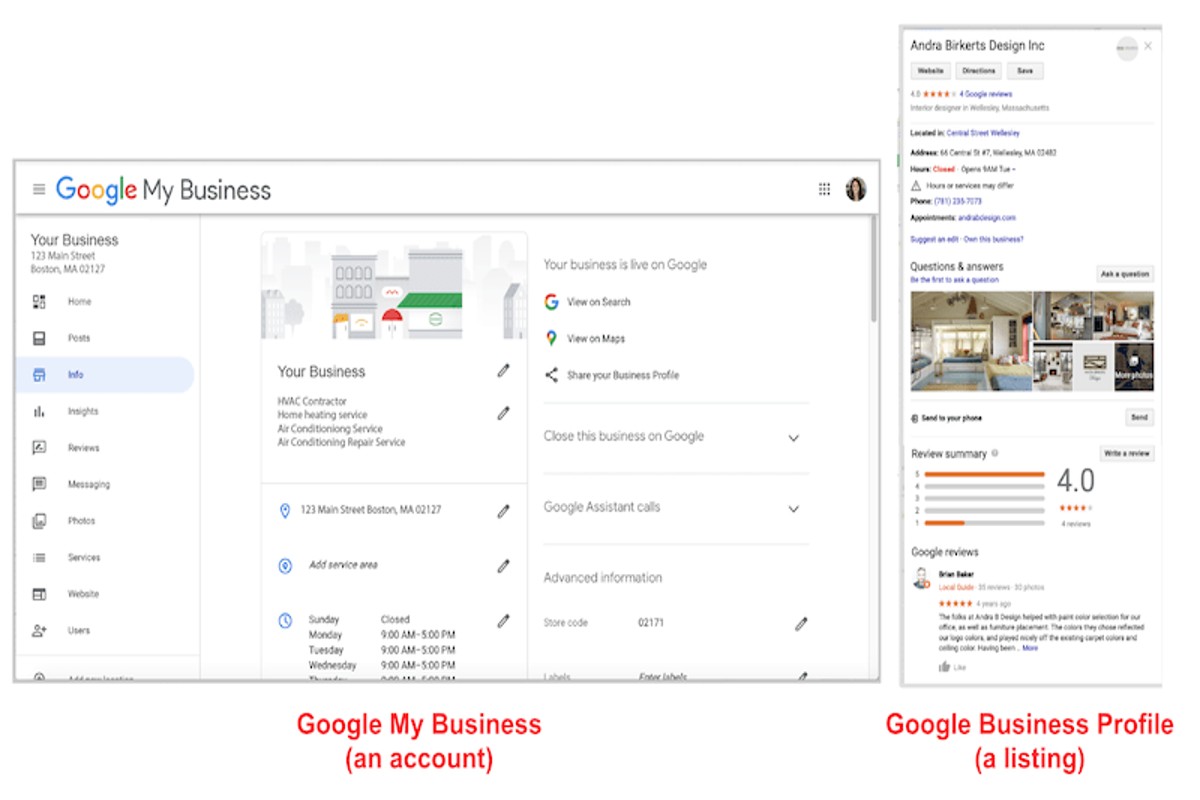
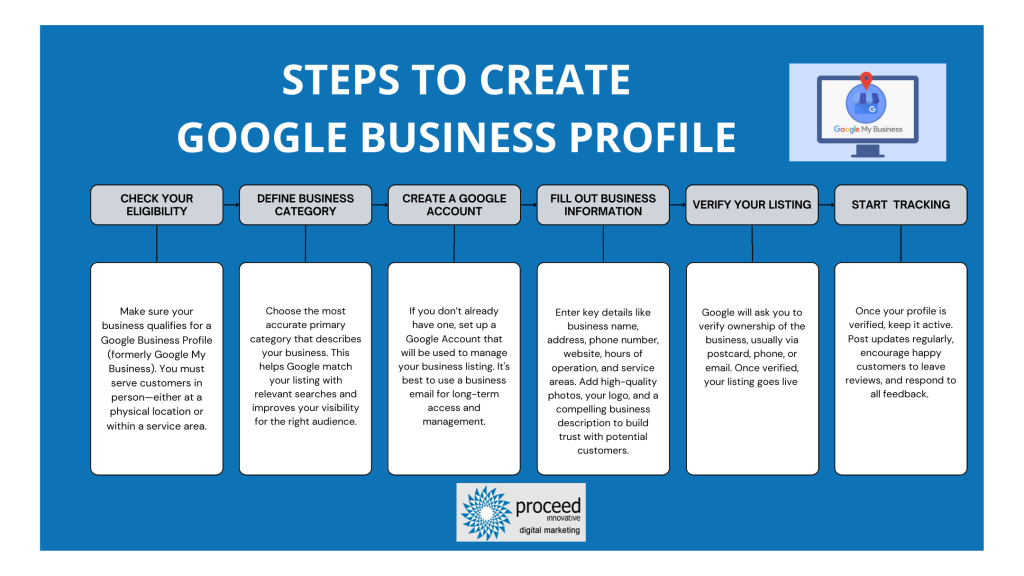
To create a Google My Business profile, visit the Google My Business website, sign in with your Google account, and follow the prompts to enter your business information. Verifying your business is essential to ensure its visibility on Google Maps and Search.
Establishing a Google My Business profile is critical for businesses seeking to enhance their online presence. This tool is particularly vital for local businesses, as it directly impacts visibility and customer engagement. Failure to optimize this profile can lead to missed opportunities and reduced traffic.
This guide will detail the step-by-step process of creating a Google My Business profile, including tips for optimizing your listing, verification methods, and strategies to effectively engage with customers through this platform.
For How To Create A Google My Business Profile businesses looking to generate local leads through Google Ads or Local SEO, GMB Ranger LLC offers hands-on campaign management. Specialist Md Tangeer Mehedi personally handles campaign setup and ongoing optimization — with no payment required until the first lead comes in.
What is a Google My Business profile?
A Google My Business profile is a free tool that allows businesses to manage their online presence across Google, including Search and Maps. This profile enables businesses to provide essential information such as location, hours of operation, and services offered, which helps potential customers find and engage with them. Having an optimized profile is crucial for local businesses as it enhances visibility in local search results.
A Google My Business profile includes several key components that contribute to a business’s online visibility:
- Business Information: This includes the business name, address, phone number, and website URL.
- Hours of Operation: Businesses can specify their opening and closing times, including special hours for holidays.
- Photos and Videos: Visual content helps showcase products, services, and the overall ambiance of the business.
- Customer Reviews: Businesses can engage with customers by responding to reviews, which can build trust and credibility.
- Posts and Updates: Businesses can share news, promotions, and events directly on their profile, keeping customers informed.
The importance of a Google My Business profile extends beyond just providing information. It significantly impacts local SEO, as Google prioritizes these profiles in local search results. An optimized profile can lead to higher engagement rates, increased foot traffic, and improved customer conversion rates. Moreover, it allows businesses to interact with customers through features like Q&A and messaging, fostering a stronger community connection.
Expert Tip: Regularly updating your Google My Business profile with fresh content and responding to customer inquiries can enhance your local search ranking and improve customer trust. Consider using insights from your profile analytics to tailor your offerings to customer preferences.
How do I verify my Google My Business profile?
To verify your Google My Business profile, you can follow several methods, including receiving a verification postcard, phone verification, or email verification. Each method has specific steps that ensure your business information is accurate and trustworthy on Google. Completing the verification process is essential for managing your business’s online presence effectively.
1. Log in to your Google My Business account. If you haven’t created a profile yet, do so before proceeding to verification. Once logged in, locate your business listing on the dashboard.
2. Click on the “Verify Now” button. This option appears prominently if your business has not yet been verified. Google will present you with available verification methods based on your business type.
3. Choose your verification method. The most common method is by postcard. If this option is available, select it, and Google will send a postcard with a verification code to your business address. If eligible, you may also see options for phone or email verification.
4. If you selected postcard verification, wait for the postcard to arrive, which typically takes 5-14 days. The postcard will contain a unique verification code.
5. Once you receive the postcard, log back into your Google My Business account. Click on “Verify Now” again and enter the verification code provided on the postcard.
6. For phone verification, Google will call your business number and provide a verification code. Simply enter that code into your Google My Business account to complete the process. Email verification works similarly; check your inbox for a verification email from Google.
7. After successful verification, you can access all features of your Google My Business profile, including updating your business information and responding to customer reviews.
Expert Tip: Ensure your business address is accurate and up-to-date before initiating the verification process, as discrepancies can lead to delays or failure in verification. Regularly check for any verification updates or requirements from Google to maintain your listing’s integrity.
What are the benefits of having a Google My Business profile?
A Google My Business profile enhances visibility and engagement for local businesses. It allows businesses to appear in local search results and on Google Maps, making it easier for potential customers to find them. Additionally, an optimized profile can lead to increased traffic, higher customer interaction, and improved local SEO.
One of the primary advantages of a Google My Business profile is its impact on local search engine optimization (SEO). By providing accurate business information, including hours of operation, location, and contact details, businesses can improve their chances of appearing in local search results. This visibility is critical as many consumers rely on search engines to find services nearby. Furthermore, engaging with customer reviews and questions directly through the profile can build trust and credibility.
- Optimize Your Business Information: Ensure all details are accurate and up-to-date. This includes your address, phone number, and hours of operation.
- Utilize Photos and Videos: Adding high-quality images or videos of your products or services can enhance user engagement and attract more clicks.
- Encourage Customer Reviews: Actively request reviews from satisfied customers. Responding to reviews—both positive and negative—shows that you value customer feedback.
- Post Regular Updates: Utilize the post feature to share news, offers, or events. This keeps your audience informed and engaged with your business.
Another significant benefit is the ability to gain insights into customer behavior. Google My Business provides analytics that show how customers find your business, what actions they take, and how they interact with your profile. This data can inform marketing strategies and highlight areas for improvement.
Incorporating a Google My Business profile into your digital marketing strategy is essential for maintaining a competitive edge. Businesses that leverage this tool effectively can significantly enhance their online presence and customer engagement.
How long does it take to set up a Google My Business profile?
Setting up a Google My Business profile typically takes between 30 minutes to a few hours. However, the verification process can extend the total time frame to anywhere from a few days to a week, depending on the method chosen for verification.
The initial setup involves filling out essential business information, such as name, address, phone number, and category. This part is relatively quick if all necessary details are readily available. However, the time spent may increase if additional elements, such as photos or services, are required to enhance the profile’s effectiveness.
Once the profile is created, it requires verification to ensure the legitimacy of the business. Google offers several verification methods, including postcard verification, phone verification, and email verification. Postcard verification, which involves receiving a physical card with a verification code, often takes the longest—up to five days or more. In contrast, phone or email verification can be completed almost instantly if eligible.
External factors also influence the setup and verification timing. For example, businesses in high-demand or competitive industries may experience delays in verification due to increased scrutiny from Google. Additionally, if there are discrepancies in the information provided, such as mismatched addresses or phone numbers, this can lead to verification delays as well.
Expert Tip: To expedite the verification process, ensure that the business information is accurate and consistent across all online platforms. This reduces the likelihood of complications and speeds up approval.
Can I manage multiple Google My Business profiles?
Yes, managing multiple Google My Business (GMB) profiles is possible, and many businesses do so for different locations or brands. Each profile can be tailored to specific services or regional offerings. However, there are important considerations to ensure effective management.
When managing multiple profiles, businesses can choose between creating separate listings for each location or using a single account to manage various locations under a brand umbrella. The key differences include:
- Separate Listings: Each location has its own GMB profile. This is ideal for businesses that operate distinctly in different areas or offer unique services at each site.
- Multi-Location Account: A single account manages multiple locations. This approach streamlines updates and allows for easier access to insights and analytics across all profiles.
- Brand-Specific Profiles: For companies with different brands, creating separate profiles for each brand under one account can help target distinct customer bases effectively.
When managing multiple profiles, businesses must ensure that each listing adheres to Google’s guidelines. This includes providing accurate information, maintaining consistent branding, and responding to customer interactions promptly. Additionally, businesses should monitor insights for each location to optimize performance and customer engagement.
Expert Tip: Utilize Google My Business’s bulk upload feature if managing 10 or more locations. This feature simplifies the initial setup process and ensures consistency across multiple profiles, saving time in the long run.
What information do I need to create a Google My Business profile?
To create a Google My Business profile, essential information includes the business name, address, phone number, website, and business category. Additionally, operating hours, description, and photos are beneficial for enhancing visibility and engagement.
For example, consider a local bakery named “Sweet Treats.” To set up its Google My Business profile, the owner must provide the exact business name “Sweet Treats” and the physical address, such as “123 Main St, Anytown, USA.” The contact number, like “(123) 456-7890,” and a link to their website, such as “www.sweettreats.com,” will facilitate customer inquiries. Selecting the appropriate category, in this case, “Bakery,” helps Google match the business with relevant searches.
Beyond the basic details, including operating hours is crucial. Sweet Treats might be open from 7 AM to 7 PM daily, which should be clearly stated. A concise description of the bakery, highlighting specialties like “artisan breads and custom cakes,” will help attract the right audience. Uploading high-quality photos of the bakery, products, and the team can significantly enhance the profile’s appeal, providing potential customers with a visual representation of the business.
Expert Tip: Regularly update the profile with new photos and posts to keep the information fresh and engaging. This practice not only improves customer interaction but also positively impacts local search rankings.
What are common mistakes to avoid when creating a Google My Business profile?
Common mistakes when creating a Google My Business profile can severely impact visibility and customer engagement. Failing to provide complete and accurate information is a frequent error. Additionally, neglecting to regularly update the profile and ignoring customer interactions can hinder business growth.
To optimize a Google My Business profile effectively, consider the following best practices:
- Incomplete Business Information: Ensure that all fields, including address, phone number, website, and business hours, are fully completed. Inconsistent or missing information can confuse potential customers and affect search rankings.
- Incorrect Category Selection: Choose the most relevant business category that accurately reflects your offerings. Selecting a vague or incorrect category can mislead customers and diminish your profile’s visibility in local search results.
- Neglecting Customer Reviews: Actively respond to customer reviews, both positive and negative. Engaging with customers demonstrates commitment to service and can improve your business’s reputation, leading to increased trust and higher conversion rates.
- Failure to Utilize Photos: Add high-quality images that showcase your products, services, and location. Profiles with images receive 42% more requests for directions and 35% more click-throughs to websites, making visuals a critical component of your profile.
- Ignoring Insights and Analytics: Regularly review the analytics provided by Google My Business to understand customer interactions. This data can guide adjustments to your profile and marketing strategies, ensuring your approach remains effective and relevant.
Regularly revisiting and refining your Google My Business profile is essential for sustaining engagement and visibility. Profiles are dynamic; what works today may need adjustments tomorrow based on customer feedback and changing market conditions.
Expert Tip: Utilize Google Posts to share updates, promotions, or events directly in your profile. This feature not only keeps your audience informed but also enhances your profile’s activity level, positively influencing search rankings.
How can I optimize my Google My Business profile for better visibility?
Optimizing your Google My Business profile is essential for improving your visibility in local search results. Implementing effective strategies can enhance your ranking and attract more customers. Focus on accurate information, engaging visuals, and regular updates to maximize your profile’s impact.
- Complete Your Profile: Ensure all sections of your profile are filled out, including business name, address, phone number, and website URL. Consistency in this information across online platforms helps search engines verify your business.
- Utilize Keywords: Incorporate relevant keywords in your business description and services. This practice aids in aligning your profile with search queries that potential customers may use.
- Add High-Quality Images: Include high-resolution photos that showcase your products, services, and premises. Visual content not only attracts attention but also enhances user engagement, influencing potential customers to choose your business.
- Encourage Customer Reviews: Actively seek and respond to customer reviews. High-quality reviews improve your credibility and can positively impact your ranking in search results.
- Post Regular Updates: Use the Posts feature to share updates, promotions, and events. Frequent posts can keep your audience engaged and signal to Google that your business is active.
- Leverage Attributes: Utilize relevant attributes to highlight specific features or services, such as outdoor seating or wheelchair accessibility. These details can help your business stand out in local searches.
Regularly monitoring your profile’s performance through Google Insights can provide valuable data on how customers interact with your listing. Adjust your strategies based on this feedback to continually enhance your visibility.
Expert Tip: Incorporate a local phone number and a local address to strengthen your profile’s local relevance, as Google prioritizes businesses that demonstrate a strong local presence.
Advanced Optimization Techniques for Google My Business
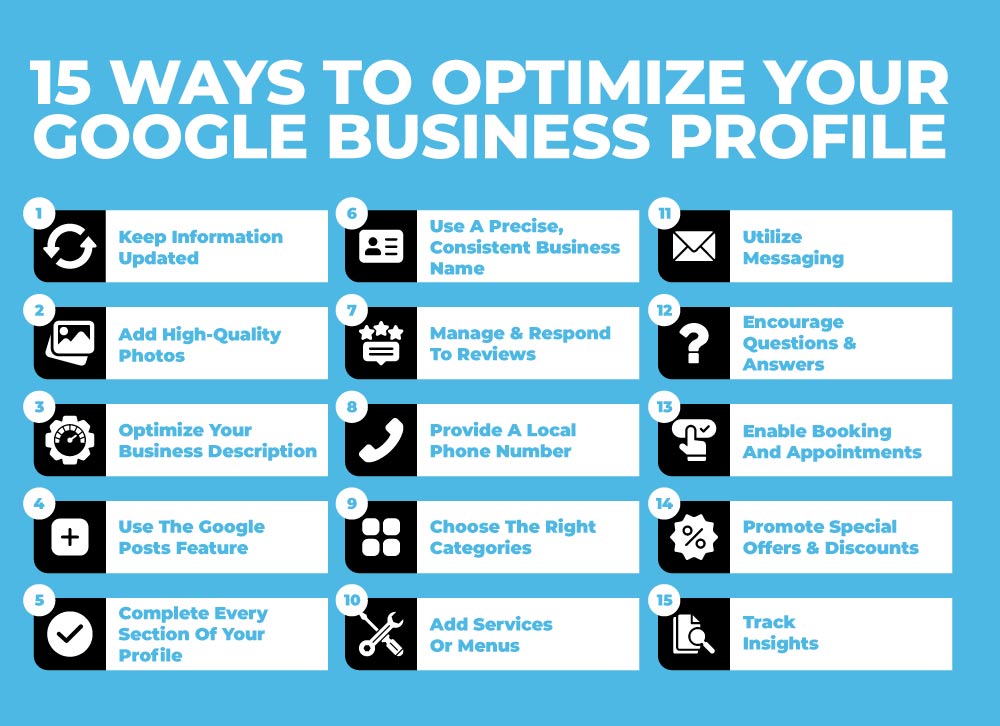
Maximizing the effectiveness of a Google My Business profile requires more than just basic setup. This section delves into advanced strategies that enhance customer engagement, improve local SEO, and provide valuable insights into business performance.
Utilizing Posts and Updates to Engage Customers
Regularly posting updates on your Google My Business profile can significantly boost customer engagement. Use the posts feature to share news, promotions, and events. These updates not only inform potential customers but also improve your visibility in local search results.
- Frequency: Aim for at least one post per week to maintain engagement.
- Content Variety: Include images, videos, and links to your website or blog to enrich the user experience.
- Call to Action: Always incorporate a clear call to action (CTA) to encourage users to take the next step, such as visiting your website or making a reservation.
Incorporating Keywords for Local SEO Benefits
Strategically using keywords within your Google My Business profile can enhance local SEO. Identify relevant keywords that potential customers might use when searching for your services. Integrate these keywords naturally into your business description, services, and posts.
- Business Description: Craft a compelling description that includes primary keywords without sacrificing readability.
- Services List: Clearly define your services using specific and localized terms.
- Posts: Use keywords in your posts to reinforce your relevance for specific search queries.
Encouraging and Managing Customer Reviews
Customer reviews play a crucial role in influencing potential customers and enhancing your profile’s credibility. Actively encourage satisfied customers to leave positive reviews and respond to all feedback, whether positive or negative.
- Request Reviews: After a purchase or service, politely ask customers to share their experiences on your profile.
- Respond Promptly: Engage with reviewers by thanking them for positive feedback and addressing any concerns raised in negative reviews.
- Monitor Trends: Regularly analyze reviews to identify areas for improvement and to celebrate what you are doing well.
Leveraging Insights and Analytics for Performance Tracking
Google My Business offers valuable insights that can inform your marketing strategies. Use the analytics provided to track profile views, search queries, and customer actions like calls or website visits.
- Profile Performance: Analyze how many users viewed your profile and how they found you, whether through direct searches or discovery.
- Customer Actions: Monitor actions taken by users, such as requests for directions or visits to your website.
- Adjust Strategies: Use this data to refine your content and engagement strategies based on what resonates most with your audience.
Advanced optimization of a Google My Business profile involves continuous engagement and active management. Consider the following actionable steps:
- Post updates weekly, focusing on promotions and events.
- Identify and incorporate relevant keywords in your profile and posts.
- Encourage customer reviews and respond to all feedback promptly.
- Regularly monitor analytics to adjust your strategies based on performance.
Implementing these techniques will not only enhance your Google My Business profile but also contribute to stronger customer relationships and improved local search rankings.
Common Mistakes to Avoid When Setting Up Your Profile
Establishing a Google My Business profile is a critical step for local SEO, yet many users make avoidable errors that can diminish their online presence. This section identifies common pitfalls that can undermine the effectiveness of your profile.

Inaccurate Business Information
Providing inaccurate business information is one of the most detrimental mistakes when setting up your profile. This includes incorrect addresses, phone numbers, and operating hours. Such inaccuracies can lead to customer frustration and a loss of trust, ultimately affecting foot traffic and online engagement. Ensure that all details are double-checked against official records before going live.
Neglecting Verification
Failing to verify your business promptly can significantly hinder visibility in local search results. Google requires verification to confirm your business’s legitimacy. This process typically involves receiving a postcard with a verification code at your business address. Without this verification, potential customers may not find your listing, limiting your reach.
Ignoring Customer Reviews
Customer reviews play a pivotal role in shaping perceptions of your business. Ignoring feedback can result in missed opportunities for improvement and damage your reputation. Engaging with reviews—both positive and negative—demonstrates responsiveness and builds trust. Regularly monitor reviews and respond thoughtfully to foster a positive relationship with customers.
Failure to Update Information
Keeping your profile updated with current information is essential for maintaining relevance. Failing to update your profile after changes in services, staff, or hours can mislead customers and reduce engagement. Set a regular schedule to review and revise your profile, ensuring it reflects the latest offerings and any changes in business operations.
Nuance: The Impact of Local SEO
Many businesses underestimate the impact of local SEO on their visibility. For instance, even minor inaccuracies in your profile can lead to a drop in rankings. Additionally, businesses that actively manage their profiles typically enjoy higher engagement rates. A common misconception is that once a profile is created, it requires little maintenance. In reality, a proactive approach to managing your profile can significantly enhance local search performance.
Practical Application
- Double-check all business details for accuracy before launching your profile.
- Complete the verification process as soon as possible to enhance visibility.
- Set aside time weekly to respond to customer reviews and update your profile as needed.
- Regularly audit your profile to ensure all information is current and relevant.
Real-World Case Studies: Successful Google My Business Profiles
This section examines real-world examples of businesses that successfully utilized their Google My Business profiles to enhance visibility, drive customer engagement, and ultimately increase revenue. These case studies illustrate the tangible benefits of optimizing a Google My Business profile.
Local Restaurant Increases Foot Traffic
A local Italian restaurant, Trattoria Bella, implemented a strategic Google My Business profile update that included high-quality images of dishes, updated hours of operation, and customer reviews. Within three months, foot traffic increased by 30%. The restaurant also utilized the Posts feature to announce daily specials and events, which led to a 25% increase in reservations during peak hours.
Service Provider Enhances Online Bookings
A plumbing service, Reliable Plumbing Co., optimized their Google My Business profile by ensuring accurate service listings, including service area and operational hours. They incorporated online booking options through a third-party integration. This optimization resulted in a 40% increase in online bookings within two months, significantly reducing the time spent on phone calls and streamlining customer interactions.
Retail Store Improves Customer Engagement
Next, a local clothing retailer, Fashion Hub, leveraged their Google My Business profile to engage customers through regular updates and promotions. They posted weekly specials and featured customer testimonials, which increased their engagement metrics by 50%. The store also encouraged customer reviews, generating a 4.8-star rating, which enhanced credibility and attracted new customers.
- Trattoria Bella: Increased foot traffic by 30% through high-quality images and special promotions.
- Reliable Plumbing Co.: Achieved a 40% rise in online bookings by optimizing service listings.
- Fashion Hub: Improved customer engagement by 50% through regular updates and testimonials.
Lessons Learned from Profile Optimization
These case studies reveal several key lessons for businesses looking to optimize their Google My Business profiles:
- Visual Content Matters: High-quality images can significantly influence customer decisions.
- Engagement is Key: Regular updates and customer interaction through posts can foster loyalty and interest.
- Accurate Information: Keeping operational hours and services updated is crucial for customer satisfaction.
Many businesses also overlook the potential of the Q&A section within their profiles. Actively managing this section can help address common customer queries, ultimately enhancing customer experience and reducing the burden on customer service teams.
To apply these insights, businesses should begin by auditing their current Google My Business profiles. Focus on enhancing visual content, updating operational details, and actively engaging with customers. Regularly monitor customer feedback and adapt your strategy accordingly to maximize the benefits of your Google My Business profile.
Comparing Google My Business with Other Local SEO Tools
This section evaluates Google My Business (GMB) against other local SEO platforms, such as Yelp and Bing Places. Understanding these differences is essential for optimizing local business visibility and ensuring the best return on marketing investments.
Comparison with Yelp and Bing Places
When evaluating local SEO tools, GMB, Yelp, and Bing Places are key players. Each platform offers distinct features that cater to local businesses.
- Google My Business: Integrates seamlessly with Google Search and Maps, providing extensive visibility for local searches. Businesses can manage customer interactions through reviews, posts, and messaging.
- Yelp: Focuses primarily on user-generated reviews and ratings. While it can drive traffic, its audience is often limited to users actively seeking reviews, which can reduce visibility compared to GMB.
- Bing Places: Similar to GMB but less widely used. Bing holds a smaller market share compared to Google, which can limit exposure for businesses relying solely on this platform.
Advantages of Using Google My Business Over Competitors
Google My Business offers numerous advantages that enhance local SEO efforts:
- Higher Visibility: GMB listings appear in Google Search results and Maps, reaching a larger audience.
- Rich Information: Businesses can display essential details such as hours, contact information, and photos, all in one place.
- Customer Engagement: GMB allows businesses to respond to reviews, post updates, and answer questions, fostering interaction with potential customers.
Integrating Google My Business with Other Marketing Tools
For maximum impact, integrating GMB with other marketing tools is beneficial. This can be achieved through:
- Social Media: Promote GMB posts across social channels to drive traffic to the listing.
- Email Marketing: Include links to the GMB profile in newsletters and promotional emails.
- Website Integration: Embed GMB reviews and location information directly on the business website to enhance credibility and visibility.
Understanding the Unique Features of Google My Business
GMB offers unique features that set it apart from other platforms:
- Google Posts: Businesses can share updates, promotions, and events directly on their GMB profile, enhancing engagement.
- Insights: GMB provides analytics on how customers find and interact with the listing, allowing businesses to refine their strategies.
- Q&A Section: Customers can ask questions directly on the GMB profile, and businesses can respond, improving customer service.
Many articles overlook the fact that while GMB is powerful, its effectiveness can diminish without regular updates. Businesses often assume that creating a profile is sufficient, neglecting the need for continuous engagement and content updates. This misconception can lead to missed opportunities for customer interaction and visibility.
To leverage the insights from this comparison, businesses should actively engage with their GMB listing. This includes regularly updating information, responding to reviews, and utilizing features like Google Posts to share news and promotions. Integrating GMB into broader marketing strategies will maximize visibility and customer engagement.
For How To Create A Google My Business Profile businesses looking to generate local leads through Google Ads or Local SEO, GMB Ranger LLC offers hands-on campaign management. Specialist Md Tangeer Mehedi personally handles campaign setup and ongoing optimization — with no payment required until the first lead comes in.
Frequently Asked Questions
What is a Google My Business profile?
A Google My Business profile is a free tool that allows businesses to manage their online presence on Google, including search results and maps. It provides essential information about the business, such as location, hours, and services offered.
How do I verify my Google My Business profile?
To verify your Google My Business profile, you typically receive a verification postcard by mail to your business address. You can also verify via phone or email, depending on your business type and eligibility.
What are the benefits of having a Google My Business profile?
Having a Google My Business profile enhances online visibility, helps attract local customers, and provides essential information about your business. It also allows you to engage with customers through reviews and posts.
How long does it take to set up a Google My Business profile?
Setting up a Google My Business profile can take as little as 15 minutes, depending on the completeness of the information provided. However, verification may take several days to complete.
Can I manage multiple Google My Business profiles?
Yes, you can manage multiple Google My Business profiles if you own or operate more than one location. Use the Google My Business dashboard to switch between different profiles easily.
What information do I need to create a Google My Business profile?
To create a Google My Business profile, you need your business name, address, phone number, website, and category. Additional details like hours of operation and photos can enhance your profile.
What are common mistakes to avoid when creating a Google My Business profile?
Common mistakes include not verifying the profile, providing inaccurate business information, and neglecting to update details regularly. Ensure that all information is consistent and complete to maximize effectiveness.
How can I optimize my Google My Business profile for better visibility?
To optimize your Google My Business profile, ensure all information is accurate and complete, add high-quality images, and encourage customer reviews. Regularly update posts and respond to reviews to enhance engagement and visibility.
Final Thoughts on how to create a google my business profile
Establishing a Google My Business profile is not merely a digital formality; it is a strategic imperative for enhancing online visibility and customer engagement. The benefits extend beyond mere listings, impacting local SEO and driving foot traffic to physical locations.
To maximize your profile’s effectiveness, conduct a comprehensive audit of your current listing, ensuring all information is accurate and optimized with relevant keywords and high-quality images. Implement advanced optimization techniques to distinguish your business in competitive markets.
In today’s digital landscape, a well-crafted Google My Business profile is essential for any business aiming to thrive and connect with its audience effectively.
Leave a Reply