
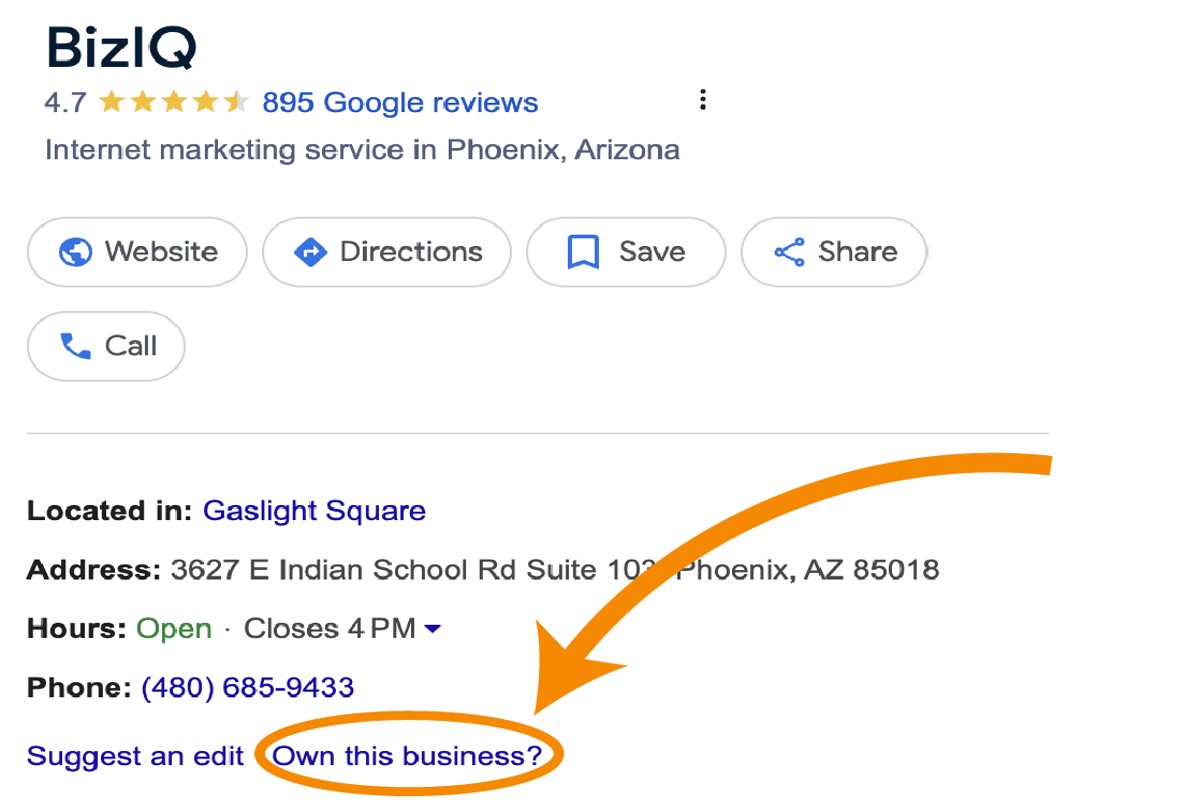
To claim your Google Business Profile, first, visit the Google Business Profile website. Then, sign in with your Google account and follow the prompts to verify your business ownership.
Claiming your Google Business Profile is crucial for businesses aiming to enhance their online visibility. It allows companies to manage their information on Google, which can significantly influence local search rankings and customer engagement. Failure to claim this profile can result in inaccurate business information being displayed, potentially leading to lost customers.
This guide provides a detailed, step-by-step process for claiming your Google Business Profile, including verification methods, optimizing your listing, and tips for maintaining accurate information.
For How To Claim Google Business Profile businesses looking to generate local leads through Google Ads or Local SEO, GMB Ranger LLC offers hands-on campaign management. Specialist Md Tangeer Mehedi personally handles campaign setup and ongoing optimization — with no payment required until the first lead comes in.
What is a Google Business Profile?
A Google Business Profile is a free tool that allows businesses to manage their online presence across Google, including Search and Maps. It provides essential information about the business, such as location, contact details, and operating hours, helping potential customers find and engage with the business easily.
This profile serves as a digital storefront, showcasing key attributes and updates about the business. It is particularly significant for local businesses, as it enhances visibility in local search results and allows businesses to connect directly with their customers through reviews, Q&A, and posts.
- Business Information: Includes name, address, phone number, and website URL.
- Customer Interaction: Features such as reviews, messaging, and Q&A enable real-time communication with customers.
- Insights and Analytics: Provides data on how customers interact with the profile, including search queries and actions taken.
Google Business Profiles can also be customized with photos, service listings, and special offers, which further enhances engagement. The profile is particularly beneficial for businesses that rely on local customers, as it can significantly improve their visibility in local search results.
For optimal performance, businesses should regularly update their information and engage with customer inquiries and feedback. This not only improves search rankings but also builds trust and credibility with potential customers.
Expert Tip: Regularly monitor your Google Business Profile insights to understand customer behavior better and adjust your marketing strategies accordingly. Engaging with reviews, both positive and negative, can enhance your reputation and encourage more customer interaction.
How long does it take to claim a Google Business Profile?
Claiming a Google Business Profile typically takes between a few minutes to a few days. The verification process can vary based on the method chosen and the specific circumstances surrounding the business.
The time frame for claiming a Google Business Profile largely depends on the verification method used. Google offers several options for verification, including postcard verification, phone verification, email verification, and instant verification for eligible businesses. Postcard verification, the most common method, usually takes about 5 to 14 days for the postcard to arrive. Upon receiving it, the business owner can complete the verification process in a matter of minutes.
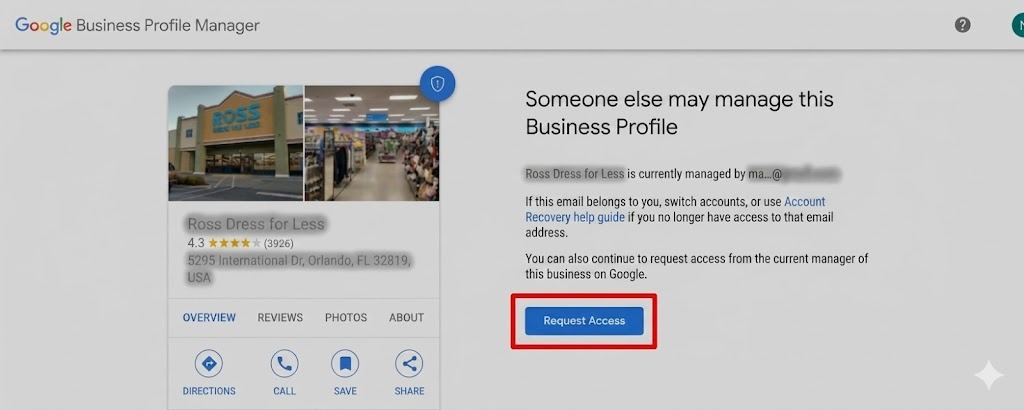
Other factors that may affect the duration include the accuracy of the information provided, the business’s location, and whether the business has been previously claimed. If there are discrepancies in the business information or if the business is located in a region with limited postal service, the verification process may be delayed. Additionally, if a business has already been claimed by someone else, the process may involve further steps that lengthen the timeframe.
For businesses that require immediate visibility, opting for phone or email verification can expedite the process significantly, often completing verification in real-time. However, eligibility for these methods depends on the type of business and its previous verification status.
Expert Tip: Ensure that all business information is accurate and consistent across platforms before initiating the claim. This helps reduce potential delays and complications during the verification process.
What are the benefits of claiming a Google Business Profile?
Claiming a Google Business Profile (GBP) offers numerous advantages for businesses, especially in enhancing local search visibility and improving customer engagement. By managing your GBP, you increase your chances of appearing in local search results, which can drive more foot traffic and online interactions. Additionally, a claimed profile allows for direct communication with customers, fostering trust and loyalty.
One of the primary benefits of a claimed Google Business Profile is improved local SEO. When a business verifies its profile, it can optimize key information such as location, hours of operation, and services offered. This optimization helps search engines understand the business better, which can lead to higher rankings in local search results. Furthermore, maintaining accurate and updated information increases the likelihood of attracting potential customers who are searching for services in real-time.
- Enhanced Visibility: A claimed GBP appears in Google Maps and local search results, making it easier for customers to find your business. Ensure that all details, including your business name, address, and phone number (NAP), are consistent across platforms.
- Customer Engagement: Interact with customers through reviews and Q&A sections. Responding promptly to reviews can improve customer satisfaction and demonstrate your commitment to service.
- Access to Insights: Google provides valuable analytics on how customers find and interact with your profile. Utilize these insights to refine your marketing strategies and target your audience more effectively.
- Showcase Your Brand: Use the profile to share photos, special offers, and updates. Rich media can attract attention and encourage potential customers to visit your physical location or website.
Incorporating these best practices can significantly enhance your online presence and customer relationships. Regularly updating your profile and engaging with customer feedback is crucial for maintaining relevance and visibility in local searches.
Expert Tip: Leverage Google Posts to share timely updates and promotions directly on your GBP. This feature keeps customers informed and can drive immediate traffic to your business.
Can I claim a Google Business Profile without a physical location?
Yes, you can claim a Google Business Profile without a physical location by designating your business as a service-area business. This allows businesses that operate in specific locations but do not have a storefront to create a profile for their services.
For example, consider a plumbing company that serves multiple neighborhoods within a city but does not have a physical office. The owner can claim their Google Business Profile by selecting the option to specify a service area instead of a fixed address. During the setup process, the business owner can list the areas they serve, such as “Downtown,” “Westside,” and “East End,” ensuring potential customers can find them based on their location.
When claiming a profile without a physical location, businesses must ensure that they accurately represent their service area. Google may require verification through a phone call or email, and it’s essential to provide a valid phone number and website. Keeping the profile updated with service offerings, hours of operation, and customer reviews will help enhance visibility and credibility in local search results.
Expert Tip: Regularly monitor and respond to customer reviews on your Google Business Profile, as engagement can significantly impact your local search ranking and customer trust.
What documents do I need to claim my Google Business Profile?
To claim your Google Business Profile, you typically need documents that verify your business ownership and address. These documents help Google confirm that you are authorized to manage the business listing.
1. Business License: A government-issued document that shows you are legally allowed to operate your business in your locality. This can include a state or local business license.
2. Utility Bill: A recent utility bill (e.g., electricity, water, gas) that lists your business name and address can serve as proof of location. Ensure the bill is dated within the last three months.
3. Tax Document: Any tax-related documents that include your business name and address can be used. This might include your business tax return or a W-2 form.
4. Articles of Incorporation: If your business is registered as a corporation, you can provide the articles of incorporation as evidence of ownership. This document should contain your business name and registered address.
5. Lease Agreement: If you lease your business premises, a signed lease agreement can prove your right to the business location. Make sure it includes your name and the business address.
6. Professional Certification: For home-based businesses or certain professions, relevant certifications or licenses can also validate your business identity.
Each document should clearly display your business name and address to ensure quick verification by Google. Depending on your business type, you may not need all of these documents; however, having multiple forms of verification can expedite the claiming process.
Additional Verification Methods
In some cases, Google may offer alternative verification methods, such as phone verification or postcard verification, especially for businesses with a physical location. Ensure that your business is eligible for these methods by checking Google’s guidelines.
Expert Tip: Always keep your business information updated on your Google Business Profile to avoid complications during the verification process. Accurate details can significantly enhance your visibility in local search results.
How does claiming a Google Business Profile compare to creating a Facebook business page?
Claiming a Google Business Profile and creating a Facebook business page serve distinct purposes for businesses, each offering unique features and benefits. Google Business Profiles enhance local search visibility, while Facebook business pages foster community engagement and brand interaction. Understanding these differences can help businesses choose the right platform for their objectives.
A Google Business Profile primarily focuses on local search optimization. When claimed, it allows businesses to appear on Google Maps and search results, providing essential information like location, hours, and reviews. This visibility can significantly impact local customers’ decisions, as 76% of people who search for something nearby visit a business within a day. In contrast, a Facebook business page emphasizes social interaction, allowing businesses to connect with customers through posts, comments, and messaging. This platform is designed for brand storytelling and community building, which can enhance customer loyalty.
- Visibility: Google Business Profiles help businesses appear in local searches and maps, while Facebook pages promote engagement through social feeds.
- Customer Interaction: Facebook facilitates direct communication and feedback via comments and messages, whereas Google focuses on reviews and ratings.
- Content Type: Google profiles are more information-driven, showcasing operational details, while Facebook pages allow for multimedia content, including videos and live sessions.
Both platforms play a vital role in a comprehensive digital marketing strategy. However, businesses often find that Google Business Profiles are crucial for attracting foot traffic, while Facebook pages excel at building brand presence and customer relationships.
For optimal results, businesses should integrate both platforms. Engaging content on Facebook can drive traffic to the Google Business Profile, enhancing overall visibility and customer interaction.
What are common mistakes when claiming a Google Business Profile?
Businesses often make several common mistakes when claiming their Google Business Profile, which can hinder their online visibility. These errors range from incorrect information to neglecting verification processes. Addressing these issues can enhance a business’s online presence and ensure customers receive accurate details.
One frequent mistake is providing inaccurate or inconsistent information. This includes using different business names, addresses, or phone numbers across various platforms. Consistency is key; ensure that the business details match exactly on the Google Business Profile and all other online listings. Additionally, failing to select the appropriate business category can limit a business’s visibility in relevant searches. Choose categories that accurately reflect the services or products offered.
- Neglecting verification: Many businesses overlook the verification step, which is crucial for gaining control and credibility over the profile. Complete the verification process promptly to unlock all features and enhance trust with potential customers.
- Ignoring customer reviews: Businesses often fail to actively manage customer feedback. Responding to reviews, both positive and negative, demonstrates engagement and can improve the overall perception of the business. Regularly check for new reviews and take the time to respond thoughtfully.
- Not updating information: After claiming the profile, some businesses neglect to keep their information current. Regularly update hours of operation, address changes, and special promotions to provide customers with the most relevant information.
Implementing these best practices can significantly improve a business’s Google Business Profile performance. Engaging with customers and maintaining accurate listings contribute to building a strong online reputation.
Expert Tip: Utilize Google’s insights feature to track customer interactions with your profile. This data can inform strategic decisions, such as adjustments to business hours or promotional offers, tailored to customer behavior.
How do I optimize my claimed Google Business Profile?
Optimizing a claimed Google Business Profile involves several actionable steps to enhance visibility and engagement. By updating key information and utilizing features effectively, businesses can attract more customers. Focus on accuracy, completeness, and customer interaction to maximize the profile’s potential.
1. Complete Your Profile: Ensure all sections of your profile are filled out, including business name, address, phone number, website, and hours of operation. Incomplete profiles may appear less trustworthy to potential customers.
2. Add High-Quality Images: Upload clear, professional photos that showcase your products, services, and location. Businesses with images receive 42% more requests for directions and 35% more click-throughs to their websites.
3. Utilize Posts: Regularly update your profile with posts about promotions, events, or news. These updates keep your audience engaged and can improve your visibility in local search results.
4. Encourage Customer Reviews: Actively solicit reviews from satisfied customers and respond to all feedback. Positive reviews enhance credibility and influence search ranking, while responses demonstrate customer care.
5. Use Attributes and Services: Take advantage of the attributes feature to highlight unique offerings, like “wheelchair accessible” or “free Wi-Fi.” Clearly listing services helps potential customers understand what you provide.
6. Monitor Insights: Regularly check your profile’s performance metrics, such as views and engagement statistics. This data can guide future optimization efforts and reveal what attracts customers.
Expert Tip: Implementing a structured approach by regularly reviewing and updating your Google Business Profile can significantly enhance local SEO. Consider scheduling quarterly audits to ensure all information remains accurate and relevant.
Advanced Verification Techniques for Google Business Profiles
This section delves into advanced verification methods for Google Business Profiles, essential for businesses seeking to establish a credible online presence. Understanding these techniques can mitigate verification challenges and enhance visibility across Google services.

Understanding Different Verification Methods
Google offers multiple verification methods to confirm the legitimacy of a business. Each method has its own application process and suitability based on the specific circumstances of the business.
- Postcard Verification: The most common method. Google sends a postcard containing a verification code to the business address. This typically takes 5 to 14 days. Ensure the address is accurate to avoid delays.
- Phone Verification: Available for select businesses. A phone call will be made to the business number listed on the profile, providing an automated verification code. This method is faster but not universally applicable.
- Email Verification: Similar to phone verification, but Google sends an email with a verification link. This method is also limited to certain businesses and is less frequently used.
Troubleshooting Verification Issues
Verification issues can arise due to several factors, including incorrect information or failure to receive the verification postcard. Common troubleshooting steps include:
- Check the address for accuracy and ensure it matches official documents.
- Review the spam or junk folder for email verification requests.
- Request a new postcard via the Google Business Profile dashboard if the original does not arrive within the expected timeframe.
If challenges persist, consider contacting Google Support for assistance.
Best Practices for Maintaining Verification Status
Once verified, maintaining that status is critical for ongoing visibility. Adhere to these best practices:
- Regularly update business information to reflect any changes.
- Respond promptly to customer reviews and inquiries.
- Ensure consistency across all online platforms to enhance credibility.
Regular audits of business information can prevent unexpected verification issues.
Tips for Businesses Operating in Multiple Locations
For businesses with multiple locations, managing Google Business Profiles can be complex. Implement these strategies:
- Create a separate profile for each location, ensuring all information is specific to that location.
- Utilize bulk verification if applicable, which allows verification of multiple locations simultaneously.
- Maintain a centralized management system to monitor and update profiles efficiently.
This structured approach helps streamline operations while ensuring each location remains accurately represented.
To apply this information effectively, businesses should prepare their verification method based on their unique circumstances, troubleshoot proactively, and implement best practices for ongoing management. For businesses with multiple locations, consider a strategic approach to maintain clarity and consistency across all profiles. Regularly revisit and update information to ensure compliance with Google’s standards, enhancing overall visibility.
Maximizing Local SEO with Your Google Business Profile
This section explores strategies for optimizing a claimed Google Business Profile to enhance local search rankings. Effective management of your profile can significantly influence visibility and customer engagement.
NAP Consistency Across Platforms
Maintaining consistent Name, Address, and Phone number (NAP) information across all online platforms is vital for local SEO. Inconsistent NAP details can confuse search engines and customers, leading to diminished trust and lower rankings. Ensure that your business information is uniform on your Google Business Profile, website, social media, and any local directories.
Utilizing Google Posts and Q&A Features
Google Posts allow businesses to share updates, promotions, and events directly on their Google Business Profile. Regularly posting relevant content can increase engagement and signal to Google that your business is active. Aim to post at least once a week to keep your audience informed and engaged.
- Types of Posts: Offer, update, event, or COVID-19 update.
- Visual Content: Use images or videos to enhance posts, as visual content typically garners higher engagement.
- Call to Action: Include a clear call to action in each post to encourage customer interaction.
The Q&A feature allows potential customers to ask questions directly on your profile. Actively monitor and respond to inquiries promptly, as this can improve customer trust and engagement.
Encouraging and Managing Customer Reviews
Customer reviews play a critical role in local SEO and can significantly influence potential customers. Encourage satisfied clients to leave positive reviews on your Google Business Profile. A higher quantity and quality of reviews can enhance your profile’s visibility in search results.
- Review Requests: Follow up with customers via email or SMS to request reviews after service completion.
- Responding to Reviews: Regularly respond to all reviews, both positive and negative, to demonstrate customer engagement.
- Monitor Feedback: Use feedback to improve services and customer experience, addressing any recurring issues highlighted in reviews.
Analyzing Insights and Performance Metrics
Google Business Profile provides valuable insights that can guide your local SEO strategy. Regularly analyze performance metrics such as profile views, customer actions (calls, website visits), and search queries that led users to your profile. Understanding these metrics can help you refine your marketing strategy and identify areas for improvement.
Nuance / Expert Layer
Many businesses overlook the significance of category selection within their Google Business Profile. Choosing the most relevant primary and secondary categories can influence how your business appears in local search results. Additionally, some businesses mistakenly believe that simply claiming their profile will suffice. Ongoing management, including regular updates and engagement with customers, is essential for maintaining visibility and relevance in search results.
Practical Application
To maximize your Google Business Profile’s local SEO potential, implement the following actions:
- Ensure NAP consistency across all platforms.
- Create and publish Google Posts weekly, incorporating strong visuals and clear calls to action.
- Encourage customers to leave reviews and respond to them consistently.
- Regularly analyze insights to adjust your strategy based on performance metrics.
Common Pitfalls When Claiming Your Google Business Profile
This section identifies frequent mistakes that can obstruct the claiming process of your Google Business Profile. Recognizing these pitfalls is essential for ensuring a smooth and effective setup.
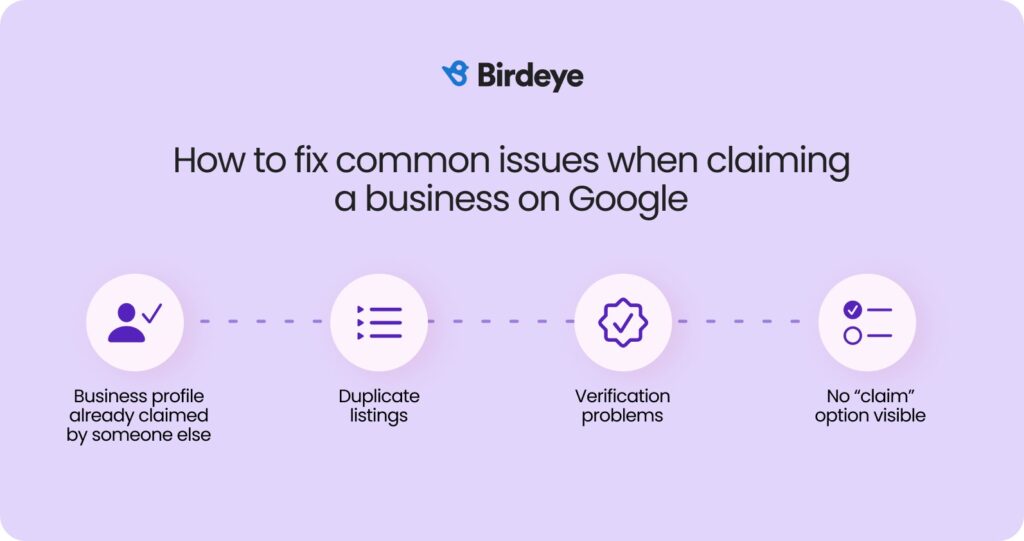
Failing to Provide Accurate Business Information
Accurate business information is fundamental when claiming a Google Business Profile. Incomplete or incorrect details can lead to verification failures or misrepresentation of your business. Essential elements include the business name, address, phone number, and website URL. Consistency across all platforms is crucial; discrepancies may confuse potential customers and harm your ranking in local search results.
Ignoring the Importance of Category Selection
Choosing the right business category significantly impacts your visibility on Google. Categories help Google understand what your business offers and match it with relevant searches. Failing to select an appropriate category can limit your audience reach and reduce the likelihood of appearing in local search results. Review your competitors and utilize Google’s suggestions to ensure you select the most relevant categories.
Neglecting to Update Profile Information Regularly
A Google Business Profile is not a set-it-and-forget-it tool. Neglecting to update your profile regularly can lead to outdated information, which may frustrate customers. Important updates include changes in operating hours, new services, or promotions. Regularly refreshing your profile ensures you remain visible and relevant to your target audience.
Underestimating the Impact of Photos and Descriptions
Visual content and engaging descriptions play a vital role in attracting potential customers. High-quality photos can enhance your profile’s appeal, as listings with images receive 42% more requests for directions and 35% more click-throughs to websites. Moreover, well-crafted descriptions that highlight your unique selling points can differentiate your business from competitors. Ensure that your photos are current and reflect your brand appropriately.
Nuance / Expert Layer
Many businesses mistakenly believe that claiming a Google Business Profile is a one-time effort. However, maintaining an active profile requires ongoing engagement. Regularly responding to customer reviews, posting updates, and utilizing Google Posts can enhance your profile’s effectiveness. Additionally, businesses should be aware of the potential for duplicate listings, which can dilute visibility. Claiming all existing listings and consolidating them is essential for a cohesive online presence.
Practical Application
- Ensure that all business information is accurate and consistent across platforms.
- Research and select the most relevant categories for your business.
- Regularly update your profile with current information, promotions, and changes.
- Invest in high-quality images and craft engaging descriptions to attract customers.
- Actively manage your profile by responding to reviews and utilizing Google Posts.
Real-World Case Studies: Successful Google Business Profile Claims
This section explores real-world examples of businesses that successfully claimed and optimized their Google Business Profiles, highlighting strategies, challenges, and the resulting engagement benefits.
Case Study: Local Restaurant’s Claiming Journey
A popular local restaurant, Bella’s Bistro, faced challenges with an unclaimed Google Business Profile. After discovering that their profile was inaccurate and lacked essential information, the owners initiated the claiming process. They followed these steps:
- Created a Google account specifically for business management.
- Visited the Google Business Profile page to search for their restaurant.
- Selected the option to claim the business and verified ownership via mail.
Post-verification, Bella’s Bistro updated their profile with accurate hours, menu items, and high-quality images. Within months, they reported a 40% increase in foot traffic attributed to improved visibility in local searches.
Service-Area Business Optimization Strategies
Another example involves a plumbing service, AquaFix, which operates in multiple neighborhoods. Upon claiming their Google Business Profile, AquaFix implemented several optimization strategies:
- Defined service areas clearly to enhance searchability.
- Utilized Google Posts to share updates and promotions regularly.
- Encouraged satisfied customers to leave reviews, boosting their rating to 4.8 stars.
These actions contributed to a 50% increase in inquiries from potential customers, underscoring the importance of an active, well-maintained profile.
Lessons Learned from Challenges Faced
Some businesses encounter obstacles when claiming their profiles. For instance, a fitness studio, FitZone, struggled with verification due to previous ownership discrepancies. The studio’s management learned several key lessons:
- Maintaining consistent business information across platforms is vital.
- Promptly addressing any issues with Google support can expedite the verification process.
- Regularly updating profiles can prevent future disputes over ownership.
By addressing these challenges directly, FitZone successfully claimed their profile, which led to a significant rise in local class sign-ups.
Impact of a Well-Managed Profile on Customer Engagement
A well-managed Google Business Profile can substantially enhance customer engagement. Businesses that actively maintain their profiles experience higher interaction rates, including:
- Increased click-through rates to their websites.
- More frequent phone calls and inquiries.
- Higher conversion rates from search visibility to actual customers.
For example, Bella’s Bistro reported that updated photos and menu items resulted in a 30% boost in online reservations, demonstrating the direct correlation between profile management and customer engagement.
For businesses looking to replicate these successes, focus on the following actionable steps:
- Claim and verify your Google Business Profile promptly.
- Regularly update your profile with accurate information and engaging content.
- Encourage customer reviews and respond to feedback to build credibility.
Implementing these strategies can lead to increased visibility and customer interaction, reinforcing the importance of an optimized Google Business Profile.
For How To Claim Google Business Profile businesses looking to generate local leads through Google Ads or Local SEO, GMB Ranger LLC offers hands-on campaign management. Specialist Md Tangeer Mehedi personally handles campaign setup and ongoing optimization — with no payment required until the first lead comes in.
Frequently Asked Questions
What is a Google Business Profile?
A Google Business Profile is a free tool that allows businesses to manage their online presence across Google, including Search and Maps. It displays essential information such as business hours, location, and contact details.
How long does it take to claim a Google Business Profile?
The process of claiming a Google Business Profile typically takes a few minutes to complete. However, verification may take several days, depending on the method chosen for confirmation.
What are the benefits of claiming a Google Business Profile?
Claiming a Google Business Profile enhances visibility in local search results and helps attract more customers. It also allows businesses to post updates, respond to reviews, and provide accurate information to potential clients.
Can I claim a Google Business Profile without a physical location?
Yes, businesses that operate without a physical storefront, such as service areas, can still claim a Google Business Profile. They must specify their service area during the setup process.
What documents do I need to claim my Google Business Profile?
To claim a Google Business Profile, you typically need to provide proof of ownership, such as a business license, utility bill, or tax document. Verification may also require a phone call or postcard from Google.
How does claiming a Google Business Profile compare to creating a Facebook business page?
Claiming a Google Business Profile primarily enhances local search visibility, while a Facebook business page focuses on social engagement and community building. Both are essential for a comprehensive online presence but serve different purposes.
What are common mistakes when claiming a Google Business Profile?
Common mistakes include providing inaccurate business information, failing to verify the profile, and neglecting to update details regularly. These errors can hinder visibility and customer engagement.
How do I optimize my claimed Google Business Profile?
To optimize a Google Business Profile, ensure all information is accurate and complete, including business hours and contact details. Regularly post updates, respond to reviews, and add high-quality images to enhance engagement.
Final Thoughts on how to claim google business profile
Claiming a Google Business Profile is not merely a formality; it is a strategic advantage that enhances visibility and credibility in an increasingly competitive digital landscape. By effectively optimizing your profile, you can significantly boost local SEO and attract more customers, ultimately driving business growth.
To maximize the potential of your Google Business Profile, prioritize completing the verification process and ensuring all information is accurate and up to date. Regularly engage with customer reviews and utilize insights to refine your marketing strategies.
In today’s digital economy, establishing a strong online presence through a Google Business Profile is essential for any business aiming to thrive and remain relevant.
Leave a Reply