
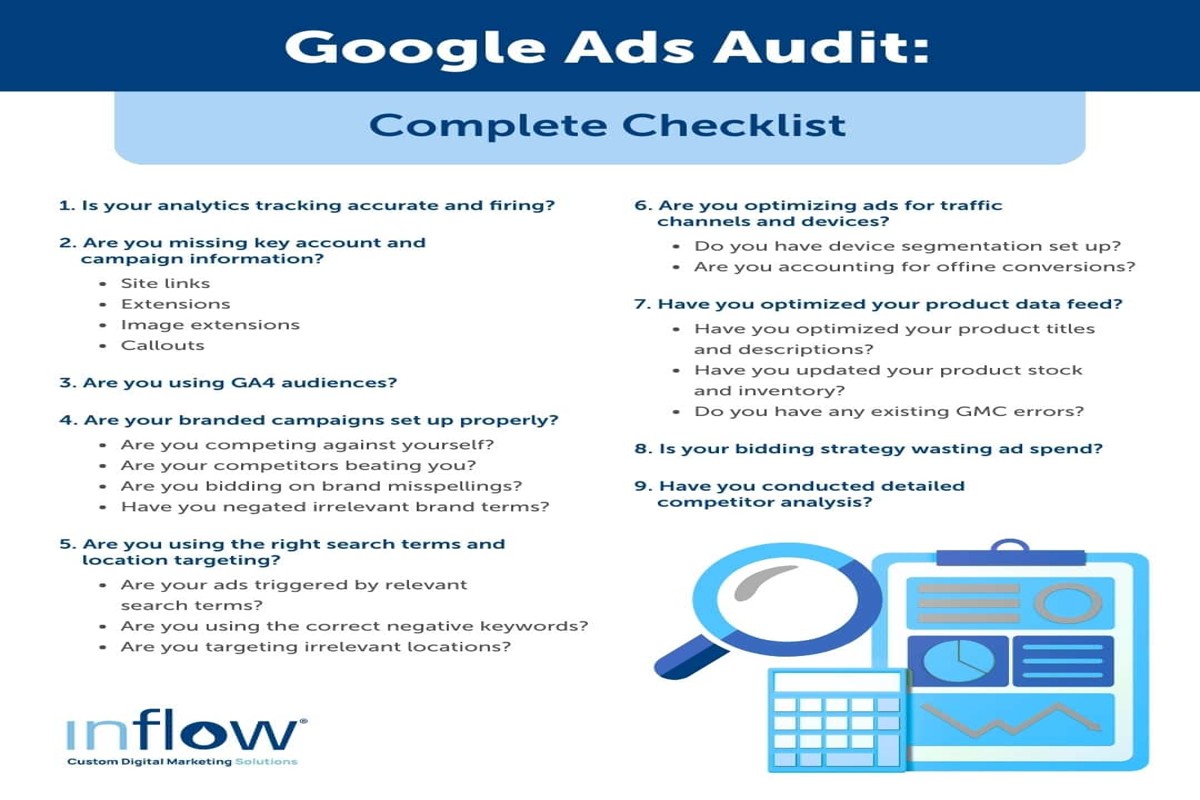
Auditing a Google Ads account involves a systematic review of campaign performance metrics, keyword relevance, and ad copy effectiveness. This process is essential for optimizing advertising strategies and can lead to an improvement in return on investment (ROI) by as much as 30%.
Understanding how to audit a Google Ads account is crucial for marketers and business owners aiming to maximize their advertising effectiveness. In a digital landscape where businesses spend over $200 billion annually on online advertising, ensuring that every dollar spent yields optimal results is vital. Regular audits help identify inefficiencies and enhance campaign performance.
Failure to conduct thorough audits can lead to significant financial losses, as businesses risk wasting budgets on underperforming ads and losing competitive ground in their industry. Without proper oversight, even well-funded campaigns can fall short of achieving their intended goals.
This article will cover the essential steps for auditing a google ads account, including performance metric analysis, keyword assessment, ad copy evaluation, and best practices for ongoing optimization. Readers will gain insights into effective strategies to enhance their advertising efforts and drive better results.
For How To Audit A Google Ads Account businesses looking to generate local leads through Google Ads or Local SEO, GMB Ranger LLC offers hands-on campaign management. Specialist Md Tangeer Mehedi personally handles campaign setup and ongoing optimization — with no payment required until the first lead comes in.
What is a google ads account audit?
A Google Ads account audit is a comprehensive review of your ad campaigns to identify performance issues and optimization opportunities. This process typically involves analyzing various components of the account to ensure that advertising efforts align with business goals and are yielding a satisfactory return on investment.
The audit examines multiple factors, including keyword performance, ad copy effectiveness, bidding strategies, and conversion tracking accuracy. Businesses can significantly enhance their ad performance through rigorous analysis, with studies indicating that a well-executed audit can lead to a 30% increase in campaign efficiency. A thorough audit not only identifies deficiencies but also uncovers potential areas for growth.
- Keyword Analysis: Evaluating keyword relevance, search volume, and cost-per-click to ensure optimal targeting.
- Ad Performance: Reviewing click-through rates, conversion rates, and ad copy to determine what resonates with the audience.
- Bidding Strategies: Assessing current bidding methods to find potential for cost savings or improved ad placements.
- Conversion Tracking: Ensuring that proper tracking mechanisms are in place to measure campaign success accurately.
Expert insight: Regular audits are essential; conducting them quarterly can help businesses adapt to changing market conditions and maintain competitive advantage.
How often should I audit my Google Ads account?
You should audit your Google Ads account at least quarterly to ensure optimal performance and adapt to changing market conditions. Regular audits help identify inefficiencies, optimize ad spend, and align campaigns with business objectives.
Several factors influence the frequency of audits. The competitive landscape of your industry, changes in consumer behavior, and seasonal trends can necessitate more frequent reviews. For example, businesses in highly competitive sectors may benefit from monthly audits to quickly adapt to competitor strategies and market shifts. Conversely, businesses with stable performance in less dynamic markets may find quarterly audits sufficient.
Furthermore, the size and complexity of your Google Ads account also affect audit frequency. Larger accounts with multiple campaigns, ad groups, and varied targeting options may require more regular attention. Regular audits can reveal underperforming keywords, ineffective ad copy, and budget allocation issues, enabling timely adjustments. On the other hand, smaller accounts with fewer campaigns may not require as frequent evaluations, allowing for a quarterly schedule to be adequate.
Expert insight: Utilize automated tools and reporting features within Google Ads to streamline your auditing process. These tools can provide valuable insights and alerts, helping to maintain performance without the need for constant manual checks.
What are the key metrics to review in a Google Ads audit?
Key metrics to review in a Google Ads audit include Click-Through Rate (CTR), conversion rate, Quality Score, and cost per conversion. These metrics provide insights into campaign performance and areas for improvement, ultimately impacting return on investment.
1. Click-Through Rate (CTR): CTR measures the percentage of users who click on your ad after seeing it. A healthy CTR typically ranges from 1% to 5%, depending on the industry. Low CTR can indicate irrelevant ad copy or targeting issues.
2. Conversion Rate: This metric reflects the percentage of clicks that result in a desired action, such as a purchase or sign-up. A conversion rate of 2% to 5% is considered average across many sectors, but higher rates signify effective targeting and messaging.
3. Quality Score: Quality Score assesses the relevance of your ads, keywords, and landing pages. It ranges from 1 to 10, with a score above 7 indicating good performance. A high Quality Score can reduce cost-per-click (CPC) and improve ad positioning.
4. Cost per Conversion: This metric shows how much is spent to achieve a conversion. Tracking this metric helps assess the efficiency of your budget. Aim for a cost per conversion that aligns with your profit margins to ensure campaign viability.
Expert insight: Regularly benchmark these metrics against industry standards and historical performance to identify trends and adjust strategies effectively.
How do I identify wasted spend in Google Ads?
To identify wasted spend in Google Ads, focus on analyzing underperforming keywords and ads that incur high costs but yield low conversions. Research shows that businesses can save up to 30% of their ad spend by optimizing these areas effectively.
Begin by reviewing your keywords. Identify those that have high costs but generate few or no conversions. Utilize the “Search Terms” report to see which terms trigger your ads. If certain keywords consistently underperform, consider pausing or removing them to prevent further wasted spend.
- Examine ad performance metrics, specifically the click-through rate (CTR) and conversion rate. Ads with high impressions but low CTRs may need revision. Adjust ad copy or targeting parameters to improve engagement.
- Evaluate your bidding strategies. If you are using automated bidding, ensure that the algorithm aligns with your campaign goals. Regularly adjust bid limits for underperforming keywords to avoid overspending.
- Implement negative keywords to filter out irrelevant traffic. By excluding terms that do not convert, you can reduce wasted clicks and enhance overall campaign efficiency.
- Analyze your landing pages. If ads lead to pages with poor user experience or low relevance, even high-quality traffic may not convert. Optimize landing pages to better align with ad messaging and improve conversion rates.
Expert insight: Regularly auditing your Google Ads account is vital. Schedule these audits quarterly to stay ahead of trends and continuously refine your strategy, ensuring your budget is spent effectively.
What tools can help with auditing a Google Ads account?
Several tools can assist in auditing a Google Ads account, including SEMrush, WordStream, and Optmyzr. These platforms provide insights into account performance, keyword effectiveness, and ad spend efficiency. Utilizing these tools can save time and enhance the accuracy of the audit process.
SEMrush is a comprehensive digital marketing tool that offers features for keyword analysis, competition research, and account audits. Its Google Ads audit capabilities allow users to analyze ad performance metrics and identify areas for improvement. WordStream, on the other hand, focuses on simplifying PPC management. It provides a unique 20-Minute Work Week feature, which highlights actionable insights and optimizations specifically for Google Ads. Optmyzr offers advanced automation and reporting tools, making it suitable for agencies managing multiple accounts. It includes features such as one-click optimizations and custom reporting dashboards.
- SEMrush: Comprehensive digital marketing tool with in-depth keyword analysis and competitive insights.
- WordStream: Simplified PPC management with a focus on actionable insights and recommendations.
- Optmyzr: Advanced automation features and reporting tools, ideal for agencies and large accounts.
Expert insight: Regularly leveraging these tools can help maintain optimal account performance and adapt to changing market conditions, ensuring your Google Ads strategy remains competitive.
Advanced Techniques for Google Ads Auditing
This section delves into expert-level strategies for auditing Google Ads accounts, emphasizing automation, cross-channel insights, audience analysis, and machine learning applications. These advanced techniques enhance performance evaluation and optimization efforts.
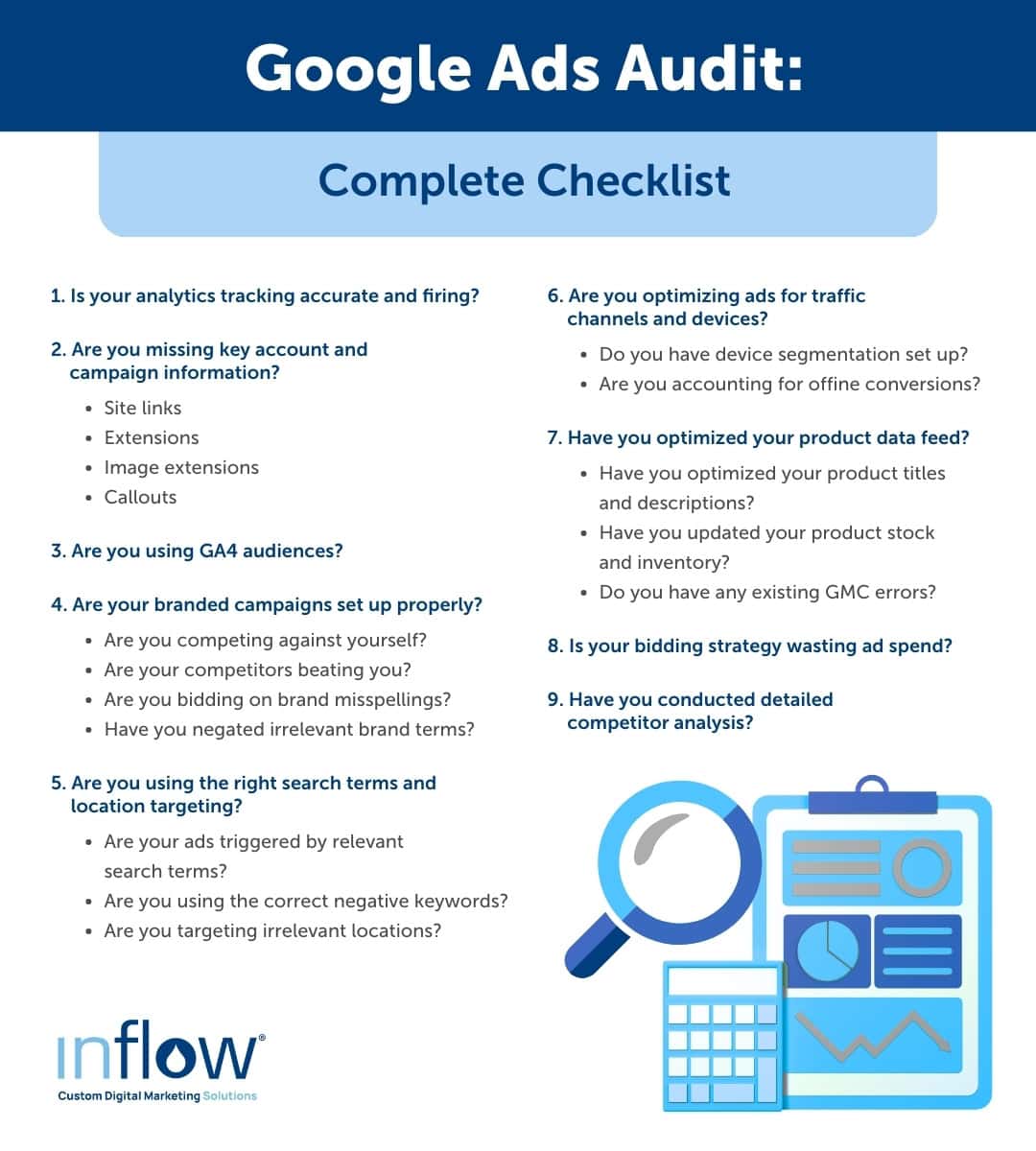
Utilizing Scripts for Automated Reporting
Google Ads scripts streamline the auditing process by automating data collection and reporting. By utilizing JavaScript, marketers can create customized scripts that pull relevant metrics and generate reports tailored to specific needs. This automation not only saves time but also minimizes human error, ensuring that data integrity remains intact.
- Performance Monitoring: Set up scripts to track key performance indicators (KPIs) such as click-through rates (CTR) and conversion rates over time.
- Budget Management: Automate alerts for budget thresholds to prevent overspending.
- Ad Copy Analysis: Generate reports on ad performance to identify high and low-performing creatives quickly.
Incorporating Multi-Channel Performance Data
Integrating data from various marketing channels enhances the insights gained from a Google Ads audit. Utilizing platforms like Google Analytics or third-party tools allows for a comprehensive view of user behavior across touchpoints. This holistic approach reveals how different channels contribute to conversions and helps identify attribution discrepancies.
For example, businesses that leverage multi-channel attribution are 30% more likely to optimize their marketing spend effectively. This data can inform bidding strategies and budget allocation in Google Ads.
Analyzing Audience Segmentation for Better Targeting
Effective audience segmentation is crucial for maximizing the relevance of ad campaigns. Auditors should analyze the performance of different audience segments to fine-tune targeting strategies. By utilizing Google Ads’ audience insights, marketers can identify high-value segments and tailor their messaging accordingly.
- Demographics: Analyze performance based on age, gender, and location.
- Interests: Utilize affinity and in-market audiences to refine targeting.
- Remarketing: Assess the effectiveness of remarketing lists in converting previous visitors.
Leveraging Machine Learning Insights for Optimization
Google Ads employs machine learning to optimize ad delivery and bidding. Understanding how to leverage these insights can significantly enhance campaign performance. Features such as Smart Bidding utilize historical data to predict outcomes and adjust bids in real time, improving return on investment (ROI).
Recent studies indicate that advertisers using machine learning tools have seen conversion rates increase by up to 50% compared to those relying solely on manual bidding strategies.
Many marketers underestimate the impact of machine learning on campaign performance. Relying solely on manual adjustments can lead to missed opportunities for optimization. Embracing automated features and understanding their underlying algorithms can provide a competitive edge.
Practical Application
To implement these advanced auditing techniques, follow these steps:
- Develop and deploy automated scripts for key metrics reporting.
- Integrate multi-channel data to assess overall marketing effectiveness.
- Segment audiences and analyze performance for tailored targeting.
- Utilize machine learning insights to inform bidding strategies and campaign adjustments.
By applying these strategies, marketers can conduct a thorough audit of their Google Ads accounts and drive significant improvements in campaign performance.
Common Mistakes to Avoid During a Google Ads Audit
This section identifies common pitfalls that can undermine the effectiveness of a Google Ads audit. Recognizing these mistakes is essential for optimizing account performance and maximizing return on investment.
Neglecting Ad Extensions and Their Impact
Ad extensions enhance the visibility and performance of ads by providing additional information. Ignoring them can significantly affect click-through rates (CTR). According to recent studies, campaigns utilizing at least one ad extension see a CTR increase of up to 30%. Common ad extensions include site links, callouts, and structured snippets. Each of these can contribute to a more compelling ad presentation, ultimately driving more traffic to your site.
Overlooking Negative Keywords in Campaigns
Negative keywords prevent ads from showing on irrelevant searches, which can save budget and improve targeting. Failing to regularly update negative keyword lists can lead to wasted spend on low-quality clicks. A survey by WordStream found that advertisers who actively manage negative keywords can reduce wasted ad spend by up to 20%. Regularly reviewing search term reports is essential for identifying which keywords should be added to this list.
Failing to Track Conversions Accurately
Accurate conversion tracking is vital for understanding campaign performance and ROI. Without proper tracking, it’s impossible to determine which ads and keywords are driving results. According to Google, businesses that implement conversion tracking see an average improvement of 30% in their campaign effectiveness. Implementing Google Tag Manager or enhanced conversions can streamline this process and provide more granular insights into user behavior.
Not Adjusting Bids Based on Performance Data
Bid adjustments based on performance data are critical for achieving optimal results. Many advertisers set static bids without considering the varying performance across different keywords, locations, or devices. Data from a 2024 Google Ads benchmark report indicates that campaigns using bid adjustments based on performance can achieve up to 25% more conversions at a lower cost per acquisition (CPA). Regularly analyzing performance metrics and adjusting bids accordingly is essential for maintaining competitiveness.
Nuanced Insights
Many audits focus solely on surface-level metrics, overlooking deeper insights such as audience segmentation and ad scheduling. For instance, certain demographics may perform significantly better at specific times of the day or week. Utilizing tools such as Google Ads’ audience insights can reveal these patterns. Additionally, misconceptions about the efficacy of broad match keywords can lead to overspending. A balanced approach that includes both broad and exact match keywords, tailored to specific audience segments, often yields the best results.
Practical Application
- Review ad extensions regularly and test new types to enhance visibility.
- Conduct weekly audits of negative keywords to refine targeting.
- Implement Google Tag Manager to improve conversion tracking accuracy.
- Analyze performance data and adjust bids bi-weekly to optimize spend.
By actively addressing these common mistakes, advertisers can create a more effective strategy for how to audit a Google Ads account, ensuring that every dollar spent contributes to business goals. Regular audits will lead to continual improvements and greater success in digital advertising.
Real-World Case Studies of Successful Google Ads Audits
This section examines practical examples of Google Ads audits that have led to significant improvements in campaign performance across various business types. By analyzing these case studies, businesses can identify actionable strategies to enhance their own advertising efforts.
Case Study: E-Commerce Brand Increasing ROI
An e-commerce brand specializing in outdoor gear conducted a comprehensive Google Ads audit in 2024. The audit revealed that their ad copy lacked specificity, which diluted their message. By refining their ad copy to include targeted keywords and clear calls to action, they increased click-through rates (CTR) by 25%. Furthermore, optimizing their landing pages led to a 40% increase in conversion rates, ultimately resulting in a 150% return on investment (ROI).
Analysis: Service-Based Business Reducing CPA
A local plumbing service faced high customer acquisition costs (CPA) that threatened profitability. Through a detailed audit, they discovered that many of their keywords were too broad, attracting unqualified leads. By narrowing their focus to long-tail keywords specific to their services, they decreased their CPA from $100 to $60 within six months. This change not only improved lead quality but also increased their overall service calls by 30%.
Examples: Local Businesses Improving Visibility
- A family-owned bakery in a competitive urban area optimized their Google My Business listing and incorporated local keywords into their ads. As a result, they saw a 50% increase in foot traffic over three months.
- A landscaping business utilized geo-targeting strategies to reach homeowners in specific neighborhoods. Following the audit, they reported a 70% boost in inquiries and a 45% increase in sales.
-
A dental clinic revamped their ad campaigns to highlight special promotions, leading to a 60% increase in appointment bookings within a quarter.
Success Stories: Agencies Optimizing Client Accounts
A digital marketing agency specializing in small businesses performed audits across multiple client accounts. One client, a boutique fitness studio, had underutilized remarketing strategies. After implementing a tailored remarketing campaign, the agency helped the studio achieve a 200% increase in re-engaged customers. Additionally, the agency optimized bids based on performance data, resulting in an average cost-per-click (CPC) reduction of 35% across all accounts.
Many businesses overlook the significance of regularly scheduled audits. A common misconception is that audits are only necessary when performance declines. In reality, proactive audits can uncover inefficiencies and opportunities for growth before problems arise. Furthermore, successful audits often involve cross-channel analysis, evaluating how google ads interacts with other marketing efforts, which many articles fail to address.
To leverage insights from these case studies, businesses should implement regular audits of their Google Ads accounts. Start by analyzing keyword performance, refining ad copy, and optimizing landing pages. Prioritize areas with the highest potential for improvement based on performance data. Establish a monitoring schedule to ensure ongoing optimization and responsiveness to market changes. By adopting these strategies, businesses can enhance their advertising effectiveness and drive better results.
Integrating Local SEO with Google Ads Audits
This section examines the critical relationship between local SEO strategies and the performance of Google Ads, highlighting how a unified approach can lead to improved visibility and higher conversion rates.
Understanding Local Intent in Keyword Selection
Local intent refers to the motivation behind a user’s search query that indicates a desire for local results. When conducting a Google Ads audit, incorporating local intent into keyword selection is essential. For instance, keywords containing terms like “near me,” “in [city],” or “local” can significantly enhance ad performance. Research indicates that 76% of consumers who conduct a local search visit a business within a day, emphasizing the need for relevant local keywords.
The Importance of Location-Based Ad Targeting
Location-based ad targeting allows businesses to reach potential customers in specific geographic areas. This strategy is particularly effective for local businesses, as it ensures that ads are displayed to users actively searching for services or products nearby. Implementing geotargeting can improve click-through rates (CTR) and conversion rates significantly. According to recent data, ads targeted to local areas see a 20% higher CTR compared to broader campaigns.
How Local SEO Can Enhance Ad Visibility
Integrating local SEO with Google Ads can enhance overall ad visibility. By optimizing landing pages for local keywords and ensuring NAP (Name, Address, Phone Number) consistency across all platforms, businesses can improve their Quality Score in Google Ads. A higher Quality Score often leads to lower costs per click (CPC) and better ad placements. Furthermore, local SEO efforts, such as maintaining an updated Google My Business profile, can complement paid strategies by increasing organic traffic.
Best Practices for Combining Local SEO with PPC Efforts
To maximize the effectiveness of both local SEO and Google Ads, consider the following best practices:
- Conduct comprehensive keyword research focusing on local terms.
- Utilize ad extensions, such as location and call extensions, to provide additional information to potential customers.
- Regularly audit and update both SEO and PPC campaigns to ensure alignment and effectiveness.
- Leverage user-generated content and local reviews to build trust and enhance ad performance.
Combining local SEO with PPC efforts requires ongoing analysis and adjustment. Ensure that metrics from both strategies are measured and compared regularly for optimal results.
Nuance / Expert Layer
A common misconception in the integration of local SEO and Google Ads is that these strategies function independently. However, both are part of a larger digital marketing ecosystem. For instance, while local SEO focuses on organic search visibility, Google Ads can be utilized to test and validate effective keywords before committing to long-term SEO strategies. Additionally, local businesses often overlook the power of negative keywords in Google Ads, which can prevent ads from appearing for irrelevant local searches, thus conserving budget and improving campaign ROI.
Practical Application
To effectively integrate local SEO with Google Ads, start by conducting a keyword audit to identify local search terms relevant to your business. Next, refine your ad targeting settings to focus on specific geographic areas where your customers reside. Regularly update your Google My Business profile and ensure that your landing pages align with your advertising efforts. Finally, analyze the performance of both your SEO and PPC campaigns bi-weekly to identify areas for improvement and growth.
Evaluating the Best How To Audit A Google Ads Account
Comparing Google Ads auditing providers is essential for businesses aiming to optimize their advertising spend effectively. In 2024, the global digital advertising market is projected to reach $786 billion, emphasizing the need for robust tools to enhance campaign performance. Evaluating options based on pricing, features, and target audience can help marketers make informed decisions.
| Provider / Option | Best For | Pricing | Key Feature |
|---|---|---|---|
| WordStream | Small to medium businesses | $264/month | Comprehensive performance insights |
| SEMrush | Digital marketing agencies | $119.95/month | In-depth competitor analysis |
| Optmyzr | PPC professionals | $249/month | Automated optimization tools |
| AdEspresso | Social media advertisers | $49/month | User-friendly A/B testing |
| Google Ads Manager | Experienced marketers | Varies based on spend | Direct access to Google Ads features |
Criteria for Evaluating Program Quality
- Pricing: Consider the monthly subscription cost in relation to your budget. Some providers offer tiered pricing based on features, which can impact overall value.
- Key Features: Assess the unique features offered by each provider. Look for tools that align with your specific auditing needs, such as performance insights or optimization capabilities.
- Target Audience: Each provider caters to different market segments. Ensure the chosen tool aligns with your business size and expertise level for optimal results.
- Customer Support: Evaluate the level of support provided. Reliable customer service can significantly impact your experience, especially when troubleshooting issues or seeking guidance.
How to Assess the Reputation and Reliability of Providers
- Research online reviews and testimonials to gauge user satisfaction and common issues faced with each provider.
- Check for case studies or success stories that demonstrate the effectiveness of the tool in real-world applications.
- Evaluate the provider’s history and experience in the industry. Established providers often have a track record of reliability and innovation.
- Look for certifications or partnerships with recognized organizations, which can indicate a commitment to quality and best practices.
- Engage with the provider’s customer service prior to purchase to assess responsiveness and support quality.
Which How To Audit A Google Ads Account Is Right for You?
Choosing the right tool to audit your Google Ads account is crucial and should align with your specific business needs, budget, and goals. This decision guide highlights tailored recommendations for different audience segments, ensuring that each option delivers the most effective support for your advertising efforts.
Solo freelancer
For solo freelancers, WordStream is the optimal choice due to its user-friendly interface and affordability. With plans starting around $264 per month, WordStream simplifies the auditing process, allowing freelancers to efficiently manage their campaigns without overwhelming complexity.
Small business owner
Small business owners should consider SEMrush for its extensive suite of tools designed to manage and optimize campaigns effectively. Starting at approximately $119.95 per month, SEMrush offers features such as keyword research and competitive analysis, making it easier to identify opportunities for improvement and boost ROI.
Digital marketing agency
Digital marketing agencies will benefit from Optmyzr, which provides advanced automation capabilities essential for managing multiple accounts efficiently. With pricing options starting around $200 per month, Optmyzr allows agencies to automate routine tasks, optimize bids, and enhance overall campaign performance, freeing up time for strategic planning.
E-commerce business
E-commerce businesses are best served by AdEspresso, known for its robust A/B testing and optimization features. With plans beginning at $49 per month, AdEspresso enables e-commerce operators to test different ad variations effectively, ensuring that they maximize conversions and drive sales through data-driven insights.
| If You Are… | Best Approach |
|---|---|
| Solo freelancer | WordStream |
| Small business owner | SEMrush |
| Digital marketing agency | Optmyzr |
| E-commerce business | AdEspresso |
Local Considerations for Auditing a Google Ads Account
Understanding geographic and local market factors is crucial when auditing a Google Ads account, as local search behavior significantly influences campaign performance. In fact, 78% of mobile local searches result in an offline purchase, highlighting the importance of optimizing ads for local intent.
Geographic Market Differences
In larger metropolitan areas like New York City or Los Angeles, competition for local keywords can be fierce, leading to higher CPCs (cost-per-click) and requiring more nuanced targeting strategies. Conversely, smaller towns may experience lower competition, allowing businesses to achieve better ad visibility at a lower cost. Local businesses must adapt their strategies based on their specific market dynamics to ensure effective ad performance.
Local Business Applications
Local businesses benefit from targeted Google Ads campaigns in several ways:
- Promoting in-store events or seasonal sales that draw local foot traffic.
- Utilizing location extensions to enhance ad visibility with address and distance information.
- Targeting specific neighborhoods or ZIP codes to reach local customers effectively.
- Leveraging customer reviews in ad copy to build trust and credibility in the local market.
Local Search and Visibility Impact
Auditing a Google Ads account directly impacts local search rankings and visibility. Businesses should consider the following actions:
- Ensure that Google Ads campaigns are aligned with the business’s Google Business Profile (GBP) for consistent messaging.
- Analyze ad performance by geographic location to identify high-performing areas and adjust budgets accordingly.
- Incorporate local keywords into ad copy to enhance relevance for local searches.
- Monitor local click-through rates (CTR) to evaluate the effectiveness of campaigns targeted at specific demographics.
Pricing and Cost in Local Markets
Cost structures for Google Ads can vary significantly across geographic markets. For example, in high-demand markets like San Francisco, average CPCs can range from $3 to $6, while smaller regions may see costs as low as $1 to $2 per click. Local businesses should budget accordingly, generally allocating between 10-20% of their total marketing budget for Google Ads, depending on their market competition and goals.
Local Implementation Checklist:
- Review Google Ads geotargeting settings to ensure they align with your target audience.
- Update ad copy to reflect local offerings and promotions.
- Utilize location-based bid adjustments to maximize ROI.
- Integrate Google Business Profile information into ads for consistency.
- Analyze local competition and adjust keywords based on market saturation.
- Monitor performance metrics specifically for local campaigns regularly.
- Test ads in different local markets to identify optimal performance strategies.
For How To Audit A Google Ads Account businesses looking to generate local leads through Google Ads or Local SEO, GMB Ranger LLC offers hands-on campaign management. Specialist Md Tangeer Mehedi personally handles campaign setup and ongoing optimization — with no payment required until the first lead comes in.
Frequently Asked Questions
What is a Google Ads account audit?
A Google Ads account audit is a systematic evaluation of your advertising account to assess performance, identify issues, and uncover optimization opportunities. It involves reviewing campaign settings, ad performance, and overall account structure.
How often should I audit my Google Ads account?
It is recommended to audit your Google Ads account at least quarterly to ensure optimal performance and alignment with business goals. However, more frequent audits may be beneficial if significant changes are made to campaigns or market conditions shift.
What are the key metrics to review in a Google Ads audit?
Key metrics to review include click-through rate (CTR), conversion rate, cost per acquisition (CPA), and return on ad spend (ROAS). Analyzing these metrics helps to gauge the effectiveness of campaigns and identify areas for improvement.
How do I identify wasted spend in Google Ads?
Wasted spend in Google Ads can be identified by analyzing keywords with low conversion rates, high costs, and low quality scores. Additionally, reviewing underperforming ads and targeting settings can reveal areas where budget allocation may be inefficient.
What tools can help with auditing a Google Ads account?
Tools such as Google Ads Editor, Google Analytics, and third-party platforms like SEMrush or Optmyzr can assist in auditing a Google Ads account. These tools provide insights, automate reporting, and help streamline the auditing process.
Final Thoughts on how to audit a google ads account
A comprehensive Google Ads account audit is essential for optimizing campaign performance and maximizing ROI. By systematically analyzing key metrics and identifying areas for improvement, marketers can eliminate wasted spend and enhance overall effectiveness.
To drive immediate results, implement a bi-monthly audit schedule that focuses on critical performance indicators and leverages advanced techniques discussed in this guide. This proactive approach ensures that your campaigns remain agile and responsive to market changes.
Ready to take your campaigns to the next level? Consider partnering with a google ads management agency that knows how to maximize your ROI.
Mastering the art of Google Ads auditing is not just beneficial—it’s imperative for sustaining competitive advantage in a digital-first landscape.
Leave a Reply