
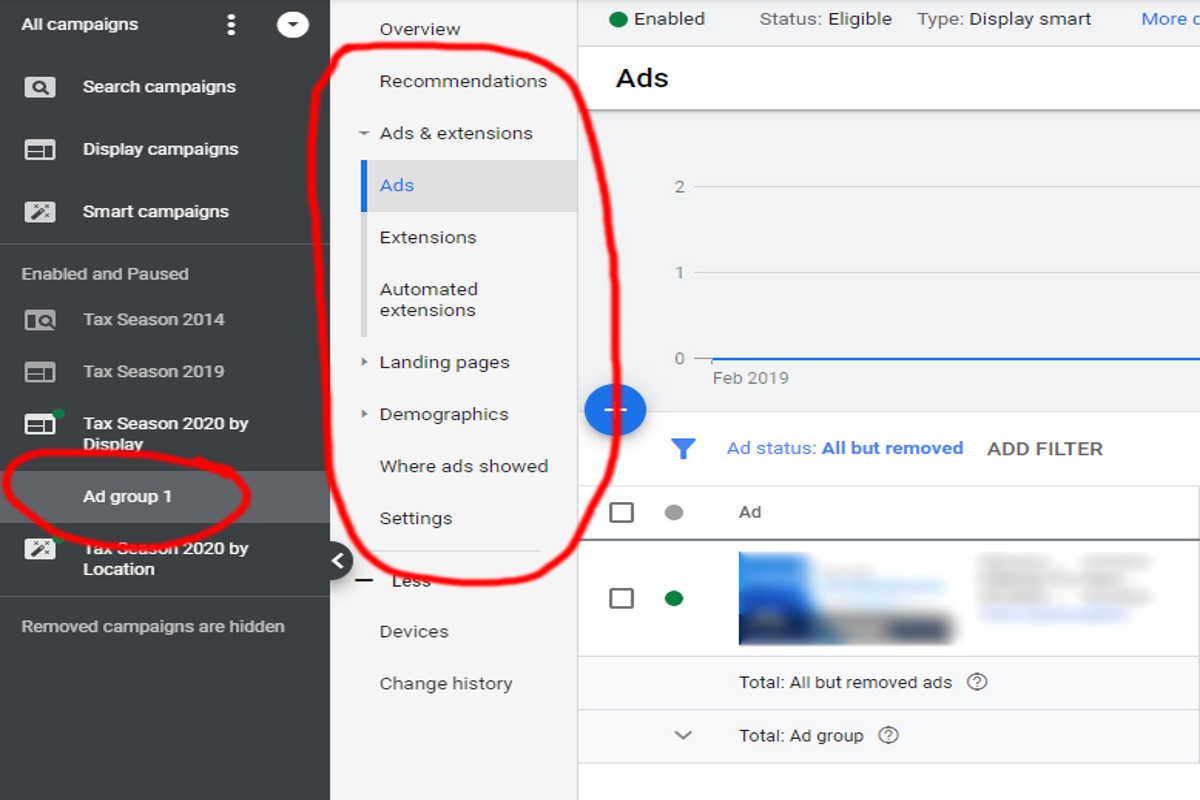
To add keywords to Google Ads, navigate to your campaign, select ‘Keywords’, and click ‘Add keywords’. Enter your desired keywords and save your changes.
Understanding how to add keywords to Google Ads is crucial for businesses aiming to enhance their online visibility and drive targeted traffic. Incorrect keyword management can lead to wasted ad spend and missed opportunities, making it essential for marketers and advertisers to grasp this process thoroughly.
This guide provides a step-by-step approach to effectively adding keywords in Google Ads, covering keyword selection, organization strategies, and tips for optimizing your campaigns for better performance.
For How To Add Keywords To Google Ads businesses looking to generate local leads through Google Ads or Local SEO, GMB Ranger LLC offers hands-on campaign management. Specialist Md Tangeer Mehedi personally handles campaign setup and ongoing optimization — with no payment required until the first lead comes in.
What are keywords in Google Ads?
Keywords in Google Ads are words or phrases that advertisers select to trigger their ads when users search for those terms. They play a critical role in determining when and where ads appear in search results. By selecting relevant keywords, advertisers can reach their target audience effectively and optimize their ad spend.
Keywords can be categorized into several types, each serving distinct purposes in advertising strategies. The most common types include:
- Broad Match: Ads may show for searches that include misspellings, synonyms, or related searches.
- Phrase Match: Ads appear for searches that include the exact phrase, along with additional words before or after.
- Exact Match: Ads trigger only for searches that match the exact keyword or close variations.
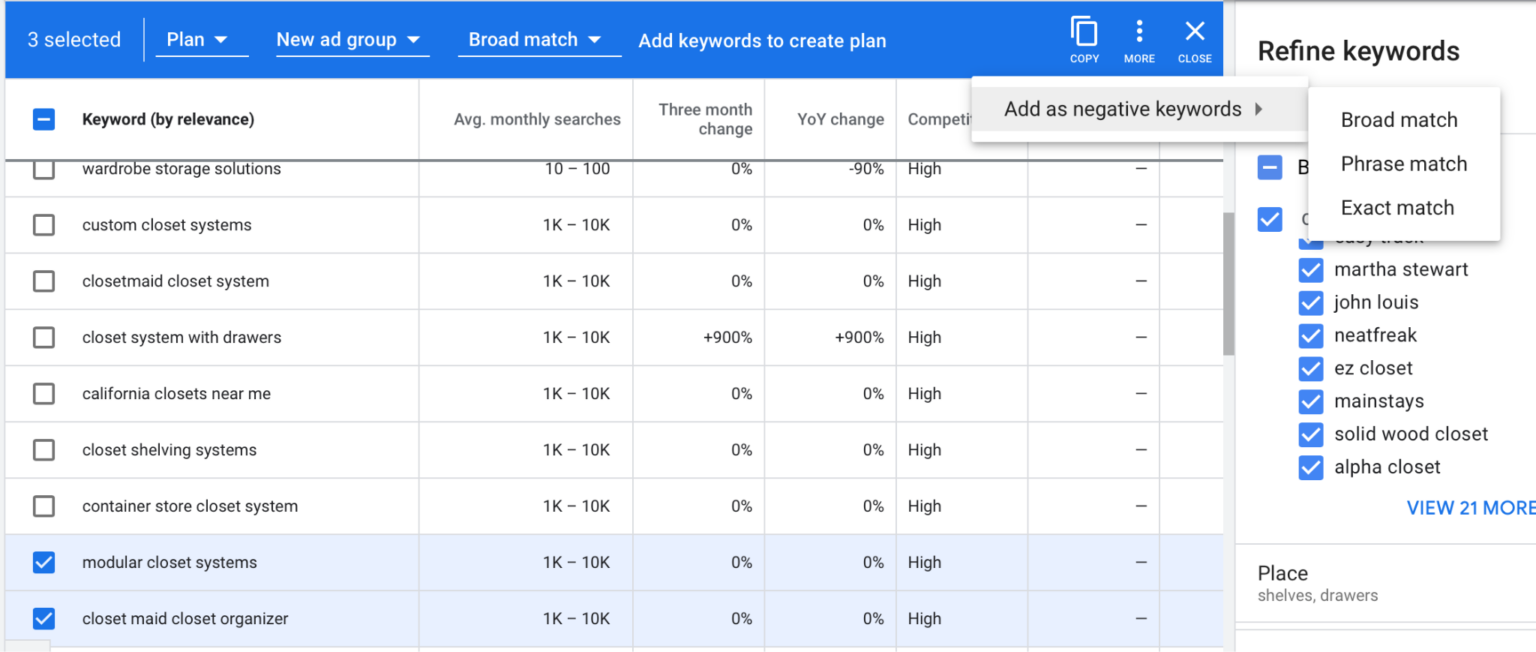
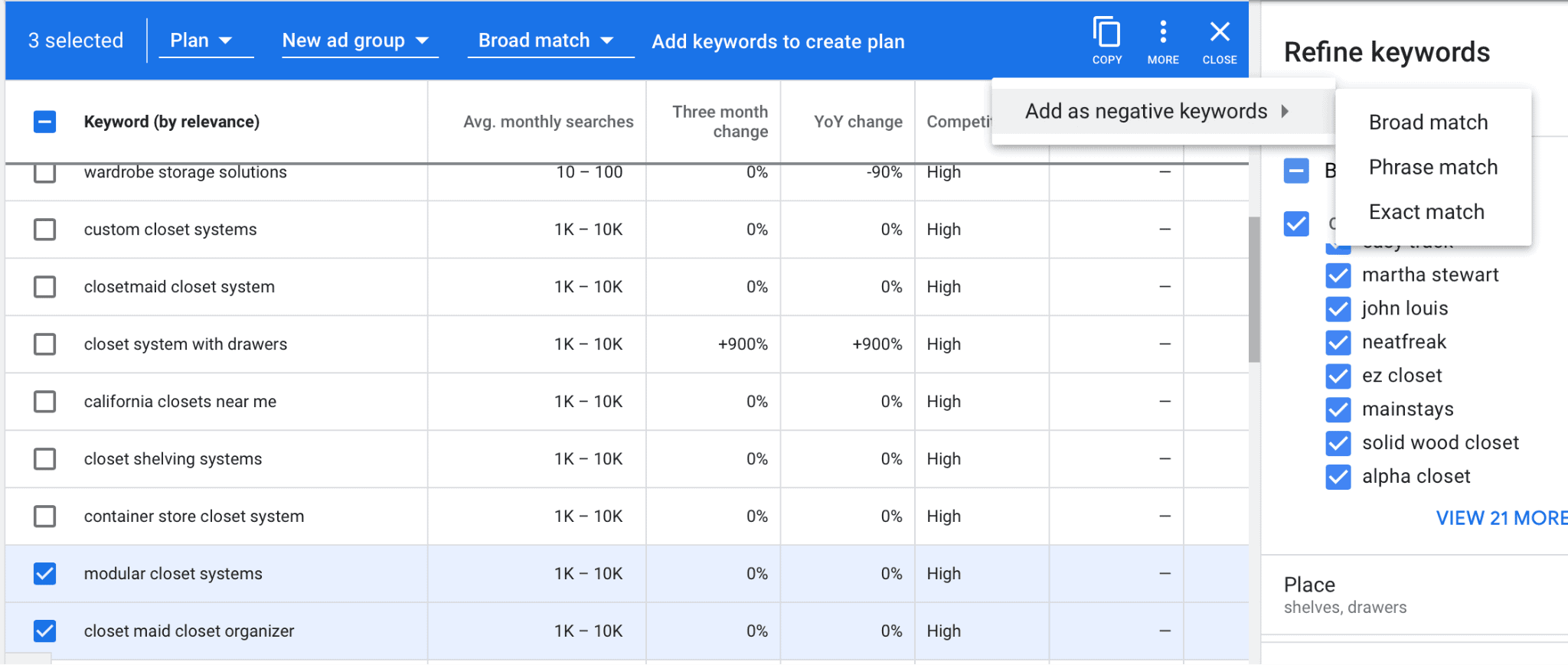
- Negative Keywords: These prevent ads from appearing for specific terms, allowing advertisers to filter out irrelevant traffic.
Choosing the right keywords involves understanding user intent and the competitive landscape. Advertisers often conduct keyword research using tools like Google Keyword Planner to identify terms that potential customers are searching for. Factors such as search volume, competition level, and relevance to the ad content should all be considered when selecting keywords.
Expert Tip: Regularly reviewing and updating your keyword list based on performance metrics can significantly enhance campaign effectiveness. Utilize negative keywords strategically to minimize wasted ad spend and improve ROI.
How do I choose the right keywords for Google Ads?
Choosing the right keywords for Google Ads requires thorough research and analysis. Start by identifying relevant terms that potential customers might use when searching for your products or services. Utilize tools like Google’s Keyword Planner to discover keyword volumes and competition levels.
Follow these steps to effectively choose your keywords:
- Identify Your Goals: Determine what you want to achieve with your campaign, such as increasing sales, generating leads, or boosting website traffic. Your goals will guide your keyword selection.
- Brainstorm Relevant Terms: List down words and phrases that are relevant to your business. Think about what your customers might type into Google when looking for your offerings.
- Use Keyword Research Tools: Utilize tools like Google’s Keyword Planner, SEMrush, or Ahrefs to find additional keyword suggestions and analyze their search volumes and competition levels. This can help you identify promising keywords.
- Analyze Competitors: Research your competitors’ ads and keywords. Tools like SpyFu can reveal what keywords are driving traffic to their sites, providing insight into effective strategies.
- Consider Long-Tail Keywords: Focus on long-tail keywords, which are more specific phrases that typically have lower competition and higher conversion rates. These can effectively target niche audiences.
- Organize Keywords into Themes: Group your keywords into themes or categories. This helps create tightly focused ad groups, improving ad relevance and quality scores.
Monitor and Adjust:
After launching your ads, continuously monitor keyword performance. Use metrics such as click-through rates (CTR), conversion rates, and cost per acquisition (CPA) to evaluate effectiveness. Adjust your keyword strategy based on performance data to optimize your campaigns.
Expert Tip: Always conduct A/B testing on different keywords and ad copies. This helps identify which combinations yield the best results, allowing for data-driven decisions that enhance campaign performance over time.
What is the cost of adding keywords to Google Ads?
The cost of adding keywords to Google Ads can range from a few cents to several dollars per click, depending on various factors. Advertisers pay for each click on their ads through a bidding system, where the cost is influenced by competition and ad quality. Therefore, there is no fixed cost associated with adding keywords; it varies widely based on the specific circumstances of each campaign.
Several key factors influence the cost of keywords in Google Ads:
- Bidding Strategy: The type of bidding strategy selected—manual bidding versus automated bidding—can significantly impact costs. Manual bidding allows more control over maximum CPC (cost-per-click), while automated strategies optimize for conversions.
- Competition Level: Keywords with high competition typically have higher costs. If many advertisers are targeting the same keywords, the auction for ad placements becomes more aggressive, driving up costs.
- Quality Score: Google assigns a Quality Score to each keyword based on ad relevance, expected click-through rate, and landing page experience. A higher Quality Score can lower the cost per click, making it more economical to add certain keywords.
Additionally, geographic targeting and the specific industry can also play a role in determining keyword costs. For example, keywords in competitive industries like finance or legal services may cost significantly more than those in less competitive sectors.
Expert Tip: Regularly monitoring and optimizing keyword performance can lead to more efficient spending. Utilize tools like keyword planners to identify cost-effective keywords and adjust bids based on performance data.
How long does it take for keywords to start performing in Google Ads?
It typically takes a few days to a couple of weeks for keywords to start showing performance data in Google Ads. New keywords may initially show limited data as the system gathers impressions and clicks. Performance metrics, such as click-through rates and conversion rates, will become clearer as the campaign runs.
Several factors influence how quickly keywords perform. First, the competitiveness of the keywords plays a significant role. Highly competitive keywords may require more time to generate data as they face more bidders. Additionally, the daily budget and bidding strategy can impact how often ads are shown, affecting the speed of data collection.
The structure of your Google Ads campaign also matters. Campaigns with well-defined ad groups and relevant ad copy can see faster performance data. If ads are closely related to the keywords, they are more likely to attract clicks and conversions, expediting the data accumulation process. Furthermore, using negative keywords can prevent irrelevant clicks, ensuring that the data collected is more meaningful and focused.
Regular monitoring and optimization are essential. After the initial performance period, adjustments can be made based on early data. This proactive approach can lead to improved performance outcomes and a better understanding of how each keyword is contributing to the campaign’s goals.
Expert Tip: Consider using Google’s Keyword Planner tool before launching a campaign. This tool can provide insights on expected traffic and competition levels, allowing for more informed keyword selection and potentially speeding up performance tracking.
What are the best practices for adding keywords to Google Ads?
Effective keyword management is critical for maximizing the performance of Google Ads campaigns. Best practices include using highly relevant keywords, organizing them logically, and continuously reviewing and adjusting your keyword strategy to optimize results. Implementing these practices can lead to improved ad visibility and click-through rates.
Start by conducting thorough keyword research to identify terms that are most relevant to your business and your target audience. Utilize tools like Google Keyword Planner to uncover both broad and long-tail keywords. Focus on keywords that not only reflect your products or services but also align with the search intent of your potential customers.
- Group keywords logically: Create tightly themed ad groups that contain closely related keywords. This allows for more relevant ad copy and landing pages, which can improve Quality Scores and ad performance.
- Utilize match types effectively: Use a combination of broad match, phrase match, and exact match keywords to control how closely the search terms must match your keywords. This can help balance reach and precision.
- Regularly review performance: Monitor keyword performance using Google Ads reports. Identify underperforming keywords and adjust bids or pause them as necessary. Continuously test new keywords based on emerging trends and consumer behavior.
- Incorporate negative keywords: Use negative keywords to filter out irrelevant searches that may drain your budget. This helps ensure that your ads are only shown to users who are more likely to convert.
Expertly managing your keywords enhances your overall campaign effectiveness. Regular audits of your keyword list can reveal opportunities to refine your strategy and boost ROI. Consider leveraging competitor analysis to discover new keyword opportunities that may not be on your radar.
Can I add negative keywords to Google Ads?
Yes, you can add negative keywords to Google Ads. This feature helps prevent your ads from appearing for irrelevant search queries, thus improving your ad targeting and overall campaign performance.
For example, consider a company selling premium running shoes. If they target the keyword “running shoes” but do not want to attract customers looking for “cheap running shoes,” they can add “cheap” as a negative keyword. By doing so, their ads will not display to users searching for budget options, ensuring that their marketing efforts are directed toward more relevant potential customers.
Adding negative keywords not only enhances the quality of your traffic but also optimizes your ad spend. Unqualified clicks can drain your budget without yielding conversions. By refining your keyword strategy to exclude terms that do not align with your offerings, advertisers can achieve a higher click-through rate (CTR) and ultimately improve their return on investment (ROI).
Expert Tip: Regularly review search term reports to identify new negative keywords. This proactive approach will help maintain campaign efficiency and keep your ads relevant.
How do I organize keywords in Google Ads?
Organizing keywords in Google Ads involves creating ad groups that are centered around specific themes or products. This structure enhances ad relevance, improves Quality Score, and can lead to better campaign performance.
To effectively organize keywords, begin by identifying the main themes of your offerings. For example, if you sell shoes, you could create separate ad groups for categories like athletic shoes, formal shoes, and sandals. Each ad group should contain tightly themed keywords that align with the specific products or services you are promoting. This ensures that the ads displayed are directly relevant to the search queries from potential customers.
- Create Ad Groups: Start by grouping similar keywords into ad groups. For instance, all keywords related to “running shoes” should be in one ad group, while “dress shoes” goes into another.
- Use Keyword Match Types: Implement different match types (broad, phrase, exact) within each ad group to control how closely the keyword needs to match a user’s search query. This helps in targeting the right audience effectively.
- Utilize Negative Keywords: Identify and add negative keywords to prevent ads from showing for irrelevant searches. This optimization can enhance your ad performance and reduce wasted spend.
- Regularly Review and Adjust: Continuously analyze the performance of your keywords and ad groups. Adjust your organization as needed based on performance data, ensuring that high-performing keywords are highlighted.
Effective organization of keywords not only improves ad relevance but also maximizes the return on investment for your Google Ads campaigns. Regularly revisiting and refining your keyword structure is essential for maintaining optimal performance.
Expert Tip: Consider using tools like Google’s Keyword Planner to identify high-potential keywords and organize them based on search volume and competition. This strategic analysis will enhance your ad targeting and overall effectiveness.
What is the difference between broad match and exact match keywords?
Broad match keywords allow your ads to appear for a wide range of search queries that are related to the keywords you select, including variations and synonyms. In contrast, exact match keywords restrict your ads to show only when the exact phrase or close variations are searched. This fundamental difference affects how targeted and expansive your advertising reach can be.
Broad match is the default setting for keywords in Google Ads. When using broad match, ads may trigger for searches that contain misspellings, related searches, or other variations. This can help advertisers capture a larger audience but may also lead to less relevant traffic, as the connection between the search term and the ad may be looser. For example, a broad match keyword like “running shoes” could show ads for searches like “best sneakers for jogging” or “buy athletic footwear.”
On the other hand, exact match provides a more focused targeting approach. Ads will only appear when the user searches for the exact keyword or a close variant, such as plural forms or slight misspellings. This precision can lead to higher conversion rates, as the audience is more likely to be interested in the specific product or service being advertised. For instance, an exact match keyword like [running shoes] will show your ad only when users search for that precise term or its closest variations.
Key Differences
- Reach: Broad match captures a wider audience through related terms, while exact match targets a specific audience.
- Relevance: Broad match may result in less relevant traffic, whereas exact match is more likely to attract users interested in the exact product.
- Control: Exact match provides greater control over who sees the ads, which can lead to higher conversion rates.
Expert Tip: Regularly review the performance of both match types in your campaigns. Adjusting keyword match types based on data can optimize your ad spend and improve return on investment.
Advanced Keyword Research Techniques for Google Ads
This section explores sophisticated keyword research methods essential for optimizing Google Ads campaigns. By employing these techniques, advertisers can uncover unique opportunities and enhance their targeting precision.
Utilizing Competitor Analysis Tools
Competitor analysis tools provide valuable insights into the keywords that rival businesses are targeting. Tools such as SEMrush, Ahrefs, and SpyFu allow users to analyze competitors’ ad strategies and identify high-performing keywords. By entering a competitor’s domain, advertisers can view the keywords their competitors are bidding on, along with metrics like search volume and cost-per-click (CPC). This information can reveal gaps in your own keyword strategy and highlight new opportunities.
Leveraging Google Trends
Google Trends is a powerful tool for discovering seasonal keyword insights. By inputting relevant keywords, advertisers can visualize search interest over time, identifying peaks and valleys in consumer interest. This data helps in planning campaigns around seasonal trends, ensuring that ads are timely and relevant. Additionally, Google Trends can highlight rising search queries, pointing to emerging topics that can be targeted before they become saturated.
Exploring Long-Tail Keywords
Long-tail keywords consist of three or more words and are often less competitive, making them ideal for niche targeting. These keywords tend to have lower search volume but higher conversion rates due to their specificity. For instance, instead of targeting “running shoes,” a long-tail keyword could be “best running shoes for flat feet.” Incorporating long-tail keywords into your campaign can attract more qualified traffic, ultimately leading to better ROI.
Using Negative Keyword Research
Implementing negative keywords is crucial for refining ad targeting. Negative keywords prevent ads from showing up for irrelevant searches, thereby improving click-through rates and reducing wasted ad spend. Advertisers should regularly review search term reports to identify terms that trigger ads but do not convert. By adding these terms as negative keywords, campaigns become more focused, ensuring that only relevant traffic is targeted.
Expert Layer: Common Misconceptions
Many advertisers mistakenly believe that focusing solely on high-volume keywords guarantees success. However, high-volume keywords are often highly competitive, resulting in inflated CPCs and diminished ROI. Additionally, overlooking long-tail keywords can lead to missed opportunities in niche markets. A balanced keyword strategy that incorporates both high-volume and long-tail keywords, along with negative keywords, is essential for maximizing campaign effectiveness.
Practical Application
- Utilize competitor analysis tools to gather data on competitors’ keyword strategies.
- Regularly check Google Trends to align campaigns with seasonal search patterns.
- Identify and incorporate long-tail keywords relevant to your niche.
- Conduct negative keyword research monthly to refine targeting and reduce costs.
Common Mistakes to Avoid When Adding Keywords
This section identifies frequent errors advertisers encounter when adding keywords to Google Ads campaigns. Recognizing and addressing these mistakes can significantly enhance campaign effectiveness.
Neglecting to Use Negative Keywords Effectively
Negative keywords play a vital role in optimizing ad spend and improving relevance. Advertisers often overlook this feature, resulting in ads appearing for irrelevant searches. Without negative keywords, campaigns may attract unqualified traffic, leading to wasted budget and low conversion rates. Regularly reviewing search term reports can help identify terms that should be excluded.
Overloading Ad Groups with Too Many Keywords
Each ad group should focus on a specific theme or product. When an ad group contains too many keywords, it dilutes the relevance of the ads. This can negatively impact Quality Score, resulting in higher costs per click and lower ad placements. A well-structured strategy involves grouping related keywords together, typically limiting each ad group to 10-20 closely related keywords.
Ignoring Keyword Performance Metrics and Not Adjusting Bids
Monitoring keyword performance metrics is essential for successful campaign management. Advertisers often fail to analyze key indicators such as click-through rate (CTR), conversion rate, and cost per acquisition (CPA). Not adjusting bids based on performance can lead to missed opportunities. Regularly evaluating these metrics allows for data-driven decisions, optimizing budget allocation and maximizing ROI.
Failing to Align Keywords with Ad Copy and Landing Pages
Consistency between keywords, ad copy, and landing pages is crucial for maintaining relevance. When these elements are misaligned, it can confuse potential customers and lead to higher bounce rates. Ensure that the keywords selected are reflected in both the ad text and on the landing page. This alignment improves user experience and boosts Quality Score, resulting in better ad performance.
Expert Insights: Addressing Common Misconceptions
Many advertisers mistakenly believe that more keywords always equate to better performance. However, quality often trumps quantity in keyword selection. Focus on high-intent keywords that closely match user search behavior. Additionally, some advertisers may not realize the importance of continual keyword refinement. Keywords that once performed well may lose relevance over time, necessitating regular updates to the keyword list.
Practical Application: Steps to Optimize Keyword Addition
- Conduct thorough keyword research to identify both primary and negative keywords.
- Organize keywords into tightly themed ad groups, limiting each to 10-20 keywords.
- Monitor performance metrics weekly and adjust bids based on data.
- Ensure that ad copy and landing pages reflect selected keywords for maximum relevance.
Real-World Case Studies: Successful Keyword Strategies
This section presents real-world examples of businesses that have effectively implemented keyword strategies in their Google Ads campaigns. These case studies provide actionable insights and demonstrate the tangible benefits of targeted keyword usage.
Case Study: E-commerce Business Increases ROI
An online retail company specializing in eco-friendly products implemented a targeted keyword strategy that focused on specific product categories. By leveraging keywords such as “biodegradable phone cases” and “reusable shopping bags,” they achieved a 35% increase in ROI within three months. This campaign utilized a combination of broad match and phrase match keywords to reach a wider audience while maintaining relevance.
Long-Tail Keywords: Dominating Niche Markets
A local bakery sought to expand its market share by targeting long-tail keywords. Rather than competing for generic terms like “cake” or “pastries,” they focused on phrases such as “gluten-free wedding cake in [City]” and “custom birthday cakes for kids.” This strategy resulted in a 50% increase in organic traffic and a significant rise in conversions, as the bakery attracted customers specifically searching for their unique offerings.
Utilizing Negative Keywords to Reduce Wasted Spend
A digital marketing agency managed a Google Ads campaign for a client in the home improvement sector. By implementing negative keywords such as “cheap” and “free,” the agency successfully reduced irrelevant clicks. This adjustment led to a 20% decrease in cost-per-click and a more focused audience, ultimately improving the overall conversion rate by 15%.
Impact of Seasonal Keyword Adjustments
A seasonal retailer specializing in holiday decorations analyzed past performance data to refine their keyword strategy. By incorporating seasonal keywords like “Christmas lights” and “Halloween decorations” into their campaigns, they observed a 40% boost in ad performance during peak months. Adjusting bids and ad copy according to seasonal trends allowed them to maximize visibility and sales during critical periods.
Many marketers mistakenly believe that once keywords are set, they do not require further adjustments. However, continuous monitoring and optimization are essential to adapt to changing market conditions and consumer behavior. For instance, seasonal trends, emerging competitors, and shifts in consumer preferences can significantly impact keyword effectiveness. Additionally, relying solely on high-traffic keywords can lead to increased competition and costs without guaranteeing conversions. Adopting a holistic approach that includes both broad and niche keywords, as well as negative keyword strategies, creates a more balanced and effective campaign.
To apply these insights, businesses should:
- Conduct a thorough keyword analysis to identify high-potential terms, including both short-tail and long-tail options.
- Implement negative keywords to filter out irrelevant searches, ensuring ad spend is focused on qualified leads.
- Regularly review and adjust keywords based on seasonal trends and performance metrics to maintain campaign relevance.
Monitoring and Optimizing Your Keywords Over Time
This section delves into the strategies for ongoing management and optimization of your Google Ads keywords. Regular monitoring and adjustment are essential for maintaining campaign effectiveness and maximizing return on investment.
Setting Up Regular Performance Reviews
Establishing a routine for performance reviews allows advertisers to assess the effectiveness of their keywords systematically. Scheduling these reviews on a weekly or monthly basis can help identify trends and areas needing improvement. During these reviews, focus on key performance indicators (KPIs) such as click-through rate (CTR), conversion rate, and cost per acquisition (CPA).
Using A/B Testing to Refine Keyword Effectiveness
A/B testing involves comparing two variations of ad copy or keywords to determine which performs better. This method is valuable for refining keyword strategies. Implement A/B tests by selecting a subset of keywords and testing different match types, ad copy, or landing pages. Analyze the results to identify which combinations yield the highest engagement and conversion rates.
Analyzing Search Term Reports for New Keyword Opportunities
Search term reports provide insights into actual queries triggering your ads. Regularly review these reports to discover new keyword opportunities that may not have been initially included. Look for high-performing search terms with significant impressions and conversions. Adding these terms as keywords can enhance campaign performance and reach a broader audience.
Implementing Bid Adjustments Based on Keyword Performance
Bid adjustments allow advertisers to optimize their spending based on the performance of individual keywords. Monitor the performance of each keyword and adjust bids accordingly. For instance, increase bids for high-performing keywords with strong conversion rates while reducing bids for underperforming ones. This targeted approach helps maximize ad spend efficiency.
Nuances in Keyword Management
Many advertisers overlook the importance of negative keywords in their campaigns. Negative keywords prevent ads from showing on irrelevant searches, preserving budget and improving CTR. Additionally, understanding seasonality can impact keyword performance. Certain keywords may perform better during specific times of the year, necessitating adjustments to bidding strategies and keyword selection based on seasonal trends.
Practical Application
- Schedule monthly performance reviews to evaluate keyword effectiveness.
- Conduct A/B tests on ad copy or keyword match types to determine optimal combinations.
- Regularly analyze search term reports for new keyword opportunities to add.
- Adjust bids based on keyword performance, increasing for high performers and decreasing for low performers.
For How To Add Keywords To Google Ads businesses looking to generate local leads through Google Ads or Local SEO, GMB Ranger LLC offers hands-on campaign management. Specialist Md Tangeer Mehedi personally handles campaign setup and ongoing optimization — with no payment required until the first lead comes in.
Frequently Asked Questions
What are keywords in Google Ads?
Keywords in Google Ads are specific words or phrases that advertisers select to trigger their ads when users search for those terms. They play a crucial role in determining the relevance of an ad to a user’s search query.
How do I choose the right keywords for Google Ads?
Choosing the right keywords involves researching relevant terms that your target audience is likely to search for. Utilize tools like Google Keyword Planner to identify high-traffic keywords with manageable competition.
What is the cost of adding keywords to Google Ads?
The cost of adding keywords to Google Ads varies based on the bidding strategy and competition for those keywords. Advertisers pay per click (CPC), meaning costs are incurred only when users click on their ads.
How long does it take for keywords to start performing in Google Ads?
Keywords can start generating traffic and performance data within a few hours to a few days after activation. However, optimizing performance typically requires ongoing adjustments and monitoring over several weeks.
What are the best practices for adding keywords to Google Ads?
Best practices include using a mix of match types, organizing keywords into relevant ad groups, and regularly reviewing performance metrics. Additionally, incorporating negative keywords can help refine targeting and reduce irrelevant clicks.
Can I add negative keywords to Google Ads?
Yes, adding negative keywords to Google Ads prevents your ads from showing for specific terms that are not relevant to your business. This helps improve the quality of traffic and reduces wasted ad spend.
How do I organize keywords in Google Ads?
Organizing keywords involves grouping them into relevant ad groups based on themes or products. This structure allows for more targeted ads and better performance tracking.
What is the difference between broad match and exact match keywords?
Broad match keywords allow your ads to show for variations and related searches, increasing reach. In contrast, exact match keywords trigger ads only for the exact search phrase, providing more precise targeting.
Final Thoughts on how to add keywords to google ads
Mastering the integration of keywords into Google Ads is essential for optimizing campaign performance and maximizing return on investment. A well-researched and strategically implemented keyword strategy not only enhances ad visibility but also directly influences conversion rates and overall business growth.
To elevate your Google Ads strategy, conduct a thorough analysis of your competitors’ keyword choices and performance metrics; this insight can provide invaluable direction for refining your own keyword list and targeting approach.
In the competitive landscape of digital advertising, the ability to effectively leverage keywords can distinguish successful campaigns from those that underperform.
Leave a Reply