
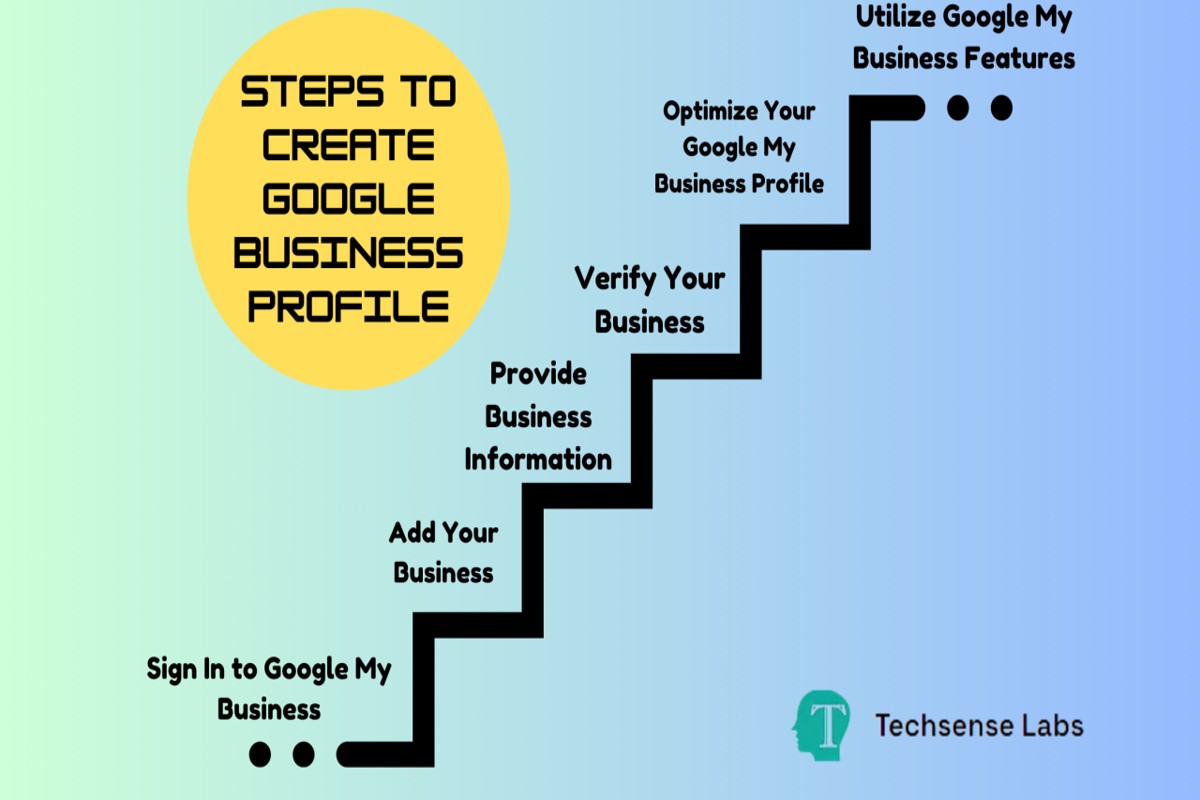
To set up a Google Business Profile, visit the Google Business Profile website, sign in with your Google account, and follow the prompts to enter your business information, verify your location, and optimize your profile for search visibility.
Understanding how to set up a Google Business Profile is crucial for businesses of all sizes, as it enhances online visibility and helps attract local customers. Failure to properly set up and maintain this profile can result in lost opportunities and diminished search rankings.
This guide will provide a step-by-step approach to creating and optimizing your Google Business Profile, including tips on verifying your location, entering essential business details, and enhancing your profile for better search performance.
For How To Set Up Google Business Profile businesses looking to generate local leads through Google Ads or Local SEO, GMB Ranger LLC offers hands-on campaign management. Specialist Md Tangeer Mehedi personally handles campaign setup and ongoing optimization — with no payment required until the first lead comes in.
What is a Google Business Profile?
A Google Business Profile is a free tool that allows businesses to manage their online presence across Google, including Search and Maps. It provides essential information about the business, such as location, hours, services, and customer reviews. This profile enhances visibility and enables potential customers to find and engage with the business more easily.
The primary purpose of a Google Business Profile is to improve local search visibility. When users search for products or services in their vicinity, a well-optimized profile can significantly influence their decision-making process. Businesses can showcase their offerings, share updates, and respond to customer inquiries directly through this platform.
- Business Information: Includes name, address, phone number, and website.
- Customer Engagement: Allows businesses to interact with customers through reviews, Q&A, and posts.
- Insights: Provides analytics on how customers find and interact with the profile.
Additionally, the Google Business Profile can enhance a business’s credibility. A complete profile with positive reviews can foster trust among potential customers. Regularly updating the profile with accurate information and engaging content can lead to higher visibility and increased customer interaction.
Incorporating high-quality images and responding promptly to reviews can further boost the profile’s effectiveness. Businesses that actively manage their profiles tend to attract more customers and achieve better engagement metrics.
Expert Tip: Regularly monitor your Google Business Profile’s performance metrics to identify trends and adapt your strategy accordingly. This proactive approach can help optimize your profile for local search and improve overall customer engagement.
How do I verify my Google Business Profile?
To verify your Google Business Profile, you can choose from several methods, including postcard verification, phone verification, email verification, or instant verification. The verification method you can use may depend on your business type and location. Completing the verification process ensures that your business information is accurate and displayed to potential customers.
Follow these steps to verify your profile:
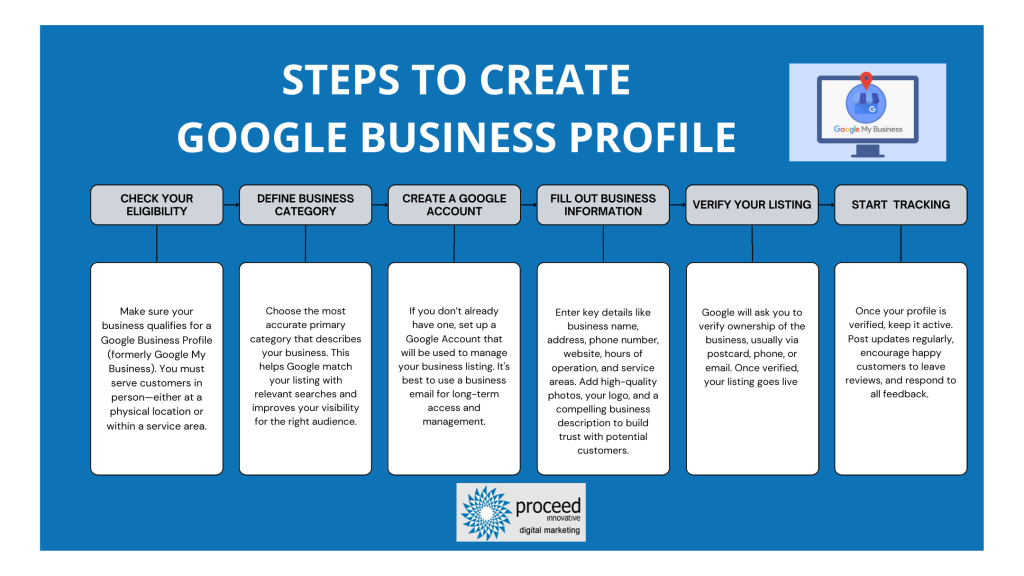
- Sign in to Google Business Profile: Go to the Google Business Profile website and log in with the Google account associated with your business.
- Locate your business: If you haven’t created a profile yet, click on “Add your business” and follow the prompts. If your business already exists, find it in the dashboard.
- Select verification method: Click on the “Verify” button. Google will present several verification options, including postcard, phone, email, or instant verification.
- Postcard verification: If you choose this method, Google will send a postcard containing a verification code to your business address. This may take up to 14 days. Once received, enter the code in your profile.
- Phone verification: If eligible, you can receive a verification call. Google will send you a code via an automated call. Enter the code to verify your business.
- Email verification: If available, you can opt for email verification. Google will send a verification code to your registered email address. Enter this code to complete the verification.
- Instant verification: For eligible businesses that have already verified their business website with Google Search Console, instant verification may be available. Simply follow the prompts to verify your profile immediately.
After successfully verifying your Google Business Profile, ensure that your business information is accurate and regularly updated. This helps improve your visibility in local search results and enhances customer trust.
Expert Tip: Regularly monitor your profile and respond to customer reviews. Engagement can positively impact your local search ranking and customer relationships.
What are the benefits of having a Google Business Profile?
A Google Business Profile enhances local SEO and improves customer engagement. By providing accurate information about your business, it increases visibility in local search results, leading to higher foot traffic and online interactions. Additionally, it fosters trust and credibility with potential customers.
One of the primary advantages of maintaining a Google Business Profile is the increased visibility it offers. When customers search for services or products in their vicinity, businesses with optimized profiles appear prominently in local search results and Google Maps. This can significantly drive more traffic to your website or physical location.
Another benefit is the ability to engage directly with customers through reviews, Q&A, and posts. This interaction not only builds rapport with your audience but also provides valuable feedback. Additionally, regularly updating your profile with posts about promotions, events, or new products keeps your business top-of-mind for customers and encourages repeat visits.
- Optimize your listing: Ensure that all business information, including name, address, phone number, and hours of operation, is accurate and up-to-date. This improves your chances of appearing in relevant local searches.
- Encourage customer reviews: Actively request reviews from satisfied customers. Responding to reviews—both positive and negative—demonstrates your commitment to customer service and helps build trust.
- Utilize posts and updates: Regularly share updates, offers, or events through Google Posts. This keeps your audience engaged and informed about what your business has to offer.
- Monitor insights: Use the insights feature to track how customers interact with your profile. This data can inform your marketing strategies and help you understand customer behavior.
Maintaining an active Google Business Profile can significantly enhance your local online presence. Prioritize regular updates and customer interaction to maximize its impact on your business growth.
How long does it take to set up a Google Business Profile?
Setting up a Google Business Profile typically takes about 15 to 30 minutes. However, the verification process can extend this time frame, taking anywhere from a few days to a couple of weeks, depending on the method chosen for verification.
The initial setup involves filling out essential information such as your business name, address, phone number, and business category. This part is straightforward and can be completed quickly if all necessary information is at hand. Factors that may slow down this process include complex business details or lack of clarity regarding the business category.
Verification is a crucial step that can affect the overall timeline significantly. Google offers several verification options, including postcard verification, phone verification, and email verification. Postcard verification, which is the most common method, can take up to 14 days for the postcard to arrive and for you to enter the verification code. If you opt for phone or email verification, this can often be completed instantly, but not all businesses are eligible for these quicker methods. The choice of verification method and the accuracy of the provided information will ultimately determine how fast the profile becomes active.
Consider preparing all required documentation and information before starting the setup. This ensures a smoother process and reduces delays during verification.
Can I edit my Google Business Profile after setting it up?
Yes, you can edit your Google Business Profile after setting it up. This flexibility allows businesses to keep their information accurate and up-to-date, which is essential for engaging with customers effectively.
To make updates to your Google Business Profile, follow these steps:
- Sign in to Google Business Profile: Access your profile by signing in to your Google account associated with your business. Navigate to the Google Business Profile Manager dashboard.
- Select the location: If you manage multiple locations, choose the specific business location you wish to edit from the list presented on your dashboard.
- Edit your information: Click on the “Info” section to modify details such as business name, address, phone number, website, and hours of operation. Make sure to provide accurate and current information.
- Update photos and posts: Enhance your profile by adding or changing photos and creating posts. This can help attract more customers and keep your profile engaging.
- Save your changes: After making the desired updates, ensure you click the “Apply” button to save your changes. Google may take some time to review and publish these updates.
Regularly updating your Google Business Profile is vital for maintaining visibility and relevance in local search results. Changes can reflect seasonal hours, special promotions, or new offerings, which can significantly impact customer engagement.
Expert Tip: Monitor your profile for customer reviews and respond promptly. This not only boosts customer satisfaction but also enhances your profile’s credibility in the eyes of potential customers.
How does a Google Business Profile compare to a website?
A Google Business Profile (GBP) serves as an online listing for a business on Google, while a website is a standalone platform that hosts all information about a business. Both tools are essential for enhancing online visibility, but they provide different functionalities and advantages.
The key differences between a Google Business Profile and a traditional business website can be outlined as follows:
- Visibility and Accessibility: A GBP appears in Google Search and Maps, making it highly accessible to potential customers searching for services nearby. In contrast, a website requires users to know the URL or find it through search engine optimization (SEO) efforts.
- Content Control: A website allows for comprehensive content customization, including design and multimedia integration. A GBP, however, offers limited fields for information such as business hours, address, and customer reviews.
- User Engagement: A GBP facilitates immediate customer interaction through features like the “Call” button, messaging, and reviews. Websites may include contact forms and chat options but often lack the immediacy of GBP interactions.
While both GBP and websites are beneficial, the choice between them depends on business goals. Small businesses may find a GBP sufficient for local visibility and customer engagement. Conversely, businesses that require detailed content, e-commerce capabilities, or brand storytelling should prioritize a traditional website.
Expert Tip: Regularly updating the Google Business Profile with accurate information and responding promptly to customer reviews can significantly enhance local search rankings, providing a competitive edge in your market.
What information should I include in my Google Business Profile?
To maximize the effectiveness of your Google Business Profile, you should include essential information such as your business name, address, phone number, website, hours of operation, and a brief description of your services. Each of these elements contributes to your visibility and helps potential customers find and engage with your business.
For example, consider a local bakery named “Sweet Delights.” In its Google Business Profile, Sweet Delights should ensure the business name is accurately listed as “Sweet Delights Bakery” to avoid confusion. The address must be precise, including any suite numbers, and the phone number should be a direct line to the bakery for customer inquiries. Additionally, including a link to the bakery’s website allows customers to view the menu and place orders online.
Hours of operation should reflect the bakery’s actual hours, including any special hours for holidays. A well-crafted description—such as “Sweet Delights offers artisanal baked goods made from locally sourced ingredients, including gluten-free options”—provides potential customers with a clear understanding of what to expect. Including photos of signature items can also enhance the profile, attracting more customers through visual appeal.
Expert Tip: Regularly updating your Google Business Profile with current information, seasonal offerings, or customer reviews can significantly improve your search ranking and customer engagement.
What common mistakes should I avoid when setting up my Google Business Profile?
Many businesses make critical errors during the setup of their Google Business Profile that can hinder their visibility and effectiveness. Avoiding these mistakes is essential for maximizing your online presence. Here are some common pitfalls and how to sidestep them.
One frequent error is providing incomplete or inconsistent information. Make sure that your business name, address, and phone number (NAP) are accurate and match the information on your website and other online listings. Inconsistencies can confuse potential customers and may harm your ranking in local search results.
- Neglecting to choose the appropriate business category: Selecting the right category is crucial for helping customers find your business. Take the time to research and choose a primary category that best describes your services. You may also select additional categories, but prioritize relevance to your offerings.
- Failing to verify your business: Verification establishes your business’s legitimacy on Google. Without verification, you cannot access essential features such as customer reviews and insights. Complete the verification process promptly to unlock the full potential of your profile.
- Ignoring customer reviews: Customer reviews significantly impact your online reputation and local SEO. Encourage satisfied customers to leave positive reviews and respond to all feedback, both positive and negative. This engagement shows potential customers that you value their opinions and can improve your visibility.
- Overlooking photos and updates: High-quality images and regular updates are vital for engaging customers. Profiles with photos receive 42% more requests for directions and 35% more click-throughs to websites. Regularly update your profile with new images and posts to keep your audience informed and interested.
Implementing these best practices will enhance your Google Business Profile and ensure that it serves as an effective marketing tool. Regularly review your profile for accuracy and updates to maintain its relevance and performance.
Expert Tip: Utilize Google’s insights feature to track how customers interact with your profile. This data can guide adjustments and improvements, ensuring your profile remains effective in attracting and converting potential customers.
Advanced Optimization Techniques for Google Business Profile
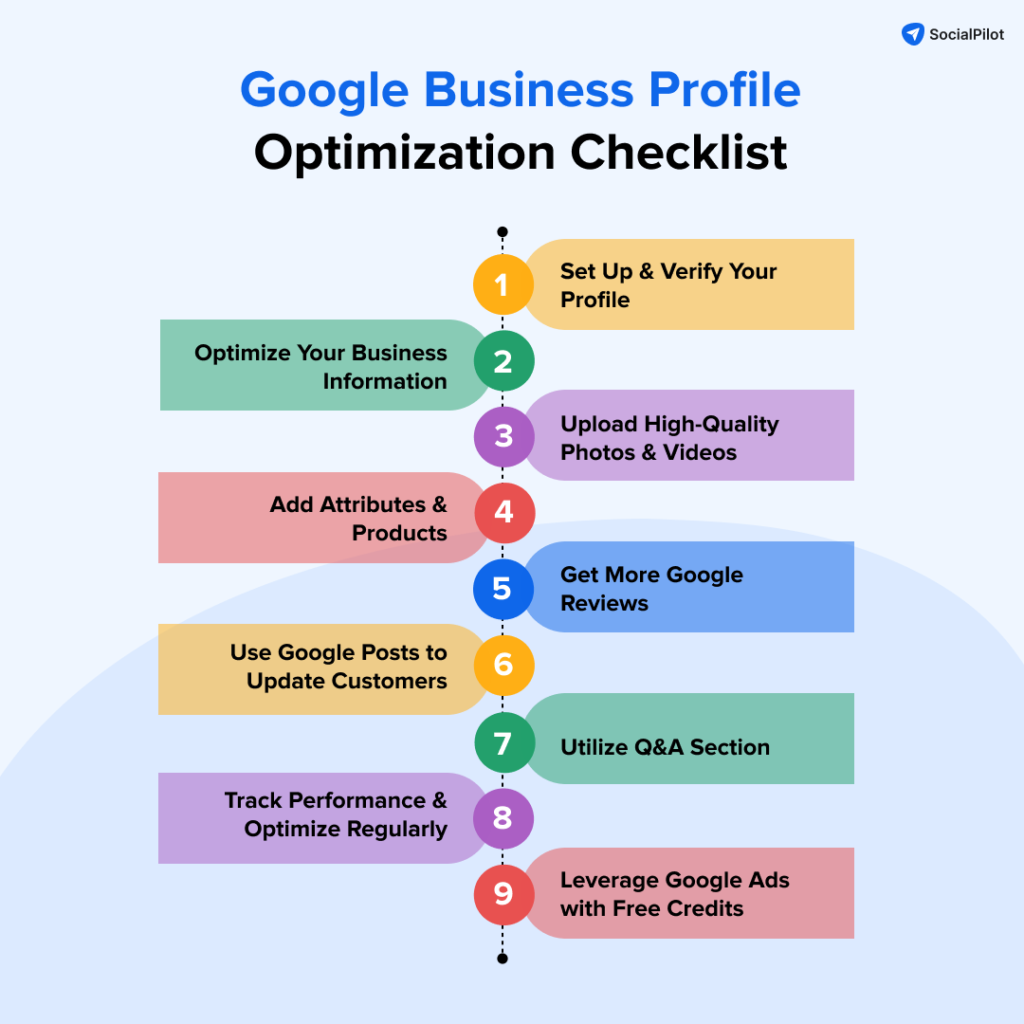
Enhancing your Google Business Profile goes beyond basic setup; it requires strategic actions that improve visibility and foster customer engagement. Implementing advanced optimization techniques can significantly impact your local search ranking and customer interactions.
Utilizing Posts and Updates to Engage Customers
Regularly posting updates, promotions, and events on your Google Business Profile can keep your audience informed and engaged. These posts appear in search results and can attract potential customers. Key types of posts include:
- Event Announcements: Share information about upcoming events, including dates and times.
- Special Offers: Highlight limited-time promotions to entice customers.
- News Updates: Inform customers about significant changes or news related to your business.
Incorporating Keywords for Better Search Ranking
Integrating relevant keywords into your business description and service listings can enhance your profile’s visibility in local search results. Conduct keyword research to identify terms your target audience is searching for. Focus on:
- Business Description: Include primary keywords naturally within your business overview.
- Services Section: List services with descriptive titles that contain keywords.
- FAQs: Use keywords in your responses to common customer questions.
Encouraging and Managing Customer Reviews
Customer reviews are a critical factor in local SEO and can influence potential customers. Actively encourage satisfied customers to leave positive reviews. Consider the following strategies:
- Follow-Up Emails: Send a thank-you email post-purchase, inviting customers to share their experience.
- Incentives: Offer small discounts or freebies for leaving a review.
- Respond to Reviews: Engage with both positive and negative feedback, showing that you value customer input.
Leveraging Insights and Analytics for Performance Tracking
Google provides valuable insights into how customers interact with your business profile. Regularly review these analytics to understand performance metrics such as views, clicks, and customer actions. Key metrics to monitor include:
- Profile Views: Track how many times your business profile has been viewed.
- Customer Actions: Analyze actions taken by users, such as website visits or phone calls.
- Search Queries: Identify keywords that drove traffic to your profile.
Many businesses overlook the depth of insights available in their Google Business Profile analytics. For example, while some may focus solely on the total number of reviews, understanding the sentiment and specific feedback trends can provide actionable insights that drive improvements in service and engagement.
To apply these advanced optimization techniques, businesses should:
- Regularly schedule posts to keep content fresh and engaging.
- Conduct keyword research quarterly to update and optimize descriptions.
- Implement a systematic approach to request and manage reviews.
- Review analytics monthly to adjust strategies based on performance data.
Real-World Case Studies of Successful Google Business Profiles
This section examines how various businesses have leveraged Google Business Profiles to enhance visibility, drive traffic, and boost sales. These case studies illustrate actionable strategies and the potential pitfalls of profile management.
Case Study: Local Restaurant Success
A local restaurant in Austin, Texas, revamped its Google Business Profile by enhancing its visuals and updating its information regularly. The restaurant added high-quality images of its dishes and incorporated seasonal menu items into the profile. Within three months, the establishment reported a 40% increase in foot traffic and a 25% rise in online reservations. Customer reviews highlighted the engaging profile, which played a pivotal role in attracting new patrons.
Impact of Profile Optimization on a Service-Based Business
A plumbing company in Orlando optimized its Google Business Profile by including detailed service descriptions, operational hours, and emergency contact options. The business also encouraged satisfied customers to leave positive reviews. As a result, the company experienced a 50% increase in service inquiries within two months. The profile’s visibility in local search results improved significantly, leading to higher conversion rates for appointments.
Retail Store Increases Foot Traffic
A clothing retailer in Seattle effectively managed its Google Business Profile by utilizing features such as posts about new arrivals and promotions. The store maintained an updated inventory list and regularly responded to customer inquiries. Following these enhancements, the retailer saw a 30% increase in foot traffic during promotional weekends. The profile served as a key marketing tool, connecting online engagement with in-store visits.
Lessons from Failed Profiles and Recovery Strategies
Several businesses have struggled with ineffective Google Business Profiles, often due to outdated information or lack of engagement. A failed case involved a local gym that neglected to update its hours during the pandemic. This oversight led to a significant drop in membership inquiries. To recover, the gym implemented a strategy that included regular updates, engaging with reviews, and leveraging Google Posts to inform users about new offerings. The gym successfully regained lost traction, witnessing a 20% increase in inquiries after six months of consistent profile management.
Common misconceptions include the belief that a Google Business Profile is a one-time setup. In reality, profiles require ongoing management to remain effective. Regular updates, prompt responses to reviews, and the addition of engaging content are essential for maintaining visibility and attracting customers.
Practical Application
- Regularly update your business information, including hours, services, and promotions.
- Encourage satisfied customers to leave positive reviews to enhance credibility.
- Utilize high-quality images and engaging posts to attract potential customers.
- Monitor insights from your profile to understand customer engagement and adjust strategies accordingly.
Implementing these strategies can significantly improve your Google Business Profile’s effectiveness, driving traffic and increasing sales. Focus on these actionable insights to maximize your business’s online presence.
Common Pitfalls When Setting Up Google Business Profile
Setting up a Google Business Profile can significantly enhance your online presence, but several common pitfalls can hinder effectiveness. Recognizing these mistakes and implementing corrective measures ensures a smoother setup and improved visibility.
Ignoring Verification Steps and Implications
Verification is a critical step in establishing a Google Business Profile. Without completing this process, your business may not appear in local search results, limiting potential customer engagement. Businesses can verify their profiles via postcard, phone, email, or instant verification, depending on eligibility. Failing to verify can lead to a lack of control over your business information.
Overlooking the Importance of Accurate Business Information
Accuracy in your business information is essential for effective customer outreach. Inaccurate details such as the business name, address, phone number (NAP), and operating hours can confuse potential customers and damage credibility. Ensure that all listed information is current and consistent across all online platforms. Regularly audit your profile to maintain accuracy.
Neglecting to Respond to Customer Reviews
Customer reviews play a significant role in shaping public perception. Ignoring reviews, whether positive or negative, can negatively impact your reputation and ranking. Engaging with customers through thoughtful responses demonstrates that you value their feedback. Aim to respond to reviews within 24-48 hours to foster a positive relationship with your clientele.
Failing to Update Profile with Changing Business Details
Businesses frequently evolve, and failing to update your Google Business Profile can mislead customers. Changes in services, hours, or location must be reflected promptly. Utilize Google’s features to post updates, offers, or events, keeping your audience informed. Regular updates also signal to Google that your business is active, which can improve your search ranking.
Nuances of Profile Management
Many businesses overlook the significance of utilizing all available features within their Google Business Profile. For instance, adding photos, posts, and services can enhance engagement. Some businesses mistakenly believe that a basic profile suffices. However, a comprehensive profile that fully utilizes multimedia elements can attract more clicks and improve customer interaction. Furthermore, some may not realize that failing to monitor insights and analytics can lead to missed opportunities for optimization.
Practical Application
- Complete the verification process immediately after profile creation.
- Regularly check and update your business information to ensure accuracy.
- Establish a protocol for responding to customer reviews within a set timeframe.
- Utilize all features of the Google Business Profile, including posts and photos.
- Monitor profile insights monthly to identify areas for improvement.
Comparative Analysis of Google Business Profile and Other Local Listings
This section examines Google Business Profile in relation to prominent local listing platforms like Yelp and Bing Places, highlighting its unique advantages in SEO, user engagement, cost-effectiveness, and ease of management.
Comparison with Yelp and Bing Places
Google Business Profile stands out in several key areas when compared to Yelp and Bing Places. While all three platforms aim to enhance local visibility, the integration of Google Business Profile with Google Search and Google Maps offers unparalleled reach. Businesses listed on Google can appear in local search results and Google Maps, significantly increasing their chances of discovery by potential customers.
Yelp, while popular, often directs traffic away from business websites to its own platform, which can limit direct customer interaction. Bing Places, though useful, lacks the extensive user base and search engine dominance that Google possesses.
Advantages in SEO and Visibility
Google Business Profile provides distinct SEO advantages. Listings are indexed by Google, making them more likely to appear in the coveted local pack that shows up above organic search results. This visibility can lead to higher click-through rates and more foot traffic. According to a recent study, businesses with optimized Google Business Profiles receive 70% more clicks compared to those without.
- Local Pack Inclusion: Increases likelihood of appearing in first-page search results.
- Mobile Optimization: Seamless integration with mobile searches enhances visibility.
- Rich Snippets: Displaying reviews, ratings, and business details improves user engagement.
User Engagement Differences
Engagement metrics are crucial for local businesses. Google Business Profile enables direct interactions through features such as messaging, Q&A, and review responses, fostering customer relationships. Yelp offers a review platform but lacks the direct messaging capability, which can hinder real-time communication between businesses and customers. Bing Places, while functional, does not offer the same level of engagement tools that Google does.
Cost-Effectiveness and Management Ease
Setting up a Google Business Profile is free, providing businesses with a cost-effective tool to enhance their online presence. In contrast, Yelp has paid advertising options that can be costly, and Bing Places, while free, often requires more manual updates and management. Google Business Profile offers a user-friendly dashboard, allowing businesses to manage their listings efficiently, update information, and track performance metrics seamlessly.
Nuance / Expert Layer
Common misconceptions about Google Business Profile include the belief that simply creating a profile guarantees high visibility. In reality, ongoing optimization is necessary. Factors such as keyword usage in business descriptions, regular updates, and engagement with customer reviews all play significant roles in maintaining and improving a profile’s effectiveness. Additionally, businesses must understand that while Google Business Profile offers substantial benefits, neglecting other platforms like Yelp can limit exposure to different customer demographics.
Practical Application
To leverage the advantages of Google Business Profile, businesses should follow these steps:
- Complete the profile with accurate business information, including address, phone number, and hours of operation.
- Regularly update photos and posts to keep the profile engaging.
- Encourage satisfied customers to leave reviews to enhance credibility.
- Utilize the Q&A feature to address common customer inquiries proactively.
By implementing these strategies, businesses can maximize their visibility and engage effectively with their target audience, fully utilizing the unique strengths of Google Business Profile.
For How To Set Up Google Business Profile businesses looking to generate local leads through Google Ads or Local SEO, GMB Ranger LLC offers hands-on campaign management. Specialist Md Tangeer Mehedi personally handles campaign setup and ongoing optimization — with no payment required until the first lead comes in.
Frequently Asked Questions
What is a Google Business Profile?
A Google Business Profile is a free tool that allows businesses to manage their online presence across Google, including Search and Maps. It provides essential information about the business, such as location, hours, and services offered.
How do I verify my Google Business Profile?
To verify your Google Business Profile, you typically need to receive a verification code via mail, phone, or email from Google. Follow the instructions provided in the verification message to complete the process.
What are the benefits of having a Google Business Profile?
Having a Google Business Profile enhances online visibility, improves local SEO, and allows customers to find essential information easily. It also enables businesses to engage with customers through reviews and posts.
How long does it take to set up a Google Business Profile?
Setting up a Google Business Profile can be completed in a few minutes; however, verification may take longer, depending on the method chosen. Typically, verification by mail can take up to 14 days.
Can I edit my Google Business Profile after setting it up?
Yes, you can edit your Google Business Profile at any time to update information such as hours, address, and services. Regular updates ensure that customers have the most accurate information about your business.
How does a Google Business Profile compare to a website?
A Google Business Profile complements a website by providing essential business information directly in search results. While a website offers more comprehensive content, a Google Business Profile enhances local visibility and facilitates customer interaction.
What information should I include in my Google Business Profile?
Include key details such as your business name, address, phone number, website, hours of operation, and services offered. High-quality images and customer reviews also enhance your profile’s effectiveness.
What common mistakes should I avoid when setting up my Google Business Profile?
Avoid using inaccurate information, neglecting to verify your profile, and failing to update details regularly. Additionally, do not skip adding photos or responding to customer reviews, as these elements significantly impact engagement.
Final Thoughts on how to set up google business profile
Establishing a Google Business Profile is not merely an option; it is a strategic necessity for any business seeking to enhance its visibility and credibility in an increasingly digital marketplace. By prioritizing verification and employing advanced optimization techniques, businesses can significantly increase their chances of attracting local customers and outperforming competitors.
To leverage the full potential of your Google Business Profile, conduct a thorough review of your current profile and implement at least three advanced optimization techniques discussed in this guide, such as enhancing visual content and utilizing customer reviews effectively.
In today’s competitive landscape, a well-optimized Google Business Profile can make the difference between obscurity and prominence, directly impacting customer engagement and business growth.
Leave a Reply